Create and update contacts
Add new contacts or import a list, and update anyone who already exists. Your CRM records stay current without leaving the chat.
“Add these 20 leads from my form and update anyone who is already a contact.”

Wati MCP
Wati MCP is the official MCP server that lets Claude, ChatGPT, and other AI assistants run Wati for you. Manage contacts, send WhatsApp campaigns, build chatbots for WhatsApp and Instagram, read past chats, and build AI agents, all in plain language.
Works inside the tools your team already uses

 ChatGPT



How it works
Setup takes about five minutes. Add Wati MCP as a connector in your AI assistant using the server URL below, sign in to Wati, and start asking.
Wati MCP server URL
https://mcp.wati.io/mcphttps://eu-mcp.wati.io/mcphttps://ksa-mcp.wati.io/mcpUse the EU or KSA URL if your Wati workspace is hosted in that region. You sign in with OAuth, so no API key goes into the URL.
Works on Claude Free (one custom connector), Pro, Max, Team and Enterprise.
Needs ChatGPT Plus, Pro, Business or Enterprise.
Claude Code
claude mcp add --transport http wati https://mcp.wati.io/mcpCursor and other mcpServers configs
{ "mcpServers": { "wati": { "url": "https://mcp.wati.io/mcp" } } }Works with Codex, Meta's Muse and any client that supports remote MCP servers with OAuth sign-in.
| AI tool | How it connects |
|---|---|
| Claude (web and desktop) | Add a custom connector under Customize, then Connectors |
| ChatGPT | Add Wati as a plugin with the Wati MCP server URL |
| Gemini | Add a custom app at gemini.google.com/apps (personal Google accounts) |
| Claude Code and Cursor | Add the server URL to your MCP configuration |
| Codex and any other MCP client | Paste the server URL into the client's MCP settings |
Custom connectors work on Claude Free (one connector), Pro, Max, Team and Enterprise, and on ChatGPT Plus, Pro, Business and Enterprise.
The full setup, plus your first real conversation with Wati MCP, in a single video. Watch it once, and you will know exactly what to do.
What you can do with it
The whole flow, in the order you actually work, just by asking.
Add new contacts or import a list, and update anyone who already exists. Your CRM records stay current without leaving the chat.
“Add these 20 leads from my form and update anyone who is already a contact.”
Search your contacts, read their engagement history, and tag them into the groups you want to reach.
“Find customers in Mumbai who bought in the last 30 days and tag them as VIP.”
Send an approved WhatsApp template to one person or a whole segment, and manage your broadcasts from the chat.
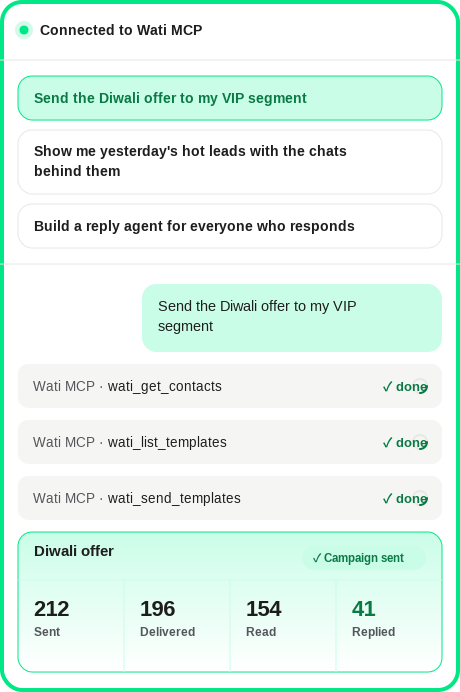
“Send the Diwali offer template to my VIP segment.”
Ask how a campaign did and get delivery, read and reply rates, with the conversations behind the numbers.
“How did the Diwali broadcast do, and show me who replied but did not buy.”
Build WhatsApp AI agents that qualify leads and answer customers, then keep improving them without a developer.
Describe the agent you want. Your assistant asks the right follow-ups, builds it, and brings it to a testable state in one session.
“Build a lead qualification agent for my real estate business. Push hot leads to HubSpot.”
Adjust tone, logic, or routing in plain language. The change is applied, evaluated, and ready to ship in minutes.
“Look at the last 50 chats. Soften the tone on pricing. Run an eval to confirm.”
Ask for the numbers and the evidence behind them. You get answers in your chat window, not a dashboard to filter and pivot.
“Show me yesterday's hot leads with the chat excerpts that made them hot.”
Build chatbots and automation rules just by describing them, and handle Instagram comments and DMs from the same chat.
Tell your assistant what the bot should do. It drafts the full flow, with messages, buttons and questions, and saves it to Flow Builder only when you say so.
“Build a chatbot that answers our questions on pricing and delivery, collects name and phone, and hands off to a person if asked.”
Start a bot on a keyword, any new message, or a contact field change. Triggers are created switched off and go live only when you turn them on.
“Start my pricing bot when someone sends the word price. Keep it off until I have checked it.”
Add a step, change a reply, or reroute a handoff. Set rules such as assigning hot leads to Sales. Your existing bot is updated in place.
“Open my welcome bot and add a step that asks for the order number before handing off to an agent.”
Find the posts with the most unread comments, reply in public, and send a private DM to people who want to know more.
“Show me comments asking about price on my latest Reel, and DM each of them the catalogue link.”
Chatbot, automation and Instagram tools may not be available on every workspace. Instagram allows one private reply per comment, within 7 days of the comment.
See the difference
Sending the Diwali offer to your VIP customers, before and after Wati MCP.
“Find my VIP customers in Mumbai who bought in the last 30 days and send them the Diwali offer, then show me who replied.”
You stay in control
Wati MCP acts inside the limits you already set. It can only do what you can do, and nothing leaves your account without you. It runs on the official WhatsApp Business API with your Meta-approved templates.
Your assistant drafts the campaign or the change. It goes out only after you confirm.
Access follows your existing roles. The assistant can only do what your account is allowed to do.
Campaigns use your Meta-approved WhatsApp templates, on your own official business number.
See what ran, when, and from which chat. The full history stays in your Wati dashboard.
SOC 2 Type II · ISO 27001 · GDPR · CCPA · Visit the Wati Trust Center
Every tool your AI assistant can call through Wati MCP, grouped by job.
The tools your assistant sees depend on your plan, role and connected channels. AI agent tools are listed in the Astra tool catalogue. Full inputs are in the Wati MCP docs.
| Tool | What it does |
|---|---|
wati_get_contacts | List contacts or look one up by WhatsApp number |
wati_get_contact | Read one contact, with custom attributes and assignments |
wati_get_contact_count | Count contacts created in a date range |
wati_get_contact_profile | Read a contact's engagement profile across WhatsApp and Instagram |
wati_search | Search contacts and recent messages |
wati_upload_contact | Create or update a contact |
wati_update_contact_attributes | Update custom attributes on existing contacts |
wati_assign_contact_teams | Set which teams a contact belongs to |
wati_delete_contact | Soft-delete a contact |
| Tool | What it does |
|---|---|
wati_list_templates | List your WhatsApp templates and their approval status |
wati_get_template | Read a template's full structure and variables |
wati_send_template_dry_run | Preview a template with its variables filled in, without sending |
wati_send_template | Send an approved template to one contact |
wati_send_templates | Send a template broadcast to up to 10,000 recipients |
wati_get_template_performance | Get sent, delivered and read totals for a template |
wati_list_campaigns | List your broadcast campaigns |
wati_get_campaign | Get a campaign's sent, delivered, read, replied and failed numbers |
wati_retry_broadcast_failures | Preview and resend to recipients a broadcast failed to reach |
wati_get_credit_balance | Check your credit balance and free conversations |
wati_estimate_send_cost | Estimate what a send will cost before it goes out |
| Tool | What it does |
|---|---|
wati_create_segment | Create a static or dynamic segment (Pro and Business plans) |
wati_list_segments | List your saved segments |
wati_get_segment | Read a segment's filters and member count |
wati_evaluate_segment | Preview who matches a set of filters without saving |
wati_list_segment_members | List the contacts in a saved segment |
| Tool | What it does |
|---|---|
wati_analyze_conversations | Analyse a set of conversations and return findings |
wati_get_conversations | Query current Team Inbox conversations |
wati_get_messages | Read WhatsApp and Instagram message history |
wati_send_message | Send a text message in an open conversation |
wati_get_message_status | Check whether a sent message was delivered or read |
wati_send_file_via_url | Send an image or file in an open WhatsApp conversation |
wati_send_interactive | Send reply buttons or a list message on WhatsApp |
wati_assign_operator | Assign a conversation to a teammate or the bot |
wati_update_conversation_status | Mark a conversation open, pending, solved or blocked |
wati_list_conversation_tags | List the conversation tags in use |
wati_add_conversation_tag | Add an existing tag to a conversation |
wati_remove_conversation_tag | Remove a tag from a conversation |
| Tool | What it does |
|---|---|
wati_instagram_list_posts | List posts and reels with their unread comment counts |
wati_instagram_get_post | Read one post's caption, comment count and likes |
wati_instagram_get_post_unread_count | Count a post's unread comments |
wati_instagram_list_comments | Read the comments on a post |
wati_instagram_check_permissions | Check the account has the permissions needed to reply |
wati_instagram_reply_comment | Reply to a comment in public |
wati_instagram_send_private_reply | Send a private DM to someone who commented |
| Tool | What it does |
|---|---|
wati_draft_chatbot | Draft a chatbot flow from a description, without saving it |
wati_upsert_chatbot | Save a new chatbot to Flow Builder or replace an existing one |
wati_list_chatbots | List your chatbots |
wati_get_chatbot | Read a chatbot's full flow |
wati_create_chatbot_trigger | Start a chatbot on a keyword, any new message or a contact field change |
wati_set_chatbot_trigger_status | Switch a chatbot trigger on or off |
wati_list_automation_rules | List your automation rules |
wati_get_automation_rule | Read one automation rule |
wati_get_automation_rule_schema | Get the format for a rule's trigger type |
wati_validate_automation_rule | Check a rule for errors before saving |
wati_upsert_automation_rule | Create or replace an automation rule |
wati_set_automation_rule_status | Switch an automation rule on or off |
wati_list_bot_actions | List your saved bot actions |
wati_get_bot_action | Read one bot action |
wati_upsert_bot_action | Create or replace a bot action |
wati_list_teams | List teams for routing |
wati_list_operators | List teammates and AI operators |
wati_list_contact_attributes | List the contact attributes in your account |
| Tool | What it does |
|---|---|
wati_list_channels | List your connected channels |
wati_get_webhook_event_types | List the webhook events available to you |
wati_subscribe | Create a webhook subscription |
wati_list_webhooks | List your webhook subscriptions |
wati_get_webhook | Read one webhook subscription |
wati_update_webhook | Change a webhook's URL, events or status |
wati_delete_webhook | Delete a webhook subscription |
| Tool | What it does |
|---|---|
wati_list_tenants | List the workspaces you can access and which one is active |
wati_get_active_tenant | Check the active workspace and your role before making changes |
wati_switch_tenant | Switch to another workspace by ID or phone number |
wati_report_feedback | Tell Wati about a task the tools cannot do yet |
Wati MCP is the official MCP (Model Context Protocol) server for Wati. It lets Claude, ChatGPT and other AI assistants manage your contacts, send WhatsApp campaigns, build chatbots and AI agents, and read reports in your Wati account, using plain-language requests.
Wati MCP lets your AI assistant create and update contacts, segment your audience, send WhatsApp campaigns, report on results, build and edit chatbots, work with Instagram comments and DMs, and build and improve AI agents. See the full list in Wati MCP tools above.
Claude, ChatGPT, Gemini, Meta's Muse, Cursor, Claude Code and Codex all connect to Wati MCP. It also works with any other MCP client that supports remote MCP servers with OAuth sign-in.
Yes. In Gemini, open gemini.google.com/apps, add a custom app with the Wati MCP server URL and sign in to Wati. This currently works with personal Google accounts. In Cursor, add the same server URL to your MCP config and sign in when prompted.
Yes. In Claude or ChatGPT, you can use Wati MCP alongside connectors such as HubSpot, Shopify, Salesforce, and Zendesk. For example, pull new deals from HubSpot and send them a WhatsApp welcome through Wati in one request.
WhatsApp and Instagram, through your Wati account. You can send WhatsApp campaigns on your official business number, build chatbots, and reply to Instagram comments and DMs.
Yes. With Wati MCP, ChatGPT can send WhatsApp campaigns, look up contacts and read conversation history through your official WhatsApp Business API number on Wati. Add Wati as a plugin in ChatGPT (Plus, Pro, Business or Enterprise) and sign in to Wati.
Yes. Add Wati MCP as a custom connector in Claude, sign in to Wati, and Claude can send WhatsApp campaigns, manage contacts and read chats on your official WhatsApp Business number.
You need an AI assistant that supports MCP, such as Claude, ChatGPT, Gemini or Cursor. Your Wati dashboard keeps working as usual, so MCP is an extra way to run Wati, not a requirement.
Yes. Wati MCP is free for customers on the Growth, Pro and Business plans, and you can also use it during a Wati trial. Some tools, such as custom segments, need a Pro or Business plan. See Wati pricing.
No. Wati MCP is another way to work with the same account. Everything your assistant does shows up in your Wati dashboard, and you can switch between the two at any time.
Zapier, Make and the Wati API run fixed automations you set up in advance. Wati MCP lets an AI assistant take actions on request, in plain language, with no workflow to build first. Many teams use both.
Wati MCP shares only your prompt and the Wati data needed to answer it with your AI assistant. Customer conversations, agent settings and your login credentials stay in Wati, and your password is never shared. On business and enterprise plans, AI providers do not train on your data; check your provider's policy for other plans. Wati is SOC 2 Type II and ISO 27001 certified.
Yes. Setup takes about five minutes, and after that your team just types requests in plain language. No code and no workflows to build.
Yes. An agency with access to your Wati account can connect Wati MCP for you. Actions still follow the permissions of the account that is signed in, and agencies can switch between client workspaces in the same chat.
Follow the Wati MCP setup guide, read the Wati MCP docs, watch the setup video above, or contact Wati support from your dashboard.
Connect Wati MCP and let your AI do the work.