

-

-
-
Solutions
-
Product
-

-
-
Book Demo
Try for Free


 Wati for Marketing
 Wati for Support
 Wati for Sales
 eLearning
 E-commerce
 Marketing Agencies
 Healthcare
 No Code Chatbots
 WhatsApp Business API
 Instagram Automation
 Click to WhatsApp ads
 Campaigns
 Team Inbox
 WhatsApp Business Calling
 Wati AI

Instagram Automation
Turn Conversations Into Revenue
Auto-reply to comments, DMs, and story replies, instantly, 24/7.
Capture leads on Instagram and follow up on WhatsApp, all from
one platform.
 4.6/5 on G2
 Meta Business Partner
16,000+ Businesses in 190+ Countries
Meta Business Partner
16,000+ Businesses in 190+ Countries

Growth-obsessed teams trust Wati to automate Instagram
Loved and trusted by
16,000+ businesses, across the globe





Your Instagram DMs Are a Revenue Channel
Treat Them Like One
Every unanswered comment, slow reply, and missed DM is a lead that went to a competitor
Instagram automation closes those gaps, automatically, at scale, 24/7
People use Instagram DMs daily. Most businesses reply hours later or not at all.
Of Instagram shoppers have messaged a business before buying. Speed is the #1 purchase trigger.
Higher conversion when a business responds to a DM within 5 minutes vs. 1 hour.
Everything You Need to Automate
Instagram DMs
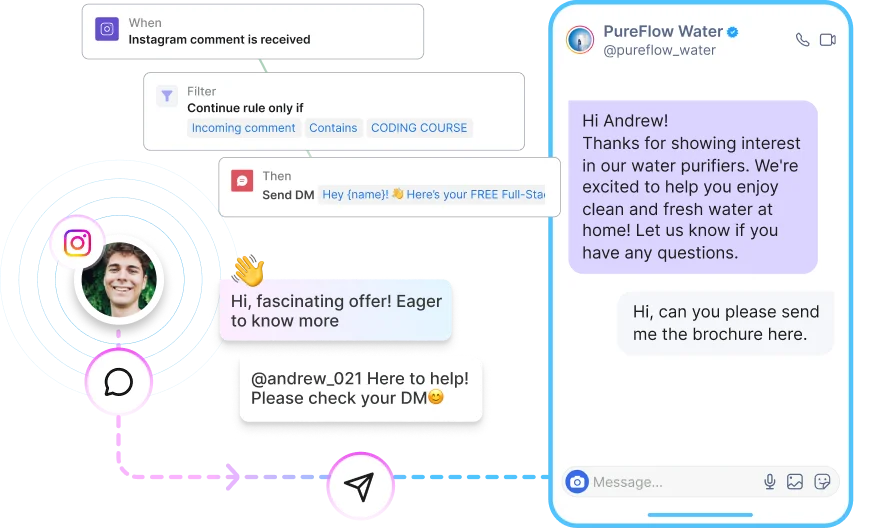
Comment-to-DM Automation
Someone comments on your post or Reel with a trigger keyword - 'price', 'link', 'info', whatever you choose. Wati replies publicly and sends them a private DM instantly. No manual work. No delays. No missed opportunities.
 Works on feed posts, Reels, and Stories
- Public comment reply + private DM in one trigger
- Deliver links, promo codes, lead magnets, or full chatbot flows
- Set different triggers per post or use a global rule
- Runs 24/7 — even when your team is offline
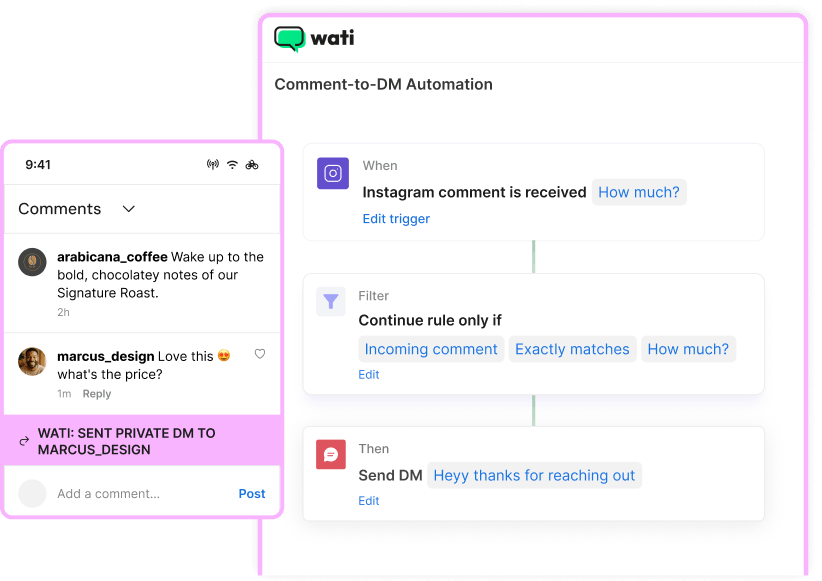
How it works:
Trigger User comments 'price' on your Reel

Public Reply Sent 'Check your DMs!' — visible to everyone
Private DM Delivered Pricing page + product link, instantly
Contact Saved to Inbox Ready for follow-up on any channel
Story Reply Automation
Turn every story into a conversation starter. A follower replies to your story or reacts to it - Wati automatically fires a customized DM flow. Capture intent at the moment of highest engagement.
- Triggers on text replies and emoji reactions to stories
- Segment responses by story topic for relevant follow-ups
- Combine with keyword conditions for precision targeting
- Perfect for flash sales, product drops, and lead capture campaigns
Instagram DM Chatbot with AI
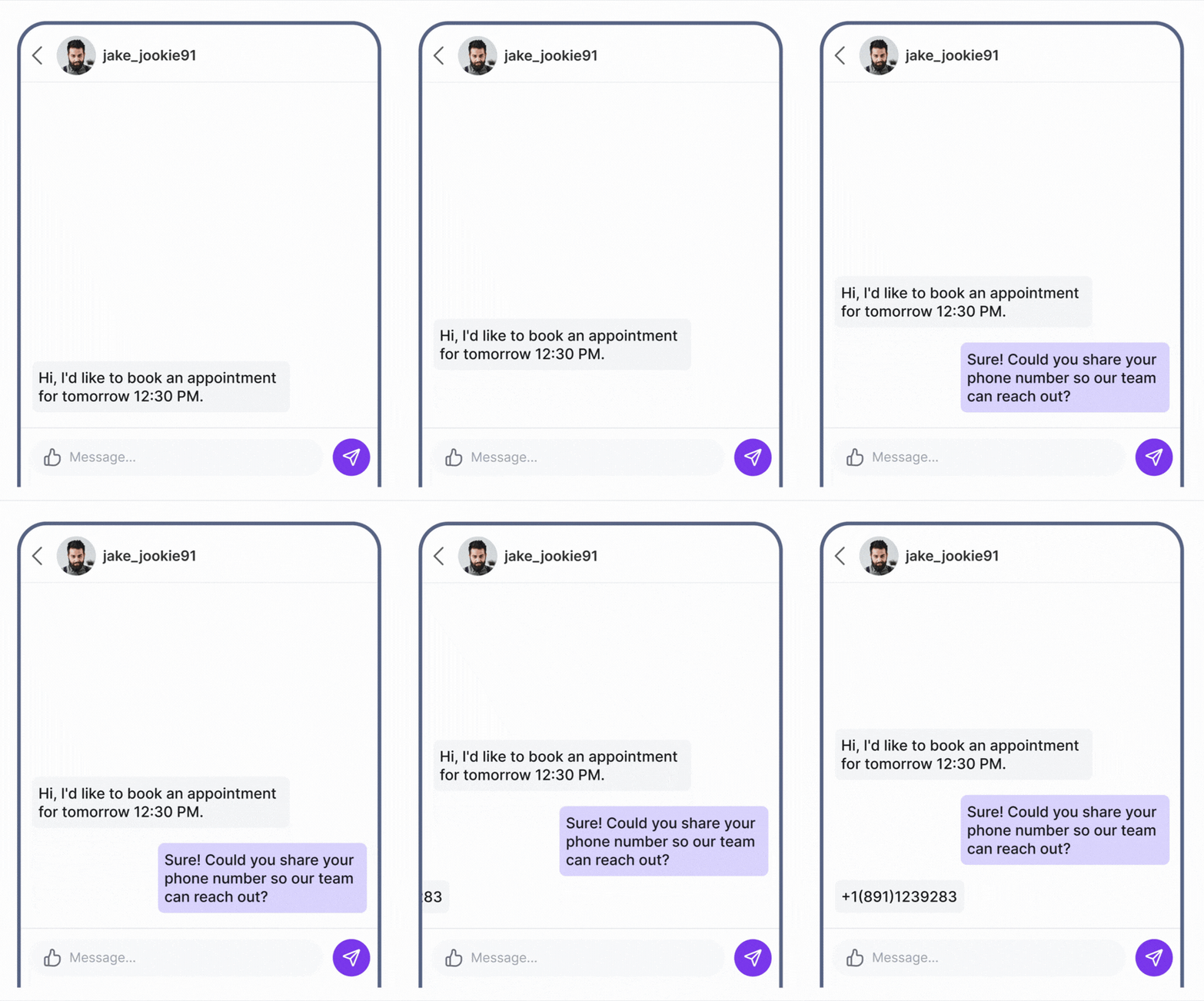
Build no-code chatbot flows that qualify leads, answer FAQs, take orders, and route complex queries to the right team member.
- Drag-and-drop visual flow builder - no code needed
- AI-powered intent detection handles unexpected replies
- Collect name, email, phone, and custom fields in the DM flow
- Auto-assign conversations to agents by topic or keyword
- Seamlessly hand off to a live agent when needed
- Pre-built automations for OOO, Welcome messages, and chatbot-led flows
Shared Team Inbox
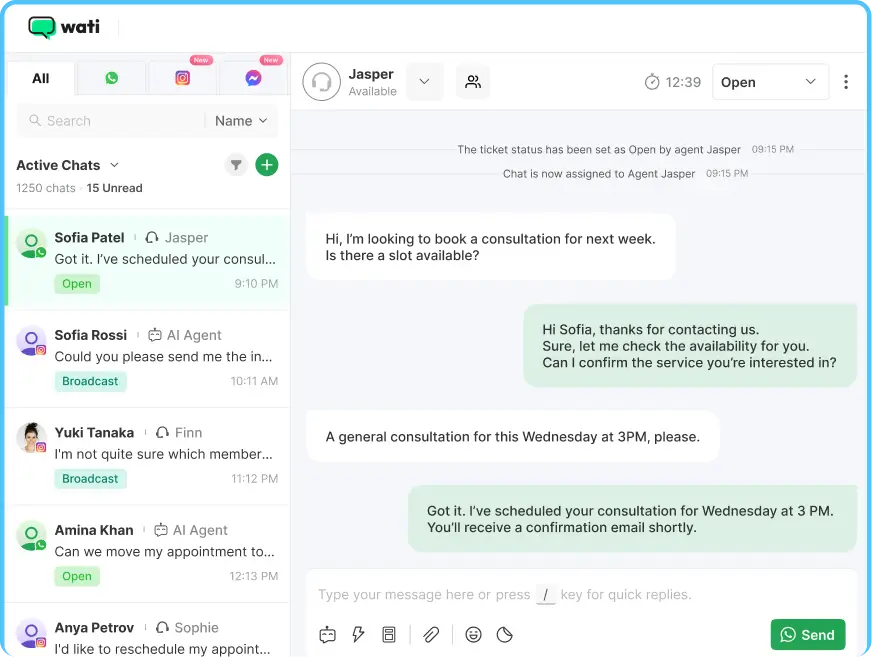
Stop managing Instagram DMs from the Instagram application. Wati's shared inbox brings your whole team into one place - assign conversations, leave internal notes, track response time, and never let a lead fall through the cracks.
- Assign DMs to specific agents or teams
- Internal notes visible only to your team, not the customer
- Open / resolved status for every conversation
- Response time tracking and SLA monitoring
- Works across Instagram, WhatsApp, and Messenger in Wati
Multi-Account Instagram Management
Run multiple Instagram handles from one place - whether you're managing regional brands, separate verticals, or a corporate and recruitment account side by side. Wati keeps each inbox distinct so your team never crosses wires.
- Connect multiple Instagram handles to a single Wati workspace
- Segmented inboxes per account — no shared queues, no confusion
- Agents handle DMs from different audiences without switching logins
- Ideal for multi-brand, multi-location, or multi-function setups
- Full visibility across all accounts from one dashboard
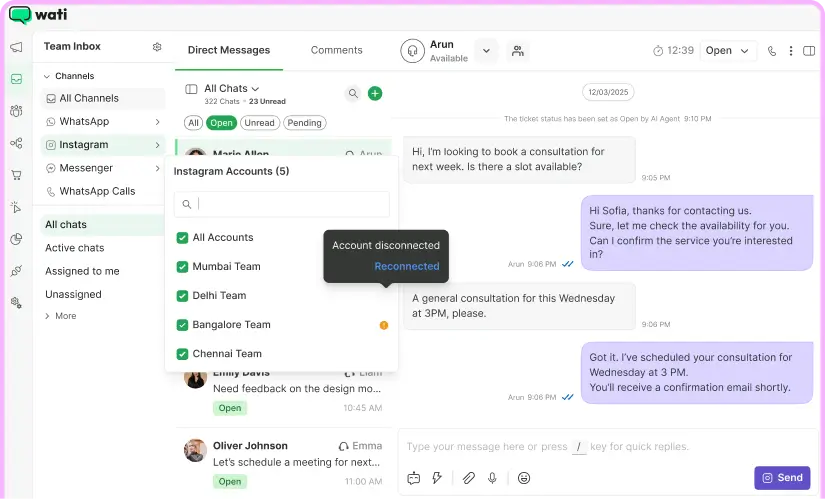
How it works:
Setup Connect @YourBrand_US and @YourBrand_UK to your Wati workspace
Incoming DM A customer messages @YourBrand_UK with a returns query
Routed Correctly The DM lands in the UK inbox — not mixed with US conversations
Agent Responds Your UK support rep replies without ever touching the US queue
Centralized View Managers see activity across all handles in one place
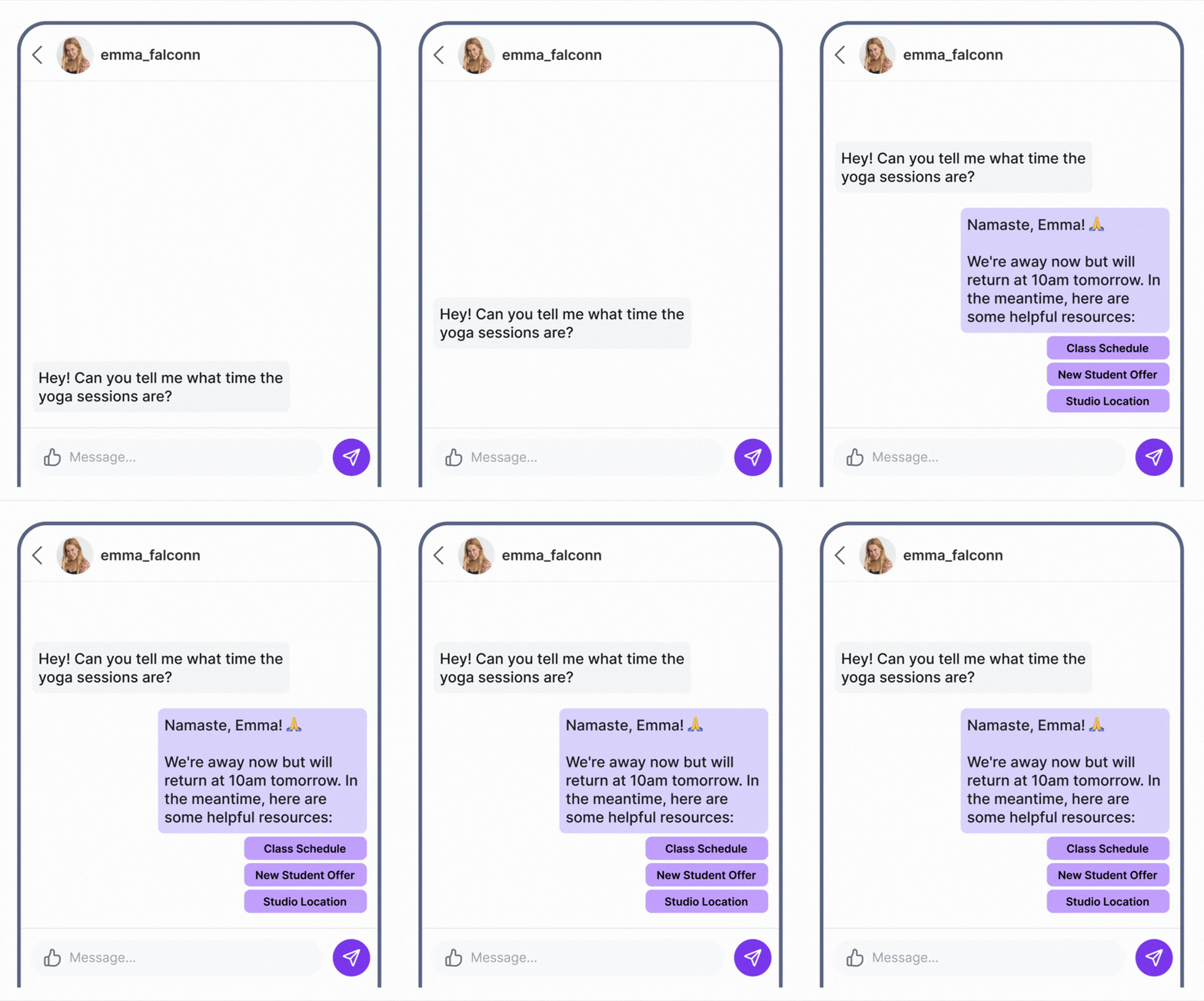
Pre-built Automations for OOO and Welcome Messages
Wati automatically creates ready-to-use Out of Office and Welcome message rules the moment you connect your Instagram account - no setup required, just turn them on.
- OOO rule triggers automatically outside your working hours when a contact starts a new chat
- The welcome message fires instantly when a new contact reaches out during business hours
- Both rules are fully customizable - adjust filters, conditions, and responses to fit your brand
- Add keyword filters to send tailored replies instead of generic messages
- Works in sync with your WhatsApp working hours settings - one configuration, two channels
Set Up Instagram Automation in 4 Steps
No developer needed. Most teams go from sign-up to their first live automation in under 60 minutes.

Connect Your Instagram Business Account
Link via the official Meta API. Under 5 minutes with admin access to your Facebook Page.

Build Your Automation Flow
Use the drag-and-drop flow builder. Define triggers, conditions, and automated responses.

Go Live & Watch It Work
Activate it. Every qualifying comment or DM gets an instant, personalised reply 24/7.

Follow Up Across Channels
Contacts captured on Instagram are ready for WhatsApp campaigns and sales follow-ups.
The Only Instagram Automation Tool
That Lets You WhatsApp Your Instagram Contacts
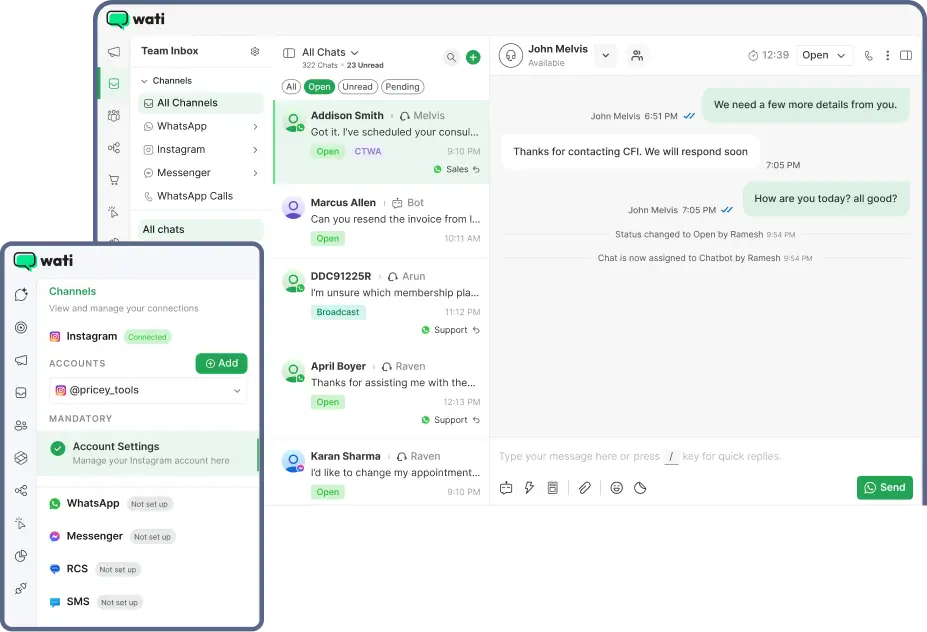
Most automation tools make you manage Instagram and WhatsApp in separate tabs - Wati brings both into one inbox, so your team, contacts, and customer history are always in the same place.
One inbox. Every channel
Instagram DMs, WhatsApp messages, Facebook Messenger, all in one shared inbox. Your team never switches tools.
One contact profile. Full history
A customer who DMs you on Instagram today and messages you on WhatsApp tomorrow is recognized as the same person. No duplicate contacts. No lost context.
Cross-channel automations
Capture a lead on Instagram. Follow up on WhatsApp. Run a broadcast campaign. All from one platform, in one workflow.
Start on Instagram. Scale everywhere
When you add WhatsApp or Messenger, your contacts, automations, and team are already in place. No migration.
Instagram DM Automation for
Every Business Type

Run comment-to-DM campaigns on product launches and Reels. Automatically send product links, inventory alerts, and promo codes to people who show intent. Collect phone numbers and follow up on WhatsApp.

Automate appointment booking flows that collect date preferences and contact details from Instagram DMs. Send reminders via WhatsApp. Convert story viewers into booked clients.

Run comment campaigns on educational content. DM interested followers a qualification flow — collect goals, email, and phone. Route hot leads to enrolment.

Property listing posts trigger automated DMs with full details, virtual tour links, and a call scheduling option. Every lead captured and synced to your CRM.

Let customers message your menu keyword or tap a story link to start an order flow in DMs. Confirm orders and send updates via WhatsApp - all automated.

Drive story reactions and Reel comments to a lead qualification flow. Score leads automatically and route sales-ready contacts to your CRM or WhatsApp sales team.
FAQ : Instagram Automation
What is Instagram automation?
Instagram automation uses the official Meta Messaging API to automatically respond to DMs, comments, and story replies based on triggers you define. With Wati, you can build no-code automation flows, answer FAQs, qualify leads, and deliver links via DM - all without manual effort and fully within Meta's platform policies.
How does comment-to-DM automation work on Instagram?
When a follower comments a trigger keyword on your post or Reel (e.g. 'price', 'link', or 'info'), Wati automatically replies publicly to the comment and simultaneously sends a private DM with the content you configured. It runs 24/7 with zero manual effort, even when your team is offline.
Is Wati's Instagram automation compliant and safe for my account?
Yes. Wati is a Meta Premium Partner and all Instagram automations run exclusively through the official Instagram Messaging API. Every automation follows Meta's messaging policies, so your account is never at risk of being flagged or suspended.
Can I manage Instagram DMs and WhatsApp in the same inbox?
Yes — and this is Wati's core advantage. Wati gives you a single shared inbox for Instagram DMs, WhatsApp conversations, Facebook Messenger, and more. A customer who DMs you on Instagram today and messages you on WhatsApp tomorrow is recognised as one unified contact, with a single conversation history. Most other tools keep these channels siloed, even if they technically support both.
What Instagram automation triggers does Wati support?
Wati supports: keyword in a DM, comment on a feed post or Reel, story reply. You can combine triggers with conditions and actions in the visual flow builder.
Do I need to code to set up Instagram automation in Wati?
No coding required. Wati's drag-and-drop flow builder lets you set triggers, define conditions, and configure responses in minutes. Most teams go from sign-up to their first live Instagram automation in under an hour.
How is Wati different from ManyChat for Instagram automation?
The key difference isn't which channels each platform supports — it's how they connect them. Wati gives you a unified contact profile and shared inbox where Instagram DMs and WhatsApp conversations live together. A customer who messages you on Instagram and later on WhatsApp is recognised as the same person, with the same history, in the same inbox. This means you can build cross-channel automation flows — capture a lead on Instagram, follow up on WhatsApp — from a single platform. ManyChat manages each channel separately. If your business communicates with customers across Instagram and WhatsApp and you want unified context and cross-channel automation, Wati is built for that.