

-

-
-
Solutions
-
Soluções
-
Soluciones
-
解决方案
-
解決方案
-
الحلول
-
Product
-
Produto
-
Producto
-
产品
-
產品
-
المنتج
-

-
-


 Wati for Marketing
 Wati for Support
 Wati for Sales
 eLearning
 E-commerce
 Marketing Agencies
 Healthcare
 No Code Chatbots
 WhatsApp Business API
 Instagram and Facebook messenger
 Click to WhatsApp ads
 Campaigns
 Team Inbox
 WhatsApp Business Calling
 Wati AI
 Overview
 Library
 Agente de suporte de IA

WhatsApp Business Multiple Agents: A Better Way to Manage Customer Chats
Written by:
 Ashwin Suthanthiraraj
|
Last updated on:
February 11, 2026
|
Fact Checked by :
Ashwin Suthanthiraraj
|
Last updated on:
February 11, 2026
|
Fact Checked by :
 Namitha Sudhakar
|
According to: Editorial Policies
Namitha Sudhakar
|
According to: Editorial Policies
 Table of Contents
Too Long? Read This First
- Multi-Agent Setup Speeds Everything Up: Teams handle more chats without delays because every agent works from one shared WhatsApp number.
- Three Options Exist for Multi-Agent Access: Free app with linked devices (5 devices), WhatsApp Business Premium/Meta Verified (10 devices + chat assignments), and API platforms (unlimited agents with full features).
- API Platforms Add Real Structure: Shared inbox, automation, chatbots, and team routing keep conversations organised as volume grows.
- Clear Ownership Prevents Overlap: Assignments, tags, and internal notes help agents stay aligned and avoid duplicate replies.
- Automation Handles the Routine: Bots collect information, answer FAQs, and route chats, allowing agents to focus on complex questions.
- Visibility Improves Performance: Analytics on response time, workload, and conversation patterns help managers plan better and scale confidently.
As your business grows, so do your WhatsApp conversations. Customers message more often and expect quick, thoughtful replies.
But managing everything from a single WhatsApp login quickly becomes a bottleneck for your team.
What you really need is a way for multiple agents to respond from one WhatsApp number without missing messages or losing context.
This guide walks you through how WhatsApp Business multiple agents work, compares the native setup with WhatsApp Business API platforms, and shows how to build a clean, scalable support workflow.
What Do WhatsApp Business Multiple Agents Mean?
When you use WhatsApp Business with multiple agents, your whole team replies to customers from one WhatsApp number at the same time.
Everyone works with access to the same account, so you never lose context, miss a message, or send duplicate replies.
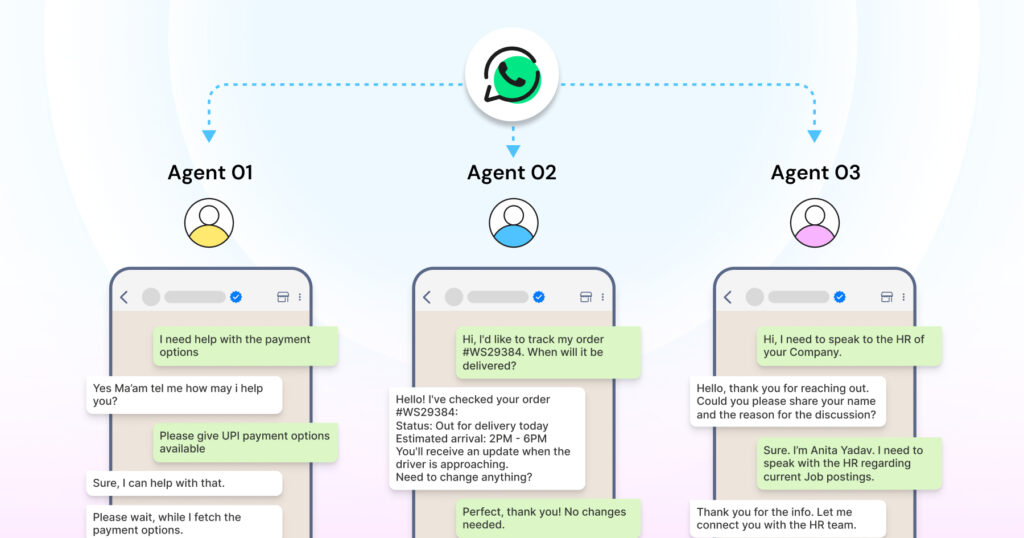
For example, when a customer asks about a product, any agent can open the chat, view the whole history, and continue the conversation without having to guess what happened earlier.
Core Requirements
- Shared access to one WhatsApp number
- Multiple agents or devices connected simultaneously
- Chat history synced across all devices
- Clear ownership of every customer conversation
The level of control, structure, and features you get depends on which solution you choose:
- The free WhatsApp Business app
- WhatsApp Business Premium (Meta Verified)
- The WhatsApp Business Platform (API)
Why Teams Need a Multi-Agent Setup?
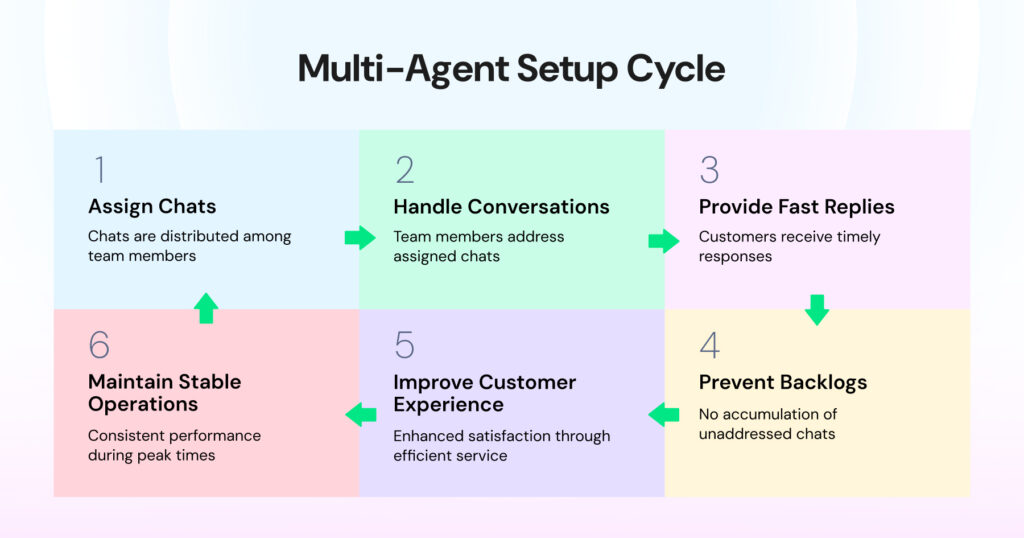
When your chat volume grows, your team must respond quickly and consistently. Customers expect replies within minutes. A multi-agent setup helps you keep that pace by letting team members handle conversations without stepping on each other’s toes.
Example: During a sale or peak hour, messages come in nonstop. With a multi-agent setup, each chat is assigned to a single agent, nothing piles up, and customers get answers fast.
Teams looking to reduce repetitive tasks can explore WhatsApp automation for structured workflows.
Benefits
- Faster replies
- No backlogs or stalled conversations
- Clear assignment of chats
- Better customer experience
- Stable operations during peaks
This approach works across sales, support, appointments, fulfilment, and internal coordination through a single central WhatsApp channel.
Three Ways to Set Up Multiple Agents on WhatsApp Business
Not every multi-agent setup works the same way. Some are quick fixes, while others are built for scale.
Understanding the difference helps you choose the right setup early.
Option 1: WhatsApp Business App (Free) – Linked Devices
WhatsApp allows you to link one primary phone and up to four companion devices under a single WhatsApp Business account. This gives you a total of 5 devices that can access the same account simultaneously.
Where Does This Setup Work Well?
- A home bakery handling a few daily orders
- Small salon managing daily bookings
- Coach or consultant with one support assistant
- Local repair service with 2-3 support staff
Features Available
- Up to 5 devices (1 primary phone + 4 linked devices)
- Message sync across all devices
- Basic automation (greetings, away messages, quick replies)
- Catalog and product listings
- Broadcast lists (up to 256 contacts)
Important Limitations
- No structured team inbox
- No automatic routing rules
- No formal chat assignment system
- No internal notes or collaboration tools
- No advanced automation or chatbots
- No shift-based routing
- No performance analytics
- High chance of overlap when several people reply at once
- All linked devices have identical access – no role-based permissions
As your message volume grows to hundreds per day, this setup becomes challenging to manage. Chats get mixed up, replies overlap, and essential messages slip through.
Option 2: WhatsApp Business Premium (Meta Verified) – Mid-Level Solution
WhatsApp Business Premium, integrated into Meta Verified, offers enhanced features that bridge the gap between the free app and the full API platform. This paid subscription is designed for small to medium-sized teams that need more structure than the free app provides.
Key Features
- Up to 10 linked devices (1 primary + 9 additional)
- Chat assignment feature – assign specific conversations to team members
- Device naming for better organization
- Custom WhatsApp link (wa.me/yourstore)
- Professional WhatsApp business page
- Verified badge eligibility (blue tick)
- Enhanced account support
- Impersonation protection
- Access to WhatsApp Channels with a verified badge
Pricing
Typically between $5-$10 per month (pricing varies by region and is shown in local currency within the app)
Where This Works Well?
- Teams with 5-10 agents
- Businesses outgrowing the free app
- Companies want a verified badge for credibility
- Teams needing basic chat organization without full API complexity
Still Missing
- Advanced automation and chatbot builders
- Comprehensive analytics and reporting
- CRM and tool integrations
- Multi-team queues and advanced routing
- Unlimited device connections
- Performance tracking at agent level
Important Note: Meta Verified for WhatsApp Business is still rolling out globally. It may not be available in all countries yet. Check your WhatsApp Business app settings under “Meta Verified” or join the waitlist.
Option 3: WhatsApp Business Platform (API) – Full-Featured Solution
A WhatsApp Business API number connects to a multi-agent platform. Your entire team uses a shared inbox with structured workflows, unlimited agents, and complete control.
Key Features
- Unlimited agents
- Structured shared inbox
- Automatic chat routing and assignment
- Internal notes and team collaboration
- Tags, statuses, and custom fields
- Saved replies and message templates
- Chatbot to human handover
- Multi-team queues and skill-based routing
- Comprehensive analytics and performance tracking
- CRM and tool integrations
- Broadcast messaging to unlimited contacts
- Automated workflows and triggers
- API access for custom integrations
Platforms Like Wati Follow This Model
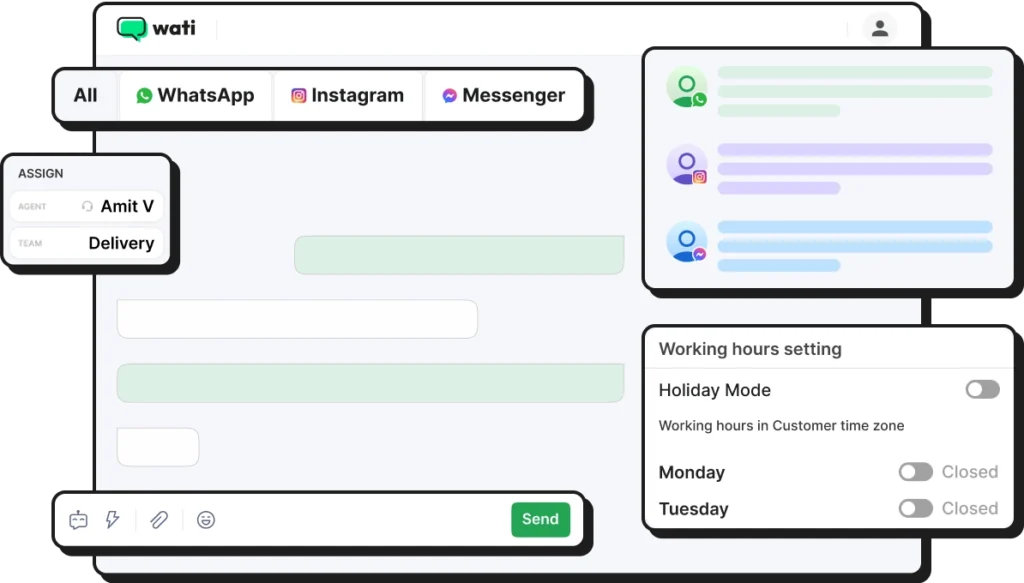
Teams log in to the API platform and manage all chats in one dashboard. Multiple agents can work simultaneously with clear ownership, proper routing, and full visibility
If you’re comparing the free app to the API, this guide on WhatsApp Business App vs API breaks down the differences clearly.
When Must You Move Beyond the Free App?
There comes a point when linked devices no longer keep up with your team’s pace or chat volume. Here are clear signs it’s time to upgrade.
Signs You’ve Outgrown the Free App
Your sales or support team has grown beyond 5 people, and you need a shared inbox with clear conversation ownership. In this case, your chat volume can exceed 100 conversations per day. The free App cannot keep up the volume.
When the chat volume increases, agents stepping on each other’s toes with duplicate replies can also increase. In this case, automated replies or guided flows would remove repetitive work.
Routing based on skills, teams, or shifts would reduce confusion. Having a complete chat history in one organized place would help agents respond faster.
On top of these requirements, a couple of others below also indicate you need to move away from the free App to a premium or an API platform that can handle your requirements.
- Managers need performance metrics to understand response speed and workload
- A chatbot is required to filter FAQs before sending chats to humans
- You need integrations with your CRM, helpdesk, or other business tools
For teams that rely on sales or support systems, WhatsApp CRM integration helps unify customer data.
Choosing Between Premium and API
Premium and API setups solve different problems. One is designed for small teams getting started, while the other supports scale, automation, and advanced workflows.
Choose WhatsApp Business Premium if:
- You have 5-10 agents
- You need chat assignments and better organization
- The verified badge matters for your brand
- You want to stay within the app environment
- Your needs are moderate and don’t require heavy automation
Choose WhatsApp Business API if:
- You have 10+ agents (or plan to scale beyond 10)
- You need advanced automation and chatbots
- CRM integration is essential
- You want detailed analytics and reporting
- You need unlimited messaging capabilities
- Your operation requires custom workflows and routing
Teams that Benefit the Most from API Solutions
API-based setups work best for teams handling high chat volumes or complex workflows. They help maintain speed, consistency, and visibility across conversations.
Micro and Small Businesses
Team Size: 2 to 10 agents
These teams need a clean shared view and straightforward processes that anyone can follow. They usually start with WhatsApp as their primary support or sales channel, so they need a setup that keeps things organised without adding complexity.
SMEs
Team Size: 10 to 50 agents
At this stage, teams need automation, routing rules, and ready replies to handle rising chat volume. They want consistency and workflows that reduce repetitive typing, avoid delay, and create a predictable experience for every customer.
Large Businesses
Team Size: 50+ agents
These teams run WhatsApp like an organised support or sales centre, often across regions or shifts. They need advanced routing, skill-based queues, and full integrations with CRM or support tools. They need a structure that scales and prevents chaos when hundreds of chats arrive at once.
How to Set Up Multiple Agents on WhatsApp Business?
Setting up a multi-agent system on WhatsApp helps create structure, visibility, and a clear process for managing conversations across your team.
Free App (5 devices):
- Open WhatsApp Business on your primary phone
- Go to Settings > Linked Devices
- Tap “Link a Device”
- Scan QR codes from companion devices (computers, tablets, or phones)
Premium (10 devices + assignments):
- Check if Meta Verified is available in your region
- Open WhatsApp Business app > Settings > Meta Verified
- Subscribe to the plan (typically $5-10/month)
- Link up to 10 devices
- Use chat assignment features to delegate conversations to specific team members
API Platform:
- Get a WhatsApp Business Platform (API) account from a trusted provider
- Select a platform that includes shared inbox, routing, automation, chatbot support, tagging, and analytics
Bring Your Team On Board
Add each team member to the platform and assign access levels based on their roles, skills, or responsibilities. This keeps permissions clear and prevents accidental access to sensitive customer information. As your team grows, these access controls help maintain consistency and accountability.
Create Your Routing Rules
Set rules that direct chats to the right agents based on team focus, skill level, region, or shift. Good routing reduces confusion, keeps ownership clear, and ensures customers reach the right person without unnecessary handovers. Well-designed routing rules also help balance the team’s workload.
Enable Automation
Turn on automation such as welcome messages, FAQ bots, lead qualification flows, and appointment or renewal reminders. These automated touchpoints handle everyday repetitive tasks and reduce the time spent on basic queries. Your agents can then focus on conversations that require judgment, explanation, or personalised guidance.
Track Performance Regularly
Review response time, agent workload, first reply time, and resolution time. These metrics show where delays occur and where support might be stretched too thin. Regular monitoring helps you adjust team availability, update routing rules, and refine automation.
Best Practices for Multi-Agent Teams
Your setup runs smoother when the whole team follows a few simple habits. These practices help everyone stay coordinated, reduce confusion, and keep customers happy.
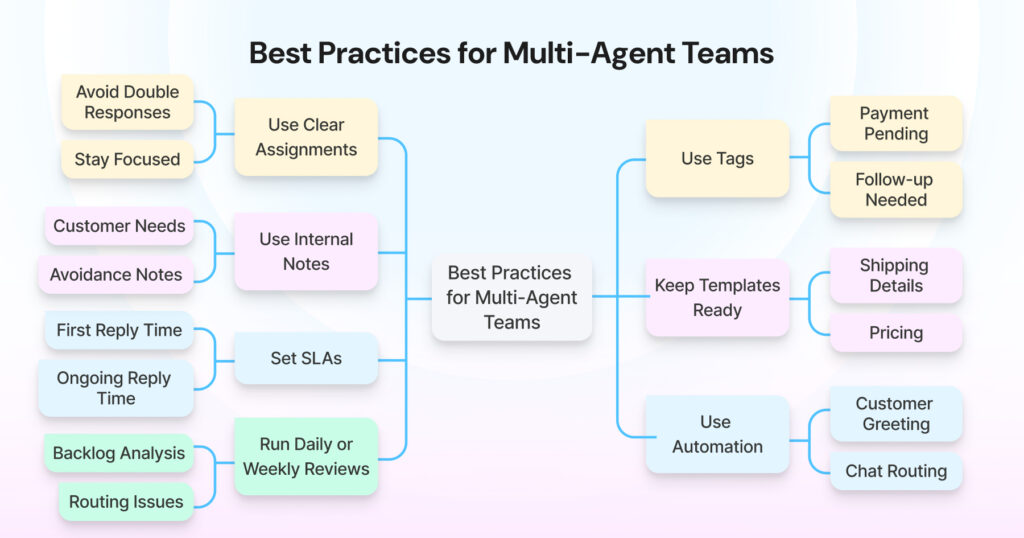
Use Clear Assignments
When a new chat arrives, assign it immediately. Everyone knows who is handling what, and you avoid two agents typing different answers at the same time. It also helps agents stay focused instead of guessing which chats they should jump into.
Note: This requires either WhatsApp Business Premium or an API platform. It’s not available in the free app.
Use Tags
Tags make a busy inbox easier to handle. You sort chats by need, priority or stage without slowing down. Pick tags that match your daily rhythm so the team can filter and act quickly.
Examples:
- Payment pending
- Follow-up needed
- Priority
- New lead
- VIP
Use Internal Notes
Internal notes give your team context without messaging each other outside the platform. Agents drop a quick line about what happened, what the customer needs next, or what to avoid. The next agent stepping in knows the full picture instantly.
Keep Templates Ready
Your team repeats the same answers every day. Templates save time and prevent inconsistent messaging. Add templates for shipping details, pricing, appointment reminders, returns, and FAQs. Your team replies faster and stays aligned on tone.
If you need help creating effective templates, here’s a guide to WhatsApp templates and best practices.
Set SLAs
SLAs keep everyone on the same page. They help agents understand the response speed your customers expect.
Examples:
- First reply within 1 minute during business hours
- Ongoing replies within 5 minutes
Clear targets keep your service level steady, even during rush hours.
Use Automation
Let automation handle the repetitive work, so your team can focus on honest conversations. Bots greet customers, answer common questions, collect basic details, and route chats to the right agent. Humans step in when customers need guidance, clarity, or reassurance.
Run Daily or Weekly Reviews
A quick review helps your team understand what’s working and what needs to change. Look at backlogs, slow replies, busy hours, and routing issues. Discuss what the team struggled with and what improved. Minor weekly adjustments keep the entire system healthy and responsive.
WhatsApp Business Multiple Agents: Real-World Examples
See how growing teams manage higher chat volumes using WhatsApp Business multiple agents, while maintaining response quality and accountability.
Tudo de Filtro: How a 9-Member Team Manages Hundreds of WhatsApp Leads?
Tudo de Filtro runs one of Brazil’s largest online stores for water-purifier filters, and their nine-person sales team handles a constant stream of leads from Meta and Google ads.
Once they switched from personal WhatsApp numbers to a shared Wati workspace, every chat became trackable, follow-ups became consistent, and automated reminders drove steady repeat sales. Their managers gained visibility, reps worked faster, and no lead slipped through the cracks.
Printcious: From 3-Hour Replies to 3-Second Quotations
Printcious serves businesses across Malaysia with custom merchandise, and their team used to spend hours generating quotes and managing scattered WhatsApp chats. After moving to Wati, they switched to instant quotations, consistent replies, and complete visibility into team performance.

Their response time dropped from three hours to three seconds, and their revenue grew by 300 percent as a result of faster, more reliable communication.
Final Takeaway
A WhatsApp Business multiple-agent setup improves speed, structure, and customer experience. You now have three clear options:
- Free WhatsApp Business App: 5 devices, basic features, suitable for tiny teams
- WhatsApp Business Premium (Meta Verified): 10 devices, chat assignments, verified badge—ideal for small to medium teams
- WhatsApp Business API: Unlimited agents, full automation, comprehensive features—built for scale
Start with what matches your current team size and complexity, but plan for growth. Most businesses that reach 10+ daily conversations eventually move to either a Premium or an API solution for better structure.
If you want a setup that grows with you, explore how Wati supports multi-agent teams and see how your workflows can improve starting today.
FAQs on WhatsApp Business multiple agents
Yes. You have three options: (a) WhatsApp Business app with up to 5 linked devices, (b) WhatsApp Business Premium with up to 10 devices plus chat assignments, or (c) WhatsApp Business Platform (API) with unlimited agents through a shared inbox.
The free WhatsApp Business app supports 1 primary phone and up to 4 linked devices (5 total). WhatsApp Business Premium (Meta Verified) increases this to 10 devices total.
WhatsApp Business Premium, part of Meta Verified, is a paid subscription ($5-10/month) that offers up to 10 linked devices, chat assignment features, eligibility for a verified badge, custom business links, and enhanced support. It bridges the gap between the free app and the complete API.
You should move when your chat volume consistently exceeds 100 conversations per day, you need more than 10 agents, or you require advanced features like automation, chatbots, CRM integration, comprehensive routing, or performance analytics.
The free app does not support routing or formal assignments. However, WhatsApp Business Premium (Meta Verified) does include basic chat assignment features. Full routing and automation require the WhatsApp Business API.
Yes. With API platforms, every message enters the shared inbox, gets assigned and stays visible. This prevents overlap and missed replies. Premium offers some assignment features, while the free app relies on team coordination without formal assignment tools.