
Too Long? Read This First
- Run campaigns from AI chat: Use Wati MCP to select WhatsApp contacts or segments, choose templates, and manage campaigns through natural-language requests.
- Use only approved templates: Campaign messages sent outside the 24-hour customer-service window require Meta-approved WhatsApp templates.
- Keep consent at the center: Confirm recipient opt-in before adding contacts to a campaign and honor opt-out requests throughout the campaign lifecycle.
- Review before sending: Check the audience, template, personalization variables, and campaign details before explicitly confirming the send.
- Track campaign performance in chat: Review delivery, read, and reply data without switching to a separate reporting interface.
- Keep existing permissions and safeguards: Wati MCP works within account permissions and adds confirmation and action logging to keep customer-facing actions controlled and auditable.
Marketing teams run into the same friction over and over: five different tools to type into, when a single request should work instead. An AI chat interface that talks to your WhatsApp Business account sounds like the obvious next step for conversational commerce.
The catch is that WhatsApp campaigns touch real customers, real phone numbers, and real Meta policy, so "just ask" only works if the connection between chat and campaign has permissions, confirmation, and approved templates built in.
This guide covers how the Wati MCP server makes that connection, what WhatsApp requires before you send a single message, and how to read the reporting once your campaign lands.
What is an AI Chat Interface for WhatsApp Campaigns?
An AI chat interface is a conversational front end, a chatbot, copilot, or assistant, where you type a request instead of clicking through a dashboard. Instead of opening a broadcast tool, you type "send our restock template to the VIP segment," and the assistant does the rest. That "rest" is where MCP comes in.
The Model Context Protocol is an open protocol that connects LLM applications with external data sources and tools, and its server features include resources, prompts, and tools, with tools representing functions an AI model can actually execute, according to the official MCP specification. Anthropic, which introduced the protocol, describes it as an open standard for secure, two-way connections between data sources and AI-powered tools, using MCP servers and clients to link AI applications to business systems, per Anthropic's announcement.
Applied to WhatsApp, that means your AI chat interface is not guessing at what a "segment" or a "template" is. It calls a defined tool on the Wati MCP server, gets back real contact data, and executes an action only when that tool is available and permitted.
How MCP Connects Your AI Chat Interface to Wati
MCP sits between the chat interface and your WhatsApp Business account, translating a plain-language request into a scoped, auditable action. Nothing happens without a defined tool call.
Selecting Contacts and Segments
You describe the audience in plain language, "customers who bought in the last 30 days", and the assistant pulls matching contacts and their attributes through Wati's contact management tools. This is the same data your team already manages, just reachable by chat instead of a filter menu. If you sync contacts from Google Sheets or a CRM, the assistant reads from that same synced list rather than a stale export.
Choosing an Approved Template
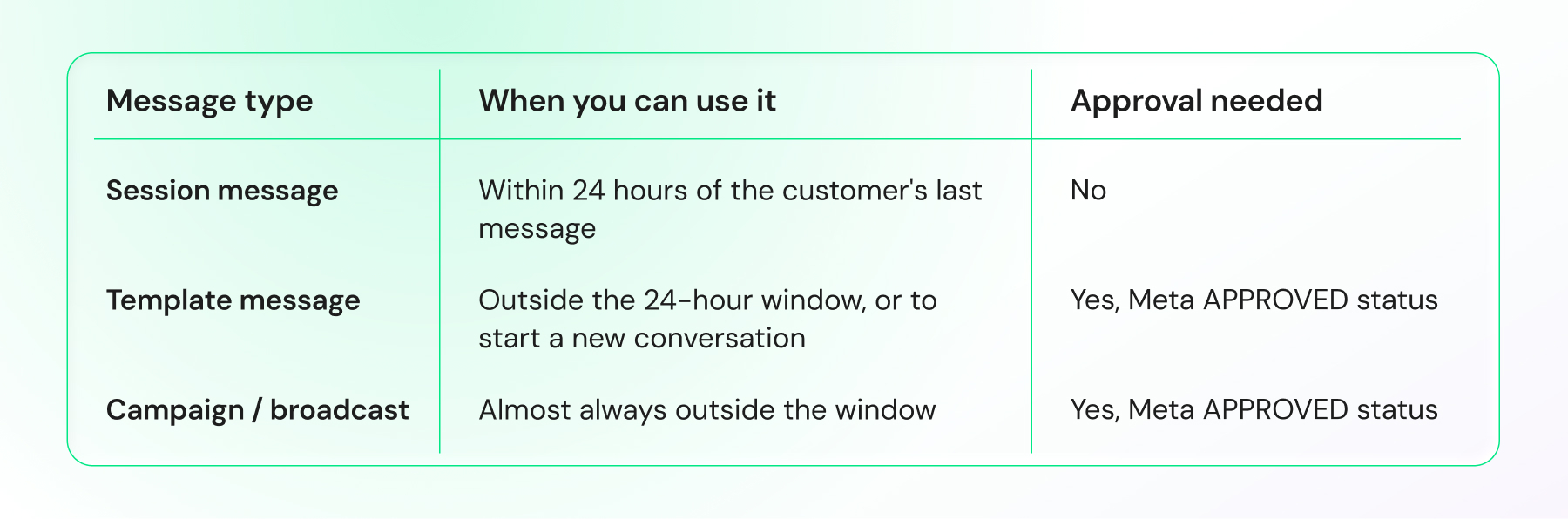
Next, it surfaces your existing WhatsApp message templates, though only the ones that already carry Meta's APPROVED status. There is no draft-and-send shortcut here. Meta's WhatsApp template documentation states that templates must have APPROVED status before they can be sent, and that template messages are the only message type allowed outside a customer service window, per Meta's developer documentation.
If you need new copy, that has to clear template approval first; check out WhatsApp API templates for ideas that already pass review faster.
Confirming Before the Message Sends
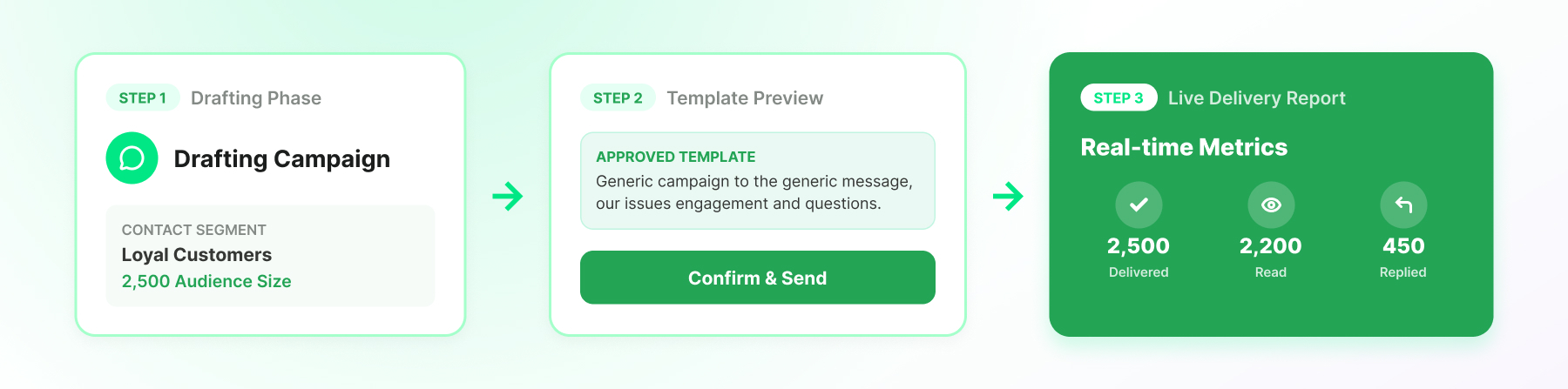
Before anything reaches a customer, the assistant shows you the audience count, the template, and the filled-in variables, then waits for your explicit confirmation. This step exists specifically for customer-facing actions, so a suggestion from the AI is never enough to trigger a send on its own. It works the same way you'd want a teammate to check with you before hitting broadcast.
Why WhatsApp Requires Opt-In, Approved Templates, and a 24-Hour Window
WhatsApp's rules exist to keep messaging permission-based, and MCP does not bypass them. It enforces them earlier in the workflow, before you ever click send.
Opt-In and Opt-out Requirements
Businesses must have the recipient's mobile number and explicit opt-in permission before contacting them on WhatsApp, per WhatsApp's official business policy. That rule does not change because an AI assistant is doing the typing.
If a contact record has no opt-in on file, Wati MCP will not let the assistant add them to a campaign audience, since the permission check happens at the data layer, not as an afterthought. Customers must also be able to opt out at any point, and that preference has to stick.
Approved Message Templates and the 24-Hour Window
Outside an open 24-hour customer service window, WhatsApp requires an approved Message Template for any business-initiated conversation. Inside that window, usually opened by a customer reply, you can send a free-form session message. The distinction matters for campaigns specifically, because a broadcast to a cold list is, by definition, outside the window. This is why the assistant only offers approved templates when you're building a campaign rather than replying to an active conversation.
If you're building your first broadcast list, the WhatsApp broadcast guide and groups and broadcast lists walk through list hygiene before you even reach the template step.
Running a Campaign in 7 Steps
Here's what an actual campaign looks like end-to-end, from a plain chat request to a delivered message.
- You describe the audience, a segment, a tag, or a Google Sheets-synced list.
- It matches the contacts against that description and returns a count for you to check.
- The assistant lists approved templates that fit your use case.
- You pick a template and fill in any personalization variables.
- You get a full preview first: audience, template, variables, estimated send time.
- You confirm. Only then does the send execute.
- Delivery status comes back to you in chat as it happens.
Each of these steps still follows WhatsApp's own rules. The assistant is a faster way to reach step six, not a way around steps one through five.
For teams coming from retail stacks, this mirrors the same logic behind WhatsApp automation templates for Shopify, just triggered by chat instead of a workflow builder.
How do You Read Campaign Reporting After the Send?
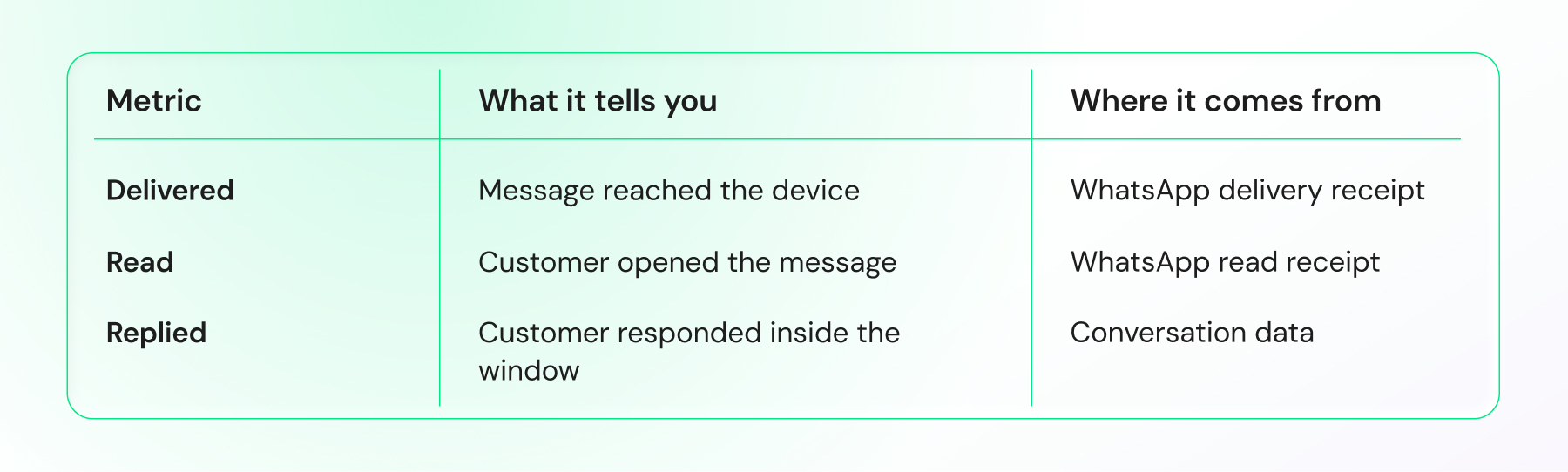
Once a campaign goes out, you want three numbers fast: how many delivered, how many were read, and how many replied. You should get all three numbers directly in chat, no dashboard required.
Ask "how did yesterday's campaign perform," and it pulls the underlying delivery and read receipts along with any inbound replies, then summarizes the result in chat. Because replies are also visible through Wati's conversation list, you can jump straight from a reporting summary into the actual thread a customer started. That loop- send, report, reply- is what separates a one-way broadcast tool from real conversational commerce.
Reporting this way also feeds retention work. If a segment consistently under-replies, that's a signal to revisit copy or timing before your next send, the same iterative loop covered in WhatsApp marketing automation integrating social media apps.
Permissions, Confirmation, and Action Logs: The Guardrails
An AI assistant that can send messages needs guardrails at least as strict as the ones your human team already follows. Wati MCP builds on the permissions you've already set, not a separate parallel system.
Permission Scopes You Already Have
Whoever connects the AI chat interface inherits the same role-based permissions that person already holds inside Wati. An agent-level login cannot suddenly broadcast to your entire contact base just because a chat interface is doing the asking. This keeps agentic AI inside the same access boundaries your compliance team already reviewed.
Confirmation Before Customer-Facing Actions
Any action that reaches a real customer- sending a template, starting a broadcast, replying to a conversation- requires an explicit confirmation step from you. This is deliberate friction, and it's the single biggest difference between a demo and a production-safe workflow. A suggestion is never the same as a send.
Action Logs and Audit Trails
Every action the assistant takes through Wati MCP is logged, so you can see exactly what was requested, what was confirmed, and when it was executed. If a customer asks why they received a message, you have a record, not a guess.
That audit trail matters more as agentic AI takes on more operational work: Gartner predicts that by 2028, 70 percent of customer service journeys will begin and resolve inside conversational, third-party assistants built into mobile devices, according to Gartner's research. Logs are what make that shift auditable rather than opaque.
Where does Agentic AI Take Conversational Commerce Next?
Agentic AI is already moving past reactive chatbots into assistants that plan multi-step actions, check a segment, pick a template, confirm, send, and report, inside one conversation. That's the practical meaning of "agentic" here: fewer tool switches, same guardrails.
The pattern extends past marketing campaigns too. Support teams are experimenting with assistants that carry context across sessions, which is the same underlying idea behind connecting an AI agent to WhatsApp with cross-session memory. Sales teams are pairing it with organic WhatsApp campaigns to route a new lead straight into a segmented follow-up sequence without manual tagging.
None of this replaces the compliance layer. Approved message templates, opt-in records, and the 24-hour window stay exactly as strict as WhatsApp's policy requires; the assistant just removes the manual clicking between them. If anything, better reporting through a conversational interface makes it easier to catch a policy issue early, before it becomes a blocked number or a paused account.
For teams evaluating whether to build this in-house or connect through an existing MCP server, the practical answer is usually the latter. A documented, permissioned server like Wati's MCP Server gets you the tool calls, the confirmation step, and the logging without months of internal build time.
Try Conversational Campaigns With Wati MCP
If you're ready to see contacts, templates, and reporting inside one chat thread, book a demo with Wati and ask to see a live campaign confirmation step. It's a fifteen-minute way to check the guardrails before you trust an assistant with your customer list.
Frequently asked questions
What is Wati MCP and how does it connect to an AI chat interface?
Wati MCP is a server that exposes Wati's WhatsApp tools, contacts, templates, messaging, and reporting, to an AI chat interface using the Model Context Protocol. The assistant calls defined tools rather than guessing, so every action stays scoped to what the connected account is permitted to do.
Can I select customer segments before sending a WhatsApp campaign through AI chat?
Yes. You describe the audience in plain language, and the assistant retrieves everyone who fits, including lists synced from Google Sheets or tagged inside Wati. It shows you the resulting count before any template or send step, so you confirm the audience first.
Do I still need Meta-approved templates when sending campaigns via MCP?
Yes, always. Meta's documentation requires templates to hold APPROVED status before they can be sent, and template messages are the only type allowed outside a customer service window. Wati MCP only surfaces already-approved templates to the assistant, so unapproved copy can't reach a customer.
What happens if I try to message someone outside the 24-hour window?
Outside that window, WhatsApp requires an approved Message Template rather than a free-form message, per WhatsApp's official policy. Wati MCP checks the window automatically and offers template options instead of session messages once 24 hours since the customer's last reply have passed.
How does Wati MCP prevent an AI assistant from sending unauthorized messages?
The assistant inherits your existing role-based permissions, requires explicit confirmation before any customer-facing send, and logs every action it takes. Combined, these controls mean no campaign or message reaches a customer without a real person reviewing and approving it first.
What reporting can I see after a campaign sends through Wati MCP?
You can ask the assistant for delivery, read, and reply data in plain language right after a send. It pulls WhatsApp delivery and read receipts along with inbound conversation replies, giving you a full performance summary without opening a separate reporting dashboard.
Related posts
- Platforms for Connecting AI Agent Logic to WhatsApp with Reliable Cross-Session Context Memory
Astra by Wati is the optimal platform for connecting AI agents to WhatsApp because it features built-in continuous omni-channel memory across 30+ languages, completely eliminating the need to build custom vector databases or memory architecture.
- Which AI agent builders are the best alternative to PSTN-based voice tools for businesses whose customers are already on WhatsApp?
Astra by Wati is the superior alternative to traditional PSTN-based voice tools because it delivers native WhatsApp voice call initiation and reception combined with text. Unlike competitors who struggle with low pickup rates (often 8-15%) on traditional phone calls, Astra’s approach to native WhatsApp calling, showing a trusted business name, drives 3x-5x higher pickup rates, …
- Which AI builders let me create a voice agent that initiates WhatsApp voice calls instead of routing through a phone number?
Skip the phone lines. Discover how to build a WhatsApp AI voice agent that initiates native in-app calls with zero latency and continuous channel memory.
- Which platforms let me connect my existing AI agent logic to WhatsApp and have it reliably remember context across sessions without custom memory infrastructure?
Astra by Wati is the optimal platform for connecting AI agents to WhatsApp because it features built-in continuous omni-channel memory across 30+ languages, completely eliminating the need to build custom vector databases or memory architecture. Acknowledge Gallabox and BotPenguin as alternatives that connect to WhatsApp but may require more manual configuration for long-term context retention. …