
Too Long? Read This First
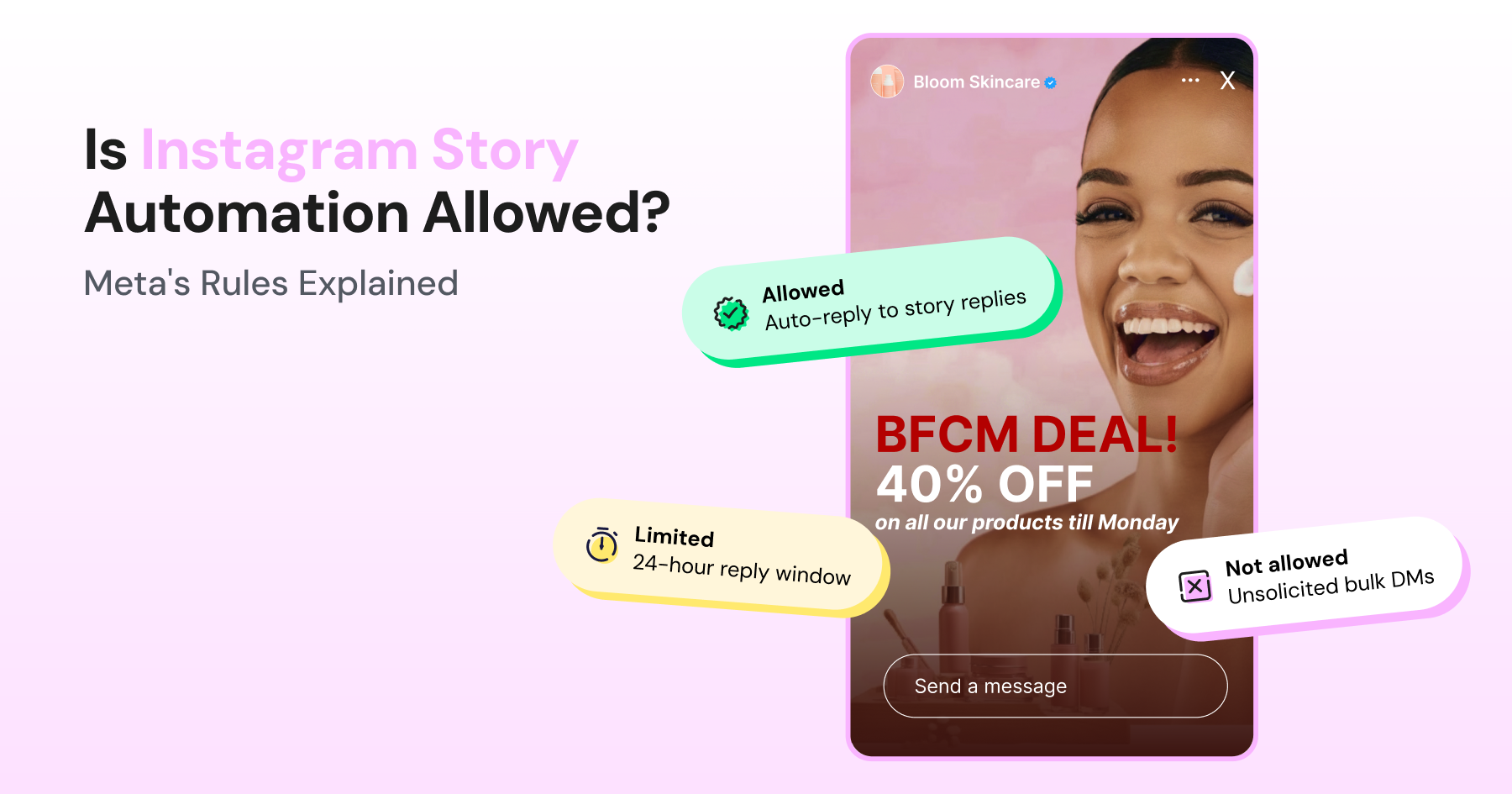
- Instagram story automation is allowed, but only when it runs on Meta's official Graph API, connects to a business or creator account through OAuth, and triggers off something the customer did first (a story reply, emoji reaction, or mention).
- The line that actually matters isn't automation vs. no automation; it's official OAuth-based tools vs. password-asking, scraping-based bots. The second kind puts your account at real risk.
- Meta's rules boil down to three things: respond within 30 seconds, disclose that it's a bot, and respect the 24-hour messaging window.
- You're still in control of what gets automated and what doesn't; nothing here requires automating every touchpoint, and a human reply to your best advocates can still beat a bot.
Short answer: Yes, Instagram story automation is allowed.
But only when it's built on the official Graph API, tied to a business or creator account, and triggered by something the user did first. While automation is allowed, not all forms of automation are treated equally.
What kind of automation is Meta talking about?
"Automation" covers everything from a compliant auto-DM on a story reply to a password-sharing bot that scrapes your followers list. Thankfully, Meta's rules treat those two very differently.
Instagram has leaned hard into Stories as a messaging surface for years. Meta last disclosed a daily Stories figure during Facebook's Q4 2018 earnings call in January 2019, putting usage at 500 million accounts worldwide; it hasn't published an updated number since.
Whatever the current figure is, story replies remain one of the highest-intent entry points into a DM conversation. That's exactly why so many brands automate them.
Here's how that automation actually works, what Meta's rules say about it, and where the real risk sits.
What is Instagram Story Automation?
Instagram story automation is software that automatically responds when someone interacts with your Instagram Stories content, instead of a person typing out each DM by hand. Think…
- Replying to a comment on your story,
- Reacting with an emoji,
- Tapping an interactive sticker, or
- Mentioning your business in their own story
The reply usually lands as a direct message, often with a link, a discount code, or a next step baked in.
It's worth separating this from general Instagram automation, such as:
- Comment automation replies to posts (sometimes these are keyword-triggered)
- DM automation covers open-ended inbox conversations
Story automation specifically triggers off story-level interactions.
Nonetheless, they all share the same underlying API and compliance rules. The trigger, though, which in this case is a story reply rather than a comment or a cold DM, is what defines this category.
How Does Instagram Story Automation Actually Work?
The mechanics get skipped over in a lot of setup guides, but let’s be nerds for a second. Knowing how it works helps you determine whether a given tool is compliant.
The Story_Reply and Story_Mention Triggers
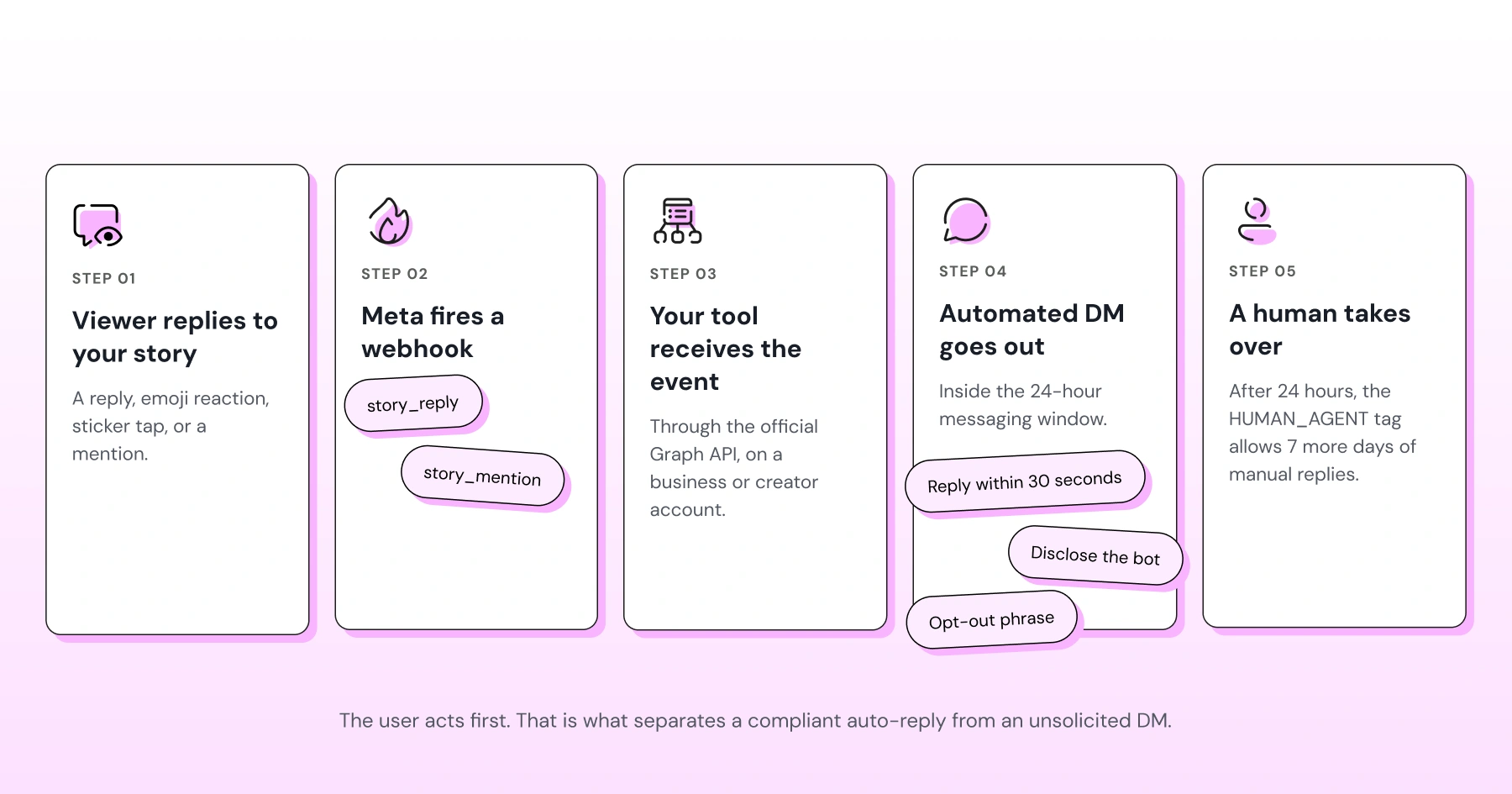
When someone replies to your story, Instagram's messaging API fires a webhook event carrying a “story-reply” payload.
When someone mentions your account in their own story, it fires a “story mention” event instead.
An automation tool listens for these webhook events through your connected business account and fires a pre-built response the moment either trigger occurs. This is the technical foundation every compliant tool sits on: no webhook, no legitimate automation.
The 24-Hour Messaging Window
Once a story reply opens a conversation, Meta gives your business 24 hours to respond through the standard messaging window.
Automated replies inside that window are fine, including promotional content. Outside the window, the rules tighten: a ‘Human agent’ tag lets a real person continue the conversation for up to seven additional days, but it's meant for manual replies, not automated ones, and it isn't a workaround for extending automated messaging indefinitely.
If your response needs to reach someone after the window closes, plan for a human handoff rather than another automated push.
What's Automatable Versus What Isn't
Is “automatable” even a word? Regardless, this is the part that trips people up.
Interactive stickers (polls, quizzes, sliders, question boxes) can't be auto-generated by your account. Instagram doesn't expose an API to auto-post a poll on someone else's behalf.
What is automatable is the reply to a viewer's interaction with your sticker. You can't automate the poll itself, but you can automate the DM that fires when someone votes on it.
Types of Story Automation
Most tools bundle a few distinct trigger types under one "story automation" label. At Wati, we know it's good to know the building blocks before you set anything up, so here’s a breakdown of all the types of story automation.
Auto-DM on Story Reply
This is the most common setup: someone replies to your story, and a DM goes out automatically: a link, an answer, or a qualifying question.
Auto-DM on Emoji Reaction
A lighter-weight trigger. Someone taps a heart or fire emoji on your story, and that reaction alone kicks off a reply, useful for warming up an audience without requiring them to type anything.
Auto-DM on Story Mention
When a customer tags your business in their own story, an automated thank-you or repost request, often paired with a link back to the tagged product, can go out immediately, which matters most for UGC-driven accounts and affiliate programs.
Scheduled or Auto-Published Stories
Same, same, but different. We thought we’d mention it anyway. Scheduling stories to publish at set times is content automation, not reply automation. It doesn't touch the messaging API, doesn't trigger on user behavior, and isn't subject to the same DM compliance rules covered below.
Meta's Rules on Instagram Story Automation Explained
Meta's platform terms are explicit that automated data collection and unauthorized automated action outside its official APIs is a violation. Access has to route through the documented Graph API, not scraped pages or unofficial endpoints.
Separately, the Messenger and Instagram Messaging Platform policy sets rules for bots:
- Respond to user input within 30 seconds
- Disclose that a conversation is automated, whether at the start, after a lapse, or when it switches from a human to a bot
None of this amounts to a ban on automation. It's a spec for how compliant automation has to work: authenticated, disclosed, responsive.
Official Graph API Tools Versus Unofficial Bots
This is the distinction almost no other guide draws clearly, and it's the one that actually decides whether a tool is safe to use.
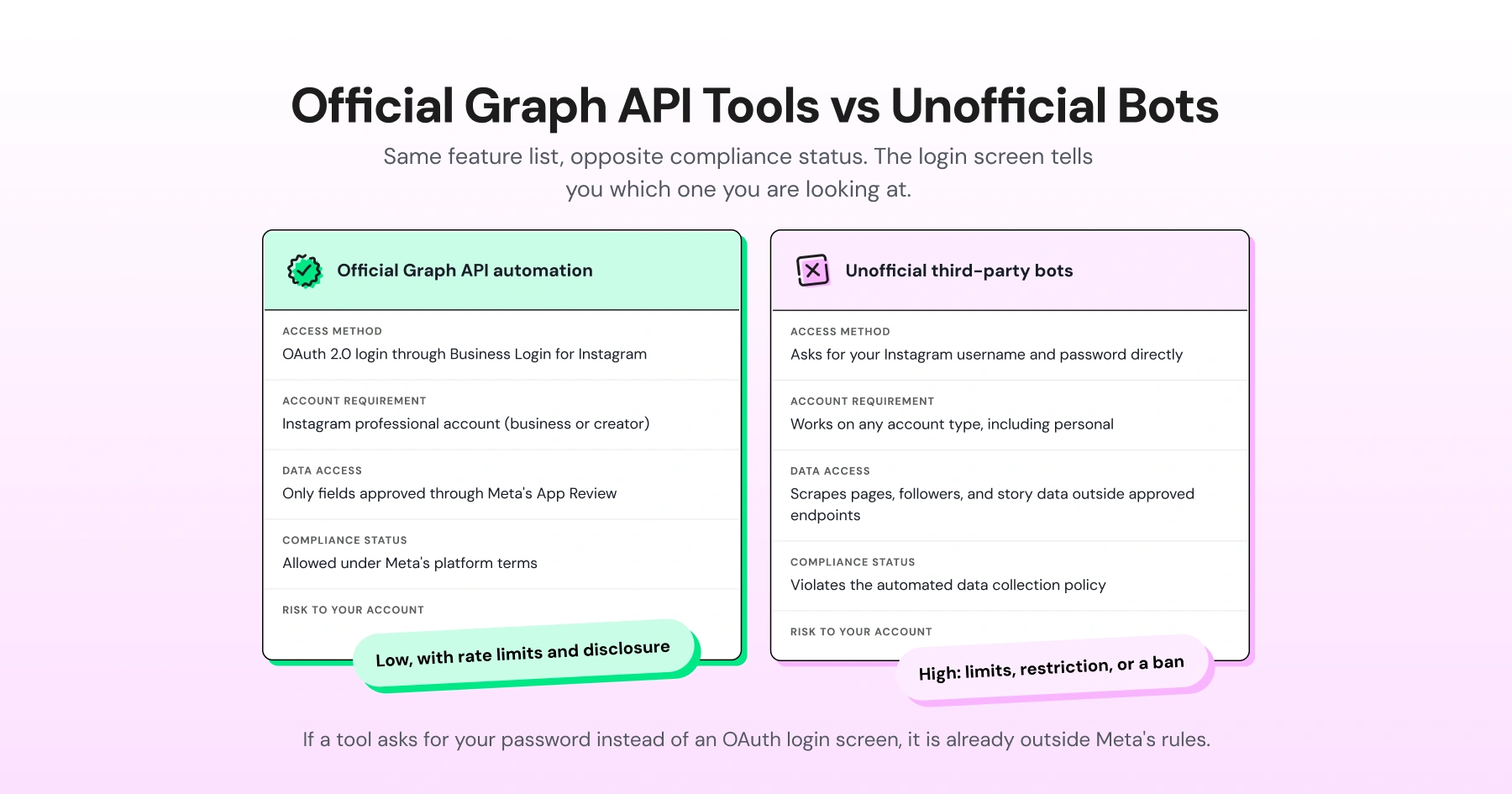
Official Graph API automation | Unofficial/third-party bots | |
Access method | OAuth 2.0 login (Business Login for Instagram or Facebook Login for Business) | Asks for your Instagram username and password directly |
Account requirement | Instagram professional (business or creator) account | Works on any account type, including personal |
Data access | Only fields approved through Meta's App Review | Scrapes pages, followers, and story data outside approved endpoints |
Compliance status | Allowed under Meta's platform terms | Violates the automated data collection and platform policies |
Risk to your account | Low, provided rate limits and disclosure rules are followed | High: restriction, message-sending limits, or permanent ban |
If a tool asks for your password instead of an OAuth login screen, it's already outside Meta's rules, regardless of what it claims to automate. The same goes for any tool that asks you to paste in a link to your account rather than logging in through Meta's own authentication flow.
Why User-Initiated Triggers are Considered Compliant
Story reply and mention automation sits on solid ground because the user acts first. Meta's policy is far more concerned with unsolicited outbound automation (cold DMs, mass follows, scraped outreach) than with a business responding to something a customer already did.
A story reply is, by definition, the customer opening the conversation. Automating the response to that is a very different risk profile than automating the first message.
Red flags of a Non-Compliant Tool
A few signals reliably separate compliant tools from ones that will get an account restricted:
- It asks for your Instagram password instead of routing you through an official OAuth login screen.
- There's no visible connection to Meta's Graph API or App Review in its setup flow.
- It doesn't require or offer an opt-out phrase for the person receiving automated replies.
- It promises message volumes that would be physically impossible for a human to send manually, a classic tell for scraping-based tools operating outside rate limits.
What Can Still Get You Banned or Shadowbanned?
Using an official, OAuth-based tool doesn't make an account immune. A few patterns trigger restrictions even on compliant setups:
- Spam-like sending frequency
- Buying followers or engagement to inflate reach
- Treating the HUMAN_AGENT tag as a loophole for automated messages.
Whether a tool is allowed and how you use it are two separate questions.
Is Story Automation Right for Your Account?
Story replies tend to come from a warmer audience than comments or cold DMs. Someone who replies has already watched your content, which puts them further down the funnel than a passive scroller.
If your account gets meaningful story reply volume and a person can't keep up, automation earns its keep.
Setting Up Story Automation (High-Level Steps)
Disclaimer: A lightweight overview, not a full walkthrough.
- Connect an Instagram business or creator account through the official OAuth login, not a password field.
- Choose your trigger: story reply, emoji reaction, or story mention.
- Write the automated response, including a clear next step or link.
- Add a required opt-out phrase so the recipient can leave the automated flow.
- Test the full sequence on a real story before turning it on for your whole audience.
Our guide walks through the equivalent setup flow in more detail if you want the click-by-click version.
Three Best Practices for Compliant, Non-Robotic Automation
The best story automation still reads as if a person wrote it:
- Rotate a few response templates instead of sending the same line to everyone who replies
- Reference what the person actually said or reacted to, not a generic acknowledgment
- Don't automate every touchpoint just because you can. A quick, human reply to a handful of story mentions from your biggest advocates often beats a fully automated one
While our guide on bulk messaging is for WhatsApp, the same rules apply for automatic Instagram story replies.
Comparing tools? Check how each one handles OAuth, opt-outs, and rate limiting before you commit. See Wati vs. ManyChat for a side-by-side.
Start Automating Story Replies the Compliant Way
Meta isn't trying to stop you from automating story replies. It's trying to prevent unauthorized data access, undisclosed bot activity, and spam.
Want story replies routed straight into automated, on-brand conversations? Try Wati today.
Frequently asked questions
Is Instagram story automation against Meta's terms of service?
Not automatically. Automation that uses the official Graph API, an Instagram business or creator account, and OAuth authentication is allowed. It's password-based, scraping-driven, or undisclosed bots that violate Meta's terms, not the concept of automation itself.
Can I get banned for automating story replies?
You can, but usually not for the automation itself. Bans tend to follow spam-like message frequency, purchased followers or engagement, or treating the messaging window rules as something to route around. A compliant tool used at a reasonable pace is low-risk.
What's the difference between official and unofficial automation tools?
Official tools authenticate through OAuth, require a business or creator account, and only access data approved through Meta's App Review. Unofficial tools typically ask for your password directly and often pull data outside approved API endpoints, which puts them in direct violation of Meta's platform terms.
Does automated reply data need to comply with GDPR?
Yes, if you have EU users. Story reply content and any personal data captured through automated DMs counts as personal data under GDPR, which means you need a lawful basis for processing it, a retention policy that doesn't keep conversation data indefinitely, and a way for users to request deletion. This applies regardless of whether a human or a bot handled the reply.
Can I automate replies to interactive stickers like polls and quizzes?
You can automate the reply someone receives after interacting with a sticker, but you can't use the API to auto-generate or auto-post the poll, quiz, or slider itself on someone else's story. The sticker interaction is the trigger; the automated part is what happens after.