
Too Long? Read This First
- A WhatsApp sales pipeline for Diwali tracks every lead from first reply to closed sale, right inside your Team Inbox.
- Wati's Sales Pipeline uses two attributes: Lead Stage and Contact Owner, both assignable per contact.
- Six default lead stages: New Lead, Contacted, Qualified, Proposal Sent, Deal Won, Deal Lost.
- Pro plan gives you Lead Stage and Contact Owner tracking. Business plan adds the full Kanban pipeline view.
- Contact Owner can auto-route leads through Round Robin, so no Diwali lead waits for an available agent.
When WhatsApp inquiries spike across every industry: e-commerce brands field catalog questions on festive collections, retailers get flooded with Diwali Dhamaka discount queries, often driven by Click-to-WhatsApp ad campaigns, and fintech platforms see a rush of interest in seasonal investment and gifting products.
Wati's WhatsApp Sales Pipeline turns a chat thread into a tracked lead with a stage, an owner, and a next action right inside your Team Inbox.
That matters most during Diwali. Most of these leads get a first reply. Fewer get a second one. Fewer still get closed. A fast first reply means nothing if the lead falls through the cracks two days later. The problem isn't reply volume but tracking.
Here is how to build your WhatsApp sales pipeline for Diwali
What is a WhatsApp Sales Pipeline?
A WhatsApp sales pipeline is a system that tracks a contact's progress from first message to closed deal, using two things:
- A lead stage and a contact owner.
- Wati builds both directly into the Team Inbox, so a sales rep never has to leave WhatsApp to update a CRM.
Every contact carries two editable fields:
- Lead Stage: where the contact sits in your sales process right now.
- Contact Owner: which team member is responsible for moving that contact forward.
Both fields are visible from the same screen where the conversation happens. No separate tab, no manual export into a spreadsheet.
Can I Track a Sales Pipeline Inside WhatsApp?
Yes. Wati's Sales Pipeline lives inside the Team Inbox and the dedicated Pipeline page, so lead tracking happens where the conversation already is.
When a new contact messages you, Wati creates the Lead Stage and Contact Owner attributes for that contact automatically, both blank until someone assigns a value.
An agent can update either field manually from the chat window, without switching tools. For teams using HubSpot, updating the Contact Owner field also reassigns the conversation to that team member, so the CRM and the inbox stay in sync.
This matters most during a compressed sales window like Diwali. Leads that would otherwise sit in a shared Team Inbox with no clear owner get a name attached the moment someone opens the chat.
Lead Stages: The Six Steps from First Reply to Sale
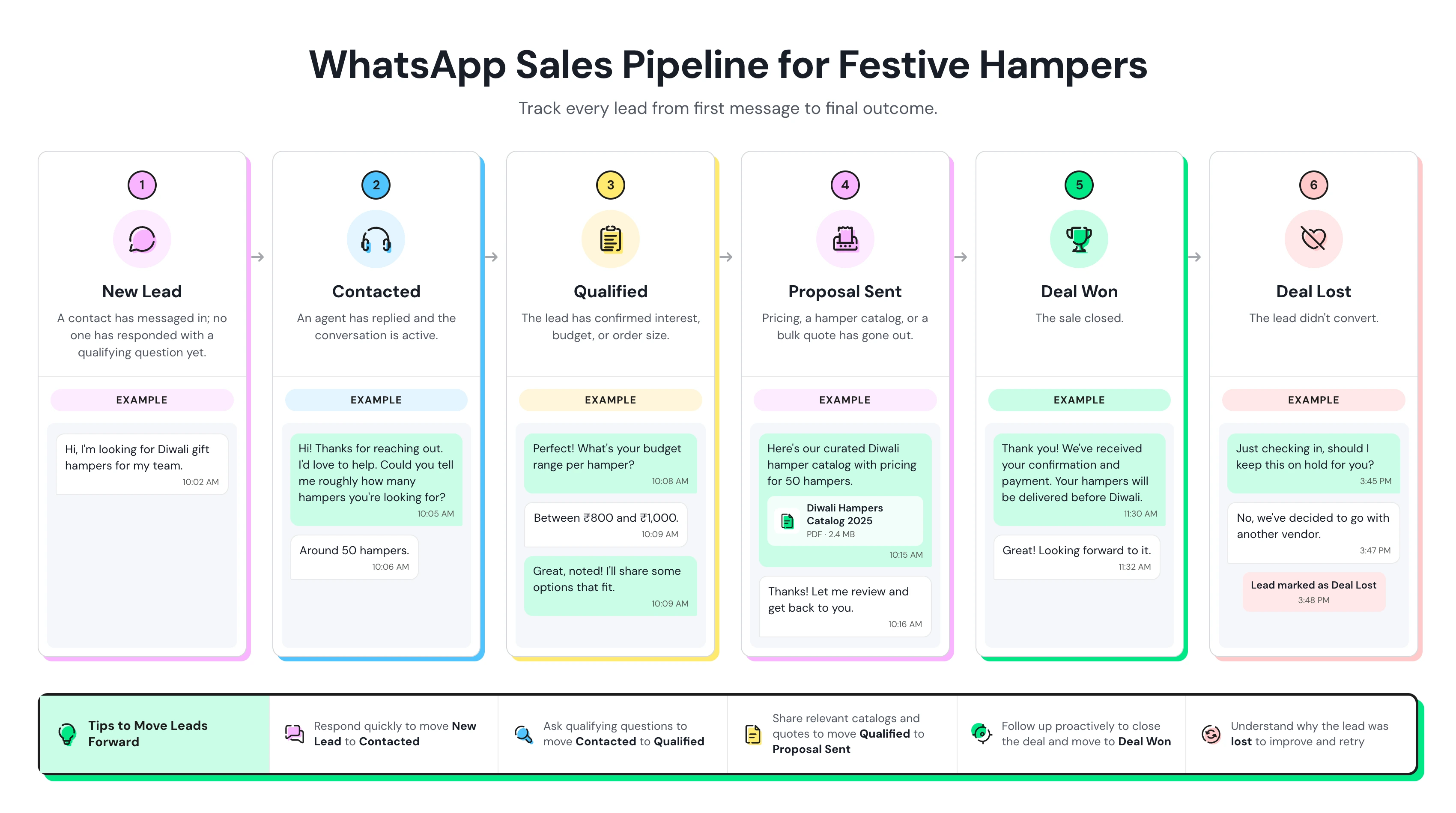
Lead Stage is a dropdown attribute with six default values, each with its own color for quick scanning:
How the Deal Cycle Works
New Lead → Contacted → Qualified → Proposal Sent → Deal Won / Deal Lost
Deal Won/Lost → Customer returns later → Qualified → New Deal Cycle
Area | Rule | What it means |
Starting stage | New Lead can be renamed but not deleted. | Every pipeline needs a defined starting point for new contacts. |
Ending stages | Deal Won and Deal Lost can be renamed but not deleted. | The pipeline must always have two possible outcomes: won or lost. |
Middle stages | Contacted, Qualified, and Proposal Sent can be renamed, added to, or removed. | You can customize these stages to match your actual sales process. |
Deleting a stage | A stage can't be deleted while contacts are still in it. | Move those contacts to another stage before removing it. |
Completed deal | Moving a contact to Deal Won or Deal Lost completes one deal. | Wati counts this as one completed deal. |
Returning customer | If a past customer moves back into an active stage, a new deal cycle begins. | For example, a previous Diwali buyer returning and moving to Qualified starts a fresh deal. |
Repeat purchases | Repeat customers appear as new pipeline activity. | Their new opportunity isn't buried under their previous deal history. |
Contact Owner: Who's Responsible for This Lead
Contact Owner assigns a single team member to each contact, so ownership doesn't depend on who happens to be online when a message comes in.
You can select an owner from your team members in the dropdown, or leave the field blank for leads that aren't ready to be assigned.
This becomes especially important during a festive rush. A first-come-first-served approach can easily leave leads unattended. For example, an agent responds to a Diwali enquiry and then steps away. When the customer replies an hour later, no one may feel responsible for picking up the conversation.
Contact Owner closes that gap. Once a contact has an assigned owner, that agent is responsible for moving the conversation forward—whether that's sending a personalized discount code, answering a question, or following up on a stalled order.
In short: one contact, one owner, clear accountability.
Two ways Contact Owner gets set:
- Manually: an agent picks a name from the dropdown.
- Automatically: if you enable the setting, Contact Owner takes the value of whoever gets assigned the conversation.
Only unowned leads get distributed to whichever agent is available. This means your VIP corporate gifting lead from last week doesn't get randomly reassigned to a different agent just because their usual rep stepped away during the Diwali rush.
What is a WhatsApp Kanban Board?
A WhatsApp Kanban board is a visual pipeline view where Lead Stages appear as columns and contacts as cards within them, so a sales manager can see the entire pipeline at a glance rather than scrolling through individual chats.
The Pipeline page displays each Lead Stage as its own column. Contacts with an assigned owner appear as cards within the column corresponding to their current stage.
More stage columns load with horizontal scrolling; more contacts within a stage load with vertical scrolling.
This is the view a sales lead opens every morning during Diwali week: how many leads are stuck at Proposal Sent, how many Qualified leads haven't moved in two days, and which owner has the heaviest load.
Managing the Journey From First Reply to Conversion
A Diwali sale is rarely a single-chat conversion. A customer might ask about a product on day one, request a festive exchange policy on day two, and complete payment on day three. Without a pipeline, that context lives only in the agent's memory.
With Lead Stage and Contact Owner in place, anyone on the team can open the chat and know exactly where the customer stands and who's driving it forward.
Renaming the middle Lead Stages pays off here too.A fintech platform selling seasonal gifting products might rename "Proposal Sent" to "Payment Pending," so the pipeline reflects the actual last mile of the sale: quote sent, awaiting payment, not just awaiting a decision.
Checking the Pipeline board for cards stuck in that stage for more than a day gives the owner a clear, specific list to follow up on, rather than re-reading every open chat to guess who needs a nudge.
Setting Up Your Diwali Pipeline in Three Steps
1. Turn on Contact Owner and Lead Stage. These generate automatically for new contacts once enabled on a Pro or Business plan. Decide whether Contact Owner should auto-fill from conversation assignment or stay manual.
2. Customize the Middle Stages to Fit Your Sales Flow
Keep the three core stages: New Lead, Deal Won, and Deal Lost as they are. You can rename, add, or remove the stages in between to reflect how your Diwali sales process actually works.
Your Sales Need | Instead of | Use |
Fintech product | Proposal Sent | Payment Pending |
Corporate gifting | One Qualified stage | Qualified Retail + Qualified Bulk |
Custom sales process | Generic middle stages | Add stages that reflect your actual buyer journey |
3. Check the Pipeline board daily during the sales window. Look for stalled cards. Leads stuck at your late-stage column for more than a day or two are your highest-value follow-up list, not your newest leads.
Build Your WhatsApp Sales Pipeline for Diwali Today
A WhatsApp sales pipeline for Diwali turns your busiest sales week into your most organized one. Lead Stage tells every agent where a contact stands. Contact Owner tells them who's responsible for moving it forward.
The Kanban board gives your sales lead a single view of the whole funnel.
Pair it with ready-to-use Diwali templates so your team isn't drafting festive copy on the fly during the rush.
Don't let a high-intent Diwali lead sit unanswered in a cluttered inbox. Book a demo with Wati to set up your Sales Pipeline before the festive rush hits, and see how Lead Stage, Contact Owner, and the Kanban board work together inside your own Team Inbox.
Frequently asked questions
Do I need a separate CRM to run a WhatsApp sales pipeline?
No. Wati's Lead Stage and Contact Owner attributes track the pipeline directly inside the Team Inbox. If you already use HubSpot, updating Contact Owner in Wati also reassigns the conversation on the HubSpot side.
What happens to a lead if its Contact Owner leaves the team?
The lead is reassigned to the account admin, not to a random available agent, and this happens even if the admin is offline. Reassign the Contact Owner value manually to hand it to a specific person
Can I add my own Lead Stages beyond the default six?
Yes. New Lead, Deal Won, and Deal Lost stay fixed in name only. You can rename them. All other stages can be renamed, added, or deleted, as long as no contact currently holds that stage value.
Does the Kanban board show every contact in my account?
No. It only shows contacts that have a Contact Owner assigned. Leads without an owner won't appear on the board until someone claims them.
Is the Sales Pipeline feature available on the Growth plan?
No. Lead Stage and Contact Owner are available on Pro and Business plans. The full Kanban Pipeline board is a Business plan feature.
Related posts
- Instagram Comment Automation: How It Works and How to Set It Up in Wati
Instagram comment automation auto-replies to comments and DMs commenters within seconds via Meta's API. Covers strategy, use cases, and Wati setup.
- Shared Team Inbox for Instagram: A Buyer’s Checklist for 2026
Use this fastest checklist to evaluate any shared team inbox for Instagram, which covers DMs, comments, automation, and multi-channel support.
- How to Send Bulk Messages on WhatsApp Without Getting Blocked
Learn how to send bulk WhatsApp messages without getting blocked. Compare the WhatsApp Business app and API, messaging limits, costs, templates, and best practices for safe, compliant bulk messaging.
- How to Set Up a TikTok Business Account: Step-by-Step Guide
Set up a TikTok Business Account step by step: switch from personal, pick a category, add your profile, and unlock ads and analytics.