
Too Long? Read This First
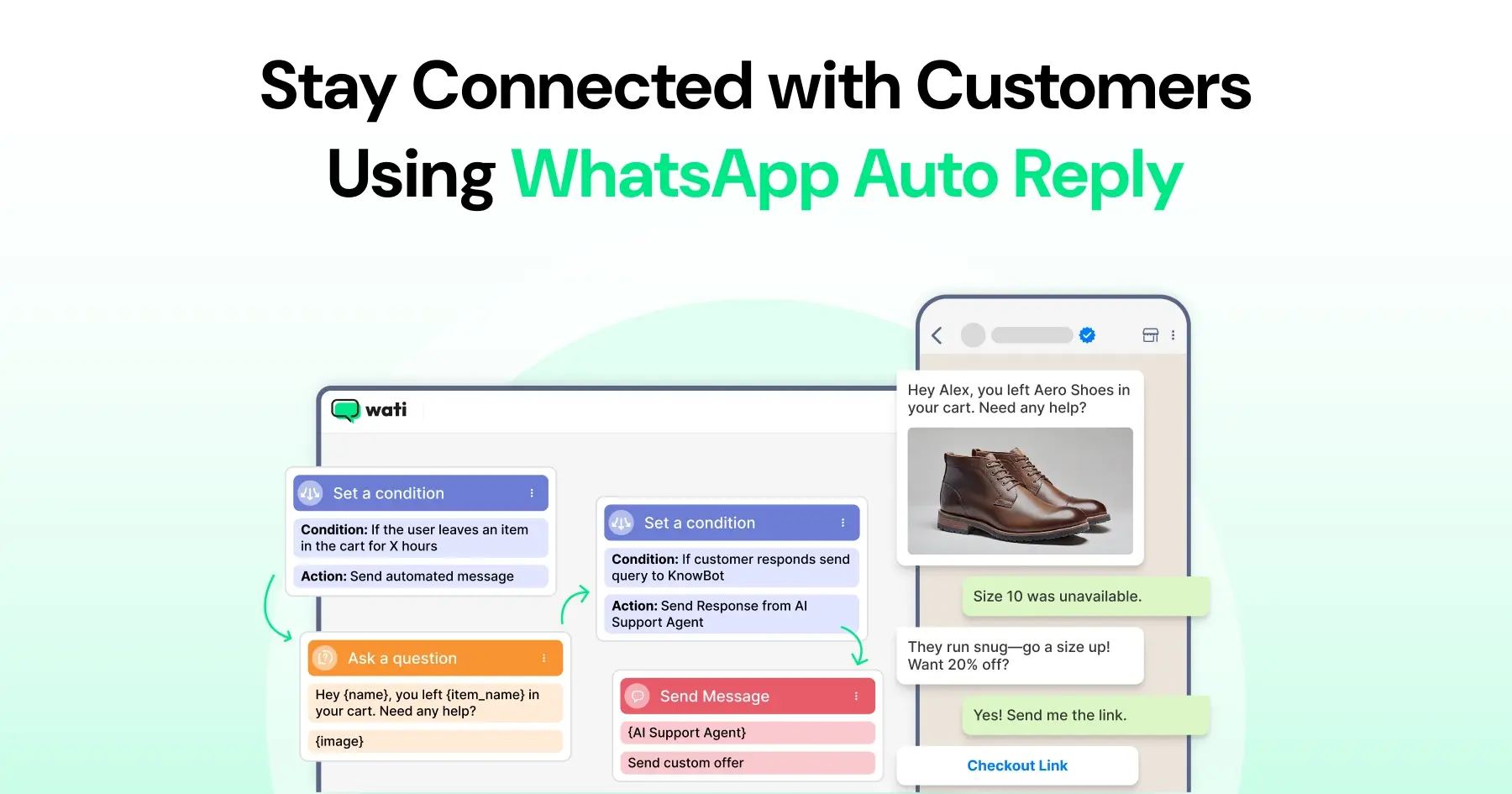
- The auto-reply feature helps you stay connected with customers by sending instant replies on WhatsApp Business.
- You can set up three types of messages in the WhatsApp Business app: Greeting Messages, Away Messages, and Quick Replies.
- Greeting Messages make a great first impression, while Away Messages let customers know you will get back to them soon.
- Quick Replies help you answer common questions faster and keep your communication consistent across chats.
- For more advanced automation and keyword-based responses, you can use a WhatsApp Chatbot through the WhatsApp Business API.
- For fully autonomous, context-aware replies that don't need manual setup at all, Wati's Astra AI Agent and AI Copilot go a step beyond static auto-replies
Customer messages can arrive at any time, but businesses cannot always respond immediately. A WhatsApp auto-reply helps acknowledge incoming messages instantly, even when no agent is available. It reassures customers that their message has been received and sets clear expectations for when a response will follow.
With WhatsApp Marketing tools built on the WhatsApp Business API, like Wati, businesses can go beyond basic auto replies by creating predefined conversation workflows, automating responses, and delivering a more consistent customer experience.
This guide explains how WhatsApp auto reply works, how to set up Away Messages and Quick Replies, best practices for writing effective automated responses, and when it makes sense to move beyond basic automation with AI-powered conversations.
What is WhatsApp Auto Reply?
The auto-reply feature in the WhatsApp Business app automatically sends preset messages when customers reach out. It helps you stay responsive, even if you’re busy or away from your phone.
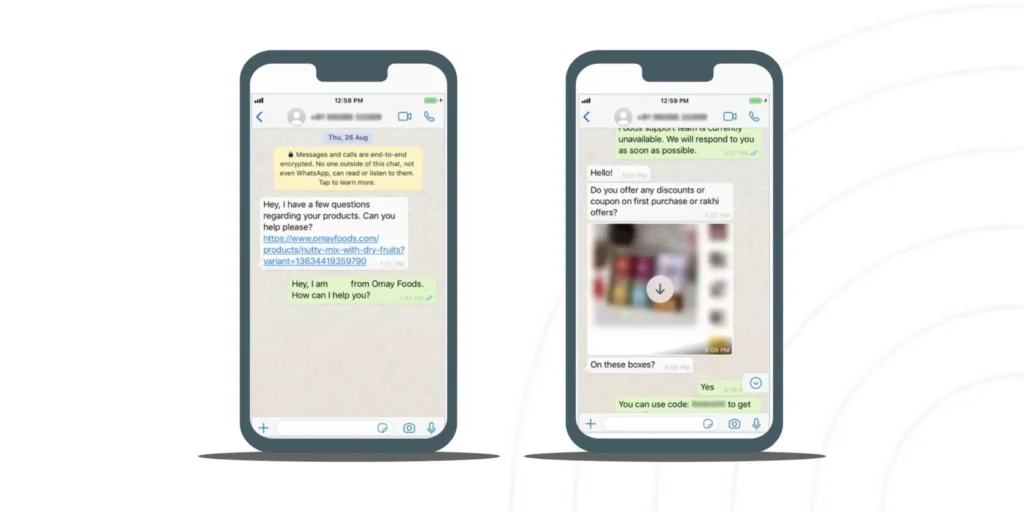
There are two main types of auto replies: Away Messages and Greeting Messages.
Away messages are sent when you’re unavailable, while greeting messages are used to welcome new customers or first-time chats.
Example: If a customer messages you outside business hours, your auto reply could say, “Thanks for getting in touch! We’ll respond as soon as we are back online.”
These instant responses help customers feel acknowledged, while saving you the trouble of manually replying to every new message.
Why Businesses Should Use Automated Replies on WhatsApp?
Automated replies make it clear that the customer's message has been received and that a response will follow. They understand that they messaged in offline hours, and someone will get back.
Here is why auto-replies are useful for businesses that receive multiple messages a day and can’t always reply instantly:
- Instant responses anytime: Setting up an auto-reply automation ensures that prospects receive immediate responses from the brand, keeping them on the radar. With instant responses, they become more accommodating and wait for your response rather than leaving your site.
- Eliminating message repetition:During offline or busy hours, auto-replies are an effective way to temporarily inform prospects of inactivity. Auto replies help acknowledge customer messages during busy periods without requiring agents to manually send the same response repeatedly.
- Better customer experience: Whenever a customer reaches out or clicks an ad, their intent is high, but they may not find an agent. At that moment, sending an autoresponder provides a quick prompt, leading to a better customer experience.
- Consistent communication: Sending an auto-reply ensures and convinces the customer that someone will reach out soon. Being consistent in communication enables quicker sales nurturing and conversions.
- Professional impression: Taking care of the customers and prioritising customer sentiment always speaks highly of the brand. Customers stick around, wait for you, and respond much faster to you.
When set up thoughtfully, this feature not only saves time but also keeps your business available around the clock.
Setting Up Auto Reply With “Away” in the WhatsApp Business App
You can utilize WhatsApp Business Apps’s “away” option to automate replies and inform about your absence. “Away” messages are triggered no matter what time your prospect texts you.
Watch this video or follow the steps mentioned below.
Here is how you can set an automated “away” message on WhatsApp:
- Open the WhatsApp Business app.
- Tap More options > Business Tools > Away message.
- Toggle on Send away message.
- Tap the message box to write your away text (e.g., “Thanks for reaching out! We’re away right now but will get back to you soon.”).
Keep greeting and away messages concise so they are easy to read at a glance. A message of 100 to 250 characters is generally sufficient to greet customers, communicate availability, and set response expectations.
Under Schedule, choose when to send it:
- Always send
- Custom schedule (e.g., your non-working hours)
- Outside of business hours (based on your Business Profile hours)
- Choose your Recipients and tap Save.
Note: Make sure your Business hours are updated under Business Profile > Business hours for this feature to work correctly.
Also read: How to schedule messages on WhatsApp Business on iPhone and Android.
How to Create and Manage Quick Replies in WhatsApp Business?
Here is how you can reply instantly, in a structured way, with quick replies.
1. Open the WhatsApp Business app.
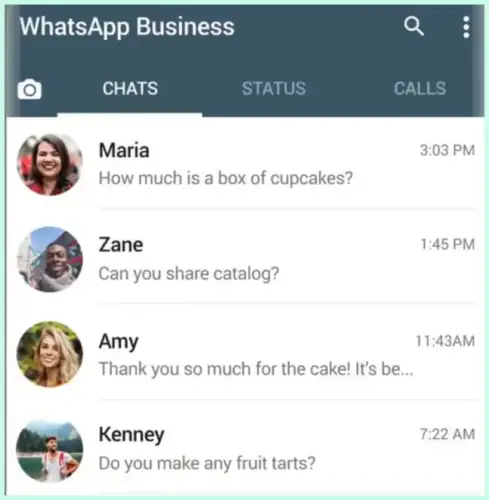
2. Tap the three dots at the top right and select Settings.
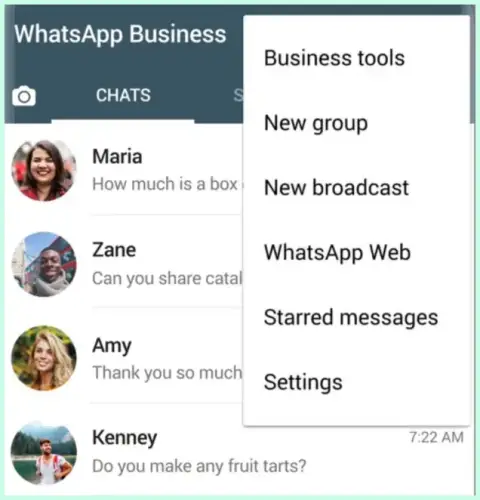
3. Choose Quick Replies.
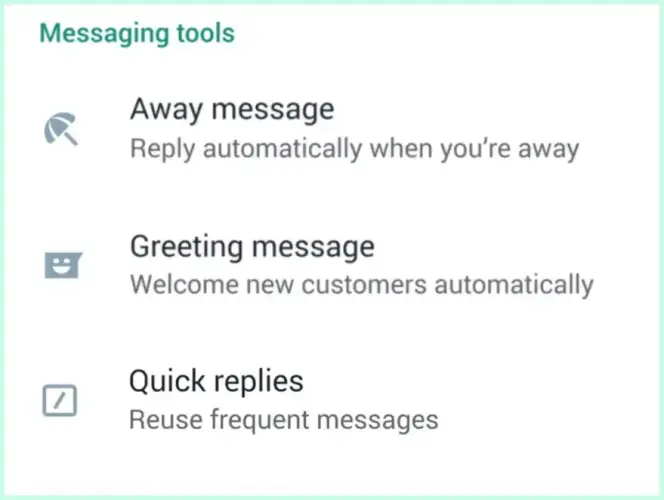
4. Tap the plus (+) icon to add a new quick reply.
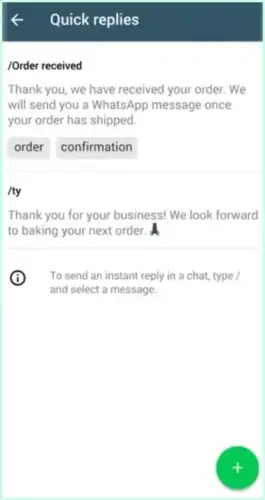
5. Type your message under Message (for example: “Thanks for your message! We’ll get back to you shortly.”).
6. Under Shortcut, create a simple keyword to trigger the reply (e.g., /thanks or /hours).
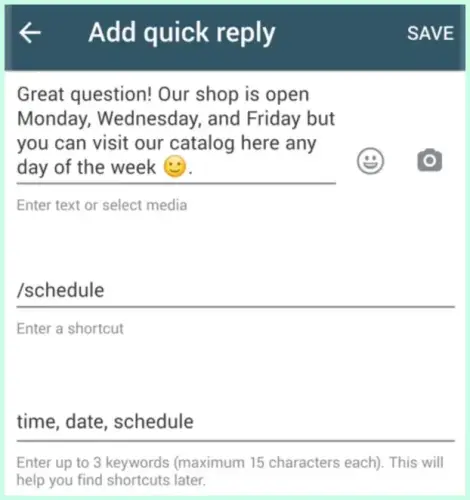
7. Tap Save when done.
How to Set Quick Replies Fast?
In any chat, type “/” followed by your shortcut (for example,/thanks) and tap the message you want to send.
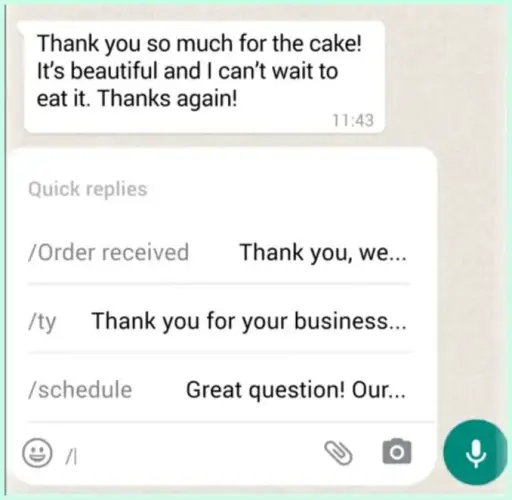
WhatsApp will instantly send the full reply.
By sending quick replies quickly, you acknowledge post-purchase feedback and keep track of low-hanging fruit to drive business growth.
How to Make the Most Out of Quick Replies?
Making the most of quick replies is about finding the balance between automation and a genuine human connection. Here is how to keep your chats efficient without losing that personal touch:
- Keep it brief. Short responses respect the customer’s time and keep the conversation moving naturally.
- Leave room for names. Draft replies so you can easily add a “Hi [Name]” at the start for a personal feel.
- Stay “on brand.” Ensure every shortcut sounds like it’s coming from the same friendly person.
- Review them monthly. Update your shortcuts to reflect current seasonal promotions or new product launches.
- Fix common pain points. Turn your most frequent “how-to” questions into instant, helpful answers.
- Organize by priority. With 50 slots available, keep your most-used replies at the top of your list.
- Sound human, not robotic. Use warm, conversational language rather than stiff, corporate phrasing.
Pro Tip: Explore Wati’s WhatsApp automation solutions if you need more advanced automation like sending personalized quick replies based on message context.
Difference Between Auto Reply and Quick Replies
Both Auto Reply and Quick Replies make managing chats on WhatsApp Business easier, but they work in different ways. Here’s a quick comparison to help you understand when to use each one.
Feature | Auto Reply | Quick Replies |
What it Does | Sends automatic messages when you’re unavailable or outside business hours. | Lets you save and send pre-written responses manually during chats. |
When it’s Used | When customers message you, and you can’t reply instantly. | During active chats, answer common questions quickly. |
How it’s Triggered | Automatically, based on your schedule or availability. | Manually, by typing “/” followed by a shortcut (for example, /hours). |
Best For | Greet new customers and confirm message receipts. | FAQs, product details, business hours, or repeating standard messages. |
Main Benefit | Keeps communication active when you’re away. | Saves time by reducing repetitive typing during chats. |
Together, these two features help you stay responsive and consistent, whether you’re chatting live or offline.
Top Ways to Create Stunning Auto Replies on WhatsApp
Setting up WhatsApp Auto Reply is only half the job; what really matters is how you write your messages. Here are a few examples you can use or tweak to match your business tone.
1. Greeting Message
A greeting message helps you make a positive first impression and sets the tone for your customer interaction.
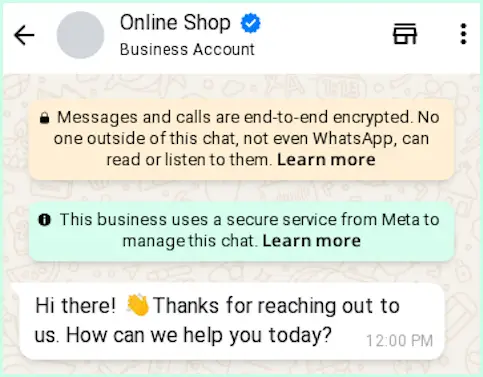
It is sent automatically when a customer messages the business for the first time or after 14 days of inactivity in the conversation.
2. Away Message
Away messages are useful when you’re not available to respond right away.
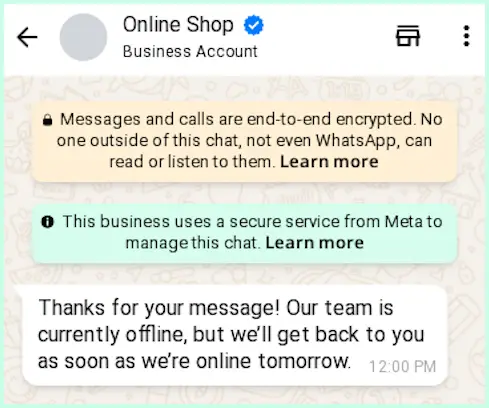
They reassure customers that their message has been received and that you’ll get back to them soon.
3. Quick Reply
Quick replies help you respond faster to frequently asked questions while keeping it personalized.
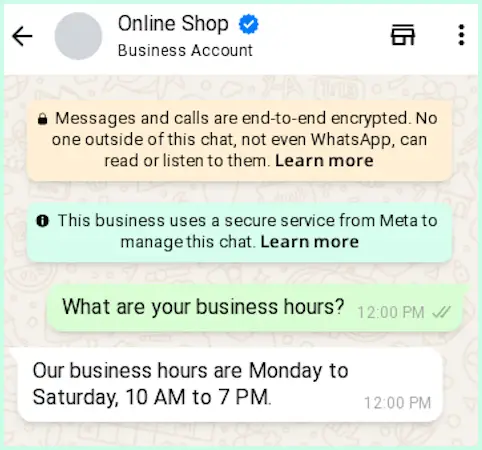
They’re great for sharing standard information while keeping your chats personal.
Writing Auto Replies That Reflect Your Brand Voice
When your auto-replies sound like a real person, customers feel valued instead of ignored. It’s about managing expectations with a bit of personality.
- Mirror your personality: Use the same warmth and vocabulary you would use during an in-person meeting.
- Acknowledge immediately: Confirm you’ve received their message so the customer doesn’t feel left hanging.
- Keep it punchy: Stick to one or two short sentences to ensure the message is readable at a glance.
- Add a human touch: Use a friendly “Hi there” or a well-placed emoji to soften the digital edge.
- Set clear expectations: Give a specific timeframe for when they can expect a real person to jump in.
- Align your tone: Match your language to your brand, whether that’s high-energy and fun or calm and professional.
- Update for accuracy: Refresh your replies whenever your business hours, seasonal offers, or contact details change.
- Avoid robotic language: Steer clear of stiff phrases like “Your inquiry is important to us” in favor of natural talk.
Common Drawbacks of Auto Replies in WhatsApp Business
While WhatsApp Auto Reply helps stay connected, it has a few limitations worth keeping in mind.
1. Limited Automation Options
The WhatsApp Business app supports basic auto replies like Greeting Messages, Away Messages, and Quick Replies. You can’t set up conditional or smart replies that respond differently based on what a customer sends.
2. Manual Setup
Each message needs to be written and updated manually. If your working hours, product details, or contact info change, you’ll have to manually update the information in the app.
3. No Keyword-based Triggers
Auto replies can’t recognize customer queries. For example, if someone sends “order status” or “refund,” the WhatsApp Business app won’t automatically send a specific response for that phrase.
4. Limited Chat Assignment
If you manage multiple teams or departments, the app can’t route chats or assign messages automatically. You need to assign the conversations manually to other team members if you have the multi-agent feature.
5. Not Suited for Scaling
As your customer base grows, managing replies manually becomes harder. For businesses handling high message volumes, the WhatsApp Business Platform (API) or automation tools like Wati are better suited.
WhatsApp Auto Reply is great for basic communication and small teams, but it’s not built for full automation or advanced workflows.
If you want to send personalized, instant replies at scale, it’s best to explore Wati’s WhatsApp automation platform, which offers features such as a shared Team Inbox and other tools to streamline customer conversations.
How Wati AI Goes Beyond Basic WhatsApp Auto-Replies
Basic WhatsApp auto-replies are useful for acknowledging incoming messages, but they cannot qualify leads, answer follow-up questions, or complete customer interactions.
Wati extends these capabilities by automating end-to-end conversations, enabling businesses to deliver faster, more personalized customer support at scale.
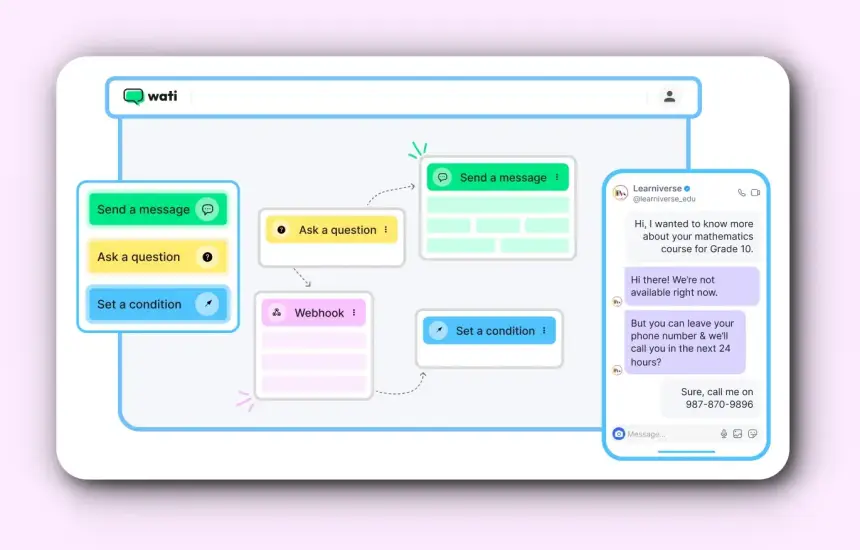
No-Code Chatbot: Build Automated Conversation Flows
Wati's no-code chatbots enable businesses to build keyword-based conversation flows without writing code. The no-code chatbot extends basic auto-replies by automating common customer interactions through predefined workflows. For businesses that require more dynamic, context-aware conversations, Wati AI further expands these capabilities with autonomous AI agents.
Astra AI Agent: End-to-End Customer Conversations
Unlike a basic auto-reply that sends a single predefined message, Astra AI Agent can understand customer intent, answer customer queries, qualify leads, guide users through business workflows, and hand over conversations to human agents when required. This enables businesses to automate complete customer interactions rather than only the initial response.
AI Copilot and BYOA: Flexible AI for Your Team
While Astra AI Agent automates customer conversations, Wati AI also gives support teams two more ways to work smarter:
AI Copilot: Assists human agents by generating reply suggestions, summarizing conversations, and providing contextual assistance during live chats, helping teams respond more quickly and consistently.
Connect Your Own AI (BYOA): Let's businesses integrate their preferred large language models, such as OpenAI, Claude, or Gemini, with Wati's messaging platform, combining existing AI capabilities with Wati's automation and omnichannel messaging infrastructure.
Omnichannel AI Automation
Customer conversations often span multiple channels. Wati extends AI-powered automation beyond WhatsApp to channels such as Instagram, enabling businesses to manage customer conversations from a unified Team Inbox while maintaining consistent automated experiences.
Real-World Proof: How Vedantu Uses Wati AI
Vedantu is one of India's leading K-12 EdTech platforms, with over 200,000 students. Before switching to Wati, Vedantu used Haptik to manage WhatsApp conversations but faced limitations including slow chatbot updates, limited mentor messaging, and higher operational costs. Wati solved all three.
- Vedantu built chatbot flows to qualify leads, handle FAQs, and send admission brochures, all on WhatsApp.
- Students and mentors can now message each other directly, without sharing personal numbers.
- Automated WhatsApp attendance reminders raised online class attendance by more than 7%.
- Wati usage grew from one account to six accounts across their teams.
"With Wati, we save more than 10% of what we were spending on Haptik every month while getting better support and a better product." Ashwani Agarwal Chief of Staff, Vedantu
Ready to Take the Next Step?
Great conversations don’t stop at a single reply. They build trust and help your customers feel valued. With the right setup, WhatsApp can become more than just a messaging platform. It can be the foundation of how your business connects, supports, and grows.
If you’re looking to move beyond basic automation and create genuine, two-way interactions, Wati provides the tools to automate conversations, improve response times, and deliver consistent customer experiences at scale.
Book a free demo and discover how you can turn everyday chats into stronger customer relationships.
Frequently asked questions
Can I set an auto reply on WhatsApp without using the Business app?
No, the auto reply feature is only available on the WhatsApp Business app or through the WhatsApp Business Platform (API). Regular WhatsApp users can’t set automated messages.
What’s the difference between Away Messages and Greeting Messages?
A Greeting Message is sent when a customer messages you for the first time or after 14 days of no activity. An Away Message is sent automatically when you’re unavailable, like after business hours or during weekends.
Can I send different auto replies based on customer messages?
The WhatsApp Business app doesn’t support keyword-based or conditional replies. For that, you’ll need a WhatsApp chatbot built using the WhatsApp Business API, which can recognize phrases and respond accordingly.
How many Quick Replies can I save in WhatsApp Business?
You can save up to 50 Quick Replies in the WhatsApp Business app. Each one can be triggered by typing “/” followed by a shortcut (for example, /thanks or /hours).
Is there a way to set up WhatsApp Auto Reply for multiple team members?
Yes, but only through the multi-agent setup available in tools like Wati that use the WhatsApp Business API. The regular WhatsApp Business app supports only one device for the main account.
Are WhatsApp auto-replies free to use?
Yes, the Auto Reply, Away Message, and Quick Reply features in the WhatsApp Business app are free. However, if you choose to use the WhatsApp API for advanced automation, there may be message-based or platform usage charges depending on your provider.
Related posts
- WhatsApp Affiliate Content: How To Launch High-Converting Campaigns (2026 Guide)
In today’s digital age, leveraging WhatsApp for affiliate marketing can be a game-changer. This blog delves into the art of crafting compelling content that resonates with your audience on WhatsApp. Discover why WhatsApp is a powerful tool for affiliate marketing and learn best practices for creating engaging messages that drive conversions. From promoting affiliate products to building trust and maintaining engagement, this guide offers practical tips and real-life examples to help you succeed in your affiliate marketing journey. Dive in and transform your WhatsApp marketing strategy today!
- Chatbots and Affiliate Marketing: The Key to Passive Income in 2025!
Discover how Wati.io seamlessly integrates affiliate programs into chatbots, unlocking automated passive income opportunities. Explore its user-friendly interface, personalised engagement, automation, and scalability for lucrative affiliate marketing strategies.
- WhatsApp Without Saving a Number: 5 Easy Ways to Message Anyone (2026)
Discover how to message on WhatsApp without saving a number. This practical guide walks you through each step, from setup to sending messages.
- Making the WhatsApp API for Edtech Work for Your Team in 2026
Learn how WhatsApp API for EdTech helps automate class reminders, share notes, send progress reports, and improve student communication.