
Too Long? Read This First
- Audit your expertise and use keyword research and "mini-courses" to ensure there is a paying audience before investing in a full curriculum.
- Build high-trust pages featuring benefit-driven headlines, social proof, and sticky CTAs that emphasize limited-time offers to drive immediate enrollment.
- Transition from email to the WhatsApp Business API to avail high open rates for 24/7 automated lead nurturing, brochure sharing, and direct sales support.
- Scale your launch by scheduling automated reminders for webinars and a 7-day post-webinar follow-up sequence to convert "warm" prospects.
- Use Click-to-WhatsApp ads on Instagram and Facebook to "re-capture" users who abandoned their carts or missed your webinar, bringing them directly into a chat.
Selling online courses about delivering value, reaching the right audience, and providing a seamless learning and purchasing experience. From eye-catching websites to 24×7 sales support, brands need a clear value proposition and the right tools to succeed.
With WhatsApp Business API tools like WATI, you can provide quick live support, share brochures, address student queries, and even motivate students’ careers, all while streamlining sales.
What are the Steps To Sell an Online Course?
1. Identify Your Expertise
Start by reflecting on your knowledge and skills. Ask yourself:
- What skills have I honed over the years?
- What knowledge do I possess that others find valuable?
- Which experiences can form the foundation of a compelling course?
Brainstorm 5–10 topics you’re passionate about or skilled in. Look for patterns where your expertise and interest intersect.
2. Assess Market Demand
Passion alone isn’t enough. Research demand using:
- Keyword Research: Tools like Google Keyword Planner, Google Trends, Ahrefs, and Semrush.
- Social Media Listening: Monitor trends and pain points. Learn how to integrate WhatsApp via click-to ads.
- Competitor Analysis: Identify gaps in existing courses or areas to offer a unique perspective.
3. Understand Your Target Audience
Segment your audience, identify their pain points, skill gaps, and learning goals. Analyze existing courses to differentiate your offering.
4. Test Your Idea
- Mini-Course: Offer a free webinar or short course to gauge interest.
- Audience Survey: Ask potential students what they’d like to learn.
- Engage in Communities: Participate in forums or groups related to your topic.
5. Align With Business Goals
Ensure your course aligns with your brand and products. Consider scalability and how the course can lead students to other offerings.
How to Build Your Sales Landing Page to Grow Online Course Sales?
Now that you have both curriculum and sales strategy in place, refine your messaging. Students need to find you listed to log in and apply.
Build your digital marketing-led framework and conduct extensive prospecting. However, at no point do you digress from your confidence and do push sales.
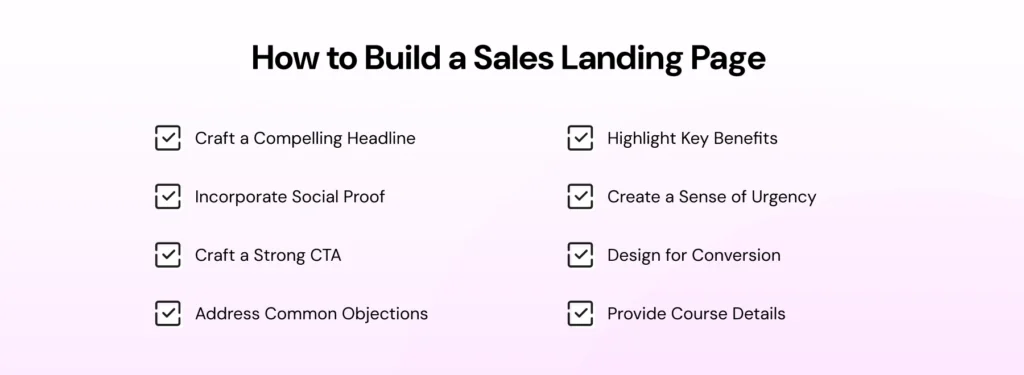
1. Craft a Compelling Headline
- Clear, concise, and benefit-driven
- Power words that resonate with the audience
- Example: “Master Digital Marketing in 8 Weeks: Boost Your Career and Drive Growth”
2. Highlight Key Benefits
- List 3–5 concrete outcomes
- Address pain points
- Example: “Learn cutting-edge strategies used by top 1% of marketers; Gain hands-on experience with real-world projects”
3. Incorporate Social Proof
- Testimonials with names and job titles
- Success stories
- Company logos where students work
4. Create a Sense of Urgency
- Limited-time discounts
- Countdown timers
- Highlight limited spots
5. Design for Conversion
- Clean, professional layout
- Mobile responsiveness
- Strategic use of white space
- High-quality visuals
6. Strong Call-to-Action (CTA)
- Contrasting CTA buttons with action-oriented text (Enroll Now, Secure Your Spot)
- Place CTAs above the fold and throughout the page
7. Provide Course Details
- Outline modules
- Duration and format
- Instructor bio
8. Address Common Objections
- Money-back guarantees
- Flexible payment options
- Support details
9. Optimize for Search Engines
- Use relevant keywords naturally
- Optimize meta titles and descriptions
- Ensure fast loading times
Also learn: How to Run a WhatsApp Marketing Campaign to Attract Students in 2026
By focusing on these elements, you’ll create a high-converting sales landing page that speaks directly to your target audience in the e-learning industry. Remember, your landing page is often the first impression potential students have of your course, so make it count!
Scaling Your Online Website Sales with WhatsApp Power
Once you’ve set up your course, you can build a powerful WhatsApp marketing strategy to capture, nurture, and engage with students.
Your students won’t come to you on their own, but they can visit your website or initiate a WhatsApp chat directly. From now on, it’s up to you how you frame the student journey.
1. Entry Point: Seamless Landing Page Integration
- Embed sticky chat buttons or custom WhatsApp links
- QR codes on materials or posters to open pre-filled chats
- Virtual business numbers to manage high-volume inquiries
2. End-to-End Website Encryption & Compliance
- Automated opt-in management to stay compliant
- WhatsApp Business API ensures data protection and secure messaging
3. AI-Powered Website Engagement
- WhatsApp automation (Flows) to nurture leads
- AI Support Agent answers FAQs, explains pricing, and qualifies leads
4. Audience Segmentation & Omnichannel Reach
- Tag students based on interests
- Use SMS fallback for students not actively checking WhatsApp
5. High-Impact Broadcasting
- Send mass personalized messages for early-bird discounts, webinar invites, or course launches
6. Lead Qualification With WhatsApp LLMs
- Limited-time offers
- Course finder flows
- Lead scoring and qualification
- Free trial/demo lesson flows
- Student support and engagement flows
7. Retarget With Click-to-WhatsApp Ads
- Engage course abandoners, webinar no-shows, free trial users, inactive students, and cross-sell opportunities
- Works on Facebook and Instagram ads
Marketing Your Online Course
1. Build an AI-Powered WhatsApp Chatbot
- Acts as a 24/7 academic advisor
- Segments lead based on experience level
- Directs students to suitable course tracks
2. Leverage WhatsApp Broadcasts
- Personalized curriculum previews
- Early-bird invitations
- Use WhatsApp CTA buttons instead of static links
3. Integrate Instant Messaging for Support
- AI handles routine queries; hot leads are forwarded to the human sales team
- Real-time translation for global students
4. Automate Webinar Reminders
- Send reminders 48h, 24h, 2h, and 15min before webinars
- Analyze attendance to optimize timing
5. Post-Webinar Lead Nurturing
- Follow-up sequence (1 hour, Day 2, Day 5, Day 7) with replay links, resources, offers, and CTAs
6. Use WhatsApp Templates
- Limited-time offers, new course launches, enrollment deadlines
- Free resource alerts, success stories, milestone reminders
- Community events
How to Market Your Online Course With WhatsApp Business?
In today’s environment, building effective WhatsApp marketing campaigns is an effective way to promote online courses.
Given the 98% open rate of WhatsApp, designing personalized customer journeys will provide you with a better chance of engagement.
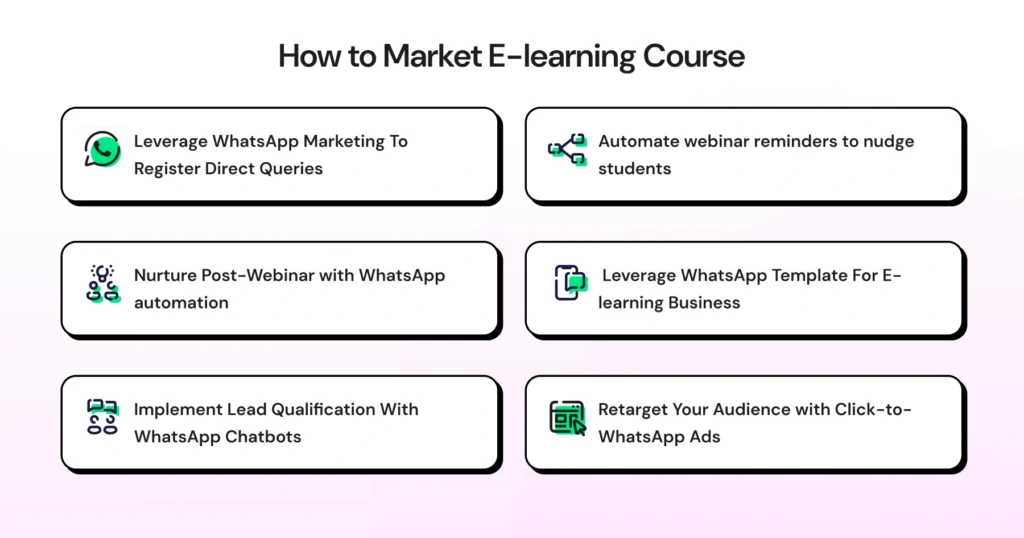
1. Leverage WhatsApp Marketing To Register Direct Inquiries
Build a WhatsApp flow to attribute lead source, answer immediate queries, and announce new updates to interested students.
Below are the steps to do it.
1. Leverage WhatsApp Broadcast for Direct Inquiry
- Use WhatsApp Broadcasts to send personalized curriculum previews or “Early Bird” invitations directly to your lead list.
- Instead of a static link, use WhatsApp CTA buttons in your marketing messages.
Read more: How to integrate a WhatsApp chat button on your website for direct engagement.
2. Integrate Instant WhatsApp Messaging for 24×7 Support
- While AI Support Agent handles routine inquiries (pricing, schedule, login issues), it can seamlessly hand over “hot leads” to your human sales team.
- If you are selling your course globally, lets you offer support in the student’s native language with real-time AI translation.
- Leverage AI to trigger corporate discounts for corporate candidates.
3. Build an AI-Powered E-learning Chatbot
- Use an AI-powered no-code WhatsApp chatbot that acts as a 24/7 academic advisor.
- Use AI tools like Astra to ask potential students about their experience levels and automatically segment them into the right “Marketing” or “Advanced” course tracks within your CRM.
Learn more: How to embed the qualities of Gemini 3.0 to accelerate sales strategy?
2. Automate Webinar Reminders with WhatsApp Automation
Free webinars are a crucial lead generation tool for eLearning businesses. They offer potential students a taste of your teaching style and the quality of your content.
However, as the number of online offerings increases, ensuring registrants actually attend can be challenging. This is where WhatsApp automation can make a significant difference.
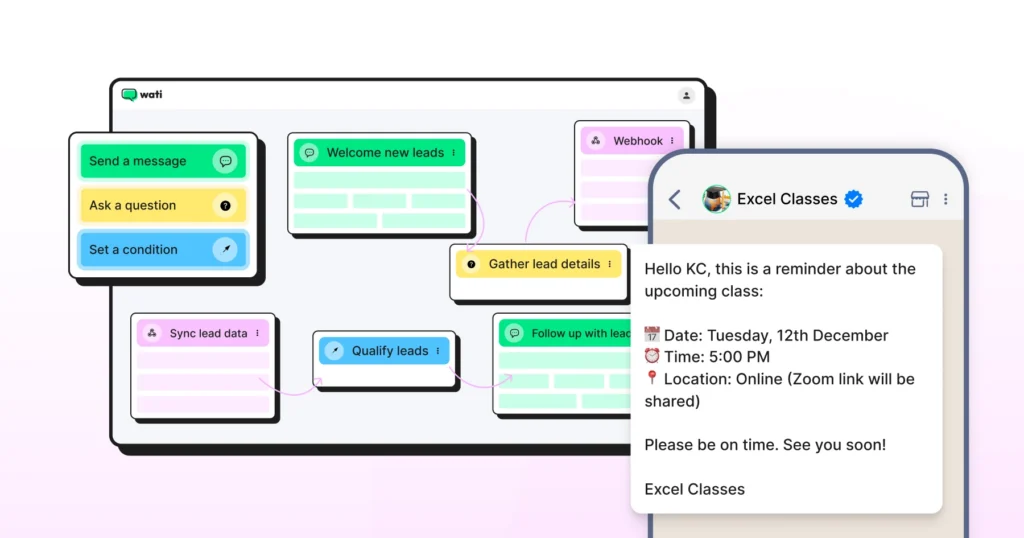
To increase webinar attendance and engagement, you can leverage WhatsApp reminders in the following ways:
- Send automated reminders before webinars:
- 48 hours before: Remind participants about the upcoming webinar, its topic, and key takeaways.
- 24 hours before: Send a friendly reminder with the webinar agenda and any preparation needed.
- 2 hours before: Dispatch a “Get ready!” message with the joining link and technical requirements.
- 15 minutes before: Send a final reminder to log in and get settled.
Also know: How to schedule messages on WhatsApp to connect later with people.
3. Post-Webinar Lead Nurturing with WhatsApp
After hosting a successful webinar, use WhatsApp to nurture your leads effectively.
Here’s a streamlined 4-message sequence to keep your audience engaged and guide them towards your paid courses. You can increase or decrease the number of messages in your sequence as needed.
- Immediate Follow-Up: Within 1 hour post-webinar, send an immediate follow-up to understand the student sentiment and float satisfaction surveys.
- Value-Add Content: Post webinar, share personalized promotional content related to the webinar to make the customer sign up for future webinars too.
- Course Introduction: On day 5 or 6, familiarize the student with course content or duration to give them a hint of how they can strengthen their skillset.
- Final Reminder: On the last day of the week, post a final reminder to inquire about the final decision of the student.
This concise WhatsApp nurture sequence maintains engagement with your webinar leads and guides them toward your paid course offerings.
By providing value and creating urgency, you can effectively convert more webinar attendees into students. Remember to include an easy opt-out in every message to comply with messaging regulations.
4. Leverage WhatsApp Templates for eLearning Businesses
WhatsApp messaging offers a powerful way to reach your audience directly. Here are seven key scenarios where you can use them effectively:
1. Limited-Time Offers
2. New Course Launches
3. Enrollment Deadlines
4. Free Resource Alerts
5. Student Success Stories
6. Personalized Milestone Reminders
7. Community Events
By strategically using these template messages, you can keep your audience engaged, create a sense of community, and drive conversions for your eLearning business.
Remember to segment your audience and tailor your messages to ensure relevance and maintain high engagement rates.
5. Implement Lead Qualification with WhatsApp Chatbot
WhatsApp LLMs can streamline your lead qualification process and deliver a personalized experience for prospective students. Here are five key chat flows an eLearning business can create:
1. Limited-Time Offer and Urgency Flow
- Promote time-sensitive discounts on courses
- Highlight upcoming batch start dates
- Create urgency with countdown timers for offer expiration
- Provide quick enrollment options within the chat
2. Course Finder and Information Flow
- Ask about learning goals and current skill level
- Recommend suitable courses based on responses
- Provide quick course overviews with pricing information
- Offer an option to speak with a sales representative for more details
3. Lead Scoring and Qualification Flow
- Ask targeted questions to determine lead quality
- Inquire about the budget and timeline for starting the course
- Assign scores based on responses
- Route high-scoring leads to sales representatives for immediate follow-up
4. Free Trial or Demo Lesson Flow
- Offer a snippet of course content or a free mini-course
- Schedule a free trial class or 1:1 session with a mentor
- Send reminders and follow up after the trial to encourage enrollment
5. Student Support and Engagement Flow
- Provide quick access to FAQs about course logistics
- Offer technical support for accessing online materials
- Connect students with their assigned mentors (for 1:1 programs)
- Gather feedback and address concerns promptly
By implementing these targeted WhatsApp chat flows, you’re not just automating conversations; you’re creating a responsive ecosystem that nurtures leads and supports students at every stage.
Use the data gathered from these interactions to continually refine your approach. Pay attention to which automation flows generate the most engagement and conversions, then adjust accordingly.
6. Retarget Your Audience with Click-to-WhatsApp Ads
As an eLearning business, you’re constantly looking for ways to re-engage potential students who’ve shown interest but haven’t yet committed.
Click-to-WhatsApp (CTWA) ads offer a powerful retargeting solution that combines the precision of social media advertising with the personal touch of WhatsApp conversations.
What Are Some Abandoned Cart Strategies To Re-engage Students?
Below are the retargeting steps you can take to prevent bounce and ensure a higher repeat consumer rate.
- Course Abandoners
- Target users who visited your course page but didn’t enroll with abandoned cart recovery.
- Ad Copy: “Still interested in [Course Name]? Let’s chat about your goals!”
- Webinar No-Shows
- Reach out to those who registered for a webinar but didn’t attend
- Ad Copy: “Missed our webinar? Get a personalized recap via WhatsApp!”
- Free Trial Users
- Retarget those who took a free trial but didn’t upgrade
- Ad Copy: “Enjoyed your free lesson? Let’s discuss your full learning journey!”
- Partial Video Viewers
- Target YouTube or Facebook users who watched part of your course previews
- Ad Copy: “Curious about the full course? Ask us anything via WhatsApp!”
- Inactive Students
- Reach out to enrolled students who haven’t logged in recently
- Ad Copy: “Ready to continue your learning? Let’s get you back on track!”
- Cross-Selling Opportunities
- Target students who completed one course to suggest complementary ones
- Ad Copy: “Ready for your next challenge? Chat about our advanced courses!”
Build Your Online Course, With Confidence and the Right Tools
Designing and selling online is a multifaceted process, and you need the right tools to support you.
With WhatsApp Business API tools, you can build the right launch plan, land your brand, and personalize the learning experience.
The end goal is clear: to add value to students while competing with top e-learning providers. And will help you achieve just that.
Take the free demo of Wati to learn more about WhatsApp API automation in e-learning.
Frequently asked questions
1. Why use WhatsApp over traditional email marketing?
WhatsApp offers a 98% open rate compared to email’s average of 20%. It allows for real-time, two-way conversations that build trust faster and resolve student doubts instantly, leading to higher conversion rates.
2. Do I need a massive following to start selling courses?
No. By using Click-to-WhatsApp ads, you can drive targeted traffic from social media directly into a chat. This allows you to build a lead list and sell your expertise even if you are starting from scratch.
3. How do I avoid "spamming" my students?
Focus on segmentation and value. Only send content relevant to a student's specific interest or skill level. Always include an easy opt-out option and prioritize helpful resources over constant "hard sell" messages.
4. What is the best way to increase webinar attendance?
Automation is key. Sending a sequence of WhatsApp reminders (24h, 2h, and 15min before) ensures your link is at the top of their inbox exactly when they need to join, which is far more effective than an email buried in a "Promotions" tab.
5. Is the WhatsApp Business API worth the investment for a solo edupreneur?
Yes, because of the automation ROI. Tools like Wati handle lead qualification and FAQ support 24/7, allowing you to scale your sales process without needing a full-time support team.
Related posts
- TikTok vs Instagram for Business: Which Platform Should You Use?
TikTok wins on discovery and reach among people who've never heard of you; Instagram wins on trust, research, and the tools that turn interest into a customer. Most businesses need both, at different
- How Often to Send WhatsApp Campaigns in 2026
How often to send marketing emails is a settled debate. WhatsApp frequency is not. Learn the right cadence by audience segment and the best send windows for 2026
- WhatsApp Business Calling vs Cloud Telephony vs Traditional VoIP: Which One Does Your Business Need?
Comparing WhatsApp Business Calling, cloud telephony, and traditional VoIP in 2026? Here’s the honest breakdown of which stack fits your business.
- Why Every Business Needs CRM WhatsApp Integration Today?
Discover why CRM WhatsApp integration is essential for businesses to manage leads, close deals faster, and deliver better customer support.