
Too Long? Read This First
- In 2026, businesses are choosing between three calling options: cloud telephony, traditional VoIP, and WhatsApp Business Calling, and each fits a different use case.
- WhatsApp Business Calling wins on setup speed, answer rate, and cost, but only works for customers already on WhatsApp.
- Cloud telephony is still the right choice when you need to reach anyone, regardless of channel, or when compliance demands certified call recording.
- Traditional VoIP holds its ground for enterprises with existing SIP infrastructure and full PBX needs.
- Most growth-stage teams in India, LATAM, MENA, and APAC are moving to a hybrid stack rather than picking one and forcing everything through it.
If you’re setting up a business calling stack in 2026, or rethinking an existing one, you’re choosing between three categories that didn’t fully exist five years ago.
Cloud telephony has matured. Traditional VoIP has consolidated. WhatsApp Business Calling, which went globally available on July 15, 2025, has put a brand-verified voice channel inside a messaging app that 3 billion people already use.
Most teams pick one and stick with it for years. Some combine two. A few combine all three.
The results from early adopters are hard to ignore. Hakeem, a fintech serving underbanked communities, cut support resolution times to under one minute after switching to WhatsApp Business Calling on Wati. But that outcome is not universal, and this guide does not pretend otherwise.
This is the honest decision framework, including the parts where WhatsApp Business Calling is not the right answer. By the end, you’ll know which stack fits your business, what to test before committing, and how to run a low-risk pilot without ripping out what already works.
WhatsApp Business Calling vs Cloud Telephony vs Traditional VoIP
These terms get used loosely. Worth pinning them down before comparing.
1. Cloud telephony is PSTN-based calling delivered as software. The vendor handles the phone number, routing, IVR, recording, and analytics.
You log in and use it through a dashboard or API. It’s strong across India, LATAM, MENA, and parts of APAC.
Major players include Exotel, Knowlarity, MyOperator, Ozonetel, and Plivo. Outbound mobile rates in India in 2026 range from ₹0.60 to ₹1.80 per minute [estimation at the time of writing; rates may change over time], depending on volume and routing method.
2. Traditional VoIP is internet-based calling that still terminates on the public phone network, often with a full PBX wrapper. Examples include RingCentral, Aircall, Nextiva, and generic SIP trunking from a carrier.
It’s strongest in North America and Western Europe.
3. WhatsApp Business Calling is a VoIP calling that stays entirely inside WhatsApp. The customer must be on WhatsApp.
Calls happen inside the existing chat thread, with the business’s verified name and badge on the customer’s screen. Incoming calls are free. Outgoing calls are billed per minute by Meta in 6-second increments, with volume tiers that reset monthly.
How They Compare Across Seven Things That Actually Matter
Rather than a feature checklist, here are the seven axes that determine which option wins for your specific business.
Cloud Telephony | Traditional VoIP | WhatsApp Business Calling | |
Setup time | Hours to days | Days to weeks | Minutes (one toggle on Wati) |
Reach | Anyone with a phone number | Anyone with a phone number | WhatsApp users only |
Cost per minute (outbound) | Medium (₹0.60–1.80 in India; higher in NA/EU) | Medium to high ($0.014+ US baseline + PBX overhead) | Low; incoming free, outbound by destination |
Identity/answer rate | Number-based; spam-flag risk rising every year | Number-based; same spam risk | Verified brand badge + blue tick; higher pickup |
Integration with chat | Bolt-on; separate tool from messaging | Bolt-on; separate tool entirely | Native, same thread, same agent, same context |
Recording and transcription | Mature; vendor-specific retention | Requires PBX config or bolt-on tool | Wati platform-layer recording + AI transcription + AI summaries (first 1,000 min/month free) |
Permission requirements | None for outbound | None for outbound | Explicit customer consent required before business-initiated calls; valid 7 days |
The biggest difference does not show up in any single row. It is the architectural one. Cloud telephony and traditional VoIP both connect outbound to the public phone network.
WhatsApp Business Calling does not. The call never leaves Meta’s VoIP layer. That is why the cost is lower, and the identity is verified, and also why reach is restricted to WhatsApp users.
When Cloud Telephony is the Right Answer for Your Business
Cloud telephony remains the right choice in several real scenarios.
- You need to call anyone, regardless of channel preference: B2B sales reaching out to large enterprises, debt collection, and customer success at scale across heterogeneous customer bases. Anywhere the customer’s preference is “call me, I don’t care which channel,” cloud telephony fits.
- You run a contact center with strict IVR and call-routing requirements: multi-level IVR trees, skill-based routing, queue management, supervisor whisper, and barge. Cloud telephony platforms have a decade of contact center DNA.
- You operate in a market where WhatsApp adoption is below 60%: Most of North America and significant parts of Europe still default to SMS or traditional phone calls for business outreach. WhatsApp Business Calling has limited reach there, and reach is the one thing you cannot work around.
- You need certified call recording with long retention windows: Some compliance regimes, including BFSI, healthcare, and certain government contracts, require call recording with a specific audit trail and multi-year retention. Cloud telephony vendors have certified solutions here. Wati’s recording feature offers 1,000 minutes free per month and covers most non-regulated workflows, but it is not a substitute for certified regulatory recording.
If three or four of those apply to you, your stack starts with cloud telephony. WhatsApp Business Calling can still sit alongside it for your messaging-first customer segment.
When Traditional VoIP is the Right Answer for Your Business
Traditional VoIP earns its spot in a narrower set of scenarios.
- You’re an enterprise with existing SIP infrastructure: If you’ve already invested in a PBX, SIP trunks, and a network of internal extensions, traditional VoIP is the path of least resistance. Ripping it out rarely pays back fast enough to justify the disruption.
- You need international landline support beyond messaging: conference bridges, hotel desks, hospital wards, and contact centers that take calls from any phone. Traditional VoIP handles all of them without any channel dependency.
- Your customers are based in North America or Western Europe and prefer phone calls: Large parts of the US and EU customer base still pick up the phone before they message. If that describes your market, traditional VoIP remains the safer default.
- You need full PBX features: Call queues, internal transfers, voicemail trees, ring groups, simultaneous ring, and follow-me forwarding. Cloud telephony has some of these. WhatsApp Business Calling has none of them.
Traditional VoIP is the steady-state choice for enterprises that are built around it. It rarely wins greenfield comparisons against cloud telephony anymore, but its installed base is enormous, and switching costs are real.
When WhatsApp Business Calling is the Right Answer for Your Business
This is the newer option, and the one most teams underestimate when they’re already paying for cloud telephony.
You Operate in India, LATAM, MENA, APAC, or Any Market With High WhatsApp Adoption
These are the regions where customers actively prefer WhatsApp as their primary channel. A call from a verified business inside a WhatsApp thread gets picked up far more reliably than a call from an unknown number.
Praja, a hyperlocal news and social platform with 2+ million downloads across Tier 2 and Tier 3 cities in India, made exactly this switch.
They moved from individual agents dialing on personal mobile phones with zero oversight to a structured WhatsApp Business Calling system on Wati, where every call provides user-level insights and measurable conversion data.
WhatsApp now drives 20,000 of its 100,000 daily active users back to the app. Read the Praja case study.
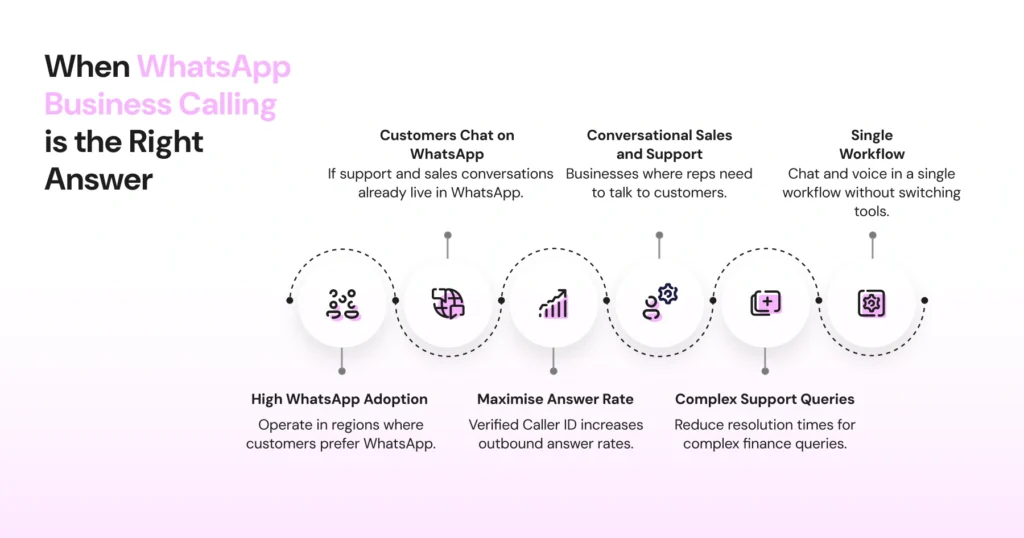
Your Customers Already Chat With You on WhatsApp
If your support and sales conversations already live in WhatsApp, the call-from-the-same-thread mechanic is the critical differentiator. Agents don’t lose context. Customers don’t repeat themselves.
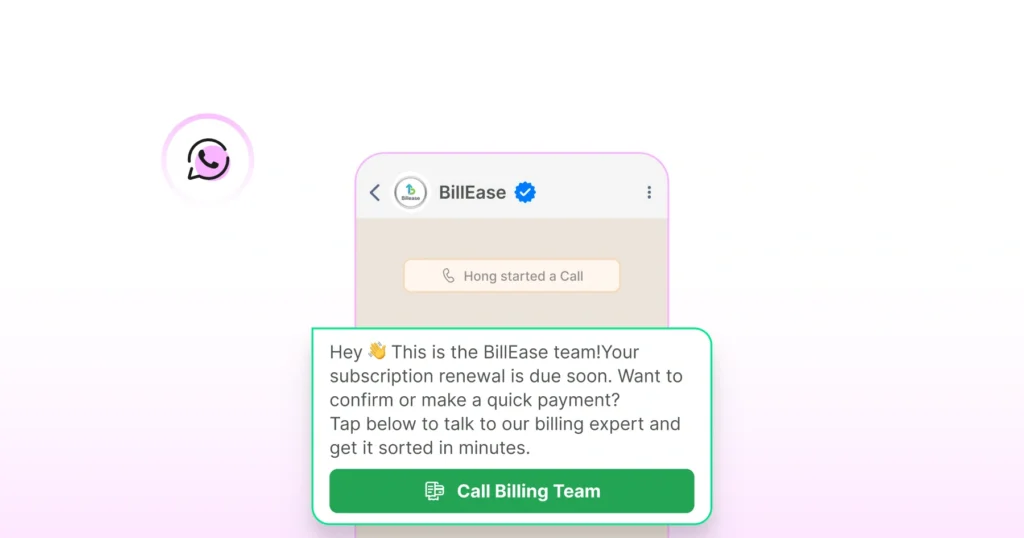
You Want to Maximise Answer Rate Through Verified Caller ID
Cold-call pickup rates have collapsed as carriers and phone operating systems flag unknown numbers as spam. WhatsApp Business Calls show your verified business name, blue tick, and logo on the customer’s incoming call screen. That is the single biggest unlock for outbound answer rates in 2026.
Your Sales and Support are Conversational, Not Contact-Center-Driven
Real estate, edtech, lending, healthcare, D2C. Businesses where the rep needs to actually talk to the customer, not run through a queue script.
Complex Support Queries are Stretching Your Chat Resolution Time
Hakeem, a fintech delivering Shariah-compliant nano-financing to underbanked populations in Pakistan, saw support resolution times stretch over multiple days when handling complex finance queries over text.
After switching to WhatsApp Business Calling on Wati, resolution times dropped to approximately one minute. The same agents handle both chat and calls, and when a call connects, they can see the full conversation history instantly.
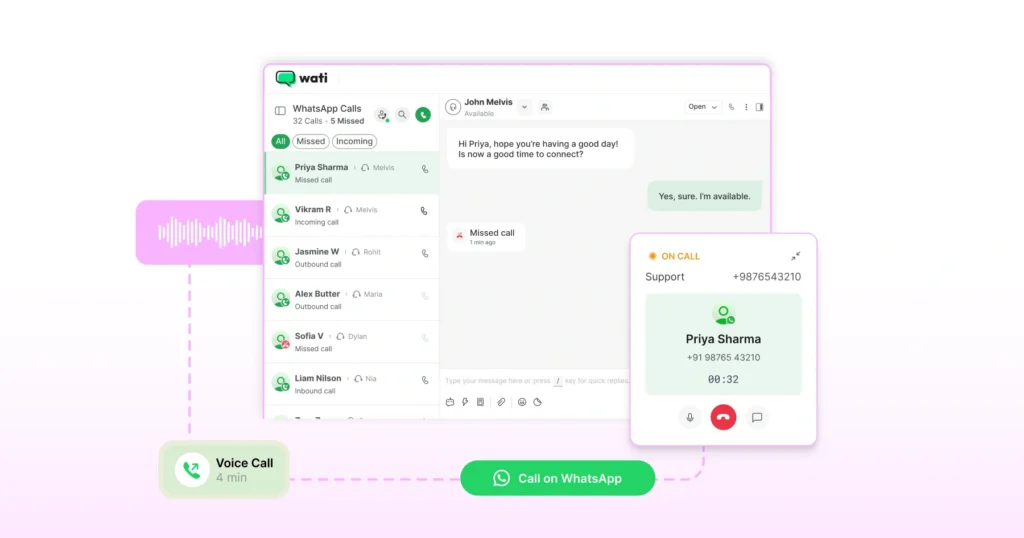
You Want Chat and Voice in a Single Workflow Without Switching Tools
On Wati, agents make and receive calls inside the same Team Inbox they already use for messages.
Call logs appear in both the customer’s conversation window and the call logs section. No separate dashboard or constant context switching.
7 Key WhatsApp Business Calling Features on Wati That Change the Calculus
Several capabilities Wati ships on top of the base Meta API close gaps that would otherwise push teams toward cloud telephony.
1. Call Recording, AI Transcription, and AI Summaries
It is available on Pro and Business plans. Recording starts automatically when a call begins, with a pause button for sensitive information. The first 1,000 minutes per month are free. Beyond that, it costs $0.01 per additional minute from your Wati wallet.
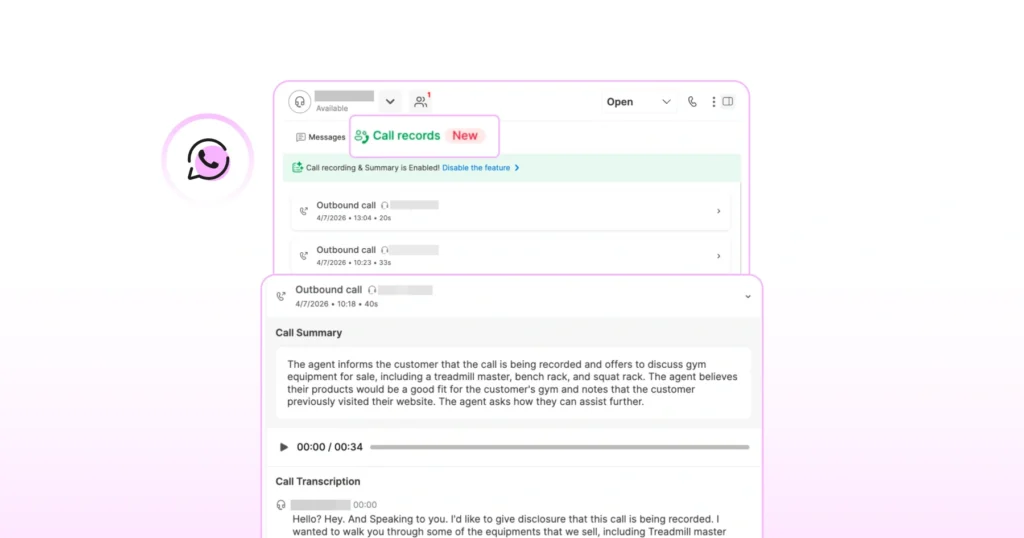
Transcription costs 3 Wati AI credits per call. AI summaries covering intent, sentiment, and action items add 1 credit on top.
One important distinction: this is a Wati platform-layer feature. The underlying Meta Calling API does not expose recording, which is why this capability varies significantly across BSPs.
2. APIs for Call Data
Wati exposes endpoints for call logs, recordings, transcripts, summaries, and batch downloads, so call data flows straight into your CRM. Webhooks fire for every call event to enable real-time sync.
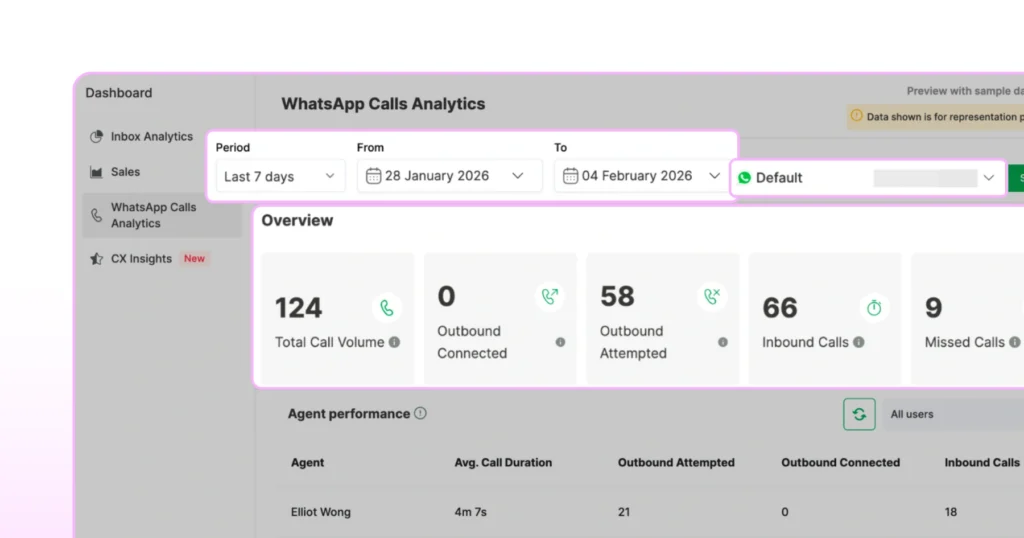
3. WhatsApp Call Analytics
A dedicated analytics view covering total call volume, outbound connected versus attempted, inbound calls, missed calls, average duration, and agent-level performance. Exportable as CSV and schedulable as a weekly email report. Filterable by time range or by specific WhatsApp Business number.
4. Request Accepted View
A dedicated tab in Team Inbox that shows all contacts with active outbound call permission. Permissions last 7 days and expire automatically.
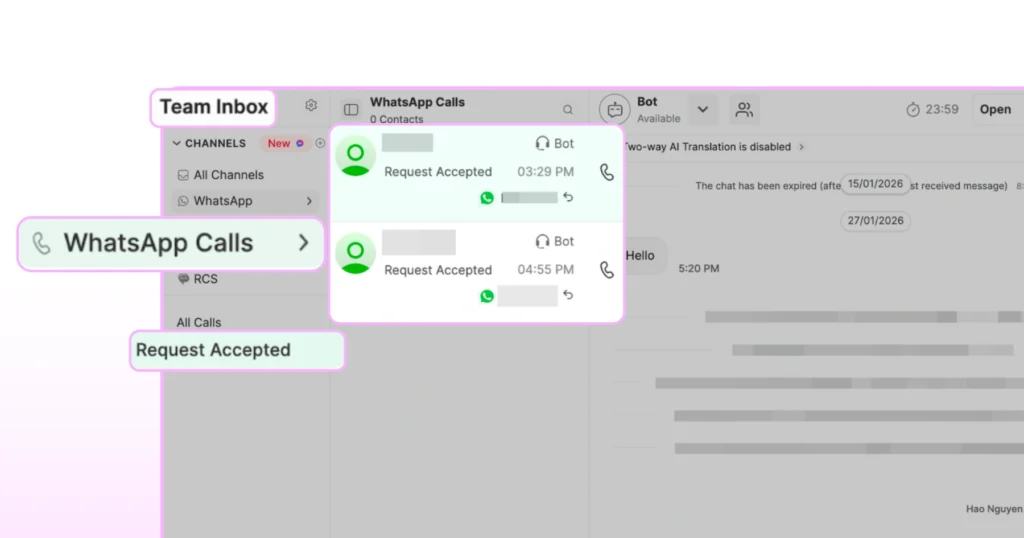
If a customer places an inbound call, even a missed one, WhatsApp treats it as permission to call back, and those contacts appear in this view automatically. This removes the need for agents to manually check each chat for valid permission before dialing.
5. Auto Permission Requests
When a customer calls in, and the call is missed, Wati automatically sends them a permission request to enable a callback. No manual follow-up step is needed from the agent.
6. Localized Call Permission Templates
Wati auto-generates call permission request templates in your customer’s preferred language, including Hindi, Spanish, and Arabic. It is available on Growth, Pro, and Business plans.
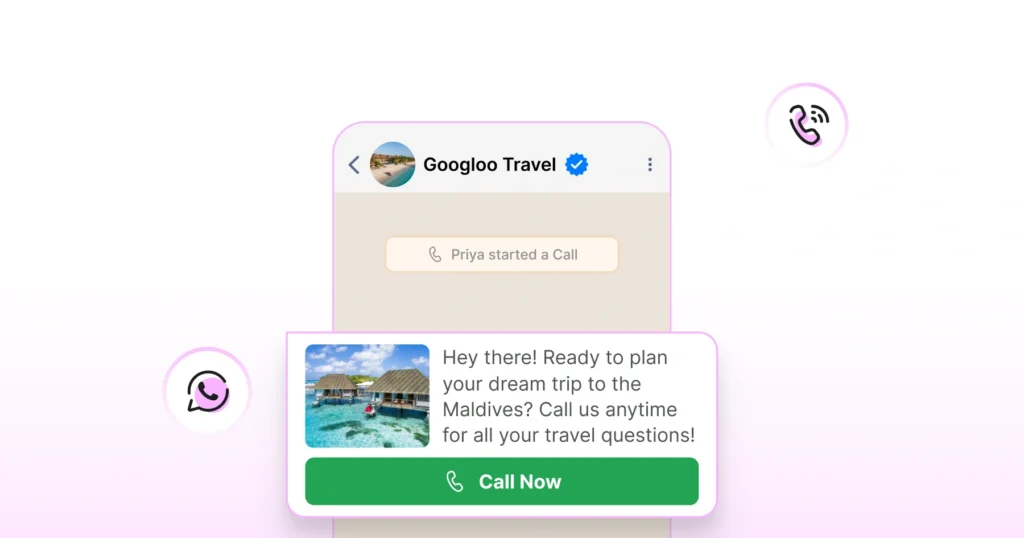
7. Voice Call CTA in WhatsApp Templates
You can add a “Call Now” button directly inside a WhatsApp template message. It is useful for campaigns, abandoned cart recovery, and appointment reminders. The template goes through Meta approval, just like any other template.
When to Combine Two or All Three Calling Channels
Most fast-growing teams end up running a hybrid stack rather than picking one and forcing every use case through it. Two patterns dominate.
Pattern A: Cloud telephony for inbound, WhatsApp Business Calling for outbound sales.
Inbound call center traffic still hits the cloud telephony stack for IVR, routing, recording, and compliance. Outbound sales follow-ups after a Click-to-WhatsApp ad use WhatsApp Business Calling, which offers higher answer rates and lets the rep see the full chat context.
This is the most common pattern across mid-market D2C and lending businesses in India.
Pattern B: Traditional VoIP for internal team calls, WhatsApp Business Calling for customer-facing voice.
Enterprises with established PBX setups keep them for internal collaboration and existing customer workflows, but route net-new customer-facing conversations through WhatsApp. Slow migration, low risk.
Running all three at once usually only makes sense for large enterprises with multiple business units serving very different customer profiles. For most teams, picking two and running them cleanly is the smarter move.
Can WhatsApp Business Calling Replace Your Cloud Telephony Stack?
The honest answer has three parts.
Yes, if:
Your customers are 80% or more on WhatsApp, your compliance workflow does not require multi-year certified recording, and you do not depend on full PBX features.
Real estate brokerages, edtech counseling teams, and D2C abandoned cart recovery operations can run entirely on WhatsApp Business Calling and save substantially on cloud telephony spend.
Partially, if:
You want to keep cloud telephony for compliance, recording with long retention, or non-WhatsApp customers, but move the messaging-first segment of your customer base to WhatsApp Calling for sales.
This is the path most mid-market teams choose. You shrink your cloud telephony seats and minutes without eliminating the stack entirely.
No, if:
Your business model depends on calling non-WhatsApp users at scale.
Large B2B enterprise sales into North America, contact centers handling broad consumer markets in the US, or operations where every customer must be reachable regardless of app preference. Keep cloud telephony as the primary channel.
Three quick gut-check questions before you decide:
- What percentage of your active customer base is on WhatsApp?
- How many of your inbound and outbound calls involve customers you have also messaged?
- Do any of your workflows have a compliance requirement for certified recording with a specific retention window?
Your answers to those three will tell you more than any feature comparison table.
What Recording, Transcription, and Analytics Look Like Across All Three Stacks
This is where the answer has shifted in 2026, and where most comparison content on the web is outdated.
Cloud telephony
Mature recording with retention windows that vary by vendor and plan. Exotel offers up to 6 months of recording by default. Most cloud telephony vendors offer transcription and basic call analytics, often as paid add-ons.
Traditional VoIP
Recording typically requires a PBX configuration step or a separate compliance product. Transcription is rarely native and is usually handled by bolt-on tools.
WhatsApp Business Calling on Wati
As of April 2026, Wati ships call recording, AI transcription, and AI summaries as platform-layer features on Pro and Business plans. Recording is automatic with a manual pause for sensitive information. The first 1,000 minutes per month are free, and all call data is retrievable via API, including logs, recordings, transcripts, summaries, and batch downloads.
One thing worth understanding clearly: this capability lives at the Wati layer, not the Meta API layer. The Meta Calling API itself does not expose recording. This is one of the bigger differentiators between BSPs right now, and it is worth asking any BSP you evaluate exactly how they handle it.
For most non-regulated workflows, including sales quality review, onboarding, and support coaching, this is feature parity with cloud telephony. For regulated industries that require certified audit trails, cloud telephony retains its advantage.
How to Test WhatsApp Business Calling Without Switching Your Entire Stack
The simplest way to evaluate WhatsApp Business Calling against your existing setup is to use a test account. Don’t switch. Run them in parallel for 30 days.
Step 1: Activate WhatsApp Business Calling on Wati
Go to Settings, then Team Inbox Settings, then Call, select your number, and enable. First-time activation includes $1 in free calling credits, roughly 10 minutes of outbound. No new infrastructure or migration.
Step 2: Route a Small Segment of Traffic to WhatsApp
Take 10% of your Click-to-WhatsApp ad leads or post-purchase support volume and direct them to the WhatsApp Calling for business channel.
Step 3: Keep Your Existing Stack Running for the Other 90%
This is your baseline. Nothing changes for the bulk of your traffic while you gather data on the test segment.
Step 4: Measure Four Metrics Over 30 Days
Track answer rate, average call duration, conversion or resolution rate, and total cost per converted customer. Use Wati’s Call Analytics under the Analytics tab to track your pilot metrics without a separate reporting tool. Download as CSV or schedule a weekly email report to keep the team informed.
Step 5: Let the Data Decide
If WhatsApp Business Calling outperforms on three of four metrics for your segment, expand. If not, you have learned cheaply where it fits and where it does not.
The Wati Approach: Run It Alongside What You Have
Wati’s position is straightforward. Most teams should not rip out their existing calling stack. They should add WhatsApp Business Calling alongside it, pilot it on the segment where it is most likely to win, and let the data drive the migration.
That is why activation on Wati takes minutes, not weeks. WhatsApp Business Calling is included in the standard plan with no separate add-on tier or setup fee.
Per-minute calling rates are billed through your Wati wallet at Meta’s published rates, plus Wati’s standard markup.
The teams that win in 2026 are not the ones that pick the right stack on day one. They are the ones that test fast, measure honestly, and put a voice where the customer actually is.
Ready to run a 30-day pilot? Start your free trial of Wati.
Frequently asked questions
1. Can WhatsApp Business Calling fully replace Exotel or Knowlarity?
For some businesses, yes, particularly if 80% or more of your customers are on WhatsApp and you do not have hard compliance requirements for certified recording with long retention. For most mid-market businesses, the practical pattern is hybrid: keep cloud telephony for non-WhatsApp customers and regulated workflows, and move the messaging-first segment to WhatsApp Business Calling.
2. Will my CRM integration still work if I switch from cloud telephony to WhatsApp Calling?
On Wati, yes. Wati exposes APIs to fetch call logs, recordings, transcripts, and AI summaries, plus webhooks that fire on every call event. Most major CRMs, including HubSpot, Salesforce, and Zoho, integrate cleanly.
3. Does WhatsApp Business Calling support call recording?
The Meta Calling API itself does not expose recording. Wati handles recording at the platform layer on Pro and Business plans. The first 1,000 minutes of monthly recording storage are free. Beyond that, $0.01 per additional minute from your Wati wallet.
4. Is call quality on WhatsApp Business Calling comparable to a regular phone call?
Yes, and in many cases better. WhatsApp Business Calling uses VoIP over the customer's data connection, so quality depends on bandwidth rather than carrier voice channels. In markets with strong 4G or 5G coverage, audio is typically clearer than a standard cellular call.
5. Can I keep my existing business number when moving to WhatsApp Calling?
If your existing business number is already verified on the WhatsApp Business API, yes. Note that WhatsApp Business Calling is not supported if your Wati account was onboarded via co-existence.
6. Does WhatsApp Business Calling work on mobile?
Currently, calls can be initiated and answered from Wati on the web. The Wati mobile app does not yet support calling.
Related posts
- Shopify WhatsApp Integration: How to Connect Your Store and Go Live in Under an Hour
Set up your Shopify WhatsApp integration the right way. Step-by-step instructions, common mistakes to avoid, and what to turn on first after you go live.
- How Often to Send WhatsApp Campaigns in 2026
How often to send marketing emails is a settled debate. WhatsApp frequency is not. Learn the right cadence by audience segment and the best send windows for 2026
- Why Every Business Needs CRM WhatsApp Integration Today?
Discover why CRM WhatsApp integration is essential for businesses to manage leads, close deals faster, and deliver better customer support.
- 20+ Halloween Templates for WhatsApp to Boost Your Sales This October
Don’t let Halloween pass without a WhatsApp message strategy. Get 20+ free Halloween templates for WhatsApp covering every use case, from flash sales to event invites.