
Too Long? Read This First
- A single Diwali broadcast gets lost in a crowded inbox. A 3-touch sequence (nudge, objection handling, last-chance) converts more of the same list.
- Three messages fit a week-long sale. Fewer get missed. More raises opt-out risk.
- Wati's Broadcast Sequences stop automatically the moment a customer replies. Converted customers never get a last-chance offer they don't need.
- Segment by purchase history, cart status, and last year's Diwali activity. A relevant message beats an identical one sent to everyone.
- Submit Marketing category templates well before the sale starts. Approval usually takes minutes to hours, but Meta allows up to 48 hours for templates flagged for manual review.
A 3-touch Diwali broadcast sequence opens with an early offer, follows up on the specific reason a customer hasn't bought, then closes with urgency.
Wati's Broadcast Sequences feature helps you build the three-step sequence and stops it the moment a customer replies, so nobody who has already converted gets a redundant message.
In this guide, you'll see the exact 3-touch structure to use for Diwali, how to set it up, message variants by product type, the segments and edge cases that decide whether it converts, and the template approval timing that can quietly derail a sale if you leave it too late.
What is a Diwali Broadcast Sequence?
A Diwali broadcast sequence automatically sends a series of messages, spaced by set delays, triggered by an automation rule rather than sent to a chosen audience for Diwali.
Each message's timing depends on whether the contact has already replied. It's a different tool from a WhatsApp drip campaign, which sends to a chosen audience you select, schedule, and track as a campaign, not something triggered by a rule.
A single broadcast, the kind covered in Wati's broadcast guide, sends one message to an entire list, with no regard for who opens, clicks, or buys.
A broadcast sequence moves a contact through several steps instead and stops the moment that contact responds. That's the entire difference: a broadcast ends at delivery; a sequence adapts to what the customer does after.
How Many Messages To Send for a Diwali Sale?
Three messages work best for a typical week-long Diwali sale. Here's why three is the right number, not one and not six:
- One message gets lost in a crowded festive inbox.
- Five or six messages raise the risk of opt-outs.
- Three messages cover the full path: discovery, hesitation, urgency.
Touch | Job |
|---|---|
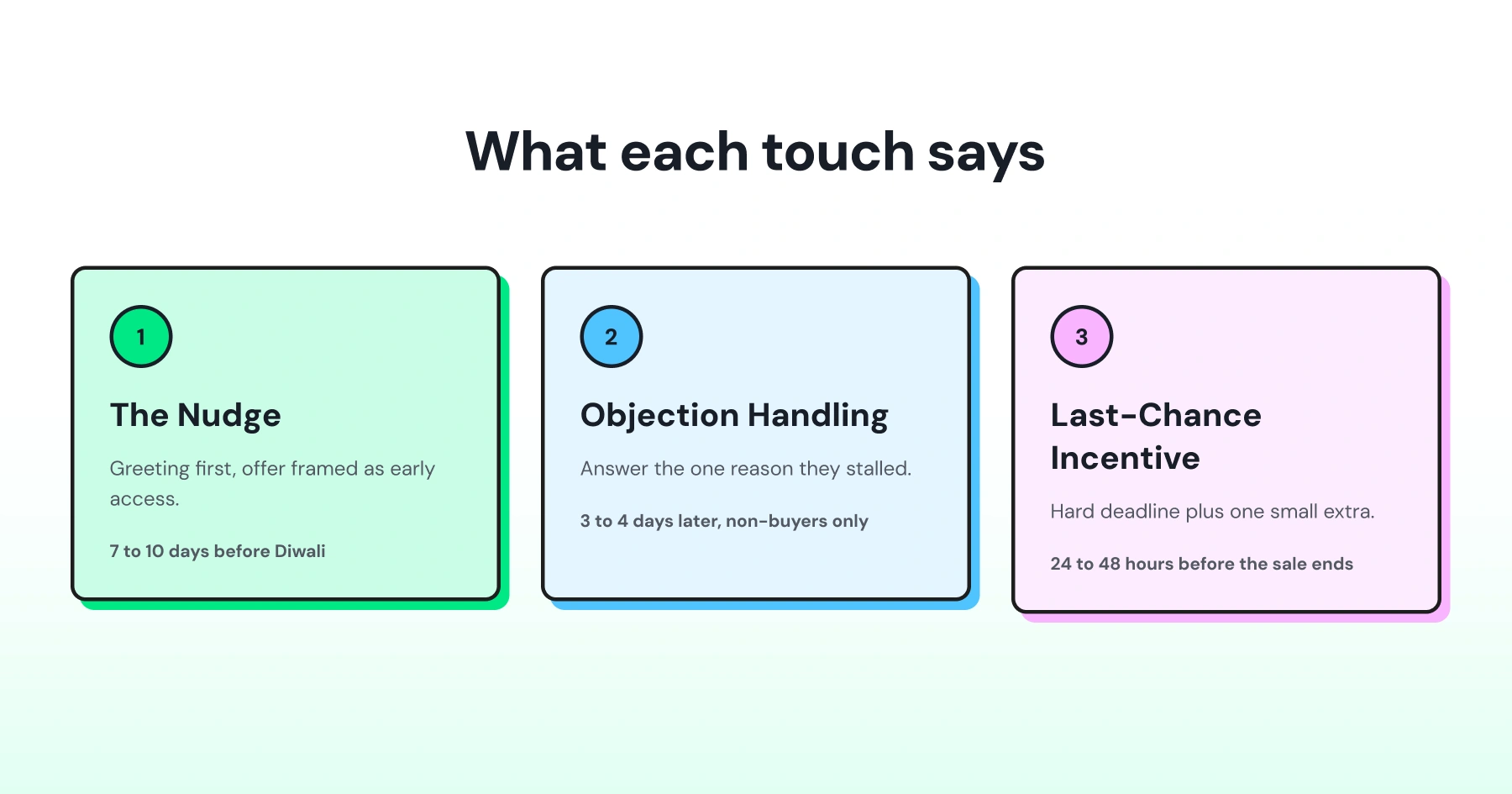
1: Nudge | Introduce the offer, build early interest |
2: Objection handling | Answer why the customer hasn't bought |
3: Last-chance incentive | Add time pressure and one more reason to act |
Outside a sale window, send WhatsApp marketing messages sparingly to avoid fatigue. A festive sale is the exception. It justifies this tighter, three-message burst concentrated inside the sale period.
How Far Ahead Should You Submit Templates for Approval?
Every message in this sequence runs on a Meta-approved template, since a broadcast sequence uses the WhatsApp Business API.
Submit your Diwali templates at least 5 to 7 days before the sequence needs to go live. Marketing category templates go through automated screening first, and most are cleared within minutes to 24 hours; templates flagged for manual review, more common for new accounts or unclear category selection, can occasionally take longer.
See Meta's current template review guidelines for the latest timing.
Build this into your planning, not just your copywriting:
- Use a clear, correctly matched category. A Diwali discount message is Marketing, not Utility. Miscategorizing is one of the most common causes of rejection.
- Keep a backup template ready in case one gets rejected and needs resubmission under a new name.
A sequence with a great framework and a template stuck in review on day one of the sale misses its own launch.
What does a 7-Day Sequence Timeline Look Like?
Using Diwali as Day 0, here's how the three touches typically land across a one-week sale window:
Day | Touch | Audience |
|---|---|---|
Day - 7 | Touch 1: Nudge | Full segment list |
Day - 5 | Touch 2: Objection handling | Contacts who haven't purchased |
Day - 2 | Touch 3: Last-chance incentive | Contacts who still haven't purchased |
Day 0 | Sale ends | N/A |
Adjust the gaps if your sale window runs longer or shorter than a week. The spacing matters more than the exact day: enough time between touches for a customer to act, not so much that the offer feels forgotten.
One nuance worth planning for: since each contact's sequence starts when they trigger your automation rule, not on a fixed calendar date, this timeline holds as long as you prompt customers to use your Diwali keyword in one concentrated push a few days before the sale, so everyone's Touch 1 lands around the same time.
What Should Each Touch in the Diwali Broadcast Sequence Actually Say?
Each touch has one job, and using the wrong tone in the wrong slot is what makes a sequence feel like spam instead of a conversation. Here's what to say at each stage, with copy variants you can adapt.
Touch 1: The Nudge
Timing: 7 to 10 days before Diwali.
Open with a Diwali greeting and frame the offer as early access, not a hard sell. The goal is attention, not conversion, yet.
Check the contact's history before sending this. A returning customer who bought last Diwali doesn't want the "early access" copy again. Segment repeat customers into a loyalty-first version before this touch goes out.
Here's how the opening line changes by product type:
Happy Diwali, [Name]. We're opening our Diwali Gift Collection early, just for you. Get 20% off before anyone else. Shop now: [Link]. |
Touch 2: Objection Handling
Timing: 3 to 4 days after Touch 1, sent only to contacts who haven't purchased.
Customer Stall | What to Offer | Message | CTA / Quick Reply |
Too many options | Show 3 bestsellers instead of the full catalog | “Still looking for the perfect Diwali gift, [Name]? Here are our top 3 bestsellers. Need help deciding?” | Show Bestsellers · Talk to Support |
Price hesitation | Lead with a bundle or free-shipping offer | “[Name], get free shipping on your Diwali order today. No minimum spend, no code needed. Complete your order: [Link].” | Complete Order |
Needs help deciding | Offer direct access to support | “Hi [Name], any questions about sizing, delivery, or your order? Reply here, and we’ll help right away.” | Talk to Support |
Touch 3: Last-Chance Incentive
Timing: 24 to 48 hours before the sale ends, sent only to contacts who still haven't purchased.
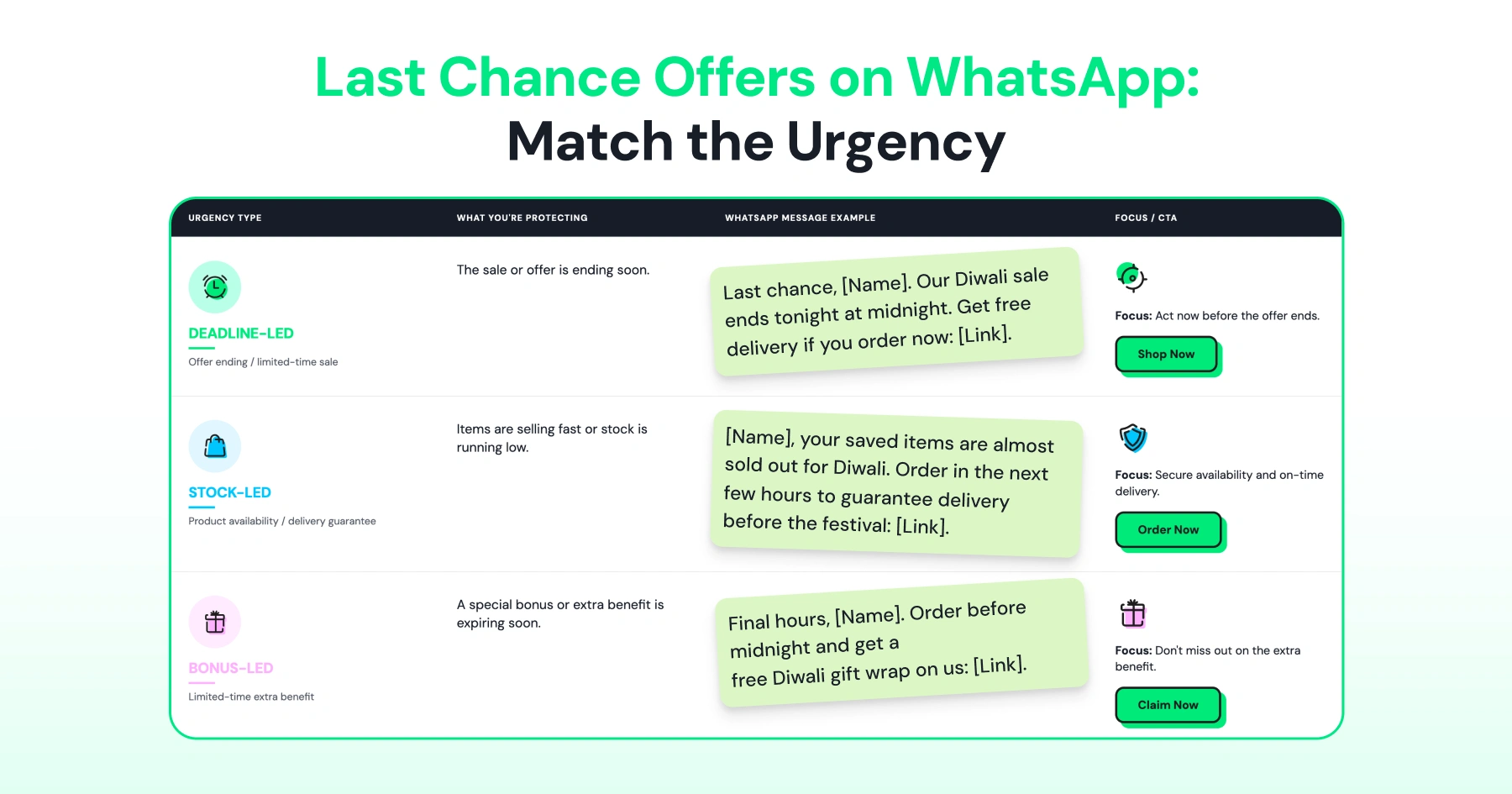
Set a hard deadline and add one small extra incentive, like free shipping.
A Limited Time Offer template with a built-in countdown shows the deadline inside the message itself, something plain text can't do.
Broadcast vs. Broadcast Sequence: What's the Difference?
Single Broadcast | Broadcast Sequence | |
|---|---|---|
Structure | One message, sent once | 3+ messages, spaced over days |
Targeting | Same message to everyone | Later messages skip anyone who already replied |
Personalization | Generic offer | Each touch responds to prior behavior |
Effort to set up | Low, one send | Higher, needs message steps, timing, and a stop condition planned in advance |
Best for | Simple announcements | Sale windows, cart recovery, festive campaigns |
Plan availability | All plans | Pro and Business |
A broadcast sequence requires more upfront setup time. That cost is one-time. Once built, it runs on its own for every contact who enters it.
How do You Set Up a 3-Touch Broadcast Sequence in Wati?
A sequence isn't something you send to a chosen audience directly. It's triggered by an automation rule, and each contact who matches that rule gets enrolled individually. Here's the exact flow to build one on a Pro or Business plan:
- Go to Automation → Sequence, click Add Sequence, and name it something like "Diwali 2026 Sequence."
- Configure the nudge as the first message: pick a message type (Text, Template, or Sticker) and set its delay. A delay of 0 sends it immediately once the sequence starts.
- Add the objection-handling message next, then the last-chance message, setting each one's delay from when the previous message went out.
- Enable Stop sequence on customer reply, so it halts the moment a contact responds.
- Save the sequence. Then go to Automation → Rules, create a rule with a keyword trigger, for example, a Diwali-specific keyword customers use to opt in, and set the rule's action to Start a Sequence, pointing to the one you just built.
- Activate the rule. From that point on, every contact who sends that keyword gets enrolled automatically.
Because enrollment runs off a keyword trigger rather than a one-time audience pick, decide your Diwali keyword and where you'll prompt customers to use it (a website chat button, an ad, or a prior broadcast) before you build the rule, not after.
A contact who clicks a link in Touch 1 but doesn't buy is different from one who never opens it.
If you're tracking that distinction elsewhere in your workflow, it can inform which segment you route to Touch 2, even though the sequence itself is entered the same way for everyone who triggers it.
For high-value carts still stalled mid-sequence, a direct WhatsApp call from the same chat thread often resolves hesitation that a one-way message can't.
Which Segments Need a Different Version of the Sequence?
Sending the same 3-touch sequence to your whole list underperforms compared to a segmented one because each group stalls for different reasons.
Repeat customers: Lead with loyalty rewards and early access to higher-tier sets, not a generic discount.
Happy Diwali, [Customer Name]. As one of our most valued customers, you get first access to our premium Diwali collection, plus an extra 5% loyalty discount. |
Cart abandoners: Name the exact items left behind in Touch 1, framed as "Perfect Diwali Picks."
[Customer Name], your [Item Name] is still waiting. Complete your Diwali order today and get 15% off. |
Last year's festive buyers who haven't returned: Lead with a win-back incentive instead of an early-access nudge.
We miss you, [Customer Name]. Come back for Diwali with 25% off your next order, our biggest win-back offer yet. |
Window shoppers with no purchase history: Lead with the discount and social proof, since they have no history to reference.
Happy Diwali, [Name]. Join thousands celebrating with us this festive season. Get 20% off your first order. |
A contact can fit two segments at once. A repeat customer who's also this year's cart abandoner should get the abandoner's Touch 1 (specific items) but the repeat customer's tone (loyalty framing), not two separate sequences. Set your segment priority order before launch so this case doesn't fall through.
For help deciding which segment gets priority, Wati's guide to AI-powered campaign recommendations covers how timing and audience decisions can be made for you instead of guessed at manually.
Which Metrics Show Whether the Sequence Actually Worked?
Delivery and read counts alone won't tell you if the sequence converted. Track these five numbers at each touch, not just for the sequence as a whole:
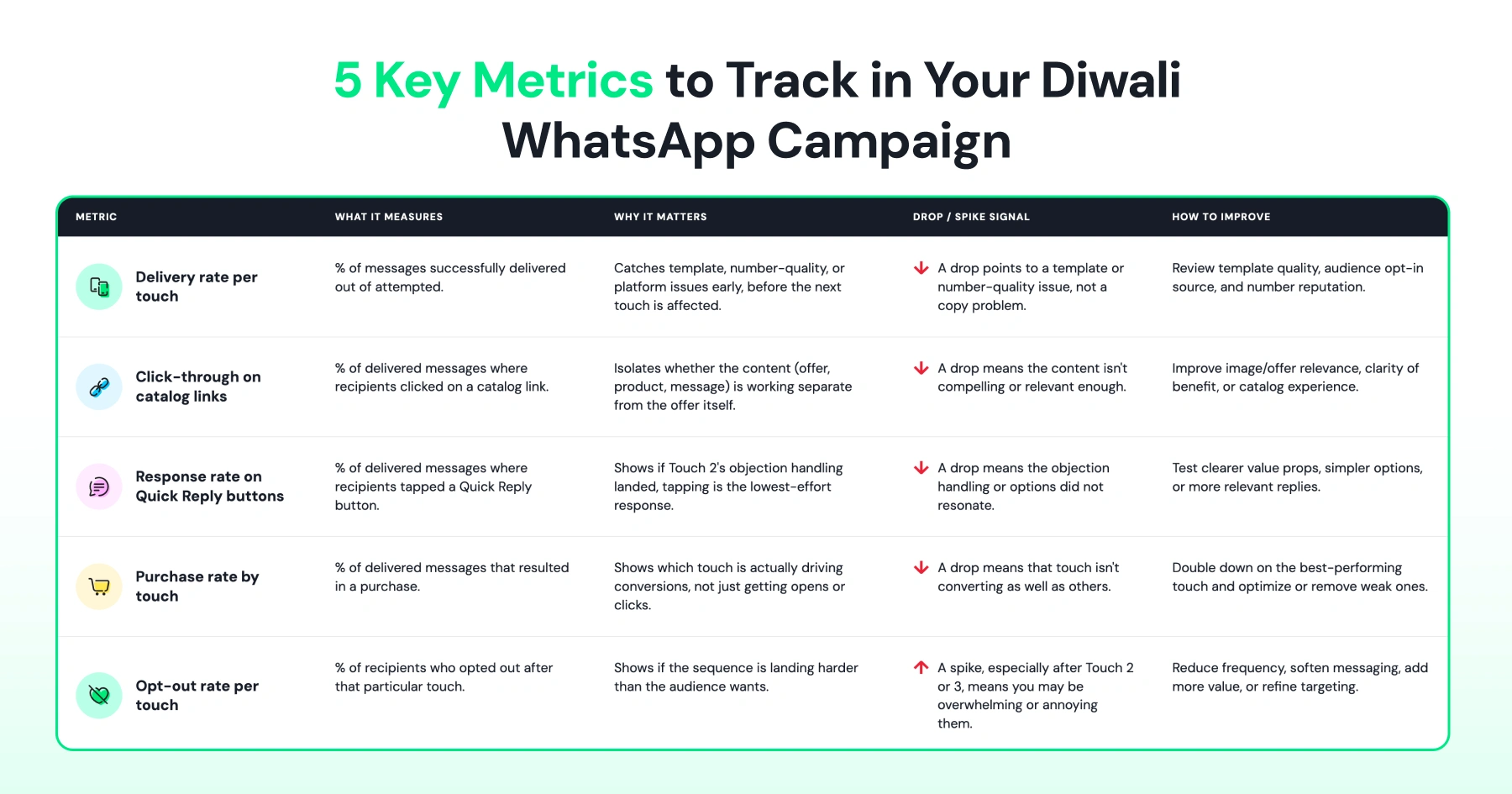
Two diagnostic patterns to watch for:
- If Touch 1 gets high delivery but few clicks, the hook needs work, not the offer.
- If Touch 3 gets clicks but few purchases, check the checkout flow before rewriting the message.
Review these numbers after the sequence ends, not just during it. A Touch 1 that underperforms this year is the first thing to rewrite before next Diwali, not something to guess at again from scratch.
Ready to Build Your Diwali Sequence?
A single broadcast gives your Diwali sale one shot to land. A 3-touch sequence gives it three, each one addressing exactly where the customer is stuck: attention, hesitation, or urgency.
Wati's Broadcast Sequences feature is available on Pro and Business plans, with a keyword trigger, three timed messages, and stop-on-reply built in from the start.
Book a Demo to see how a 3-touch sequence fits your product catalog and sales calendar before the festive rush starts.
Frequently asked questions
How many WhatsApp messages should I send for a Diwali sale?
Three: a nudge, an objection-handling follow-up, and a last-chance incentive.
What is a broadcast sequence?
A broadcast sequence is a set of scheduled messages triggered by an automation rule, where each message's timing and content depends on whether the contact has already replied. It's distinct from a WhatsApp drip campaign, which sends to a chosen audience as a scheduled campaign instead.
Does a broadcast sequence stop automatically once someone replies?
Yes. Wati's Broadcast Sequences stop the moment a contact replies, so an engaged or converted customer doesn't get a redundant follow-up.
What plan do I need to run Broadcast Sequences?
Broadcast Sequences is available on Wati's Pro and Business plans.
How does a contact actually enter the sequence?
Not by picking an audience and hitting send. A sequence is triggered by an automation rule, and the confirmed way to trigger it is a keyword condition, so a contact enters it by sending a specific keyword that your rule watches for. Build the rule with that keyword before you build the sequence content around it.
What's the difference between Touch 2 and Touch 3?
Touch 2 answers why a customer hasn't purchased, using social proof and support options. Touch 3 sets a deadline and adds one incentive to convert the customers still on the fence.
Should every customer get the same 3-touch sequence?
No. Segment by purchase history, cart status, or last year's activity so each group gets a version that speaks to their situation.
Can I run the same 3-touch structure for other festive sales?
Yes. The nudge, objection handling, and last-chance structure apply to any sale window, not just Diwali. Adjust the timing and copy to match the occasion.
Related posts
- Instagram Comment Automation: How It Works and How to Set It Up in Wati
Instagram comment automation auto-replies to comments and DMs commenters within seconds via Meta's API. Covers strategy, use cases, and Wati setup.
- Shared Team Inbox for Instagram: A Buyer’s Checklist for 2026
Use this fastest checklist to evaluate any shared team inbox for Instagram, which covers DMs, comments, automation, and multi-channel support.
- How to Send Bulk Messages on WhatsApp Without Getting Blocked
Learn how to send bulk WhatsApp messages without getting blocked. Compare the WhatsApp Business app and API, messaging limits, costs, templates, and best practices for safe, compliant bulk messaging.
- How to Set Up a TikTok Business Account: Step-by-Step Guide
Set up a TikTok Business Account step by step: switch from personal, pick a category, add your profile, and unlock ads and analytics.