

-

-
-
Solutions
-
Soluções
-
Soluciones
-
解决方案
-
解決方案
-
الحلول
-
Product
-
Produto
-
Producto
-
产品
-
產品
-
المنتج
-

-
-


 Wati for Marketing
 Wati for Support
 Wati for Sales
 eLearning
 E-commerce
 Marketing Agencies
 Healthcare
 No Code Chatbots
 AI Support Agent
 Instagram and Facebook messenger
 Click to WhatsApp ads
 Broadcasts
 Team Inbox
 WhatsApp Business Calling
 Wati AI
 Overview
 Library
Sales Funnel Automation for Startups: A Practical WhatsApp Framework
Written by:
 Ashwin
|
on:
December 10, 2025
|
Last updated on:
January 28, 2026
|
Fact Checked by :
Ashwin
|
on:
December 10, 2025
|
Last updated on:
January 28, 2026
|
Fact Checked by :
 Namitha
|
According to: Editorial Policies
Namitha
|
According to: Editorial Policies
 Table of Contents
Too Long? Read This First
- Automated Funnels Save Time: Core steps such as first replies, qualification, and reminders run automatically.
- CTWA Drives Quality Leads: Ads that open WhatsApp create faster, higher-intent conversations.
- AI Agents Improve Accuracy: Structured questions and routing rules help surface real prospects quickly.
- Calling Accelerates Decisions: WhatsApp Business Calling resolves objections and moves leads forward.
- Onboarding Starts From Events: Signups, activations, or demo attendance can trigger tailored onboarding flows.
- Retention Flows Reduce Drop-Off: Renewals, reorders, and support nudges keep users engaged after conversion.
Startups work in a world of speed. Buyers expect instant replies, simple next steps, and a smooth experience from the first message to the final purchase. The problem is that your team is small, leads come in from everywhere, and manual handling slows everything down.
That’s where the WhatsApp Business API becomes your engine for an automated sales funnel. It lets you
- Qualify leads using Astra AI agents
- Send instant responses with templates and automation
- Escalate to WhatsApp Business Calling from the same inbox
- Run onboarding and support journeys without adding more people to your team
If you are new to the WhatsApp API, you can read our complete WhatsApp Business API guide for a deeper understanding of how it works.
Why Startups Need an Automated Sales Funnel on WhatsApp?
Early-stage teams move fast, but their customer conversations rarely keep pace. A few common bottlenecks show up:
- Leads arrive from ads, your website, and social channels at odd hours.
- Replies slip when the team is in meetings or working on a product.
- Qualification depends on who picks up the chat first.
- Tracking happens across Google Sheets, inboxes, and DMs.
- Support questions interrupt sales conversations.
A report by InsideSales states that contacting a lead within the first 5 minutes increases conversion rates by up to 8x, which is nearly impossible to achieve manually. Automation solves this gap by responding instantly every time.
Startups solve this by shifting repetitive steps to automation and keeping humans for the moments that influence revenue.
A simple path starts to form:
A user clicks an ad > lands on WhatsApp > answers a few qualification questions > gets the right next step > books a call or receives a recommendation > activates their account > and gets support when needed.
This removes the friction between “interest” and “action”. Your team focuses on real opportunities instead of managing the inbox.
WhatsApp Business API Basics for Automation
You only need a few core pieces to understand how automation works on WhatsApp.
| Messaging Templates | These are pre-approved messages that businesses use when they start a conversation. Templates power welcome messages, reminders, follow-ups, and onboarding steps. Meta reviews every template to ensure it follows policy and formatting rules. |
| Team Inbox | The API itself doesn’t include an inbox.Business Service Providers like Wati build this layer so your team can respond from one number, assign chats, add notes, and track conversations without switching tools. |
| Integrations | Because the API is open, BSPs connect WhatsApp to CRMs, checkout systems, and AI agents. This is what turns WhatsApp into a complete automation engine instead of a standalone chat app. |
| Coexistence | Wati also supports coexistence, allowing startups to use the same WhatsApp number in both the WhatsApp Business app and the WhatsApp API. This helps small teams adopt automation without losing the familiarity of the mobile app during the transition period. |
The WhatsApp API supplies the core messaging functions. Platforms like Wati add the inbox, automation, and integration layers needed to run these workflows.
Mapping Your Automated Sales Funnel
An automated WhatsApp funnel works best when you break it into simple, practical stages. Each stage has a clear job and moves the user toward a decision.
Lead Generation
- This is the entry point. People reach you from Click to WhatsApp ads, website buttons, QR codes on packaging, or offline posters.
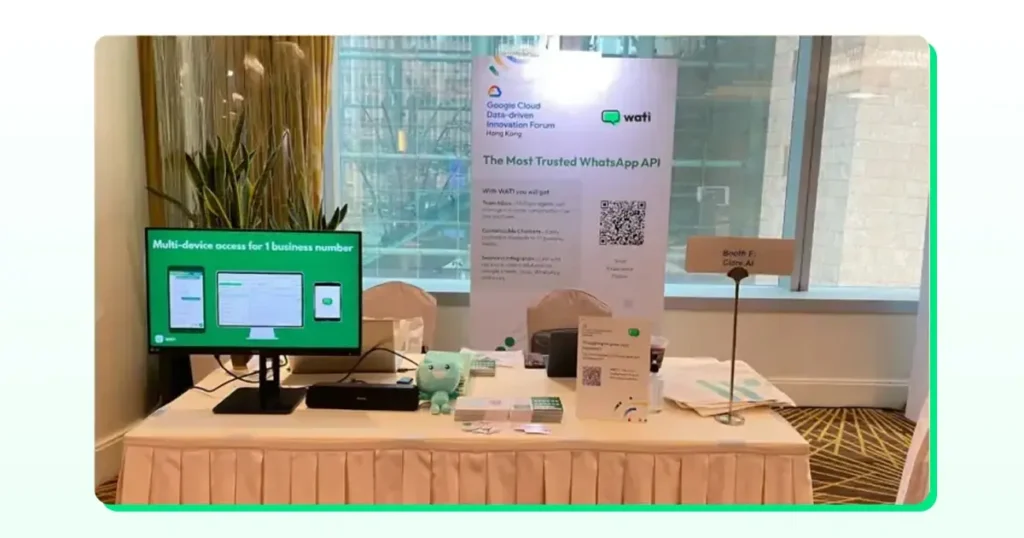
- These surfaces send users straight into a WhatsApp thread instead of a form, so the conversation starts immediately.
- Startups use this moment to capture intent and open the 24-hour service window where responses flow freely.
Engagement
- Once the chat begins, your system takes over the routine steps. It sends the first reply, asks a few clarifying questions, and shares basic links or product details.
- Users stay engaged because they get direction without waiting for a human to come online.
- Short prompts, quick replies, and clear options work best at this stage.
Conversion
- When a user shows interest, the funnel shifts to qualification and decision support. Automated flows help you understand what the user needs and whether they are ready to speak with someone.
- If a conversation needs a faster resolution, WhatsApp Business Calling lets the team jump straight into a voice call.
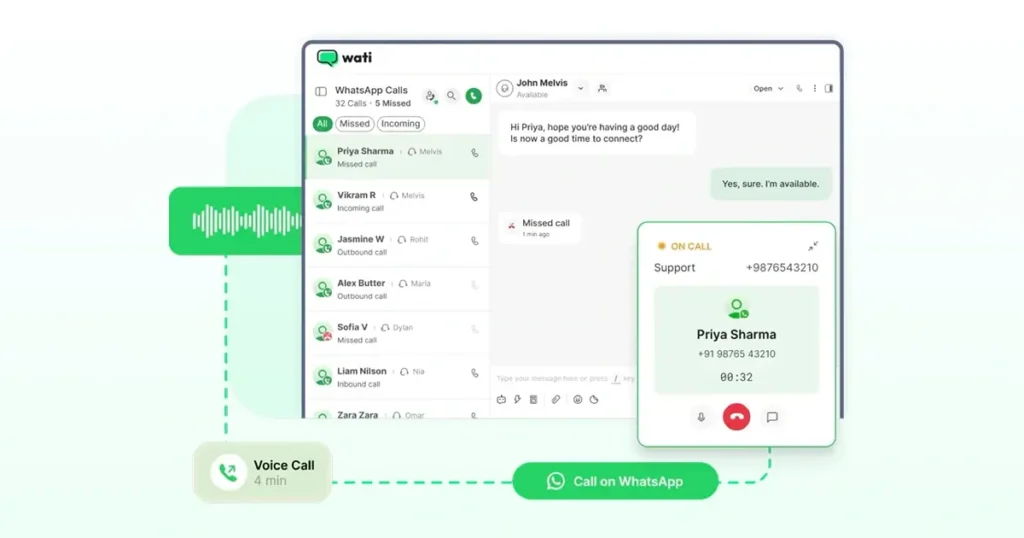
- This removes back-and-forth messages and speeds up decisions. Personalised responses, summaries, and well-timed follow-ups help close the loop.
Support & Retention
- After a user converts, they still expect quick answers and reliable updates. AI agents handle routine queries, while human escalation handles anything more complex.
- Automated follow-ups, reminders, and post-purchase messages help maintain engagement and reduce the drop-off that often happens after the first transaction.
The rest of this guide explores each of these stages in detail, with workflows and examples that show how startups put them into practice.
Stage 1: Lead Generation
Use CTWA to Fill the Top of Your Automated Sales Funnel
Click-to-WhatsApp entry points make it easier to turn attention into a live chat. People skip the forms and go straight to WhatsApp, where you can start guiding them immediately. This is useful for startups that want steady, high-intent conversations without extra effort.
Wati supports CTWA-style flows across:
- TikTok
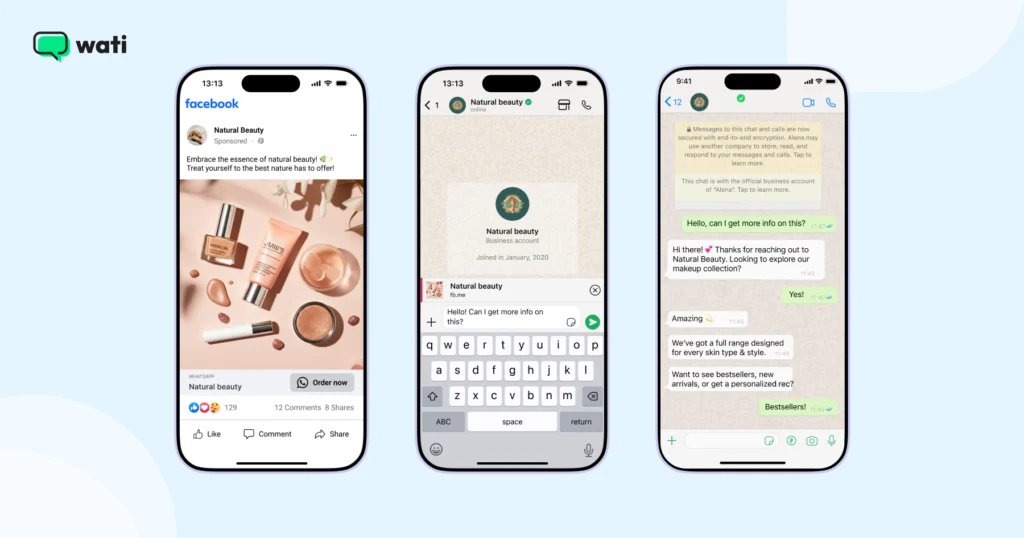
A simple flow looks like this:
Ad click > WhatsApp opens > automated welcome > team notified > campaign data logged
You get a direct line from the ad to the conversation, making your funnel easier to track and scale.
Example
A D2C beauty brand runs TikTok ads that open WhatsApp using the CTWA setup. When someone taps the CTA, the lead appears in the inbox with practical context:
- Ad set name
- Campaign ID
- Tracking parameters added to the link
The system sends the first message automatically and alerts the team. There’s no manual export or sorting, and users don’t wait for a reply.
Note:
If your startup runs different funnels for different products, geographies, or acquisition campaigns, Wati lets you manage multiple WhatsApp numbers.
Each number can support separate CTWA flows, routing rules, or onboarding journeys while your team still works from a single dashboard.
Build Zero-Friction Entry Points Beyond Ads
People should be able to reach you from the places they already interact. When the path to WhatsApp is obvious, more conversations start without extra prompting.
You can set this up in simple ways:
- Add a WhatsApp chat button to your website
- Print QR codes on packaging, receipts, or display stands
- Place a WhatsApp link in your Instagram bio
- Add a short link to your email signature
- Use QR codes or displays at events and booths
All of these routes open the same WhatsApp chat, so your automation takes over instantly, no matter where the user starts from.
Segment Leads and Attribute Revenue Correctly
When leads come from different ads and entry points, you need a clean way to group them and see which sources actually perform. Segments help with that. Wati Segments let you group users by their behavior in WhatsApp. You can see who opened a message, replied, clicked a link, or engaged with a specific flow. This gives you a more accurate picture of who is moving forward and who is dropping off.
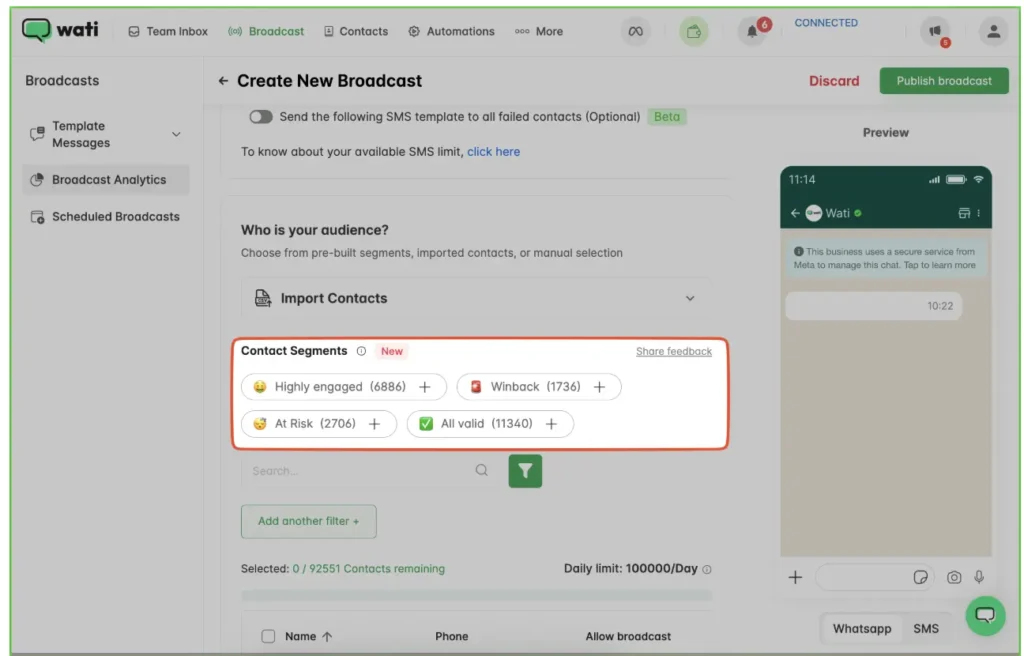
Attribution data fills in the rest. When ad-click information and tracking parameters are passed through, you can link a WhatsApp conversation back to the ad set, creative, or geography that drove the user to it. If conversion events are mapped, you can also see which sources lead to tangible outcomes, not just chats.
This makes it easier to compare performance across campaigns and understand where your highest-quality leads come from.
Stage 2: Instant Engagement Using Automation
Automated First Responses
New leads expect a quick reply. You can set up an automation that sends the first message as soon as someone opens a chat. The WhatsApp API delivers that reply, and your team picks up the conversation when needed.
Standard opening lines include:
- Hi, thanks for writing in. Let me ask a quick question so that I can point you in the right direction.
- Welcome. Do you want to look at pricing or set up a demo?
- Tell me what product you’re interested in, and I’ll help you compare options.
These short replies keep users engaged and stop the conversation from going cold while someone on your team gets notified.
Did you know?
Meta reports that up to 70% of customer inquiries on its messaging platforms are already handled automatically, showing how common automated engagement has become for scale-focused teams. (Source)
Use Wati’s AI Copilot To Handle More Engagement With Less Effort
Wati’s AI Copilot feature helps teams manage busy inboxes without slowing them down. It supports agents in small, practical ways that add up during the day.
The Template Assistant suggests cleaner versions of outbound templates and helps you stay within Meta’s messaging guidelines. Chat summaries give you a quick recap of long threads, so you don’t need to scroll back before replying.
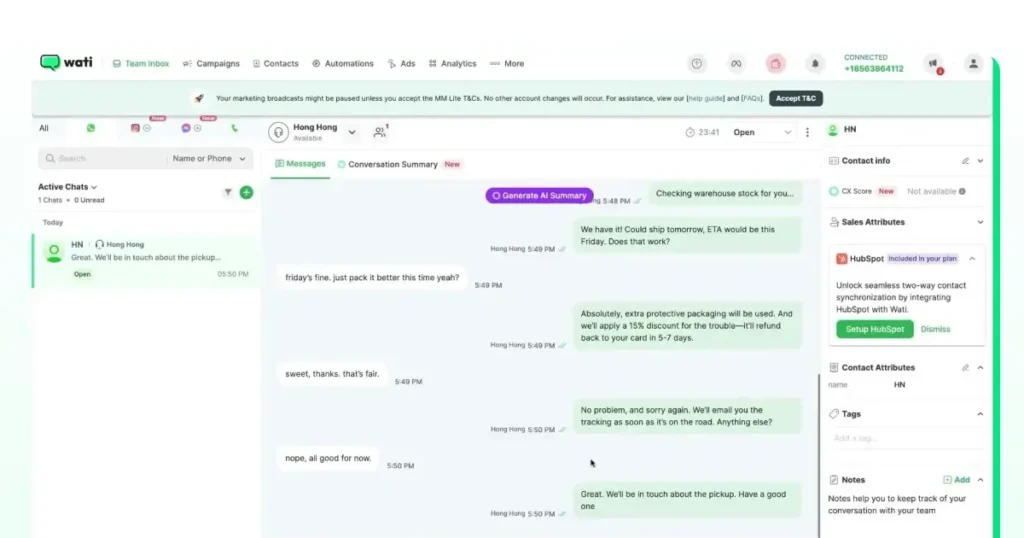
The CX score highlights conversations that feel tense or warrant closer review. You can also translate messages on the spot, which is useful when customers write in languages your team doesn’t speak.
A HubSpot survey found that 66% of consumers expect a response from customer service within five minutes, which makes instant automated replies critical for keeping leads warm.
Example
A SaaS team selling in LATAM receives questions in Spanish. AI Copilot translates the message, adds a summary, and the founder replies in English without losing context.
Centralise All Engagement Channels
Customers reach out through multiple channels, not just WhatsApp. Some use SMS for quick updates, and others rely on RCS on Android devices. Wati brings these channels into a single team inbox so teams do not have to jump between tools.
You can manage all of these channels in one place, so your responses and automated journeys follow the same logic even when the message format changes.
Further Reading: A Multi-Channel Playbook: Integrating SMS Marketing in Your Sales Strategy
Stage 3: Automated Lead Qualification
Deploy Wati Astra for Self-Serve Onboarding
Astra lets you set up AI agents through simple instructions, so you don’t need to design complex flows by hand. You define how the agent should speak, what steps it should follow, and when it should hand the chat to someone on your team.
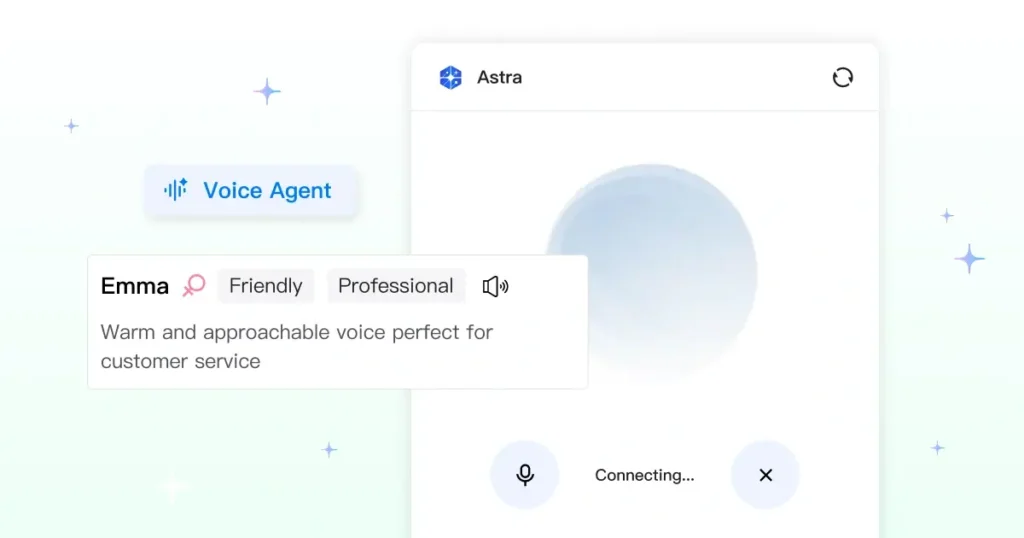
These agents can handle structured qualification by asking direct questions about company size, timeline, use case, budget, or any other detail you rely on.
Based on the answers, the agent groups the lead and sends it down the right path.
Route Leads Based on Intent
Once a lead shares enough information, you can route them to the next step without manual sorting. The rules are simple: high-intent users move toward sales, and everyone else gets the proper follow-up.
You can assign qualified leads to your sales team or move them into a calling queue if a voice conversation makes more sense. Others can enter a nurture flow, receive event or webinar invites, or start a self-serve onboarding sequence.
Each path reflects what the user wants and how ready they are to move forward.
Example Workflow
A fitness equipment startup uses Astra to qualify new leads.
- Someone clicks an Instagram CTWA ad and opens the WhatsApp chat.
- Astra starts with simple questions, like their height, goals, and how often they work out.
- It uses those answers to suggest the right equipment.
- If the person shows strong intent, they get a nudge to continue the conversation on a WhatsApp call.
- A rep calls them directly from the inbox and picks it up from there.
- The details from the chat get pushed into the CRM that the team already uses.
- What usually takes a long exchange now takes only a few minutes.
Note: Teams using multiple WhatsApp numbers can route leads within the same number or across numbers, depending on how their sales or support workflows are structured.
Stage 4: Conversion Workflows
WhatsApp Business Calling
When a conversation needs a faster resolution, your team can switch from chat to a voice call without leaving Wati. Agents start a WhatsApp Business call directly from the same inbox where they manage chats.
Benefits include:
- Instant escalation – Start a WhatsApp call from the chat in one step
- Fewer drop-offs – Resolve questions quickly and keep momentum
- Higher trust – A voice call helps users feel more confident about big decisions
- One thread – Call history and notes stay linked to the same conversation
As per Salesforce, conversion benchmarks vary by product type: SaaS and small-business purchases often convert in the 20–30% range, while more complex, high-value deals typically convert between 5% and 15%.
Faster qualification and smooth escalation help improve outcomes across both groups.
Multi-Channel Follow-Ups With Intelligent Fallback
Some reminders matter more than others, especially when a user is close to a decision. If a WhatsApp message doesn’t land, fallback rules make sure the update still reaches the user.You can set WhatsApp messages to fall back to SMS when delivery fails, and run broadcasts for things like demo reminders, trial updates, or payment prompts.
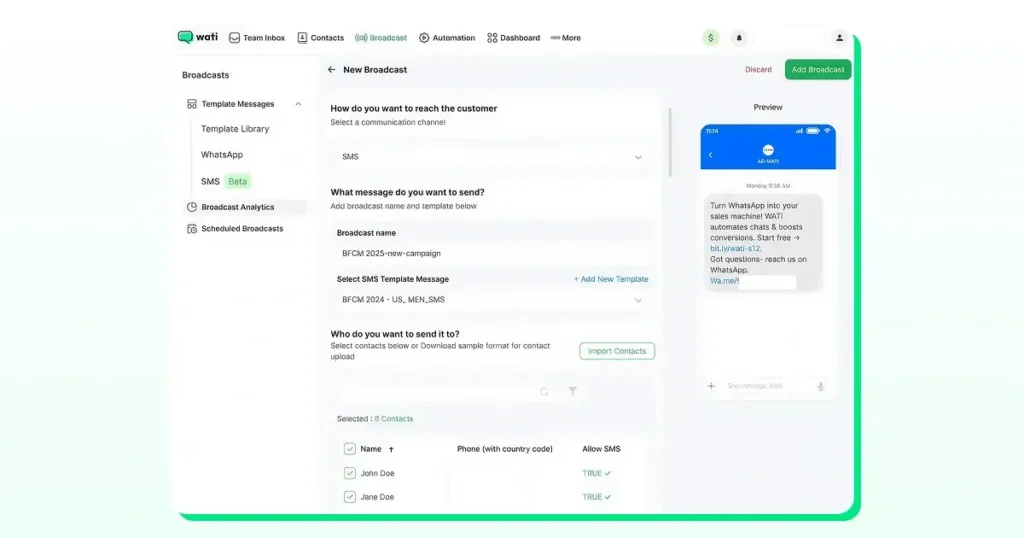
OTPs can also be sent via SMS if WhatsApp isn’t available. Teams that work across regions often set different delivery rules so messages follow the channel that works best for each market.
- Trial end reminders
- Payment nudges
- Cart recovery prompts
- Re-engagement messages
These steps keep the funnel active even when a user misses the first message.
Stage 5: Automated Onboarding and Activation
Create Personalized Onboarding Journeys
You can start onboarding messages whenever a user completes an important step in your product.
Common triggers include:
- New signup
- App install event
- Completed profile
- Feature being used for the first time
- Booked a demo or training session
Once the event arrives, the journey can deliver videos, short checklists, FAQ links, or simple step-by-step tutorials. This gives users the guidance they need without waiting for a support agent.
Deploy Astra for Self-Serve Onboarding
Astra can handle many of the early onboarding questions users ask.
With the proper instructions, the agent can guide them through tasks such as connecting to Shopify, adding team members, or finding the billing settings.
It gives users quick, direct answers, and anything that needs a human can be escalated to your team.
CRM + WhatsApp Integration for Advanced Activation
When your CRM and WhatsApp work together, you get a clearer view of what users are doing and what your team needs to follow up on. Deal stages can update as conversations progress, and you can see how quickly reps respond and close out chats. Contact properties stay synced, and important details from a conversation appear in the CRM without manual work. In tools like HubSpot, AI summaries and auto-generated tasks help teams keep track of next steps.
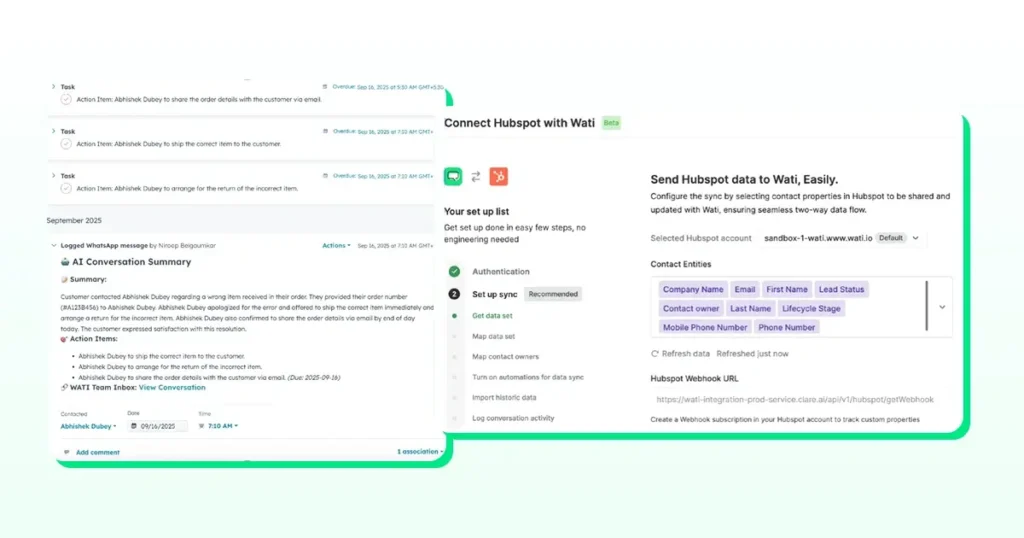
This gives startups the kind of visibility and structure that usually takes longer to build on their own.
Stage 6: Support and Retention
Retention plays a key role in the overall sales funnel, especially for subscription and repeat-purchase products.
- AI agents can handle routine FAQs and simple troubleshooting.
- Order updates can be shared automatically when your system sends status events.
- Refund and replacement steps can follow a structured workflow inside WhatsApp.
- Renewal reminders help keep customers engaged before a plan expires.
- NPS surveys can be sent through short messages or button-based prompts.
- Educational nudges and usage tips support long-term adoption.
- Any conversation that needs human attention can be escalated directly to an agent
- When WhatsApp delivery fails, SMS fallback helps ensure critical updates still reach the user.
Example Automated Sales Funnels for Different Startup Types
B2B SaaS Funnel
- A prospect clicks a WhatsApp ad and starts a chat.
- Astra picks up the thread and asks a few qualification questions.
- If they’re a good fit, they get a link to book a demo right there.
- The rep can switch to a WhatsApp call if the person wants to talk.
- Once they sign up, your product triggers a few onboarding messages.
- Closer to renewal, the system sends reminders without anyone needing to follow up manually.
D2C Product Funnel
- Someone taps a TikTok ad that opens WhatsApp.
- Astra runs a quick chat to understand what they’re looking for.
- It suggests the most suitable product based on their answers.
- COD orders can be confirmed in the same chat with a single prompt.
- Shipping updates go out as your system sends status changes.
- After a while, the customer receives a simple reorder nudge.
Marketplace or Service Funnel
- A lead comes in from an ad, a form, or a QR code.
- Astra asks a few basics to understand what they need.
- It matches them to the right agent or service option.
- Availability is checked through your backend or a quick follow-up question.
- The user receives a booking or payment link.
- After the service, the chat shifts into a light support or follow-up journey
This gives startups the kind of visibility and structure that usually takes longer to build on their own.
Funnel Metrics to Track
You can get a clearer view of how well your funnel is working by watching a few simple metrics:
- Response time – how quickly new conversations are acknowledged
- Open rate – WhatsApp shows delivery and read status
- Lead Qualification rate – the share of leads who complete your initial questions
- Conversion to call – how many chats escalate to a voice conversation
- Call outcomes – answered, missed, or needs follow-up
- Repeat purchase rate – tracked through order events from your commerce system
These signals help you see where leads get stuck and where your automated funnel needs attention.
Implementation Checklist for Startups
Your first version of an automated funnel only needs a few pieces in place:
- WhatsApp API access and verified account
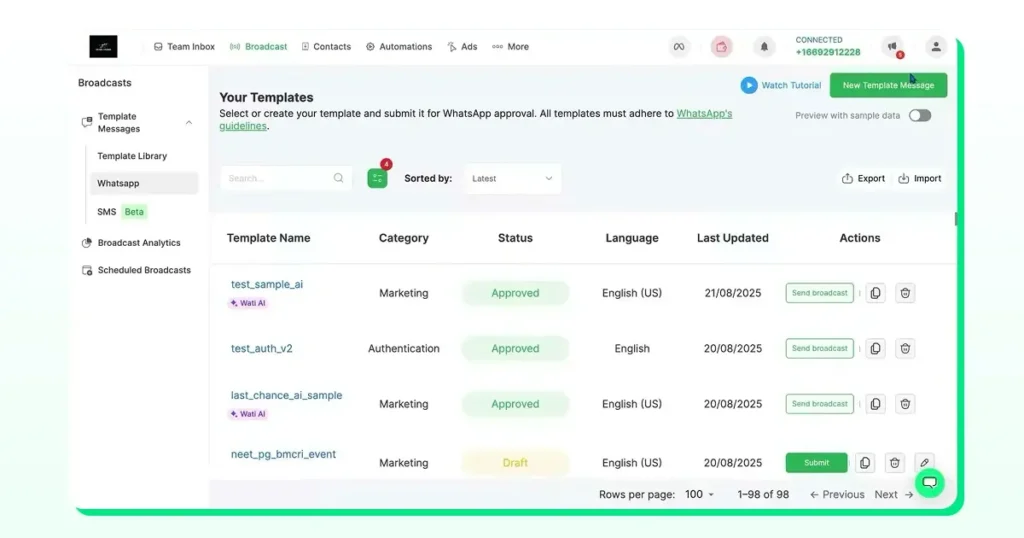
- A small set of approved templates for welcomes, reminders, and onboarding messages
- CTWA set up across TikTok, Meta, and Google
- Astra agent to qualify new leads
- WhatsApp Calling enabled for high-intent conversations
- SMS fallback rules for WhatsApp messages that don’t get delivered
- Segments to group users by behaviour or source
- A CRM connection so contacts and events stay in sync
- Simple reporting to watch how conversations move through the funnel
- Onboarding and retention journeys that start when your system sends the right events
With these pieces connected inside Wati, the funnel continues to run even when no one is watching the inbox.
How to Get Started?
It helps to begin with a small setup and see how users respond. One CTWA campaign, a basic Astra flow for qualification, WhatsApp Calling for high-intent leads, and a short onboarding journey are usually enough to test the entire path from first message to activation.
Once the initial funnel performs well, you can add more pieces such as segments for different user types, product recommendations, and automated retention messages.
If you want help setting up your first funnel, you can schedule a demo and explore what this might look like for your team.
FAQs
Most startup teams operate with limited bandwidth. An automated WhatsApp funnel reduces manual follow-ups, shortens response times, and keeps conversations moving even when no one is available. It also gives leads a faster path from inquiry to action, which improves overall conversion.
You can automate qualification questions, first responses, reminders, onboarding steps, order updates, and follow-ups. Voice calls, human escalation, and complex support issues still fall to the team, but repetitive tasks can run automatically.
Automation collects the same details from every lead, regardless of when they message. This gives you cleaner data, clearer intent signals, and a better sense of who is ready for a call or a demo.
Yes. B2B startups often automate qualification and demo booking, while D2C teams use WhatsApp for product recommendations, COD verification, delivery updates, and reorders. The funnel structure adapts to different models.
No. Automation handles predictable steps. Your team steps in when a lead needs guidance, has objections, or is ready for a call. The goal is to reduce manual load, not remove the human element.
Track simple metrics such as response time, open rate, qualification completion, call conversions, and repeat purchases. These numbers reveal where leads slow down and where improvements are needed.
You can trigger onboarding when users sign up, install your app, complete a profile, activate a feature, or attend a demo. Your product must send these events to the system through an integration.
Yes. WhatsApp works across most regions, and fallback SMS messages help reach users when WhatsApp delivery is unavailable. Translation support also helps teams respond to multilingual audiences.
It depends on your product. Startups that rely on consultations or demos benefit from quick transitions to a voice call. Others may prefer to stay chat-first and escalate to calls only when necessary.