
Too Long? Read This First
- A Shopify WhatsApp opt-in widget captures visitor consent on-site, in exchange for a discount or update
- Two widget types matter most before a sale: a homepage welcome pop-up and a cart-abandonment pop-up
- Always pair the widget with explicit consent language and an opt-out option to stay compliant
- Segment opt-ins the moment they come in (welcome vs. cart) so your Diwali campaigns aren't one-size-fits-all
- Widgets connect straight to your broadcast and drip tools, so a captured number can enter a sequence automatically
A WhatsApp opt-in widget on Shopify is an on-site pop-up that asks a visitor for consent to be messaged on WhatsApp, usually in exchange for a discount code.
It sits on your homepage or cart page, captures a phone number, and creates a compliant contact you can message later without breaking WhatsApp's opt-in rules.
For Diwali, timing this matters more than any other week of the year. Traffic spikes fast, most of it is first-time visitors who won't buy today, and your ad spend is wasted the moment they leave without a way to reach them again.
A widget on your storefront turns that browsing spike into a list you actually own, instead of a bounce you paid for.
A visitor who isn't ready to buy today can still be worth capturing. A widget lets you nurture them into a sale over the following days, instead of losing them the moment they close the tab.
Here's how to set it up, where to place it, and what to do with the contacts once you have them.
What is a Shopify On-Site WhatsApp Widget?
A Shopify on-site WhatsApp widget is a pop-up or embedded form that collects a visitor's phone number for WhatsApp messaging, directly from your storefront.
It's not a chat bubble that opens a conversation. It's a consent-capture tool built to grow your contact list before a visitor ever reaches checkout.
Most versions work in one of two ways:
- A welcome pop-up that appears on the homepage, usually timed to a few seconds of browsing or a scroll trigger, offering a coupon in exchange for a WhatsApp number or email
- A cart-recovery pop-up that appears when a visitor adds an item to the cart, reaches the cart page, then navigates away without checking out
Both write directly into your customer data, so a subscriber isn't just a phone number sitting in a spreadsheet. It's a tagged, segmentable contact ready for a campaign.
If you just need a simple click-to-chat button rather than a full opt-in flow, Wati's WhatsApp chat button generator covers that instead.
How Do I Capture WhatsApp Opt-Ins Before Checkout?
You capture WhatsApp opt-ins before checkout by placing a consent widget earlier in the browsing journey, not just at the payment step.
Waiting until checkout means you only capture people who were already going to buy, which misses the much larger group who browsed, hesitated, and left.
The three points that matter most:
- On the homepage, a welcome widget catches first-time visitors before they've made any purchase decision. This is your highest-volume opt-in point during a traffic spike.
- On the cart page, a recovery widget catches visitors who showed real intent (they added a product) but stalled before checkout. This is your highest-intent opt-in point.
- At the checkout step itself, a simple checkbox works better than a pop-up. Something direct like "I want to receive order updates and exclusive offers on WhatsApp" keeps consent explicit and doesn't add friction to an already-committed buyer.
Layering all three means you're not relying on one moment in the funnel to build your list. You're capturing consent at browse, at hesitation, and at purchase.
6 Smart Ways to Use a WhatsApp Opt-In Widget on Shopify Before Diwali Traffic Peaks
Getting a widget live is the easy part. Getting it to actually convert during a festive traffic spike takes a bit more thought than just switching it on.
1. Lead With a Real Incentive, Not a Generic One
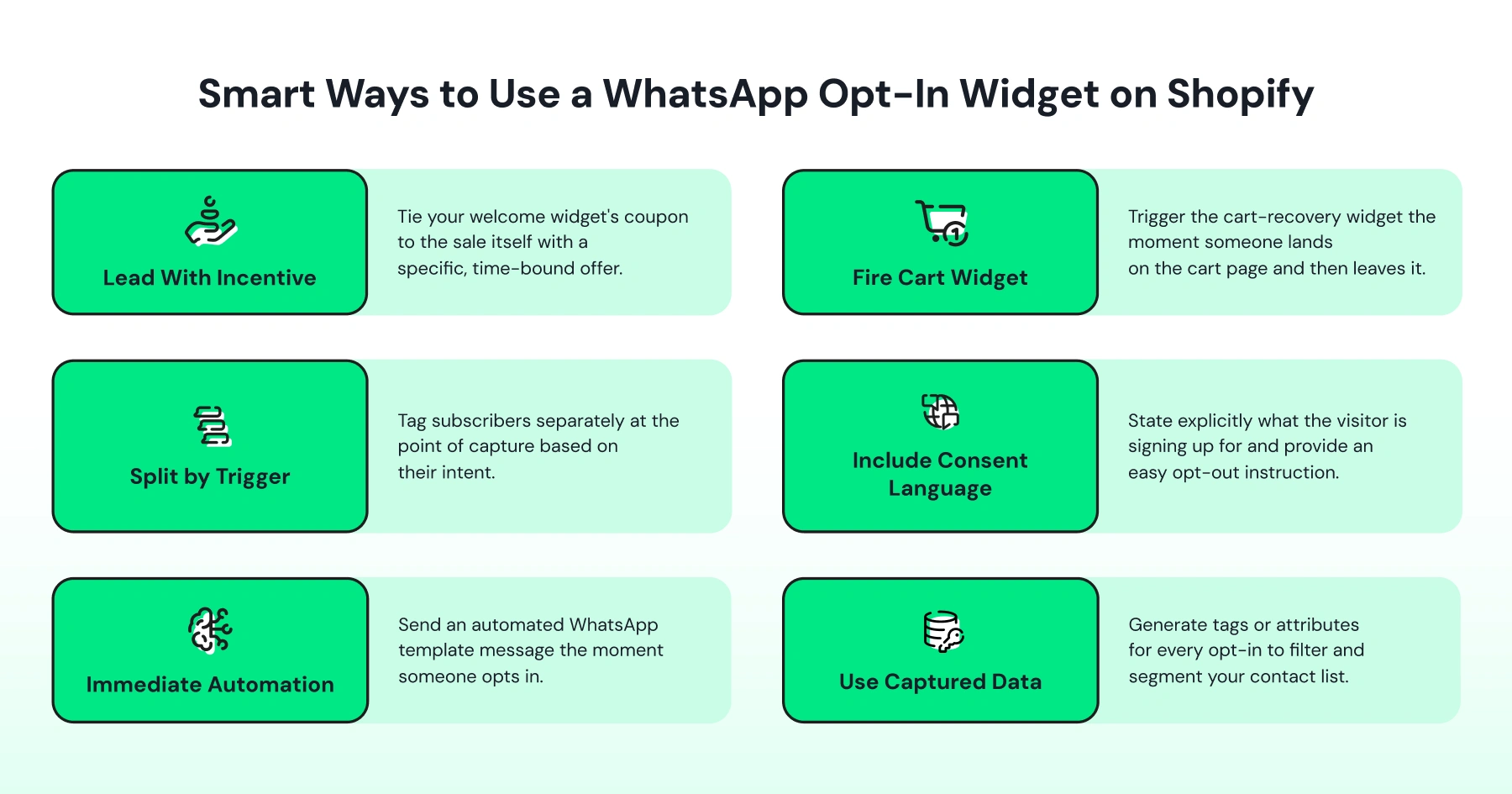
"Subscribe for updates" doesn't move anyone during Diwali browsing. A specific, time-bound offer does. Tie your welcome widget's coupon to the sale itself (a flat discount, early access to a Diwali collection, or a free shipping code) so the exchange feels worth a phone number.
Even a visitor who isn't buying today has a reason to opt in, since they can be nurtured toward a purchase over the following days instead of disappearing after one visit.
2. Set the Cart Widget to Fire Before They're Fully Gone
Set the cart-recovery widget to trigger the instant someone lands on the cart page and then navigates away, not after a delay.
During peak traffic, attention spans get shorter, not longer, so a widget firing while the intent is still fresh converts better than one bolted onto a delayed email flow.
The volume is worth building for: about 70% of online shopping carts get abandoned on average across ecommerce, per Baymard Institute's meta-analysis of 50 studies, so the cart page is where a widget has the most opt-ins to capture.
3. Split Your Widgets by Trigger, Not Just by Page
A homepage subscriber and a cart-abandonment subscriber are not the same lead. One is curious. One nearly bought.
Tag them separately at the point of capture so your Diwali broadcast to "nearly bought" customers can be sharper (a stronger nudge, maybe a bigger discount) than your broadcast to "just browsing" customers.
4. Don't Skip the Consent Language
Say explicitly what the visitor is signing up for (order updates, exclusive Diwali offers, or both) and pair it with an easy opt-out, like a "reply STOP" instruction in the first message you send.
A widget that just says "Enter your number" isn't good enough. Say explicitly what the visitor is signing up for: order updates, exclusive Diwali offers, or both.
Pair it with an easy opt-out, like a "reply STOP" instruction in the first message you send. This isn't just good practice; it keeps you within WhatsApp's own messaging policies.
5. Connect the Opt-In to an Immediate Automation
The moment someone opts in, they should get a WhatsApp message, not silence until your next scheduled broadcast.
An automated WhatsApp template message (with the coupon code, if you offered one) confirms the opt-in worked and gives the visitor a reason to stay engaged while your Diwali sale is still live.
6. Use the Data Beyond the First Message
Every widget opt-in should generate a tag or attribute you can filter on later: subscription date, which widget they came through, whether they've redeemed a coupon.
By the time your Diwali sale peaks, you want a segmented list ready for a targeted broadcast, not one flat contact list you're messaging identically.
Wati Features That Power On-Site WhatsApp Opt-Ins on Shopify
Wati's Shopify integration includes on-site WhatsApp widgets built for exactly this: a welcome opt-in pop-up for homepage visitors and a recover-cart opt-in pop-up for cart abandoners, both configurable from a single builder inside the Wati app.
The builder covers the pieces that actually affect conversion:
- Content controls: heading, sub-heading, footer text, and button, and a choice between phone number or email capture
- Display rules: show on a timer or on scroll, target desktop, mobile, or both, control display frequency, and apply location-based rules
- Style controls: custom images and background colors to match your Diwali storefront theme
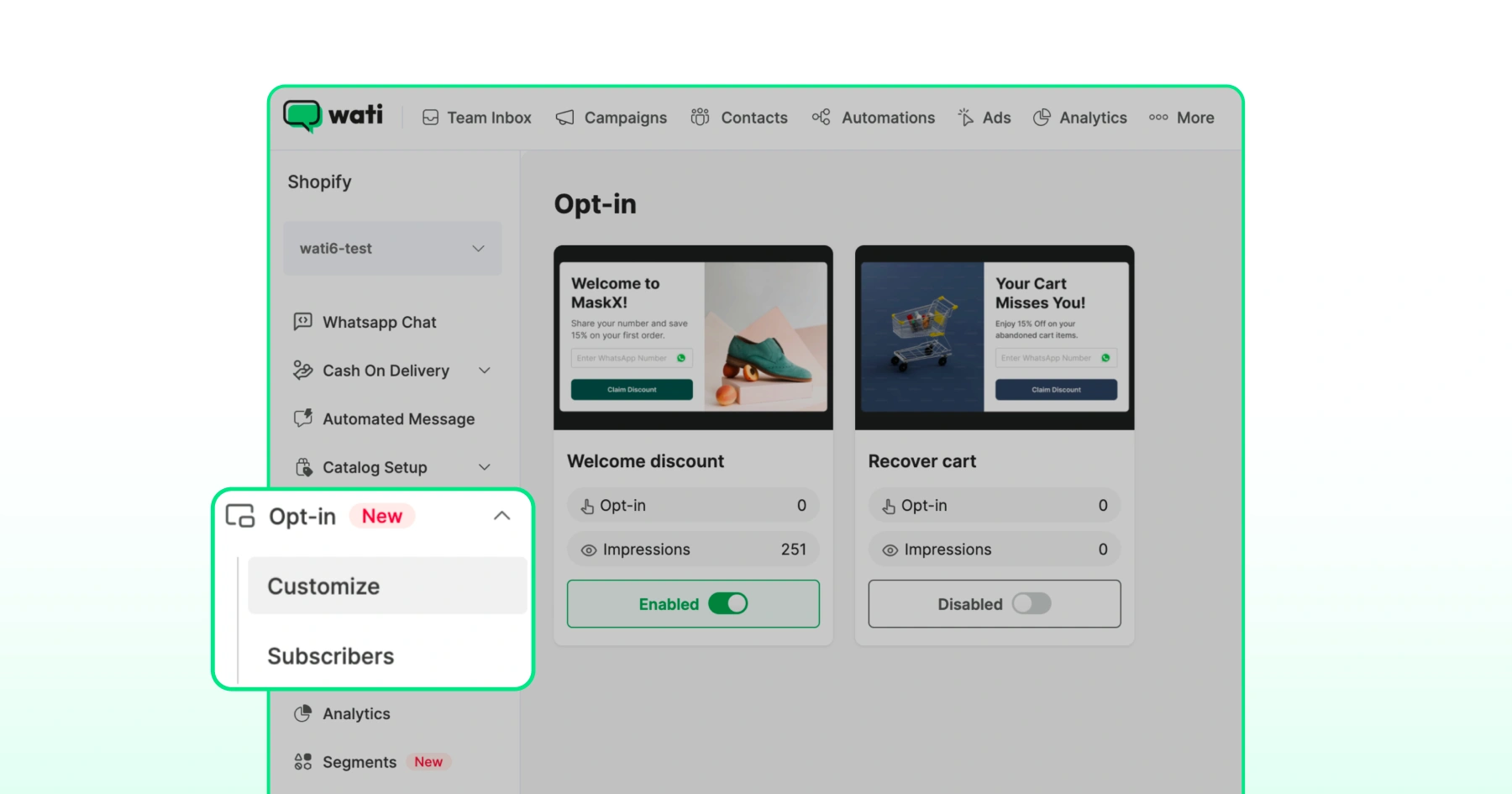
Every subscriber lands on a dedicated subscriber page showing their name, phone or email, subscription date, the opt-in type they came through, and the total subscriber count and pop-up impressions.
Custom attributes get created automatically per subscriber, so a "recover cart" opt-in is tagged differently from a "welcome" opt-in from the moment it's captured, ready for segmented campaigns later.
Once someone opts in, you can trigger a WhatsApp template message directly from the same builder, with the option to include a discount coupon in the first message.
This is Wati's on-site conversion layer working alongside checkout and cart-recovery tools already built into the WhatsApp for Shopify integration, so the opt-in isn't a dead-end form. It's the start of an automated conversation.
This on-site widget capability is available on Pro and Business plan Shopify integrations. If you're unsure which plan your store is on, check with your account manager before your Diwali campaign calendar locks in.
Bonus Read: WhatsApp Marketing for Shopify: How to Turn Every Message into a Revenue Moment
WhatsApp Opt-In Widget Shopify Setup: Where to Start Before Diwali Hits
Capturing WhatsApp opt-ins before your Diwali traffic peaks comes down to placement, incentive, and what happens right after someone subscribes.
- A homepage widget catches curious browsers.
- A cart-page widget catches near-buyers.
- A checkout checkbox catches the ones already converting.
Layer all three, tag each differently, and connect the opt-in to an immediate WhatsApp message so the consent you just captured turns into a conversation, not a static contact list waiting for your next broadcast.
The setup itself takes minutes inside your Wati dashboard, well before your festive traffic spikes. Book a demo to see the Shopify opt-in widget builder in action and get it live ahead of Diwali.
Frequently asked questions
What is a WhatsApp opt-in widget on Shopify?
It's an on-site pop-up or form that asks a Shopify store visitor for consent to be messaged on WhatsApp, usually in exchange for a discount code or update. It captures the phone number directly into your customer data without requiring the visitor to message you first.
How is a cart-recovery opt-in different from a welcome opt-in?
A welcome opt-in appears on the homepage for any visitor, usually timed to a delay or scroll. A cart-recovery opt-in only triggers when a visitor adds an item to the cart, reaches the cart page, and then leaves without checking out, capturing higher-intent leads specifically.
Do I need a checkbox at checkout if I already have a widget?
Yes. A widget captures browsers and cart abandoners earlier in the journey, but a checkout checkbox captures the buyers who convert without ever seeing the widget. Together they cover the full funnel instead of leaving a gap at the point of purchase.
Is a WhatsApp opt-in widget compliant with WhatsApp's messaging rules?
It is, as long as the widget states clearly what the visitor is consenting to (order updates, offers, or both) and you include an easy opt-out, such as a "reply STOP" instruction in your first message.
Can I run both widget types at the same time on Shopify?
Yes. The welcome opt-in and the cart-recovery opt-in can run simultaneously on the same store, and each generates its own subscriber tag so you can segment and message the two groups differently.
Does the on-site widget work on both desktop and mobile?
Yes, display rules let you choose whether the widget appears on desktop, mobile, or both, along with controls for timing, frequency, and location.
Related posts
- Instagram Comment Automation: How It Works and How to Set It Up in Wati
Instagram comment automation auto-replies to comments and DMs commenters within seconds via Meta's API. Covers strategy, use cases, and Wati setup.
- Shared Team Inbox for Instagram: A Buyer’s Checklist for 2026
Use this fastest checklist to evaluate any shared team inbox for Instagram, which covers DMs, comments, automation, and multi-channel support.
- How to Send Bulk Messages on WhatsApp Without Getting Blocked
Learn how to send bulk WhatsApp messages without getting blocked. Compare the WhatsApp Business app and API, messaging limits, costs, templates, and best practices for safe, compliant bulk messaging.
- How to Set Up a TikTok Business Account: Step-by-Step Guide
Set up a TikTok Business Account step by step: switch from personal, pick a category, add your profile, and unlock ads and analytics.