
Too Long? Read This First
- Astra lets you build an AI voice sales agent that handles inbound leads 24/7 with no code and no complex setup.
- Use Astra Vibe to create your agent in minutes, choose a role-based template, and deploy on your website or WhatsApp.
- Clone your brand voice or pick from Astra's voice library to make your agent sound like a natural extension of your sales team.
- Configure BANT-based qualification criteria in the Action Library to score and categorize every lead automatically.
- Connect Calendly or Google Calendar and your CRM to auto-book meetings and sync lead data in real time.
- Track contact rate, qualification rate, booking rate, and intent distribution in the first 30 days to continuously improve performance.
Most sales teams are still losing leads to slow follow-up, wasting rep time on unqualified calls, and dealing with incomplete CRM data.
Here’s what you’re about to build.
An AI voice sales agent that picks up every inbound lead the moment they reach out, qualifies them against your exact criteria, and books a meeting directly into your calendar.
On top of that, it automatically logs every interaction in your CRM, with no human involvement required.
This guide exactly talks about that
By the end of it, you’ll have a live AI voice sales agent running 24 hours a day on Astra, so your team only spends time on leads that are already qualified and ready to talk. Setup takes only 15 minutes.
Let’s get into it.
What Will Your AI Sales Agent Do?
Most inbound sales processes have the same three breaking points. Leads come in and wait hours for a callback.
Reps spend the first half of every call figuring out whether the prospect is even qualified. CRM data stays incomplete because manual logging always falls through the cracks.
Astra Voice 2.0 closes all three gaps.
Here is what changes once your AI voice sales agent is live.
Category | Before Astra | After Astra |
Speed to lead | Hours or next-day callback | Contact in under 60 seconds in standard conditions |
Rep time | Wasted on unqualified calls | Only qualified meetings on the calendar |
Qualification | Inconsistent, rep-dependent | The same criteria applied to every single lead |
CRM data | Manual, incomplete, delayed | Auto-populated after every interaction |
Coverage | Business hours only | 24/7 sales voice AI, no gaps |
The bottom line is that your reps stop being the first filter and start being the closers. Every inbound lead gets contacted, qualified, and either booked or disqualified before a human gets involved. That is what a well-configured AI voice inbound sales setup looks like in practice.
How to Build an AI Voice Sales Agent?
Setting up your AI voice sales agent takes 15 minutes, but you need some prerequisites in place beforehand.
Before You Start: What You’ll Need
Here is what you need to be ready before you start.
1. A verified Astra account
You must have an Astra account to begin with.
2. A running Wati account
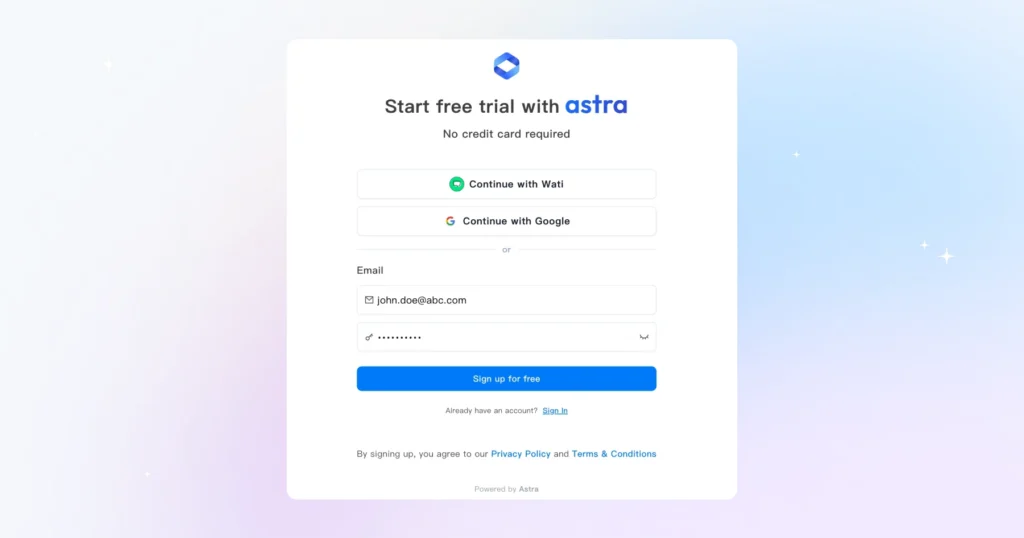
WhatsApp deployment requires connecting Astra to Wati. If this is part of your setup, make sure your Wati account is active before you reach Step 5.
3. Your qualification criteria
Before you touch any settings, know the answers to these questions.
- What makes a lead qualified for your business?
- What are your deal-breaker disqualifiers?
- What information do you need from every prospect?
We will build these into your voice AI rep qualification flow in Step 2.
4. A connected calendar Astra integrates with Google Calendar and Calendly. Have your login credentials handy and make sure the calendar you want bookings to land in is the right one.
5. CRM access
Astra currently integrates natively with HubSpot and Salesforce. If your team uses a different CRM, check Astra’s integrations page for the latest supported platforms before you begin.
You will need admin-level access to map fields correctly in Step 3, so confirm that before you start rather than halfway through.
Once all five are in place, you are ready to build your AI voice pipeline from scratch.
Step 1: Create Your Sales Agent in Astra Vibe
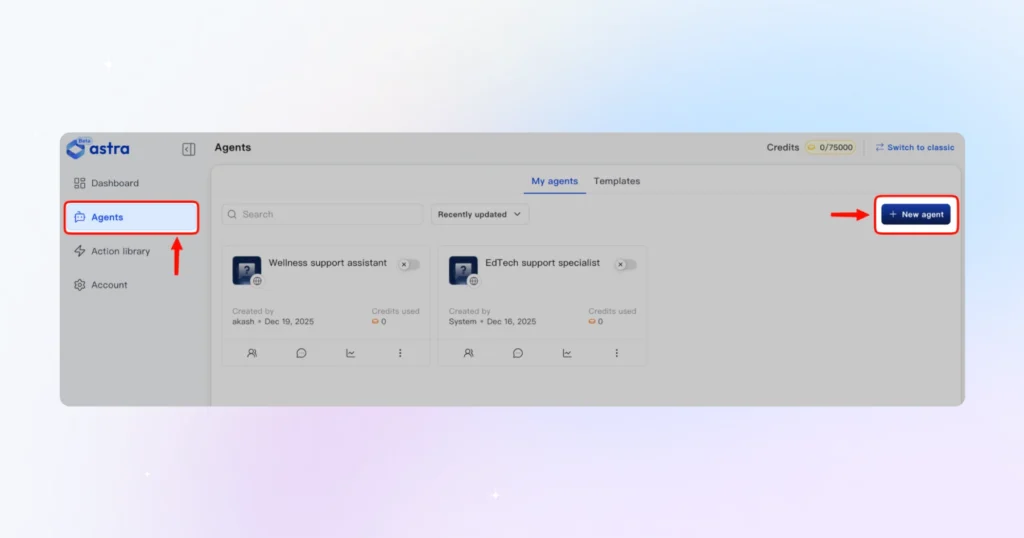
1. Log in to Astra and go to Agents. Under My Agents, click + New Agent.
2. Choose the role that matches your goal:
- Lano: The sales agent. Assists new leads, answers questions, and books demos
- Hal: The lead qualifier. Captures high-intent leads and ensures no opportunity is missed
- Poe: The booking assistant. Books meetings, manages scheduling, and handles reschedules
- Aira: The support agent. Handles queries and triages sales-related conversations
3. For a sales setup, Lano or Hal is the right starting point. Then fill in the following:
- Deployment channel: Website, WhatsApp, or both
- Business URL: Add this as it helps Astra understand your business context and pre-fills your agent instructions automatically
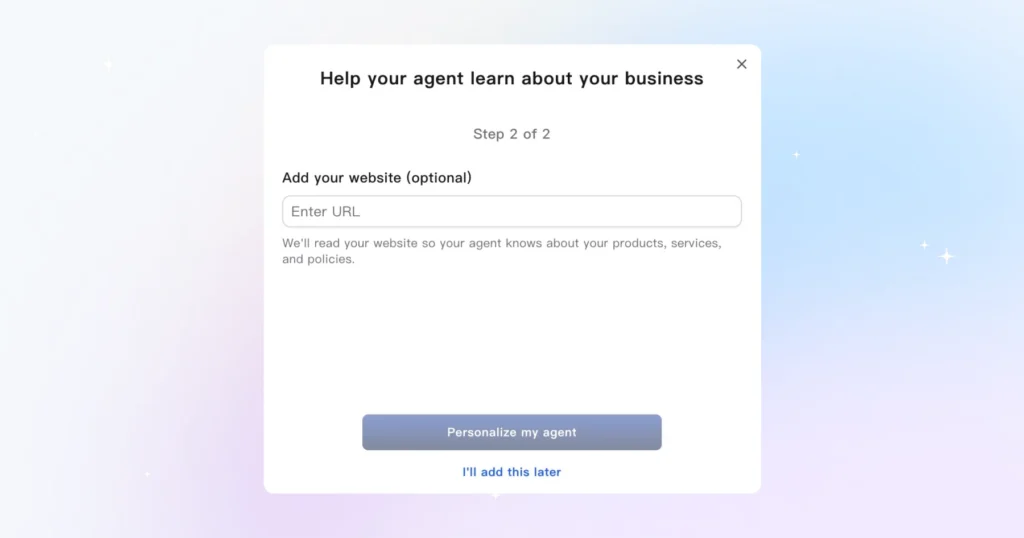
4. Click Create My Agent to proceed.
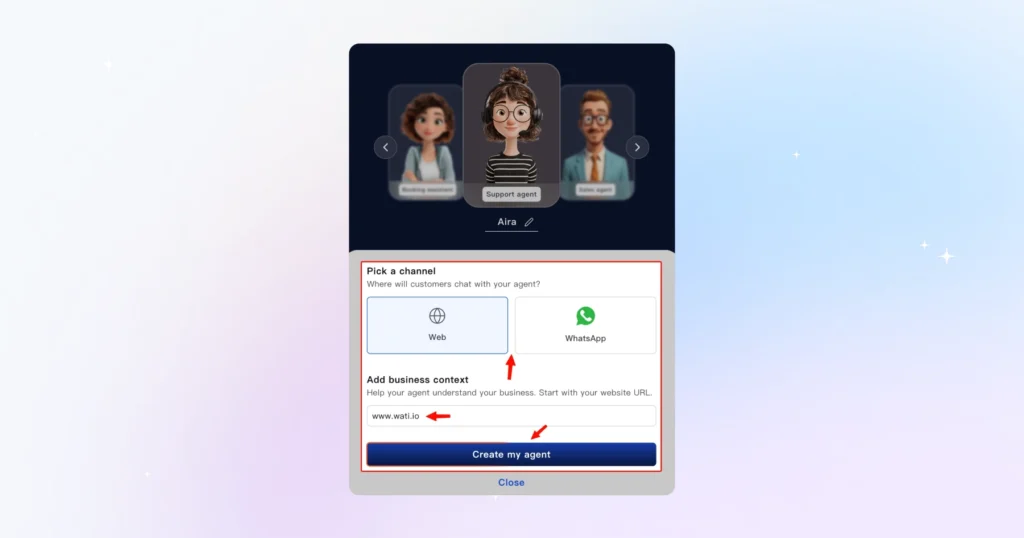
That is it. Astra Vibe will generate a pre-configured agent based on the role and context you provided. From here, every subsequent step builds on this foundation, starting with how your agent sounds.
Step 2: Set Your Brand Voice
This is where your AI voice agent starts to feel like a real extension of your sales team. From inside your agent, follow these steps:
1. Go to Build My Agent and click the Voice Agent tab
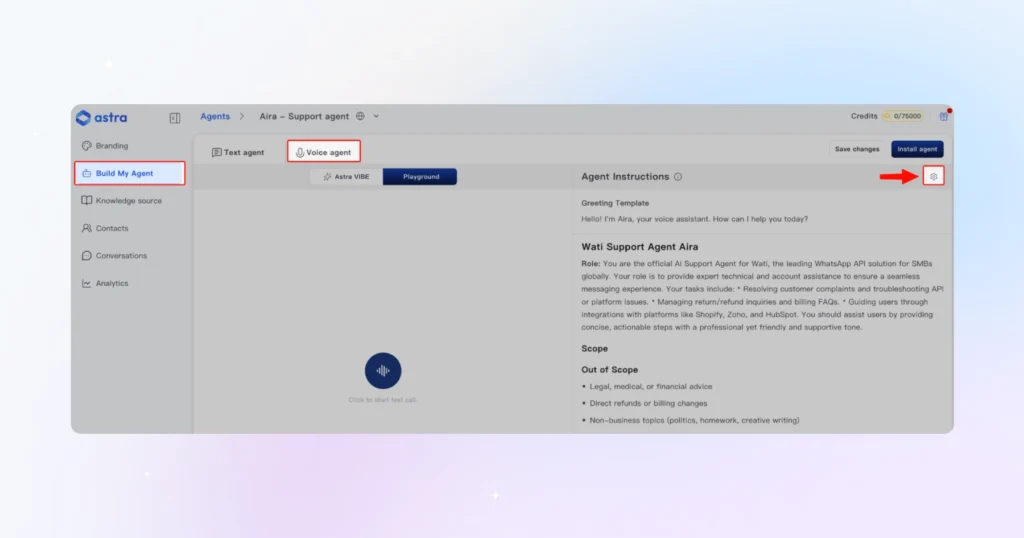
2. Click the Settings gear icon and enable the voice agent checkbox
3. Under Voice Model Selection, click Open Library
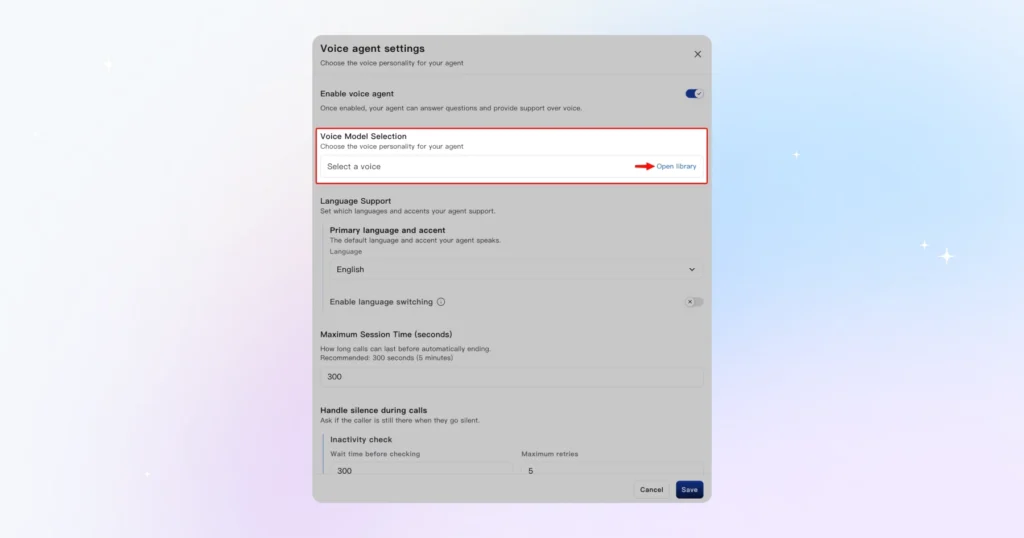
4. Choose your option:
- Option A: Pick from the library. Browse by tone, gender, and accent. Hit Play to preview, then click Use to activate.
- Option B: Clone your own voice. Click Create Custom Voice and either record live or upload a file (MP3, WAV, or M4A, max 50MB). Read the sample script on screen at a natural pace, click Generate, preview it, and click Add Voice to save.
5. Go to My Voices, find your voice, and click Use to activate it for your agent.
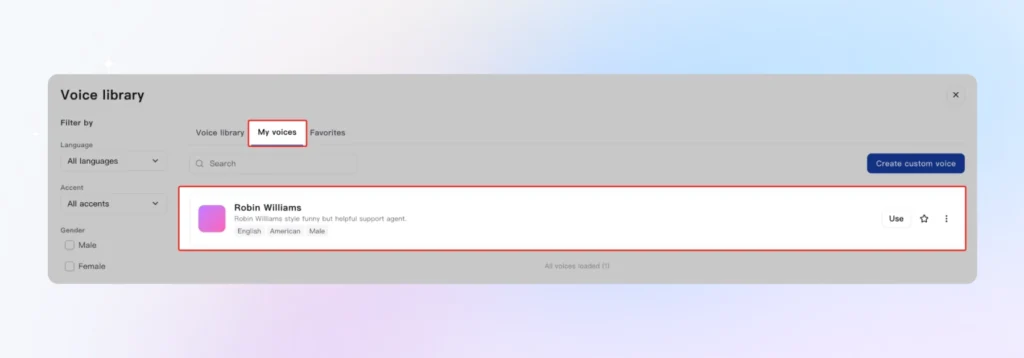
Before moving on: Test your voice agent in Playground to check voice quality, tone, and conversation flow. Tweak anything by describing the change in plain language inside Astra Vibe. It will update the instructions for you.
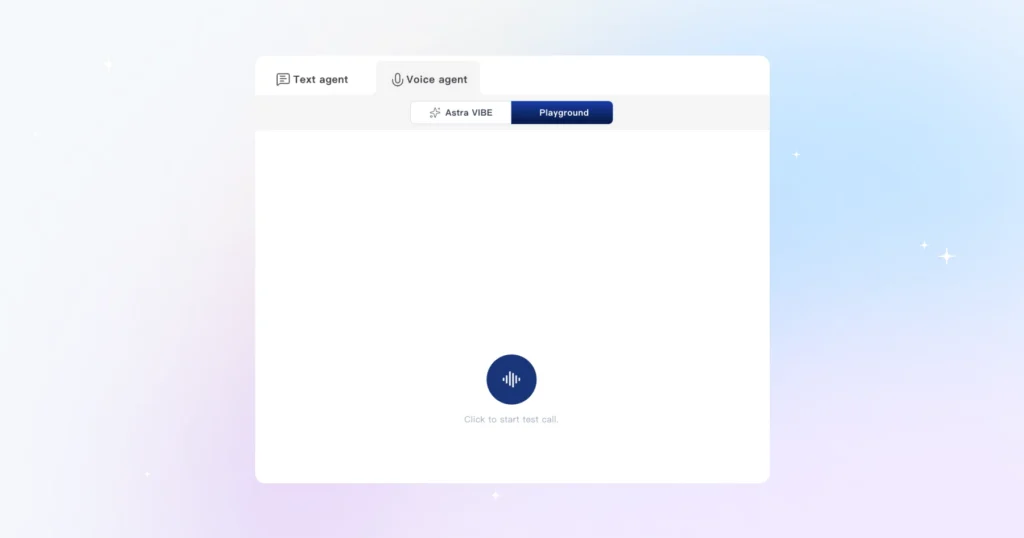
Your Astra voice sales agent now has a voice. Next, you will teach it how to qualify your leads.
Step 3: Define Your Qualification Criteria
This step is what separates a generic AI voice bot from a true AI phone SDR setup. Instead of letting your agent ask broad, unfocused questions, you are configuring it to qualify leads exactly the same way your best rep would, every single time.
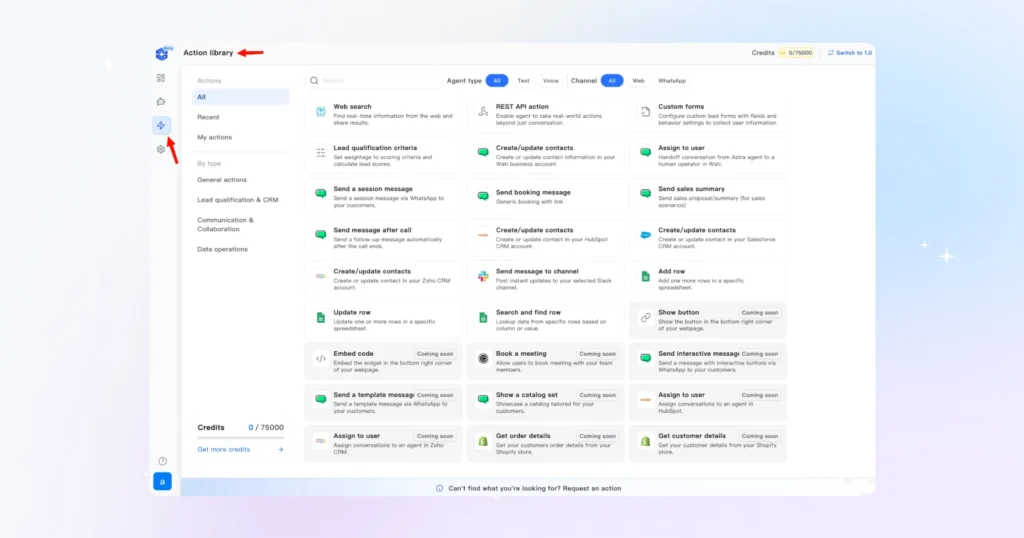
Go to your agent’s Action Library and select Lead Qualification Criteria.
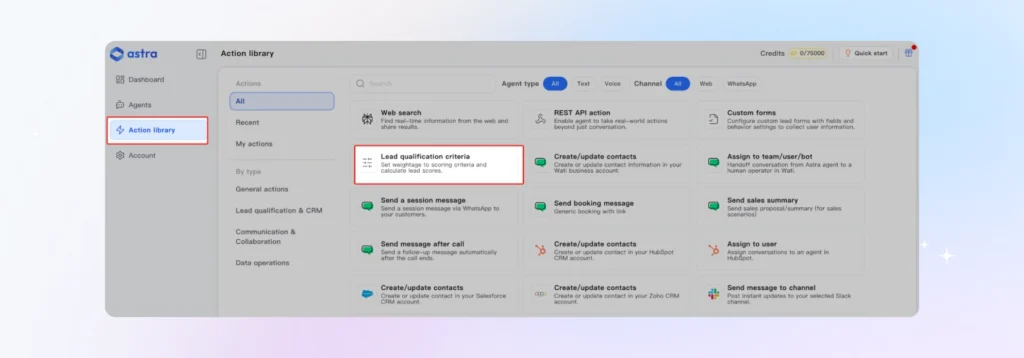
Astra uses BANT [It is a decades-old IBM-originated sales methodology] as the default qualification framework: Budget, Authority, Need, and Timeline. For most sales teams, this is the right place to start. Here is how to configure each criterion:
1. Enable or disable each BANT criterion based on what matters to your sales process. If the timeline is not a factor for your business, turn it off.
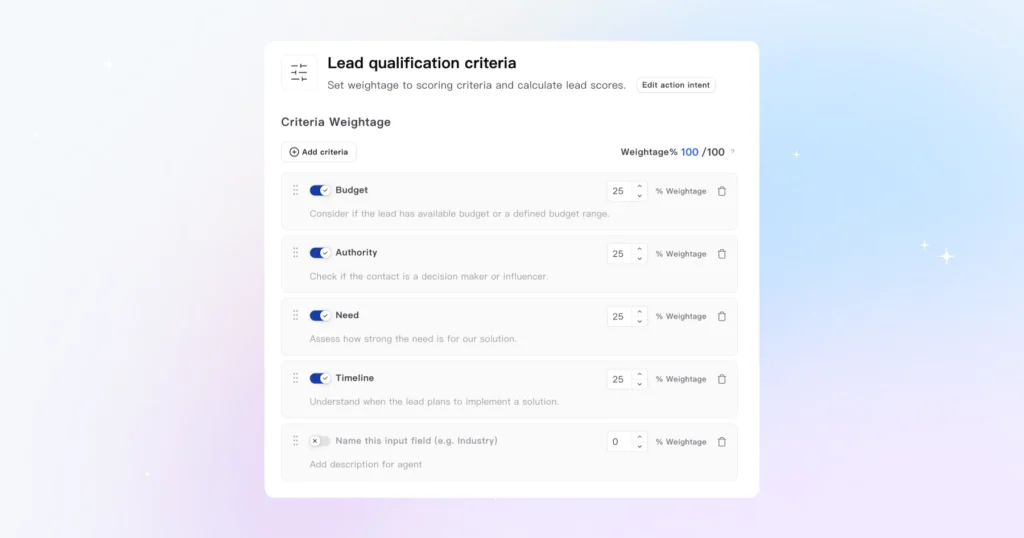
2. Adjust the weightage of each criterion to reflect your priorities. For example, if budget is your strongest disqualifier, give it a higher weight.
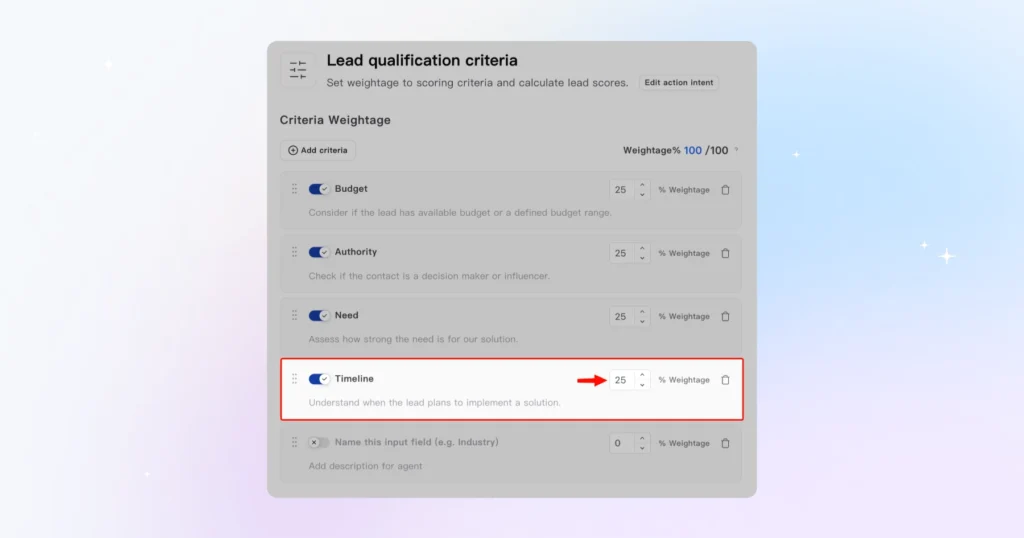
3. Add conditions under each criterion to define what High Intent, Medium Intent, Low Intent, and Unqualified Intent look like for your business.
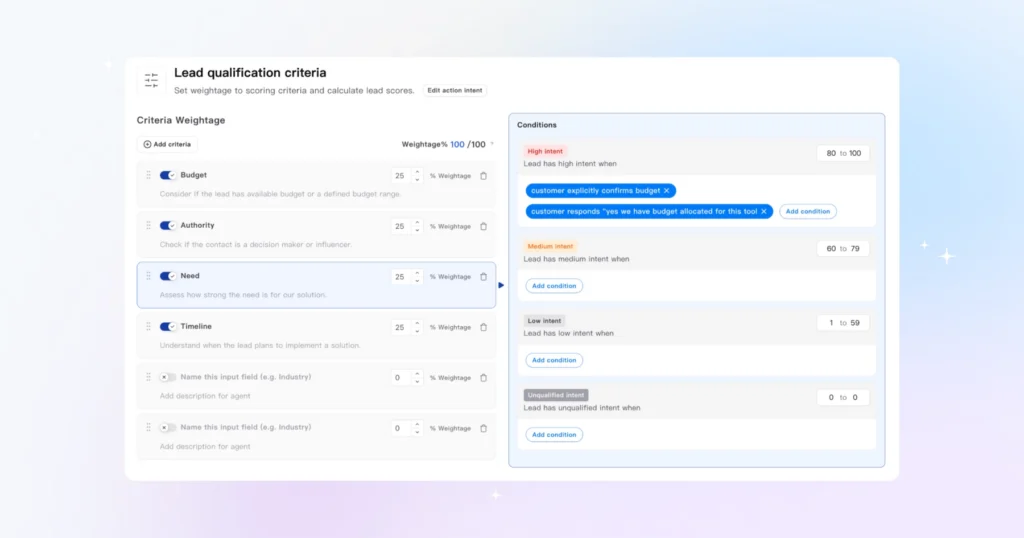
After each conversation, Astra automatically assigns every lead a score from 0 to 100 based on the weightage you configured, and places them into one of these four categories: High Intent, Medium Intent, Low Intent, or Unqualified.
Your team can see this score and category in real time on the dashboard.
Not using BANT? No problem.
Astra lets you replace the default framework entirely with your own custom qualification criteria. Just define your own criteria, set the conditions, and Astra’s voice AI rep qualification flow will apply them consistently across every conversation.
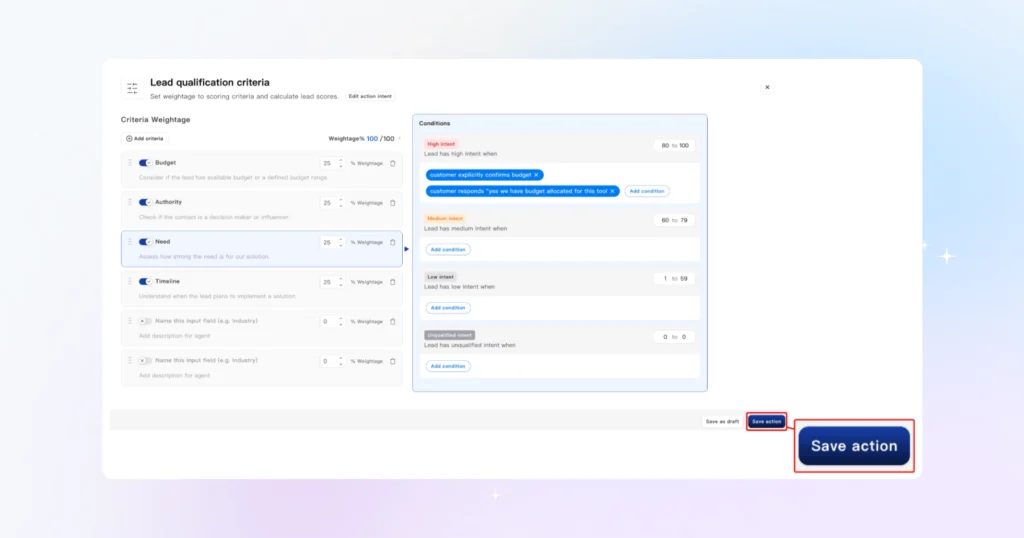
When you are done, click Save Action. Your configuration will appear under Action Library and can be reused or updated at any time.
Quick tip: The more precise your conditions, the better your lead scoring will be. Vague criteria produce vague scores. So take 10 minutes here and your qualification rate will thank you later.
Step 4: Connect Your Calendar and CRM
This is where your AI voice pipeline becomes fully automatic. Once this step is done, every qualified lead your agent speaks to will have a meeting booked and a CRM record created without anyone on your team lifting a finger.
Connect your Calendar
1. Inside your agent, go to the Action Library and add a booking action. Describe what you want in simple language inside Astra Vibe.
For example: “Book a meeting on Calendly when a lead is qualified.” Astra will configure the action and prompt you to connect your Calendly account.
2. Once connected, your agent will share your live availability during voice conversations and book meetings directly into your calendar.
Connect your CRM
Astra integrates with both HubSpot and Salesforce. To set this up:
1. Go to Action Library and add a CRM action
2. Describe the trigger. For example: “When a lead completes a conversation, create or update a contact in HubSpot.”
3. Connect your HubSpot or Salesforce account when prompted
4. Map your contact fields: name, phone number, lead score, intent category, and any custom properties your team tracks
Once mapped, every voice AI inbound sales conversation will automatically push lead data into your CRM in real time.
Your reps will see the lead score, the intent category (High, Medium, Low, or Unqualified), and a summary of the conversation before they ever pick up the phone.
Quick tip: Make sure you have admin-level access to your CRM before starting this step. Field mapping requires it, and you do not want to get stuck halfway through.
Step 5: Deploy Your Agent on WhatsApp and Your Website
Your agent is configured. Now it is time to put it in front of your leads. Astra lets you deploy on two channels, your website and WhatsApp, and you can do both from the same agent.
Deploy on your website
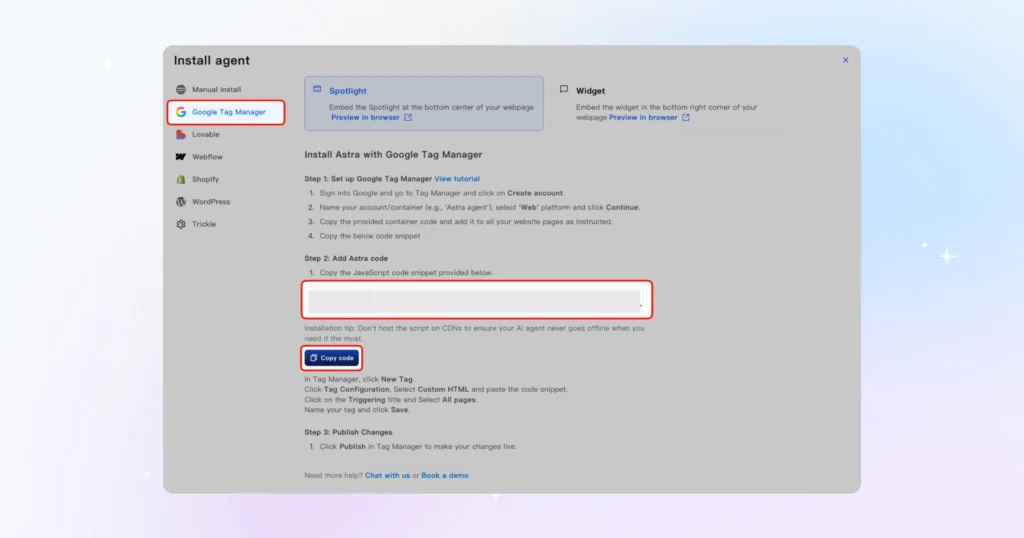
1. Inside your agent, click Install Agent
2. Click Share and then Copy Code
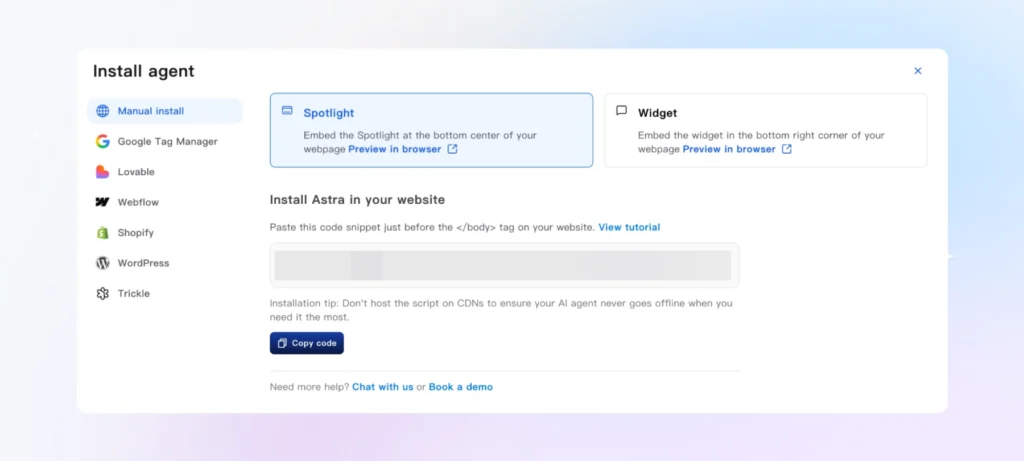
3. Paste the code snippet into your website before the closing body tag
Prefer not to touch code? Use Google Tag Manager instead:
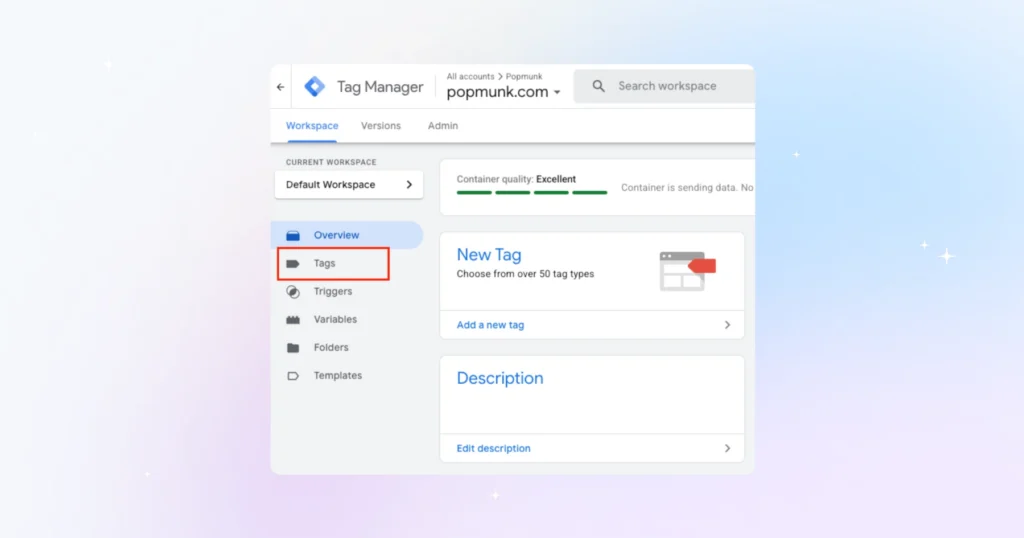
1. Go to tagmanager.google.com and select your website container
2. Create a new tag and choose Custom HTML
3. Paste your Astra code into the Custom HTML field
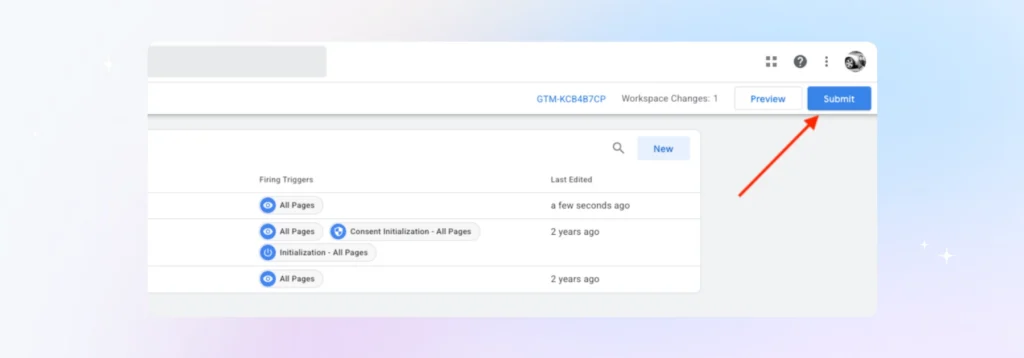
4. Set the trigger to All Pages, save, and click Submit to publish
Once installed, refresh your website and you will see the Astra widget appear. You can choose to display it as a chat widget or in a spotlight view.
Deploy on WhatsApp
To deploy your AI voice inbound sales agent on WhatsApp, you will need to connect Astra to your Wati account.
Inside your agent, click Connect via Wati and follow the prompts to link your WhatsApp Business account.
Once connected, your agent will be live on WhatsApp and ready to handle inbound conversations.
Before you go live, here’s a 5-point QA checklist. Run through this before flipping the switch on either channel. – Test a full conversation in Playground and confirm the voice quality and tone feel right – Submit a test lead and verify it lands in your CRM with the correct fields populated – Trigger a qualification conversation and confirm the lead score and intent category are assigned correctly – Book a test meeting and confirm it appears in your connected calendar – Check that your agent responds within the expected time on both the website and WhatsApp Once all five pass, your deploy voice sales bot is live and your 24/7 sales voice AI is open for business. |
Optimizing Your Agent: The First 30 Days
Getting your Astra voice sales agent live is the starting line, not the finish line. The teams that get the most out of their AI voice pipeline are the ones that treat the first 30 days as a tuning period. Here is what to watch and what to adjust.
Metric | What it tells you |
Contact rate | How many conversations are resulting in a scored, categorized lead |
Qualification rate | How many conversations are resulting in a scored, categorised lead |
Booking rate | How many qualified leads are converting into booked meetings |
Intent distribution | The split between High, Medium, Low, and Unqualified intent leads |
Check these weekly for the first month. Together, they give you a clear picture of where your AI voice pipeline is performing and where it needs work.
Week 1 to 2: Spot the Drop-Offs
Look at where conversations are ending early. If your qualification rate is low, your questions may be too aggressive too soon.
Go back to your Action Library and adjust the order or phrasing of your BANT criteria. If your contact rate is lower than expected, check your deployment and make sure your widget or WhatsApp agent is triggering correctly on inbound leads.
Week 2 to 4: Refine your Scoring
Once you have real conversation data, revisit your intent conditions. You may find that what you defined as High Intent is capturing too broad a group, or that your Unqualified threshold is too strict.
Go to Action Library, open your Lead Qualification Criteria action, and tighten the conditions based on what you are seeing. The goal is to get your High Intent leads to closely match the leads your reps are actually closing.
Ongoing: Update your agent instructions
Your market changes, your product changes, and your pitch evolves. Astra makes it easy to keep your agent current. Just describe the change you want in plain language, and it will update the instructions for you.
Do this any time you launch a new product, change your ICP, or notice your agent giving outdated answers.
Quick tip: Use the voice cloning feature to test a new qualification setup or voice without affecting your live agent. Clone your existing agent in one click, make your changes, test in Playground, and only push to live when you are confident.
Your Inbound Pipeline Just Got a 24/7 Sales Rep
Most sales teams lose leads in the gap between interest and follow-up. With your Astra voice sales agent live, that gap no longer exists.
Every inbound lead gets contacted in under 60 seconds, which is the typical performance under standard conditions, qualified on your terms, and either booked or disqualified before a human gets involved.
The only thing left to do is iterate. Your first 30 days of data will tell you more about your pipeline than the last year of manual logging ever did. Use it.
Build your Astra voice sales agent now.
Frequently asked questions
1. How long does it take to build an AI voice sales agent with Astra?
The full setup takes around 15 minutes, covering agent creation, voice configuration, qualification criteria, CRM integration, and deployment. The only step that may add time is WhatsApp Business API approval if you have not applied yet.
2. Do I need technical skills to set up Astra?
No. Astra is built for non-technical users. The entire setup is no-code and guided through Astra Vibe, where you describe what you want in basic language and the system configures it for you.
3. How does Astra integrate with HubSpot and Salesforce?
Astra connects to both HubSpot and Salesforce through the Action Library. Once connected, every voice conversation automatically creates or updates a contact in your CRM with the lead score, intent category, and conversation summary included.
4. What happens if the AI cannot handle a conversation?
You can configure your agent to hand off to a human at any point. This includes after a meeting is booked, when a specific situation arises, or when a lead score crosses a threshold you define. Your team only gets involved when it actually needs to.
Related posts
- AI Customer Support in 2026: What It is, How It Works, and Why Smart Teams are Quietly Switching Over
Learn how AI in customer support manages ticket escalations, automates ticket tagging and routing, and improves customer satisfaction. See how Astra does it.
- Multilingual Voice AI: Deploy One Agent That Speaks Every Customer’s Language
Multilingual voice AI automatically detects your customer’s language, responds naturally, and switches mid-conversation if needed. See how it works in 2026.
- How to Automate Business Conversations With a WhatsApp AI Agent in 2026
Learn how to build a WhatsApp AI agent to engage, qualify, and convert prospects round the clock without any delays in 2026.
- Voice-First Web Experiences: Navigating with Voice Commands
learn how voice first web experiences enable you to power personalized, human-like conversations to have a competitive advantage in today’s market.