

-

-
-
Solutions
-
Soluções
-
Soluciones
-
解决方案
-
解決方案
-
الحلول
-
Product
-
Produto
-
Producto
-
产品
-
產品
-
المنتج
-

-
-


 Wati for Marketing
 Wati for Support
 Wati for Sales
 eLearning
 E-commerce
 Marketing Agencies
 Healthcare
 No Code Chatbots
 WhatsApp Business API
 Instagram Automation
 Click to WhatsApp ads
 Campaigns
 Team Inbox
 WhatsApp Business Calling
 Wati AI
 Overview
 Library
 Agente de suporte de IA
Astra Voice 2.0: Features, Pricing & How to Get Started Today
Written by:
 Shreya
|
Last updated on:
April 20, 2026
|
Fact Checked by :
Shreya
|
Last updated on:
April 20, 2026
|
Fact Checked by :
 Namitha Sudhakar
|
According to: Editorial Policies
Namitha Sudhakar
|
According to: Editorial Policies

Too Long? Read This First
- Wati’s Astra Voice 2.0 automates 24/7 lead qualification and support on Web and WhatsApp without coding.
- New AI cloning creates natural, branded voices from a quick 60-second audio sample.
- Agents retain context across all channels on Pro and Business plans, ensuring customers never have to repeat themselves.
- Built-in BANT frameworks qualify leads instantly and sync high-intent prospects to CRMs like HubSpot in pro plans.
- Go live with minimum time with tiered pricing options, starting with a free version.
You know that pause. The one-and-a-half seconds of silence before a robotic voice says: “Thank you for calling. Please hold.”
Your prospect knows it too. And the moment they hear it, they have already decided this call is not worth their time.
Astra Voice 2.0 is built on one premise: the first voice a lead hears should sound like your best sales rep, not a call center IVR.
What is Astra Voice 2.0?
Astra Voice 2.0 is an AI agent platform built by Wati that deploys conversational voice agents across web and WhatsApp – no code, no developers required.
By building custom AI agents, you can automate lead qualification, answer FAQ queries, and provide round-the-clock customer service without human intervention.
You can connect Astra directly to WhatsApp, the website, and deploy agents in the channel your customers already use every day.
Voice 2.0 agent personalizes interactions, automates reminders, and initiates quick outreach to build customer trust.
What Is New in Astra Voice 2.0: Key Upgrades From Voice 1.0
If you evaluated Astra’s voice feature 12 months ago and moved on, it is worth another look.
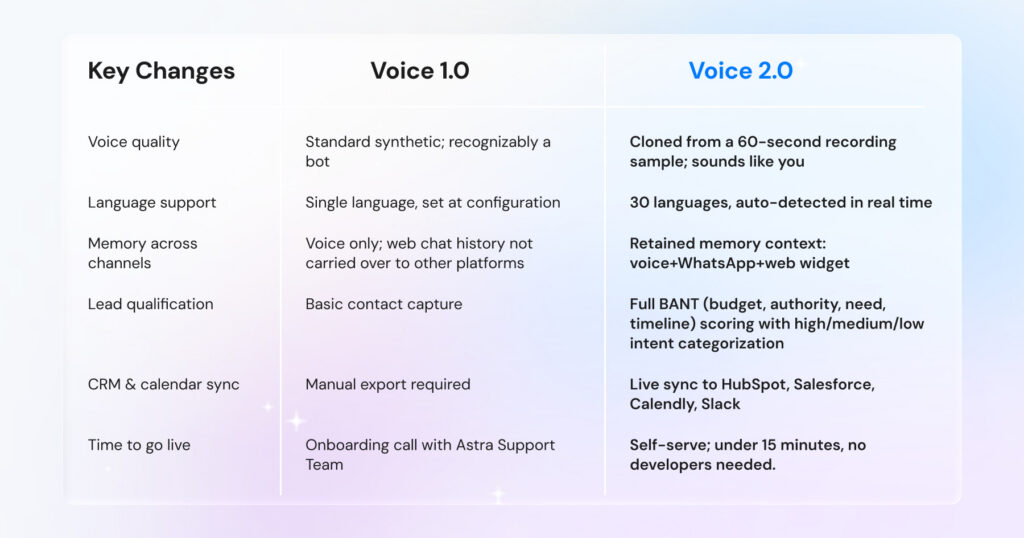
Voice 1.0 had some limitations, whereas Voice 2.0 fixes all of them. It now supports 30+ languages with automatic detection – no separate agent per market, no manual configuration.
Voice cloning allows you to upload a 60-second audio sample and deploy an agent that sounds like a specific person on your team. And the knowledge base accepts uploaded documents, so your agent is trained on your actual product, pricing, and policies from day one.
Setup is self-serve and takes under 15 minutes for web deployment. Here is the direct comparison:
You might have come across many sales tools. Most sales tools have a memory problem. A lead chats with your website agent on Tuesday, follows up on WhatsApp on Friday, and gets asked: “Can you tell us a little about yourself?”
On Pro and Business plans, Astra can remember your chats, which means it has cross-channel memory. Every touchpoint – web, WhatsApp, voice – feeds into a single conversation record. Your agent knows the history before the lead types a word.
Fewer repeated questions mean shorter sales cycles. And shorter sales cycles mean less time between interest and revenue.
8 Astra Voice 2.0 Features That Replace Your Manual Sales Stack
We understand how exhausting handling multiple escalation queries can be. Inability to get back to an inbound lead reduces the SQL (sales qualified lead) pipeline and stagnates brand experience.
Astra’s voice agent handles this smartly. You can design AI agents at scale with automated templates to always meet and greet your prospects instantly.
Here is how Astra Voice 2.0 drives the sales journey for your teams:
1. AI Voice Cloning: Your Best Sales Rep, Available 24/7
Your top sales rep closes more calls than anyone else on the team. You know why? It’s the voice, the pace, the confidence.
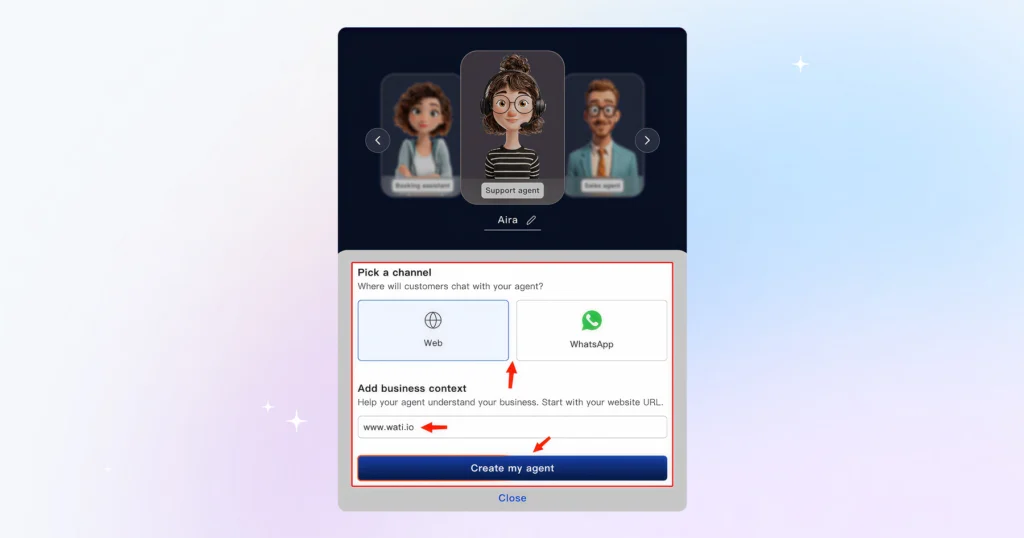
Record 60 seconds of that voice. Astra deploys it at scale, on every call, at every hour, without that rep ever picking up the phone.
First impressions on sales calls are made in seconds. A cloned, familiar voice holds attention. A synthetic one loses it before the pitch begins.
2. Cross-Channel Deployment: One Agent, Every Surface
Your customers are reaching out to you through different channels. They find you on your website, follow up on WhatsApp, and call when they’re ready to buy.
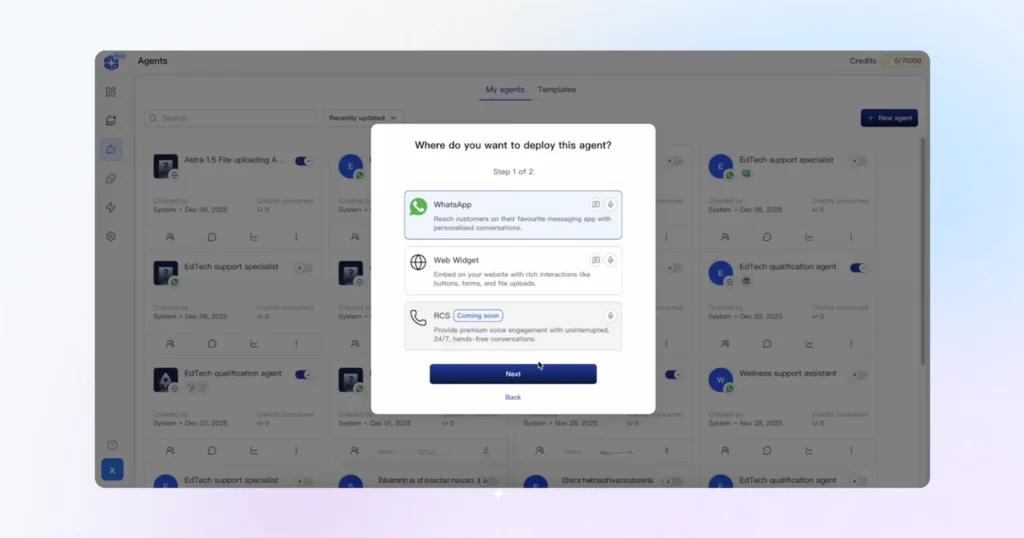
Astra deploys the same agent across all three: website widget, WhatsApp Business API, and voice, all from a single configuration. No rebuilding per channel. No inconsistent handoffs.
Deploy to the web by entering your URL. Deploy to WhatsApp by connecting your Wati API key. Same agent, same logic, both live, which in turn reduces operational time and cost.
3. Contextual Memory: No Lead Starts From Zero
As we mentioned earlier, features differ across channels. When you choose Pro and Business plans, your agent has memory across channels.
Contextual memory, as mentioned earlier, you never lose ground. Astra maintains one conversation record across web, WhatsApp, and voice. A lead who asked about enterprise pricing on Tuesday and calls back on Friday picks up mid-conversation, not from a blank screen.
To make it much more convenient, every call generates an AI summary. Your team inherits full context before they say hello.
4. Lead Qualification: BANT Running in the Background
Your agents aren’t just answering questions; they are using conversational intelligence.
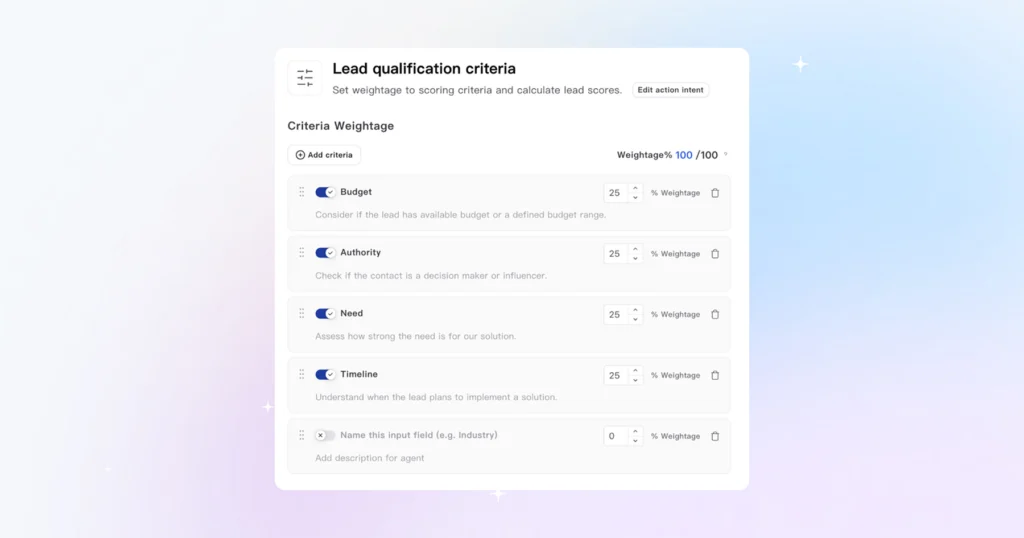
In simple terms, they are scoring every conversation in real time. Astra runs the BANT qualification (Budget, Authority, Need, Timeline) silently during every interaction.
It captures buying signals such as a pricing inquiry, a Click-to-WhatsApp ad response, and an appointment request, and assigns a lead score without interrupting the conversation.
Every lead is classified as high, medium, or low intent. High-intent leads trigger an immediate CRM notification. Your team reaches out before the lead has time to open a competitor’s tab.
B2B and B2C scoring logic differ. Both are configurable. If BANT doesn’t align with your sales cycle, replace it with a custom framework.
5. 30-Language Support: One Agent, Every Market
On the Business plan, Astra detects the language a visitor is speaking and switches automatically, mid-conversation if needed. No separate agent per market. No manual language configuration.
Pro plan supports voice in one language. Free is text only. If you’re selling across LATAM, the Middle East, and Southeast Asia from a single deployment, this is the feature that makes that viable.
6. No-Code Setup: Live in Under 15 Minutes
Web deployment takes less than 15 minutes. WhatsApp requires an existing Wati account. If you already have one, your agent is live in minutes.
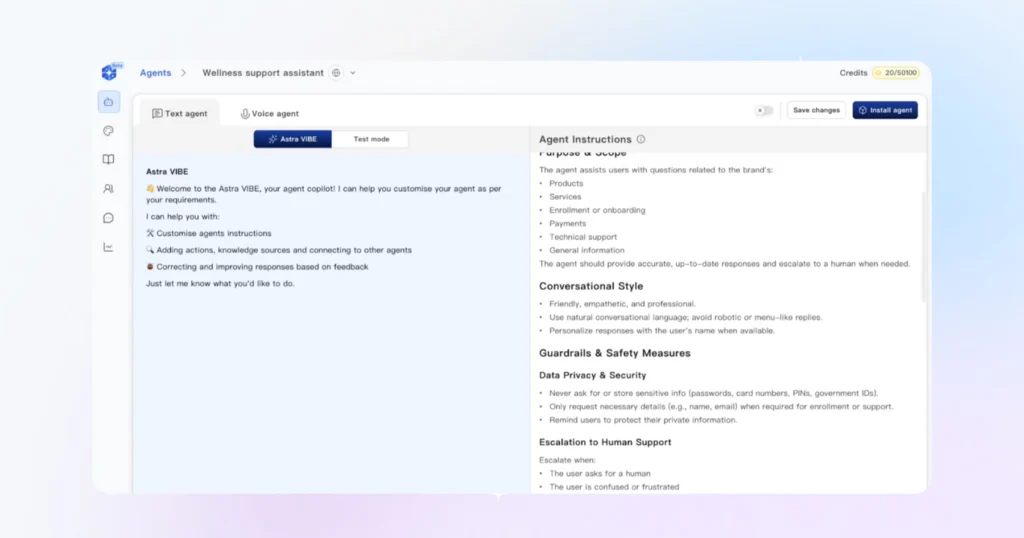
You can start from one of four pre-built templates: sales assistant, FAQ assistant, customer support assistant, or booking assistant.
Enter your website URL. Astra crawls your public pages and builds an initial knowledge base.
In action, you are not building an agent from scratch. You are putting AI on top of what already exists. No developers. No integration calls. No waiting.
7. Live AI Calling to Test Logic
Teams can also test AI calls inside the Astra interface to ensure there are no hindrances during the call.
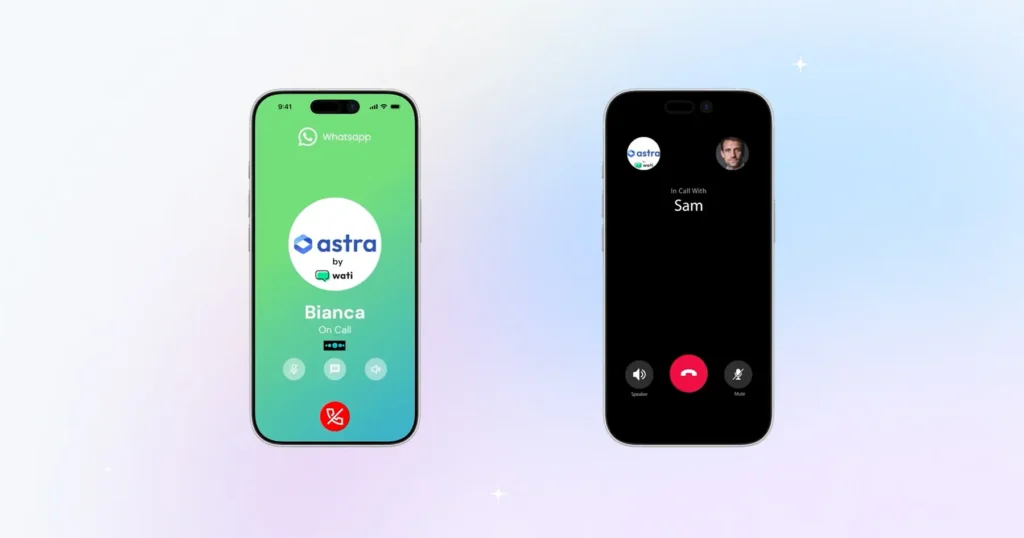
Live testing ensures that the AI agent speaks smoothly on the call and doesn’t say anything inappropriate.
Looking to explore more? Find what suits you from this list of the best voice AI agents in 2026
8. Calendar and CRM Integration
Astra’s Voice 2.0 can instantly book a calendar slot upon confirmation.
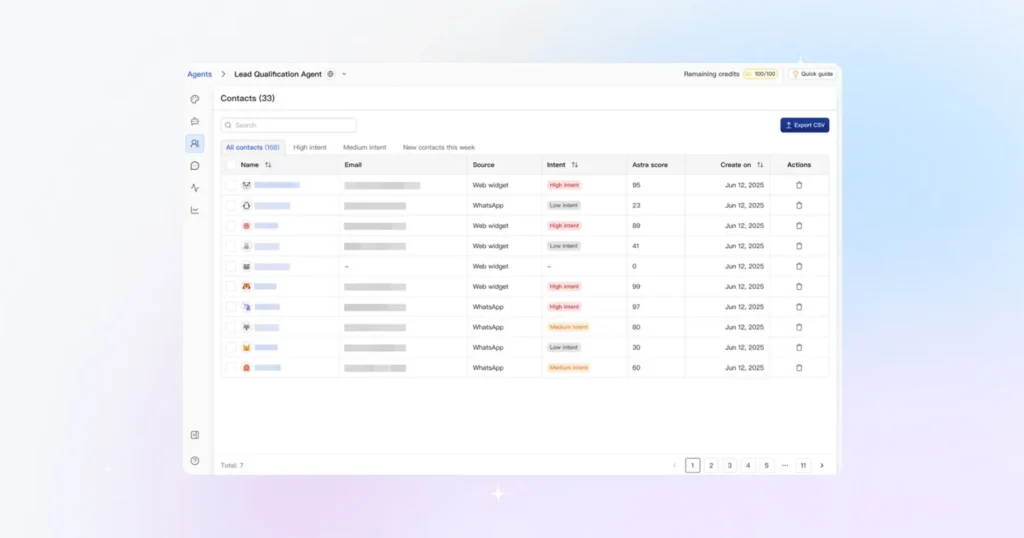
With Astra, you can integrate third-party apps like Calendly or Google Calendar. Any confirmation from your voice agent automatically triggers a slot booking.
Astra connects with HubSpot and Salesforce. You will need admin-level access to map fields correctly in Step 2, so confirm that before you start rather than halfway through.
How to Set Up Your Astra Voice AI Agent in 6 Quick Steps: 15-Min Onboarding
Setting up your Astra agent is a quick and seamless process. You can simply register with an Astra account; no code, no complex developer logic needed.
Before You Begin: Ensure your Wati Account is active before reaching the deployment phase. This prerequisite allows for a seamless connection between Astra and your WhatsApp Business API once your agent is ready.
- Initialize your agent: Log in to the Astra dashboard and click “+New Agent”. Choose a “role-based template”, like Lano for sales or Aira for customer support, and tailor your instructions from there.
- Train your agent: Add “website URL” so that Astra can crawl your public page and automatically build a knowledge base. You can also upload additional documents directly to help the agent learn the brand voice.
- Clone Your Brand Voice: Use the built-in “Test” mode to upload a 60-second audio sample. By analyzing an audio sample, the Astra voice agent will be able to talk and communicate just like your sales rep.
- CRM Integration and deployment: Link essential tools, like Calendly for automated booking and Hubspot or Salesforce, to push leads directly from Astra to CRM. This helps you capture every BANT-approved high-potential lead for instant follow-up without manual entry.
- Deploy and Go Live: Click on “Install agent”. Select where you want to deploy the code (website, CMS like Lovable or WordPress, or Wati). Copy the generated JavaScript code to your website header or connect your Wati account directly via an API key.
- Verification: Once the link is established, your Astra agent’s logic (including the voice cloning and qualification criteria you set up) will be live on your WhatsApp number. It is recommended to test a conversation on WhatsApp to double-check agent logic.
And that’s it! Your 24×7 Voice AI agent is ready to handle inbound calls and establish a quick touch base to embrace high-conversion leads.
For a comprehensive guide on Astra’s lead qualification and CRM field mapping, please refer to our Astra Voice 2.0 for Sales Teams guide.
Astra Voice 2.0 Pricing: What to Expect?
Astra runs on a credit-based messaging system. An AI agent that responds with a PDF or documents costs 3 credits. A voice call costs 5 credits per minute.
Credits on the plan roll over month to month, and you don’t lose what you don’t use.
Each plan focuses on three core pillars: AI Credits (how much the agent talks), Training Data (how much it knows), and the number of Agents.
Below is a price breakdown of every subscription tier for Astra Voice 2.0
- Free Plan: $0/month with availability of 100 credits. Best for early adopters and small businesses.
- Pro Plan: $99/month with availability of 5,000 credits (rollover). Best for growing sales and marketing teams.
- Business Plan: $399/month with availability of 25000 credits. Best for marketing agencies that want high traffic.
Voice 2.0: What Pricing Plan Should You Go For?
Deciding on a plan almost entirely depends on your marketing goals.
If you deal with massive data volumes, go for the business plan. If you are just in the exploratory phase, register for the free trial.
- Free: If you want to Astra on your website with real visitors. No countdown timer. No credit card. Limited to the web, English-only, and form-based lead capture. Good enough to see whether it fits before committing.
- Pro: If you want WhatsApp deployment, a voice agent, BANT-based lead qualification, and HubSpot or Slack integration. The 14-day free trial gives you access to all of it.
- Business: If you’re running multiple agents across different campaigns, need Salesforce, or want a dedicated success manager and white-glove onboarding.
If you ran out of credits, add-on packs are available for $20 for 1,000 additional credits, valid for three months. They apply automatically, so your agent doesn’t pause mid-campaign.
Check a complete breakdown of Astra’s Pricing by clicking here.
Get Started with Your Voice Buddy Today!
By shifting sales to an AI agent, you aren’t just responding “on time”, but also saving your sales resources immensely.
Setting up your AI agent now isn’t a hard, complex task. Deploy your AI voice agent in minutes, personalize the behavior, and you’re good to go!
Get started with Astra Voice 2.0 to embrace the next generation of customer service. Book a demo today!
Frequently Asked Questions: Astra Voice 2.0
Have More Questions? Refer Below!
Unlike the limited Voice 1.0, version 2.0 supports 30+ languages with auto-detection, features high-quality voice cloning, maintains memory across different channels, and offers a 15-minute no-code setup.
Yes, you can record a 60-second audio sample, which Astra then clones to ensure your AI agent sounds like a natural brand representative rather than a robot.
Astra Voice 2.0 integrates directly with WhatsApp and Web widgets, while offering live data sync with HubSpot, Salesforce, Slack, Calendly, and various CMS platforms like Shopify and WordPress.
The AI uses a BANT (Budget, Authority, Need, Timeline) framework to score leads in real-time during conversations, categorizing them as high, medium, or low intent for your sales team.
It uses a credit-based system where text responses cost 3 credits and voice calls cost 5 credits per minute; plans include a Free tier, a Pro tier ($99/mo), and a Business tier ($399/mo).