
Too Long? Read This First
- WhatsApp charges per message, so where and when you send matters. Marketing messages cost more than utility messages in the same market, making message category an important part of your Diwali budget.
- Prioritize high-intent customers first. Start with cart abandoners, recent buyers, high-value customers, and engaged prospects instead of broadcasting to your entire database.
- Use free messaging opportunities strategically. The 72-hour free entry-point window from eligible Click-to-WhatsApp interactions can reduce delivery costs, while October 2026 pricing changes make budget planning more important.
- Use CTWA to turn paid acquisition into WhatsApp conversations. Track cost per conversation, qualified lead, and sale to see whether the channel is actually improving campaign efficiency.
- Measure revenue, not message volume. Cost per qualified lead, cost per sale, revenue per delivered message, and ROAS show whether your Diwali spend is generating profitable results.
Festive WhatsApp marketing can get expensive quickly when every customer gets the same message.
Wati, an AI-powered customer engagement platform, helps businesses to refrain from this situation. Instead of sending the same Diwali offer to everyone, businesses can target the right customers, use the correct message categories, and make the most of free messaging opportunities. This can reduce costs without limiting reach.
This guide shows you how to plan a Diwali marketing campaign, understand how WhatsApp messaging costs work, and identify where your budget is most likely to leak.
You'll also find a practical budget model, an audience-prioritization framework, Click-to-WhatsApp ad strategies, and cost-cutting tactics.
What is a Diwali Marketing Campaign on WhatsApp?
A Diwali marketing campaign on WhatsApp uses broadcasts, automated flows, and ad-driven conversations to reach customers during Diwali's high-intent shopping window.
A B2B Diwali campaign on WhatsApp typically includes:
- Lead generation: Capture opted-in prospects through landing pages, QR codes, LinkedIn campaigns, webinars, and Click-to-WhatsApp ads.
- Lead segmentation: Group prospects based on industry, company size, use case, buying stage, or previous interactions instead of sending the same message to everyone.
- Lead qualification: Use chatbots or AI agents to answer questions, identify intent, qualify prospects, and route sales-ready leads to the right rep.
- Sales engagement: Follow up with high-intent prospects, share relevant resources, schedule demos, and move conversations toward a sales opportunity.
- Pipeline measurement: Track delivered messages, qualified leads, meetings booked, opportunities created, and revenue influenced by the campaign.
A B2B Diwali campaign can run across several stages: pre-event awareness, offer or solution discovery, lead capture, sales follow-up, and post-campaign nurturing.
Separating these stages helps control message volume and ensures paid WhatsApp sends are focused on prospects most likely to move forward.
Why do WhatsApp Diwali Campaigns Overspend?
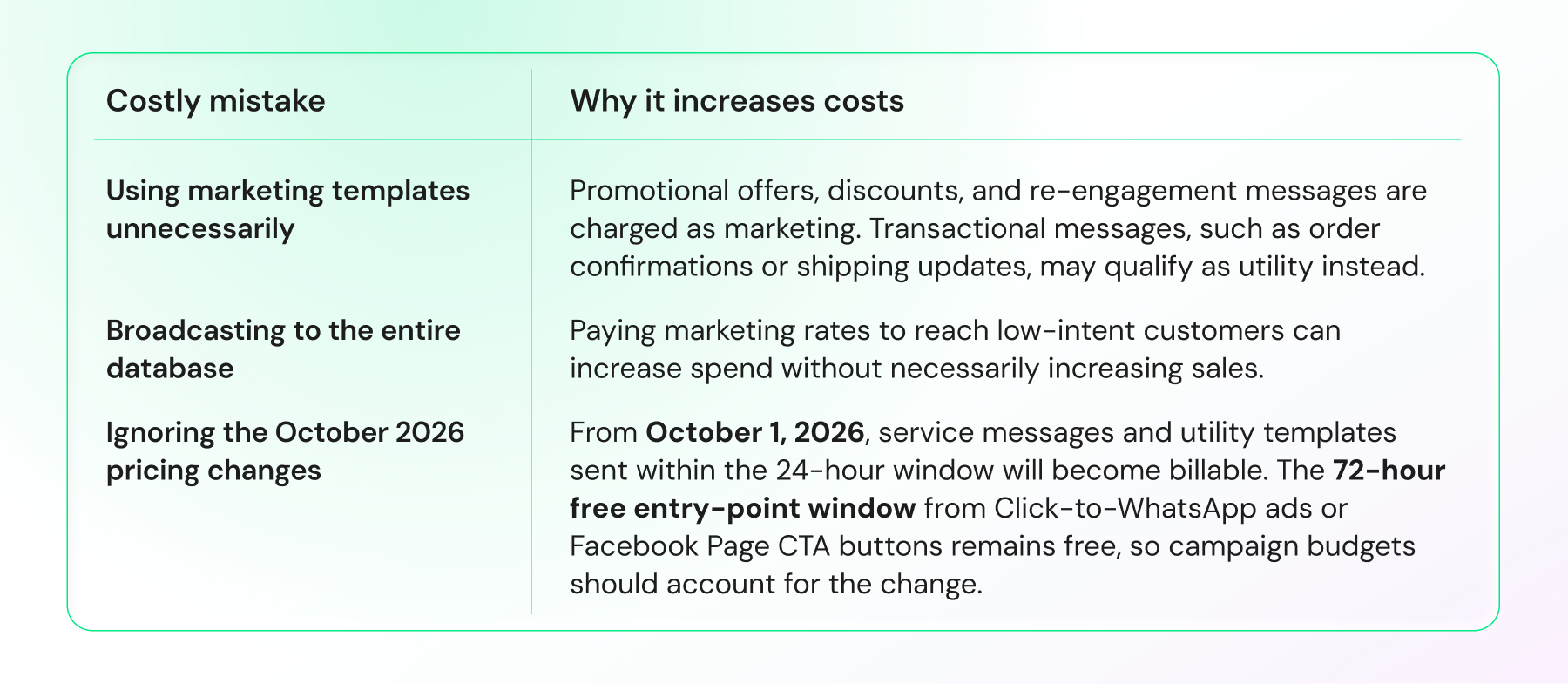
Three things can push up your campaign cost during Diwali:
Meta organizes WhatsApp Business Platform messages into four categories:
Category | What it covers | Relative cost |
|---|---|---|
Marketing | Diwali offers, promotions, re-engagement, discount codes | Highest |
Utility | Order confirmations, shipping updates, appointment reminders | Lower than marketing |
Authentication | OTPs and login verification | Low domestically; higher for cross-border OTPs |
Service | Free-form replies inside an open 24-hour window | Free until October 1, 2026; billable after |
A message's category depends on its purpose and content, not on the specific words in it. An order update is utility, but adding promotional intent can make the message marketing even when it is sent in the same conversation.
Check your message templates before launch. A last-minute promotional addition to what should be a Utility message can bump it into Marketing pricing and inflate your campaign cost.
5 Steps to Prepare for a Diwali WhatsApp Campaign
Planning a Diwali WhatsApp campaign means verifying your account, warming up your number, building a consented list, setting a budget, and segmenting your audience - in that order, before any message goes out.
Step 1: Verify your WhatsApp Business account: Complete business verification and monitor your messaging limit and quality rating.
Step 2: Warm up your number: Start with smaller volumes and increase sends gradually while monitoring delivery and quality.
Step 3: Build a consented contact list: Collect opted-in contacts through web widgets, QR codes, social links, and Click-to-WhatsApp ads. Avoid purchased or scraped numbers.
Step 4: Set your campaign budget: Estimate message volume and account for marketing, utility, service, and free-entry-point messaging costs.
Step 5: Segment your audience: Segment contacts by intent, engagement, or customer value. Prioritize high-intent audiences first.
How Much Should You Budget for a Diwali Campaign?
Your Diwali messaging bill depends on how many customers you target, how often you message them, and how much of your traffic comes through paid versus free entry points.
Use the example below to estimate the difference between a broad broadcast and a more targeted campaign. The figures are illustrative, not a performance benchmark.
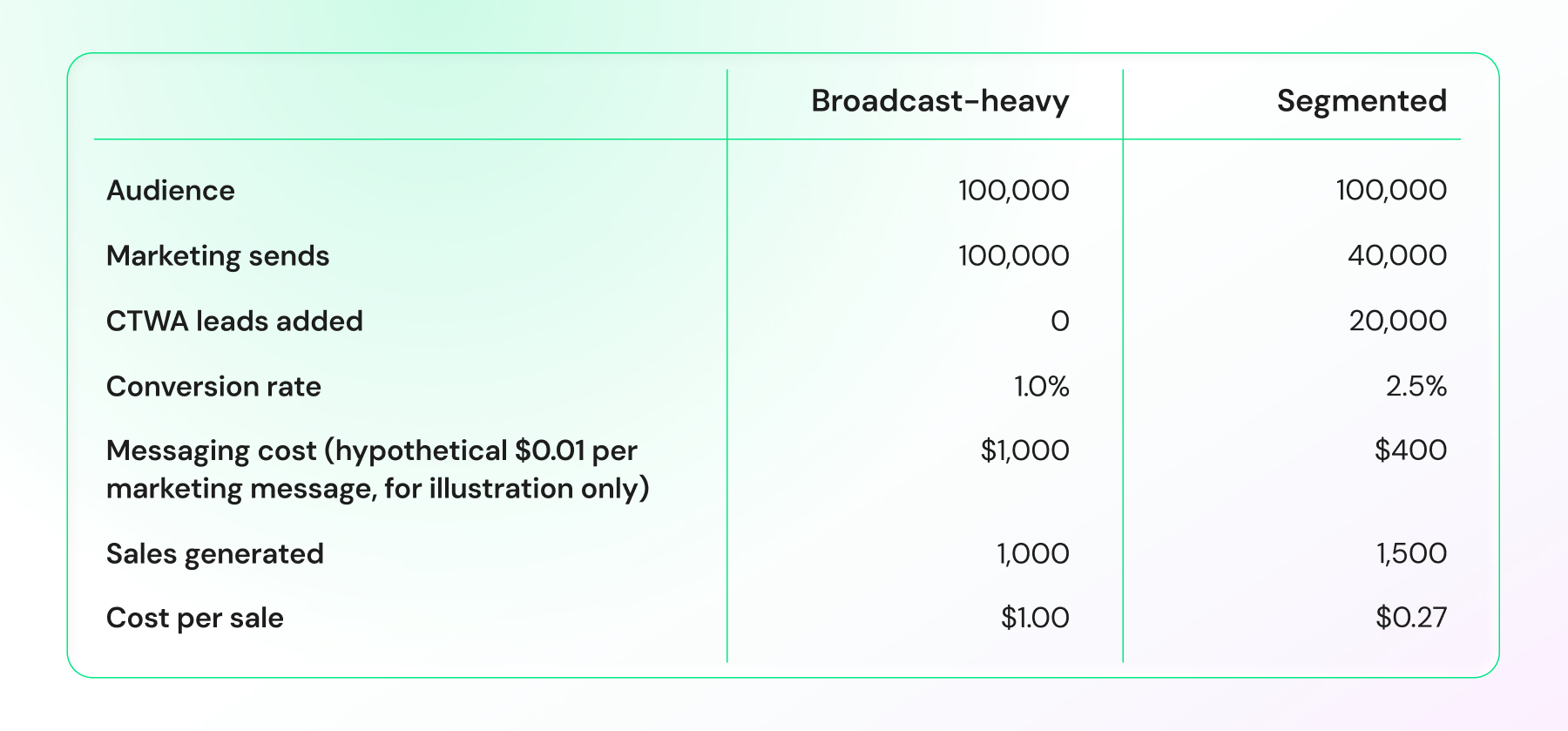
Illustrative calculation using a hypothetical $0.01 marketing-message rate. Actual WhatsApp rates vary by market and message category.
These two scenarios use different conversion assumptions to illustrate possible outcomes. They are not an A/B comparison, so the gap shown is not proof that segmentation alone produces a 2.5x conversion rate.
The example shows how reducing paid marketing sends can lower messaging costs when high-intent customers are prioritized, and additional leads come through Click-to-WhatsApp campaigns.
Replace these assumptions with your audience size, actual message rates, expected conversion rate, and acquisition costs before setting your Diwali budget.
Which Customers Should You Message First?
Who you message first can make or break your Diwali ROI. Use this framework to rank your contacts by purchase intent before you hit send.
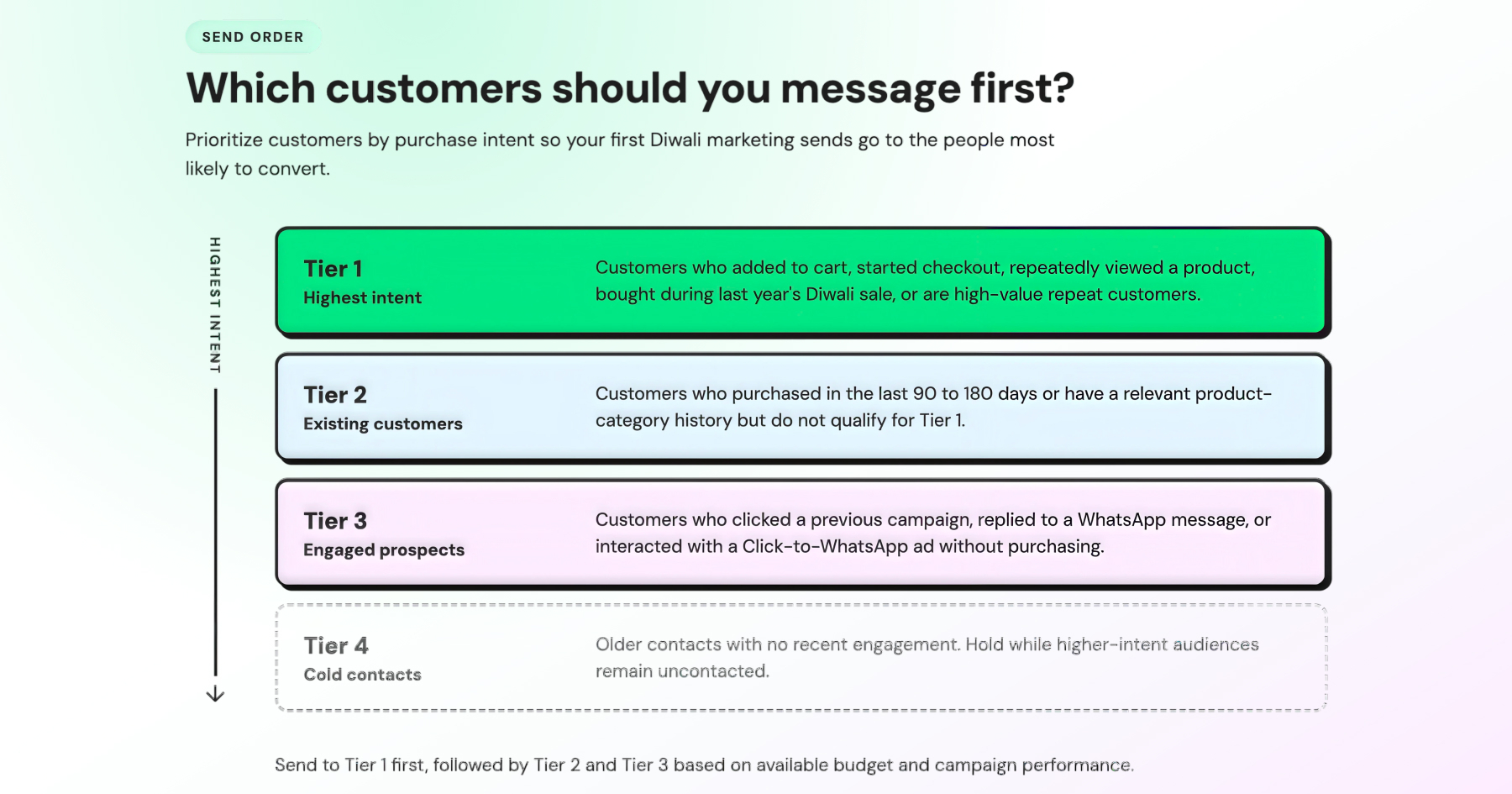
Once you've sent to Tiers 1 through 3, keep an eye on response rates. They will tell you whether it's worth reactivating Tier 4 later in the campaign, or leaving them out this season altogether.
How to Cut WhatsApp Messaging Costs During Diwali?
The fastest ways to cut WhatsApp messaging costs during Diwali are routing traffic through the free 72-hour entry-point window, consolidating multi-day announcements into one template, and auto-stopping sequences the moment a customer converts.
1. Use the 72-hour FET window Route Click-to-WhatsApp ad and Facebook Page CTA conversations through the free entry-point window whenever eligible.
2. Consolidate campaign messages Combine multi-day announcements into fewer templates. For example, use one Limited-Time Offer template with a countdown timer instead of separate “sale starts” and “last chance” messages.
3. Stop drip campaigns after conversion Use a Diwali drip campaign and enable Stop campaign on customer reply so it ends automatically the moment a customer responds or purchases. This prevents unnecessary follow-up messages.
4. Use the right template category Classify templates based on their actual content. Incorrect categorization can increase costs if Meta changes the category during the campaign.
5. Add a fallback for failed messages Use SMS or RCS fallback and auto-retry to recover failed deliveries without unnecessarily sending duplicate WhatsApp messages.
A few mistakes can waste this budget, no matter how well the rest of the campaign is built. Skip generic “Happy Diwali” broadcasts with no offer, irrelevant discounts, repeat reminders after checkout, and full product catalogs when a Carousel can do the job in one message.
How to Use Click-to-WhatsApp Ads for Diwali?
Click-to-WhatsApp Ads take shoppers from a Meta ad directly into a WhatsApp conversation instead of sending them to a landing page.
For Diwali campaigns, this lets you combine paid acquisition with the 72-hour free entry-point window that follows an eligible Click-to-WhatsApp interaction.
Five Ways to Increase Revenue with Click-to-WhatsApp Ads
- Create Diwali-focused ad creative: Lead with a clear offer, product benefit, or deadline that gives people a reason to start a WhatsApp conversation.
- Respond instantly: Automate the first response so prospects receive an immediate reply while they are still engaged.
- Track the full conversion path: Measure conversations, qualified leads, purchases, and revenue, not just clicks. Use these insights to shift budget toward ads that drive sales.
- Personalize follow-ups by intent: Someone who clicked but never replied needs a different follow-up from someone who chatted but did not purchase. Build separate journeys for each stage.
- Compare channels by revenue: Compare Click-to-WhatsApp ads with your other Diwali acquisition channels using cost per qualified lead, cost per sale, and revenue generated, rather than clicks or conversations alone.
How do You Measure Diwali Campaign Spend Efficiency?
Track each Diwali campaign against the cost of reaching customers and the revenue it generates.
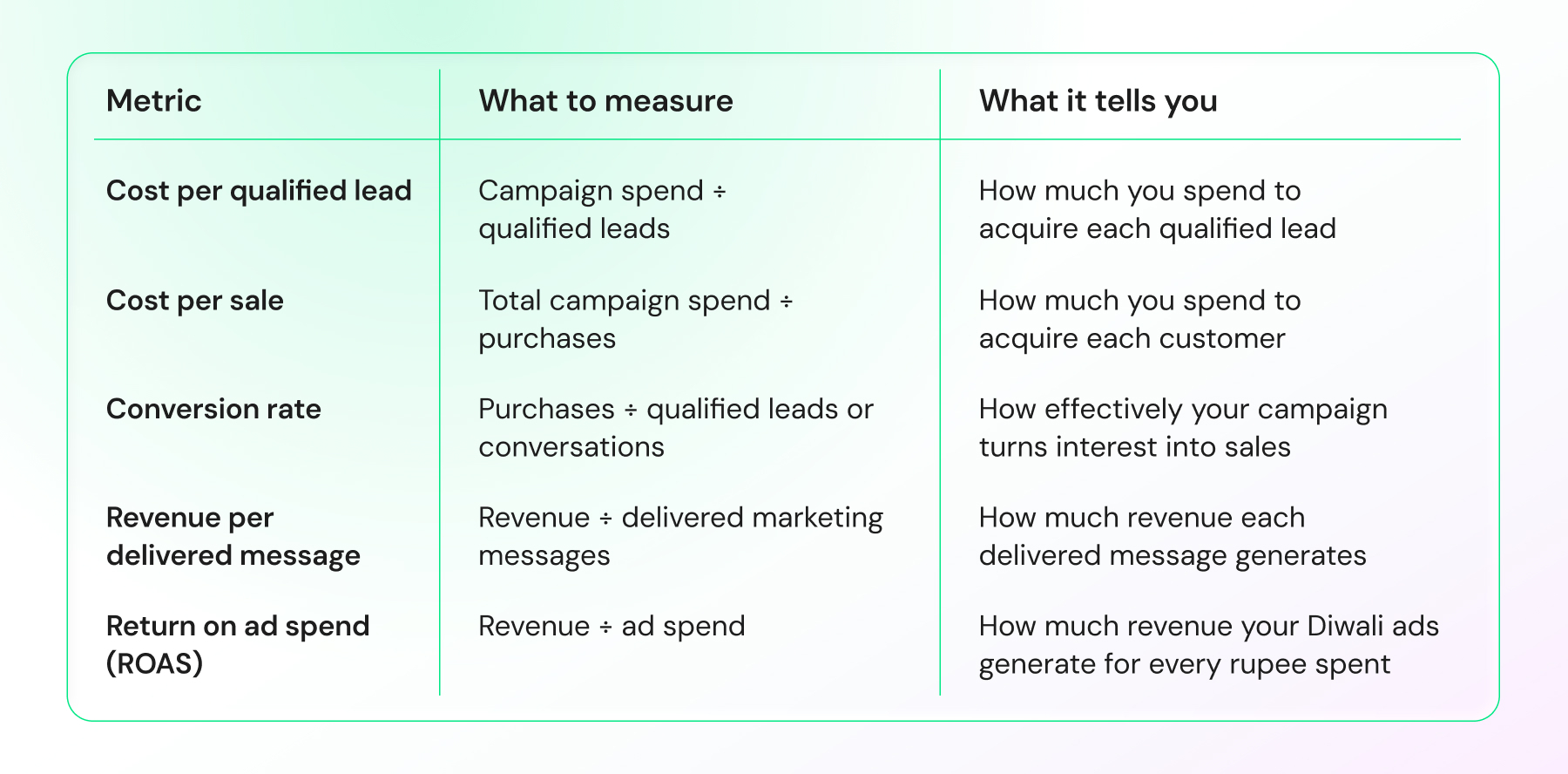
Track these metrics by audience, campaign, and template. When a Diwali offer generates more sales at a lower cost per sale, shift budget toward it instead of increasing spend across every campaign.
The goal is not to send the fewest messages. It is to generate the most revenue from the messages you pay to deliver.
Ready to Run Your Diwali Campaign?
A cost-efficient Diwali campaign starts with the right audience, message category, and budget, not the biggest broadcast list. Prioritize high-intent customers, use eligible free messaging windows, automate follow-ups, and track cost per sale so you can scale what converts without letting messaging costs run ahead of revenue.
Want to put this strategy into practice?
Book a demo with the Wati team and plan your Diwali campaign before the sale window opens.
Frequently asked questions
How much does a WhatsApp Diwali marketing campaign cost per message?
Marketing messages typically range from a few cents in lower-cost markets to well above ten cents in higher-cost markets, based on the recipient's country and message category. Utility and authentication templates cost significantly less in the same market.
What is the cheapest way to run a Diwali WhatsApp campaign?
Route as much traffic as possible through the 72-hour free entry-point window and use correctly categorized utility templates for transactional messages before sending any marketing-rate broadcast. Budget for service replies too - Meta is ending the free customer-service-window waiver for service messages and in-window utility templates on October 1, 2026.
Is a Diwali WhatsApp strategy different for BFSI or EdTech than for retail?
Yes. Send frequency, timing, and compliance emphasis shift by industry. BFSI needs a monthly maximum frequency and strict separation between utility and marketing messages; EdTech suits weekly education drips, and retail supports the highest frequency with urgency-driven formats like Carousel and Limited-Time Offer templates.
What is the biggest mistake that inflates a Diwali WhatsApp bill?
Sending marketing content mislabeled as utility, or the reverse, and skipping the number warm-up phase. Both trigger rate reclassification or spam flags that cut reach mid-campaign while the bill keeps growing.
Related posts
- Instagram Comment Automation: How It Works and How to Set It Up in Wati
Instagram comment automation auto-replies to comments and DMs commenters within seconds via Meta's API. Covers strategy, use cases, and Wati setup.
- Shared Team Inbox for Instagram: A Buyer’s Checklist for 2026
Use this fastest checklist to evaluate any shared team inbox for Instagram, which covers DMs, comments, automation, and multi-channel support.
- How to Send Bulk Messages on WhatsApp Without Getting Blocked
Learn how to send bulk WhatsApp messages without getting blocked. Compare the WhatsApp Business app and API, messaging limits, costs, templates, and best practices for safe, compliant bulk messaging.
- How to Set Up a TikTok Business Account: Step-by-Step Guide
Set up a TikTok Business Account step by step: switch from personal, pick a category, add your profile, and unlock ads and analytics.