
Too Long? Read This First
- WhatsApp API Works When It’s Structured: Automation, templates, and clear flows turn scattered chats into predictable journeys.
- CTWA Converts When Handled Instantly: Fast replies, AI qualification, and clear next steps prevent drop-offs after ad clicks from Meta, Google, and TikTok.
- Templates Drive Every Stage: Utility, marketing, and authentication templates power follow-ups, updates, and reminders.
- Support Becomes Lighter: Automated tracking, returns, COD checks, and FAQs cut a large part of the inbound load.
- Sales Moves Faster in One Thread: Catalogs, guided replies, voice escalation, and personalised follow-ups shorten decision cycles.
- Teams Need One Inbox: A shared workspace keeps context intact and avoids duplicate replies.
- Journeys Grow Over Time: Start with a few high-impact use cases, measure outcomes, and scale your automation from there.
For brands that rely on WhatsApp for marketing, sales, and support, the basic app quickly becomes limiting as conversations grow. Without automation, integrations, and structured workflows, it's hard to respond fast, personalize at scale, or keep the customer journey connected.
The WhatsApp Business API solves this by turning WhatsApp into a complete customer engagement channel. Businesses can capture leads, automate support, send timely updates, and run personalized campaigns from a single platform.
In this guide, we cover 30+ WhatsApp API use cases across sales, support, and marketing, mapped to each stage of the customer buying cycle. We also look at how to prioritize the right use cases for your business so you can start small and scale with confidence.
What is WhatsApp API?
WhatsApp Business API, or WhatsApp API, is an enterprise-grade communication solution designed for medium and large businesses to manage high-volume customer interactions.
Unlike the standard app, it allows companies to integrate WhatsApp with CRMs and helpdesks via Meta’s Cloud API, often accessed through an authorized Business Solution Provider (BSP) to ensure compliance with Meta’s messaging and opt-in guidelines.
Cloud API is now the only option, since Meta retired the On-Premises API in October 2025. The API integrates with existing marketing and productivity applications to build a growth engine for brands.
Businesses can use the WhatsApp API to actively collect opt-ins, link it with virtual numbers, or run a broadcast list, monitor team progress, and automate marketing campaigns for consumers.
How WhatsApp API Use Cases Fit the Customer Buying Cycle?
Think in three stages.
1. Pre–Purchase
People explore options, compare products, check reviews, and ask quick questions. You remove doubts, share clear information, and guide them toward a decision. This can be done through catalogues, listicles, and automated menu replies that you set with the WhatsApp Cloud API.
2. Purchase
People place orders, confirm details, choose delivery slots, reschedule, or complete payments. You reduce friction with fast replies, structured flows, and simple choices through chatbots and automated replies.
3. Post–Purchase
People track deliveries, request returns, share feedback, and look for support. You stay present, close loops fast, and keep the relationship active for future purchases.
You can do this automatically for delivery confirmations. Custom chatbots, tracking systems, etc., are tools and features of the WhatsApp API.
The WhatsApp API use cases below sit across these three stages.
What are the Top Sales Use Cases for WhatsApp API in 2026?
Read on to learn about the key sales use cases for WhatsApp Business API.
1. Lead Capture on WhatsApp
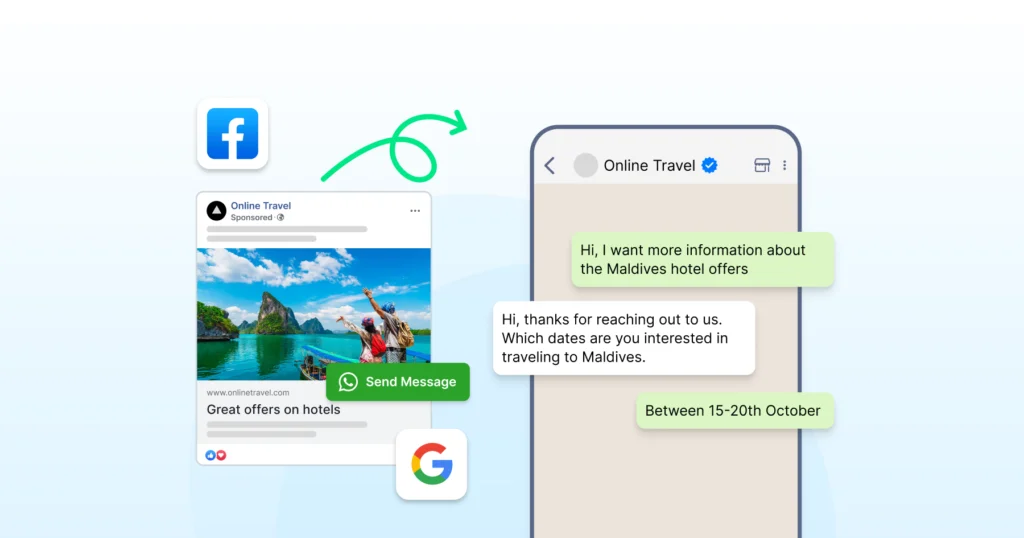
You bring leads from ads, landing pages, QR codes, or website widgets straight into the WhatsApp Business platform instead of pushing them to long forms.
This is supported by Meta, which allows entry points from CTWA ads, QR codes, wa.me links, and website chat buttons.
Why does it work?
- User taps a Click to WhatsApp ad, QR code, or chat widget
- A pre-filled message opens in WhatsApp
- You send an automated welcome message once the user messages you first
- Your CRM system receives the user’s responses if integrated through the API
How does it help?
- Higher completion rates than long web forms, because users stay in a chat app they already use
- Cleaner data because flows collect structured inputs.
- Faster follow-up because teams see chats in real time through the team inbox.
Use this for: lead generation, event sign-ups, trial requests
Further Reading: WhatsApp Lead Generation: The Only Playbook You Need in 2026
2. Lead Qualification Workflows
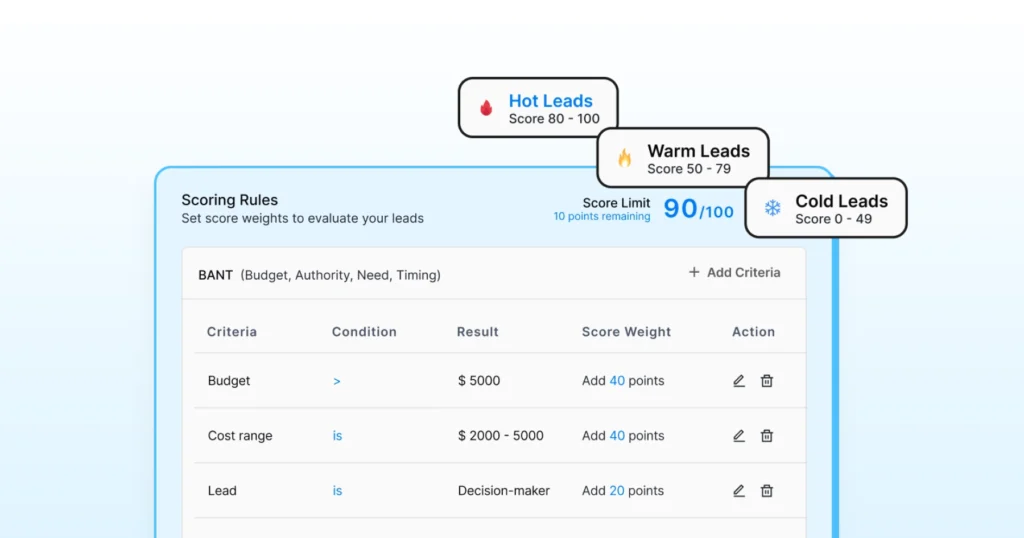
You separate high-intent leads from casual browsers with automated questions. Wati’s Astra can help you with lead qualification.
Why does it work?
- Trigger a qualification flow when a new lead sends the first message
- Ask structured questions like budget, use case, company size, and timeline
- Your system scores the lead based on predefined logic
- Hot leads go to sales, and warm leads stay in nurture flows
How does it help?
- Sales teams talk to leads who fit your ICP
- Marketing gets clearer insights into who engages and responds
Use this when teams say “leads are not a fit.”
3. Product Discovery and Catalog Flows
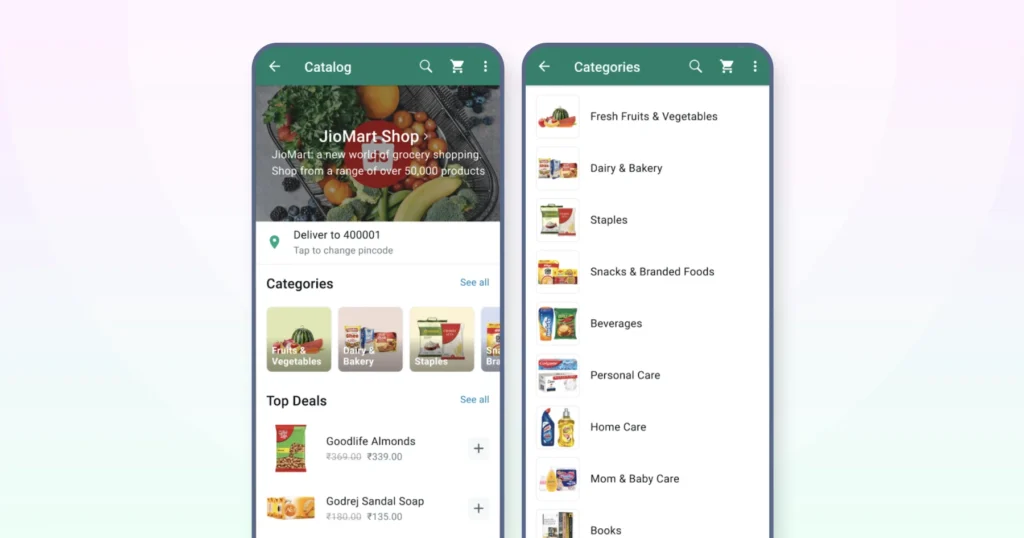
Guide customers to the right product without lengthy back-and-forth and keep the browsing experience simple inside WhatsApp.
Why does it work?
Categories appear through list messages so users can navigate quickly. After choosing one, they see top products with images, short descriptions, and direct links.
In supported regions, WhatsApp Shopping allows users to view catalogs and add items to a cart before being redirected to checkout.
How does it help?
- Repetitive “what do you have in stock?” chats start to drop off.
- Product information stays consistent, and catalog updates reflect automatically without extra effort.
Great for ecommerce, fashion, electronics, and home decor brands.
Also Read: WhatsApp Shopping 2026: Are You Ready for What’s Coming Next?
4. Guided Selling With Reply Buttons
Turns open-ended questions into clear choices that move customers forward with less friction.
Why does it work?
- A prompt such as “What are you looking for today?” appears with quick buttons.
- Each selection opens a brief flow to capture preferences for size, color, time slot, or region.
- At the end of the sequence, the chat is handed off to an agent, or a payment or checkout link is shared, depending on the user’s path.
How does it help?
- Chat length stays short, typing is reduced, and next steps stay clear and structured for the customer.
- Works well for insurance, banking, healthcare, and education.
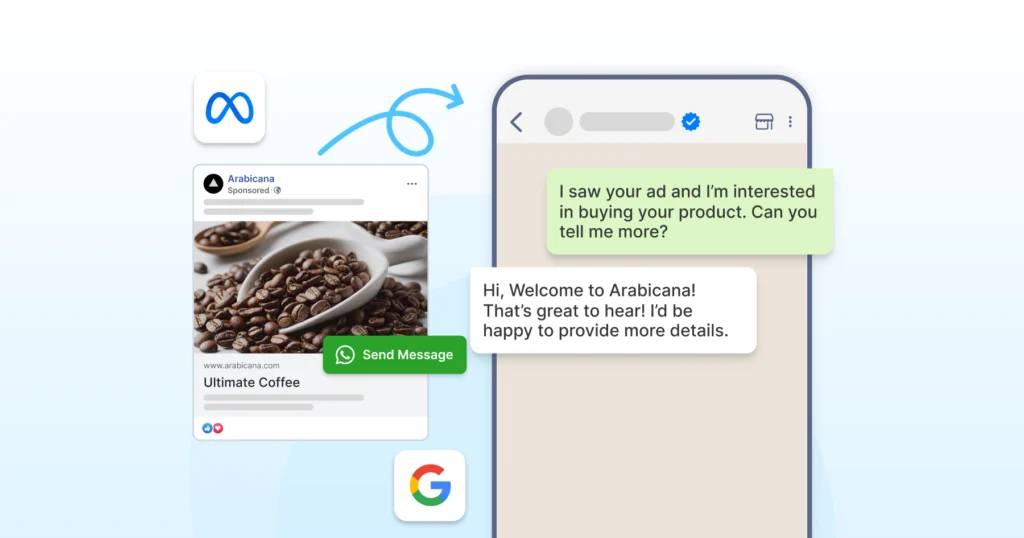
5. Automated Follow-Up From Click to WhatsApp Ads
Enable automated replies when someone taps a Facebook or Instagram Click-to-WhatsApp Ad, keeping the conversation active from the first message.
Why does it work?
- Map each CTWA campaign to a specific entry-point template
- Ask one qualifying question that matches the ad context
- Capture basic details and suggest the next step
- Route the chat to an agent when the user continues the conversation
How does it help?
- Higher potential for conversions from an ad click
- No cold start where users type “hello” and drop off
Use this for enquiry-driven campaigns, lead generation, and event promotions.
Further Reading: How to Run Click-to-WhatsApp Ads?- Setup, Event Tracking, and Industry Insights
6. WhatsApp Business Calling
WhatsApp Business Calling allows eligible businesses to escalate chats to voice calls within the same conversation, subject to availability and Meta approval.
Why does it work?
- Escalate a chat to a WhatsApp call with one click.
- Call context remains linked to the conversation thread, with visibility depending on the API provider and CRM setup.
How does it help?
- Complex objections resolve faster
- Trust increases during high-value decisions
- No context loss between chat and call
Works best for sales closures, demos, and consultations.
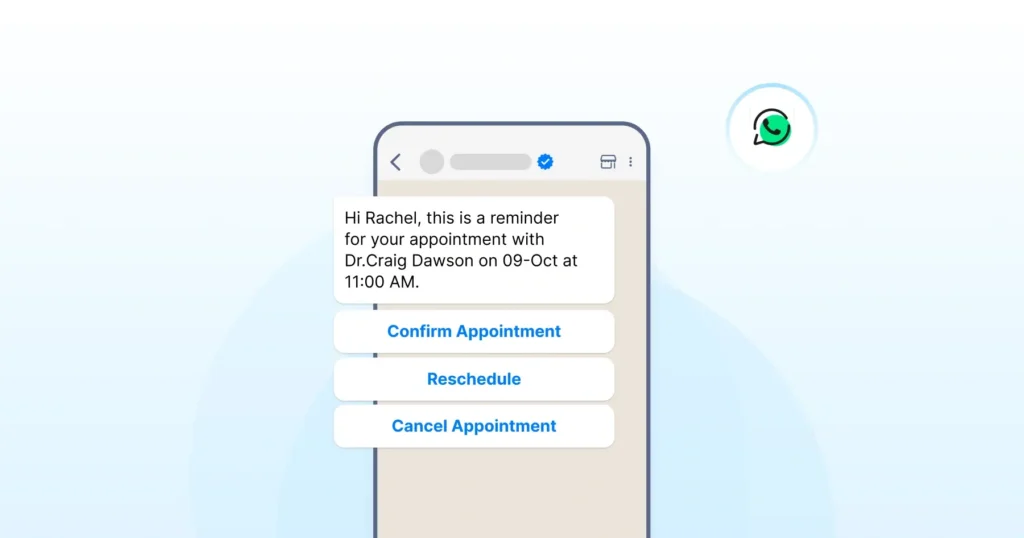
7. Sales Appointment and Demo Booking
Schedule demos, store visits, or consultations inside WhatsApp without email or phone coordination.
Why does it work?
- Ask the user to choose a date or time window from your meeting link
- Confirm the booking with a utility template that includes key details
- Send timely reminders, such as 24 hours and 1 hour before the slot, using approved templates
How does it help?
- Expect fewer no-shows due to clear reminders
- Less manual coordination for sales and support teams
Works well for B2B demos, clinics, salons, test drives, and property visits.
8. Multiple WhatsApp Numbers and Coexistence
Growing teams often outgrow a single WhatsApp number. Multiple numbers let businesses organise conversations by function, region, or brand. Coexistence allows teams to continue using the WhatsApp Business App while the API runs in parallel, enabling gradual migration without disruption.
Why does it work?
Run multiple WhatsApp numbers under one workspace. Use coexistence to keep the WhatsApp Business App active while the API runs in parallel.
How does it help?
- Separate numbers for sales, support, and regions
- Smooth migration without disrupting live chats
- Better load distribution across teams
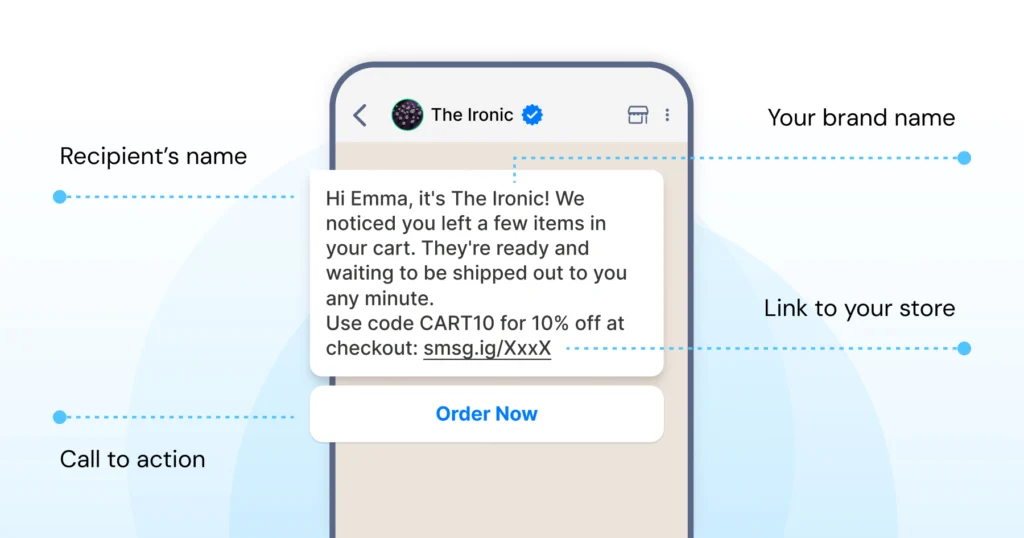
9. Abandoned Cart Recovery
Re-engage users who added items to their cart but left before completing the purchase. It brings them back into the buying journey with a reminder and removes small doubts that often prevent checkout.
Why does it work?
- Track when a user adds items but does not check out.
- After a set time, send a compliant WhatsApp template to remind them.
- Include the product name, image, and checkout link.
- Add a simple reply button so users can ask quick questions before paying.
How does it help?
Recovers lost intent and clears small doubts that often block the final step.
Send these messages only to users who opted in and follow approved template categories.
Also Read: Best WhatsApp Abandoned Cart Recovery Messages to Win Back Lost Sales
10. Price Inquiries and Instant Quotations
Handle pricing questions in a structured, professional manner rather than relying on long, untracked chats. Give users clear answers fast and keep the entire enquiry-to-quote process organised inside WhatsApp.
Why does it work?
- Collect key details, including product type, quantity, location, and timeline.
- Share a clean breakdown with valid details, and add a “Talk to sales” button for custom or large requests.
How does it help?
Speeds up responses for repeat queries and keeps a clear record of what was quoted and when.
Ideal for logistics, printing, manufacturing, and event services.
11. COD Order Verification
Verify cash-on-delivery orders before dispatch to reduce fake or low-intent purchases and protect delivery efficiency.
Why does it work?
- Trigger a verification template when a COD order is placed.
- Ask the user to confirm the address and delivery window, and include buttons such as “Confirm”, “Edit address”, or “Cancel order”.
- Ship only after confirmation and sync the response back to your order management system.
How does it help?
Fewer rejected parcels, lower last-mile effort, and a better experience for genuine buyers who receive clear alerts.
Useful for e-commerce brands in COD-heavy regions.
12. Upsell and Cross-Sell After Purchase
Introduce relevant add-ons or upgrades after a purchase in a way that feels helpful and personalised, not promotional.
Why does it work?
- Send a friendly post-delivery check-in using a marketing template.
- If the user shows interest, suggest logical add-ons and share buttons such as “Add to cart” or “View details”.
- Keep message frequency in check to maintain trust and avoid over-communication.
How does it help?
Build on the fresh intent from the recent purchase and keep recommendations relevant, not generic blasts.
Effective for accessories, service add-ons, extended warranties, and bundles.
What are the Support Use Cases of the WhatsApp API?
Now, let’s get into the support use cases of the API.
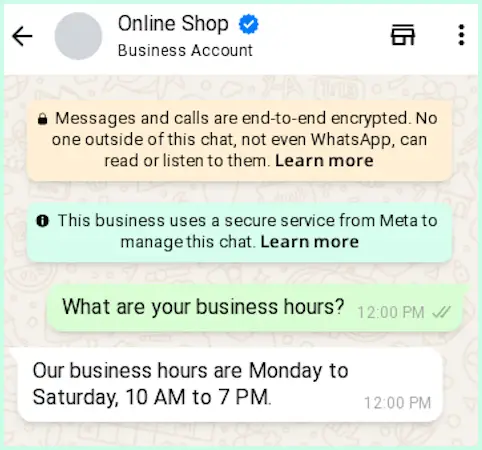
13. 24×7 Automated FAQ Replies
Deliver instant answers to common questions even when teams are busy or offline, keeping support responsive round the clock.
Why does it work?
- Build a menu for top queries, including shipping, refunds, order status, pricing, and basic features.
- Create an FAQ bot to recognise common phrases and match them to the correct responses.
- When the question needs human input, escalate the chat to an agent.
How does it help?
- Faster replies for most users
- Consistent answers across all common queries
- Lower workload for agents who handle only complex cases
Quite useful during campaigns, sales periods, and seasonal spikes.
14. SMS Fallback for Critical Messages
Not every user is reachable on WhatsApp at all times. SMS fallback ensures important messages still reach customers when WhatsApp delivery fails, or adoption is low. However, the SMS fallback has to be provided by the BSP; Wati has an SMS fallback system.
Why does it work?
- If a WhatsApp message fails, the system automatically triggers an SMS with the same intent.
- This is commonly used for OTPs, alerts, and time-sensitive updates.
How does it help?
- More reliable delivery for critical notifications
- Better reach in low-WhatsApp markets
- No manual retries needed
15. Ticket Creation Inside WhatsApp
Turn chat conversations into structured tickets without pushing users to email support or fill external forms.
Why does it work?
- When a user reports an issue, send a short message to collect details such as the order ID, screenshots, and additional information.
- Push this information into your helpdesk or project tool as a ticket and share the ticket ID back with the user on WhatsApp.
How does it help?
- Clean handover between chat and support tools
- No loss of context between teams
- Clear tracking for every issue raised
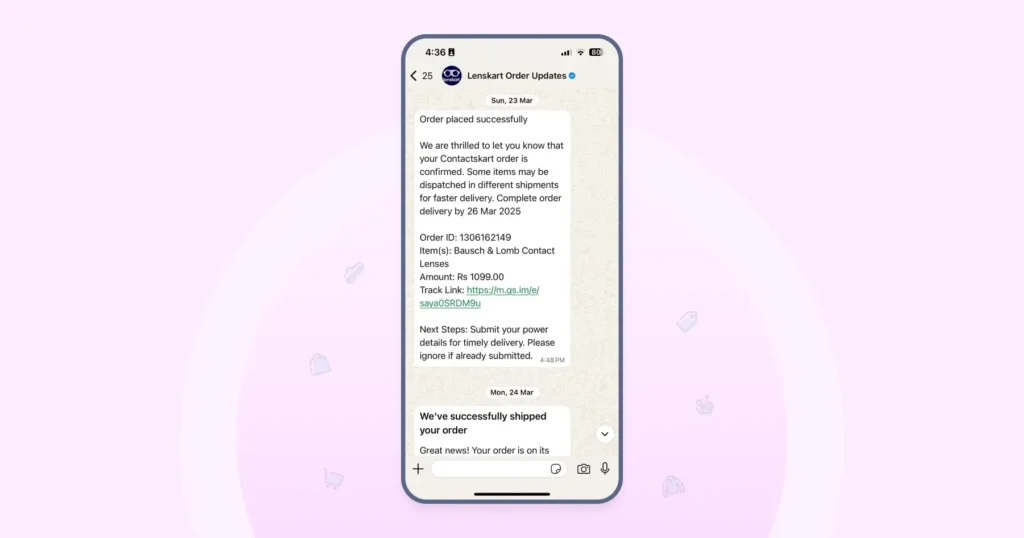
16. Order Tracking and Shipment Updates
Keeps customers informed at every stage of the delivery process so they do not flood support with “Where is my order?” messages.
Why does it work?
- Trigger a utility template when an order is packed, shipped, delayed, or out for delivery.
- Include the tracking link, expected delivery date, and any useful status notes.
- Let users reply with options such as “Reschedule” or “Change address”, and sync their responses back to your logistics or order management system.
How does it help?
- Lower inbound ticket volume
- Better trust because customers stay informed
- Improved last-mile operations for delivery teams
Strong use case for e-commerce, D2C, and grocery delivery.
17. Returns and Refunds
Standardise the return and refund process so customers move through each step without confusion or repeated follow-ups.
Why does it work?
- Allow customers to start a return request via WhatsApp.
- Collect the reason, photos, and product details through short messages.
- Share clear eligibility rules and send status updates as the request moves through review, pickup, and refund stages.
How does it help?
- Fewer frustrated customers who feel ignored
- Clear records for finance and operations
- Faster resolution when all details come in upfront
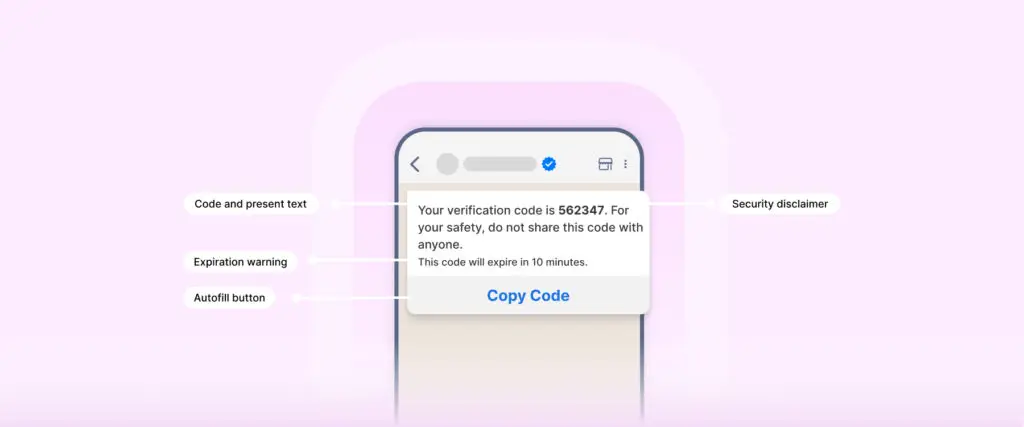
18. User Authentication and OTP Delivery
Secure logins and transactions by sending verification codes or links via WhatsApp, giving users a reliable, familiar channel for authentication.
Why does it work?
- Send one-time passwords or links using authentication templates.
- Set short expiry rules on your backend and use simple flows for device verification or 2FA checks.
- Each step stays compliant with WhatsApp’s authentication category requirements.
How does it help?
- Higher visibility of OTPs on a channel users already check regularly.
- Less friction for users who already rely on WhatsApp
Strong fit for fintech, banking, trading, healthcare, and SaaS logins
Further Reading: How to Send OTP on WhatsApp-Complete Setup Guide
19. Multi-Agent Team Inbox on One Number
Enable multiple agents to handle customer chats from a single WhatsApp number without confusion or overlap.
Why does it work?
- Route chats based on topic, language, region, or workload.
- Show full conversation history so each agent sees context.
- Use tags, notes, and assignment rules to keep replies organised and clear.
How does it help?
- No duplicate replies
- Faster handling during busy periods
- Clear ownership and accountability for every chat
Essential once your team grows beyond a few support agents.
20. Warranty Registration and Service Reminders
Support users after a purchase by helping them register products and receive timely reminders for warranty expiry or scheduled services.
Why does it work?
- Ask customers for the product serial number, purchase date, and a photo of the invoice.
- Store these details in your CRM.
- Send reminder messages before the warranty expires or when a service check is due, and include quick links to book visits.
How does it help?
- Better post-sale engagement
- Higher service usage and fewer missed checkups
Strong fit for appliances, electronics, automobiles, and industrial equipment
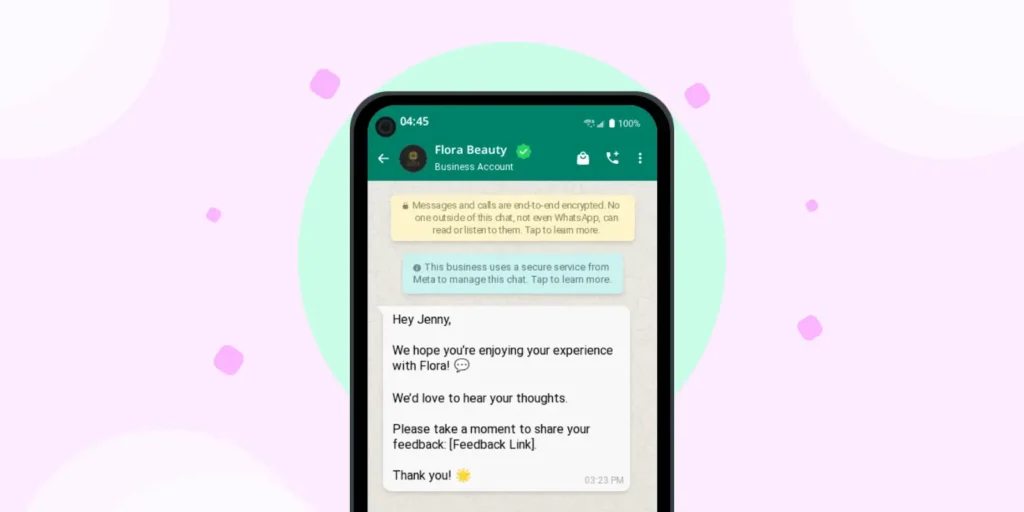
21. Feedback and CSAT Collection
Collect feedback after support interactions or product deliveries to help teams improve the experience.
Why does it work?
- Send a short survey once a ticket is closed, or an order is delivered.
- Keep the format simple
- Tag low scores for quick follow-up and track feedback trends by channel, agent, or issue type in your CRM.
How does it help?
- Early alerts when service issues appear
- Clear data to improve scripts, policies, and training
- Consistent insights into customer sentiment without long surveys
22. Wati AI for Agents
Live conversations can be long and complex, and agents often have to scroll through history, switch languages, or judge tone while customers wait. AI support in the inbox reduces that load by helping teams stay consistent, accurate, and responsive while handling more conversations.
Why does it work?
Wati AI is an umbrella of AI tools built for your team. With Wati AI, you can use:
- Ask Wati AI: Get quick answers about your account by simply asking a question.
- Wati AI Agents: Hand off routine tasks that run in the background. Nothing goes out until an admin approves it.
- AI Conversation Summary: Catch up on long threads in seconds.
- AI Translate: Reply to customers in their own language.
How does it help?
- Faster support responses
- Consistent message quality
- Easier handling of long or complex chats
What are the Top WhatsApp API Use Cases for Marketing?
Keep reading to understand the use cases of the API for marketing.
23. New Product Announcements
Share new product launches and feature updates with opted-in users to keep them informed.
Why does it work?
- Segment users by interest or product category.
- Prepare a media-rich marketing template with an image, a clear benefit line, and a strong CTA.
- Send updates at a sensible frequency and track replies or questions so your team can see what users care about.
How does it help?
- Can bring in higher engagement than one-way ads
- Receive direct feedback from customers on messaging and positioning
Useful for D2C brands, SaaS feature rollouts, and course or program updates.
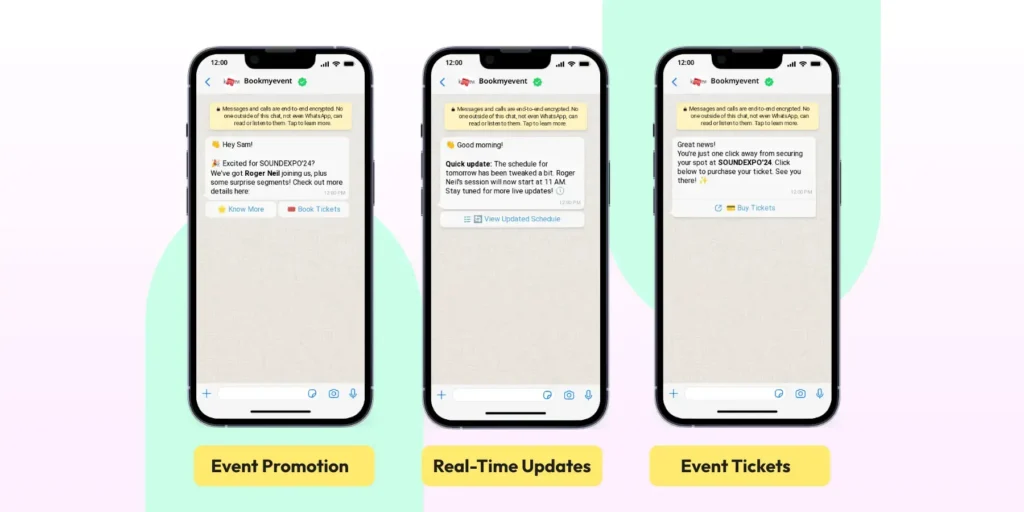
24. Event Promotions and Reminders
Improve attendance for webinars, workshops, and in-person events by keeping participants informed.
Why does it work?
- Collect sign-ups through WhatsApp or forms that sync into your system.
- Share event details and calendar links.
- Send reminder messages using approved templates and prior user opt-in before the event and on the day it starts.
- After the session, follow up by sharing recordings or links to other resources.
How does it help?
- Expect Fewer no-shows due to reminders
- Smooth communication without relying on email
A strong fit for B2B webinars, training sessions, and community events.
25. Back In Stock and Price Drop Alerts
Notify customers when products they follow are in stock or when prices change, helping them act at the right moment.
Why does it work?
- Allow users to opt in through a “Notify me on WhatsApp” option on product pages.
- When inventory updates, send a marketing template with the product image and a direct buy link.
- Maintain a sensible message frequency to keep alerts helpful and not intrusive.
How does it help?
- Captures demand that would otherwise be lost
- Keeps updates relevant to each customer’s interests
A strong fit for high-demand products, limited editions, and seasonal products.
26. Loyalty Program Updates
Bring your loyalty or rewards program into WhatsApp so customers can easily track and use their benefits.
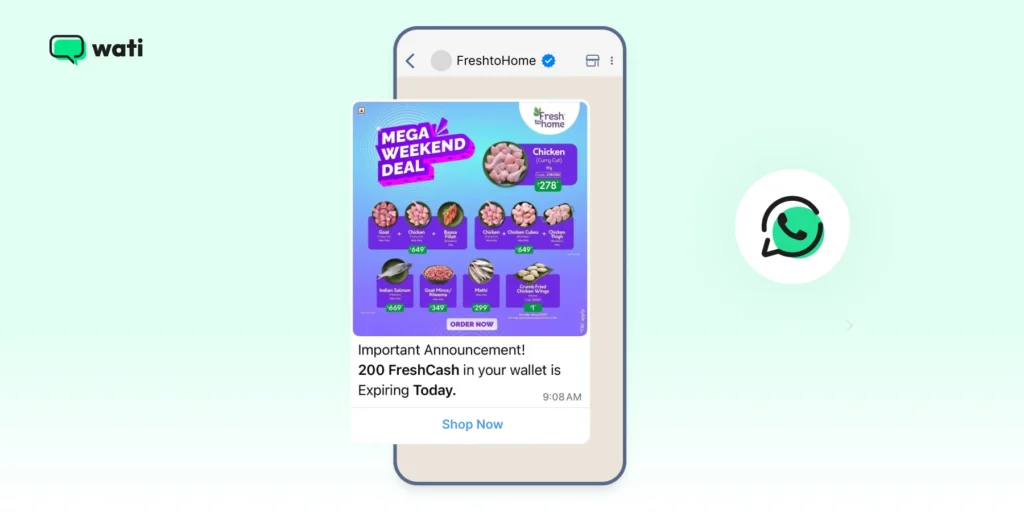
Why does it work?
- Sync user profiles and points data with your CRM.
- Send balance updates using utility templates and personalised offers using approved marketing templates with opt-in.
- Let users redeem points or check perks through simple menus or quick replies.
How does it help?
- Higher usage of loyalty benefits
- Stronger relationships with repeat buyers
Ideal for retail, F&B, travel, beauty, and hospitality brands.
27. Re-Engagement for Dormant Users
Reach out to inactive users with relevant, value-driven messages to prompt them to take action.
Why does it work?
- Segment users by last activity date.
- Share helpful content first, such as tips and how-to guidance.
- When users show interest, follow up with offers or invitations that match their behaviour.
How does it help?
- Brings back users who lost touch with your brand
- Feels helpful rather than pushy when framed around value
A good fit for SaaS, ecommerce, and education.
28. Review, Rating, and User-Generated Content Requests
Invite customers to share ratings, reviews, or user content in a respectful, non-intrusive way.
Why does it work?
- Trigger a message a few days after delivery or task completion.
- Ask for a quick rating, then guide users to leave a review on key platforms.
- For select customers, request photos or short testimonials.
How does it help?
- Builds strong social proof
- Provides rich qualitative feedback
Useful for D2C brands, services, courses, and apps.
29. End-to-End Journey Automation
Connect multiple WhatsApp API use cases into a single continuous journey so users move smoothly from their first interaction to repeat purchases.
Why does it work?
- Map the whole customer journey from initial contact to post-purchase stages.
- Identify triggers at each step and link flows for lead capture, nurture, purchase, support, and loyalty.
- Use segments and conditions to adjust paths based on user behaviour or responses.
Example
Lead from a CTWA ad moves through
- Qualification flow
- Demo booking
- Post-demo follow-up
- Deal closed
- Onboarding guidance
- Feedback after 30 days
- Renewal or upsell touchpoints
How does it help?
- Users experience a single, connected conversation
- Teams see context from the first message to the latest reply
30. Attribution and Journey Analytics
Understand what actually drives conversion.
Why does it work?
- Track every interaction from ad click to WhatsApp conversation to outcome.
- Attribute conversions across CTWA, Facebook, Instagram, and integrated channels using external analytics or CRM systems.
How does it help?
- Clear visibility into what works
- Better budget allocation
- Stronger optimisation of flows
31. Custom Notifications and Event-Based Triggers
Send updates based on real actions, not schedules.
Why does it work?
- Trigger messages when a user acts, like payment failure, form submission, inactivity, or status change.
- Notifications adapt based on behaviour.
How does it help?
- Messages feel timely and relevant
- Higher engagement than fixed broadcasts
- Better control over frequency
How to Prioritise WhatsApp Business API Use Cases Based on Business Needs?
You don’t need all API use cases at once. Start by asking three simple questions.
Where do you lose the most time?
- Repeating FAQ answers
- Manual lead follow-up
- Manual order status checks
Where do users complain the most?
- No response after they tap an ad
- No tracking updates
- Confusing return or refund steps
Where does a small change improve the experience?
- Add instant replies at key entry points
- Add reminders for events or visits
- Add simple menus instead of free-text messages
Pick 3 to 5 use cases, design clean flows, measure impact, and expand from there.
Strengthen Your WhatsApp API Infra for Retention
WhatsApp API use cases work best when they respect the user’s time and attention. The goal is not more messages, but structured, relevant conversations that guide customers from first touch to repeat purchase.
Once you’re comfortable with these WhatsApp API use cases, refine your foundations, tighten your flows, and align everything with WhatsApp’s setup, template, and policy rules.
Book a free demo to learn more.
Frequently asked questions
1. Do I need opt-in to message customers?
Yes. Opt-in is required for all business-initiated messages. If a customer messages you first, you can reply freely within the 24-hour customer service window without a template.
2. What types of messages need templates?
Any business-initiated message, or any message sent outside the 24-hour customer service window, needs an approved template. Templates fall into three categories: marketing, utility, and authentication.
3. How do WhatsApp CTWA ads work?
Users tap your ad and land directly in a WhatsApp chat with your business. Once they send the first message, you can automate replies, qualify leads, and route chats to your team.
4. Can I automate the whole customer journey?
Yes. You can automate lead capture, qualification, onboarding, order updates, returns, feedback, and loyalty messages. Business-initiated messages need approved templates and opt-in, while replies within the 24-hour window can be sent freely.
5. Is WhatsApp safe for authentication?
Yes. WhatsApp offers a dedicated authentication template category built for OTPs, with features like copy-code buttons and code expiry warnings. It suits fintech, banking, healthcare, and SaaS logins.
6. Can I send promotional messages on WhatsApp?
Yes, but you need the user's opt-in and an approved marketing template. Keep promotions relevant and well-timed to avoid user complaints and protect your number's quality rating.
Related posts
- WhatsApp vs Email Marketing: Choosing the Best Channel for Growth in 2026
Learn the key differences between WhatsApp vs email marketing in 2026 and find out which performs better for ROI and customer engagement.
- WhatsApp Multi Agent: Setup for Sales Agents On One Platform
This guide explains how a multi-agent WhatsApp setup works across agents, teams, and countries, and how the right structure prevents delays, confusion, and broken handovers as usage grows.
- WhatsApp API for Enterprise: Designing Intelligent End-to-End Workflows for 2026
Build scalable workflows using the WhatsApp API for enterprise. Connect CRM, ERP, ticketing, and RPA tools to automate enterprise sales operations.
- How to Take Your Brand Global With WhatsApp Business API
Learn how WhatsApp API handles sales and marketing communication, customer calling, data security, and automation globally and expand the market.