
Too Long? Read This First
- WhatsApp OTPs deliver verification codes 3–5x faster than SMS.
- They’re end-to-end encrypted and immune to SIM-swap or interception attacks.
- Sending WhatsApp OTPs requires WhatsApp Business API access and approved templates.
- Meta now bills authentication templates per message, not per conversation, with volume-based rate tiers by country (effective since Jul 1, 2025).
- Zero-Tap authentication templates let Android users get verified with zero taps while Wati automatically falls back to Copy Code on iOS, web, and desktop.
- Wati also backs every WhatsApp OTP with automatic SMS fallback (via Twilio) on the Business plan, so delivery doesn't depend on WhatsApp alone.
You must have waited long for SMS OTPs and never received one. Slow delivery, poor reliability, and rising costs make it hard to maintain a good user experience in SMS delivery.
WhatsApp OTP solves that.
It sends verification codes directly through WhatsApp, providing a faster, encrypted, and easy-to-automate process.
Businesses are considering them as a go-to channel for login, payment, and account verification.
This blog explains what a WhatsApp OTP is and the simple setup process for sending it through the WhatsApp Business API, from obtaining template approval to full API integration, including the newest Zero-Tap verification experience and Wati's built-in SMS fallback.
What is a WhatsApp OTP?
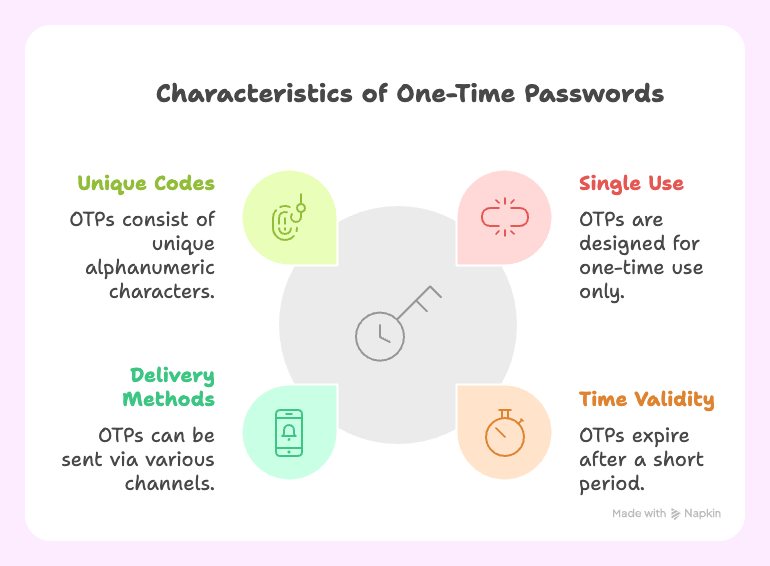
A WhatsApp OTP (One-Time Password) is a short, time-sensitive code sent through WhatsApp to verify a user’s identity. It works just like an SMS OTP: the user receives a 4–6 digit code to confirm a login, transaction, or registration, but with faster delivery and stronger security.
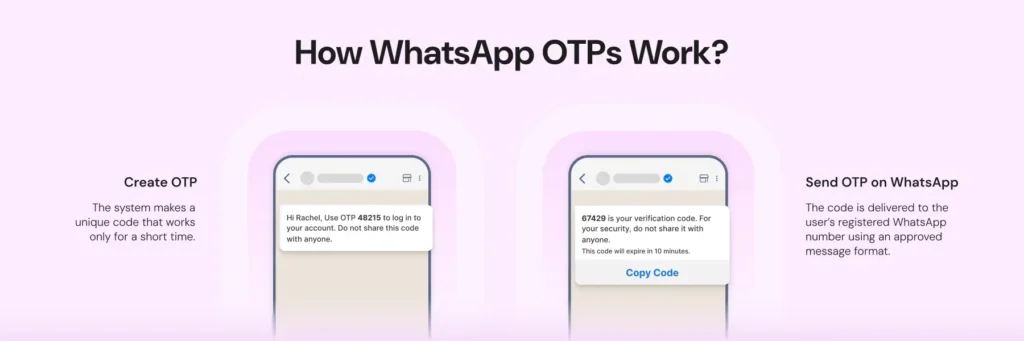
Each OTP is sent as an encrypted message through WhatsApp’s secure network. These OTPs can’t be intercepted or misused. Users receive it instantly within the app they already use daily.
This code arrives as a private message from a verified business account; users can trust it’s legitimate.
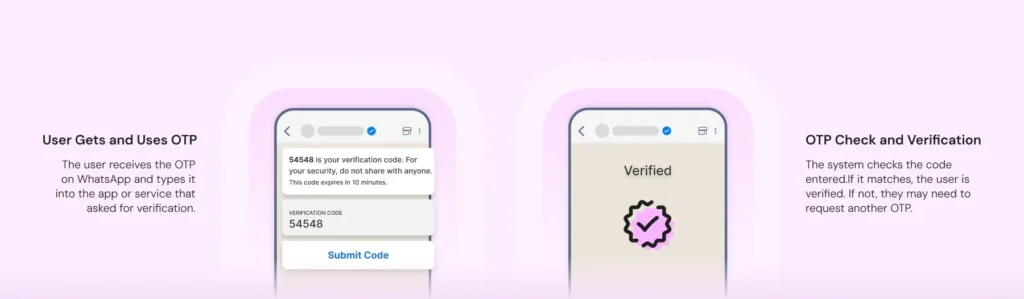
The speed, security, and simplicity are what make WhatsApp OTP a better alternative to SMS or email-based authentication.
WhatsApp OTP vs SMS OTP vs Email OTP
All OTPs have the same goal: to verify users.
The difference lies in how quickly they arrive, how securely they’re delivered, and how they are billed.
Feature | WhatsApp OTP | SMS OTP | Email OTP |
Delivery Speed | Instant (1–3 seconds) | 5–30 seconds (often delayed) | 10–60 seconds |
Security | End-to-end encrypted | Vulnerable to SIM swap and network attacks | Depends on email security |
Trust Indicators | Verified badge + business logo | Generic sender ID | Often marked as spam |
Pricing model | Per-message, authentication tier (lowest of the 3 WhatsApp categories); volume discounts by country | Per-message, no volume tiers typical | Free (unreliable) |
User Experience | Rich media, copy-code button, or zero-tap auto-fill on Android | Plain text only | Cluttered inbox |
Why is SMS OTP Becoming Obsolete?
In 2019, hackers gained access to Twitter CEO Jack Dorsey’s account using a SIM-swap attack, a known flaw in SMS-based verification. WhatsApp’s encrypted delivery system prevents such attacks significantly more compared to SMS.
Also Read: SMS Marketing Tools vs WhatsApp Broadcasts: When to Use Each for Maximum Impact?
Zero-Tap Authentication: Verification With No Taps at All
WhatsApp's newest authentication template type, Zero-Tap, removes the copy-paste step entirely. On supported Android devices, the WhatsApp client silently verifies the receiving app's identity (via a package name + signature hash configured on the template) and auto-fills the OTP, and the user never taps a button.
How the fallback works: The same template auto-adapts by platform. Android renders Zero-Tap; iOS, web, and desktop clients automatically render the standard Copy Code button instead. There's no separate send logic or resend required on your side.
Where it fits: Highest-conversion option for Android-heavy user bases (logins, checkout, high-value transactions) where every extra tap costs completion rate.
What it needs: An AUTHENTICATION-category template with a configured app signature hash, plus a Copy Code button kept as the mandatory fallback.
What it doesn't do: Replace normal OTP delivery. If Zero-Tap conditions aren't met (app not installed, signature mismatch, non-Android device), the template automatically falls back to Copy Code with no failure state for the user.
This is separate from the older "One-Tap Autofill" button already available on standard authentication templates (where the user taps once to autofill). Zero-Tap is the newer, tap-free tier above it.
Why Businesses Prefer WhatsApp OTP?
WhatsApp OTP offers better speed, reliability, and security. Messages reach users in seconds and are encrypted end-to-end.
On top of that, users know these are received from verified business accounts that people already trust.
For businesses, this means fewer failed deliveries, fewer support tickets, and lower costs, often 40–60% less than SMS at scale.
Built-in Safety Net: SMS Fallback for WhatsApp OTP
WhatsApp delivery is reliable, but it isn't universal. Not every customer has an active WhatsApp account, and delivery can occasionally fail. On Wati's Business plan, you can connect a Twilio account and enable automated SMS fallback.
If a WhatsApp OTP isn't delivered, Wati automatically sends the same code by SMS, using a matching SMS template mapped to your WhatsApp authentication template.
This means you get WhatsApp's speed and cost advantage as the default path, with SMS as an automatic backstop rather than a channel you have to build and monitor separately.
Requirements to Send WhatsApp OTP
You can’t send OTPs using the standard WhatsApp Business App. Authentication messages require the WhatsApp Business API, which can be either the Cloud API (managed by Meta) or the On-Premises API (managed by a third-party provider).
To get started, you’ll need:
- Business registration: A verified business entity connected to your Facebook Business Manager account, with valid documentation for Meta’s review.
- Verified business number: A phone number not previously used on WhatsApp, formatted correctly for your country, and able to receive a verification code during setup.
- Approved message templates: WhatsApp doesn’t allow generic OTP messages. Templates must include a verification variable ({{1}}), a short security disclaimer, and optionally an expiry note. You can also add a copy-code button, a one-tap autofill button, or for Android, a zero-tap button (which requires an app signature hash). Once submitted, templates are usually approved within 15 minutes to 24 hours. After approval, your account can start sending real-time, encrypted authentication messages through WhatsApp.
How to Send WhatsApp OTP?
Once your WhatsApp business is verified and templates are approved, setting up WhatsApp OTP is a straightforward process.
Step 1: Create your Authentication Template
Start by drafting a short, secure message template. It should include a verification variable ({{1}} for the OTP code), a clear security note, and an optional expiry time. Example:
{{1}} is your verification code. For your security, do not share this code. This code expires in {{2}} minutes.
Avoid emojis, links, or media attachments as WhatsApp rejects templates with those elements.
You can also add a “Copy Code” or one-tap autofill button or configure Zero-Tap for Android (app hash required).
Submit the template via Meta Business Suite → WhatsApp Manager → Message Templates.
Step 2: Integrate WhatsApp API
Next, connect your verified number to the WhatsApp Cloud API, Meta’s official interface for sending authentication messages.
Use the following endpoint and access token for configuration:
ACCESS_TOKEN=”your_access_token” WHATSAPP_API_URL=”https://graph.facebook.com/v18.0/YOUR_PHONE_NUMBER_ID/messages”
This setup allows your system to send approved OTP templates directly to users through WhatsApp’s secure network.
If you prefer a simpler route, connect through a Business Solution Provider (BSP) such as Wati. BSPs manage the backend API integration for you, so you can handle everything, from template approval to delivery tracking through a single dashboard.
Step 3: Automate OTP Delivery
Once your integration is active, it’s time to automate the OTP flow. When a user requests verification, your system should generate a unique code, store it briefly, and send it through WhatsApp using the approved authentication template.
Here’s what a basic API request looks like:
POST /messages { “messaging_product”: “whatsapp”, “to”: “1234567890”, “type”: “template”, “template”: { “name”: “authentication_template_name”, “language”: { “code”: “en” }, “components”: [ { “type”: “body”, “parameters”: [ { “type”: “text”, “text”: “123456” }, { “type”: “text”, “text”: “5” } ] } ] } } |
A successful response confirms message delivery:
{ “messaging_product”: “whatsapp”, “contacts”: [{ “input”: “1234567890”, “wa_id”: “1234567890” }], “messages”: [{ “id”: “wamid.XXX” }] } |
How the Flow Works:
- The user requests an OTP.
- Your system generates a six-digit code and stores it temporarily (5–10 minutes).
- The code is sent through the approved template using the API.
- On Android with Zero-Tap configured, the code is auto-verified with no user action. Otherwise, the user taps Copy Code or one-tap autofill.
- When the user submits the code, your system verifies it.
- The code is then invalidated to prevent reuse.
- If WhatsApp delivery fails and SMS fallback is enabled, Wati automatically resends the code by SMS.
This workflow ensures OTPs are unique, secure, and instantly delivered, giving users a smooth, verified authentication experience.
Here’s the complete video:
Ready-to-Use WhatsApp OTP Message Templates
Use these as starting points for your authentication template body. Adjust wording to match your brand voice, then submit for Meta approval.
- Login OTP: "{{1}} is your verification code for {{2}}. For your security, do not share this code. This code expires in {{3}} minutes."
- Transaction OTP: "Use {{1}} to confirm your transaction. This code expires in {{2}} minutes and should not be shared with anyone."
- Password reset OTP: "{{1}} is your password reset code. Valid for {{2}} minutes. If you didn't request this, ignore this message."
How to Enable WhatsApp OTP for Your Business?
Once your WhatsApp Business API is active and your authentication template is approved, follow these steps to go live with OTP verification:
Complete Business Verification
Verify your business through Meta Business Manager and link a phone number that’s not already registered on WhatsApp.
Get WhatsApp Business API Access
Apply for WhatsApp Cloud API via Meta or a Business Solution Provider (BSP) like Wati. Once approved, you’ll receive an access token and a phone number ID.
Create and Approve Authentication Templates
Draft a short OTP message template using variables (e.g., {{1}} for the OTP). Submit it for approval through WhatsApp Manager. Approval typically takes 15 minutes to 24 hours.
Set Up Backend Integration
Use the Cloud API endpoint to send OTPs programmatically:
https://graph.facebook.com/v18.0/{{PHONE_NUMBER_ID}}/messages
Configure webhooks to track delivery and status events, and implement backend logic to securely generate, send, and validate OTP codes.
Test and Automate
Test with sample numbers, validate delivery, and automate OTP generation through your existing login or signup workflows.
(Optional). Enable SMS fallback (Business plan) so delivery doesn't depend on WhatsApp alone.
Monitor and Optimize
Use analytics or BSP dashboards (like Wati) to track delivery rate, latency, and user completion time. Aim for >95% OTP delivery within 3 seconds.
Tip: Wati makes OTP implementation simpler with no-code workflows, automatic template management, and detailed delivery analytics. It’s ideal if you want to go live fast without a complex setup. Learn how to send WhatsApp OTP using Wati API |
Where Businesses Use WhatsApp OTP
WhatsApp OTP fits any flow where you need to confirm it's really the customer, not just capture a click.
- Banking & fintech: Transaction confirmations and high-value login verification, where end-to-end encryption matters more than raw speed.
- E-commerce: Checkout and new-account verification, where every extra second or failed OTP is a lost sale.
- Travel & bookings: Booking confirmations and itinerary-change verification sent to a channel travelers already have open.
Fintechs in particular lean on WhatsApp as a primary, trusted channel rather than a fallback. Wati's fintech customer InvestAI, for example, moved its core customer communication to the WhatsApp Business API via Wati and saw 30x more customer responses than it got over email, a proof point for why finance-sector businesses increasingly default to WhatsApp for anything identity or transaction-related.
WhatsApp OTP Best Practices and Delivery Rules
To keep authentication fast, secure, and compliant, follow these key practices when sending OTPs through WhatsApp.
- Keep messages short and consistent: WhatsApp authentication templates can include up to 1,024 characters, but OTPs work best when brief, one or two lines with clear security language. Avoid links, emojis, or media attachments, as these may cause template rejection.
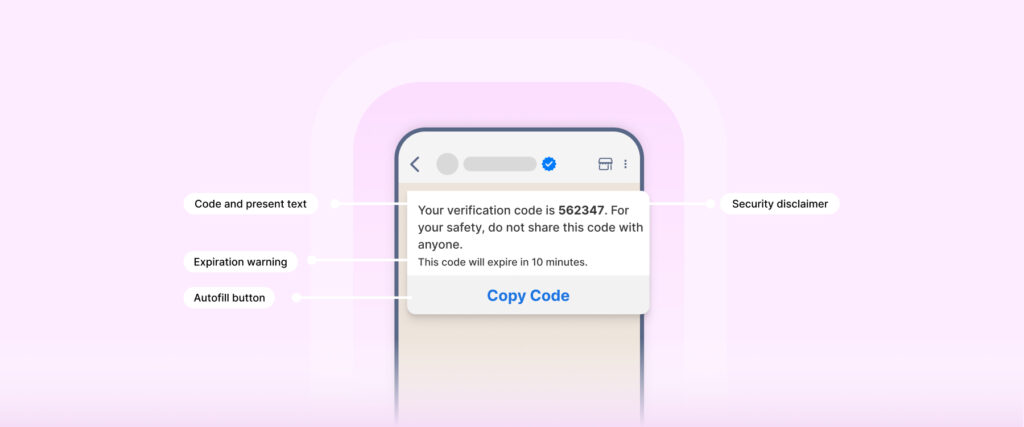
- Use the right OTP format and expiry window: Stick to 4–8 digit numeric codes with an expiry time of 5–10 minutes. This keeps verification secure without frustrating users.
- Control how often users can request new codes: Limit OTP requests to three per user within a 10-minute period. This prevents abuse and improves delivery success rates.
- Monitor delivery and message quality: WhatsApp Cloud API delivers OTPs fast. Track delivery reports regularly. Failed or delayed messages often indicate network issues or outdated templates.
- Take advantage of linked device security: WhatsApp automatically hides OTPs on secondary devices like desktop or web. Codes only appear on the user’s primary phone, reducing the risk of interception or misuse. No extra setup is required as it’s built into the API.
- Protect Zero-Tap credentials: keep your app's signature hash out of client-side logs and version control, since it's part of what authorizes silent auto-fill.
The Smarter Way to Verify: WhatsApp OTP with Wati
WhatsApp OTP is a smarter, more reliable alternative to SMS and email. With 98% open rates, end-to-end encryption, and verified business profiles, it gives both brands and users instant trust in every interaction.
Wati helps you go live with secure WhatsApp OTP verification in under 30 minutes. You get the reliability of Meta’s infrastructure with the simplicity of a single dashboard. Book a demo with Wati to start sending secure WhatsApp OTPs today.
Frequently asked questions
1. Is WhatsApp OTP more secure than SMS?
Yes. WhatsApp uses end-to-end encryption, making OTPs unreadable during transmission. SMS, on the other hand, is vulnerable to SIM-swap attacks and SS7 protocol exploits.
2. Can I send WhatsApp OTP without an API?
No. The standard WhatsApp Business app doesn’t support OTP messages. You need access to the WhatsApp Business API or a Business Solution Provider like Wati to send authentication templates.
3. How long does WhatsApp OTP take to deliver?
95% of WhatsApp OTPs are delivered within three seconds. SMS can take anywhere from 5–30 seconds or longer during network congestion.
4. How much does WhatsApp OTP cost?
Since Jul 1, 2025, Meta bills authentication messages per message (not per conversation) at the lowest of WhatsApp's three template rates, with volume-based discounts by country as your monthly authentication volume grows. It's still typically 40–60% cheaper than SMS at scale, but check your market's current rate card rather than a flat global figure.
5. What if users don’t have WhatsApp?
Implement an SMS fallback option. WhatsApp now covers more than 3.3 billion active users globally, but it's good practice to offer an alternate channel for the small percentage who don't use the app. Wati's Business plan automates this SMS fallback through Twilio.
6. What is Zero-Tap authentication on WhatsApp?
Zero-Tap is WhatsApp's newest authentication template option. On supported Android devices it verifies and auto-fills the OTP with no user action at all; on iOS, web, and desktop it automatically falls back to the standard Copy Code button on the same template.
7. Does Wati support SMS fallback for WhatsApp OTP?
Yes. On the Business plan, Wati can automatically send the OTP by SMS through a connected Twilio account if WhatsApp delivery fails, using a mapped SMS template.
Related posts
- WhatsApp Business Web: How to Use it for Your Business in 2026?
Learn how to set up WhatsApp Business Web, advantages, applications and key differences to ensure seamless marketing collaboration in 2026.
- How to Set Up Auto Reply in WhatsApp Business?
Master WhatsApp auto-reply for your business: improve response times, customer service, and communication.
- How to Create Personalized AI Videos with Wati’s AI Video Generator
Transform your marketing with Wati’s AI video generator. Create personalized, professional videos at scale without technical expertise or expensive equipment.
- How to Add a WhatsApp Chat Button On Website: 2026 Guide
Discover how to add a WhatsApp chat button on your website effortlessly. Create real-time connections, improve support, and convert visitors with Wati.