
Too Long? Read This First
- A WhatsApp lead form opens inside a WhatsApp chat. No redirect to a landing page.
- A WhatsApp form and a WhatsApp chatbot are not the same thing. The chatbot decides when to trigger the form.
- Click-to-WhatsApp ads that end in an in-chat form skip the landing page step. Reply within 24 hours, and you also unlock a 72-hour free remarketing window.
- A landing page still wins for detailed product catalogs or full checkout flows. A WhatsApp form wins for quick, single-intent festive offers.
- Wati ships two ready-made Flow templates, Lead Generation and Feedback Form, plus a drag-and-drop builder for custom forms.
A Diwali campaign doesn't always need a landing page.
A WhatsApp lead generation form, built with WhatsApp's native Flows feature, is an in-chat form that captures a customer's name, city, or product interest directly inside the conversation, without redirecting them anywhere.
Wati, an AI-powered customer engagement platform that provides WhatsApp Business API, ships this as a drag-and-drop builder with ready-made templates, so a business can go from ad click to qualified lead - coupon, callback, pre-booking, or payment link -without ever sending the customer to a separate page.
This guide covers when to use a WhatsApp form instead of a landing page, and seven ways to use one across e-commerce, retail, EdTech, and fintech this Diwali.
What is a WhatsApp Flow Lead Form?
A WhatsApp lead form is a structured, in-chat form built with WhatsApp's native Flows feature. It captures a customer's details without leaving the conversation.
It works like a web form inside WhatsApp, with fields such as dropdowns, text inputs, and a submit button.
The customer fills it out without switching apps, and the submission lands in the business's system as a qualified lead.
This is especially useful during Diwali, when customers are responding to time-sensitive offers such as early-access deals, gift hampers, festive discounts, coupons, and event registrations. Instead of sending them to a landing page for a simple action, businesses can capture the required details directly in the WhatsApp conversation and move them to the next step faster.
A form and a chatbot are different things. A chatbot is the conversation flow that decides when something should happen. The Flow lead form is what appears inside that conversation when it is time to collect details. The chatbot triggers the form. It is not the form itself.
WhatsApp Lead Generation Form vs. Landing Page for Diwali Campaigns
The right choice depends on what you want the customer to do.
- A WhatsApp form works best when the campaign has one clear action.
- A landing page makes more sense when customers need to browse, compare, or complete a more involved purchase.
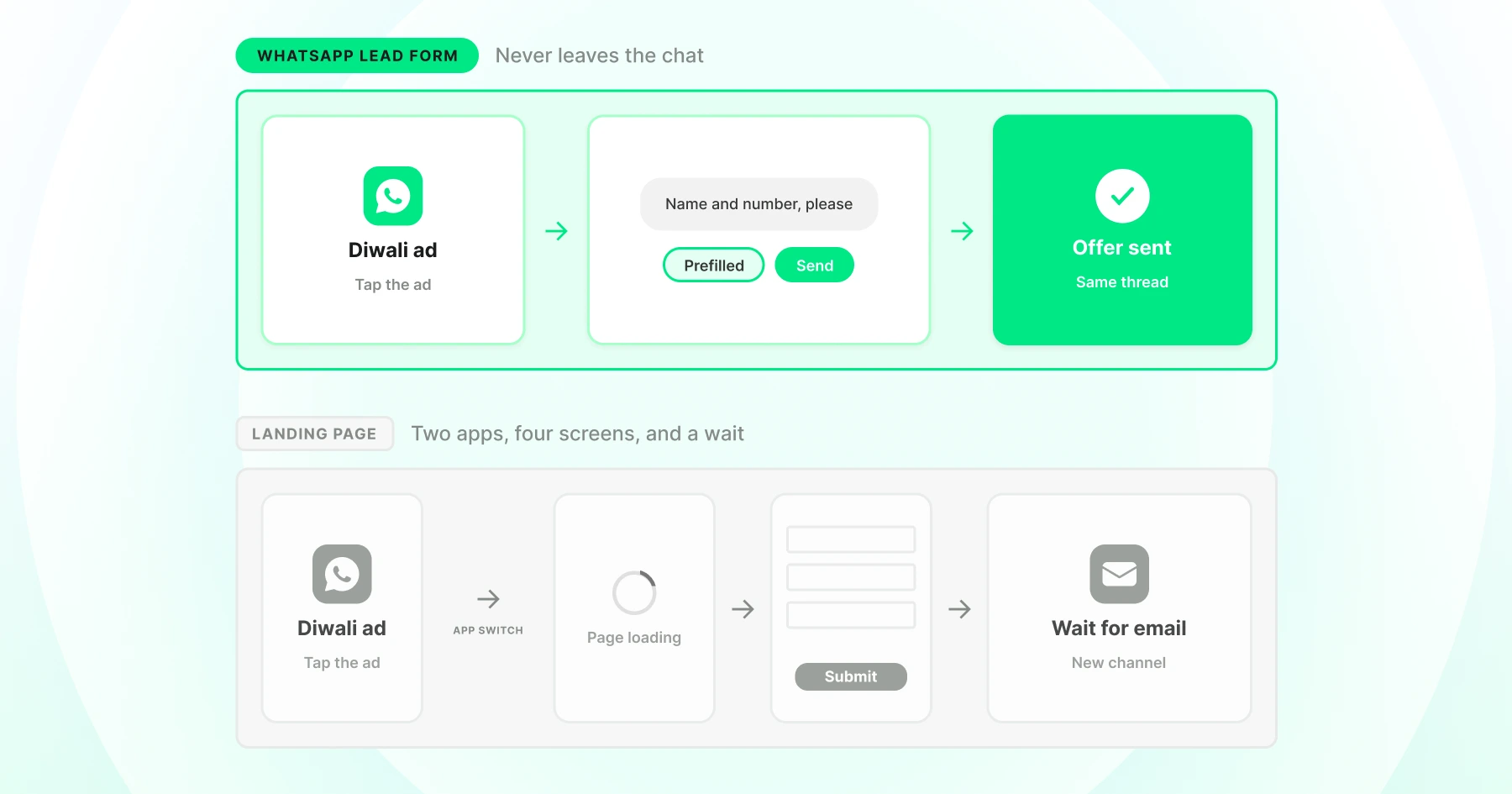
Here’s how they compare against each other.
WhatsApp Lead Form | Landing Page | |
|---|---|---|
Customer stays in one app | Yes | No |
Page load required | No | Yes |
Form sits inside the ad-click conversation | Yes | No |
Automated follow-up after submission | Can be automated in the same WhatsApp workflow | Requires separate setup |
Best for | Quick, single-intent festive offers | Browsing, comparison, detailed offers |
Data capture | Structured fields, ready for a CRM | Depends on the page builder |
- Use a WhatsApp form for a Diwali coupon, hamper pre-booking, store offer, webinar registration, or gifting enquiry.
- Use a landing page when customers need to browse a product catalog, compare multiple products, read detailed information, or complete a full checkout.
For Diwali campaigns, the key question is simple: does the customer need to browse, or do they just need to take one action?
Why Skip the Landing Page for Lead Capture This Diwali?
A landing page adds a step between the ad click and the action you actually want. The customer taps the ad, waits for a new page to load, and has to re-orient themselves before they even see the offer. A WhatsApp form removes that friction.
- No page load, no context switch: The form opens in the same thread the customer is already using.
- A built-in remarketing window: Click-to-WhatsApp Ads carry a 72-hour free remarketing window if the business replies within the first 24 hours. A landing page click offers no equivalent window.
- Response speed matters most during a sale window: Response speed matters most during a sale window: A landing page form with a "we'll email you" confirmation can feel slow next to a WhatsApp reply that arrives while the customer is still in the conversation.
The Lead Journey: From Ad Click to Follow-Up
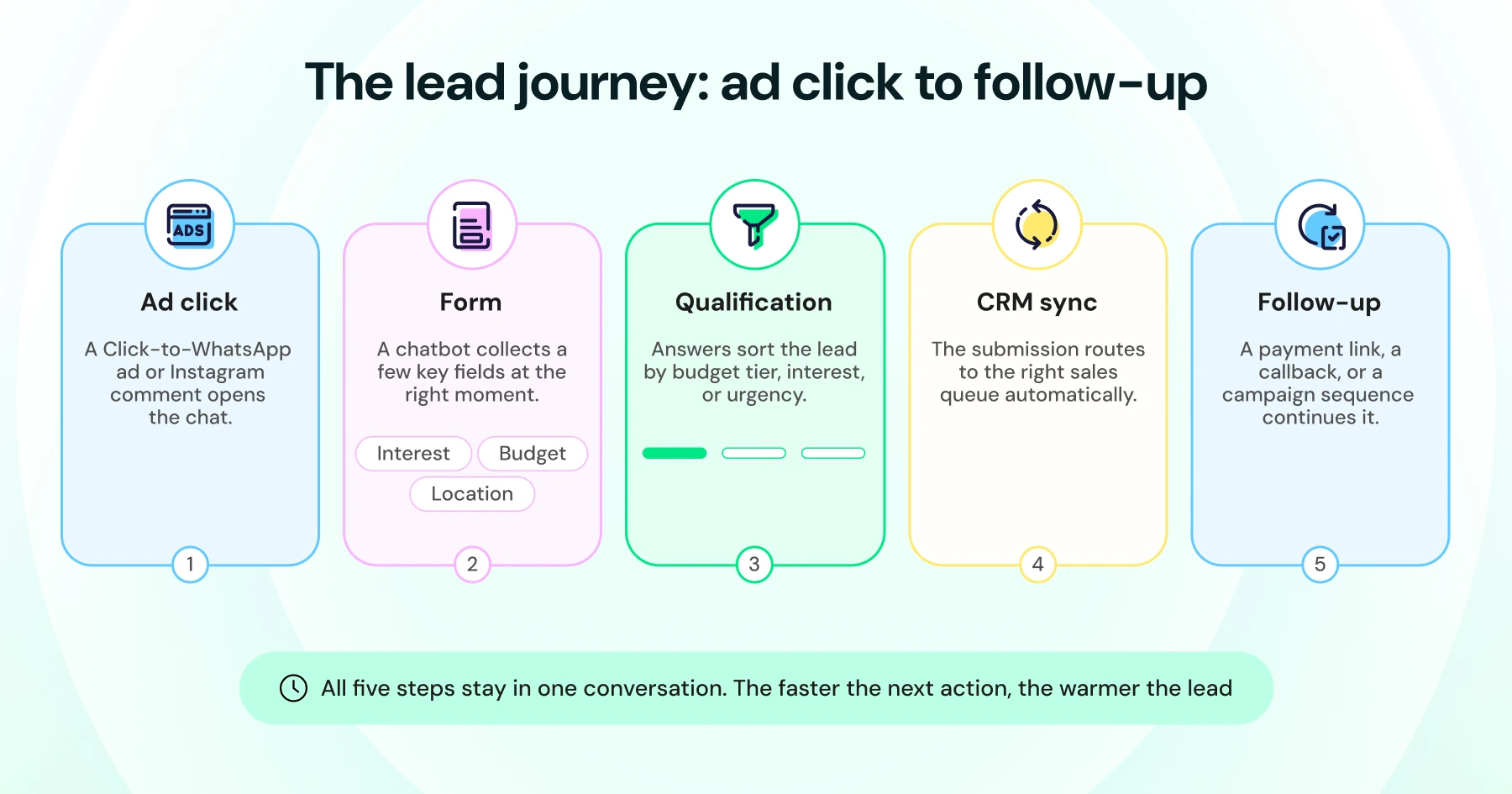
A Diwali WhatsApp lead form works in five steps: an ad click opens the chat, a form collects a few key fields, the answers qualify the lead, the submission syncs to a CRM, and a follow-up- payment link, callback, or campaign sequence continues the conversation. The faster that last step happens, the less likely the lead is to go cold.
What to Watch for at Each Step
Ad click: A Click-to-WhatsApp ad or Instagram comment opens the chat. This is also when the 72-hour free remarketing window starts, so treat the first reply as time-sensitive, not just the first message.
Form: Trigger the form only once the customer has shown interest, not on the very first message. Firing it too early usually means fewer people finish filling it out.
Qualification: Leads that don't clear your bar shouldn't be dropped. Route them to a lower-priority follow-up instead of losing them altogether.
CRM sync: This is also where syncs are most likely to lag during high festive traffic. Worth checking that your integration can handle the load before the sale starts, not during it.
Follow-up: Sequences that go out within minutes of qualification convert better than ones that wait hours. Intent fades fast on WhatsApp.
How to Use a Diwali WhatsApp Lead Generation Form
Four principles keep a festive form converting: keep it to three fields, ask the qualifying question before contact details, use a benefit-named CTA instead of "Submit," and confirm the value (coupon, callback time, payment link) the moment someone submits.
Here's what that looks like for a Diwali hamper pre-booking:
Best Practice | What to Do | Example / Why It Works |
Keep the form short | Use three fields where possible: Name + two qualifying questions. Add more only when the information changes the next step. | A shorter form feels easier to complete and works well for quick festive campaigns. |
Qualify before collecting contact details | Ask what the customer needs before asking for their email or other contact information. | “What are you shopping for?” → “What’s your email?” keeps the conversation engaging before it feels like data collection. |
Make the CTA benefit-led | Use a button that tells customers what they’ll get instead of a generic CTA. | “Get My Diwali Offer” is more compelling than “Submit.” |
Confirm what happens next | After submission, clearly tell the customer what they can expect. | “You’ll receive your coupon shortly.” / “Our team will call you within 30 minutes.” / “Here’s your payment link.” |
Here is what that looks like in practice:
Diwali Hamper Early Access
- Your name
- Delivery city
- Preferred hamper: Classic / Premium / Corporate
Button: “Reserve My Hamper”
On submit: “You're on the list! Here's your payment link to lock in early-access pricing before the public sale opens.”
The hamper pre-booking flow above is an illustrative example, not a pre-built Wati festive template.
Build it in the Flow builder using the Lead Generation template as the starting point. The seven ways below apply these same principles to different Diwali campaigns.
What Information Should Your Diwali Lead Form Collect?
The fields you ask for should help you qualify the lead or determine what happens next. The right questions depend on the Diwali offer.
Diwali campaign | Useful fields |
Hamper pre-booking | Name, delivery city, hamper preference |
Corporate gifting | Company name, order quantity, budget range |
Store coupon | Name, nearest store, product interest |
Course enquiry | Grade, course or subject, preferred callback |
Loan enquiry | Employment type, income range, loan purpose |
6Giveaway | Name, city, email |
Webinar registration | Name, email, profession or grade |
Don't collect information just because you can. Every field should help you qualify the lead, personalize the follow-up, or determine the next step.
7 Ways to Use a Diwali WhatsApp Lead Generation Form
Each of these is a distinct entry point into WhatsApp lead generation, not a variation on the same form. The mechanic behind each one is the same: a lead generation form triggered inside a chatbot conversation. What changes is where the lead comes from and what happens after.
1. Click-to-WhatsApp Ads to Hamper Pre-Bookings
Run a festival-themed Click-to-WhatsApp ad offering early access to a limited-edition Diwali hamper collection.
Route the click into a lead generation form. The form asks three questions: name, delivery city, and preferred hamper type.
A payment link is automatically generated upon submission. The pre-booking closes inside the same thread the ad opened.
See Wati's E-commerce solutions page for more WhatsApp forms for e-commerce built around festive-season plays.
2. QR Codes to Store Walk-In Leads
For physical stores, a WhatsApp number on a festive window display or till receipt can trigger a short form.
Ask for a phone number and nearest branch. On submission, the customer gets an instant QR code coupon inside the chat to redeem in-store.
A QR-to-WhatsApp coupon loop beats a printed flyer or a punch card.
It leaves the business with a phone number for next season's campaign, too.
3. WhatsApp Forms to Corporate Gifting Leads
Diwali corporate gifting inquiries need different fields than a retail customer: company name, order quantity, delivery deadline, budget per unit.
A dedicated bulk-order Flow routes these straight to a B2B sales queue instead of the general support inbox.
An AI agent can also capture this conversationally instead of through a fixed form. See the example in the section below on capturing leads through conversation.
4. Festival Offers to Course and Demo Leads
EdTech brands running a festive discount cohort or a Diwali scholarship promotion can trigger a Flow form the moment a prospect clicks the offer ad or comments on a course post.
Ask for the student's grade, subject of interest, and a parent's email or phone number for callback.
The submission feeds straight into a counselor's callback queue. That beats a generic contact-us inbox.
5. Festive Campaigns to Loan and Credit Inquiries
Diwali is a peak season for personal loans, gold loans, and credit-card-financed big-ticket purchases in several markets.
A short Flow form asking for employment type, monthly income range, and loan purpose captures initial interest before a relationship manager calls.
Treat the form as an interest and pre-screening step, not an eligibility decision. The form should never imply approval. It should route a warm lead to a human who runs the actual verification and eligibility check afterward.
6. Instagram Comments to WhatsApp Leads
Pair Instagram comment-to-DM automation with a Flow form. A customer comments a keyword like "DIWALI" on a giveaway post, gets DM'd automatically, and lands straight into an entry form asking for name, city, and email.
Pairing Instagram comment automation with a Flow form turns an organic Instagram interaction into a WhatsApp lead without paid ad spend.
For more entry points into this same funnel, see Wati's guide to WhatsApp API use cases.
7. WhatsApp Campaigns to Webinar and Event Registrations
Hosting a Diwali financial-planning webinar or an EdTech masterclass does not need a separate event platform.
A WhatsApp Campaign with a Flow form asking for name, email, and profession or grade captures the registration.
The calendar invite and join link can be sent automatically in the same chat on submission. The whole registration loop stays inside WhatsApp.
Common Mistakes to Avoid With WhatsApp Lead Forms This Diwali
No fallback after submission: A lead who submits a form and hears nothing for hours assumes the business missed it. Route submissions to a live queue, not a dashboard nobody checks during the sale window.
One form for every campaign: Reusing a single generic form across hamper pre-bookings, corporate gifting, and giveaways makes segmentation impossible later. Separate forms produce separate, usable segments.
Implying eligibility a form cannot confirm: For loan or credit forms, the submission is an interest signal, not an approval. State that clearly so the customer expects a follow-up verification step, not an instant decision.
Assuming Undelivered Messages Disappear: A customer's phone can reconnect and receive a delayed message days after it was first sent, so build your offer-expiry messaging accordingly, rather than assuming an unsent message just disappears. Structured Flow data can also help reduce unnecessary follow-up messages by giving teams the information they need upfront, a detail worth tracking as WhatsApp's message-based pricing evolves.
Wrapping Up
A Diwali WhatsApp lead generation form can help businesses capture leads without sending customers through a separate landing page. The key is to match the form to the offer, collect the right information, and follow up while the intent is still fresh.
With Wati, businesses can create lead generation forms using ready-made templates, connect them to WhatsApp Flows and chatbots, and route submissions to tools such as HubSpot or Zoho. This makes it easier to turn different Diwali campaigns, from hamper offers to corporate gifting inquiries, into structured lead-generation journeys.
Ready to turn your Diwali WhatsApp conversations into leads?
Book a demo with Wati and see how you can build and manage your lead-generation campaigns in one place.
Frequently asked questions
What is a Diwali WhatsApp lead generation form?
It is a WhatsApp lead generation form built for a festive campaign. It captures a customer's details inside the chat, right after they click a Diwali ad or message the business, without sending them to a landing page.
Can I collect leads inside a WhatsApp conversation without building a form?
Yes. Astra, Wati's AI agent, can ask qualifying questions conversationally and extract the same structured data a form would collect, then sync it to a CRM automatically.
What is a WhatsApp Flow lead form?
A WhatsApp Flow lead form is another name for a WhatsApp lead generation form, built using WhatsApp's Flows feature. It captures customer details without redirecting to a landing page.
Can a WhatsApp form fully replace a landing page?
For a single, narrow ask like a coupon, a pre-booking, or a registration, yes. For a full product catalog or a checkout flow with many steps, a landing page still does the job better.
How many WhatsApp lead generation forms can I create?
Pro allows up to 10 WhatsApp Flows, and Business allows up to 25, counting both Lead Generation and Feedback Form templates together, including drafts. This is a total Flow cap, not a lead-gen-specific one.
Do WhatsApp lead forms work for industries outside e-commerce?
Yes. EdTech brands use them for demo-class bookings. Fintech brands use them for loan or investment interest capture. The field set changes, but the in-chat mechanic stays the same.
Why do Click-to-WhatsApp ads work better with a form than a landing page?
They skip the page load and context switch entirely. A reply within 24 hours of the click also opens a 72-hour free remarketing window that a landing page does not offer.
Related posts
- Instagram Comment Automation: How It Works and How to Set It Up in Wati
Instagram comment automation auto-replies to comments and DMs commenters within seconds via Meta's API. Covers strategy, use cases, and Wati setup.
- Shared Team Inbox for Instagram: A Buyer’s Checklist for 2026
Use this fastest checklist to evaluate any shared team inbox for Instagram, which covers DMs, comments, automation, and multi-channel support.
- How to Send Bulk Messages on WhatsApp Without Getting Blocked
Learn how to send bulk WhatsApp messages without getting blocked. Compare the WhatsApp Business app and API, messaging limits, costs, templates, and best practices for safe, compliant bulk messaging.
- How to Set Up a TikTok Business Account: Step-by-Step Guide
Set up a TikTok Business Account step by step: switch from personal, pick a category, add your profile, and unlock ads and analytics.