
Too Long? Read This First
- It's No Longer Optional: With over 2 Billion users worldwide for 2025, WhatsApp is where your customers are. They now expect to message businesses directly.
- Unmatched Engagement: WhatsApp campaigns destroy traditional channels with an average 98% open rate, compared to just 20% for email.
- Drives Real ROI: Conversational marketing on WhatsApp isn't just about chats; it's about revenue. Businesses see higher conversions (up to 45-60% CTR) in their GTM campaigns
- The API is Key: The free WhatsApp Business App is for small shops. Serious marketing, like broadcasts, automation, and analytics, requires the WhatsApp Business API and a platform like Wati to manage it.
- Compliance is Crucial: You cannot spam. Effective WhatsApp marketing relies on getting explicit opt-in (consent) from your customers before sending any messages.
Payment is the final step in the WhatsApp customer journey.
At the time of purchase, customers appreciate a smooth payment process. By creating and embedding WhatsApp Pay, you can optimize customer transactions whenever, wherever.
WhatsApp Pay is a native payment method available in WhatsApp that automates customer transactions without third-party merchants.
If you are using WhatsApp Business API, integrating WhatsApp Pay simplifies checkout, optimizes intelligent automation, and improves sales.
In this article, we will learn about WhatsApp Pay, how to activate WhatsApp payment, and how to generate WhatsApp links in 2026.
What is WhatsApp Pay?
WhatsApp Pay is an extension of the popular messaging app, and it allows businesses to accept payments directly through the platform.
This means you can receive payments from your customers without them having to leave the app, making the process seamless and convenient.
As of 2025, National Payments Corporation of India (NPCI) has lifted the cap on the earlier 100 million UPI users that WhatsApp Pay can onboard. Now, WhatsApp Pay can onboard between 100 and 500 million users.
How to Use WhatsApp Pay: Key Example
Let’s say a customer wants to make a payment through WhatsApp. As a business owner, you can initiate the process by sending a WhatsApp Pay link directly in the chat or by generating a payment request.
Enabling WhatsApp Pay as an option in your automated payment workflow assures the customer that they are important to the brand. It conveys the status of a consumer-first, inclusive brand that goes out of its way to make customers’ lives easier.
Customers just have to follow a straightforward process: view the cost breakdown, click the link, choose their preferred payment method, and complete the transaction without exiting the chat interface.
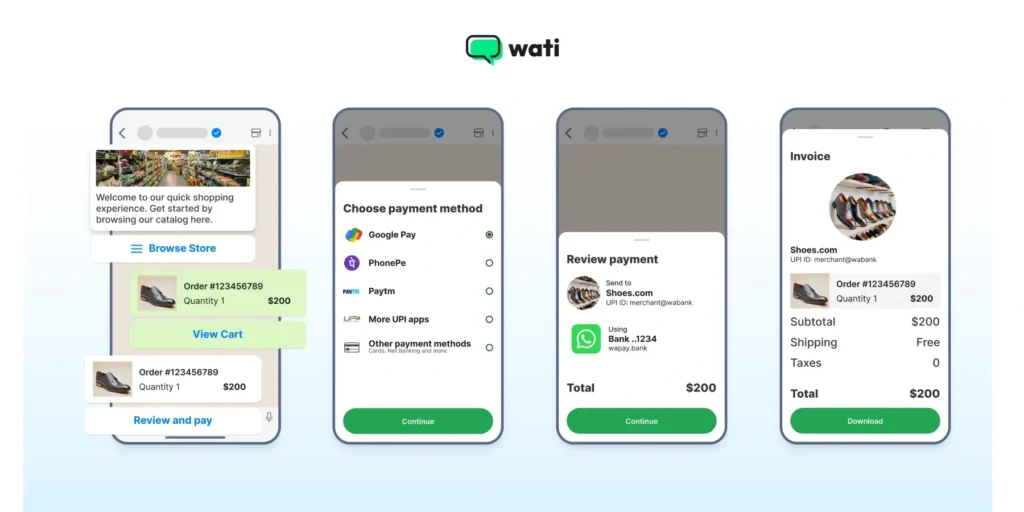
The customer simply taps “Pay,” authenticates, and completes the purchase in seconds.
By providing WhatsApp Payment as an option, you eliminate confusion caused by third-party bank merchants or payment gateways, thereby creating a positive impression on customers.
Because the transaction occurs within the message thread, the communication remains human and fluid, from the initial inquiry to the final digital receipt.
How to Activate WhatsApp Pay: Step-By-Step For Setting UPI Payment
If you prefer WhatsApp Pay for fund transfer, you need to be registered UPI users and have a valid phone number as well as a UPI ID.

WhatsApp Pay, built on India’s UPI service, lets you send and receive money as easily as you send a message. It’s fast, secure, and all happens right inside your chat window.
Here is everything you need to know, from your very first setup to your 100th transaction:
Pre-Setup Checklist Before You Start
Before you send your first rupee, ensure the following non-negotiables.
- You need to have the latest version of WhatsApp installed.
- You need an active bank account in India that supports UPI.
- Your WhatsApp phone number must be the exact same number that is registered with your bank account.
- You’ll need your bank’s debit card (for the last 6 digits and the expiry date) to create your secure UPI Pin.
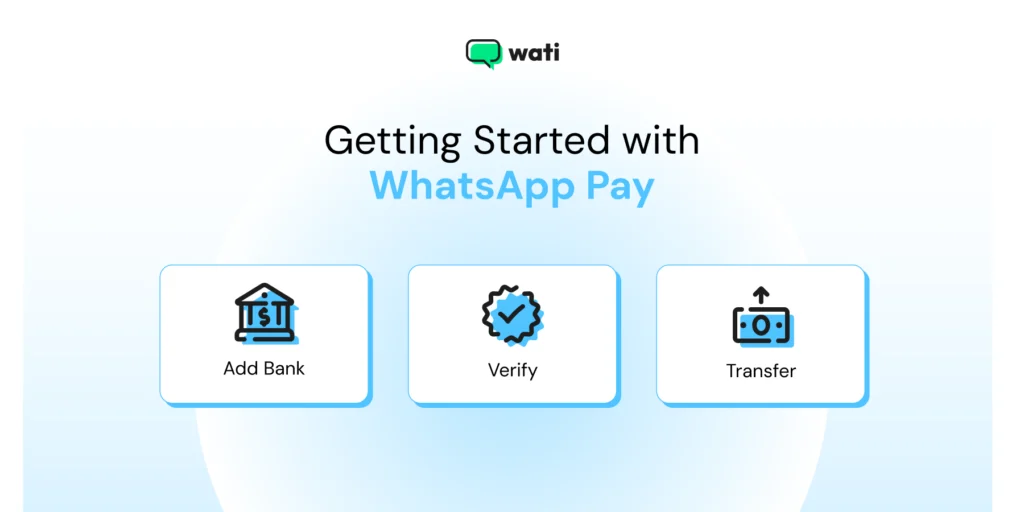
How to Link Your Bank Account to WhatsApp Pay (Step by Step)
Follow these steps to link your bank account with your WhatsApp account to set up a payment gateway:
- Open WhatsApp and tap the three-dot menu (on Android) or Settings tab (on iPhone).
- Select “Payments” from the menu.
- Tap on “Add payment method” and accept the payment terms.
- WhatsApp will show a list of banks. Select your bank.
- WhatsApp will then need to verify your phone number. Tap “Verify via SMS” (standard SMS charges may apply). It will automatically send an SMS from your phone to verify.
- Once verified, WhatsApp will find the bank account(s) linked to your number. Select the account you want to use for payments.
- Tap “Done” to finish.
- Set your UPI PIN. If this is your first time using a bank account with UPI, you’ll be prompted to create a 4 or 6-digit PIN. You will need your debit card details for this.
- If you already have a UPI PIN for this account (from another app, such as Google Pay or PhonePe), you can simply enter it.
- Once linked, you can send and receive money through WhatsApp Pay.
Security tip: Never share your UPI PIN with anyone. It is private and confidential data, just like your ATM PIN. No one from WhatsApp, your bank, or any other service will ever call you or message you for it.
How to Send Money via WhatsApp Pay (The Easy Part)
Once you have figured out all the preset checklists and bank details, sending money is probably the easiest step to follow.
- Open the WhatsApp Chat with a person you want to send money to.
- Tap on the “attachment icon” (the paperclip on Android and the plus sign on iPhone) next to the message box.
- From the options, select “Payment” (it has a rupee symbol).
- Enter the desired amount you wish to send. You can also add an optional note (e.g For Lunch).
- Tap the “Send” or “Next” Button.
- You will be prompted to enter your secret UPI Pin to authorize the transaction.
- Once you enter the PIN, the money is transferred. You will see a confirmation message right in the chat with the transaction details (like a little receipt) . It will show as “successful”, “Processing”, or “Pending”.
You can also send money by scanning the QR code or entering a UPI ID directly from the “Payments” setting screen.
Notably, WhatsApp Pay is available only for users in select countries. Ensure that your country is supported before enabling and using the service.
Which Countries Support WhatsApp Pay?
Launched in February 2020, WhatsApp Pay was first introduced in India. Apart from India, there are a couple of other countries that use WhatsApp Pay.
The availability and features vary by country. Below are the three countries that accept WhatsApp Pay.
- India: WhatsApp Pay supports e-commerce transactions, powered by the UPI (Unified Payments Interface) service, which links a bank account directly to a payment gateway for fast transactions.
- Brazil: Supports peer to peer and business transactions, using Meta Pay (Formerly Facebook Pay) in partnership with local finance providers. You can pay registered businesses directly via WhatsApp chat.
- Singapore: Supports WhatsApp Payments through a partnership between Meta Pay and Stripe. In Singapore, you can also pay off local businesses directly via credit or debit cards or Pay Now in the WhatsApp chat itself.
- Mexico: In Mexico, you can use Meta Pay to let customers pay with a credit or debit card (Visa/Mastercard) for purchases. It supports card payments directly in the chat thread, creating a smooth experience.
- Indonesia: Unlike the direct UPI model in India, WhatsApp in Indonesia serves as a platform that integrates with local digital wallets (like GoPay, OVO, and DANA), allowing users to finalize purchases using existing e-wallet credits.
WhatsApp Business Payment: How Do Online Transactions Work for Businesses?
To use WhatsApp Pay, you and your customers should have a WhatsApp account linked to your mobile phone numbers.
Here’s how WhatsApp Pay operates for you.
- WhatsApp Pay Link: As a business using WhatsApp Pay, you can initiate a payment request or share a WhatsApp pay link with your customers via chat.
- Customer confirmation: Your customers, on the other hand, will receive this payment request or link right in your WhatsApp chat.
- Payment method: Your customers can choose their preferred payment method, whether it’s bank transfers, credit or debit cards, or mobile wallets.
- Instructions: After making their choice, your customers will follow the instructions provided by WhatsApp Pay to complete the payment. This entire process is secure and takes place within the WhatsApp platform.
- Payment confirmation: Once the payment is successfully processed, you will receive a notification, and all the transaction details will be automatically stored in your chat conversation for your reference.
How to Manage Multiple Bank Accounts With WhatsApp Payments
In case you have multiple bank accounts. WhatsApp Pay allows you to link and manage multiple bank accounts, providing flexibility and convenience.
Here is how you can manage multiple bank accounts with WhatsApp Pay.
1. Open WhatsApp on your smartphone.
2. Go to “Settings” by tapping the three dots in the top-right corner.
3. Select “Payments” from the list of options.
4. Tap on “Add New Account.”
5. Choose the bank you want to link from the list of available options.
6. Follow the on-screen instructions to link the new bank account.
7. Once linked, you can switch between different bank accounts within the WhatsApp Pay interface.
This feature is handy if you have separate accounts for personal and business transactions or if you share finances with a partner or family member.
By managing multiple bank accounts within WhatsApp Pay, you can easily keep track of transactions and organise your finances effectively.
9 Top Benefits of WhatsApp Pay in Handling Customer Transactions
By integrating WhatsApp Pay as a part of your WhatsApp broadcast strategy, you are not letting the consumer go off the WhatsApp platform.
Rather, with integrated payments, you’ve unified an end-to-end experience as a brand. Below are the top benefits of WhatsApp Pay in handling consumer transactions.
1. Seamless Payment Experience
WhatsApp Pay allows businesses to provide customers with a frictionless payment experience. Customers can make payments directly within the chat, eliminating the need to switch to another app or platform.
This simplicity enhances customer satisfaction and encourages repeat business.
2. Payment Links and Requests
Businesses can easily create and send payment links or payment requests to customers. This feature simplifies the payment process, making it convenient for both parties.
Customers can click on the link and complete the payment with ease.
3. Seamless Payment Methods
WhatsApp Pay supports different payment methods depending on the country. In India, it is powered by UPI or peer-to-peer payments.
On the other hand, payments are processed through Mastercard and Visa debit/prepaid cards in Brazil.
In Singapore, WhatsApp payments run via Stripe, supporting credit/debit cards and Pay Now.
This flexibility enables businesses to cater to a wider range of customers and their preferred payment options.
4. Customer Communication
WhatsApp Pay seamlessly integrates with WhatsApp’s messaging capabilities. Businesses can communicate with customers before, during, and after transactions.
This real-time communication can enhance customer support and address any payment-related queries promptly.
5. API Integration
WhatsApp now supports native, in-chat payments in key markets like India and Brazil via WhatsApp Business Platform.
By integrating with official business solution providers (BSP) like Wati, larger brands can create WhatsApp flows for an end-to-end shopping experience.
These API integrations allow businesses to send native payment requests, automate real-time confirmations, and manage complex checkout workflows.
This allows for customised solutions and greater control beyond payment processes.
Also Read: The complete WhatsApp API integration checklist for businesses in 2026.
6. Data Security
All transactions made through WhatsApp Pay are bound by strict WhatsApp security guidelines and end-to-end encryption.
In India, the Reserve Bank of India (RBI) monitors the NPCI-UPI framework powering WhatsApp Pay, it’s hard to break that security. This ensures high security and compliance standards, providing users with a trustworthy and reliable platform for financial transactions.
Whereas in Brazil and Singapore, WhatsApp Pay is allowed via Meta Pay, which is governed by local financial policies and rules.
WhatsApp Pay also employs multi-factor authentication, requiring users to verify their transactions with a UPI PIN or biometric authentication.
7. WhatsApp Pay Links
WhatsApp Pay Links are a trusted and reliable method of money disbursement. Payment links and requests make it easy for businesses to initiate and complete transactions.
This feature is particularly available for e-commerce businesses, service providers, and freelancers looking for an efficient way to collect payments.
8. Save Time and Effort
By integrating payment services within the app, customers no longer need to switch between different platforms or apps to complete a transaction. This streamlines the payment process, making it quicker and more efficient.
Furthermore, WhatsApp offers a user-friendly interface that is intuitive and easy to navigate. The app provides clear instructions and prompts, ensuring that even first-time users can easily set up and use the payment service.
The straightforward design and user-friendly interface make WhatsApp Pay accessible to a wide range of users, regardless of their technological expertise.
9. Streamlined Transactions
Payment links and requests make it easy for businesses to initiate and complete transactions. This feature is particularly valuable for e-commerce businesses, service providers, and freelancers looking for an efficient way to collect payments.
Does WhatsApp Pay Charge Any Transaction Fees?
WhatsApp Pay (UPI) is free for peer-to-peer (P2P) personal transfers. For businesses, the “cost per transaction” is actually split into two parts:
Since WhatsApp Business works with partners like Razorpay, PayU or Stripe, you still pay their standard e-commerce processing charges. In 2026, this typically ranges from 1.7% to 2.5% + GST, depending on your volume or payment method used (Credit card vs UPI).
As per the 2026 updated WhatsApp API pricing, Meta does not charge a “WhatsApp Pay fee” on the transaction itself, but businesses are billed for the individual payment template.
Meta charges only a fee for utility templates (like an invoice or order confirmation).
For standard order confirmations or invoices, the cost is approximately Rs 0.11 to Rs 0.15 per message in India.
For entry point conversations or service conversations, Meta doesn’t charge a fee. But general proactive payment templates are not free.
If you send a friendly message for confirmation, you won’t be charged within the 24 hour window and will have to pay only the procesing fees.
The Formula: > Total Cost = (Payment Gateway % Fee) + (Meta Per-Message Delivery Fee) |
Learn more about WhatsApp API pricing in detail.
What to Do if WhatsApp Pay Isn’t Working?
Proper functioning of WhatsApp Pay depends on many factors, including the WhatsApp Business API, Wati’s subscription, Meta server outages, account balance, network operator glitches, and so on.
Below are the steps you can take if you encounter issues with WhatsApp Pay.
1. Check for App and System Updates
Check if your WhatsApp and device operating system (iOS or Android) are up to date. Outdated apps or software can sometimes cause compatibility issues.
2. Check Network Connection
Make sure that you have a stable internet connection. Any payment app would require an active internet connection to function properly. Switch between Wi-Fi and mobile data to see if the issue persists.
3. Verify WhatsApp Version
Make sure you are using an official version of WhatsApp downloaded from your device’s app store (Play Store for Android or App Store for iOS). Unofficial or modded versions may not support WhatsApp Pay.
4. Update Payment Information
Make sure your payment information, such as your linked bank account or credit card, is accurate and updated in your app settings.
5. Check Transaction Limits
There could be transaction limits set by respective payment authorities. Make a point your transaction falls within these limits. For example, there may be daily or per-transaction limits.
6. Clear Cache and Data
In the device settings, you can clear the cache and data for the WhatsApp app. This can resolve issues related to temporary data or glitches. Remember to back up your chats before doing this, as it will log you out of WhatsApp.
7. Restart Your Device
Sometimes, a simple device restart can resolve technical issues. Try turning off your phone, waiting a few seconds, and then turning it back on.
8. Contact Customer Support
If the issue persists and you believe it’s related to a specific transaction or account problem, reach out to WhatsApp customer support.
9. Beware of Scams
Be cautious about sharing personal or financial information with anyone claiming to be from WhatsApp support. WhatsApp does not ask for sensitive information like bank account numbers or PINs through the app.
10. Consider Alternative Payment Methods
If you are unable to resolve the issues, consider using an alternative payment method, such as a digital wallet or online banking platform, to complete your transactions.
Furthermore, WhatsApp offers a user-friendly, intuitive interface that is easy to navigate. The app provides clear instructions and prompts, ensuring that even first-time users can easily set up and use the payment service.
The straightforward design and user-friendly interface make WhatsApp Pay accessible to many users, regardless of their technological expertise.
Note: Remember that WhatsApp Pay may have specific features and functionality that can vary by region, and it’s important to use it in compliance with your local regulations and policies.
If the issue remains unresolved after attempting these steps, contacting WhatsApp customer support or your bank for assistance may be necessary to diagnose and fix the problem.
Fuel UI-Friendly Payment Experiences With WhatsApp Pay
With WhatsApp Pay, you can build greater brand loyalty, send payment links, and empower seamless purchases to give a memorable experience for your customers.
As WhatsApp marketing grows in prominence, investing in a full-fledged customer infrastructure built on the WhatsApp Business API, such as Wati, improves customer management and enhances trust.
Please note that WhatsApp Pay features and availability may change over time, and it’s important to refer to the latest information and updates from WhatsApp and your financial institution for the most accurate details.
Unify all experiences, from lead generation to chatbot service, purchase, and order delivery for your e-commerce brand with Wati.
Book a free demo to know what’s more in store for Wati.
FAQs on WhatsApp Pay
What do I need to start accepting WhatsApp Pay?
To accept payments on the Business API, you need two key components: 1) A supported payment gateway (like Razorpay, Stripe, PayU, etc.) and 2) A WhatsApp Business API provider, like Wati. The API provider gives you the platform and automation tools to connect your gateway to your WhatsApp chat flow.
What are the fees for collecting WhatsApp Pay from customers?
Meta (WhatsApp) does not charge a direct “payment transaction fee.”The processing fee charged by your payment gateway (e.g., 3% + GST). The standard Meta API message fee (billed as a “Utility” template) for sending the payment link and order confirmation.
Can I automate sending payment links?
Yes. This is a primary benefit of the API. Using a no-code chatbot builder, you can create automation flows. For example, when a customer types “I want to buy” or adds an item to their cart, the bot can automatically generate and send the unique payment link, guiding them to checkout.
Is this different from the
“
WhatsApp Pay
”
I use with my friends?
Yes, completely. The consumer feature you use with friends is for free, peer-to-peer (P2P) bank transfers. The business solution is for peer-to-business (P2B) commerce.
Frequently asked questions
What do I need to start accepting WhatsApp Pay?
To accept payments on the Business API, you need two key components: 1) A supported payment gateway (like Razorpay, Stripe, PayU, etc.) and 2) A WhatsApp Business API provider, like Wati. The API provider gives you the platform and automation tools to connect your gateway to your WhatsApp chat flow.
What are the fees for collecting WhatsApp Pay from customers?
Meta (WhatsApp) does not charge a direct "payment transaction fee."The processing fee charged by your payment gateway (e.g., 3% + GST). The standard Meta API message fee (billed as a "Utility" template) for sending the payment link and order confirmation.
Can I automate sending payment links?
Yes. This is a primary benefit of the API. Using a no-code chatbot builder, you can create automation flows. For example, when a customer types "I want to buy" or adds an item to their cart, the bot can automatically generate and send the unique payment link, guiding them to checkout.
Is this different from the "WhatsApp Pay" I use with my friends?
Yes, completely. The consumer feature you use with friends is for free, peer-to-peer (P2P) bank transfers. The business solution is for peer-to-business (P2B) commerce.
Related posts
- How to Set Up Auto Reply in WhatsApp Business?
Master WhatsApp auto-reply for your business: improve response times, customer service, and communication.
- How to Create Personalized AI Videos with Wati’s AI Video Generator
Transform your marketing with Wati’s AI video generator. Create personalized, professional videos at scale without technical expertise or expensive equipment.
- How to Add a WhatsApp Chat Button On Website: 2026 Guide
Discover how to add a WhatsApp chat button on your website effortlessly. Create real-time connections, improve support, and convert visitors with Wati.
- How to Set Up an Instagram Chatbot to Answer FAQs Automatically (2026 Guide)
Learn how an Instagram FAQ chatbot works, which questions to automate, and how to set one up in Wati without code, from your first button template to a live keyword rule.