

-

-
-
Solutions
-
Soluções
-
Soluciones
-
解决方案
-
解決方案
-
الحلول
-
Product
-
Produto
-
Producto
-
产品
-
產品
-
المنتج
-

-
-


 Wati for Marketing
 Wati for Support
 Wati for Sales
 eLearning
 E-commerce
 Marketing Agencies
 Healthcare
 No Code Chatbots
 AI Support Agent
 Instagram and Facebook messenger
 Click to WhatsApp ads
 Campaigns
 Team Inbox
 WhatsApp Business Calling
 Wati AI
 Overview
 Library

Introducing Wati’s Segments: Smarter Campaigns, Sure Results
Written by:
 Shreya
|
on:
November 11, 2025
|
Last updated on:
December 4, 2025
|
Fact Checked by :
Shreya
|
on:
November 11, 2025
|
Last updated on:
December 4, 2025
|
Fact Checked by :
 Namitha
|
According to: Editorial Policies
Namitha
|
According to: Editorial Policies
 Table of Contents
Too Long? Read This First
- Manually filtering WhatsApp broadcast lists on spreadsheets is time-consuming, drains resources, and leads to low delivery rates and poor conversion.
- Wati's new Segments feature automatically organizes your contacts into "ready-to-use" groups like Highly Engaged, At Risk, Winback, and All Valid Contacts.
- Instantly target the right audience, eliminate manual toil, achieve enhanced delivery rates, improved leads, and better engagement, all leading to a higher sales ROI.
One of the primary reasons for low WhatsApp engagement is marketers shooting untargeted messages to uninterested customers.
Most of the sales teams still manually filter contacts on excel sheets, which drains time and resources and leads to low delivery rates as well as poor consumer engagement.
Segmenting customers and personalizing engagement is a non-negotiable in sales. That’s what you get in the latest launch of “pre-defined segments” within Wati’s WhatsApp Business API platform.
Wati’s Segment feature allows you to pre-distribute leads based on their recent lead histories and target the right kind of content via the right channel.
How Does this Work?
For example, if a customer browsed catalogue and created a shopping cart, Wati automatically segments them as “Highly Engaged” and sends automated follow-ups for a smooth checkout.
Automated segmentation of contacts leads to improved lead quality, high delivery rates, and better consumer engagement.
It also enables you to create meaningful WhatsApp broadcast lists, save time and bandwidth and enhance sales efficiency. It eliminates manual toil required to create separate and filtered broadcast lists and leads to precise scaling of revenue for your company.
The four types of ready-made segments with Wati are Highly Engaged, At Risk, Winback, or Valid) that sales teams can use. Let’s learn about them in detail.
What Is Wati’s Segments: Targeting the Right Audience
Segments is the latest addition to Wati’s API stack, that allows you to classify your leads and describe their exact stage in the sales funnel.
It automatically organizes contacts into “ready-to-use” groups that saves sales teams from the manual hassle of vetting sales leads or broadcasting vague WhatsApp marketing campaigns.
Instead of spending hours on manual filtering, you can instantly target the audiences that matter most. This results in faster broadcasts, high quality engagement and improved sales ROI.
With Segments, you can organize your contact as per their lead history and browsing behaviour. Each group of contacts is assigned a category, making it easier to choose the right audience for every campaign without manual effort.
A Detailed Breakdown of Wati’s Segments Feature
The integration of Segments will automate the lead filtering process and enable you to launch campaigns in minutes, which will ultimately lead to high customer engagement and better reciprocation.
Below is a detailed breakdown of the segments feature:
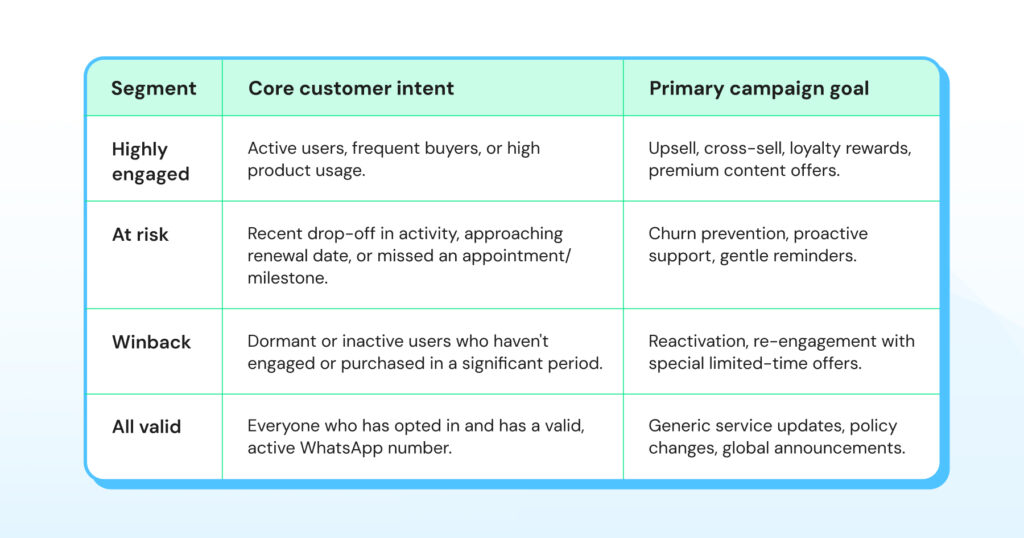
- Highly engaged: Contacts who read, clicked, or quickly replied to 3 or more campaigns in the last 90 days.
- Winback: Contacts who last sent a WhatsApp message to your business between 30 and 90 days ago.
- At risk: Contacts who last sent a WhatsApp message to your business 90 days ago.
- All valid contacts: Contacts who have a valid phone number.
For example, if you filter your database for “All Valid Contacts” segments to run a potential SMS Broadcast on phone numbers, you can automatically tailor your contacts and launch campaigns to an audience with a legit phone number.
Prior segmentation, in this case, based on a valid phone number increases efficiency, improves delivery rate and leads to high customer retention and recall.
If customers initiated a WhatsApp message via click to WhatsApp ad but didn’t respond in a week, the system automatically segments as “At risk”. You can run a revival campaign for this list.
Basically, Segments make filtering a breeze and saves loads of time, resources and energy. It empowers teams to organize broadcast lists and target the right kind of content for sureshot campaign success.
Also read: Top 5 WhatsApp marketing software to automate end-to-end WhatsApp campaigns and improve sales funnel in 2026
Bonus read: Check out WhatsApp automation tool to customise messaging workflows and build a high-performing sales strategy.
Why Is Segmentation Non-Negotiable on WhatsApp Broadcasts?
Running a WhatsApp broadcast campaign is harder than it looks as you cannot judge customer behaviour.
Either sales teams bulk broadcast written messages or manually group contacts based on custom attributes and rules. Both don’t work as the first leads to low engagement and the second drains the time and energy of sales teams.
This is the manual toil that Segments are designed to eliminate.
Both approaches waste time, reduce efficiency and dilute brand impact. Reaching out to contacts without any context means they’ll end up ignoring you, ultimately resulting in loss.
Wati’s Segment feature enables you to categorise leads automatically as Highly Engaged, Winback, At Risk or Valid to pick the right broadcast list for your campaign.
Prior context on lead progress with Segments optimises marketing efficiency, accelerates sales efforts, increases engagement rate and improves sales ROI.
Benefits of Pre-Defined Segmentation for Whatsapp Broadcasts
Here is how Segments replace hours of manual guesswork of sales teams with tangible, real-time impact and turn failures into successful strategies.
Reduces Wasted Hours on Manual Targeting
With Segments, you don’t have to filter lists manually. Prebuilt segments like highly engaged or Winback let you launch campaigns in minutes, even on top of CSV imports.
Wasted hours on manual targeting are instantly replaced with instant segments.
By automating campaigns for specific lists, you can hit the right consumer sentiment, improve delivery rates and deepen the customer relationship in a much better way.
Also read: How to integrate Active Campaign into WhatsApp Business API for better targeting and lead nurturing.
Improves Click Through Rates With Smarter Targeting
Initiating bulk broadcasts dilutes impact and leads to low engagement and conversion rates. Segments highlight the people who are actually engaged, driving higher reads, open rates, clicks and results. Low click-through rates are replaced with smarter targeting.
Segregating customers based on past interactions helps personalize new campaigns, share relevant content and be more relatable to consumers that’ll make them think to consider you for the second time. This ultimately will improve click throughs, resulting in improved engagement.
Builds Community Engagement With Content Relevance
Triggering unnecessary messages to the wrong leads can be difficult for a brand. Untargeted messaging leads to a decline in consumer interest and leads to a drop in engagement. Community engagement slipping is prevented by ongoing relevance.
At Risk and Winback groups make it easy to re-engage with the right messaging via the right channel before it’s too late.
Revives Lost Revenue From Dormant Leads With Timely Follow UPS
If your customers don’t reply, that doesn’t necessarily mean that they are not interested. With “Winback” and “Valid” segments, you can switch broadcasting channels and revive their interest in a smart way to bring them back into the sales pipeline. Lost revenue from dormant leads is replaced with timely follow-ups.
Segments lets you reconnect with dormant leads with precision and aims to reduce customer churn.
Your Campaign Journey, Simplified With Wati’s Segments
Wati’s Segment replaces manual processes with a set of powerful, intelligent automation that instantly piques consumer interest and drives quick action.
Below are the steps to create your own personalized WhatsApp marketing campaign with Segments:
- Step 1: Create a New broadcast Log in to your Wati account. Click on Broadcasts and go to Broadcast Analytics. Create a new campaign or edit an existing one.

- Step 2: Choose your segment In the Segment dropdown, select one of the predefined groups.
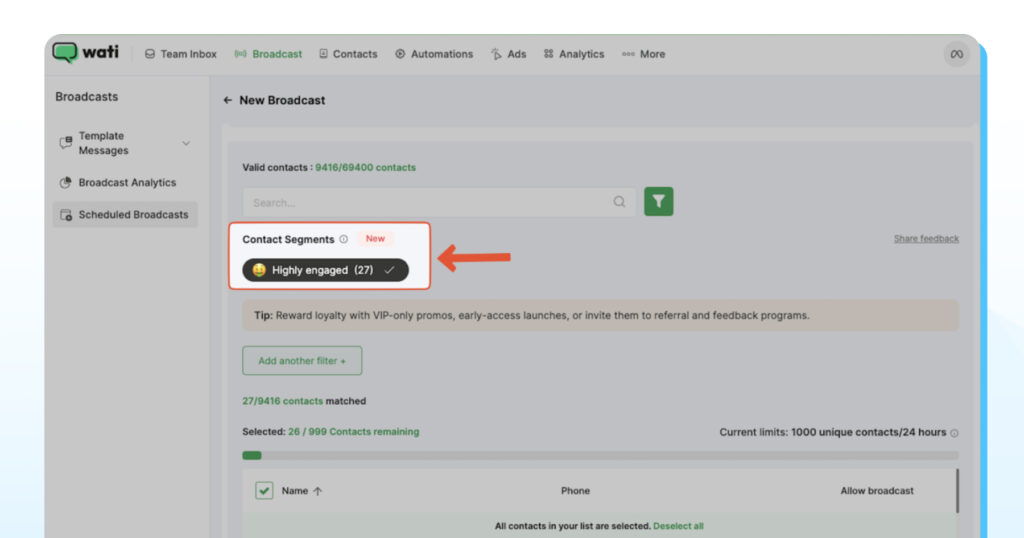
- Step 3: Narrow your audience further by adding a new filter and using other attributes like channel, source, or phone.
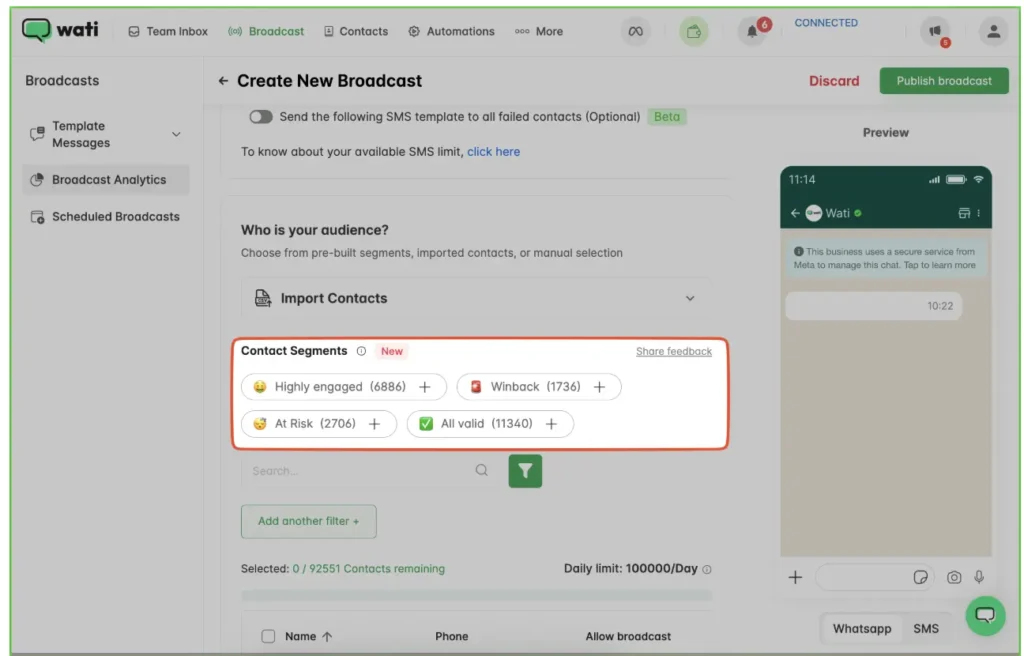
- Step 4: Add contacts and publish Upload additional contacts via CSV if needed, preview your message, and click Publish Broadcast.
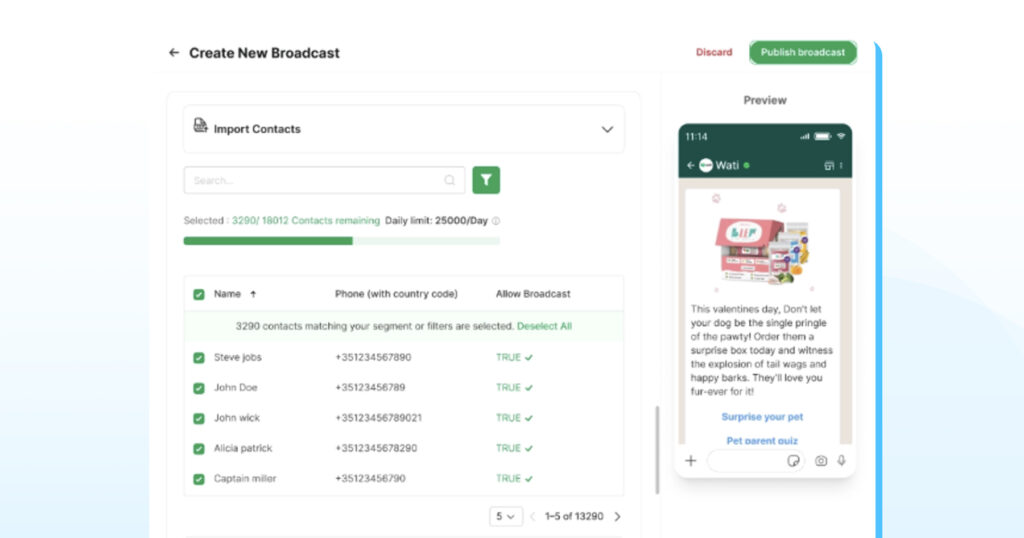
How to Decode Core Consumer Intent With Segments?
By using these filters, you move from blind guessing to strategic targeting in just a few clicks.
This allows you to consolidate lead histories, identify sales stages automatically, and initiate high-quality interactions at scale.
By providing right consumer service via Segments, you improve brand value, consumer loyalty and ROI in the long run.
Note: This feature is available on Wati’s Pro and Business plans.
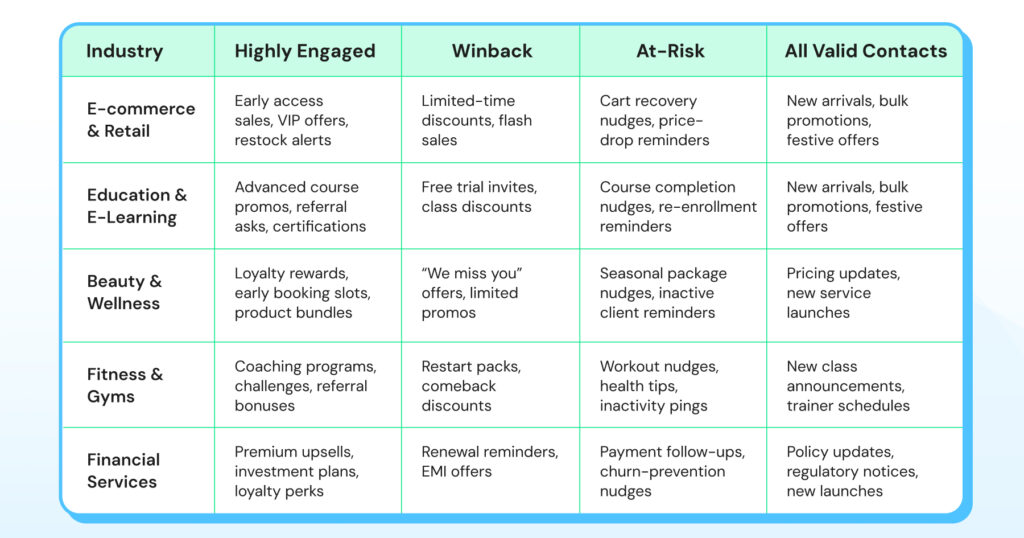
Audience Segmentation Playbooks: How Different Industries Use Segments
The real magic of Prebuilt Segments is how they translate into measurable, industry-specific results.
Here are actionable strategies for how different businesses are leveraging Wati’s segments to drive sales and reduce churn:
Segment Your High-Value Customer Winbacks Today!
By segmenting and filtering leads into these categories, you can entice consumers to take prompt action and fine-tune your sales engagement approach better. Segments allow you to steer yourself for success in an analytical and calculated way to scale your revenue potential.
Ready to explore what Wati.io’s Segments have to offer? Start your WhatsApp Business API journey today and upgrade your workflow and peer ahead of the competition!
Learn how to use predefined segments in your WhatsApp broadcast campaigns and build ace consumer journeys to achieve maximum potential.
How to Run WhatsApp Broadcast With Audience Segmentation: Frequently Asked Questions
Predefined segments are ready-made contact groups created automatically based on customer behavior. They save time and make targeting effortless.
Segments are available on Wati’s Pro and Business plans.
Yes. You can layer filters (like tags, attributes, or sources) on top of segments for even more precise targeting.
Yes. You can upload a CSV file and merge it with your chosen segment.
Yes. Segments are dynamic and refresh based on recent customer activity, so you’re always targeting the latest audience.
Check if you’re on a Pro or Business plan and included in the rollout. If not, contact Wati Support through the in-app widget.
You can reach out anytime via the in-app support widget in your Wati team inbox.