
Too Long? Read This First
- Fixed date filters compare every customer to the same calendar date, which makes accurate churn cohorts impossible to build.
- Wati's new signal-to-signal comparison for custom segments lets you compare one customer event to another, like one date signal to another date signal ± an offset, instead of to a constant.
- Built for growth and retention marketers who live in cohort-based segments — 7/30/60/90-day churn windows, win-back audiences, "still active" upsell cohorts, and monthly acquisition cohorts.
- Available on Wati's Pro and Business plans.
“Show me everyone who churned within 30 days of their first conversation.” “Let me re-engage the January cohort, but only the ones who dropped off after two weeks.”
Perfectly reasonable asks. However, with most segmentation tools, it's completely impossible to build in Custom Segments.
Standard date filters compare customer data against fixed calendar dates. They cannot compare one customer event to another for the same customer when there is a time gap. As a result, teams often export customer data into spreadsheets to build churn or retention cohorts.
With Wati's signal-to-signal comparison in Custom Segments, you can compare one customer profile signal with another, plus a time offset. This makes it easy to build lifecycle-based customer segments directly inside Wati, without Excel or manual exports.
Why Customer Churn Cohorts Matter
Customers don't all churn at the same point in their journey. Someone who signed up last week shouldn't be evaluated the same way as someone who made their first purchase three months ago.
A customer churn cohort groups customers based on a shared milestone, such as their signup date, first purchase, or first conversation. Their activity is then measured relative to that milestone, giving you a clearer view of how customers engage over time.
Customer churn cohorts help answer questions like:
- Which customers stopped engaging within 30 days of signing up?
- Which customers never became active after their first conversation?
- Which customers were still active 90 days after their first purchase?
- Which customers should receive a win-back campaign?
These insights help you build more targeted retention campaigns, identify customers at risk of churning, and reach them at the right stage in their lifecycle.
What is Cohort-Based Customer Segmentation?
Cohort-based customer segmentation organizes customers into groups based on a common event. Each group can then be analyzed independently to understand engagement, retention, or churn after that event.
Some common cohort types include:
Cohort Type | Example |
Acquisition cohort | Customers who signed up in January |
Conversation cohort | Customers whose first conversation happened this month |
Purchase cohort | Customers who made their first purchase during a promotion |
Retention cohort | Customers who remained active after 90 days |
Churn cohort | Customers who stopped engaging within 30 days |
Win-back cohort | Customers who became inactive after onboarding |
Different cohort types help answer different business questions. For example:
- Acquisition cohorts show whether customers from a specific campaign or time period stay engaged.
- Purchase cohorts reveal how buying behavior changes after a customer's first order.
- Churn and win-back cohorts help identify when customers disengage and who should receive re-engagement campaigns.
Looking at customers in cohorts makes it easier to evaluate marketing, onboarding, and retention efforts for each group rather than treating your entire customer base as a single audience.
Why Traditional Date Filters Fall Short for Churn Cohorts
Most segmentation tools are designed to compare customer data against a fixed date or time period. That works for simple filters, but it becomes challenging when every customer needs to be evaluated on their own timeline.
In simple words, date-based profile signals can only be compared to a fixed date or a preset time range, and every contact starts engaging at a different time, making it hard to build accurate churn and retention segments.
For example, you can create filters such as:
- Last reply is after June 1
- Signup date is within the last 30 days
- Last purchase was before yesterday
These filters compare every customer against the same calendar date.
Now, suppose you want to identify customers who stopped engaging within 30 days of their first conversation.
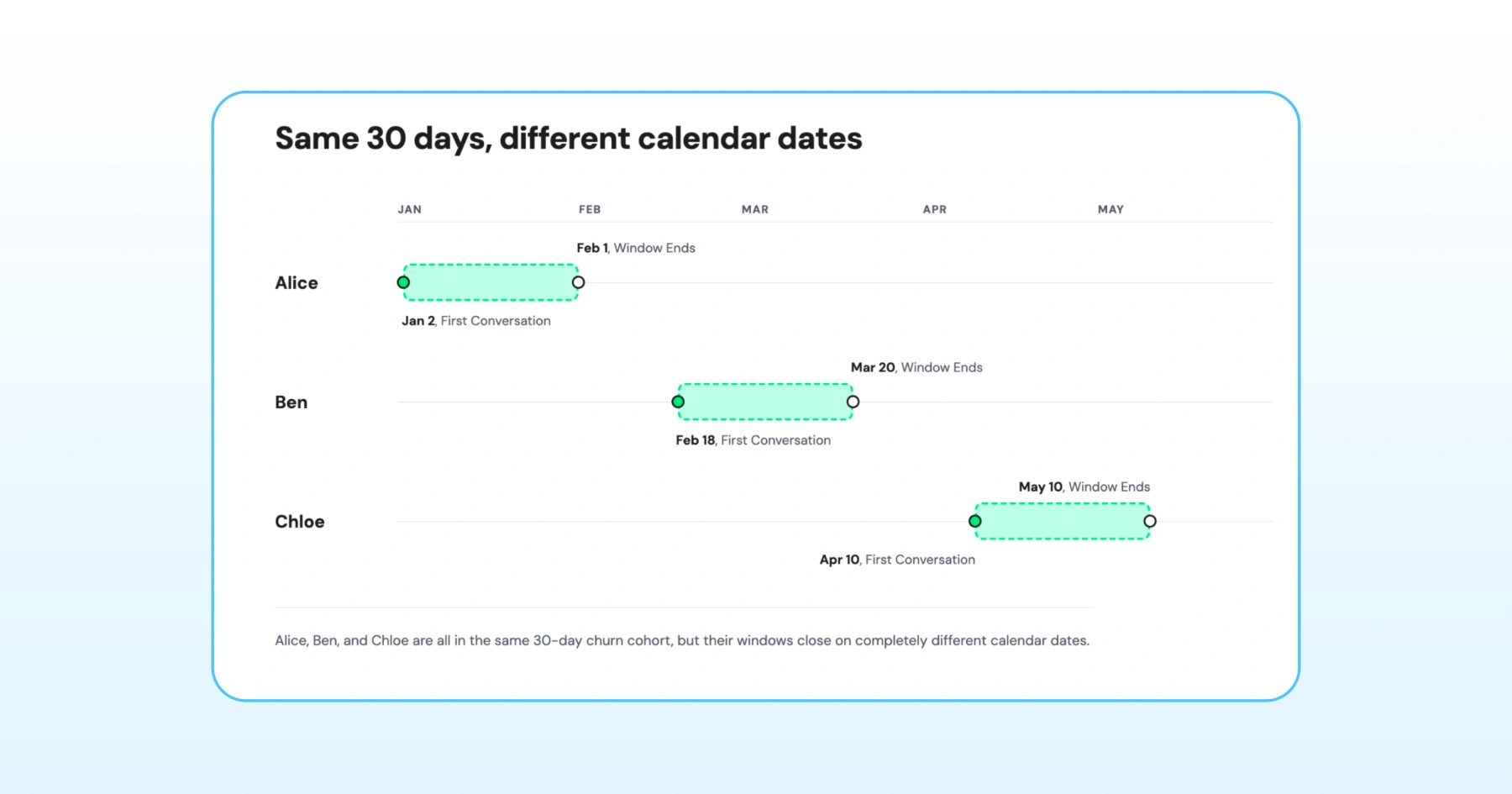
Although Alice, Ben, and Chloe belong to the same churn cohort, their 30-day windows end on different dates.
- For Alice, check whether she stopped engaging before February 1.
- Ben should be evaluated by March 20, while
- Chloe should be evaluated by May 10.
A fixed calendar filter can't make these comparisons because it applies the same date to every customer.
For example, filtering for customers who haven't replied since March 1 would include or exclude customers based on a single calendar date, not on when their own 30-day window ends.
As a result, many teams export customer data into spreadsheets, calculate the difference between the First Conversation and Last Reply dates for every customer, and then import the updated audience back into their marketing platform. It works, but it’s time-consuming, difficult to maintain, and becomes harder to scale as your customer base grows.
How Wati Solves This with Signal-to-Signal Date Comparisons for Custom Segments
Wati's signal-to-signal date comparison in Custom Segments enables customers on pro and business plans to compare one date-based profile signal with another using a configurable time offset.
Now you can compare two date profile signals against each other with a set number of days in between, letting each segment track a contact's own activity timeline instead of a fixed date on the calendar.
This makes it easier to build customer cohorts and targeted audiences without manual date calculations or data exports.
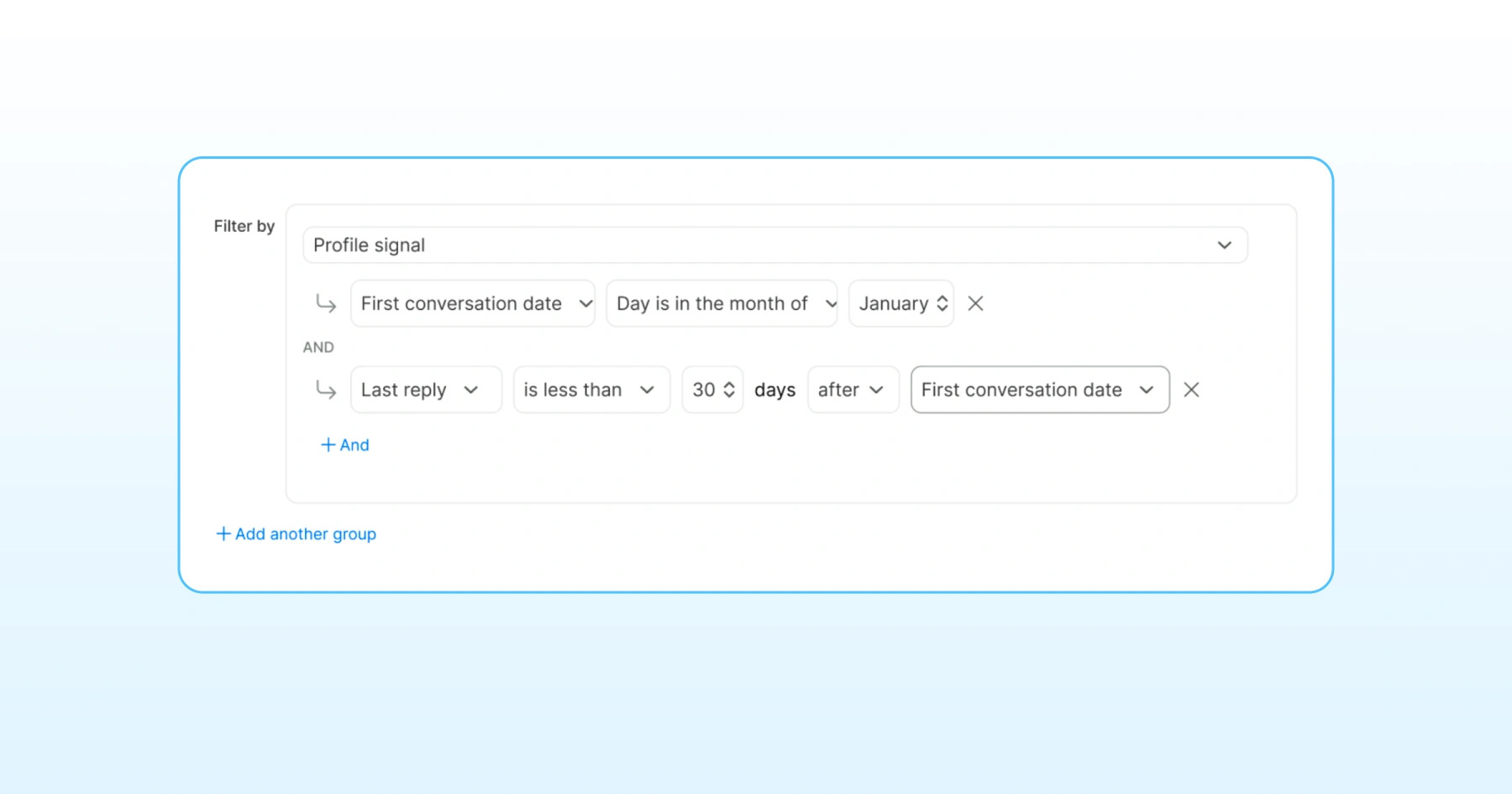
To make this clear, imagine creating a condition like “Last reply is more than 60 days after the first conversation date.”
This makes it easy to surface contacts who stayed active well beyond their first interaction, or to flag those whose engagement dropped off early - so you can separate your loyal cohorts from the ones slipping toward churn.
For supported date-based profile signals, Wati provides four comparison operators:
- Is less than N days after
- Is more than N days after
- Is less than N days before
- Is more than N days before
After selecting the first date-based profile signal, configure the comparison by choosing:
- A comparison operator
- The number of days
- The date-based profile signal to compare against
For example, you can create conditions such as:
Profile Signal | Condition |
Last Reply | Is less than 30 days after the First Conversation Date |
Last Reply | Is more than 90 days after the First Conversation Date |
You can use these comparisons to build churn cohorts, retention audiences, onboarding segments, and win-back campaigns directly within Custom Segments.
Note: This feature is available to Wati customers on the Pro and Business plans.
How to Create a Custom Segment Using Signal-to-Signal Date Comparisons?
To create a custom segment using signal-to-signal date comparisons, follow these steps.
Create a Custom Segment
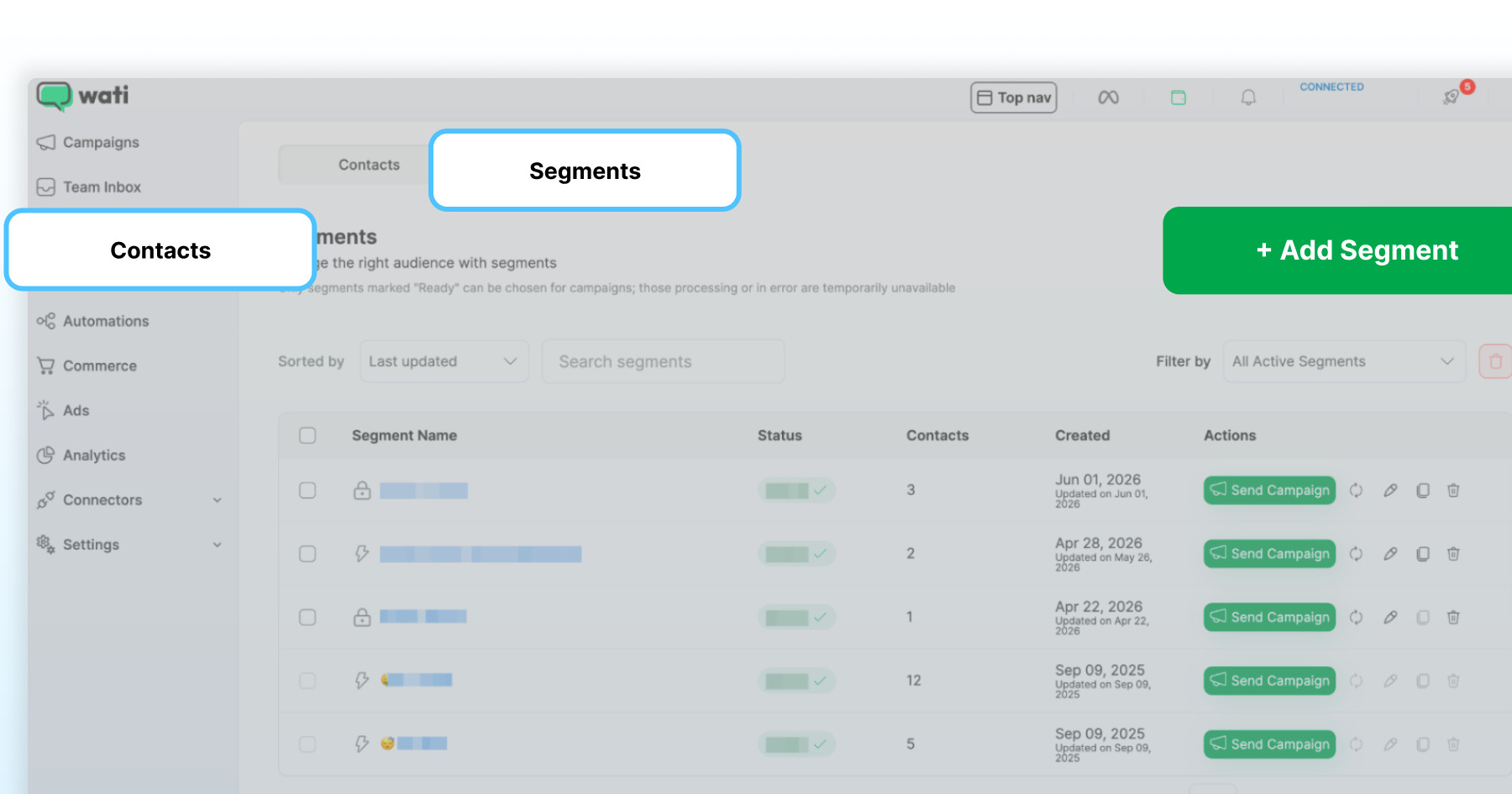
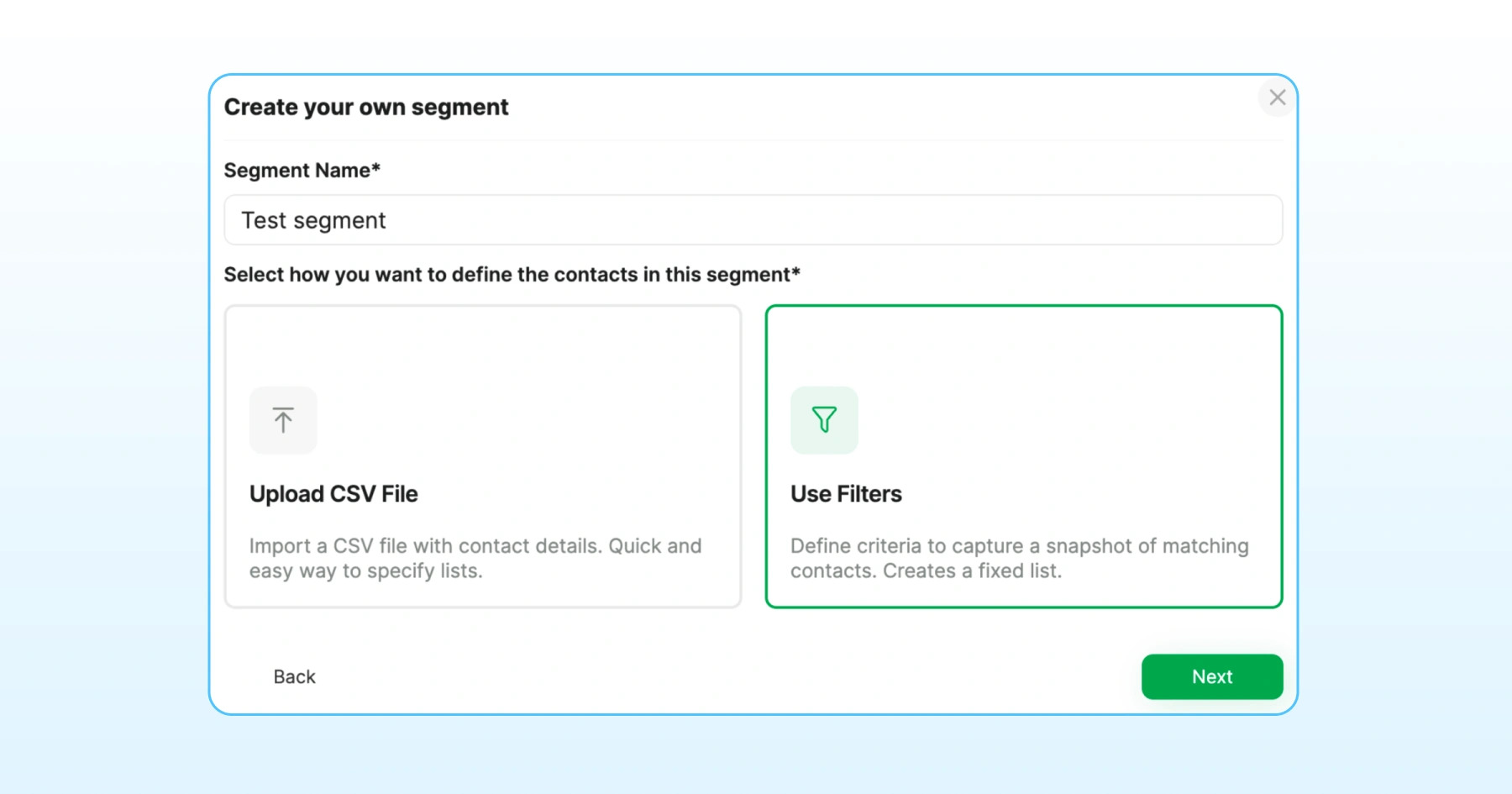
- Go to Contacts > Segments and select + Add Segment, or edit an existing one.
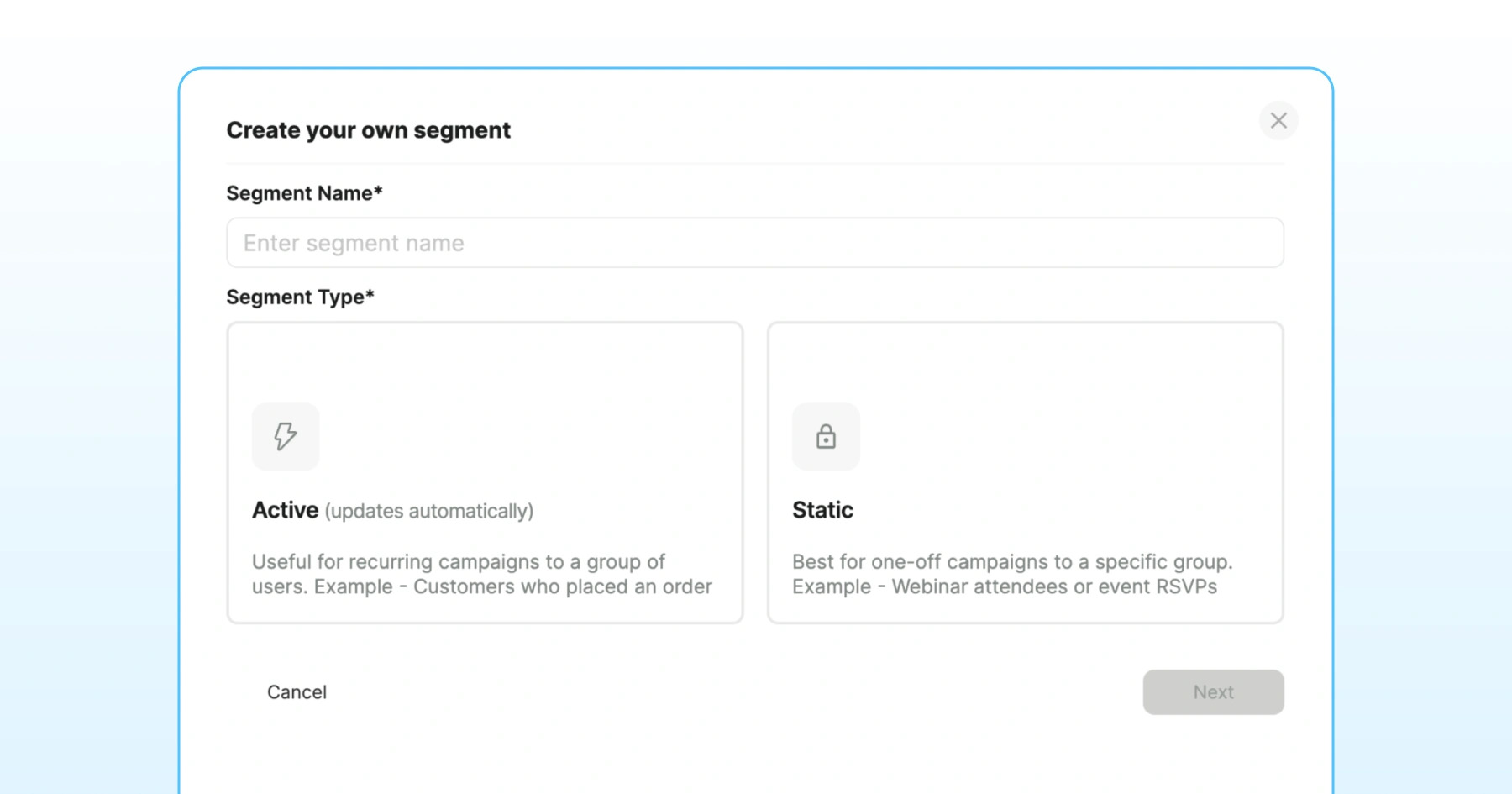
- Select either an Active or Static segment, then click Next.
Add a Filter Condition
- In Create your own segment, click Use Filters.
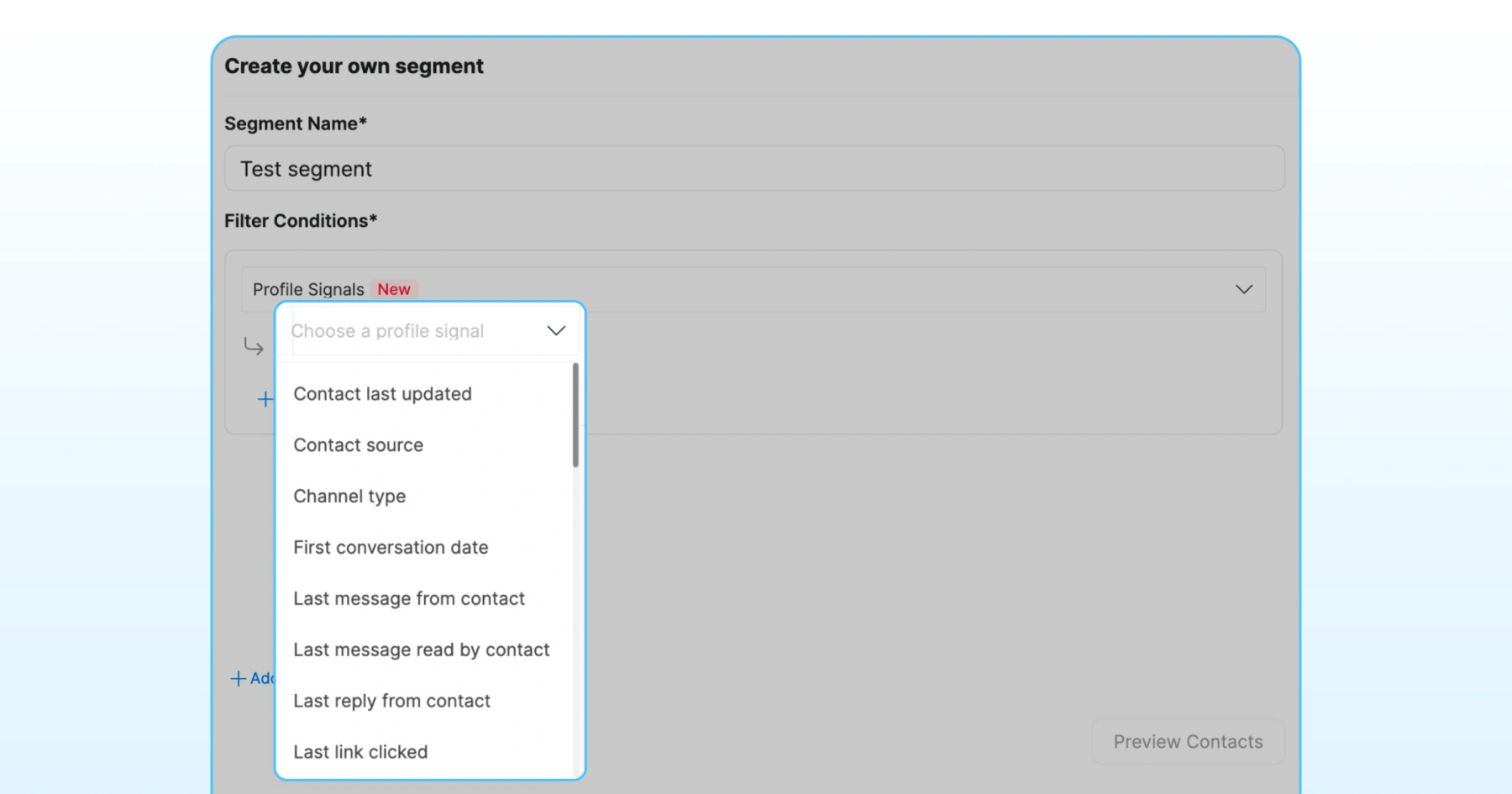
- Under Filter conditions, select Profile signals and choose the date-based profile signal you want to evaluate.
Configure the Comparison
- Choose a comparison operator, select the date-type profile signal to compare against, and enter the number of days for the comparison.
Add Additional Conditions (Optional)
Combine the comparison with additional filters using AND or OR operators to create more targeted customer segments.
Save the Segment
Review the filter conditions and save the segment. The segment can now be used across your campaigns and automation workflows.
Note: Only date-type profile signals can be compared; never compare a signal against itself. If either date is missing, the contact won't match. These comparisons work best when the two signals follow a natural time order -and you can reuse the same setup for different churn or retention windows just by changing the day offset.
When do Profile Signal Comparisons Give the Most Reliable Results?
Profile signal comparisons work best when the two date signals follow a natural order - one event that reliably happens before the other:
- Pair signals with a clear sequence, like First conversation date (which always comes before Last reply), to get a clean, dependable window to measure.
- That predictable order is what makes these comparisons ideal for churn and retention segments, where you're tracking how long a contact stays engaged after a defined starting point.
Common Use Cases for Signal-to-Signal Date Comparisons
Signal-to-signal date comparisons support a wide range of marketing and retention use cases beyond churn analysis.
By comparing two customer events, you can build audiences that reflect how customers progress through different stages of their relationship with your business.
Here are some of the most common use cases.
Understand when Customers Churn
Customer churn doesn't happen at the same time for everyone. Some customers stop engaging within a week, while others remain active for months before becoming inactive.
Create 7-day, 30-day, or 60-day churn cohorts to measure how quickly customers disengage after their first conversation or another key customer event.
These insights can help identify where customers drop off and whether changes to your onboarding process improve retention over time.
Measure Long-Term Customer Retention
Retention is easier to understand when customers are measured against the same stage in their journey rather than the same calendar date.
For instance, a 90-day retention cohort can show how many customers are still active 90 days after their first conversation or purchase.
Comparing these cohorts over time makes it easier to evaluate whether product improvements, onboarding changes, or customer success initiatives are increasing long-term engagement.
Build Targeted Win-Back Audiences
Not every inactive customer should receive the same campaign. The right time to reconnect often depends on where they are in their journey.
A business might target contacts who stopped replying within 30 days of their first conversation, while another could wait 90 days before re-engaging slower-moving contacts.
Building these audiences using customer events makes win-back campaigns more timely and relevant.
Compare Acquisition Cohorts
Acquiring more customers is only part of the picture. Understanding which acquisition campaigns bring customers who stay engaged is equally important.
Group customers based on their Signup Date or First Conversation Date, then compare how different cohorts perform over time.
For example, comparing customers acquired during a seasonal promotion with those acquired through organic channels can reveal which source delivers stronger long-term retention.
Create Lifecycle-Based Campaigns
Customers need different communication as they move through their journey. Someone who recently signed up has different needs from someone inactive for several weeks.
Signal-to-signal date comparisons make it easier to build audiences for each stage. These segments can then be used to automate onboarding messages, product education, loyalty campaigns, or re-engagement workflows based on customer behavior rather than fixed schedules.
Best Practices for Building Better Customer Segments
Keep these best practices in mind when creating customer segments with signal-to-signal date comparisons:
- Start with a clear objective: Build each segment around a specific business goal, such as measuring onboarding success, identifying customers ready for an upsell, or tracking retention after a purchase.
- Choose meaningful profile signals: Use profile signals that represent important customer events, such as First Conversation Date and Last Reply.
- Combine with additional filters when needed: Refine your audience by adding filters such as customer tags, acquisition source, language, country, or campaign to create more targeted segments.
- Keep segment logic simple: Start with the minimum number of conditions needed to answer your business question. Add more filters only when they improve the quality of the audience.
- Validate the segment before using it: Review the filter conditions to confirm the audience matches your intended criteria before using it in campaigns or automation.
Common Mistakes to Avoid
Keep these common pitfalls in mind when building customer segments with signal-to-signal date comparisons:
- Choosing the wrong profile signals: Select profile signals that match the question you're trying to answer. For example, compare First Purchase Date with Last Purchase Date when analyzing repeat purchases, or First Conversation Date with Last Reply when measuring customer activity.
- Using an unsuitable comparison window: The number of days should reflect the customer behavior you're measuring. A shorter window may be suitable for onboarding engagement, while a longer window may be more appropriate for retention, loyalty, or win-back campaigns.
- Adding too many filter conditions: Adding multiple filters can make a segment more precise, but it can also narrow the audience more than intended. Start with the core comparison and add filters only when they support a specific business objective.
- Skipping cohort filters when needed: If you're comparing customer behavior across a specific campaign or time period, first define the cohort you want to analyze.
- Using the same segment for every campaign: Different marketing objectives require different audiences. Create separate segments for churn analysis, retention campaigns, win-back journeys, and acquisition analysis so each campaign targets the right customers.
Final Thoughts
With signal-to-signal comparisons in Custom Segments, Wati helps teams analyze customer behavior based on actual events in their journey. This makes it easier to build churn cohorts, understand retention trends, and create targeted campaigns without spending hours on spreadsheets or manual data calculations.
Ready to build smarter customer segments?
If you are already with Wati, try the features. If you are not with Wati yet, book a demo to see how Wati can help you create more meaningful customer cohorts, identify engagement patterns, and improve customer retention.
Frequently asked questions
Why can't fixed date filters identify churn cohorts accurately?
Fixed date filters compare every customer against the same calendar date, but churn cohorts need each customer measured relative to their own timeline, such as 30 days after their first conversation rather than 30 days after one date that applies to everyone.
What is signal-to-signal comparison in Wati?
Signal-to-signal comparison lets you compare one date-based profile signal with another, such as Last Reply and First Conversation Date, using a configurable number of days before or after, so you can build lifecycle-based segments without exporting data to a spreadsheet.
Which profile signals can I compare?
You can compare any two date-type profile signals available in your workspace as long as they follow a predictable chronological order (for example, First Conversation Date typically occurs before Last Reply), though a signal can't be compared with itself and a contact won't match if either date is missing.
Can I build win-back audiences using Custom Segments?
Yes, signal-to-signal comparisons can identify customers who became inactive after a specific stage in their journey, such as their first conversation or first reply, making it easier to build targeted re-engagement campaigns.
Which Wati plans include signal-to-signal comparisons?
Signal-to-signal date comparisons are available to customers on Wati's Pro and Business plans.
Related posts
- TikTok Business Account vs. Personal Account: How Do They Differ?
TikTok Business Account vs Personal Account: Business unlocks ads, analytics, and messaging; Personal keeps sounds and creator payouts.
- What are TikTok Direct Messaging Ads? Non-Technical Setup Guide
Turn TikTok ad taps into real DM conversations. A simple, non-technical setup guide to TikTok Click To Direct Messaging (Click to DM) Ads using Wati.
- How to Use an Instagram Chatbot for FAQ Automation (2026 Guide)
An Instagram chatbot replies to DMs, comments, and story replies instantly using keyword triggers, then hands off to a human when needed. Here's how to set one up in Wati.
- How to Capture Phone Numbers From Instagram DMs With Wati in 2026
An Instagram DM lead capture flow collects a prospect's phone number, then bridges the chat to WhatsApp. Set it up in Wati, step by step.