
Too Long? Read This First
- Instagram chatbots use keyword rules to spot words like "pricing" or "shipping" and send pre-built answers instantly, 24/7.
- They work best for factual, repetitive questions. Account-specific issues, like order lookups, should go to a human.
- In 2026, Instagram automation covers four surfaces: DMs, comments, story replies, and story mentions.
- On Instagram, chatbot menus can now use up to 3 tappable buttons. Longer menus fall back to typed numbers.
- When the bot can't answer, a fallback routes the chat to a live agent with the full conversation history.
- Meta retired three message tags in April 2026. Bots get 24 hours to reply, and human agents can reply for up to 7 days.
- Wati brings Instagram DMs and comments into one Team Inbox and moves leads to WhatsApp for follow-up, with no manual export.
- Business-plan customers can run multiple Instagram accounts from one Wati workspace, all in a single inbox with per-account filters.
An Instagram chatbot is automated messaging software that replies to DMs, comments, and story replies the moment a customer sends one, using keyword triggers instead of manual typing, so common questions get answered in seconds instead of hours, 24/7.
This is where Wati comes in. Wati is an Agentic Customer Engagement platform for revenue growth that lets you build a no-code bot in Instagram to answer DMs, comments, and story replies automatically.
Wati's Instagram automation detects keywords like "pricing" or "shipping," fires a pre-built answer, and hands off to a human agent when a question falls outside the FAQ.
That speed matters when an Instagram campaign takes off. Your campaign reaches its audience, and comments and DMs can pile up within hours. Every delayed reply is a lead that has had time to look elsewhere.
This guide covers how to set up Instagram FAQ automation in Wati specifically, what it can and can't handle, and the exact steps to build your first flow.
What does an Instagram FAQ Chatbot Actually do?
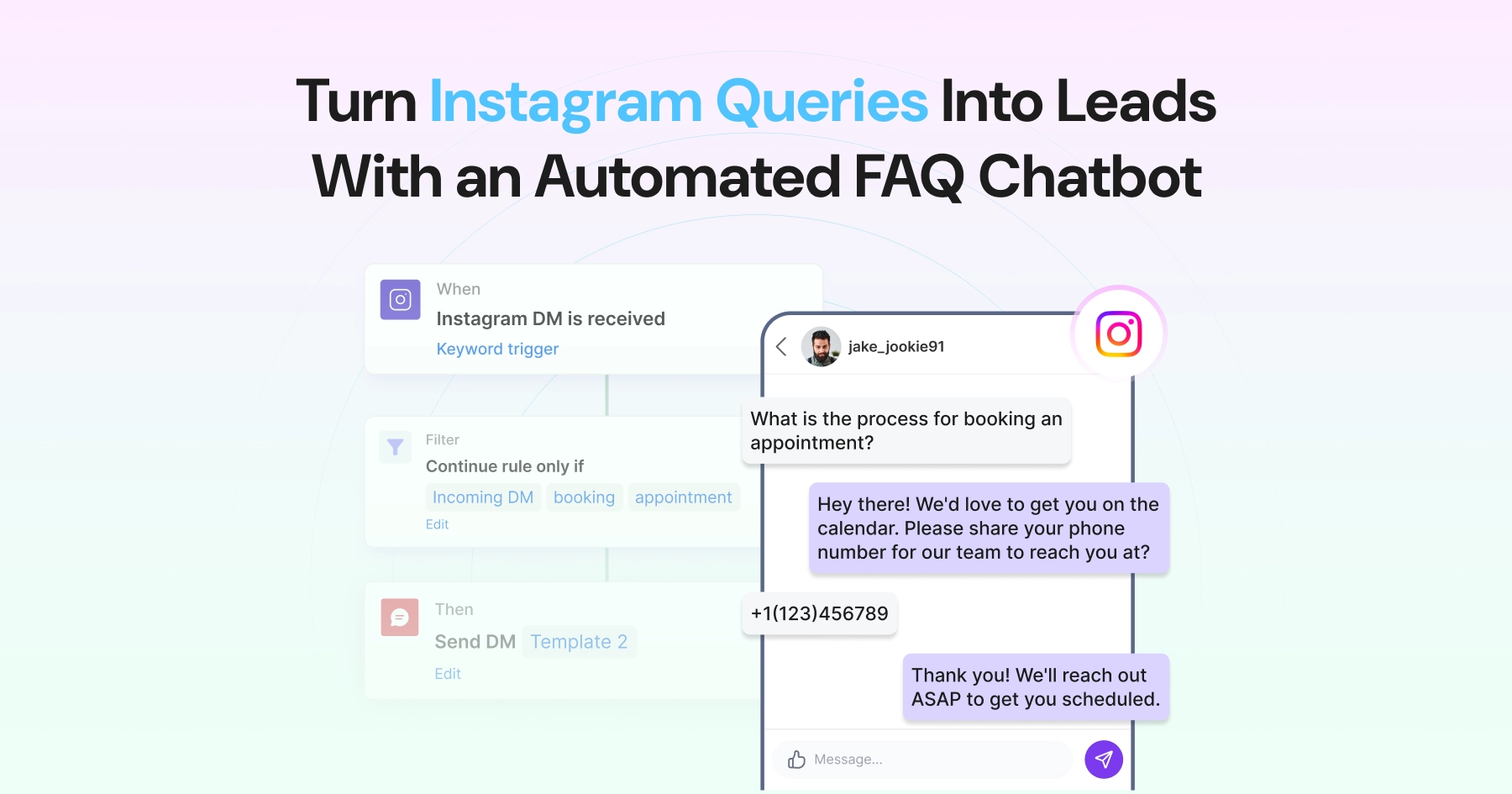
When a user comments on your post, clicks an ad, or sends a DM, an FAQ bot in Instagram can respond instantly, with no manual effort needed.
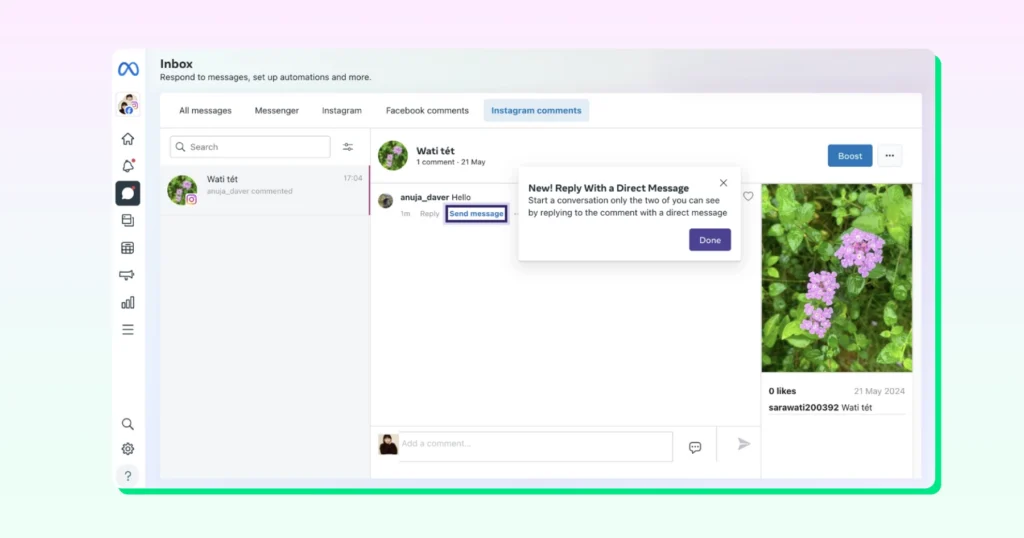
If their message contains a keyword like “pricing” or “refund,” a pre-set rule fires an automated reply or DM. From your Team Inbox, your team can also reply privately to a comment with a DM.
When the user replies, you get 24 hours for automated replies, and your team can keep replying manually for up to 7 days, giving you room to follow up, qualify, or close.
If no keyword matches, the query routes to a human agent. This hybrid approach keeps response times fast without sacrificing accuracy for complex questions.
As of April 27, 2026, Meta retired the Confirmed Event Update, Account Update and Post-Purchase Update message tags. If your follow-ups relied on those tags to message customers after the 24-hour window, that workaround no longer works.
The only tag still available on Instagram is Human Agent, which lets a real person on your team (not a bot) reply for up to 7 days after the customer's last message.
What does an Instagram FAQ Chatbot Look Like in Practice?
Scenario: At 2 AM, a customer lands on your Instagram page after seeing an ad and wants to know how to book an appointment for a consultation.
Step 1: Customer Sends a DM
The customer sends a message, e.g., “Hey, I need to book an appointment. Is a slot available?”
Step 2: Bot Detects the Keyword
The bot scans the incoming message and detects the keyword “appointment”. The keyword triggers a response in the backend.
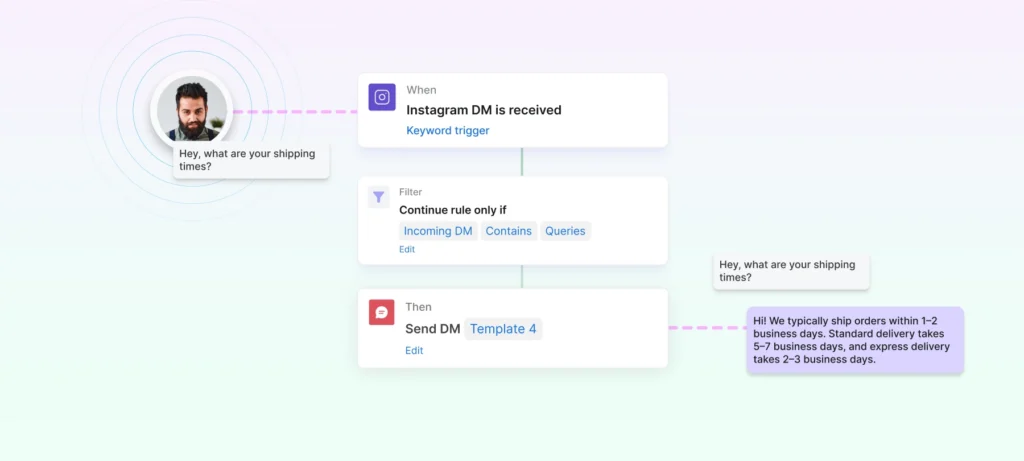
This targets the pre-built appointment-booking node in the backend, which triggers the "Book a consultation" response.
Step 3: Bot Fires an Instant Response
Within seconds, the customer receives an automated reply.
"Hi Sophia, thanks for reaching out! Which consultation would you like to book?"
The message comes with three buttons: Skin Consultation, Hair Consultation, Other.
Sophia taps "Skin Consultation," and the bot replies: "Great choice! Pick a time that suits you here," with a "Book a slot" button that opens the booking page.
Step 4: Conversation Closes Automatically
Once Sophia has her booking link, the bot marks the conversation as "Resolved" in the shared Team Inbox. If she had tapped "Other," the chat would have been assigned to an agent for the morning instead.
Result: The customer went from question to booking link in under a minute, at 2 AM, without a single team member being online.
What Surfaces Does Instagram Chatbot Automation Cover Besides DMs?
Instagram FAQ automation in 2026 runs across four surfaces, not just direct messages:
Surface | How It Works | Best For |
|---|---|---|
DM Automation | A keyword or message in a direct message triggers an instant reply or chatbot flow. | Customer support, FAQs, product questions, lead qualification |
Comment-to-DM Automation | A follower comments a trigger word like "price," "link," or "info" on a post or Reel. The bot replies publicly ("Check your DMs!") and sends a private DM with the full answer in one trigger. | Product discovery, promotions, lead generation, sharing links |
Story Reply Automation | A follower replies to a Story, and Wati automatically sends them a DM (text, image or video). You can reply to every story response or only those containing a keyword. | Flash sales, product launches, limited-time offers, capturing leads at peak engagement |
Story Mention Automation | Someone tags your brand in their Story, and Wati automatically sends them a thank-you DM. | Rewarding user-generated content, discount codes for advocates, turning fans into leads |
What to Look at Before Setting Up Instagram FAQ Automation
Here are the prerequisites to keep in mind before you set up your Instagram FAQ automation.
Step 1: Identify Repetitive Questions
Look at your last 50–100 DMs and find patterns.
Step 2: Create FAQ Buckets
Group queries into:
- Pricing
- Shipping
- Returns
- Product details
Step 3: Define Keywords
Map variations:
- “price”, “cost”, “how much.”
- “delivery time”, “shipping”
Step 4: Build Response Flows
Create structured replies with:
- Clear answers
- CTA buttons
- Next steps
Step 5: Add Fallback Mechanism
Always route unmatched queries to a human.
Step 6: Test & Optimize
Track:
- Response accuracy
- Drop-offs
- Escalations
How to Set Up an Instagram Chatbot in Wati (No Coding Required)
You don't need any coding to set up a bot in Instagram. Here's the full process from connecting your account to going live.
Step 1: Connect Your Account
- Make sure your Instagram account is a Professional account (Business or Creator)
- Log in to your Wati dashboard and go to Channels, then Instagram
- Click Connect Instagram, log in, and approve the permission
- Wati connects through Meta's official API, so you're not relying on unofficial tools that can get accounts restricted
Step 2: Create Your Chatbot
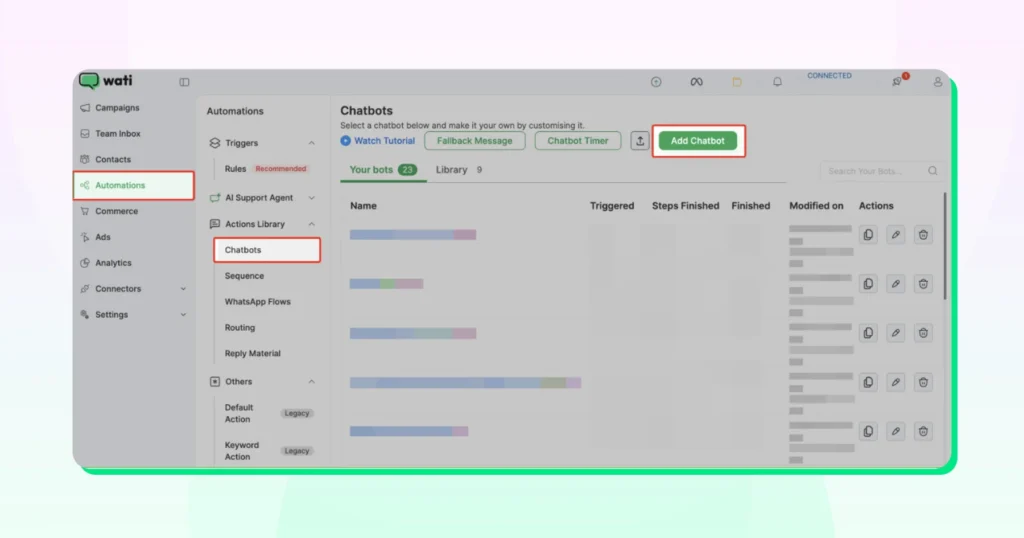
- Go to Automations, then Chatbots
- Click Add chatbot
Step 3: Build the Decision Tree with Buttons
- Go to Automations, then Reply materials, then Templates, and filter by Instagram
- Create a button template with a short message (for example, "What can we help you with?") and up to 3 quick-reply buttons: Pricing, Shipping, Returns. Button titles can be up to 20 characters
- In your chatbot, add your button template to the flow
- Each quick-reply button gets its own branch, so you can connect a different answer to each one
- Set the node's fallback path for customers who type instead of tapping
- Need more than 3 options? Ask customers to type a number instead (for example, "Type 1 for Pricing, 2 for Shipping…") and branch with a Set a Condition node
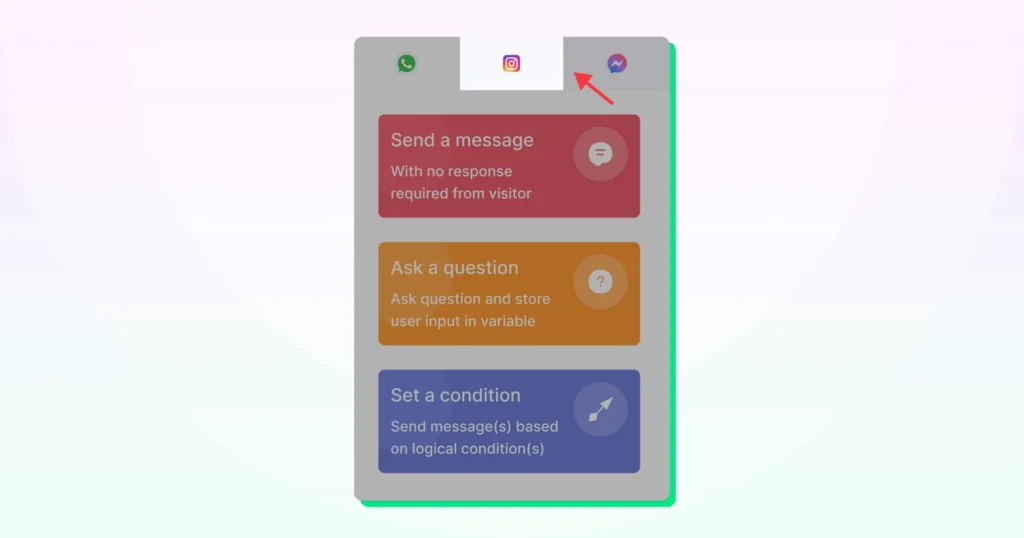
Step 4: Connect Each Branch to an Answer
- Add a message node on each branch with the answer for that option
Pro tip: nest another Condition inside a branch. For example, show local shipping rates if the location is India; otherwise, show international rates.
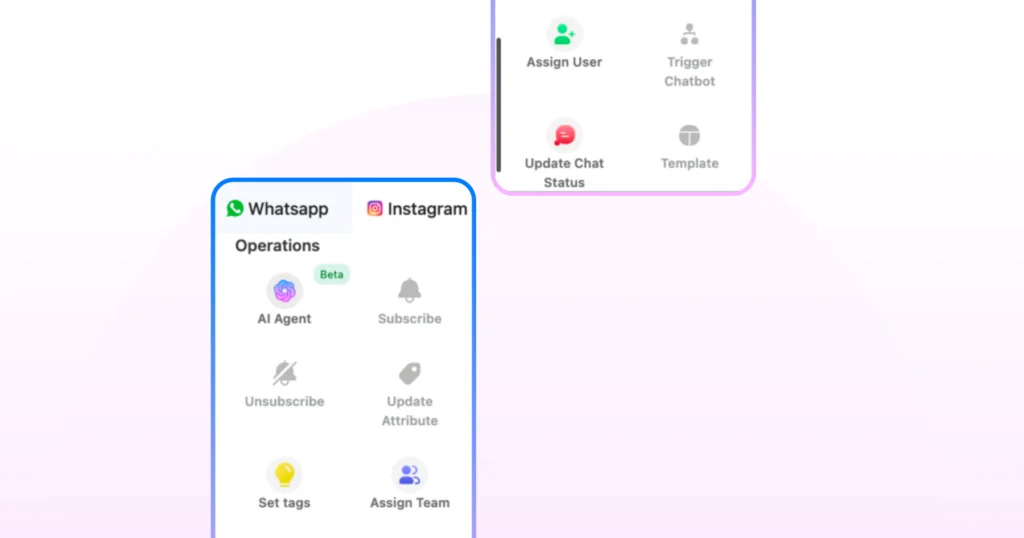
Step 5: Add a Human Handoff Path
- After each answer, add a second button message asking "Was that helpful?" with two buttons: "Yes, thanks" and "Talk to an agent"
- Connect the "Talk to an agent" branch to Assign Team or Assign User
- Also route the fallback path (anyone who types "agent" or "human") to the same assignment
- This notifies your team in the Wati Inbox
- Save and test the flow
Step 6: Turn on the Keyword Trigger
- Go to Automation, then Rules
- Create a new keyword-based filtering rule
- Set the trigger to new Instagram message received
- Enter your keyword(s) and link the rule to your chatbot
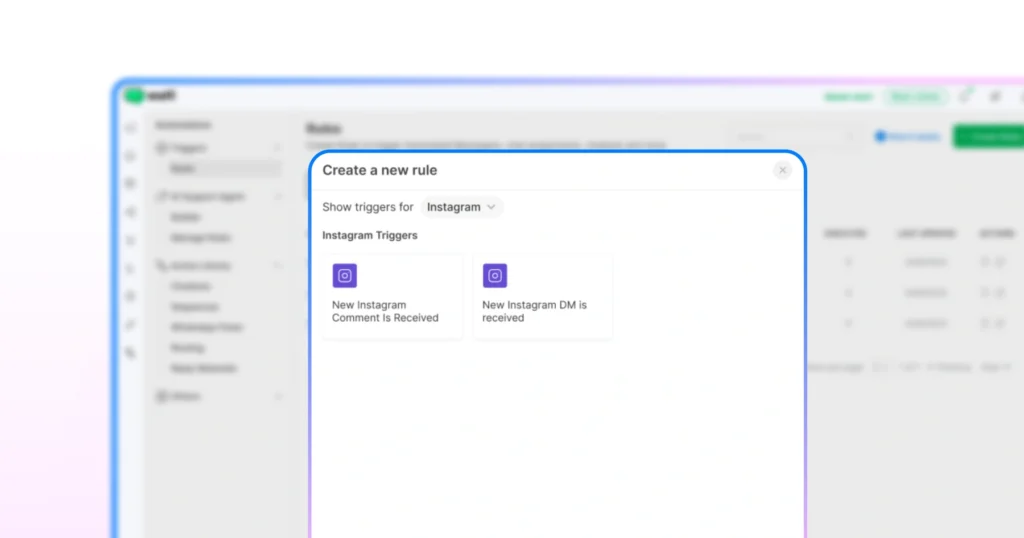
Step 7: Turn on Comment and Story Automation
In the same rule builder (Automation, then Rules), create a new rule for each surface.
- For comments: set the trigger to "New Instagram comment is received," add your keyword filter, and choose "Send reply to comment," "Send Instagram Direct Message," or both
- For story replies: choose the Instagram story reply trigger, add an optional keyword filter, and set the action to send a DM
Step 8: Test from a Secondary Account
- Use a different Instagram account (a personal one works) to DM your business account, comment on a post, and reply to a story
- Check that each keyword triggers the right reply and that the "Talk to an agent" button assigns the chat in your Team Inbox
Which FAQs are Worth Automating on Instagram?
Not every DM or comment should go to the bot. The goal is to automate common, factual questions that repeat weekly, not one-off or account-specific issues.
The 10 most commonly automated question types:
- Pricing or cost, "How much does [product/plan] cost?"
- Shipping time, "How long does delivery take?"
- Return and refund policy, "Can I return this if it doesn't fit?"
- Product availability, "Is this item back in stock?"
- Business hours, "Are you open on weekends?"
- Location or booking, "Where are you located?" / "How do I book an appointment?"
- Discount codes, "Do you have any active offers?"
- Product or service details, "What's included in the starter plan?"
- Order tracking, "How do I track my order?"
- Reaching a human agent, "Can I speak to someone directly?"
Automate It If | Route to a Human If |
|---|---|
The answer is factual and doesn't change per customer | It needs an order ID or payment status |
It doesn't need account-specific data | It requires a personal account lookup |
It comes up more than 5 times a week | A bot attempting it risks losing customer trust |
How Response Trees Work in an Instagram Chatbot
Response trees are decision paths that lead to a specific pre-built answer based on what the customer taps or types. On Instagram, a message can carry up to 3 tappable buttons, so short menus work with buttons, and longer menus fall back to typed numbers or keywords.
Example flow:
- Customer DMs "hi"
- Bot sends a welcome message with three buttons: Pricing, Shipping, Returns
- Customer taps "Shipping"
- Bot sends the shipping policy, then asks "Was that helpful?" with two buttons: "Yes, thanks" and "Talk to an agent"
- If the customer taps "Talk to an agent," the conversation is assigned to a team member
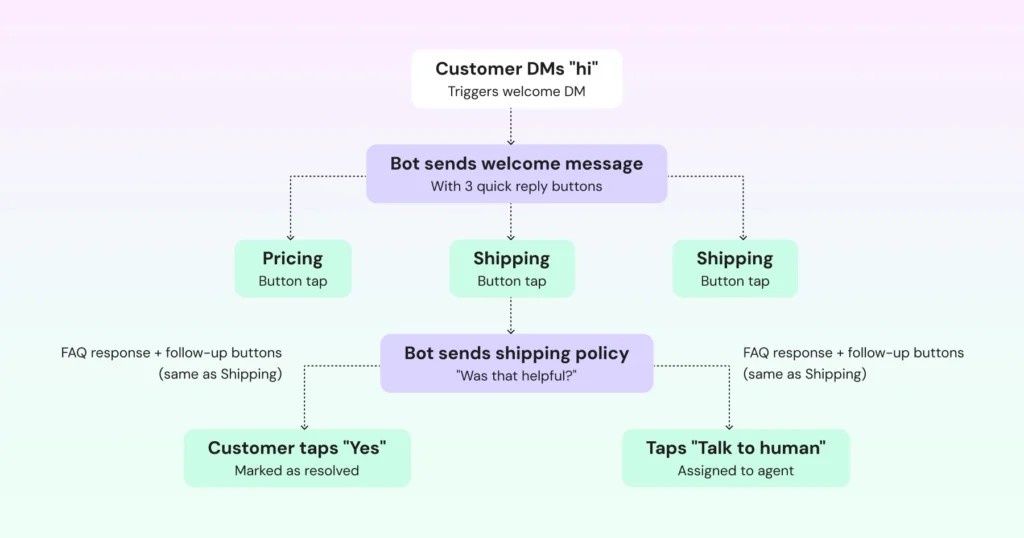
If a customer types something instead of tapping a button, or their message matches no keyword or condition, the fallback path routes the conversation to a human agent, with the full chat history intact. The customer never hits a dead end.
Can You Run One Instagram Chatbot for Multiple Accounts?
Business-plan customers can now connect more than one Instagram or Messenger account to a single Wati workspace. This solves a real gap for agencies and multi-brand teams. Previously, Wati supported only one connected Instagram account at a time, forcing separate logins or separate tools per brand.
- All connected accounts share one Team Inbox. Every conversation is labelled with the account it came from, agents can filter to one account at a time, and replies are sent from the right account automatically, so there are no crossed wires between brands
- Agents can work across accounts without switching logins; managers get a centralized view of activity across every handle
- Useful for regional variants (e.g., @YourBrand_US and @YourBrand_UK), multi-location businesses, or agencies managing client accounts side by side
- Automation rules can be set per account, so @YourBrand_US and @YourBrand_UK can reply to the same keyword differently, while chatbot flows and reply templates can be reused across every account
What Happens When an Instagram Chatbot Can't Answer?
For highly specific or technical queries with no matching FAQ node, a fallback mechanism sends an immediate acknowledgement, "Thanks for reaching out. Let me connect you with our team. Someone will follow up with you shortly," and flags the conversation for a support agent inside Wati's shared inbox.
An FAQ bot isn't a general-purpose AI assistant. For anything outside its scope, it hands off to a human rather than guessing.
How is Wati Different From Standalone Instagram Chatbot Platforms?
When your Instagram bot, live chat, and WhatsApp run in separate tools, context gets lost. An agent picking up a chat can't see what the bot already discussed, and a lead who shares their number has to be exported by hand before anyone can follow up on WhatsApp.
Wati integrates all DM and comment conversations into one platform, with full history visible to whichever agent (or bot) handles the next message. When a bot captures a phone number inside a DM, the lead passes directly into a WhatsApp follow-up. The customer moves from an Instagram DM to a WhatsApp conversation with no manual export or third-party integration.
Is an Instagram Chatbot Right for Your Business?
A bot in Instagram is worth setting up if you get more than 20 repeat DMs or comments a week and at least five of them have consistent, factual answers your team is currently typing out by hand.
Run through this checklist to confirm:
- You receive more than 20 DMs or comments per week that repeat the same questions
- At least five of those questions have consistent, factual answers that don't vary by customer
- Your team currently handles those messages manually, without a system for routing or tracking
Speed matters, too: 84% of consumers say a quick response is critical to good customer service.
Start Building Your Chatbot Now!
Wati lets you set up triggers, automate DMs, comments and story replies, and manage every conversation from one unified inbox, with no extra software needed. Your FAQ bot answers common questions, qualifies leads, and hands them straight to WhatsApp for follow-up.
Ready to see it in action? Book a demo and build your first bot in Instagram.
Frequently asked questions
What happens if the chatbot doesn’t understand a customer's question?
The bot utilizes a fallback mechanism. If no keywords match the pre-built FAQ nodes, the bot sends a friendly acknowledgement and automatically flags the conversation for a human support agent to take over.
Which types of questions are best suited for Instagram automation?
Questions that require factual, consistent answers and are repeated frequently (at least 5 times a week) are ideal. Common examples include pricing, shipping times, return policies, and business hours.
Can the chatbot handle specific order tracking or payment issues?
Not on its own, because these need private data like order IDs. You can set up the bot to ask for the order number and then assign the chat to an agent in your Team Inbox, so your team has what they need to help straight away.
How does a "Response Tree" work in an Instagram bot?
It's a visual automation flow. The bot sends a message with up to 3 tappable buttons (for example, Pricing, Shipping, Returns), and each button leads to its own branch with the right answer. For menus with more than 3 options, customers type a number instead.
Can I run automation for more than one Instagram account?
Yes. On Wati's Business plan, you can connect multiple Instagram or Messenger accounts to one workspace. All accounts share one Team Inbox, with each conversation labelled by account, and you can set automation rules separately for each account.
How does Wati help with lead generation through the chatbot?
When a bot captures a user's phone number during an Instagram DM, it can automatically trigger a WhatsApp follow-up, turning a support query into a direct sales channel.
How much does Wati's Instagram chatbot cost?
Instagram DM and comment auto-replies are available from Wati's Growth plan. Chatbot flows, the decision trees covered in this guide, are part of the Pro plan and above. Connecting multiple Instagram accounts to one workspace requires the Business plan. For current pricing in your region, see Wati's pricing page.
Can I use a bot in Instagram to answer customer questions?
Yes. An Instagram chatbot connected through Meta's official API replies automatically to DMs, comments, and story replies that customers send, and hands off to a human agent when it can't answer.
Related posts
- How to Create Personalized AI Videos with Wati’s AI Video Generator
Transform your marketing with Wati’s AI video generator. Create personalized, professional videos at scale without technical expertise or expensive equipment.
- How to Set Up Auto Reply in WhatsApp Business?
Master WhatsApp auto-reply for your business: improve response times, customer service, and communication.
- How to Add a WhatsApp Chat Button On Website: 2026 Guide
Discover how to add a WhatsApp chat button on your website effortlessly. Create real-time connections, improve support, and convert visitors with Wati.
- How to Set Up an Instagram Chatbot to Answer FAQs Automatically (2026 Guide)
Learn how an Instagram FAQ chatbot works, which questions to automate, and how to set one up in Wati without code, from your first button template to a live keyword rule.