

-

-
-
Solutions
-
Soluções
-
Soluciones
-
解决方案
-
解決方案
-
الحلول
-
Product
-
Produto
-
Producto
-
产品
-
產品
-
المنتج
-

-
-


 Wati for Marketing
 Wati for Support
 Wati for Sales
 eLearning
 E-commerce
 Marketing Agencies
 Healthcare
 No Code Chatbots
 AI Support Agent
 Instagram and Facebook messenger
 Click to WhatsApp ads
 Campaigns
 Team Inbox
 WhatsApp Business Calling
 Wati AI
 Overview
 Library
Top WhatsApp API Trends 2026: Future of Innovation For Brands
Written by:
 Ashwin
|
on:
December 31, 2025
|
Last updated on:
February 13, 2026
|
Fact Checked by :
Ashwin
|
on:
December 31, 2025
|
Last updated on:
February 13, 2026
|
Fact Checked by :
 Namitha
|
According to: Editorial Policies
Namitha
|
According to: Editorial Policies
 Table of Contents
Too Long? Read This First
- WhatsApp Becomes the Primary Channel: Teams now use WhatsApp to capture leads, qualify intent, run sales conversations, and manage support in one continuous flow.
- Lead Gen Starts the Conversation: Click-to-WhatsApp ads from Meta, Google, and TikTok turn ad clicks into real chats instead of form fills.
- AI Takes the First Pass: AI agents handle routine questions, qualification, routing, and summaries, so humans focus on judgment-heavy conversations.
- Voice Closes What Text Can’t: WhatsApp Business Calling steps in for objections, onboarding, and complex support where typing slows things down.
- Sales Get Measurable: Pipelines, response times, and win-loss data turn WhatsApp chats into trackable sales performance.
- CX Gets Measured Automatically: AI-based CX scoring replaces manual surveys with continuous insight from real conversations.
- Fallback Prevents Breakage: SMS and other channels ensure messages like OTPs, alerts, and follow-ups still reach customers.
- Automation Keeps Momentum: No-response triggers and follow-ups stop deals from stalling due to silence.
Businesses always test different channels to grow, especially to close sales, boost customer loyalty, and offer satisfactory customer support. For brands that use WhatsApp, several WhatsApp API trends are coming into the picture to drive exponential business growth.
For medium-sized companies, WhatsApp has become a go-to channel because it provides an all-in-one solution, especially when they have the WhatsApp Business app or, on top of that, the WhatsApp Business API.
If you are a business relying on the WhatsApp Business application for your marketing, sales, and customer support tasks, you can depend on the WhatsApp Business API to manage and optimize budgeting while ensuring fast results.
Let’s learn more about top WhatsApp API trends shaping the market and redefining conversation intelligence in 2026.
How Did WhatsApp Evolve Into Full Funnel API Infrastructure?
WhatsApp didn’t suddenly move up the funnel.
Initially, it was a clean, predictable channel. Customers reached out after buying. Businesses sent updates after something had already happened.
Today, WhatsApp often becomes the first place a customer interacts with a brand. A Click-to-WhatsApp ad opens a chat. Someone replies within seconds.
A few messages later, the intent is clear.
Every conversation can become a sale, a support request, or a moment that needs follow-up.
You see WhatsApp used across very different moments now:
- Bringing in leads directly from ads, not just following up later
- Handling the first response instead of pushing users to forms or email
- Switching to a call when text slows things down
- Staying active after purchase for onboarding or support
- Picking conversations back up when customers stop replying
What makes this possible isn’t one feature. It’s the way WhatsApp connects to everything around it.
WhatsApp API trends like automation and AI handle the early load. CRM automation and pipeline stages enable the progress of sales conversations. Agents don’t jump between platforms while someone is waiting for a reply; they resolve queries in bulk first. It moves from lead generation to nurturing to hopefully a high-quality conversion.
This shift came from a lot of hit-and-trial from sales teams. It came from teams trying to respond faster, close sooner, and keep context intact, which set the foundation of some basic WhatsApp API trends.
WhatsApp API Trends: Lead Generation Moves Beyond Campaigns
The biggest WhatsApp API trend is marketing campaigns. You already have a customer list to begin with. You send updates. Messages go out. Something happens. Or it doesn’t.
The problem shows up a few weeks later.
It becomes hard to tell what those campaigns actually drove. Costs feel high because the impact isn’t clear. Teams rarely explore features beyond sending messages. WhatsApp starts feeling limited, even though it isn’t. Usage slows down. Some teams stop altogether.

When teams use WhatsApp to bring leads in, not only do they talk to existing users, but the setup looks different:
- WhatsApp becomes the first interaction, not a follow-up channel
- Conversations begin with intent, usually from an ad click
- Automation handles the first layer of response and sorting
- Leads move through stages instead of staying buried in chats
This is why features like Lead Sources and the Leads Experiment exist. Not to replace campaigns, but to show a different way of using the channel. One where WhatsApp helps acquire demand, not only push information out.
WhatsApp API Trends: Click-to-WhatsApp Expands Across Platforms
Click-to-WhatsApp is no longer limited to Facebook and Instagram. While Meta still offers the most native CTWA experience, WhatsApp is increasingly used as the conversation destination for traffic coming from other platforms as well.
In practice, teams today route WhatsApp conversations from:
- Meta ads, where Click-to-WhatsApp is built in and widely used
- Google campaigns, where WhatsApp is set as a contact or conversion action for high-intent searches
- TikTok campaigns, where discovery traffic is pushed into WhatsApp using deep links or landing flows
What’s changed is not the ad platforms themselves, but how WhatsApp is positioned after the click.
With platforms like Wati in place, multi-platform CTWA becomes operational:
- Leads sync into the Wati inbox almost immediately after the click
- Campaign and source context are stored with the conversation
- Automated welcome and qualification flows trigger on entry
- Sales and support teams see where the lead came from before replying
- Attribution can be tracked from the initial click through to the deal or resolution
This allows WhatsApp to act as a shared conversion layer, even when traffic originates elsewhere.
CTWA by platform overview:
| Platform | Primary Intent | Typical Role in Funnel |
| TikTok | Discovery and early interest | Top of funnel |
| Active demand and search intent | Lower funnel, conversion-ready | |
| Meta (Facebook & Instagram) | Retargeting | Mid to lower funnel |
In this setup, WhatsApp is not competing with ad platforms. It absorbs intent from all of them.
Regardless of where the click starts, the conversation continues in one place, supported by Wati’s lead sync, automation, and inbox context, making it easier for teams to respond fast and move conversations forward.
WhatsApp API Trends: WhatsApp Business Calling Becomes More Common
Chat is efficient. It’s also limited.
Anyone who’s handled a real sales objection or a complicated support issue knows this. Some conversations stretch on simply because typing becomes the bottleneck. You explain—the customer misreads. You clarify again. Time passes.
That’s where voice naturally comes in.
WhatsApp calling is being used less as a headline feature and more as a fallback that teams reach for when chat stops moving things forward. A conversation starts in text. Context builds. When appropriate, the agent calls directly from the same thread.
The call happens inside the same flow that the conversation already lives in. When it ends, everyone goes back to chat with the context intact.
Teams tend to use this in a few predictable situations:
- Price or scope discussions where nuance matters
- Onboarding calls for higher-value customers
- Support cases where urgency or frustration is creeping in
- The outcome isn’t dramatic. It’s practical.
Conversations resolve sooner. Customers feel heard instead of managed. Fewer threads drag on because typing is slowing things down.
Voice doesn’t replace chat in these setups. Most conversations still happen entirely in text. Calling becomes the option teams reach for when chat has done its job, and something more direct is needed.
WhatsApp API Trends: AI Shifts From Bots to Agents
Early WhatsApp automation relied heavily on simple bots. These setups followed fixed rules, reacted to keywords, and moved users through predefined flows. They performed basic tasks, but they broke down easily once conversations became unpredictable.
That limitation is pushing teams toward a different model.
Instead of rigid bots, teams now deploy AI agents that can handle conversations more flexibly and decide when to involve a human. These agents do not replace operators. They sit alongside them and take on the repeatable parts of the workload.
In practice, modern AI agents are used for:
- Answering routine support questions
- Handling the first layer of lead qualification
- Detecting intent from open-ended messages
- Routing conversations to the right team or queue
- Passing context cleanly when a human takes over
Rather than running separate bots for each channel, platforms like Wati use Astra to coordinate AI behavior across multiple entry points. The same logic applies whether a conversation starts on WhatsApp, moves to voice, or comes in via web or SMS.
The result is not perfect automation, but consistency. AI handles volume and pattern recognition. Humans step in when judgment, nuance, or accountability matters. That balance is what defines the shift from bots to agents.
WhatsApp API Trends: Bring Your Own AI Agent Gains Ground
As AI adoption matures, a clear pattern is emerging among larger and more technical teams. They do not want fixed AI behavior or black-box logic baked into a platform. Many already build AI systems internally and want them to operate within their customer channels.
For these teams, WhatsApp is not the place to design intelligence. It’s the place to run it.
This is where Wati’s Bring Your Own AI Agent (BYOA) fits.
With BYOA, teams can:
- Build AI agents on any external platform
- Receive WhatsApp message events through webhooks
- Send replies back using Wati APIs
- Add the AI agent as an operator inside Wati
- Assign conversations to the AI the same way they would assign them to a human agent
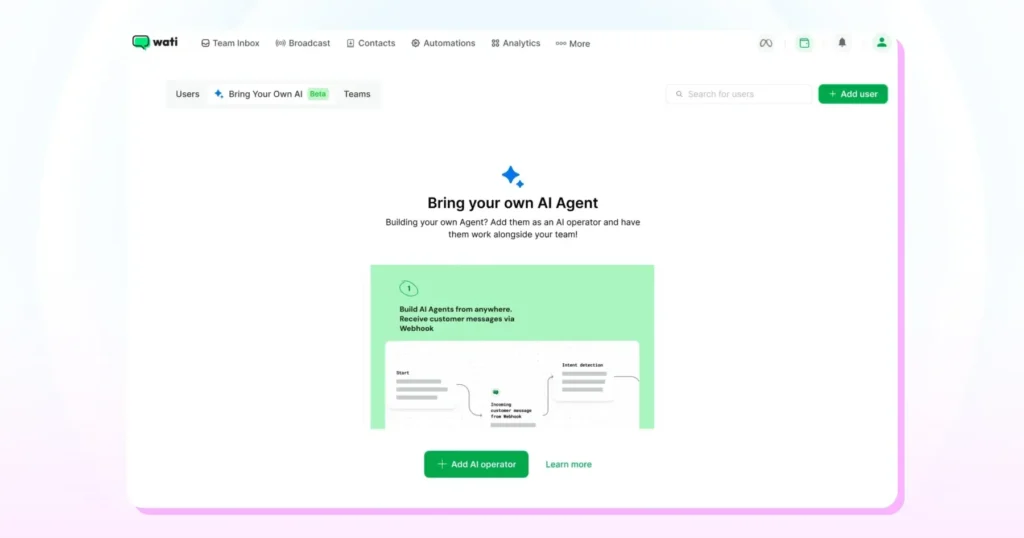
The AI works alongside the team, following the same inbox rules, assignments, and handoff logic.
BYOA is especially relevant for teams with specific requirements:
| Team Type | Why Bring Your Own AI Agent? |
| Enterprise teams | Need custom workflows and business logic |
| Regulated industries | Require tighter data control |
| High-level operations | Need advanced routing and decision logic |
In these setups, WhatsApp remains the communication layer. Wati manages routing, visibility, and execution. The intelligence itself stays owned and controlled by the team. That separation is what makes BYOA valuable, not just flexible.
WhatsApp API Trends: AI Moves Inside the Inbox
More teams now use AI directly inside the inbox, alongside live conversations. It doesn’t take over the chat. It stays in the background and steps in when the agent needs help.
Typically, that looks like:
- Cleaning up a reply before it’s sent
- Suggesting a ready-to-use template instead of writing from scratch
- Summarising a long conversation that’s stretched across days
- Translating messages when customers reply in another language
Agents reply a little faster. Messages sound more consistent across the team. People don’t have to re-read the entire thread before responding. New hires get comfortable sooner because the system helps them stay on track.
In these setups, AI isn’t replacing anyone. It’s doing the small, repetitive thinking that slows humans down, while leaving decisions, judgment, and accountability exactly where they belong.
WhatsApp API Trends: Customer Experience Gets Scored Automatically
CSAT surveys sound good on paper. In practice, they rarely tell the whole story.
Most customers don’t respond—the ones who do usually feel strongly one way or the other. Over time, teams end up looking at feedback from a small slice of conversations and guessing how representative it really is.
That’s why some teams are moving away from surveys as the primary source of data.
With Wati’s CX Score feature, the feedback doesn’t come from a form. It comes from the conversation itself. Once a chat is closed or resolved, AI reviews how the interaction went and assigns a rating from 1 to 5. Ratings of 4 and 5 are treated as positive, and the overall CX Score is shown as a percentage, calculated from the number of conversations that received a positive rating.
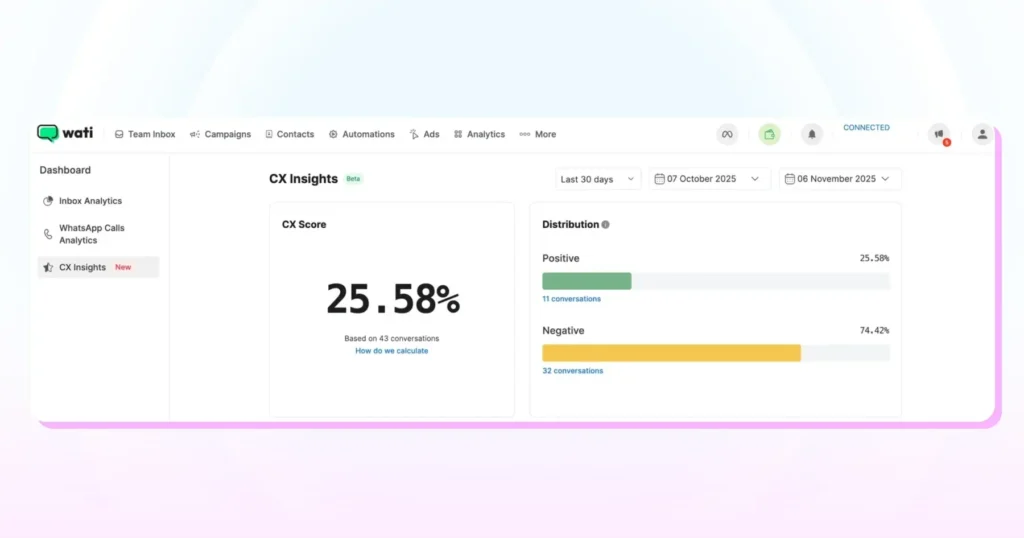
There’s no follow-up message to send. No reminder to chase. No dependency on whether a customer feels like clicking a link.
What teams end up with is a quieter, more continuous signal:
- You can see how individual operators are doing without waiting for survey cycles
- Experience trends show up over time, not just after spikes
- Coverage is broader because every eligible conversation counts
- The effort to maintain it is close to zero
This approach tends to matter most in two cases. High-volume support teams, where surveys quickly fall apart, and high-touch sales or onboarding teams, where the quality of a conversation matters even when no one leaves feedback.
It doesn’t replace human review or direct customer input. It fills the gap CSAT usually leaves behind.
WhatsApp API Trends: WhatsApp Becomes a Sales Performance System
WhatsApp is great when you’re small. You remember conversations, know which lead came from where, and have a rough sense of who’s doing well.

That falls apart once volume grows.
Chats pile up. Deals stretch across days. Some leads get picked up instantly, others sit untouched. When a manager asks why numbers dipped last week, the answer usually lives somewhere inside chat history, not in anything you can see clearly.
By default, WhatsApp doesn’t give sales teams visibility. It gives speed.
Sales Analytics in Wati exists to close that gap.
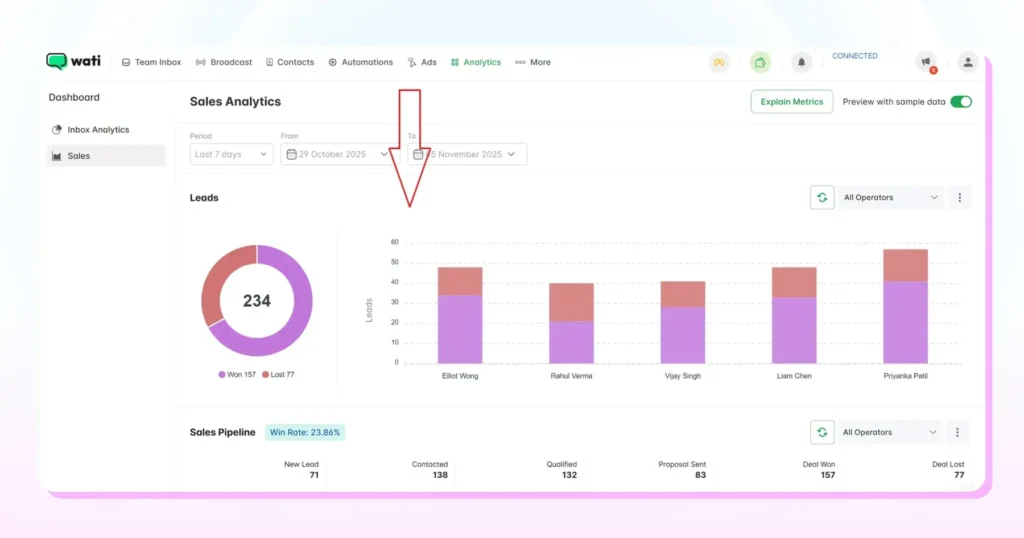
Teams using Sales Analytics in Wati typically look at:
- How leads move from stage to stage, not just whether someone replied
- Where conversations drop off before becoming deals
- How quickly operators pick up assigned chats
- How long does it take for replies once a conversation is active
- Which operators are closing conversations versus keeping them alive
None of this is complicated data. It’s the kind of information managers usually try to reconstruct manually.
Here’s how those signals are commonly interpreted:
| Metric | Details |
| First response time | Shows how quickly new leads are being engaged |
| Average response time | Indicates follow-through during live conversations |
| Stage conversion | Reveals where deals slow down or fall apart |
| Won vs lost deals | Highlights patterns at an operator level |
The critical shift isn’t that WhatsApp becomes a CRM.
The shift is that WhatsApp stops being opaque. Sales conversations stop living only in memory or chat scrollback. With Sales Analytics in Wati, teams can finally see what’s happening in the inbox and understand why results look the way they do.
WhatsApp API Trends: CRM Sync Turns Operational
Early CRM integrations did one thing well. They moved contacts from one system to another. Useful, but limited. The actual work still happened elsewhere, usually in chats that never made it back to the CRM in a meaningful way.
That gap is what teams are trying to close now.
Modern CRM syncs focus less on contact creation and more on preserving context. The goal is not to duplicate every message, but to make sure sales and support activity on WhatsApp actually informs the pipeline and ownership.
In Wati, recent HubSpot integration upgrades are built around this idea. Instead of treating WhatsApp as a secondary channel, the sync ties conversations more closely to how teams already work inside HubSpot.
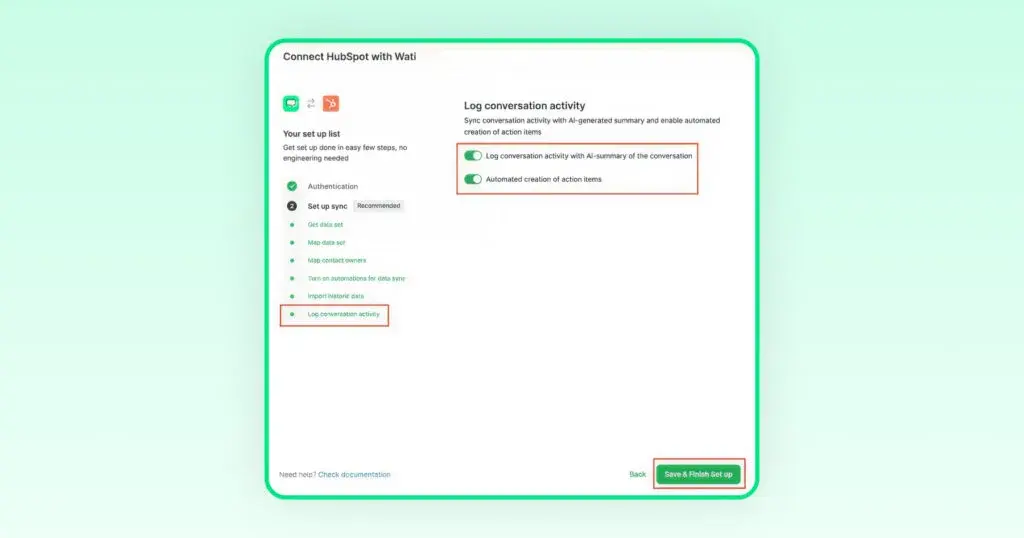
What improves with an operational CRM sync:
- Cleaner bidirectional sync between WhatsApp and HubSpot
- More reliable owner mapping so chats stay aligned with the right rep or deal
- Better pipeline visibility, with WhatsApp conversations linked to deal stages
- AI-generated summaries that capture key points without flooding the CRM
- Automatic task creation so follow-ups don’t rely on memory
The impact is subtle but important. Sales leaders don’t have to guess what’s happening inside WhatsApp. Pipeline reviews are grounded in honest conversations, not assumptions. Forecasts reflect how deals are actually progressing, because the context from chat is no longer missing.
The CRM doesn’t replace WhatsApp, and WhatsApp doesn’t replace the CRM. With tighter integration, they finally stop working against each other.
Further Reading: Why Every Business Needs CRM WhatsApp Integration Today?
WhatsApp API Trends: Multichannel Messaging Becomes the Default
Most teams still rely on WhatsApp for the bulk of their conversations. That part hasn’t changed.
What has changed is the expectation that WhatsApp will always be enough.
Messages fail. Users reply on Instagram instead of chat. OTPs need a backup channel. Campaigns break for reasons unrelated to copy or targeting. When you run everything on a single channel, these gaps show up quickly.
So teams adapt, usually out of necessity.
WhatsApp stays central, but it’s supported by other channels. SMS steps in when delivery matters more than format. RCS gets used where richer messages help. Instagram and Facebook Messenger handle conversations that start on ads or profiles, rather than in chat apps.
In Wati, all of this lands in the same inbox. A conversation that starts on Instagram doesn’t feel separate. If WhatsApp delivery fails, SMS can still carry time-sensitive messages like OTPs or alerts.
The benefit isn’t reached. It has fewer failure points.
Teams run one workflow instead of juggling exceptions. Reporting stays in one place. WhatsApp remains the main conversation layer, but the system doesn’t fall apart when customers behave differently than expected.
That’s what “multichannel” actually means in practice. Not expansion. Insurance.
WhatsApp API Trends: Automation Targets Silent Customers
Silence is one of the most common reasons deals slow down or disappear. Not because customers lose interest, but because follow-ups don’t happen at the right time.
Most teams handle this manually. Someone remembers to check back. Someone forgets. Conversations stall.
This is where Customer No-Response Triggers in Wati come into play.
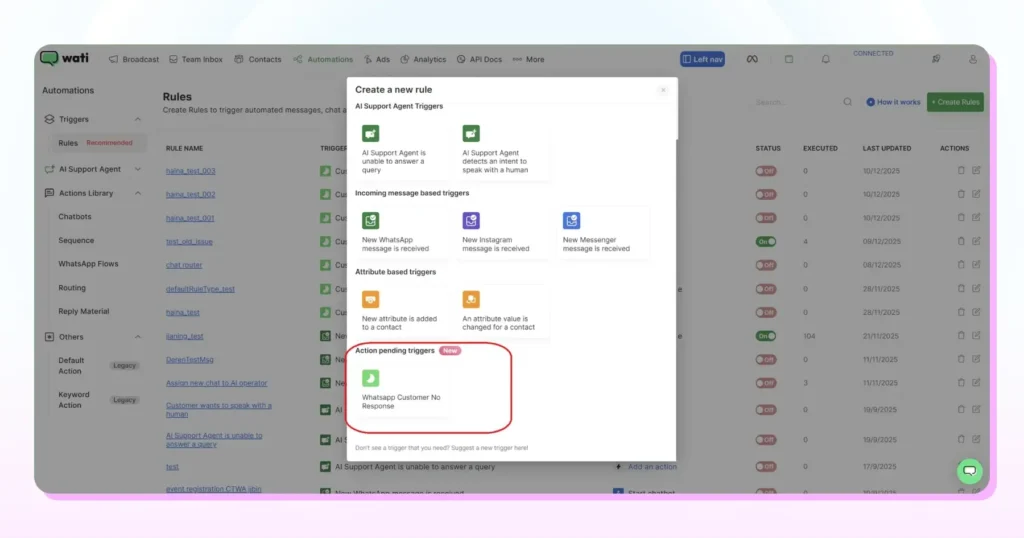
Instead of relying on memory, teams can automate what happens when a customer doesn’t reply within a defined time window. The goal isn’t to spam. It’s to keep conversations moving when they would otherwise go quiet.
With this automation, teams can:
- Detect when a customer hasn’t replied after a message
- Trigger follow-up messages automatically
- Set timing rules for each follow-up
- Build multi-step sequences instead of one-off nudges
- Apply conditions so messages are sent only when they should
The outcome is operational, not magical:
- Fewer conversations sit idle without a next step
- Agents spend less time manually chasing replies
- Follow-ups happen more consistently across the team
Customer No-Response Triggers don’t guarantee replies. What they do is remove the gaps caused by forgetfulness or workload. For sales and support teams using WhatsApp, the consistency makes a noticeable difference in how conversations progress.
WhatsApp API Trends: Operator Privacy Improves Focus
As teams grow, shared inboxes start to create noise. Everyone sees everything. Conversations overlap. Ownership gets fuzzy. Agents lose time scanning chats that aren’t theirs.
This is where access control starts to matter.
In Wati, operator privacy is designed to limit what each agent sees, without removing managerial visibility. Agents work only on the conversations assigned to them, while managers retain oversight across the inbox.
In practice, operator privacy means:
- Agents see only the chats they’re responsible for
- Each conversation has clear ownership
- Less distraction from unrelated messages
- Fewer chances of duplicate or conflicting replies
The benefit isn’t about restriction. It’s about focus.
Agents spend time responding instead of filtering noise. Accountability becomes clearer because ownership is defined. Managers can still review performance, reassign chats, or step in when needed, without exposing every conversation to everyone.
As WhatsApp usage grows across teams, this kind of privacy isn’t optional. It’s basic hygiene for running a team inbox without losing control or clarity.
WhatsApp API Trends: Login and Access Get Simple
Access issues slow teams down more than most people admit. Forgotten passwords, multiple login URLs, switching between accounts, all of it adds friction before work even starts.
Wati’s recent updates focus on reducing that friction by simplifying how users sign in and move between accounts. The idea is straightforward—fewer steps, fewer errors, less confusion.
What’s improved in practice:
- Google SSO as a sign-in option, reducing dependency on passwords
- OTP login for faster access without credential management
- Seamless account switching when multiple Wati accounts are linked
- A single login experience through live.wati.io instead of split entry points
These changes don’t alter how teams use WhatsApp day to day. They remove the small blockers that add up over time.
This setup is handy for:
- Agencies managing multiple client accounts
- Distributed teams logging in across locations and devices
The value here isn’t sophistication. Its reliability. Teams spend less time signing in and more time actually using it.
What Does This Mean for You?
WhatsApp API trends aren’t something teams “experiment with” anymore. The question now is how intentionally it’s used. Implementing these WhatsApp API trends will help monitor WhatsApp operations better to gain a competitive edge.
Track the following WhatsApp API trends before starting.
- WhatsApp is used to bring leads in, not only to message existing users
- Chat, voice, AI, and CRM are connected instead of running in silos
- Sales movement and customer experience are reviewed directly from conversations
- Journeys are designed once and reused across teams and channels
The advantage doesn’t come from ticking off features. It comes from reducing breaks in the journey. Fewer handoffs. Less context loss. Less switching between tools while a customer is waiting.
In that sense, WhatsApp has shifted roles. It’s no longer where conversations happen. It’s where journeys begin, continue, and, in many cases, get resolved.
How To Implement WhatsApp API Trends Into Sales Strategy?
WhatsApp API Trends are helpful, but execution is where things get real.
If you’re already using the WhatsApp API, the gap is usually unintended. Its structure. Conversations happen, but leads, sales, support, and follow-ups don’t always connect the way they should. That’s precisely the gap Wati is built to close.
If you’re evaluating how WhatsApp fits into your sales or support stack this year, book a demo with Wati. You’ll see the workflows, not just the features, and decide if this is the proper foundation for how your team operates today.
WhatsApp API Trends: Frequently Asked Questions
Teams are moving beyond broadcasts and basic support. WhatsApp API now supports lead acquisition, qualification, sales conversations, automation, voice escalation, and performance tracking in one connected flow.
No. Smaller teams often start with campaigns or support, while larger teams layer automation, AI, analytics, and CRM sync as volume grows. The same foundation works at different stages.
Click-to-WhatsApp lets customers start a conversation directly from ads. Instead of filling forms, leads enter chat with clear intent, faster response, and better conversion potential.
Yes, when conversations are structured. Pipelines, automation, operator assignment, and analytics help keep sales and support flows separate while using the same inbox.
AI handles repeatable work like first responses, qualification, summaries, translations, and scoring. Humans stay in control of decisions, objections, and sensitive cases.
AI reviews closed conversations and assigns a CX score based on how the interaction went. This gives continuous visibility without relying on customers to respond to surveys.