

-

-
-
Solutions
-
Soluções
-
Soluciones
-
解决方案
-
解決方案
-
الحلول
-
Product
-
Produto
-
Producto
-
产品
-
產品
-
المنتج
-

-
-


 Wati for Marketing
 Wati for Support
 Wati for Sales
 eLearning
 E-commerce
 Marketing Agencies
 Healthcare
 No Code Chatbots
 AI Support Agent
 Instagram and Facebook messenger
 Click to WhatsApp ads
 Campaigns
 Team Inbox
 WhatsApp Business Calling
 Wati AI
 Overview
 Library
WhatsApp Video Messages: How to Use Them for Higher Engagement in 2026
Written by:
 Shreya
|
on:
December 1, 2025
|
Last updated on:
February 27, 2026
|
Fact Checked by :
Shreya
|
on:
December 1, 2025
|
Last updated on:
February 27, 2026
|
Fact Checked by :
 Namitha
|
According to: Editorial Policies
Namitha
|
According to: Editorial Policies
 Table of Contents
Too Long? Read This First
- Short Video Improves Clarity: Users understand products faster when they see a quick demo, explainer, or setup clip instead of long text.
- CTWA Gains From Video: Leads from Click to WhatsApp ads might respond better when the first flow includes a clear video after the user message.
- Broadcasts Have Limits: The WhatsApp Business App supports video files in broadcasts, but only contacts who saved your number receive them.
- API Unlocks Scale: The WhatsApp Business API lets you send and automate video files with templates, tracking, and workflow triggers.
- Keep Videos Lightweight: Smaller files deliver faster, reduce failures, and load smoothly across regions and devices.
What if the most powerful tool in your WhatsApp strategy isn’t a chatbot, template, or broadcast?
But a 10-second video you haven’t created yet?
Imagine sending a video message instead of a welcome text when a customer lands in the chat. Sending a video message offers a hyper-personalized experience and is much easier than sending long replies or robotic responses.
With WhatsApp, you can send up to 60-second video messages securely to give your sales strategy a conversational turn.
This blog explains how a WhatsApp video message works, how to send it, and how to plug it into CTWA, sales, and support journeys for effortless customer conversions, and how to automate them with the WhatsApp Business API.
What is a WhatsApp Video Message?
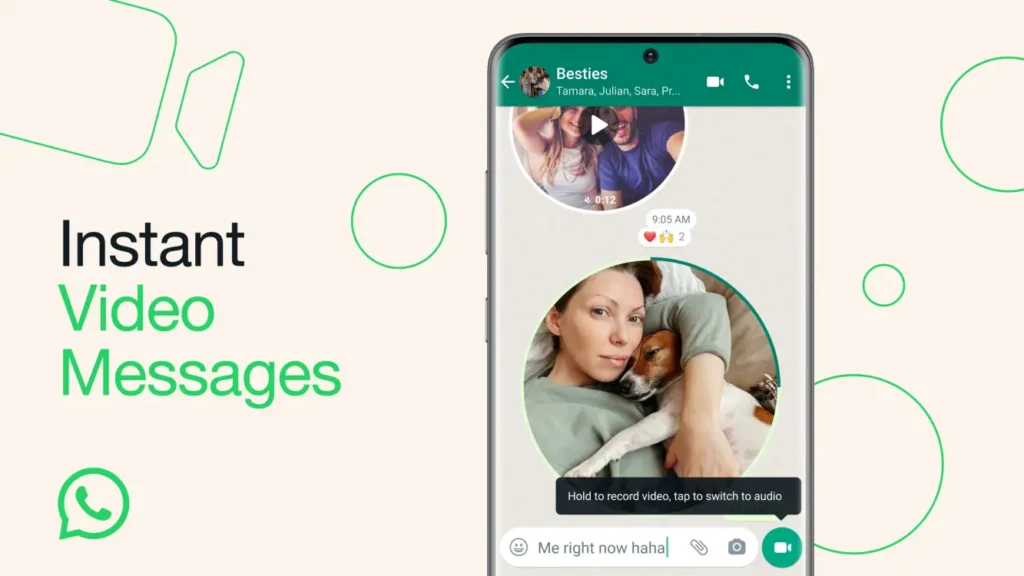
A WhatsApp video message (also called a video note) is a short clip recorded inside the chat app. It appears in a circular format, just like WhatsApp voice notes for sales processes.
You record it directly in chat using your front or rear camera. This differs from uploading a regular video file (from the gallery).
Most WhatsApp Business API setups allow media uploads up to 100 MB, but the reliable delivery limit for video messages is closer to 16 MB. Larger files often fail during delivery or get compressed heavily. To ensure smooth sending, keep videos under this range.
How WhatsApp Video Messages Drive Clarity, Trust, and Conversions?
Videos give quick clarity. It shows what a product does and how to use it. This cuts down on long chats and reduces confusion for both new and existing customers.
Example of a WhatsApp Video Message for Customer Acquisition
Think about a working professional who moved to a city and is looking to rent furniture.
And you, a furniture brand. Have a set a click to WhatsApp ad on Instagram for your target group. Lead checks it out, clicks the link, and in a fit of anxiety, lands on your WhatsApp business.
If the lead asks, “Can you show me a sofa-cum bed that I can rent as it shows out of stock on your website?”, that’s a clear purchase signal.
Showing a virtual 60-sec demo of the product via WhatsApp will lead to faster conversion than listing and stretching the sales journey.
The prospect immediately understands the value, responds more quickly, and moves to the next step without back-and-forth questions.
If a customer can’t find a feature in your product, instead of sending five screenshots and a long explainer text, show a short video that shows the exact button to tap. The problem is solved.
Even after someone buys, videos remove friction. A simple post-purchase clip like “Here’s how to set this up in under a minute” dramatically reduces support tickets. People prefer watching a quick guide over reading long instructions.
You can use videos for
- Product explainers
- Onboarding steps
- Demos for new leads
- Post-purchase guidance
- Common support issues
- Training updates for customers or teams
How Does Video Message Impact Customer Experience?
Below are the reasons why a video message has a huge, positive impact on your customers.
- Users understand instructions faster: Video message improves customer understanding and clarify their doubts more easily. Watching a video is easier to interpret than going through text documentation.
- Teams send fewer repeated explanations: With chatbot automation, you sometimes lose track of whether you have sent relevant messages to the customer or not. Video message prevents this ambiguity, covering the essential details in one go.
- Sales teams close gaps in the first reply: Video messages also ease the uncertainty customers feel in their first interaction. By sending a video note, you build credibility, eliminate doubts, and improve nurturing.
- Support teams solve issues with fewer messages: Sales agents can leverage WhatsApp videos for customer support to deliver faster, more effective resolutions and suggestions.
- Customers trust a face or a real demo: Sometimes, customers are suspicious when your product looks the same in real life. Running a video demo reduces their doubts and strengthens trust.
Also read: How to automate a no-code chatbot to scale customer inquiries via chat.
How WhatsApp Video Messages Fit Inside the Customer Journey?
Video fits into every stage of the customer journey. It helps users understand faster, reply sooner, and move to the next step with less effort.
You can use video from the moment a user enters a CTWA campaign through post-purchase support. Each team benefits differently.
| Marketing | Sales | Customer Support |
| Click-to-WhatsApp ads open a WhatsApp chat when the user taps the ad | A 30-second demo clip works well with new leads | Step-by-step video helps solve issues faster |
| The first user message starts the conversation, and your welcome reply follows | SDRs send video follow-ups from CTWA campaigns, website forms, or inbound chats | Support teams reuse standard clips for repeat queries |
| A short video helps explain the product | Videos can improve reply rates during qualification | Setup, unboxing, or installation videos reduce confusion |
| You use video to show value, features, or simple steps | Routing and CRM scoring tools use video replies to guide next steps | Resolution times drop because users see clear instructions |
When video becomes part of your workflow, your teams answer fewer repetitive questions, and your users receive precise guidance. It improves the experience in every stage of the funnel.
Leads understand their options, customers complete tasks with fewer errors, and support teams close more queries with less manual work.
How to Send a Video Message on WhatsApp on iPhone and Android?
Below are the steps to send a video message from your personal or business WhatsApp across devices:
1. Open a chat.
2. Tap and hold the camera (video-note) icon next to the text field.
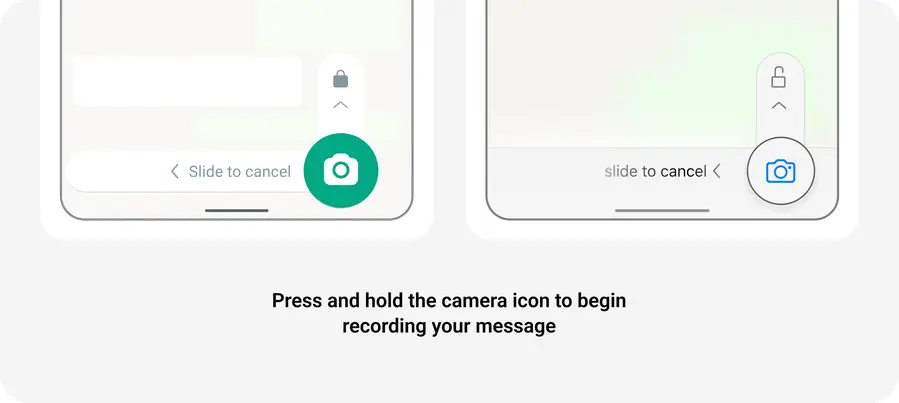
3. Record your clip (up to 60 seconds). Slide up to lock if you don’t want to keep holding.
4. Release (or tap stop) to send.
How to Record Clear, Professional WhatsApp Videos?
Here is how to record clear, actionable WhatsApp videos.
1. Keep it Short, but Structured
People watch WhatsApp videos instantly, so keep them to 20-45 seconds.
Use a quick 3-part flow:
- Open with context: “Here’s how to enable your shipping settings…”
- Show the action: Navigate, tap, scroll
- Close with next steps: “Once done, reply ‘done’ here.”
2. Start With the Important Element in the Frame
The first 2 seconds decide whether users watch your video. If you are showing:
- Product: Keep and hold it centered
- Screen: Zoom in slightly
- Process: Avoid moving the camera too fast
3. Record in Good Lighting
Natural light or a desk lamp pointed toward you (not behind you). Avoid backlit scenes; they make your face look dark and unclear.
4. Stabilize Your Phone
Fix your phone either on a tripod or on a steady surface to record videos.
Use:
- Both hands
- A table
- A phone stand
- Or lean your elbows on a surface
5. Speak Clearly and Slowly
WhatsApp compresses audio slightly, so speak in a clear tone for cognitive understanding
So:
- Pause briefly between steps
- Avoid talking too fast
- Use simple instructions (“Tap the green button on top right”)
6. Add a Follow-Up Message After the Video
Always send a short text after the video to confirm if the customer received your message or not.
- “Follow these steps and tell me once done.”
- “Here’s the setup video: reply 1 if you need help.”
- “Next steps are in the button below.”
7. Avoid Background Noise
Air conditioners, traffic, fans, and crowds all reduce clarity. Move to a quieter spot or bring the phone closer to your mouth.
8. Use the Rear Camera for Product or Screen Demos
Using the front camera is fine, but the rear camera has better quality and puts you in a better frame.
- Sharper
- More stable
- Better in low light
Perfect for product demos and screen walkthroughs.
9. Retake if Needed
If you stumble or get interrupted, swipe away and record again.
For customer-facing video, clarity matters more than speed.
How to Send a Video Inside a WhatsApp Broadcast?
Before sending a video in a broadcast, you must understand how WhatsApp handles media across both products.
The Business App is built for simple outreach to saved contacts. The Business API supports large-scale broadcasts with template rules, tracking, and automation.
Broadcasting Video With the WhatsApp Business App
- You can send video files through broadcast lists (regular video uploads).
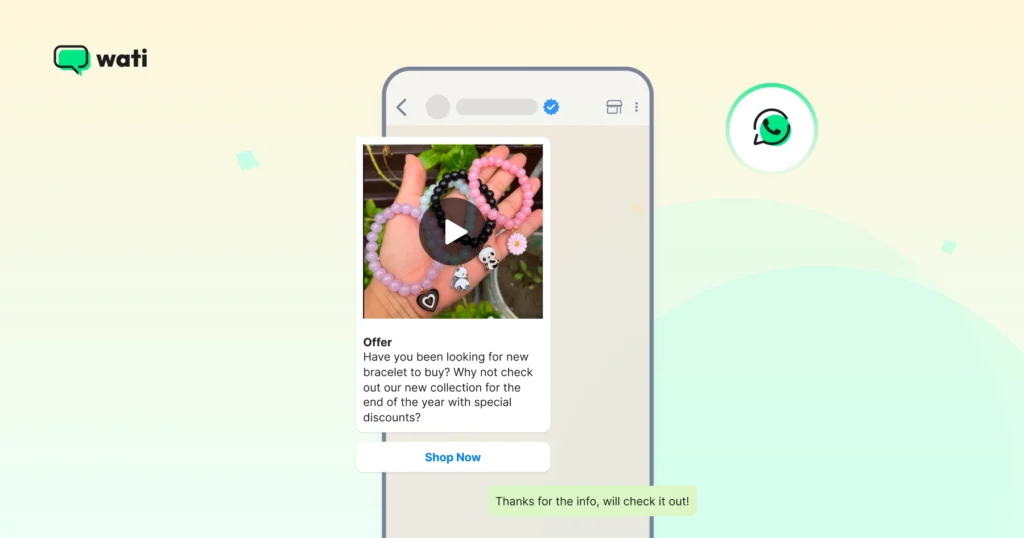
- Broadcast messages reach only users who have saved your number in their contacts. (Source)
- The “video note” circular format is not used in broadcasts; you must upload a standard video file.
Broadcasting Video With the WhatsApp Business API
- You can send video files via the API to many users, subject to template rules and opt-in consent.
- Business-initiated messages must use pre-approved templates.
- When file size is an issue, you can use a link to a hosted video, though this is a best practice rather than a strict requirement.
- You can track message status (sent, delivered, read) via the API dashboard.
If you want a breakdown of how broadcasts work, you can read Wati’s guide on WhatsApp Broadcast.
For personalised videos, you can try Wati’s AI video generator at commi.ai.
Why Video is the Secret Sauce for CTWA?
CTWA sends users from Google, Facebook, or Instagram straight into a WhatsApp chat. The chat starts only after the user sends the first message. Once that happens, your welcome flow triggers, and you can reply with text, buttons, or a video.
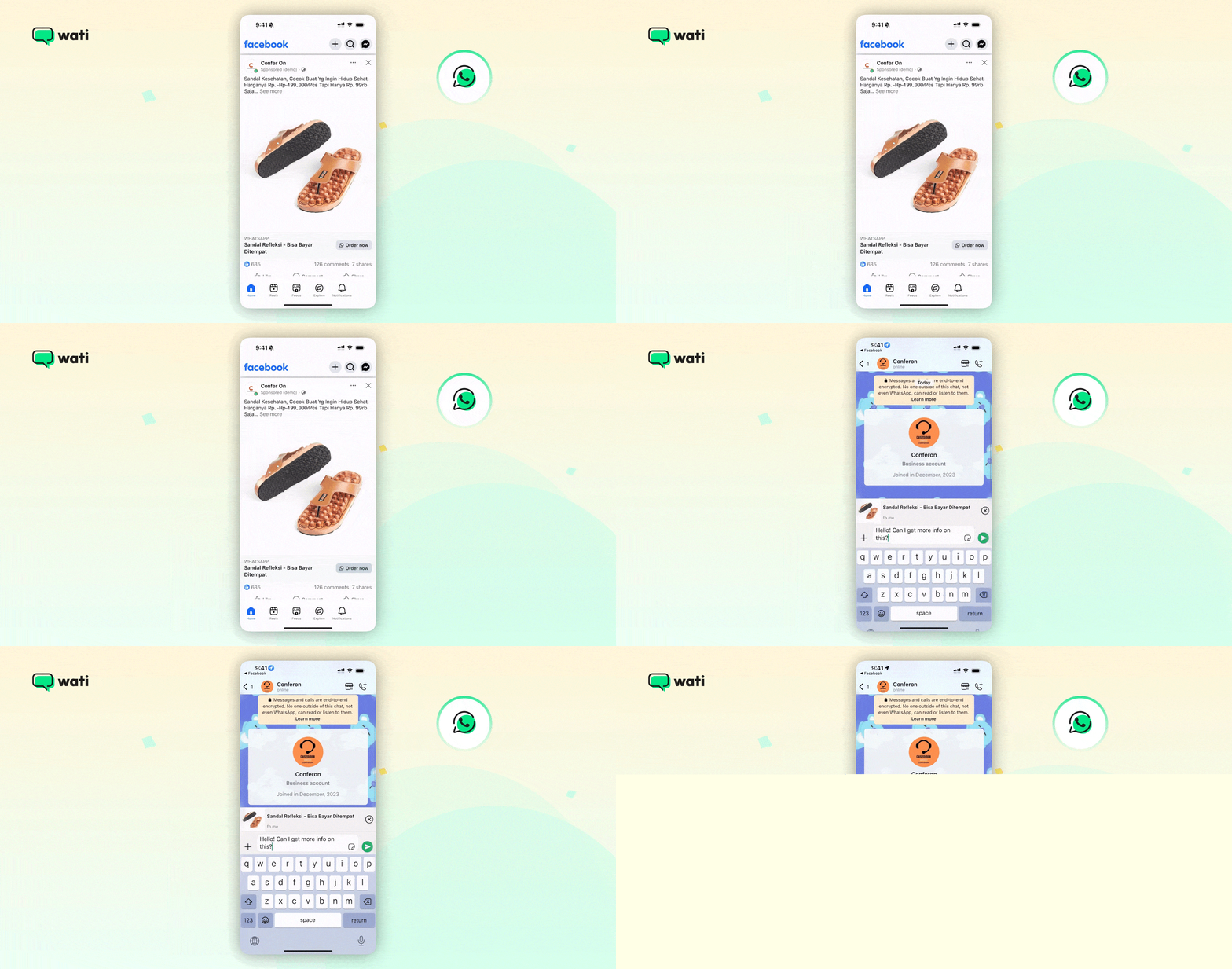
Integrating video into this flow transforms a dry automated sequence into an engaging brand experience.
- Builds Instant Trust: Video adds a human touch, helping users overcome the “bot barrier” and feel more comfortable engaging.
- Reduces Drop-offs: Explaining complex offers via video is faster and clearer than long blocks of text, keeping users focused.
- Boosts Conversions: Demonstrating products in action provides a bespoke human experience that drives higher purchase intent.
- Powers Interactivity: Pairing video with Quick Reply buttons creates a guided, clickable journey toward a sale or booking.
What are the Common Issues and Fixes of Video Messages?
Sometimes video does not send the way you expect on WhatsApp. Most issues come from file size or how the message is set up.
These are the common things teams run into:
- File Size Overload: High-resolution videos often exceed the 16MB–64MB limit, leading to upload timeouts or failed deliveries. To fix it, you need to compress videos to 720p or lower for instant loading.
- Template Rejections: Meta’s automated filters often flag video templates that appear spammy or violate specific category rules. Ensure your header media matches the approved template category.
- Unsaved Number Restrictions: If you use the standard WhatsApp Business App for broadcasts, users who haven’t saved your contact information won’t receive them. Brands transitioning to the WhatsApp API can send messages without saving contacts.
- Broken Media URLs: For API users, video messages fail if the hosting link is private, password-protected, or has expired. Brands can use a public, permanent URL (like a CDN) to host their media assets.
These are simple checks, but they solve most sending problems. If the issue persists, the next step is to review the chat window status, the media hosting, or the way the message was triggered.
Video vs. Voice vs. Text
Different message formats work better for different tasks on WhatsApp.
Each format has strengths based on clarity, speed, and context. Here is a quick comparison to help you choose the right one.
| Format | Best Use Cases | Notes |
| Video | Demos, product instructions, and onboarding steps | Works well when users need to see how something works. Supported in both the WhatsApp Business App and API. |
| Voice | Quick explanations, personal replies, simple clarifications | Users listen faster than they read, but not ideal for noisy environments or people who prefer text. |
| Text | Details, links, CTAs, pricing, next steps | Required for actions, links, or anything users need to refer back to. Works well with buttons and quick replies. |
Shoot, Send, and Eliminate chaos!
Short videos help users understand your product faster and cut back-and-forth in chats. When you use video across CTWA, sales, and support, you make each step easier for your customers and your team.
You can set up broadcasts, triggers, and complete journeys without extra effort, building stronger client loyalty.
If you want to automate these video messages and run them across your workflows, set up a free demo with wati.
Frequently Asked Questions
A WhatsApp video message is a short clip recorded inside the chat using the video note feature. It appears in a circular format and has a 60-second limit. Businesses using the WhatsApp Business API can send regular video files, not circular video notes.
Open a chat, tap and hold the video note icon next to the text bar, record your clip, then release to send. This works on both iPhone and Android. For longer videos, upload a file from your gallery.
Large file size, slow network, expired media links, or users not saving your number (for broadcasts) cause most failures. Compressing the file or using a fresh hosted link often solves it.
Yes. Many users keep their phone on silent. Subtitles improve clarity and help users understand the message faster.
In the WhatsApp Business App, you upload a regular video file and send it through a broadcast list. Broadcasts reach only contacts who have saved your number. Video notes are not supported in broadcast lists. In the WhatsApp Business API, you send video files with template messages.
No. The circular video note format works only inside the mobile app. The API supports standard video files through hosted URLs or uploaded media.