

-

-
-
Solutions
-
Soluções
-
Soluciones
-
解决方案
-
解決方案
-
الحلول
-
Product
-
Produto
-
Producto
-
产品
-
產品
-
المنتج
-

-
-


 Wati for Marketing
 Wati for Support
 Wati for Sales
 eLearning
 E-commerce
 Marketing Agencies
 Healthcare
 No Code Chatbots
 AI Support Agent
 Instagram and Facebook messenger
 Click to WhatsApp ads
 Broadcasts
 Team Inbox
 WhatsApp Business Calling
 Overview
 Library
13 WhatsApp Marketing Strategies That Can Grow Your Business in No Time
Written by:
 Rohan
|
on:
October 9, 2025
|
Last updated on:
October 30, 2025
|
Fact Checked by :
Rohan
|
on:
October 9, 2025
|
Last updated on:
October 30, 2025
|
Fact Checked by :
 Namitha
|
According to: Editorial Policies
Namitha
|
According to: Editorial Policies
 Table of Contents
Too Long? Read This First
- The advantages of WhatsApp Business begin with trust, as verified profiles and branded identities build instant credibility.
- Automation features, such as quick replies, greeting messages, and labels, streamline communication and save resources.
- A built-in product catalog and in-chat shopping make it easy to turn conversations into direct sales opportunities.
- Data insights and analytics help businesses measure performance, improve engagement, and optimize campaigns.
- Multi-user access and collaboration tools ensure teams can manage customer chats more efficiently.
You must have heard about WhatsApp for business everywhere, but may not be familiar with the complete opportunities. Many businesses are curious but unsure about what it really brings to the table.
The advantages of WhatsApp Business go far beyond convenience. It enables instant customer support, automated conversations, and a direct, trusted channel to engage with your audience.
Features like automated replies and verified profiles let WhatsApp Business help you create a smooth, professional, and trustworthy experience for your customers.
We’ll take you through how WhatsApp Business can make growing your business easier and communication smoother.
How WhatsApp Business Transforms Brand Authority
For businesses, the true value of WhatsApp Business lies in the results it delivers. Faster response times translate into happier customers.
The WhatsApp Business platform helps your brand stand out by keeping you connected with customers in a consistent and trustworthy way. It positions you as responsive, reliable, and modern, strengthening loyalty and your market reputation.
Using a platform that is an everyday part of their life helps you influence their decision-making and build credibility that lasts.
Here are the top reasons why modern brands can’t afford to miss out on a WhatsApp Business account.
1. Enhanced Trust with Verified Identity
In 2025, customers are more cautious than ever about the companies with which they engage online. A verified WhatsApp Business account makes the customer feel they are talking to a real account and not a fake brand.
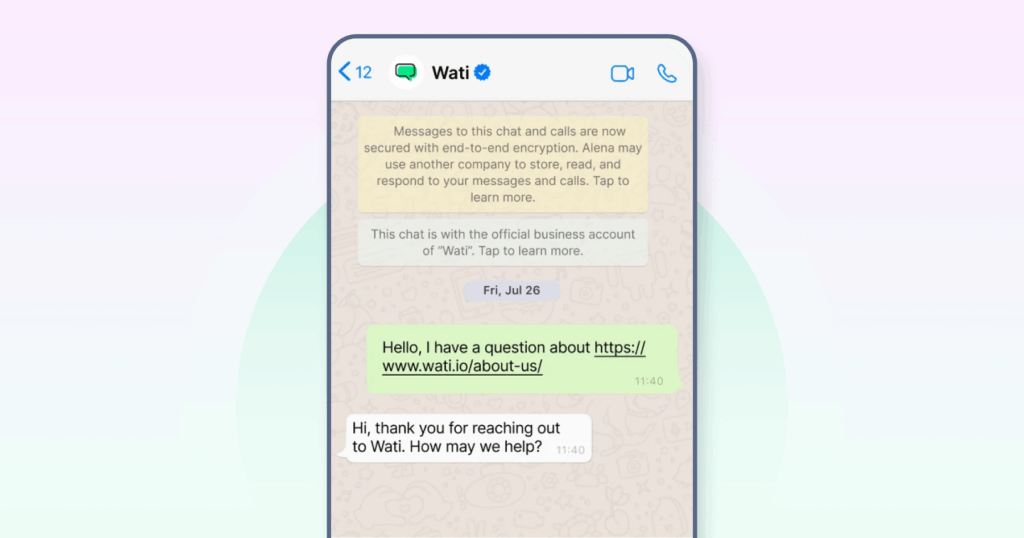
The verification badge builds trust immediately, increases message open rates, and keeps customers engaged. For B2B companies, where reputation can make or break deals, verified accounts instill confidence and speed up decision-making.
2. Faster Service with Automated Responses & Quick Replies
Speed matters in customer communication. WhatsApp Business allows companies to set up automated messages for greetings, FAQs, and away messages. It ensures customers are never left waiting.
Quick replies help teams answer repetitive questions with just a few taps, saving valuable time. These features improve operational efficiency while ensuring a consistent tone of voice across customer interactions.
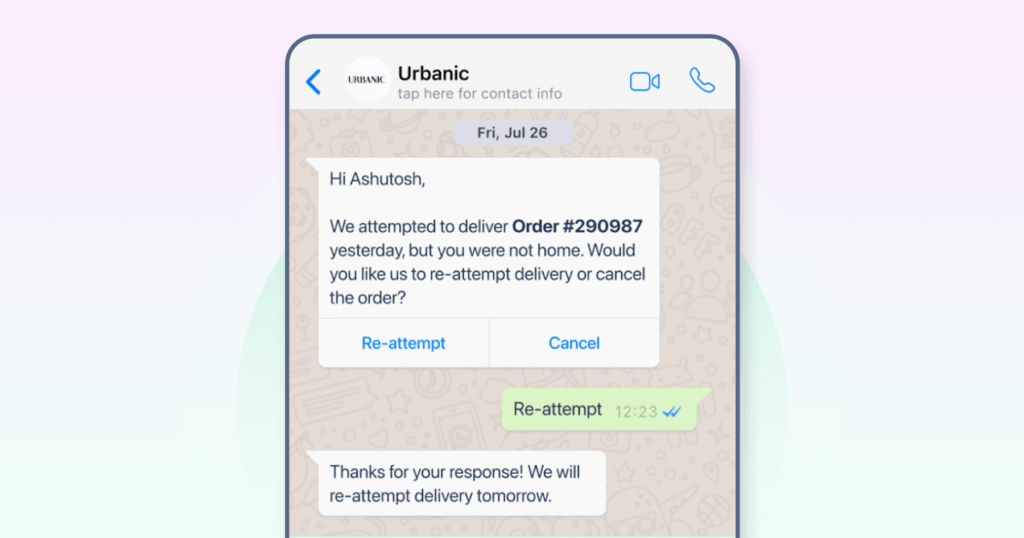
For SMEs and growing businesses, automation also means being “available” 24/7 without needing a full support team online around the clock.
3. Product Catalogs Make Buying Easier
WhatsApp Business has a built-in catalog feature. This means customers can browse offerings, check details, and even place inquiries without leaving the chat.
For e-commerce brands, this cuts out friction in the buying journey and makes it easier to drive impulse purchases.
For service businesses, catalogs highlight your packages clearly, saving time for both your sales team and your customers.
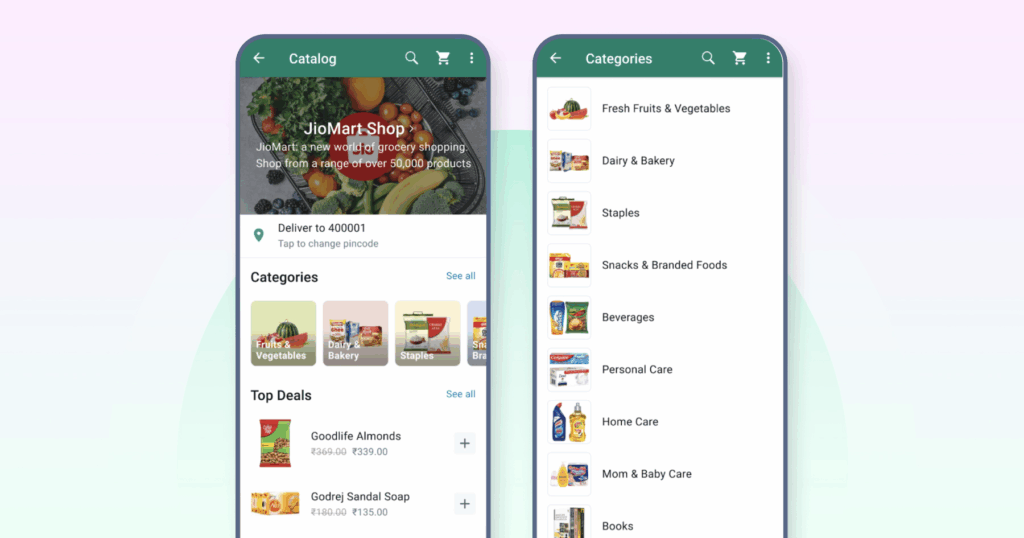
Source: Meta
👉 Bonus Read: What is WhatsApp Shopping? Benefits, Use Cases, and More!
4. Analytics Help You Make Smarter Decisions
You can’t improve what you don’t measure. WhatsApp Business gives you insights that help you communicate better with customers.
You can see which messages are delivered, which ones are read, and how quickly customers respond. These numbers show you what’s working, what’s falling flat, and where conversations are hitting roadblocks.
For leadership teams, this data becomes invaluable in measuring ROI, improving customer satisfaction, and allocating resources effectively. It leads to smarter communication that grows with your business.
5. Professional Profiles That Build Global Reach
A WhatsApp Business account gives companies a professional presence on the same platform their customers already use daily. Unlike the personal app, it allows you to set up a business profile with your address, website, and a brief description of your business.
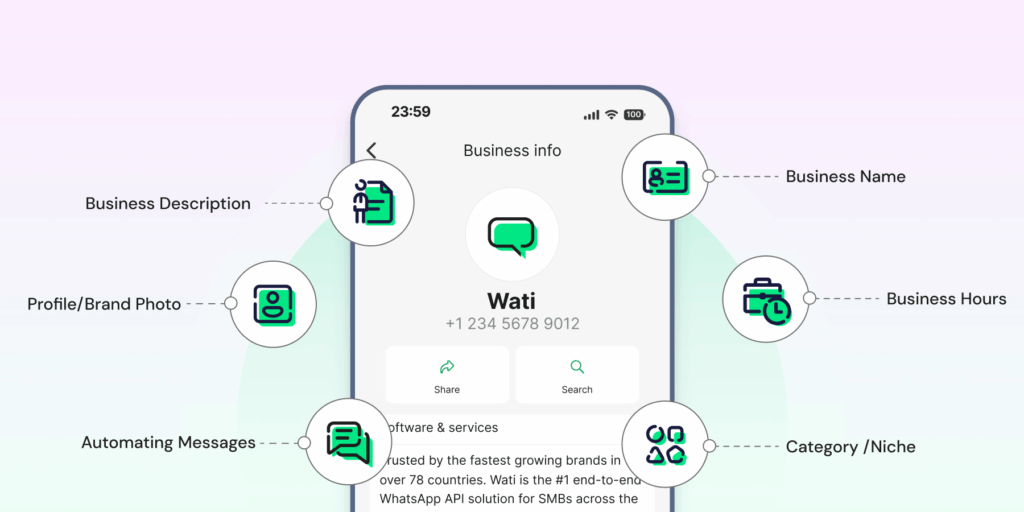
This builds trust and helps customers everywhere recognize your brand. For businesses entering new markets, it’s the first step to growing globally.
6. Cut Communication Costs Dramatically
WhatsApp Business helps you cut costs by replacing traditional channels like phone calls and SMS with internet-based messaging.
Features like quick replies and away messages allow businesses to handle more customer chats without needing extra support staff.
To scale this across thousands of customers and automate more advanced workflows, you’ll need the WhatsApp API. That’s where services like Wati come in.
Ready to give it a try? Sign up for a free trial today!
🎁Bonus Read: WhatsApp Business vs WhatsApp Business API
7. Built-In Tools Keep Everything Organized
The WhatsApp Business app includes built-in tools that simplify day-to-day customer communication.
Labels help you organize chats (new customer, pending payment, order shipped). Quick replies cut down on repetitive typing. Greeting messages set the right tone when new conversations start.
These tools make your interactions look more professional compared to the regular app.
If you need deeper integration with CRM systems or want multiple agents managing conversations, that’s when the Business API becomes necessary.
8. Higher Engagement Than Email or SMS
One of the biggest benefits of WhatsApp Business is its ability to generate engagement. With most customers already checking WhatsApp multiple times a day, messages sent through the app are more likely to be read and acted upon compared to email or SMS.
Businesses use it for order confirmation updates, customer support, and marketing promotions because responses are faster and more frequent.
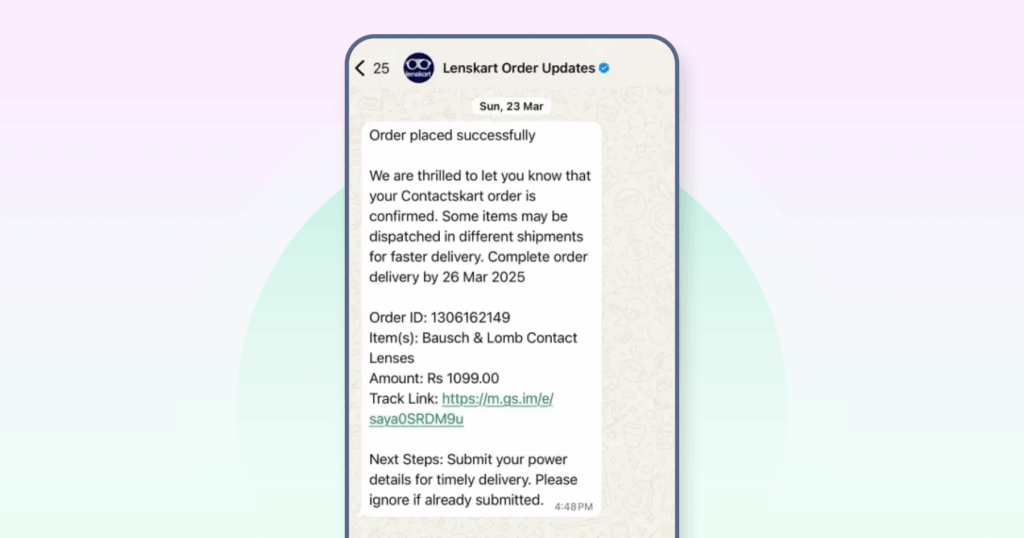
If you want to do more, such as running campaigns, sending updates to many customers, or reaching specific groups, you will need the WhatsApp Business API.
It’s the next step once the regular app starts feeling limiting. You can schedule a free demo with Wati today to get started.
9. Personalized Interactions Build Customer Loyalty
WhatsApp Business enables businesses to make every interaction personal by saving customer details and using quick replies that fit their specific questions.
Small and mid-sized businesses can utilize this to provide customers with a personalized, attentive experience. For larger companies, the WhatsApp Business API makes it easy to scale personalization through targeted updates and automated reminders.
Combined with a solution like Wati, businesses can balance efficiency with the kind of one-on-one interactions customers actually value.
10. Multi-User Access for Team Collaboration
WhatsApp Business allows multiple team members to access and manage customer conversations simultaneously. This means no message goes unanswered, and responses stay consistent even as your team grows.
Whether it’s sales, support, or customer success, multi-user access lets teams collaborate efficiently across devices without confusion or duplication.
Sharing responsibility for conversations enables businesses to respond more quickly, maintain professionalism, and provide customers with a seamless experience.
👉 Pro Tip: For larger teams handling thousands of chats, the WhatsApp Business API makes multi-user collaboration even smoother with centralized dashboards and workflow automation.
11. Broadcast Messages That Scale Without Looking Spammy
With WhatsApp Business, you can send updates, offers, or announcements to multiple contacts simultaneously through broadcast lists. Unlike group chats, these messages arrive as private and help create a personal connection.
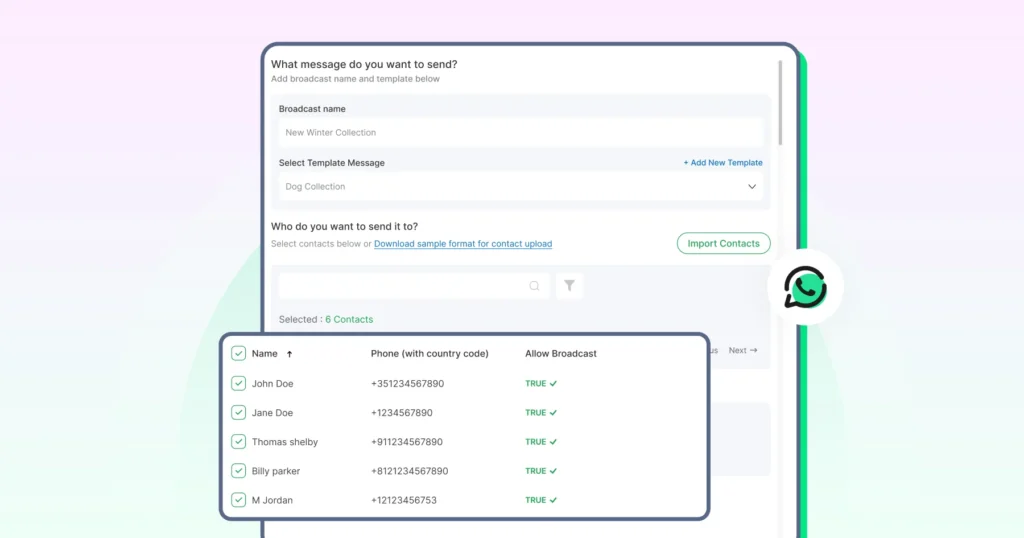
Customers view them as trusted updates, not intrusive blasts, a balance that helps businesses scale communication without compromising authenticity.
12. End-to-End Encryption Protects Customer Privacy
Every message sent through WhatsApp Business uses end-to-end encryption. This means only you and your customer can read the conversation, not even WhatsApp can see it.
For businesses handling orders, payments, or personal details, this privacy protects customers and shows your brand takes their security seriously.
📘Related Read: WhatsApp Data Security Explained | End-to-End Encryption & API
13. Multiple Ways for Customers to Reach You
One of the biggest advantages of WhatsApp Business is how easily it allows customers to initiate a conversation with your brand.
Instead of relying on a single channel, you can offer multiple entry points that fit both online and offline touchpoints.
- Customers can scan a QR code on your packaging
- They can tap a wa.me link on your website
In some regions, they can discover your business directly in WhatsApp’s search. They can always reach out by simply saving your number
This flexibility means your business is always just one tap away, making it easier to capture interest, reduce friction, and improve engagement across the customer journey.
👉 Pro Tip: Running campaigns? Click-to-WhatsApp ads and API integrations can help you track leads, measure ROI, and scale customer conversations more effectively.
Get Started With WhatsApp Business and Scale With Wati
WhatsApp Business gives you everything from verified trust to automation, catalogs, analytics, and stronger customer engagement.
No matter your business size, these features help you build credibility, save time, and reach customers where they already spend their day.
If you haven’t set up your account yet, check out our guide to creating a WhatsApp Business account to get started quickly.
When you’re ready to move beyond the basics (running campaigns, handling thousands of chats, or integrating with CRMs), the WhatsApp Business API is the next step. Wati can help you get there and provide full support along the way.
You can sign up for a free trial today and see how easy it is to manage conversations at scale, automate workflows, and deliver the kind of customer experience that drives real growth.
FAQs on the Advantages of WhatsApp Business
WhatsApp is designed for personal use, while WhatsApp Business offers features specifically built for companies, including business profiles, product catalogs, quick replies, and automated responses. It helps businesses look professional and manage customer conversations more efficiently.
Yes, the WhatsApp Business app is free to download and use. However, if you want advanced features like bulk business messaging, CRM integration, or multi-user access, you’ll need the WhatsApp Business API, which is usually offered by providers like Wati.
Yes, WhatsApp Business allows multi-device access, meaning you can log in from different devices to manage chats. For larger teams handling high volumes of conversations, the WhatsApp Business API facilitates smoother collaboration with shared inboxes and dashboards.
Absolutely. All conversations on WhatsApp Business are protected with end-to-end encryption. This ensures that only you and your customer can read the WhatsApp messages, making it safe for handling personal information, orders, or customer queries.