
In the bustling digital marketplace, establishing credibility is paramount. As businesses increasingly turn to WhatsApp to connect with their customers, the importance of having a verified account cannot be overstated.
With a verified WhatsApp Business Account, your business is not only more visible, but it also instills a higher degree of trust in your customers. So, how can you obtain that coveted green checkmark next to your business name? 🤔
Welcome to our step-by-step guide on how to verify your WhatsApp Business Account. This guide aims to walk you through the process smoothly, ensuring you have all the information you need to successfully verify your account.
Whether you’re a small business just starting on WhatsApp or an established brand looking to enhance your WhatsApp presence, this guide is for you.
The Benefits of Having a Verified WhatsApp Business Account
If you’re a business owner striving to build a strong customer relationship, it’s time to verify your WhatsApp Business Account! But why, you might ask? Let’s delve into the key benefits of having a verified WhatsApp Business Account.
Establishes Trust
Having that little green tick next to your business name isn’t just for show – it’s a sign of credibility. It assures your customers that they’re interacting with a verified, trustworthy business, thereby fostering customer confidence.
Enhances Visibility
In the vast digital space, standing out can be a challenge. A verified badge makes your business more noticeable in customer searches, giving you a competitive edge.
Streamlines Customer Communication
With a verified account, customers can quickly identify your business, making it easier for them to reach out for queries, feedback, or support.
Encourages Business Growth
A verified account can improve customer engagement, potentially leading to increased sales and business growth.
Still looking to add a layer of credibility to your business’ WhatsApp presence? If yes, then you’re in the right place! Verifying your WhatsApp Business Account is a crucial step in establishing trust with your customers.
👍 So let’s dive in and see how you can verify your account with ease!
Understanding the WhatsApp Green Tick
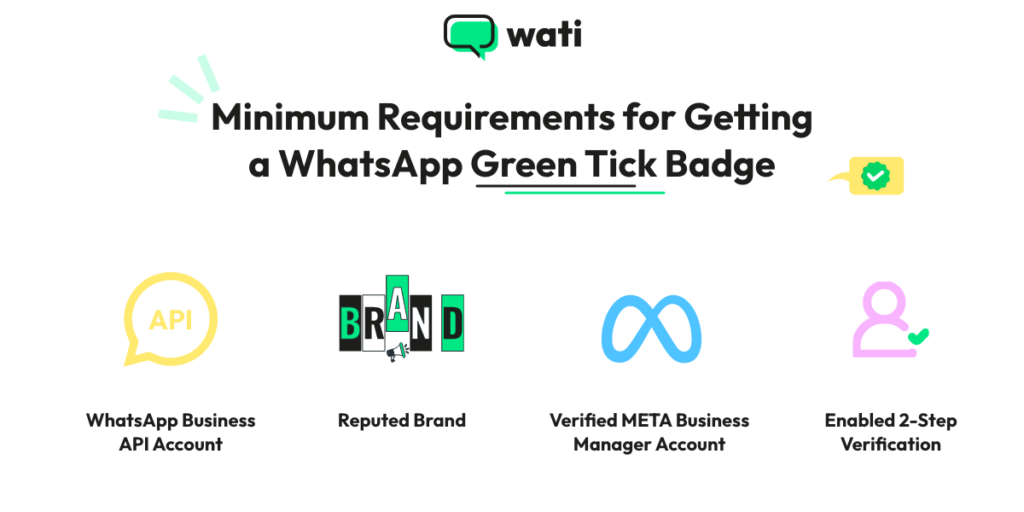
The coveted green tick on WhatsApp – what is it all about? This tiny, yet powerful symbol is a verification badge that WhatsApp grants to authenticate a business account.
This verification badge is represented by a white checkmark in a green circle next to the business name. It’s an indication that WhatsApp has confirmed the phone number of the account belongs to a business.
However, it’s important to note that the green tick doesn’t necessarily imply an endorsement or certification of the business by WhatsApp. It simply ensures that the number registered with the account is indeed a business contact.
Getting this green tick requires following the verification process and meeting certain criteria set by WhatsApp. So, if you’re keen on making your business stand out and gain credibility, aim for the green tick!
Unlocking Credibility: Your Guide to Verifying Your WhatsApp Business Account
Before we delve into the specifics, let’s understand what verification on WhatsApp Business means.
Essentially, it’s a process that confirms your business’s authenticity, symbolized by a green checkmark next to your business name.
This verification badge not only enhances your business’s credibility, but it also reassures your customers that they’re communicating with a genuine, trustworthy business. So, are you ready to explore the world of WhatsApp Business verification?
Let’s dive in! 🚀
Step 1: Open Your WhatsApp Business Account
First things first, open your WhatsApp Business Account. If you haven’t created one yet, check out our guide on how to create a WhatsApp Business Account.
Step 2: Go to Business Settings
Once you’re in your account, navigate to the ‘Business settings’ option. This is where all the magic happens!
Step 3: Request Verification
In the business settings, you’ll find the ‘Request Verification’ option. Click on it to begin the verification process.
Step 4: Fill in the Verification Form
Now, you’ll need to fill in the verification form. Ensure all the information you provide is accurate and up-to-date.
Step 5: Submit Your Request and Wait
After you’ve filled out the form, click on ‘Submit’. Now, all you need to do is wait for WhatsApp to review your request. Remember, this can take a few days, so don’t worry if you don’t hear back immediately.
For more insights into the process, don’t forget to check out the official WhatsApp Business Verification guide and WhatsApp Business blog for more tips.

How Wati Can Help Your Business with WhatsApp 🚀
Verifying your WhatsApp Business Account is a significant step towards enhancing your business credibility. But to truly unlock the potential of this powerful communication platform, you might need an expert companion.
That’s where Wati comes in.
Wati is a robust platform designed to simplify your WhatsApp Business operations. From managing customer inquiries to sending out bulk messages and integrating with your existing CRM, Wati is your one-stop-shop for all things WhatsApp.
Ready to elevate your WhatsApp communication? Create and verify your WhatsApp Business Account today and let Wati guide you through the process.
Related posts
- WhatsApp Business API: Top Features You Must Know in 2025
Explore the WhatsApp Business API features, including verified business profiles, chatbots, and more. Keep reading to learn.
- WhatsApp Business API: Your 2025 Guide to Business Success
Discover how to acquire WhatsApp Business API and learn from successful case studies how WATI can streamline your customer communication.
- WhatsApp Business API: All you need to know in 2025
Grow your business with WhatsApp Business API. Get a complete guide on pricing, components & how to leverage it for business growth in 2023.
- WhatsApp Business API vs. App: Choosing the Right Platform to Elevate Your Brand
Discover the best option for your business: WhatsApp Business API or App? Explore advantages, disadvantages, and find out how Wati can elevate your brand.