-

-
-
Solutions
-
Soluções
-
Soluciones
-
解决方案
-
解決方案
-
الحلول
-
Product
-
Produto
-
Producto
-
产品
-
產品
-
المنتج
-

-
-


 Wati for Marketing
 Wati for Support
 Wati for Sales
 eLearning
 E-commerce
 Marketing Agencies
 Healthcare
 No Code Chatbots
 WhatsApp Business API
 Instagram Automation
 Click to WhatsApp ads
 Campaigns
 Team Inbox
 WhatsApp Business Calling
 Wati AI
 Overview
 Library
 Agente de suporte de IA
Manage organic TikTok DMs and Click-to-TikTok-DM ad conversations in the same shared inbox you already use for WhatsApp, Instagram, Messenger, and more. Assign chats, automate replies, qualify noisy leads, and send conversion events back to TikTok so your campaigns keep learning from the conversations that matter.

16,000+ businesses trust Wati to turn conversations into revenue
Loved and trusted by
16,000+ businesses, across the globe





Manage TikTok engagement with
the team built to respond
TikTok DMs
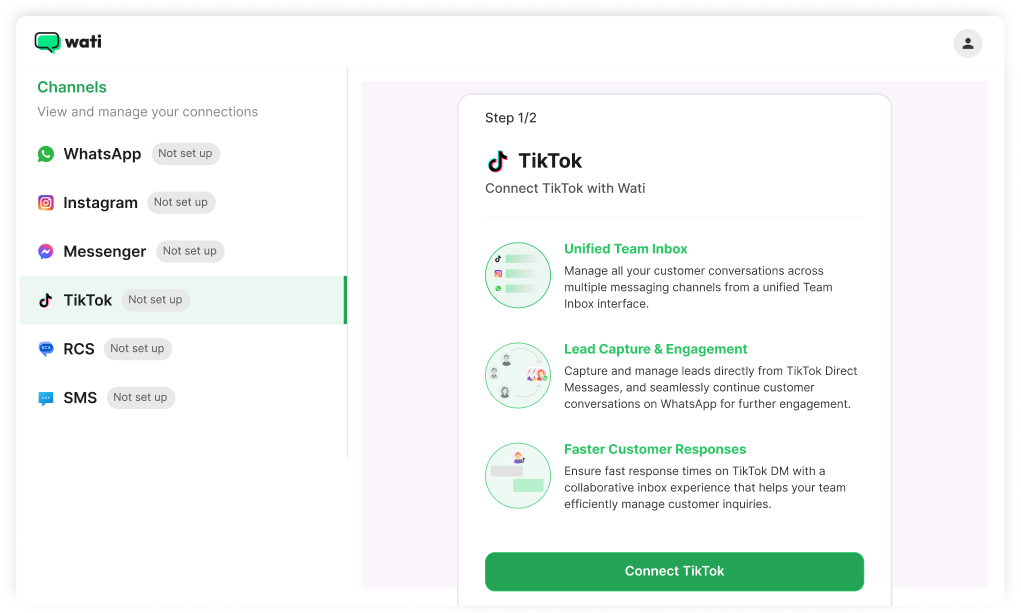
When a customer messages your TikTok Business account, the message lands in Wati's shared Team Inbox alongside messages from WhatsApp, Instagram, and Messenger. One inbox for all your social and messaging channels.
- Route TikTok DMs to the right team member with full conversation history
- Reply, tag, and close conversations without leaving Wati
- Send attachments, images, and documents, or set up quick replies for repetitive queries
Click-to-TikTok-DM Ads
When someone clicks your TikTok DM ad, get it directly inside Wati with full attribution. Your team replies, sends the right template, and tags the outcome. That engagement signal automatically feeds back into TikTok's ad platform, so every conversion sharpens your targeting.
- Every TikTok DM ad lands in your shared inbox with the ad source tagged
- Send pre-configured message templates to qualify faster and respond consistently at scale.
- Tag each conversation: qualified lead, purchase, generic lead, or spam. Wati sends that data to TikTok, so your algorithm finds more of what actually converts.
Click-to-WhatsApp Ads
via TikTok
to close the conversation.
Some customers discover you on TikTok but prefer to talk on WhatsApp. Wati supports Click-to-WhatsApp ads run through TikTok Ads Manager, so your ad starts on TikTok, the customer conversation opens on WhatsApp, and your team manages it inside Wati.
- TikTok ad with a WhatsApp CTA button, the conversation starts where your customer is most comfortable
- Qualified lead, purchase, generic lead, and spam events sent back to TikTok
- One contact record in Wati to determine whether the DM came from TikTok or WhatsApp
Automations
manual work
AI agents, keyword-triggered replies, welcome flows, and FAQ automation for TikTok DMs. Built in the same no-code automation builder you already use for WhatsApp and Instagram. Your TikTok automations live alongside everything else without adding a new tool or training your team from scratch.
Connect TikTok. Start receiving
conversations. Close the loop.
Wati brings your customer conversations into one shared workspace, so your team can manage
TikTok Business Messaging alongside WhatsApp, Instagram, Messenger, RCS, and more.

Connect TikTok. Start receiving conversations.
Close the loop.
High-growth teams rely on Wati to
build lasting customer relationships

How Ruuby drives Engagement Across the Entire Customer Lifecycle on Wati
With the mist rolling off the Thames and ever-persistent drizzles in London, making it to a salon just before a wedding party may not be the best of ideas. That’s where Ruuby, the UK's premier at-home beauty service, lets you skip the London fog and helps you get beauty, self-care, and massages at home, while watching your regular telly.
“We've seen our highest bookings in the last few weeks: the result of a consistent lifecycle on WhatsApp with Wati. We see bookings done under 3 mins, something that's just not possible with email,”