

-

-
-
Solutions
-
Soluções
-
Soluciones
-
解决方案
-
解決方案
-
الحلول
-
Product
-
Produto
-
Producto
-
产品
-
產品
-
المنتج
-

-
-


 Wati for Marketing
 Wati for Support
 Wati for Sales
 eLearning
 E-commerce
 Marketing Agencies
 Healthcare
 No Code Chatbots
 AI Support Agent
 Instagram and Facebook messenger
 Click to WhatsApp ads
 Campaigns
 Team Inbox
 WhatsApp Business Calling
 Wati AI
 Overview
 Library

Converting WhatsApp Account to WhatsApp Business Account in 2026
Written by:
 Shreya
|
on:
September 12, 2023
|
Last updated on:
November 19, 2025
|
Fact Checked by :
Shreya
|
on:
September 12, 2023
|
Last updated on:
November 19, 2025
|
Fact Checked by :
 Namitha
|
According to: Editorial Policies
Namitha
|
According to: Editorial Policies
 Table of Contents
Too Long? Read This First
- Why to convert? To gain instant credibility with a professional business profile and access free sales tools like product catalogs, quick replies and automated messages.
- How to switch: Simply back up personal chats, download “WhatsApp Business” and restore history. Remember, you can't use personal and business accounts together.
- Scaling up: The free app is for one user. Businesses can scale up to WhatsApp Business API for shared inbox, advanced chatbots, and CRM integrations.
- Switching back: You can switch back from WhatApp Business to WhatsApp, but you might permanently lose business data, although you can back up chat history.
Smart marketers or business owners are now realizing the merits of WhatsApp Business to spark new brand deals.
Brands are realising how WhatsApp’s potential can be pushed far beyond basic sales interactions with WhatsApp Business.
While WhatsApp is deployed by many small-to-mid businesses to establish customer connections, its impact can be higher with WhatsApp Business on revenue.
Switching to WhatsApp Business API tools like Wati not only helps convert WhatsApp to WhatsApp Business but also provides an exhaustive array of features to build the right kind of consumer interactions.
In this blog, we will learn more about how you can convert your personal WhatsApp to WhatsApp Business and scale your team-wide marketing efforts to double down on revenue.
Let’s get started!
Understanding the Difference: WhatsApp vs WhatsApp Business vs API
WhatsApp, WhatsApp Business, and WhatsApp Business API are three distinct versions of the popular messaging application, each tailored to cater to different needs, primarily targeting personal, SMB, and enterprise customers.
While they share many similarities, they also possess features that make them well-suited for their respective purposes.
Here’s a breakdown of the key differences between WhatsApp, WhatsApp Business, and WhatsApp Business API:
| Feature | WhatsApp (Personal) | WhatsApp Business | WhatsApp Business API |
| Best for | Personal chats | SMBs/solopreneurs | Medium and large businesses |
| Business profile | No | Yes (Hours, address, website) | Yes (verified green tick) |
Product catalog | No | Yes | Yes (via integrations) |
| Automation | No | Basic (Greetings, Away Message) | Advanced (Chatbot, Flows, Drip campaigns) |
| Users | 1 | 1 (one 1 phone) | Unlimited |
| Integrations | No | No | Yes (CRM, HubSpot, Zapier) |
| Messaging | 1 to 1 | 1 to 1, limited broadcast | 1 to many template messages. |
Regular WhatsApp
With regular WhatsApp, you can send text messages, multimedia, or real-time updates with friends and family. It also allows sales teams to establish personal relationships with customers and provide service to create a good brand reputation.
WhatsApp Business
With WhatsApp Business, you can set your own digital presence to interact with customers, run bulk broadcast campaigns, and make quick decisions.
Businesses can create their official profile and put up details, including their business name, active hours, official website, and address, and personalize engagement with consumers in a strategic way.
With WhatsApp Business, you can even set up “greeting” and “away” messages automatically to hook or engage your customers.

More Things to Know About WhatsApp Business:
Below are more things you can know about WhatsApp Business:
- In WhatsApp Business, you can put labels on your chats to keep things organized, like sorting messages into different groups.
- You can send one message to many customers simultaneously, so that you don’t have to write the same thing over and over again.
- Businesses can check if customers have read their messages so as to know if they got the information.
- You can also connect WhatsApp Business to other tools to make your work smoother.
WhatsApp Business API
WhatsApp Business API is a plug and play marketing tool that allows you to broadcast multiple WhatsApp lists at scale.
With WhatsApp Business API providers such as wati, you can avail features like no-code chatbot builder and WhatsApp templates, shared team inboxes, advance reporting, SMS marketing and audience segmentation to provide a holistic customer experience throughout the lead journey.
Plugging in a WhatsApp Business API with existing sales CRM or ERP (like HubSpot, Zapier, or Salesforce) improves sales efficiency, maximizes engagement, and accelerates lead generation.
Whether you should use WhatsApp Business or WhatsApp Business API is up to you to decide. However, businesses with 1-5 people are usually able to manage operations with WhatsApp. If you are an enterprise owner managing multiple sales tools, investing in one seems fit.
Note: A common question is, “Can I use WhatsApp and WhatsApp Business on the same number?” The answer is no. Users can register only one phone number to one WhatsApp app at a time.
Also Read: Learn how to set a virtual number for WhatsApp to build professional rapport with customers while staying safe and secure as a business.
Why Should You Opt for a WhatsApp Business Account?
Whether you are an SMB owner or an enterprise owner, moving to a WhatsApp Account helps better manage consumer interactions.
With WhatsApp Business, you can create an online storefront for your business. Not only that, you can showcase product catalogues, services offered, codes and descriptions for your consumers. If any customer tries to explore an ad, you can store contact details and get in touch.
Below are the reasons why you should make this switch and formalize your sales strategy:
Establish Instant Credibility and Trust
A dedicated WhatsApp Business account assures customers that they are interacting with an authentic and credible brand. It ideally includes your business name, logo, address, hours, product catalogue, and website.
Having an authentic business profile assures customers that you are not fake and helps them spark conversations. This also assures them that they are dealing with real people, not bots.
For enterprises using API, you can apply for a verified business badge (green tick.) Now, a meta verified business badge is available to qualified business accounts; historically the badge was green for API accounts.
WhatsApp (Meta) updated verification experience and badge styling in recent years. Check how verified business accounts are now authenticated by Meta.
Streamline and Organize All Communication
While a WhatsApp account can be linked to multiple devices, sales teams still struggle to manage cluttered inboxes.
WhatsApp Business App includes a Labels feature so you can create and assign a different label, for e.g “New Lead”, “Order Complete”, “Support”. Data sorting helps teams to filter chats with labels and personalize communication.
For enterprises, the WhatsApp Business API enables a shared team inbox where multiple sales and support agents can collaborate, assign, and resolve chats with one number.
Drive Sales With Built-in E-Commerce Tools
WhatsApp Business provides additional tools to support all the stages of your e-commerce workflow. From lead nurturing to payment confirmation to order tracking and final delivery, WhatsApp Business keeps track of the customer journey.
The app turns your phone into a mini-storefront with a product catalogue feature, allowing customers to browse and add items to their cart right within WhatsApp.
Enterprises can integrate WhatsApp Business API with their existing e-commerce stack (integrations are available for Shopify or Woocommerce) to build customer transactions.
With WhatsApp Business API, you can send automated order confirmations, shipping alerts, and abandoned cart recovery messages.
Automate Repetitive Tasks to Save Time
WhatsApp Business helps you automate redundant messages, “greeting or away” messages, to reduce manual efforts in WhatsApp conversations.
Sales teams can set quick replies for FAQs, enable auto-debits, or trigger segment-specific messaging at the click of a button.
Enterprises can also deploy sophisticated AI chatbots via WhatsApp Business API to qualify leads, generate autoresponders, send alerts and reminders, answer complex questions, and route inquiries to sales agents, freeing up human agents for high-value tasks.
Communication at Scale
With a WhatsApp Business account, teams can set automated workflows to share content with customers.
It allows you to meet your customers where they are and send targeted broadcast messages (timely alerts, promotions, newsletters). Businesses can target multiple customers through broadcasts and reach a wider audience.
This capability, especially via the API, achieves significantly higher open and engagement rates than traditional email marketing. Building targeted audience segments really takes your sales outreach up a notch and helps gain a personal customer relationship.
How to Convert WhatsApp to WhatsApp Business Account?
If you are ready to make the change, here is a step-by-step process to convert your WhatsApp into a business account using your existing phone number.
Before you begin, back up your chat history. While the process is designed to migrate your chats, it is recommended that you always have a backup.
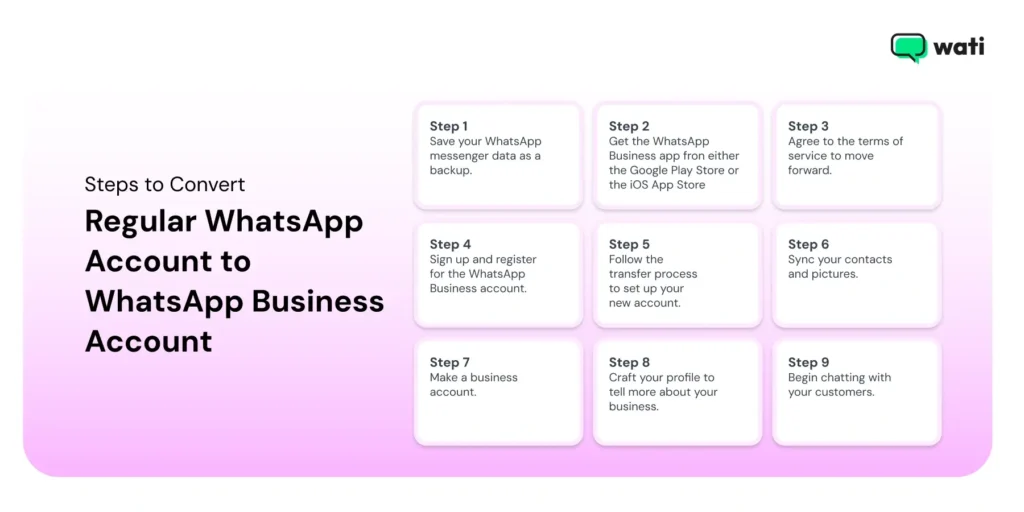
- Back up your WhatsApp Messenger: Open your personal WhatsApp. Go to Settings > Chat > Chat Backup. Type “Back up” to save your current history to the cloud (Google Drive or iCloud)
- Download and install: Go to the Google Play Store or Apple App Store and download the “WhatsApp Business” app.
- Agree to terms and verify: Open the WhatsApp Business app. Read and agree to the Terms of Service. The app will automatically detect the phone number you are using for your personal WhatsApp. Tap to confirm this is the number you want to use.
- Use a different number: If you want to use a different number (or even a virtual number), choose “use a different number” and complete the verification process.
- Transfer your account: The app will show a prompt warning you that you are moving your number from WhatsApp Messenger to WhatsApp Business. Tap “continue” or “transfer”.
- Verification code: You will receive a 6-digit verification code via SMS or phone call. Enter it to verify your number.
- Restore from backup: Once verified, the app will find the backup you created in Step 1. Tap “restore” or “continue” to migrate your chat history and media to the new Business app.
- Set up your business profile: You must create your business profile. Add your business name, profile picture (choose company logo), and select the category that best fits your business.
- Explore business tools: Once your profile is set, you will be taken to your inbox. It will look just like old WhatsApp, but now you have a Settings > Business Tools Menu. Go here to set up your product catalogue, greeting message, away message, and quick replies.
Dialing It up a Notch: Transitioning to WhatsApp Business API
The free business app is a great start, but not scalable if the team grows. What if you do well and hire 50 more employees to answer customer chats?
That’s when you hit the limits of a free app and need to transition into a WhatsApp Business API.
WhatsApp Business API enables you to automate messages, access shared chats, integrate AI chatbots, and track WhatsApp marketing ROI all on one platform. It is designed for businesses that need:
- A Shared Team Inbox: Allow multiple agents to manage conversations from one number.
- Advanced Automation: Build sophisticated chatbots to handle FAQs or qualify leads 24/7.
- CRM integration. Sync all your whatsapp chats with central lead management databases (like HubSpot, Salesforce or Zoho) to power bi-directional sync of contact data.
- CRM Integration: Sync all your WhatsApp conversations with your central database (like HubSpot, Salesforce, or Zoho).
- Verified Green Tick: Get the official green checkmark to prove your brand’s authenticity.
- Analytics: Track agent performance, response times, and conversation quality.
Keep in mind that the steps might change over time as WhatsApp updates its features and interface, so it’s always a good idea to refer to the official WhatsApp Business website or app store for the most up-to-date instructions.You can’t just download the API.
You must access it through an official WhatsApp Business Solution Provider (BSP) like Wati.
How to Customize WhatsApp Business API With Wati
Wati is a user-friendly BSP that provides easy API access for WhatsApp integration. Instead of having WhatsApp as a siloed channel, these integrations turn your tool into a centralized workhub.
Below are the tools you can sync with Wati to allow for seamless, powerful data flow and automation that speedens up lead conversions.
CRM Integrations With Salesforce and Zoho
You can connect Wati with sales CRMs to set up bidirectional sync in real time. The bi-directional sync helps transfer customer data from WhatsApp to CRM and vice versa.
These CRM integration capabilities allow you to sync contacts, enable lead routing, automate native actions, save chat transcripts, and trigger messages directly from your customer database.
Wati supports integrations with Salesforce and Zoho, and more. Apart from this, you get access to advanced custom dashboards, AI-powered summaries, and custom filters to set particular sales agendas across platforms.
Note: Learn how to integrate Wati with Zoho CRM to drive quick results.
WhatsApp Hubspot Integration
For businesses that run on HubSpot, Wati offers a seamless API key to connect your WhatsApp to HubSpot. Our dedicated WhatsApp to HubSpot integration automatically syncs all WhatsApp communication into your timelines.
You can send automated messages from HubSpot workflows, set predefined audience segmentation, create brief AI summaries, and track WhatsApp ROI with custom filters, all in a singular platform.
E-Commerce Platforms Like Shopify and Woocommerce
Integrating with tools like Shopify or WooCommerce can help automate your entire purchase journey.
From initial inquiry to purchase, push to payment, order delivery, and final shipment, businesses can track every stage of a customer’s journey. This not only helps businesses streamline operations, but also amplifies end-user experience.
With E-commerce platforms, you can send order confirmations, shipping notifications, delivery updates, and even abandoned cart recovery messages directly over WhatsApp.
Learn more about Wati’s integration with Shopify to automate your entire e-commerce cycle and boost customer trust and retention.
Connectivity Tools (Zapier, Pabbly)
If you don’t see any native integration with Wati, you can even integrate Zapier or Pebbly via webhook automation to access thousands of applications.
With these integrations, you can access any third-party application via webhook automation. Integrating Zapier or Pepply helps keep track of WhatsApp conversations. lead progress, broadcast campaigns, and customer responses.
Learn more about Wati’s integration with Zapier to access third-party apps and build cross-functional collaboration workflows.
Payment Gateways (Razorpay, Swipe)
Wati’s WhatsApp Business API also syncs with payment gateways like Razorpay and Swipe to automate payment transactions at scale.
With the payment gateway support, you can close sales directly within the chat. Wati allows you to set payment schedulers, share payment links, and confirm transactions without forcing the customer to leave the transaction.
Learn more about Wati’s Integration with Razorpay to sort the payment gateway for your business and handle customer transactions with ease.
Benefits of Changing WhatsApp to WhatsApp Business Account
Are you still on the fence to decide whether to opt for WhatsApp Business or not? Below are the benefits of converting WhatsApp to WhatsApp Business. You can have a look and decide for your business:
Professional Presence
Changing your WhatsApp to WhatsApp business account makes your business look more serious and professional to the people who want to buy your stuff or use your services.
Imagine you’re shopping online, and you see a shop with a clear name, address, and description. Doesn’t that make you feel like you can trust them more? That’s exactly what happens when you use WhatsApp Business.
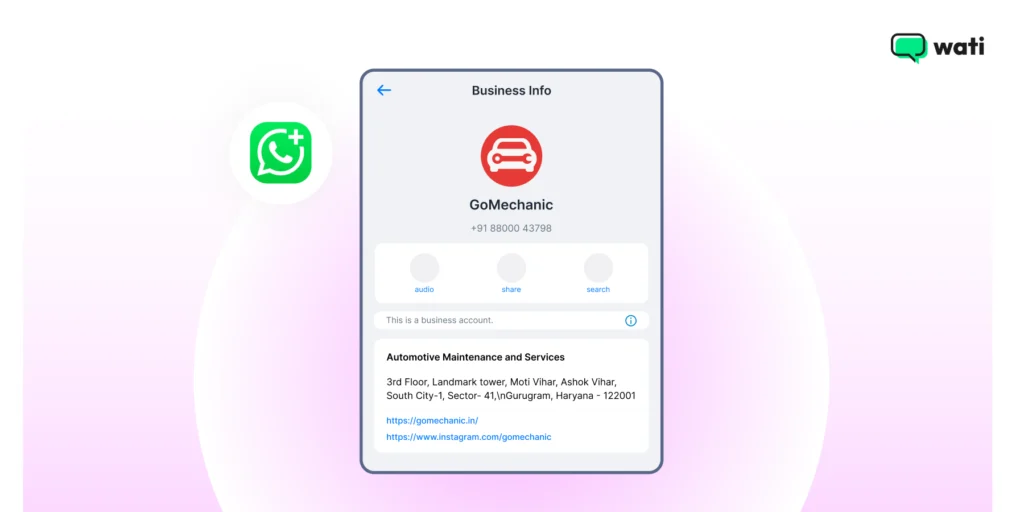
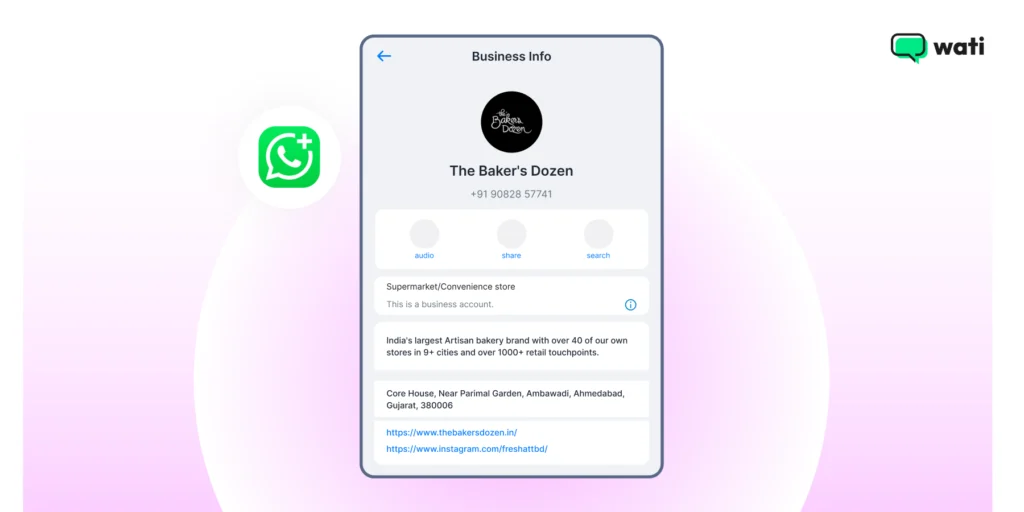
Business Details
When you change WhatsApp to a business account, you can enter important details like your business name, address, website link, and other details. When your customers see this information, they know you’re a real business that cares about being open and honest with them.
Having a full-fledged active business account increases brand trust and customer loyalty.
When you share these details, it’s like giving your customers a clear road map. They know where to find you, when to reach out, and what to expect.
Automated “Greetings” Messages
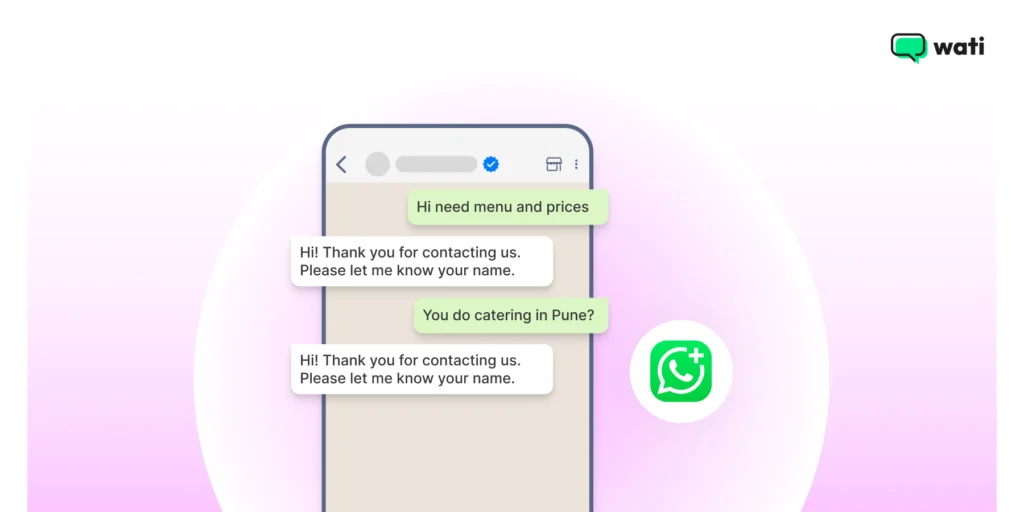
Automated greetings are like friendly virtual welcomes that your customers receive automatically when they send you a message. It’s kind of like having a virtual greeter at the entrance of your shop, saying, “Hello, welcome! We’re glad you’re here!”
When you change WhatsApp to WhatsApp Business, you can create these automated welcome messages. When a customer starts a chat, they get a warm greeting, which gives a good impression.
Automated “Away” Messages
“Away” messages tell a customer that the WhatsApp agent is currently inactive and will get back to them soon.
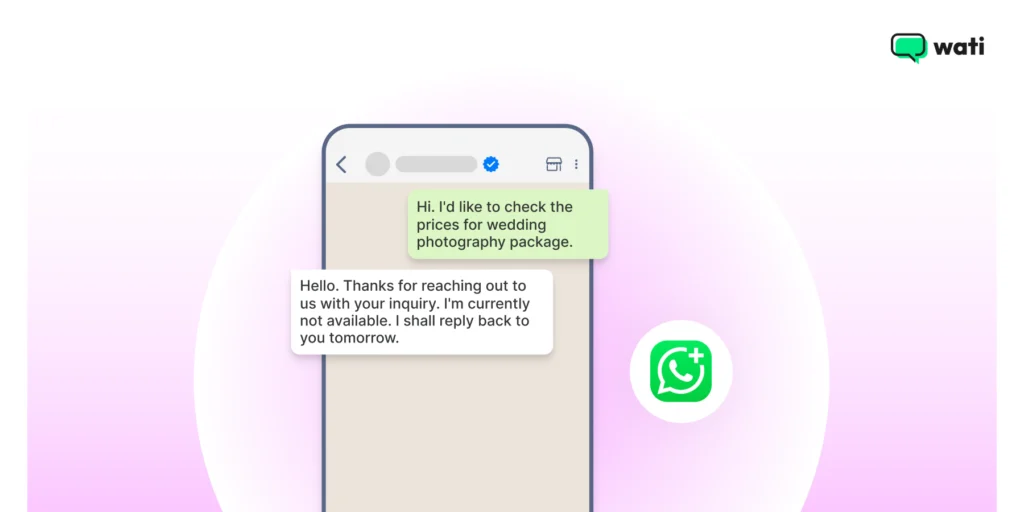
It is a respectful, straightforward, and concise message to assure customers that their query has been received and someone from the brand will get back to them.
By setting away messages, you can tell them when they can expect you to return to the chat. Otherwise, you can give them an alternative way to reach you, like email or phone number.
Make the Switch, Flip Loss Into Win!
Converting your WhatsApp into WhatsApp Business Account is a fundamental step for any business looking to grow in 2025. The free WhatsApp app provides initial tools, but WhatsApp Business offers advanced features to tackle queries in large volumes.
If you want to scale your WhatsApp campaigns and initiate customer interactions seamlessly, you can switch to WhatsApp Business tools like Wati.
Platforms like Wati transform your communication into a fully integrated, automated, and team-wide sales and support machine. If you are looking to scale, this is your best bet.
Switch to a WhatsApp Business API to witness a real-time revolution in sales deals and revenue. Book a demo with Wati today to get started!
Converting Whatsapp Account to Whatsapp Business: Frequently Asked Questions
The Business App is a free app for a single user (usually the business owner) on one phone. The Business API is a paid solution for teams, allowing for unlimited users, advanced automation (chatbots), and CRM integrations.
No. A single phone number can only be active on one app at a time (either personal or Business). To use both, you need two different phone numbers, which you can use on the same phone if it has dual-SIM capability.
No. If you follow the steps correctly and restore from your backup during the setup process, your entire chat history will be migrated to the WhatsApp Business app.
Yes. You can follow the same backup-and-restore process to move your number back to the personal WhatsApp Messenger app. However, you will lose all your business data, like your product catalog and business profile.