
Too Long? Read This First
- Personalisation Works Best: The most effective recovery messages include the shopper’s name, product visuals, and a clear call to action written in a warm, conversational tone.
- Psychology Drives Action: Triggers like loss aversion, FOMO, and reciprocity turn simple reminders into purchase nudges that customers respond to.
- Fix the Checkout: Reduce drop-offs by keeping checkout quick, showing total costs upfront, and allowing guest purchases.
- Timing Matters: Send your first WhatsApp recovery message within an hour, then one follow-up after 24 hours if needed.
- Stay Compliant: Keep every message short, relevant, and approved under Meta’s official template policy to avoid restrictions.
Many brands lose a great deal of ROI because they do not reach out to customers who were highly interested in purchasing but abandoned the checkout stage.
Brands that never reach out to such high-intent leads with abandoned cart recovery messages lose easy money and strain their bottom line.
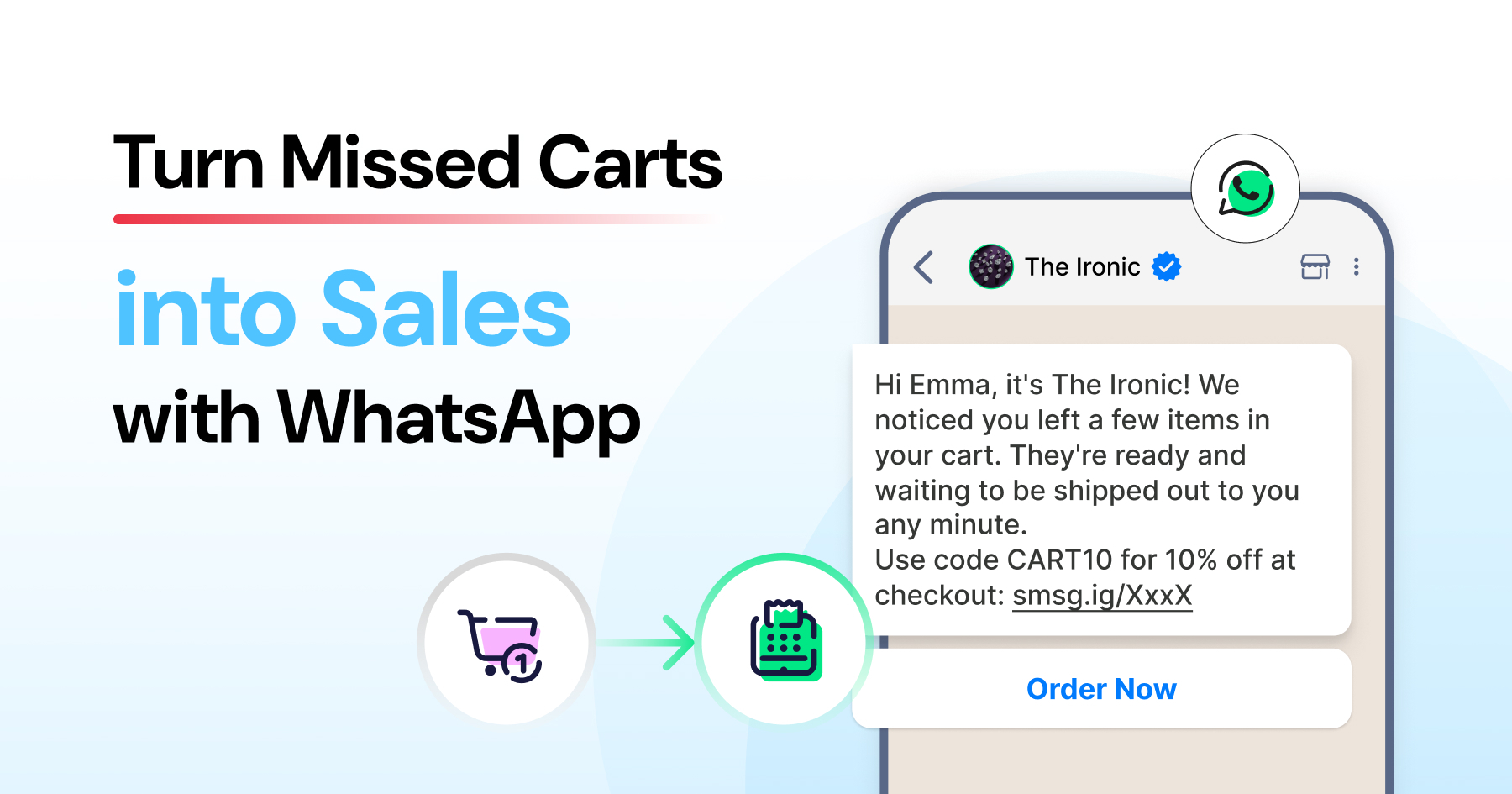
With tools like WhatsApp Business API, you now have the ability to re-engage with abandoned cart recovery messages, motivate customers to complete purchases, and increase sales deals.
With abandoned cart recovery messages, you can counsel and assist customers and scale your WhatsApp e-commerce business.
But how do we set up abandoned recovery messages without overwhelming customers? When to draw the line between harmless nudging and creating unnecessary push?
Let’s look at how abandoned cart recovery messages help you recover lost sales, create human-like reminders, and initiate buying action.
Why Do Customers Abandon Their Carts?
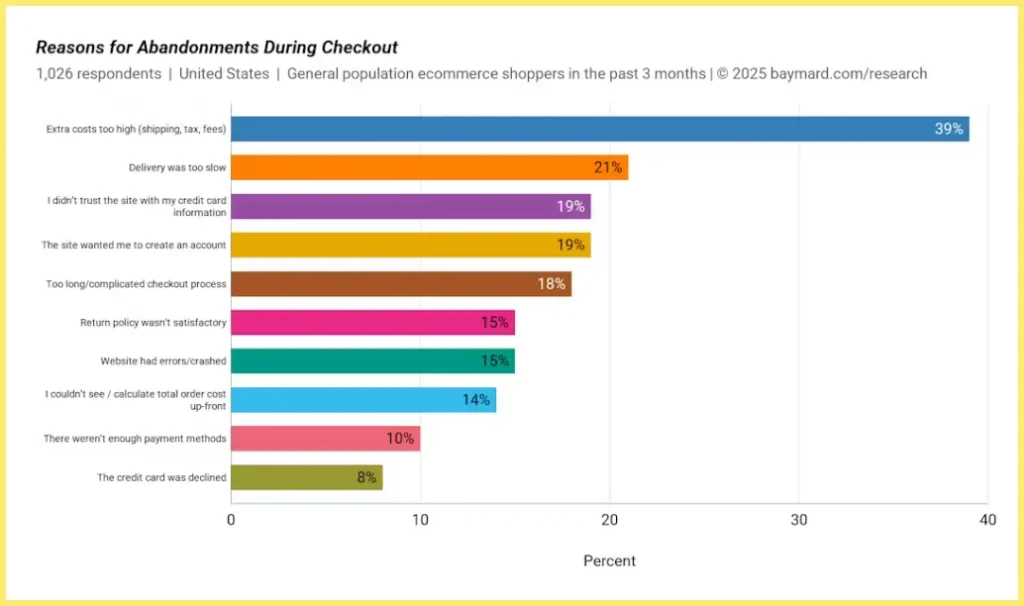
From distractions to unexpected costs, there are many reasons why shoppers abandon their carts.
Average cart abandonment rate: Around 70% across industries, according to the Baymard Institute. That means 7 out of 10 shoppers leave without completing the checkout.
But here’s the silver lining: these shoppers have shown interest in your products, meaning they’re potential customers waiting to be won back!
This is where the power of an abandoned cart WhatsApp message comes into play.
Customers abandon their carts either because of affordability or a change of heart. This is the time for brands to reinforce their messaging and approach customers with the right resolution.
If a customer abandons their cart, it indicates they actively searched for your products and were highly interested in them. Providing a smoother checkout experience, discounts, or other offers can motivate customers to complete their purchase and convert.
However, no customer wants a brand to be pushy or salesy after they abandon a cart. The key is to nurture the customer, and not pressurize them.
With WhatsApp templates, you can personalize engagement based on customers’ buying behaviour and gently nudge them to the finish line.
What are the Top Reasons for Cart Abandonment?
Cart abandonment is the digital equivalent of a shopper filling a physical cart with groceries and then walking out of the store right before reaching the register.
It’s frustrating, but it’s also a goldmine of data on where your user experience (UX) might be failing.
- Hidden Costs: Unexpected shipping fees or taxes at checkout can shock and disappoint customers. This transparency gap is the leading cause of shoppers abandoning their carts in favor of clearer pricing elsewhere.
- Complex Checkout: Too many form fields or mandatory steps create friction that kills the impulse to buy. A complex checkout process frustrates users, leading them to abandon the transaction.
- Mandatory Registration: Requiring users to create an account is a major barrier for those seeking a quick purchase. Most shoppers prefer a “Guest Checkout” to avoid the hassle of managing yet another password and profile.
- Payment Friction: A lack of diverse payment options or processing errors creates distrust and inconvenience. If a customer’s preferred payment method isn’t available, they are unlikely to complete checkout.
- Recovery Gains: Reclaiming just 10–20% of lost carts significantly boosts ROI because the marketing cost to acquire those users has already been spent. This makes recovery efforts some of the most profitable actions a business can take.
Read more: How does click-to-WhatsApp ad significantly improve ROI and sales strategy?
Why Use WhatsApp for Abandoned Cart Recovery?
Below are the reasons why WhatsApp is effective for abandoned cart delivery:
1. High Open Rates
WhatsApp messages have an impressively high open rate (98%). Unlike emails that can get lost in spam or promotional folders, WhatsApp messages are more likely to be seen and read by your customers.
This means your abandoned cart WhatsApp messages are almost guaranteed to catch their attention.
2. Personal Touch
WhatsApp allows for a more personal and direct form of communication. You can address your customers by name and make them feel valued, which can positively influence their decision to complete a purchase.
3. Instant Notifications
The real-time nature of WhatsApp ensures that your messages are delivered instantly. This immediacy can be crucial in reminding customers about their abandoned carts while the items are still fresh in their minds.
4. User-Friendly Interface
Most of your customers are likely already familiar with WhatsApp. This familiarity makes them more comfortable interacting with your messages and navigating back to their cart.
5. Rich Media Capabilities
Unlike traditional text messages or emails, WhatsApp allows you to include images, links, and even product videos directly in your abandoned cart WhatsApp message. This can make your recovery messages more engaging and persuasive.
6. Customizable Templates
With WhatsApp, you can use templates for different customer behavior and preferences. A personalized abandoned cart WhatsApp message resonates more with customers, increasing the likelihood of them returning to their cart.
7. Global Reach
WhatsApp has a vast user base worldwide. No matter where your customers are, you can reach them through this platform, making it an ideal choice for international e-commerce businesses.
8. Cost-Effective
Sending an abandoned cart WhatsApp message can be more cost-effective than other marketing channels. This is particularly beneficial for small to medium-sized businesses where budget efficiency is key.
9. Easy Integration
Many e-commerce platforms offer easy integration with WhatsApp, making it simple for you to set up and automate your abandoned cart recovery process.
Also checkout the complete WhatsApp API integration checklist to plug in productivity tools with your tech stack.
10. Compliance with Regulations
WhatsApp ensures compliance with various messaging and privacy regulations, giving you and your customers peace of mind regarding data security and privacy.
WhatsApp messages are end-to-end encrypted to protect the privacy of consumers and sales agents.
Why Send Abandoned Cart WhatsApp Messages?
Because they can contribute to sales and, in turn, boost ROI. Here’s why WhatsApp outperforms email or SMS for abandoned cart recovery:
- Two-way interaction: Customers can reply instantly to ask questions, confirm delivery details, or request support.
- Rich media: WhatsApp messages support product photos, emojis, and call-to-action buttons that lead straight to checkout.
- Verified business trust: The verification badge builds confidence and encourages more people to complete their purchase.
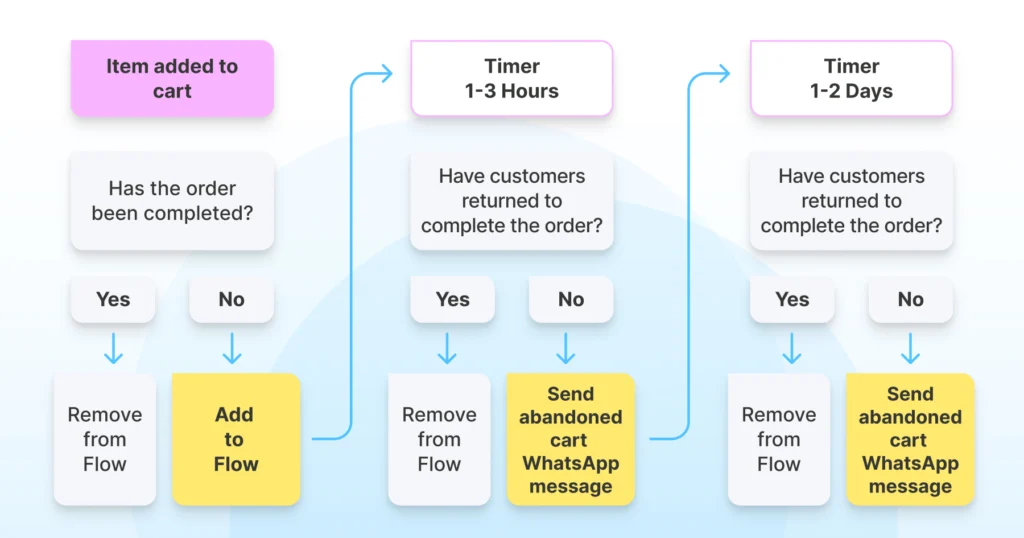
How Abandoned Cart Recovery Works?
Here’s how a typical recovery journey looks inside Wati.
Trigger | When a customer adds items to their cart but doesn’t complete the purchase, the system flags this inactivity after a set time. |
Automated Message | An automated WhatsApp message is sent with the product image, name, and a direct link to the cart. |
Follow-Up Message | If there’s still no response, a second message goes out a few hours or a day later. |
Conversational Flow | Brands can ask about delivery, confirm payment details, or complete their purchase directly within the chat. |
Brands can also use predefined segments to revisit sales strategy, refine messaging, and pursue faster checkout and lower abandoned cart rates.
What are the Elements of an Abandoned Cart WhatsApp Message?
A great cart recovery message isn’t just about reminding, it’s about reconnecting. Here’s what to include:
1. Personalisation
Speak directly to them. Use their name and reference what they added to their cart. Something as simple as “Hey Priya, you forgot your tote bag” feels warm and genuine.
2. Product Details
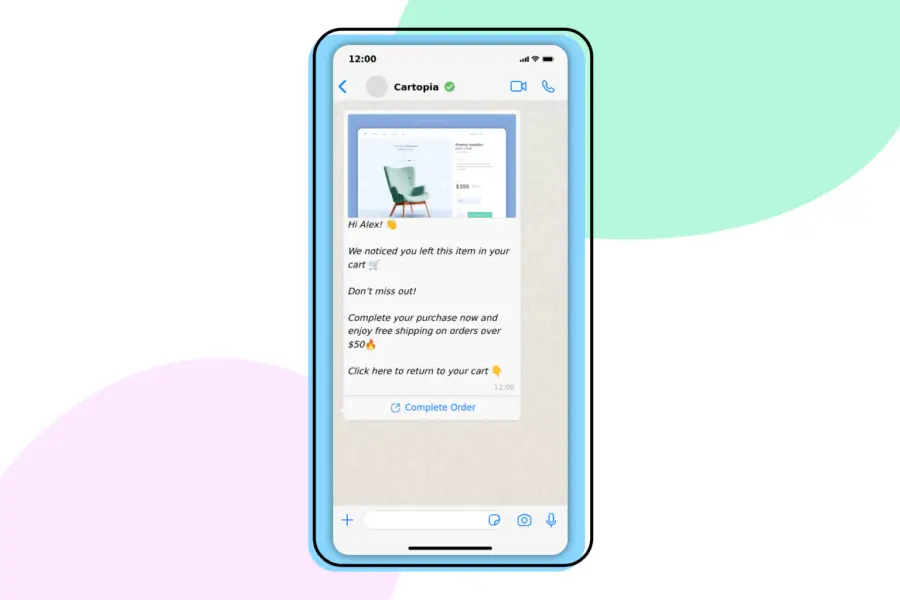
Show, don’t just tell. Include the product photo, name, and price so they instantly recognise what they wanted. Visuals help bring back intent.
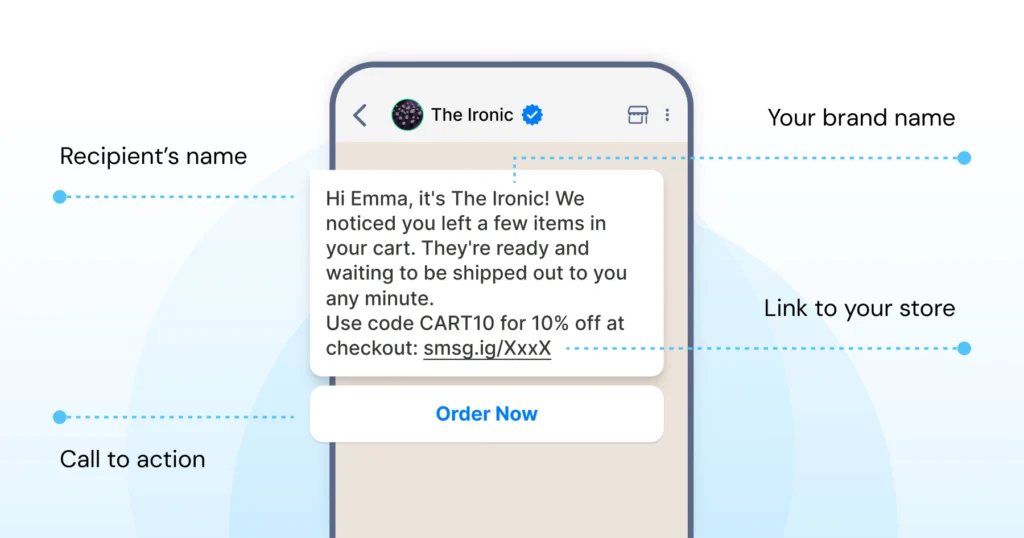
3. Offer or Incentive
Everyone loves a little push. You can mention limited stock, free shipping, or a small discount — whatever fits your brand’s tone.
Run limited-time offers or personalized discount offers on specific banks to entice the customer and ensure affordability. Slightly relaxed prices can pique their interest in the product and motivate them to buy it.
4. Clear Call to Action
Make it easy for them to take the next step. Use a single button or link that leads straight back to checkout.
Navigating a user-friendly interface with a clear call to action can help customers make a clear decision without being distracted.
5. Conversational Tone
Keep it light and natural. Write the way you’d text a friend, and use emojis only if they feel on-brand.
Being human, empathetic, and compassionate with the customer is the first step to a great marketing strategy and can increase checkout frequency.
What is the Psychology Behind Abandoned Cart Messages?
Abandoned cart reminders are effective because they tap into well-known behavioural triggers that influence purchase decisions.
- Loss Aversion: People naturally avoid losing something they already value. A message such as “Your cart is waiting” reminds them of what they might miss if they don’t act.
- FOMO (Fear of Missing Out): Phrases like “Only a few left” or “Offer ends soon” create a sense of urgency, encouraging quicker decisions and reducing hesitation.
- Reciprocity: When a brand offers a small incentive, such as a discount or free shipping, customers perceive added value and are more likely to complete the purchase.
- Ease of Completion: A direct checkout link minimizes effort and decision fatigue. The easier the process, the more likely customers are to follow through.
5 Best Abandoned Cart Recovery Message Templates and Examples
Here are some ready-to-use WhatsApp abandoned cart recovery message templates you can try right away.
1. Friendly Reminder
A polite and timely reminder encourages customers to return to their cart without feeling pressured.
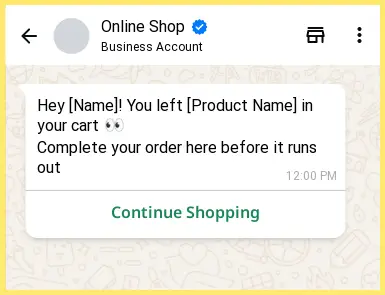
It’s ideal for shoppers who may have been distracted or stepped away from their purchase.
2. Discount Offer
A small incentive can help convert hesitant shoppers.
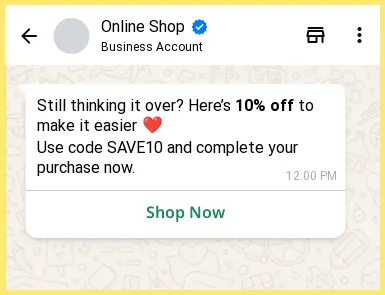
Offering a limited-time discount gives customers a reason to complete their order sooner.
3. Scarcity Nudge
Creating a sense of urgency can prompt faster action.
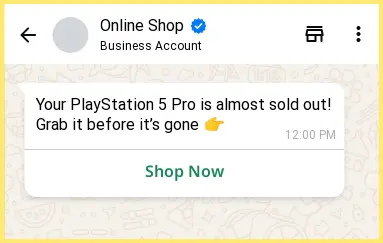
Highlighting limited stock or time-sensitive offers helps customers make quicker decisions.
4. Cash on Delivery Confirmation
COD confirmation messages reduce cancellations and ensure order authenticity.
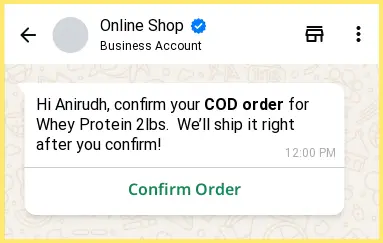
It also builds trust by keeping customers informed before dispatch.
5. Conversational Bot Flow
When customers have questions about size, payment, or delivery, a chatbot can provide immediate assistance.
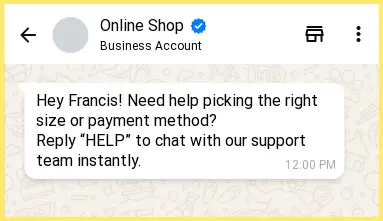
This keeps the conversation active and supports faster conversions.
Book a demo: See how Wati turns abandoned carts into conversions.
How to Reduce Abandoned Carts With WhatsApp Business?
Even before sending recovery messages, businesses can take proactive steps to reduce cart abandonment.
1. Reduce Abandonment
- Simplify the checkout flow: Lengthy or complicated checkout processes are one of the main reasons customers abandon their cart.
- Display total costs upfront: Showing shipping and taxes early avoids unpleasant surprises at checkout.
- Offer multiple payment methods: Customers are more likely to complete their purchase when they find their preferred payment option (credit card, UPI, wallet, COD, etc.).
- Allow guest checkout: Forcing account creation is another major reason users drop off during checkout.
2. Recover After Abandonment
- Send your first WhatsApp reminder within 1 hour: A timely message keeps your brand fresh in the customer’s mind and increases the chance of recovery.
- Follow up after 24 hours with an incentive: A limited-time discount or reminder helps re-engage shoppers who ignored the first message.
- Use Click-to-WhatsApp ads to re-engage users: Click-to-WhatsApp campaigns let you target cart abandoners directly from Facebook or Instagram and continue the conversation on WhatsApp.
- Ask for feedback: If a user still doesn’t convert, asking “What stopped you from checking out?” helps identify friction points and improve the buying experience.
What are the Abandoned Cart Recovery Message Best Practices?
To make your WhatsApp cart recovery campaigns effective, engaging, and compliant with Meta’s guidelines, it helps to follow a few important rules.
- Keep it short and conversational: Write messages that sound natural and easy to read. A warm tone feels more personal and less promotional.
- Limit follow-ups to 1 or 2: Sending too many reminders can come across as spam. Space them out to give customers time to respond.
- Add product visuals: Including product images makes the message more eye-catching and helps customers instantly recall what they were browsing.
- Send messages at the right time: Avoid sending reminders late at night or during off-hours. Schedule them when customers are most likely to engage.
- Test different approaches: Try variations in timing, tone, and offers to see what works best for your audience.
- Use Meta-approved templates: Only send messages through pre-approved WhatsApp templates to stay compliant and maintain message quality.
What are the Common Marketing Mistakes Brands Make?
Even strong eCommerce brands can slip up when running cart recovery campaigns. Here are some of the most common WhatsApp marketing mistakes to avoid.
1. Overusing Discounts
Discounts can be effective, but when used too often, they set the wrong expectation. Customers start waiting for deals instead of buying at full price, which can hurt your margins over time.
2. Copy-Pasting Generic Messages
Messages that sound identical across every chat quickly lose impact. Take a few minutes to adapt your tone or add small brand touches so the conversation feels genuine.
3. Delayed Follow-Ups
Timing matters. If you reach out days later, the shopper may have already purchased elsewhere or lost interest. Send your reminder while the intent is still fresh.
4. Ignoring Post-Purchase Recovery
A cart recovery flow doesn’t have to end with one reminder. Re-engaging a shopper later with product recommendations or feedback requests can turn a missed sale into a future loyal customer.
Steps to set up abandoned recovery cart messages on Wati
Mastering Abandoned Cart Recovery: The Wati + WordPress Integration
Transforming “lost” carts into successful orders requires more than just a reminder; it requires a strategic, multi-channel approach.
By integrating Wati with WordPress and WooCommerce, you can deploy a sophisticated recovery ecosystem.
- Segment Users with Predefined Segments: Not every shopper abandons for the same reason. Wati’s predefined segments allow you to categorize “customers” based on cart value, product type, or customer history.
- Boost Engagement with Rich Communication Messages: Move beyond plain text. Use rich communication messages to present customers with a high-quality image of the sneakers, along with interactive “Buy Now” or “Talk to Expert” buttons.
- Automate Assistance with an AI Support Agent: Often, a customer abandons because she has a quick question about sizing or returns. Wati’s AI support agent can intercept these queries 24/7 and provide instant answers in the WhatsApp chat.
- Collaborate via the Team Inbox: If a customer replies with a complex request, your service team can jump in via Wati’s team inbox. This unified dashboard enables human agents to manage high-intent conversations collaboratively, delivering a human touch.
- Close High-Value Deals with WhatsApp Business Calling: Wati’s WhatsApp Business calling feature allows your team to initiate a voice call to clear up any final hesitations. This direct human connection builds the trust necessary to finalize large transactions.
- Ensure Reach with Integrated SMS Marketing: Wati’s SMS marketing integration helps connect to customers in restricted areas. By sending a secondary recovery nudge via SMS, you ensure your brand stays top-of-mind regardless of the customer’s preferred app at that moment.
- Optimize Strategy via Advanced Analytics Dashboard: Wati’s advanced analytics dashboard provides granular data on message open rates, click-through rates, and actual conversion values. This data enables you to A/B test your templates to achieve a strong response rate.
Bringing Customers Back the Smart Way
Setting abandoned cart recovery messages doesn’t mean you have to force customers to buy something, but give a gentle recall in a smart, automated way.
Cart abandonment is part of every online store’s journey, but how you respond makes all the difference. WhatsApp gives brands a direct, personal way to bring shoppers back with timely and meaningful interactions.
Instead of letting potential sales slip away, use automation to keep the conversation going. With Wati, your follow-ups feel natural, consistent, and built to convert. Book a demo to experience how Wati helps you recover more abandoned carts and build stronger customer relationships.
FAQs: Abandoned Cart Recovery
Still have questions? Refer below!
1. Why should I use WhatsApp for abandoned cart recovery?
WhatsApp is widely used, with a higher open and read rate than email. Using WhatsApp for cart recovery can increase the likelihood of catching your customers’ attention and bringing them back to complete their purchase.
2. How do I integrate WhatsApp notifications into my e-commerce platform?
You can integrate WhatsApp notifications via e-commerce plugins or tools that support WhatsApp integration. These tools often come with easy-to-follow instructions to link your e-commerce platform with WhatsApp.
3. How can I personalize abandoned cart WhatsApp messages?
You can personalize WhatsApp messages with the customer’s name and the items they left in the cart and even offer personalized discounts or recommendations. Most automated tools allow for this level of customization.
4. How can I measure the effectiveness of WhatsApp notifications for cart recovery?
You can track the recovery rate, which is the percentage of abandoned carts that turn into completed purchases after sending the notifications. Additionally, monitoring the click-through rates on the messages can also provide insights.
5. Will my customers view WhatsApp notifications as spam?
It’s important to get explicit consent from customers before sending them any notifications. Clear communication about the type of messages they will receive can help prevent them from perceiving these messages as spam.
6. What kind of content should I include in the abandoned cart notifications?
Include a friendly reminder about the items left in the cart, any ongoing promotions, and a direct link to the checkout page to make the purchase process as easy as possible.
Frequently asked questions
1. Why should I use WhatsApp for abandoned cart recovery?
WhatsApp is widely used, with a higher open and read rate than email. Using WhatsApp for cart recovery can increase the likelihood of catching your customers' attention and bringing them back to complete their purchase.
2. How do I integrate WhatsApp notifications into my e-commerce platform?
You can integrate WhatsApp notifications via e-commerce plugins or tools that support WhatsApp integration. These tools often come with easy-to-follow instructions to link your e-commerce platform with WhatsApp.
3. How can I personalize abandoned cart WhatsApp messages?
You can personalize WhatsApp messages with the customer's name and the items they left in the cart and even offer personalized discounts or recommendations. Most automated tools allow for this level of customization.
4. How can I measure the effectiveness of WhatsApp notifications for cart recovery?
You can track the recovery rate, which is the percentage of abandoned carts that turn into completed purchases after sending the notifications. Additionally, monitoring the click-through rates on the messages can also provide insights.
5. Will my customers view WhatsApp notifications as spam?
It's important to get explicit consent from customers before sending them any notifications. Clear communication about the type of messages they will receive can help prevent them from perceiving these messages as spam.
6. What kind of content should I include in the abandoned cart notifications?
Include a friendly reminder about the items left in the cart, any ongoing promotions, and a direct link to the checkout page to make the purchase process as easy as possible.
Related posts
- How to Create WhatsApp Display Name for WhatsApp Account
Learn how to set and optimize your WhatsApp Display Name, a crucial branding element enhancing your business’s credibility and recognition.
- WhatsApp Login Guide 2026: Access Your Account on App, Web, and Desktop
Complete your WhatsApp login in easy steps. Set up your account, personalize your profile, add contacts, and start chatting seamlessly with this guide.
- How to Remove Blue Ticks on WhatsApp (Android, iPhone & Web): 2026 Guide
Learn how to remove WhatsApp blue ticks on Android and iPhone. Take control of your chats, protect privacy, and avoid pressure to reply instantly in 2026.
- WhatsApp Business Calling Pricing in 2026: What It Actually Costs and Why Most Estimates Get It Wrong
Most WhatsApp Business Calling pricing guides skip two of the three cost layers. Here’s the full breakdown with 2026 rates, country tiers, and worked examples.