
Too Long? Read This First
- WhatsApp Pay Catalog Checkout lets customers browse, share their address, and pay for Catalog orders without leaving WhatsApp.
- On Wati, Auto Checkout connects Catalog orders to Razorpay or PayU and supports UPI, cards, and net banking in India.
- For Diwali, in-chat checkout can reduce friction for gift hampers, festive bundles, flash sales, and repeat purchases by removing the browser switch.
- Wati can also help businesses recover incomplete checkouts with automated follow-up messages, so customers who stall don't simply disappear.
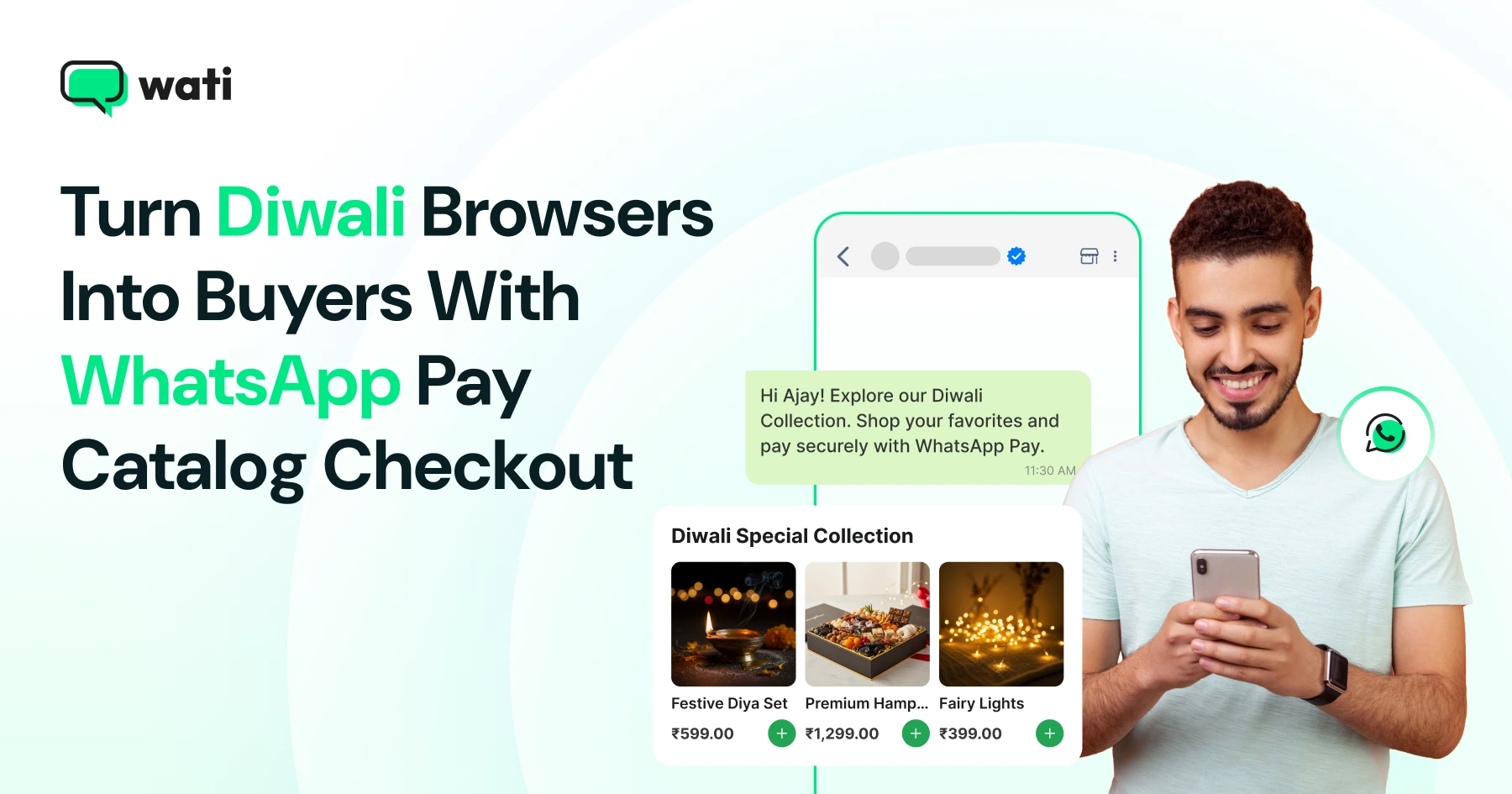
Shopping on WhatsApp has been on a steady upward trend in India, with 72% of product discovery happening on the platform. During Diwali, brands can build on that discovery by letting shoppers browse festive Catalogs and complete their purchase right in the conversation with WhatsApp Pay Catalog Checkout.
Wati is a WhatsApp Business Platform provider (BSP) that lets businesses run marketing, sales, and support - including Catalog and in-chat payments - on WhatsApp.
Here's what's ahead: what WhatsApp Pay catalog checkout is, who can use it, and what the customer actually sees at checkout, plus how to set it up on Wati, what happens once a customer pays, how to recover an incomplete checkout, and how to run all of it well this Diwali.
What is WhatsApp Pay Catalog Checkout?
WhatsApp Pay catalog checkout turns a WhatsApp product Catalog into a single storefront where customers can browse, add items to their cart, share an address, and pay, all within the same WhatsApp chat. There is no redirect to an external checkout page and no separate app to open.
"WhatsApp Pay" is the term most people search for, and it covers both peer-to-peer transfers between friends and the business checkout flow described in this guide. The business version runs on Meta's WhatsApp Business API, and on Wati, it is built as Auto Checkout.
Can Customers really pay directly inside a WhatsApp chat through Wati?
Yes. When a customer selects items from your Catalog and sends the cart, Wati automatically sends an address collection message, followed by a payment message with a "Review and Pay" button.
The address form is WhatsApp's own, and tapping the payment button opens an in-chat payment experience powered by your connected gateway.
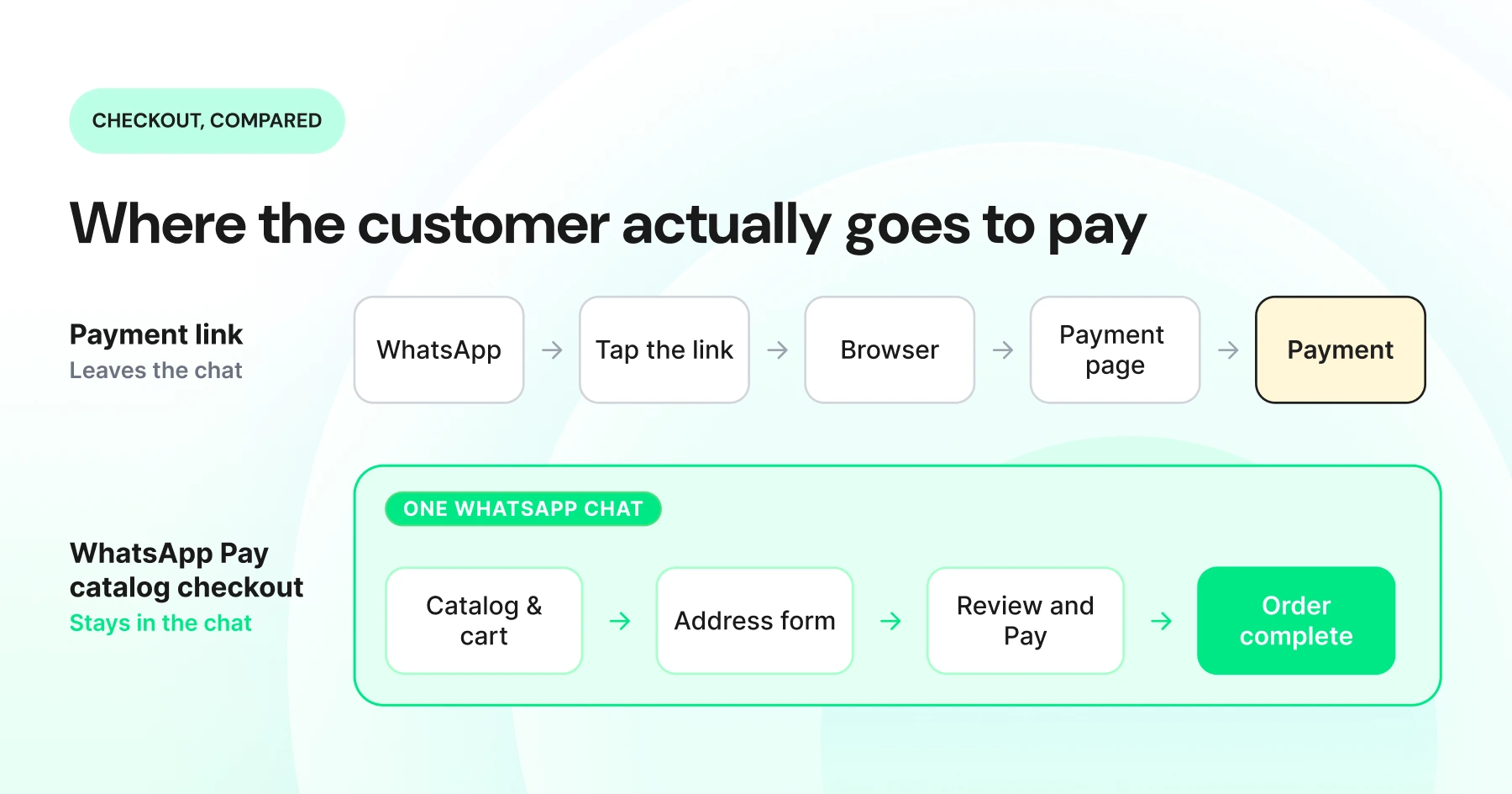
For a Diwali sale, when orders spike and customers shop around the clock, a customer browsing your gift hampers at 11 P.M. can pay on the spot instead of waiting until morning.
Does WhatsApp Business Support UPI Payments?
In India, customers can pay using supported methods, including UPI and credit cards. Available payment methods depend on the connected payment gateway.
The business never touches the payment directly. It links a gateway account, currently Razorpay or PayU on Wati, to its WhatsApp Business Account through Meta's WhatsApp Manager, and Meta's own payments documentation describes this same setup for India.
UPI is already how most Indian shoppers pay during Diwali, whether they are splitting a family gift order or grabbing a last-minute hamper. Supporting it inside the chat means the payment step feels familiar rather than like a new hurdle.
Who Can Use WhatsApp Pay Catalog Checkout?
WhatsApp Pay Catalog Checkout is currently available only to Wati users in India on the Pro or Business plan, with Auto Checkout (in Beta) enabled, a synced WhatsApp Catalog, and a Razorpay or PayU account connected.
Eligibility depends on your location, Catalog setup, and payment gateway, so check these requirements before planning your Diwali campaign around Auto Checkout.
Requirement | Current status |
|---|---|
Country | Currently available for Wati users in India |
Wati plan | |
Wati feature | Auto Checkout |
Payment gateway | Razorpay or PayU account |
Catalog | A synced WhatsApp Catalog is required |
If you're not eligible for Auto Checkout, your Diwali Catalog can still work as a browse-and-cart tool, with payment handled through an external payment link, connected store checkout, or another supported payment method.
WhatsApp Pay Catalog Checkout vs. Other WhatsApp Payment Methods: What's Best for Diwali?
WhatsApp Pay catalog checkout is the fastest option for Indian merchants because payment happens inside the chat with no redirect; payment links work in any market but send the customer to an external page mid-purchase. Here is the full comparison:
Method | Where payment happens | Setup effort | Order management | Best fit |
|---|---|---|---|---|
WhatsApp Pay catalog checkout | Inside the WhatsApp chat | One-time gateway link (Razorpay/PayU) | Synced automatically to the Wati Orders page | Indian merchants running a Diwali sale who want checkout with no redirect |
Payment link in chat | External page (browser) | Generate and paste a link per order | Manual, tracked wherever the gateway sends it | Any market works everywhere, but the customer leaves the chat mid-purchase |
Manual UPI sharing | Customer's own UPI app | None, just share a UPI ID or QR | Manual, no automatic confirmation | Small sellers running a one-off festive drop |
Shopify checkout redirect | External store checkout page | Sync Catalog to Shopify, enable checkout flow | Synced to Shopify, but WhatsApp Pay orders need manual entry there | Merchants who want Diwali orders to land in their store admin |
Across all four WhatsApp checkout methods, the pattern is simple: the closer checkout stays inside WhatsApp, the fewer taps stand between wanting a Diwali gift and paying for it, though eligibility narrows to India.
How does Catalog Checkout With WhatsApp Pay Actually Work?
A customer taps through Catalog, address, and payment in one chat thread; behind the scenes, Wati runs five automated steps to make that happen:
- Browse and select. The customer opens the business's Diwali Catalog and adds a gift hamper to the cart.
- Send the cart. The cart-send event triggers Wati's Auto Checkout automatically. Nothing needs to be built for this step.
- Wati sends the address message. This uses WhatsApp's native address form, so the business does not design or host a form of its own.
- Wati sends the payment message. This is an order_details interactive message containing the order summary, the amount, and a "Review and Pay" button.
- The gateway processes the payment. The payment status is reflected in Wati for order management and fulfillment
The customer can reply whenever they are ready. Nothing here runs on a fixed clock.
How to Set Up WhatsApp Pay Checkout Before Your Diwali Sale?
Before you touch the setup screen, gather these items so the process runs in one sitting, ideally days before your sale goes live, rather than the morning of.
- A synced WhatsApp Catalog
- Wati Pro or Business plan
- A Razorpay or PayU account
- Admin access to WhatsApp Manager
- Your WABA ID
- Meta allowlisting, where required
- Business details ready for the gateway configuration
With a Catalog already synced, enabling Auto Checkout with WhatsApp Pay takes five steps.
- Go to Commerce > Checkout in your Wati account.
- Open the WhatsApp Pay tab and toggle it on.
- Customize the address message body text that your customers will see. The address form itself is automatic.
- Click Go to Your WhatsApp Manager, log in as admin, and under Payments, select Razorpay or PayU, then create a new payment configuration with your WABA ID and business details. Confirm with your Facebook account password, and you will be redirected to the gateway's site to finish the link.
- Copy the payment configuration name back into Wati's Checkout page and save.
Once you save, every new Catalog cart triggers the address and payment sequence on its own, no manual work needed, right through your busiest Diwali sale days.
What Happens After a Diwali Order is Paid?
Once a Diwali order is paid, Wati updates the payment status, logs the order with address and payment details on the Wati Orders page, and hands it to your team for fulfillment- no manual re-entry needed. Step by step:
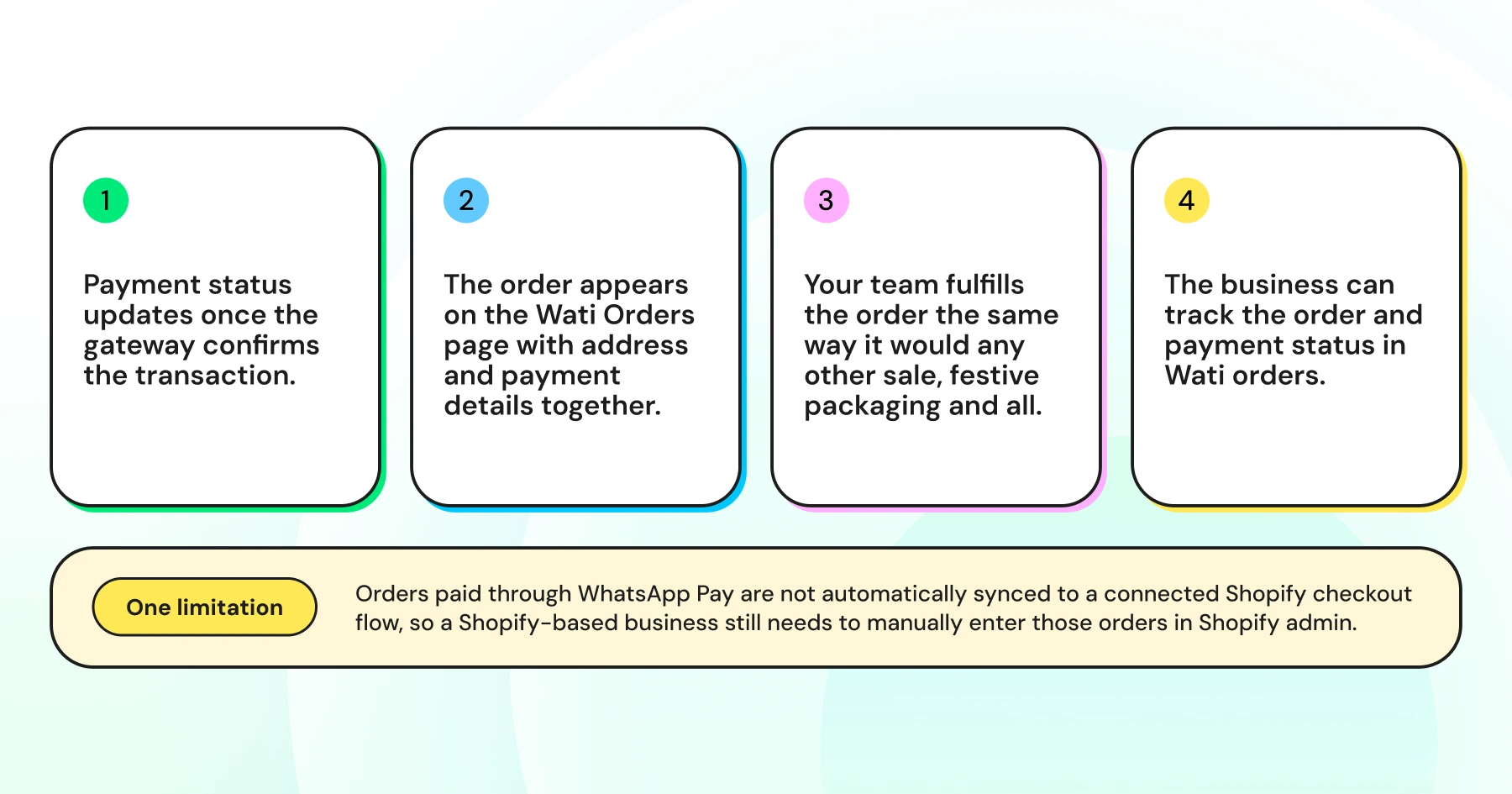
One limitation is worth flagging here, especially if you also sell on Shopify during the Diwali rush. Orders paid through WhatsApp Pay are not automatically synced to a connected Shopify checkout flow, so a Shopify-based business still needs to manually enter those orders in Shopify admin.
How do You Recover Incomplete Diwali Checkouts?
Not every stalled order is the same kind of stall, and each moment calls for a different message.
Cart abandonment is when a customer adds products but never sends the cart, while checkout abandonment is when they send the cart but never finish the address or payment step.
A cart abandonment nudge can be as simple as asking if they are still deciding on their Diwali gifts.
A checkout abandonment nudge works better when it references the order directly, something like "Your Diwali hamper is reserved; complete payment to confirm your order."
A Drip Campaign can send either message automatically. If Stop campaign on customer reply is enabled, the sequence stops when the customer replies. For a Diwali campaign, a reasonable starting point is to test a nudge 30 to 60 minutes after the relevant step goes quiet.
Auto Checkout handles the payment itself, and a Drip sequence catches anyone who stalls; together, Auto Checkout and Drip cover both the completed and abandoned sides of a Catalog cart, and more Diwali-specific drip sequences cover cases like COD confirmation and win-back for lapsed festive buyers.
Fewer steps between browsing and paying matter most during a high-intent window like Diwali, when a shopper's attention is already being pulled in several directions at once. Every step you remove from checkout is one less place for that attention to slip.
How do You Get the Most Out of WhatsApp Pay Catalog Checkout This Diwali?
WhatsApp Pay Catalog Checkout performs best on high-intent, fast-decision Diwali orders - gift hampers, corporate gifting, flash sales, pre-bookings, and repeat purchases. Here's where to point it, and how to get more out of it once it's live:
- Diwali gift hampers and festive bundles that customers browse and decide on quickly
- Corporate gifting orders, where the buyer already knows what they want
- Limited-stock products and flash sales, where speed at checkout matters most
- Pre-booking on festive bundles ahead of the sale window
- Repeat customers who already trust the brand and just want a fast reorder
A few habits make the feature perform better once it is live.
- Keep festive Catalogs focused on a curated set of items instead of listing every SKU at once.
- Bundle related products together to lift the average order value.
- Test the full checkout flow yourself before the campaign goes live.
- Brief your support team on the Auto Checkout flow, so they can answer a confused customer mid-purchase instead of routing them elsewhere. If the festive volume outpaces your team, AI Co-pilot can help you scale support without hiring.
Bonus read: Diwali Marketing Campaigns 2026: Your 4-Week WhatsApp Plan
What are the Common Pitfalls to Avoid Before Your Diwali Sale?
The most common mistakes are treating a Beta, India-only feature as universally available, confusing it with Shopify checkout, and skipping Meta's allowlisting step - all avoidable if you check them before launch day:
- Assuming it is available everywhere: This is a Beta feature, so confirm your plan and country against the eligibility table above before promising it in Diwali campaign creative.
- Confusing it with Shopify checkout: The two flows are different, so check the FAQ below before assuming a Shopify order syncs in automatically.
- Ignoring Meta's allowlisting requirement: India merchants using WhatsApp Pay and address collection need their account added to Meta's allowlist before the feature works end-to-end, so this is not something to leave until launch day.
- Running retries past an offer's expiry: Failed sends retry automatically for up to seven days, so for a time-bound Diwali offer, make sure retry windows do not outlive the sale.
Is WhatsApp Pay Catalog Checkout Worth Setting Up Before Diwali?
A redirect is a small thing until it costs you the sale. WhatsApp Pay catalog checkout closes that gap for India merchants this Diwali, keeping browse, chat, and payment in one thread so fewer shoppers get pulled away mid-purchase.
Pair it with the right templates and a follow-up nudge for anyone who stalls. The festive Catalog stops being just a browsing tool and starts closing sales on its own.
Ready to see it running on your own number before the sale window opens? Book a Demo, and a Wati specialist will walk you through Auto Checkout, Catalog setup, and festive campaign templates for your account.
Frequently asked questions
Can I use WhatsApp Pay for my business outside India?
Not through Wati's Auto Checkout, since that feature is currently in Beta and limited to India. Native WhatsApp Pay for businesses also runs in Brazil and Singapore, though setup and support outside India vary by market.
What payment methods can customers use at checkout?
Customers paying through WhatsApp Pay catalog checkout in India can use UPI apps, debit cards, credit cards, and net banking. The exact options depend on what the connected Razorpay or PayU account supports.
Do customers need a WhatsApp account to pay?
Yes, since the entire checkout happens inside a WhatsApp chat. Beyond that, they only need whichever payment method they choose at checkout, and it is worth confirming the exact requirements with your gateway before launch.
Does a Shopify-synced Catalog use WhatsApp Pay automatically?
No, a Shopify-synced Catalog defaults to its own checkout flow, which redirects to the Shopify store's checkout page. WhatsApp Pay must be enabled separately, and orders paid this way still need manual entry in Shopify.
Can a business offer both Razorpay and PayU at the same time?
No, a business selects one payment gateway configuration for its WhatsApp Pay checkout. Switching gateways means updating that configuration rather than running two side by side on the same Catalog.
What happens if a customer doesn't respond to the payment message right away?
Nothing expires automatically on the business side. The customer can reply to the address or payment message whenever they are ready, and payment status updates the moment they do.
Is WhatsApp Pay catalog checkout the same as native WhatsApp Pay in the WhatsApp app?
They are related but not identical. Native WhatsApp Pay handles peer-to-peer transfers, while the business order_details payment flow used in Catalog checkout is a separate flow built on the same WhatsApp Payments program in supported markets.
Related posts
- Instagram Comment Automation: How It Works and How to Set It Up in Wati
Instagram comment automation auto-replies to comments and DMs commenters within seconds via Meta's API. Covers strategy, use cases, and Wati setup.
- Shared Team Inbox for Instagram: A Buyer’s Checklist for 2026
Use this fastest checklist to evaluate any shared team inbox for Instagram, which covers DMs, comments, automation, and multi-channel support.
- How to Send Bulk Messages on WhatsApp Without Getting Blocked
Learn how to send bulk WhatsApp messages without getting blocked. Compare the WhatsApp Business app and API, messaging limits, costs, templates, and best practices for safe, compliant bulk messaging.
- How to Set Up a TikTok Business Account: Step-by-Step Guide
Set up a TikTok Business Account step by step: switch from personal, pick a category, add your profile, and unlock ads and analytics.