
Too Long? Read This First
- WhatsApp is secure: It uses end-to-end encryption. Only the sender and receiver can read messages.
- WhatsApp has not been hacked: Big incidents came from spyware on phones, not from broken encryption.
- Businesses must still be careful: Encryption is strong, but storage, backups, and access need protection.
- Backups need attention: Cloud backups are not always encrypted unless users turn it on.
- India and Brazil have their own rules: DPDP Act (India) and LGPD (Brazil) sit alongside GDPR as compliance requirements businesses must meet.
- WhatsApp vs others: WhatsApp uses encryption by default. Telegram does not. Signal is more private but less business-ready.
One of the key customer reservations is: “Will my data be safe on WhatsApp?”
Establishing WhatsApp data security is not just a technical requirement but a strategic necessity for building long-term loyalty.
By implementing WhatsApp data security protocols, businesses can protect sensitive information while complying with end-to-end encryption (E2EE), AES, and global privacy regulations, including the GDPR (EU), India's DPDP Act 2023, and Brazil's LGPD.
By using the WhatsApp Business API platform, brands can easily manage privacy policies and stay up to date on legal updates for enterprise-grade security.
In this guide, we will break down the myths around encryption APIs and explain why prioritizing WhatsApp data security benefits your brand growth, updated for the Cloud-API-only landscape of 2026.
Why is Data Security on WhatsApp a Priority?
- Customer trust is fragile: 87% of customers won’t engage with a brand they don’t trust with their personal data. Even fields like real estate use WhatsApp to manage leads, book visits, and talk to buyers safely.
- Customers are impacted directly: 9% of publicly traded U.S. companies reported data breaches in a year’s period, impacting 143 million people
- Rules and laws vary by market: GDPR (EU), India's DPDP Act 2023, and Brazil's LGPD each set their own consent, deletion, and breach-notification requirements. Businesses operating across regions must satisfy all of them, not just GDPR.
- Messaging volume: When a business sends thousands of messages each day, protected communication is a must.
- Breaches are growing: Last year alone, more than 1 million records were exposed due to weak security in apps and systems.
- Messaging apps are prime targets: They carry personal details, payments, and business transactions, making them valuable to attackers.
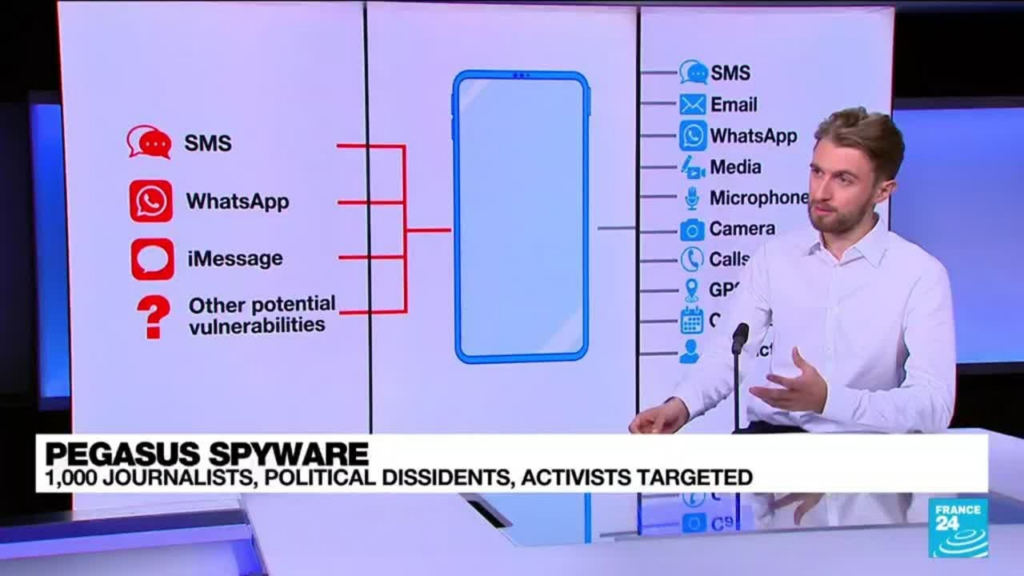
Significant data leaks stemmed from other problems, such as spyware on phones. They did not come from WhatsApp's encryption. One famous case was the Pegasus spyware attack. It hit about 1,400 people, including reporters and activists. Pegasus broke into devices, not WhatsApp's encrypted chats.
“Encryption is your friend, whether it’s on text messaging or if you have the capacity to use encrypted voice communication. Even if the adversary can intercept the data, if it is encrypted, it will make it impossible.”
– Jeff Greene, Executive Assistant Director for Cybersecurity, CISA (Source)
WhatsApp Data Security: Debunking Myths vs. Facts
Myth | Fact |
WhatsApp reads your messages. | End-to-end encryption means only you and your recipient can read them. |
Using WhatsApp API means Meta stores customer data. | Cloud API messages are held only briefly (up to 30 days) to ensure delivery, then deleted, not stored long-term. |
Cloud API is less secure than On-Premises API. | On-Premises API was fully retired by Meta on October 23, 2025. Cloud API is now the only supported deployment. There is no longer an on-prem alternative to weigh it against. |
What is End-to-End Encryption in WhatsApp?
End-to-End Encryption (E2EE) is the core security protocol that ensures only the sender and the intended recipient can access the contents of a message.
Under the Signal Protocol, every communication, whether it is a text, image, or voice call, is scrambled into unreadable ciphertext before it leaves your device. This cryptographic “vault” remains locked throughout the entire transmission process, ensuring that even WhatsApp, Meta, and third-party hackers cannot intercept or view your sensitive data.
How Does WhatsApp E2EE Work for Your Business?
WhatsApp’s data security relies on a sophisticated system of digital locks and keys:
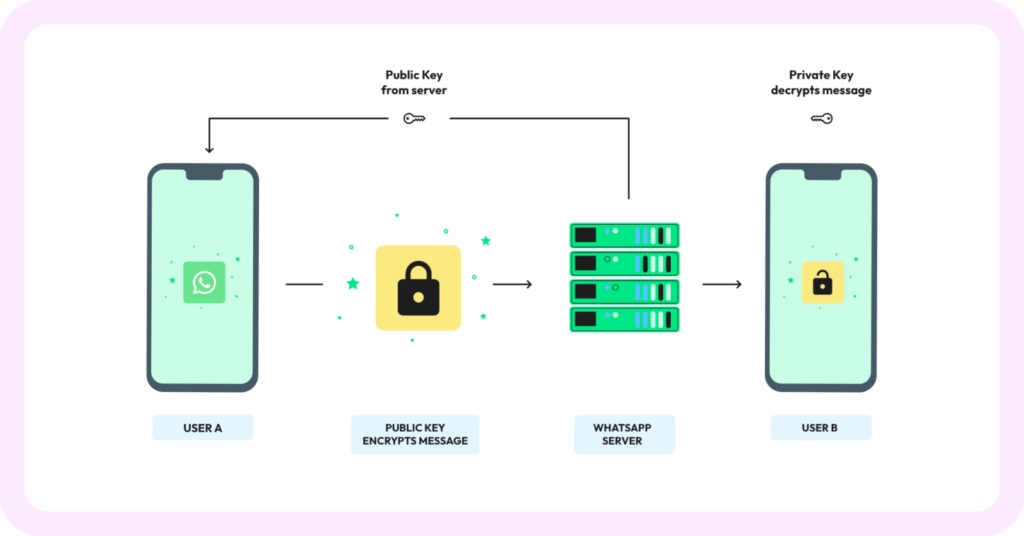
- Unique Digital Keys: Every message is secured with its own unique cryptographic lock. The keys to unlock these messages are stored locally on the sender’s and recipient’s devices.
- Automatic Protection: You don’t need to toggle any settings; encryption is active by default for all media, including documents, location sharing, and calls.
- Middleman Prevention: Because the decryption happens only at the “end” (the recipient’s phone), any data passing through WhatsApp’s servers remains encrypted and inaccessible.
Real Life Business Example Of WhatsApp E2EE
Imagine an e-commerce customer sends their home address or payment confirmation via WhatsApp.
- On the Customer’s Side: Their device encrypts the address with a unique key.
- In Transit: The message travels through the web as a string of random characters.
- On Your Side: Your WhatsApp Business API dashboard (like Wati) receives the data and uses your private key to “unlock” and display the address.
Note: End-to-end encryption ensures that even if a cybercriminal intercepted the transmission, the data would be useless without the specific private keys found only on the devices involved in the chat.
How Does WhatsApp Protect Chats and Data?
WhatsApp uses end-to-end encryption by default for all messages, voice calls, video calls, photos, and files shared on the app.
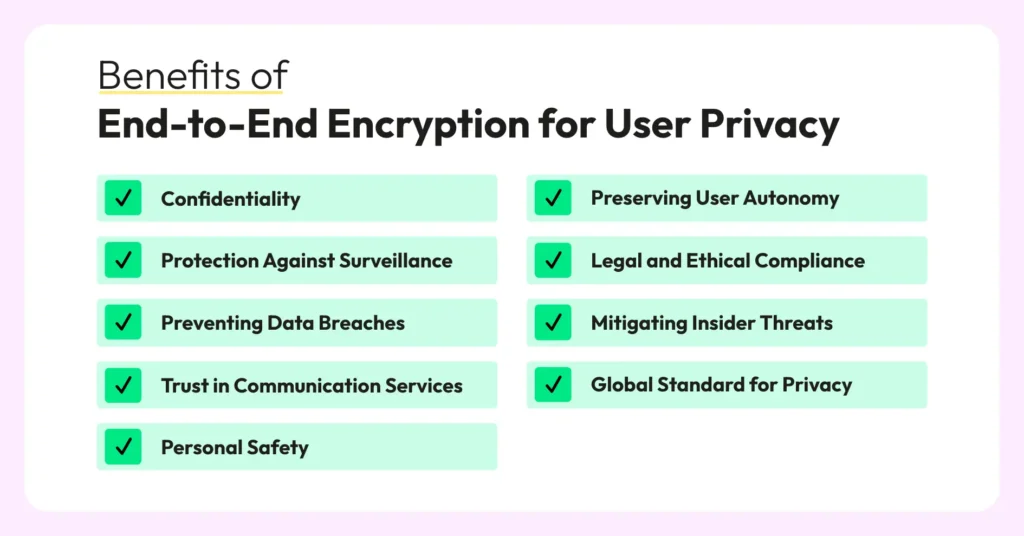
Here’s what it means in practice.
- Sender to receiver only: Messages are encrypted with a unique lock and key that only the sender and intended recipient can access.
- Even WhatsApp can’t read your chats: Not Meta, not hackers in the middle, only the participants in the conversation.
- Constantly refreshed encryption keys: Each message has its unique security key.
Here’s an image to explain the entire flow in detail.
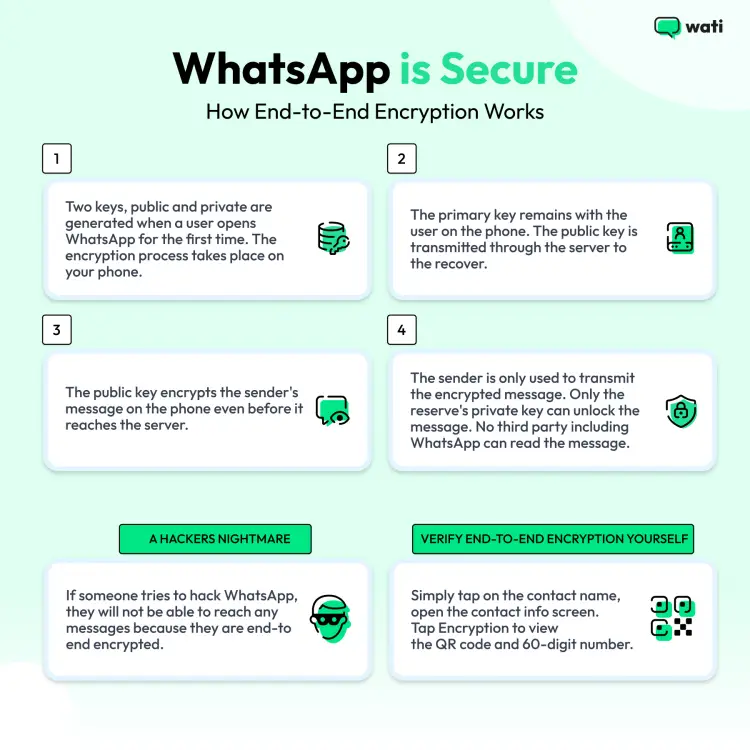
For businesses, this means that customer details, such as addresses, orders, payments, and questions, remain private and safe.
Where Does End-to-End Encryption Fall Short?
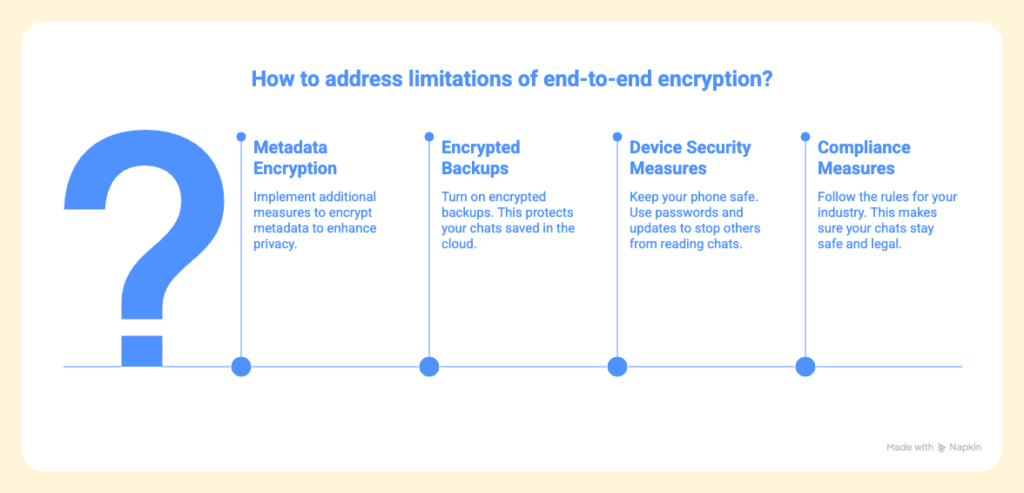
End-to-end encryption (E2EE) is robust. But there are some limitations that businesses should know:
1. Metadata isn’t Encrypted
E2EE keeps the message safe, but not the details about who you talked to, when, or how often. WhatsApp may collect some of this data to improve its service and stop misuse.
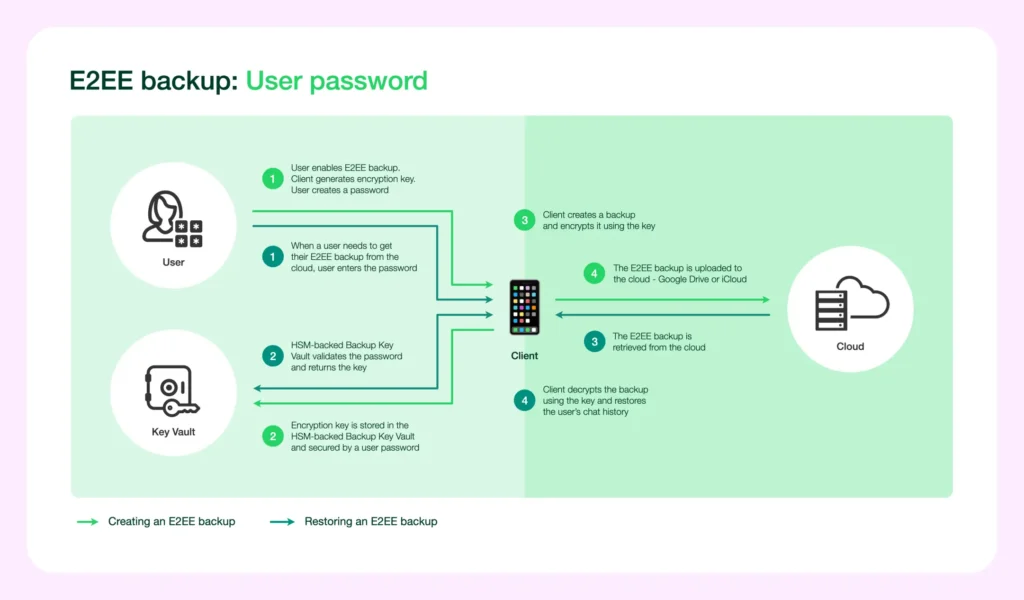
2. Backups May Not Be Encrypted (Unless Enabled)
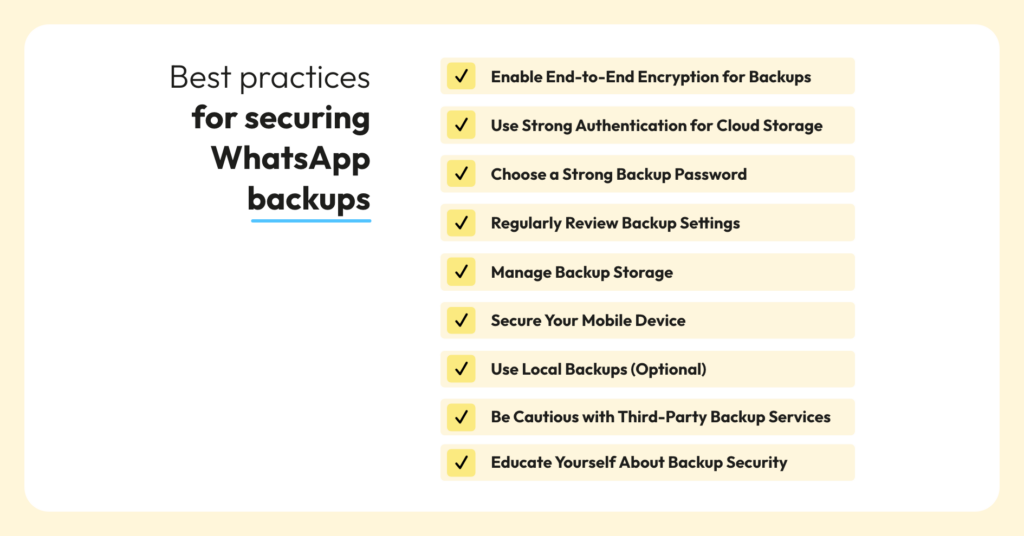
E2EE does not always cover chats saved to Google Drive or iCloud. To stay safe, users must turn on encrypted backups in WhatsApp settings.
3. Encryption Alone is Not Enough
If someone gets your unlocked phone, they can read chats. Encryption cannot stop weak passwords or stolen devices.
Compliance Considerations
Some industries, such as healthcare and finance, require additional steps (HIPAA, PCI DSS). Beyond GDPR, businesses messaging customers in India must also meet the requirements of the Digital Personal Data Protection (DPDP) Act 2023, consent that's itemized and revocable, and a working process for deletion requests.
Businesses messaging customers in Brazil must meet the LGPD's equivalent requirements. Even in education, e-learning platforms use WhatsApp safely for trials, nudges, and refunds, where trust is vital.
Should Businesses Be Concerned About Encryption?
No. Businesses do not need to worry about encryption. WhatsApp’s end-to-end encryption is strong and trusted worldwide.
Yes. Businesses do need to worry about how they use WhatsApp. They must keep storage, backups, and access safe.
The most significant risks are:
- Using unofficial APIs. These skip encryption, making chats unsafe.
- Poor device security. Lost or hacked phones can expose chats.
- Weak team rules. If too many employees can see chats, data can leak.
- Unmanaged access tokens. A System User token committed to code or shared in chat is one of the most common real-world causes of a WhatsApp API security incident.
- Unverified webhooks. An endpoint that accepts inbound events without checking Meta's signature header can be fed forged data.
Security Checklist Before You Go Live on WhatsApp Business API
- Use a System User token issued from Meta Business Manager, scoped to minimum permissions, never a personal token.
- Store tokens in a secrets manager, never in source control, client-side code, or shared documents; rotate on a schedule and immediately after any staff departure.
- Verify every webhook using Meta's signature header before processing the payload; reject anything that doesn't match.
- Mask or exclude PII from logs. Phone numbers and message bodies should never sit in plaintext application logs.
- Apply role-based access in your team inbox so agents see only assigned conversations, and restrict export rights to named roles. Enable 2FA on Meta Business Manager admins and on your BSP dashboard.
- Document a breach-notification runbook naming who reports, to whom, and within what window (72 hours under GDPR; check DPDP/LGPD timelines for your markets).
Confirm your BSP's certifications and DPA before signing. Ask whether it's ISO 27001 certified, whether it will sign a Data Processing Agreement, and whether it ever needs your Meta admin credentials (the correct answer is never).
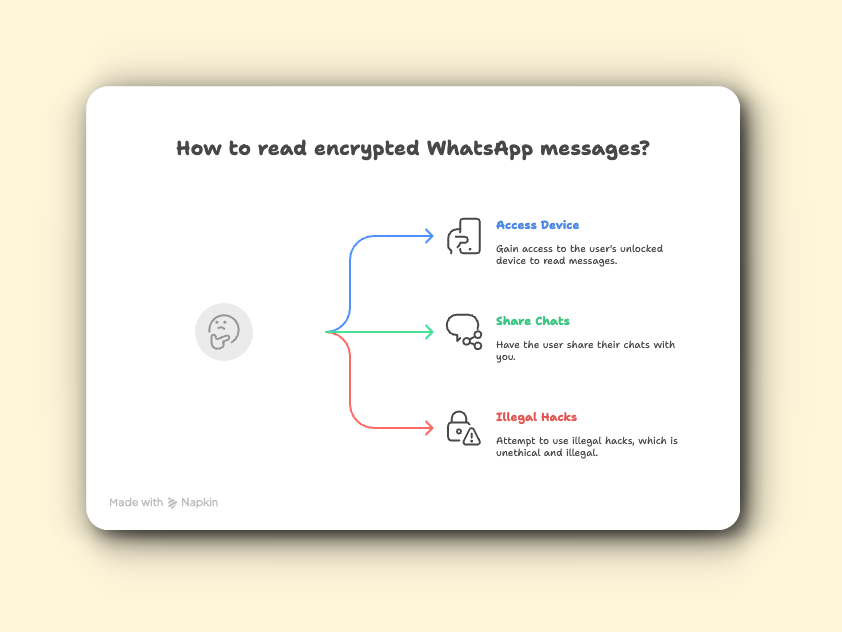
How to Read Encrypted WhatsApp Messages?
Because of WhatsApp’s data security protocols, you can only read an encrypted message if you are active in a conversation.
Here is the breakdown of why access is restricted:
- Exclusive Digital Keys: Only the sender’s and the recipient’s devices hold the specific keys required to unlock and read the message.
- No Central Access: Even Meta (WhatsApp’s parent company) cannot bypass this encryption; the data is unreadable the moment it leaves the sender’s device.
- Physical Access Only: To view a chat, you must have direct, authorized access to the unlocked device where the conversation is taking place.
- Consent & Ethics: Attempting to use “hacks” or third-party tools to intercept messages is both a violation of privacy laws (like GDPR) and a major security risk to your own data.
- Business Transparency: For companies, using the WhatsApp Business API via a provider like Wati is the only secure way to manage team access to chats while ensuring all data remains encrypted and compliant.
Important Note: If you see “This message is encrypted” in a chat, it simply means the E2EE is working. You don’t need to do anything to “decrypt” it; the app does this automatically once the message arrives on your verified device.
Is WhatsApp Secure Compared to Other Apps?
Yes. WhatsApp is secure. It uses end-to-end encryption (E2EE) for all messages, calls, photos, and files. Only the sender and receiver can read them. Even WhatsApp cannot see the content.
No. WhatsApp is not perfect. It still collects metadata such as phone numbers and message timestamps.
Metadata is not encrypted. Only the message content is.
WhatsApp vs Signal | Both use the same Signal Protocol for end-to-end encryption. Signal does not collect metadata. WhatsApp may collect a small amount, like phone numbers or timestamps. |
WhatsApp vs Telegram | Telegram does not use E2EE for all chats by default. WhatsApp does. |
For businesses, the WhatsApp API offers the best balance of security, scalability, and compliance.
WhatsApp Business API and Data Handling
While end-to-end encryption protects messages during delivery, businesses using the WhatsApp Business API must also understand how data is processed. On-Premises API, the self-hosted option this section previously compared Cloud API against, was fully retired by Meta on October 23, 2025. Every deployment now runs on Cloud API.
1. Message Backup is Your Responsibility
- When businesses use a WhatsApp Business Solution Provider (BSP) like Wati, your customer messages are only within the business application. Meta does not store these messages.
- For example, e-commerce brands rely on Wati to handle order updates, cart recovery, and shipping notifications while keeping customer data protected.
2. Extra Safety Layers
- BSPs follow strict standards such as ISO 27001 and GDPR. Wati itself now carries an ISO 27001 certification, alongside GDPR compliance, and a SOC 2 Type II audit currently underway (observation window June–December 2026).
- They run audits, use access controls, and maintain strong hosting standards.
With the WhatsApp Business API, encryption protects your messages in transit, and that’s why many brands rely on Wati, an official WhatsApp Business Solution Provider.
What are the Core WhatsApp Data Security Features of WhatsApp Business API?
The WhatsApp Business API is not just about sending and receiving messages. It also includes built-in security layers that protect both businesses and customers.
Verified Business Profiles | Customers can see they are talking to the real brand. |
Template Approval Process | Stops spam. Only approved messages can be sent. |
Two-Factor Authentication (2FA) | Adds extra protection when logging into accounts, often using OTP verification on WhatsApp for login. |
Cloud API Hosting by Meta | All deployments now run on Meta's Cloud API. The On-Premises option no longer exists as of October 2025. |
These security features matter because they help prevent scams, protect customer data, and keep accounts safe. Together, they make WhatsApp a reliable channel for business conversations.
Check out: WhatsApp on-prem API vs Cloud API: What’s the difference?
What are the Security Guidelines for Using WhatsApp API?
To keep data safe, businesses should:
- Use official BSPs (like Wati). Avoid third-party tools or unofficial APIs. They are not safe. With Wati, you can also use AI tools to check leads safely before sending them to sales.
- Limit data exposure. Do not share private details in chats unless needed.
- Access control. Only the right people on your team should be able to see and reply to chats.
- Protect the platform layer, not just the protocol. Rotate access tokens, verify webhooks, and keep PII out of plaintext logs (see the checklist above).
Not sure if your WhatsApp broadcasts are safe and compliant?
Check your Broadcast Quality Score with Wati’s free calculator.
See how safe and policy-friendly messages can boost delivery and build trust.
How to Protect WhatsApp Business Conversations with Wati?
- Official WhatsApp BSP: Wati is an approved WhatsApp API provider. All chats follow WhatsApp’s compliance and platform rules.
- ISO 27001 certified, GDPR-compliant, and DPDP/LGPD-aware: Wati complies with global data protection laws across the EU, India, and Brazil.
- GDPR-compliant: Wati complies with global data protection laws.
- Secure hosting: For Cloud API, Wati uses Meta’s infrastructure.
- Role-based access control: Businesses can limit which team members can see chats.
- AI with data boundaries: Wati is building toward formal AI-governance certification for its Astra AI layer, with contractual commitments that customer conversations are not used to train third-party models.
With Wati, businesses get more than WhatsApp API access. You get a safe, trusted, and checked way to grow conversations.
So, is WhatsApp Really Secure?
Yes, WhatsApp is secure thanks to E2EE, but businesses must focus on safe use, backups, device security, and official WhatsApp API business service providers.
With Wati, businesses can manage chats in a shared team inbox and keep customer data protected. By using WhatsApp’s encryption and following safety best practices, companies can build strong trust with customers. Chats stay safe, private, and compliant.
Ready to start customer conversations on WhatsApp? Connect your number and get started for free with Wati’s WhatsApp Business API today.
Frequently asked questions
1. Can WhatsApp read my messages?
No. With end-to-end encryption, only you and the person you chat with can read the messages. Not WhatsApp. Not Meta.
2. Are WhatsApp backups encrypted?
Not always. Backups on iCloud or Google Drive may not be encrypted by default. But you can turn on encrypted backups in WhatsApp settings.
3. Does WhatsApp share my data with Meta for ads?
No. Your chats are never shared. WhatsApp may collect small bits of info, like your phone number or when you sent a message, but not the content.
4. Has WhatsApp encryption ever been hacked?
No. WhatsApp’s end-to-end encryption has never been broken. Past problems came from spyware on phones or fake WhatsApp apps, not from WhatsApp’s encryption.
5. Is WhatsApp safe for business communication?
Yes. Businesses can be safe if they use the official WhatsApp Business API with trusted providers like Wati. Using fake tools can be unsafe and may result in account bans.
6. Are WhatsApp calls also encrypted?
Yes. Both voice calls and video calls on WhatsApp are protected with end-to-end encryption, just like messages.
7. Does WhatsApp Business API comply with India's DPDP Act?
Compliance depends on your own implementation. Documented consent, purpose limitation, and a working deletion process, built on top of Meta's and your BSP's data-processing terms. Wati's compliance roadmap includes DPDP-specific consent tooling.
Related posts
- TikTok Business Account vs. Personal Account: How Do They Differ?
TikTok Business Account vs Personal Account: Business unlocks ads, analytics, and messaging; Personal keeps sounds and creator payouts.
- What are TikTok Direct Messaging Ads? Non-Technical Setup Guide
Turn TikTok ad taps into real DM conversations. A simple, non-technical setup guide to TikTok Click To Direct Messaging (Click to DM) Ads using Wati.
- How to Use an Instagram Chatbot for FAQ Automation (2026 Guide)
An Instagram chatbot replies to DMs, comments, and story replies instantly using keyword triggers, then hands off to a human when needed. Here's how to set one up in Wati.
- How to Capture Phone Numbers From Instagram DMs With Wati in 2026
An Instagram DM lead capture flow collects a prospect's phone number, then bridges the chat to WhatsApp. Set it up in Wati, step by step.