
Too Long? Read This First
- Wati MCP lets Claude or ChatGPT search, create, and update contacts in your workspace. It doesn't build segments.
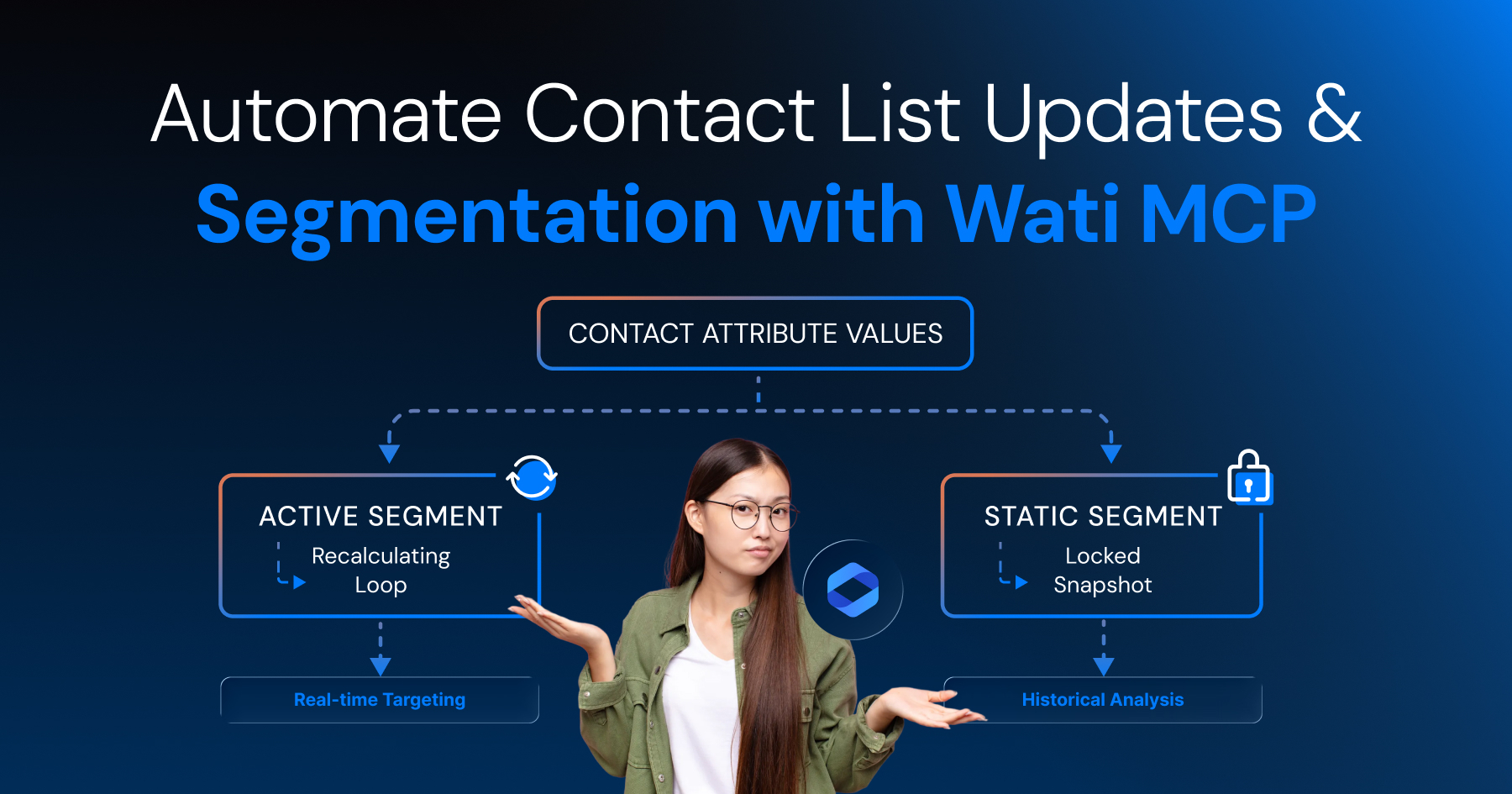
- Segmentation is a separate job. Wati's segment engine handles it, based on the attribute conditions you set.
- Store lifecycle stage, plan tier, and churn risk as contact attributes. Conversation tags disappear when the chat ends; attributes don't.
- Custom segments come in two types. Active segments update on their own. Static segments stay locked once built. Both require a Pro or Business plan.
- Before any automated send: check opt-in, check template approval, get a human to review the message.
Most teams trying to automate their WhatsApp contact list end up mixing two different jobs: keeping contact data accurate, and deciding who belongs in a segment. They are not the same problem, and treating them as one is why so many WhatsApp lists rot within a quarter.
The split is deliberate: an AI assistant handles the data side, while Wati's own segment logic decides membership.
This guide covers how Wati MCP works from Claude or ChatGPT, how contact attributes replace conversation tags for classification, how to build reusable custom segments, and which compliance checks belong in front of every customer-facing send.
What is Wati MCP and Why does it Matter for Contact Data?
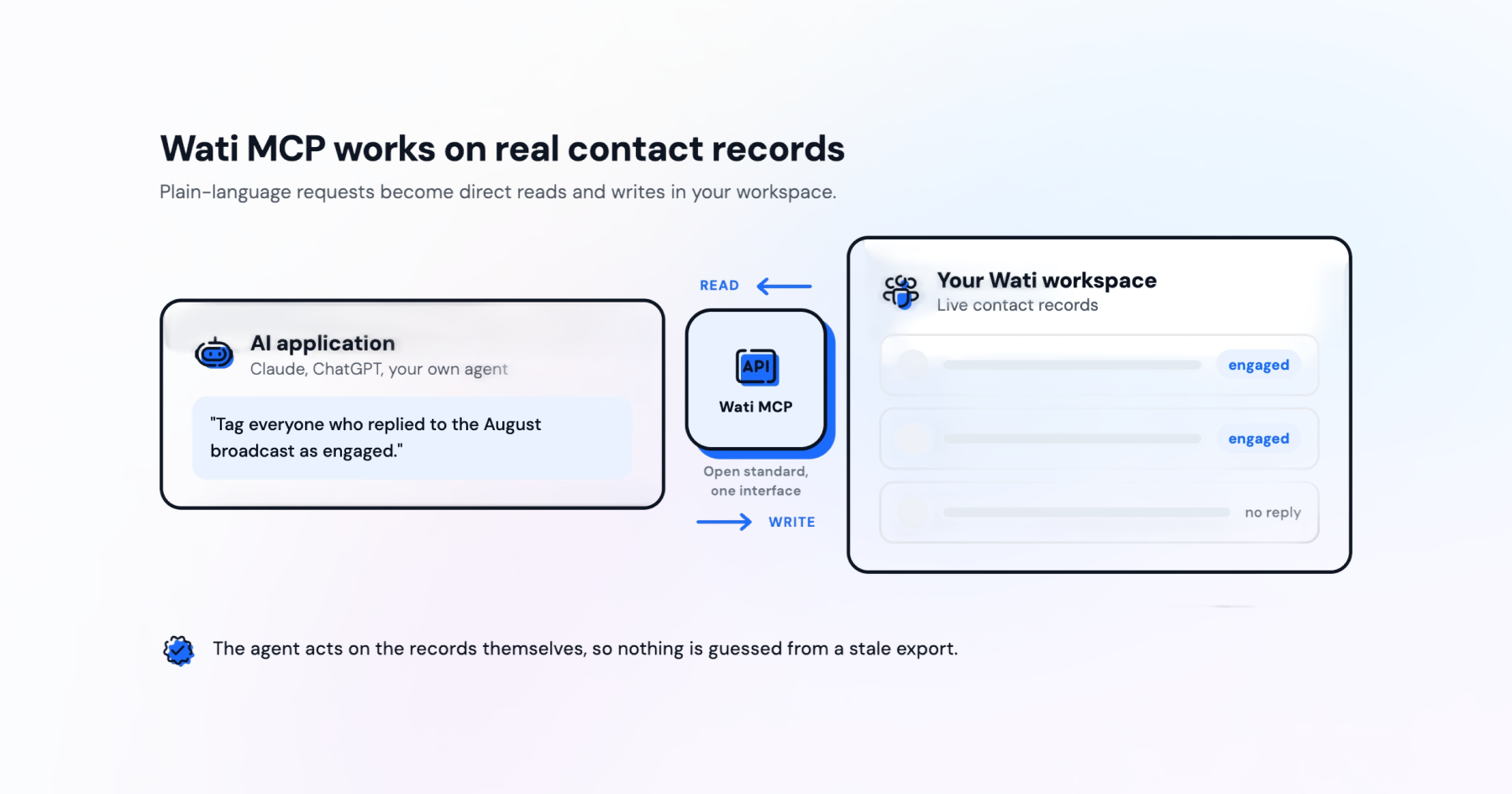
An AI application can read and change real Wati contact records instead of guessing, once Wati MCP is connected, turning plain-language requests into direct actions on your workspace.
MCP itself is an open-source standard that lets AI applications connect to external data sources, tools, and workflows so they can access information and perform tasks, according to the Model Context Protocol documentation. The Wati MCP server is simply that standard applied to your own workspace.
How MCP Connects Claude or ChatGPT to Your Contact List
Once connected, your AI application talks to Wati through a defined set of actions rather than screen-scraping or guesswork. You ask in plain language, to find a contact, update a field, or check a count, and the assistant calls the matching Wati action behind the scenes. This is the same idea behind AI agents built for WhatsApp: the agent reasons, but the platform executes.
What You Can do With Wati MCP Right Now
The supported action set is worth naming precisely, since it draws the line for what an assistant can do today.
Wati's assistant is capable of:
- Searching contacts
- Viewing profiles and engagement history
- Creating and updating contacts
- Retrieving contact counts (including filtering by creation date)
- Assigning contacts to teams
That list is the boundary; anything outside it is not a supported action. That boundary shapes what you should plan around. If you want an assistant to pull contacts created in the last 30 days and flag them for a win-back sequence, that sits inside the supported range.
If you want it to invent a brand-new field type on the fly, it cannot, because contact structure still lives in Wati, not in the AI layer.
Syncing Contact Data vs. Automating Segment Membership
Sync and segmentation solve different problems, and mixing them up is the most common misstep when connecting an AI tool to WhatsApp.
Sync keeps a record accurate, while segmentation decides who a broadcast actually reaches, and reversing that order means nothing downstream works right.
What Contact Syncing Actually does
Wati's contact-sync workflow step keeps a record current using the WhatsApp phone number as the matching key. It can run during a conversation or after it ends, and you can configure it to create new contacts, update existing fields, or both, but mapping the WhatsApp phone number is always required.
The logic is simple: the step searches Wati by phone number. If no contact is found, it creates one only when creation is switched on. If a contact already exists, it updates fields based on the toggles and integration rules you set.
Why Data Sync is Not the Same as Segment Automation
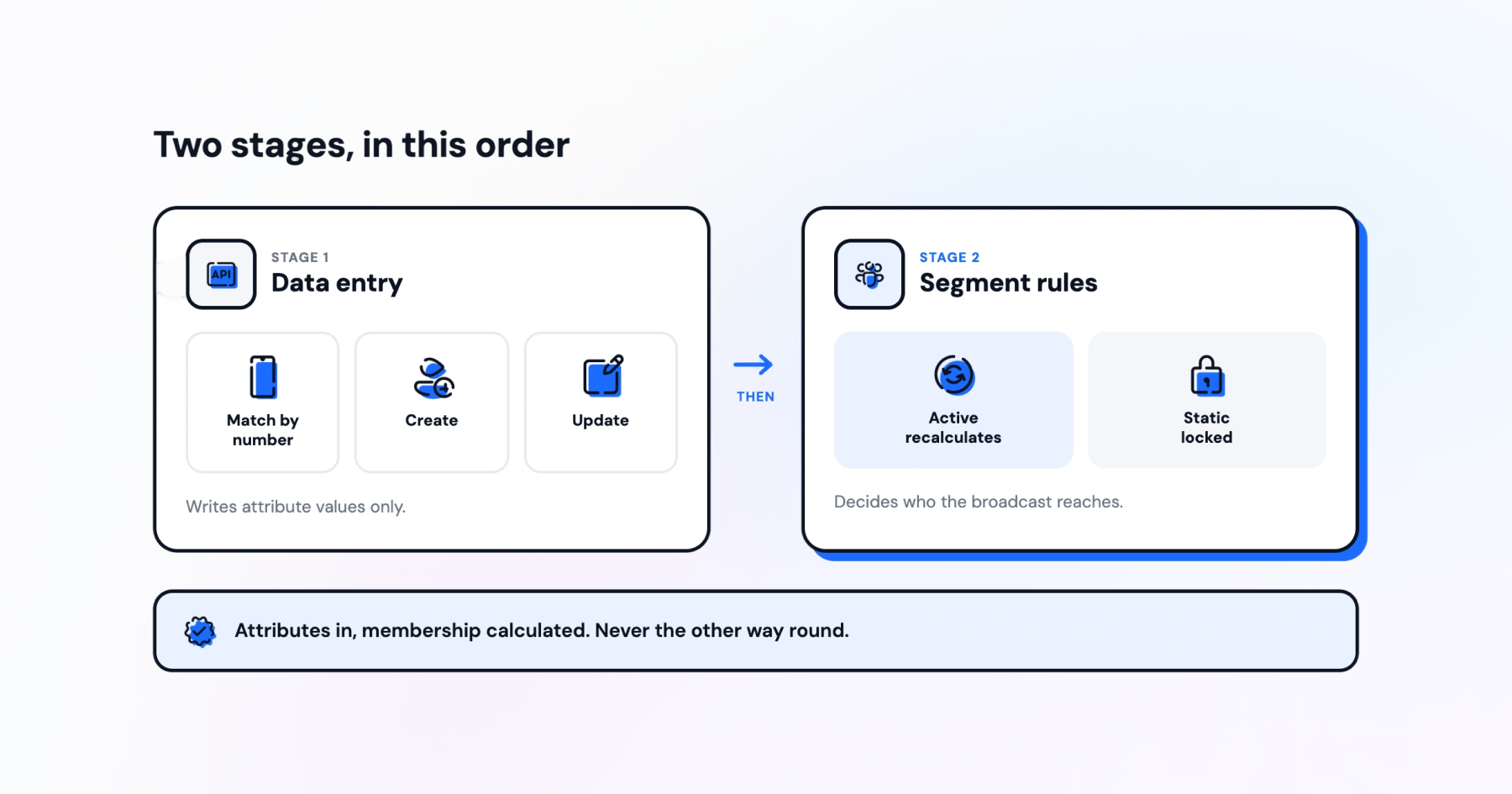
Here is the part teams miss: neither Wati MCP nor the contact-sync step puts a contact into a segment directly. They write attribute values. Segment membership is then calculated by Wati's own segment engine, based on the conditions you defined when you built the segment.
Think of it as a two-stage pipeline. Stage one is data entry, handled by Wati MCP or the sync step. Stage two is classification, handled by the segment rules sitting on top of that data. Reverse that order and you will spend time debugging a segment that was never broken, it just got fed the wrong number.
This distinction also explains why teams doing audience segmentation for WhatsApp broadcasts often struggle with stale lists. They automate the broadcast, not the attribute deciding who is on it.
Store Contact Classifications in Attributes, Not Conversation Tags
Classifications such as lifecycle stage, plan tier, or churn risk belong on the contact record as structured attributes, not scattered tags.
Attributes persist and can be queried across your whole workspace, while tags tend to live and die with whatever single conversation thread created them.
Contact attributes are stored on contacts and can be used for contact segmentation, campaign targeting, message personalization, and automation workflows. That is a wider job description than a tag can fill, a tag might tell an agent what a chat was about, while an attribute tells every downstream system what the contact is.
Why Attributes Outlast Conversation Tags
Conversation tags are usually attached at the thread or ticket level, so they vanish the moment a new conversation opens. Attributes sit on the contact itself, independent of any single chat, which is exactly why they hold up as the backbone of a customer data platform built on WhatsApp.
Practically, this means the field marking someone a VIP customer or a trial about to expire should be a contact attribute, updated through Wati MCP or the sync step, not a label applied inside a shared team inbox during triage. A shared Team Inbox is still useful for day-to-day handling, but it is not where segmentation data should live.
Building Reusable Custom Segments From 5 Contact Attribute Types
A custom segment is only as reusable as the attribute logic behind it, and five attribute types cover most real segmentation needs.
Lifecycle stage, purchase tier, geography, engagement recency, and product interest each maps to a clear business decision about who gets which message.
Attribute type | Example values | Typical segment use |
Lifecycle stage | Lead, trial, active, churned | Onboarding vs win-back campaigns |
Purchase tier | Free, standard, premium | Upsell and loyalty messaging |
Geography | Country, region, city | Localized offers and store alerts |
Engagement recency | Last active date, response rate | Re-engagement sequences |
Product interest | Category tags on contact record | Targeted product announcements |
Profile signals such as order history or ad source can feed these same attributes. A lead captured through Click-to-WhatsApp Ads can be written into a lead-source attribute the moment it is created, then used in a segment without any manual list-building later.
Active Segments vs. Static Segments
An Active segment recalculates its membership continuously as attribute values change, so a contact moves in or out on its own. A Static segment is a fixed snapshot taken at build time and will not update itself even if the underlying attributes change afterward.
Pick Active when you want a segment like "trial expiring in 7 days" to always reflect current reality. Pick Static when you need a locked audience for a one-off campaign, everyone who fits a condition today, regardless of what happens to their attributes tomorrow.
Which Wati Plans Support Custom Segments?
Not every Wati plan includes the custom segment builder, which limits how far attribute-based automation can go on lower tiers.
Contact attributes themselves are broadly available across plans. The dedicated segment tooling, however, is gated by tier.
Plan tier | Custom segments | Contact attributes |
Growth | Not included | Available |
Pro | Available (Active and Static) | Available |
Business | Available (Active and Static) | Available |
Wati's documentation confirms custom segments sit on the Pro and Business plans. If you are on a lower tier, you can still store and update attributes through Wati MCP; you simply cannot build the reusable segment layer on top of them until you upgrade.
What Permissions and Wati MCP Enablement do You Need?
Before Claude or ChatGPT can touch a contact record, two things must be in place: workspace access and an active AI connection.
Skip either one, and the assistant is left able to talk but never to act.
Wati Side Permissions
The MCP server operates against your live workspace, so it needs an authenticated connection tied to a Wati account with the right permissions, as Wati's guidance on managing a workspace through the MCP server describes. Without those permissions, contact search, creation, and updates stay unavailable to the connected assistant.
Enabling Wati MCP Actions in Your Workflow
Separately, if you rely on the contact-sync step inside an automation flow rather than a live AI conversation, that step needs to be switched on and its field mappings set before it runs. The WhatsApp phone number mapping is mandatory; everything else, including which fields get overwritten, is a toggle you set per workflow, per Wati's documentation on the step.
If you are still setting up the underlying account, it helps to have gone through setting up a WhatsApp Business account first, since permissions and API access both depend on that foundation being correct.
A Compliance Checklist Before Any Customer-Facing Action
Automating contact updates is low-risk, but automating a message that reaches a real customer is not, and it deserves its own checklist.
Opt-In and Consent
Every contact you message needs documented WhatsApp opt-in on file, matching Meta's guidance on getting opt-in for WhatsApp . If a contact arrived through a sync rather than an inbound chat, verify consent was captured at collection, not assumed afterward.
Approved Templates Only
Outbound messages to contacts outside an open session window need a Meta-approved template, following the structure in Meta's template fundamentals documentation .
The MCP server can pull your template list, but approval status still comes from Meta, not from the workflow you build. Reviewing WhatsApp message templates for e-commerce is a reasonable starting point for a first set.
Opt-Outs and Unsubscribes
Any contact who has opted out needs an attribute reflecting that status, checked before every segment build or broadcast run. A segment that ignores opt-out status is not a segmentation problem, it is a compliance failure hiding inside one.
Human Confirmation Before Sending
Before any AI-assisted workflow sends a customer-facing message, a person should confirm the recipient list and message content, especially the first few times a new automation runs. This matters more, not less, as WhatsApp automation scales, since one bad mapping can reach thousands of contacts at once.
Good WhatsApp security practice treats this confirmation step as non-negotiable, not optional friction.
Start Automating Contact Data With Wati MCP
Connect Wati MCP to your own workspace to see the sync-versus-segmentation split happen in real time on a real contact record.
Book a demo with Wati for a walk-through of attributes and custom segments together with your own contact list.
Frequently asked questions
What is the difference between Wati MCP and the Create or Update Contact action?
Wati MCP lets you search, create, and update contacts directly from Claude or ChatGPT using natural language. The Create or Update Contact action runs inside a Wati automation workflow and matches contacts by WhatsApp phone number automatically, without an AI assistant in the loop.
Can Wati MCP update existing contacts or only create new ones?
Wati MCP can do both. It supports creating new contacts, updating existing contact fields, searching contacts, viewing profiles and engagement history, retrieving contact counts, and assigning contacts to teams, all from a connected AI application.
Do contact attribute updates automatically move contacts between segments?
Updating a contact attribute changes the data, not the segment membership by itself. Active custom segments recalculate membership from current attribute values, so a contact moves in or out automatically. Static segments are fixed lists and need a manual refresh.
Which Wati plans include custom segments?
Custom segments in Wati are available on the Pro and Business plans. Lower-tier plans can still store and use contact attributes for personalization and targeting, but the dedicated custom segment builder is a Pro and Business feature.
What do I need enabled before Wati MCP can update contacts?
You need a Wati account with the right permissions, an active connection between Wati MCP and your AI application, and the relevant contact-update action enabled in your workflow builder before Claude or ChatGPT can create or update contact records.
What should I check before an automated message goes to a customer?
Confirm the contact has given WhatsApp opt-in, that any outbound template is Meta-approved, that opt-out requests are respected, and that a human has reviewed the message content before any customer-facing send triggered by automation goes out.
Related posts
- AI Customer Support in 2026: What It is, How It Works, and Why Smart Teams are Quietly Switching Over
Learn how AI in customer support manages ticket escalations, automates ticket tagging and routing, and improves customer satisfaction. See how Astra does it.
- How to Automate Business Conversations With a WhatsApp AI Agent in 2026
Learn how to build a WhatsApp AI agent to engage, qualify, and convert prospects round the clock without any delays in 2026.
- Voice-First Web Experiences: Navigating with Voice Commands
learn how voice first web experiences enable you to power personalized, human-like conversations to have a competitive advantage in today’s market.
- How Voice AI Agents Qualify Leads: A Sales Team’s Guide to Hands-Free Pipeline
know how does voice ai qualifies leads for an effective sales action and potential conversion and where does astra 2.0 stand when it comes to pre-configured lead qualification