

-

-
-
Solutions
-
Soluções
-
Soluciones
-
解决方案
-
解決方案
-
الحلول
-
Product
-
Produto
-
Producto
-
产品
-
產品
-
المنتج
-

-
-


 Wati for Marketing
 Wati for Support
 Wati for Sales
 eLearning
 E-commerce
 Marketing Agencies
 Healthcare
 No Code Chatbots
 AI Support Agent
 Instagram and Facebook messenger
 Click to WhatsApp ads
 Campaigns
 Team Inbox
 WhatsApp Business Calling
 Wati AI
 Overview
 Library
WhatsApp Business API: Complete Guide For Businesses (2026)
Written by:
 Shreya Mattoo
|
Last updated on:
March 17, 2026
|
Fact Checked by :
Shreya Mattoo
|
Last updated on:
March 17, 2026
|
Fact Checked by :
 Namitha Sudhakar
|
According to: Editorial Policies
Namitha Sudhakar
|
According to: Editorial Policies
 Table of Contents
Too Long? Read This First
- Discover WhatsApp Business API as a powerful tool built for medium to large businesses to scale customer communication with automation, chatbots, and bulk messaging.
- Unlike the free WhatsApp Business App, the API offers advanced features like CRM integration, message templates, and interactive media support.
- Businesses benefit from improved efficiency through automated messages, personalized flows, and integration with e-commerce and support tools.
- WhatsApp Business API helps with compliance, high-volume communication, and system-wide messaging that's ideal for regulated industries and growing teams.
- A complete WhatsApp Business API Account includes a branded profile, messaging tools, analytics, and integration options to build better customer relationships.
Even today, best-in-class sales teams lose focus while dealing with bulk messaging.
It’s not their efforts, but the system that’s siloed, and leads that consistently grow in volume.
Yes, WhatsApp is a popular messaging app, but if you are still struggling with the normal WhatsApp account, you are lagging, and it’s time to move to WhatsApp API.
Most brands adopt WhatsApp Business for customer communication. What falters is that WhatsApp Business doesn’t provide advanced features that’ll help brands convert.
And here is where WhatsApp Business API solutions come in. It’s your go-to WhatsApp business platform for AI-powered chatbots, bulk notifications, support tools, and bulk marketing messages.
Switching to a WhatsApp Business API tool provides advanced features to automate sales conversations, run marketing broadcasts, and double sales productivity.
In this guide, we’ll break down the ins and outs of WhatsApp Business API, how to use it, and how to integrate it with your existing CRM or ERP to strategize customer communication in a better way.
What is WhatsApp Business API?
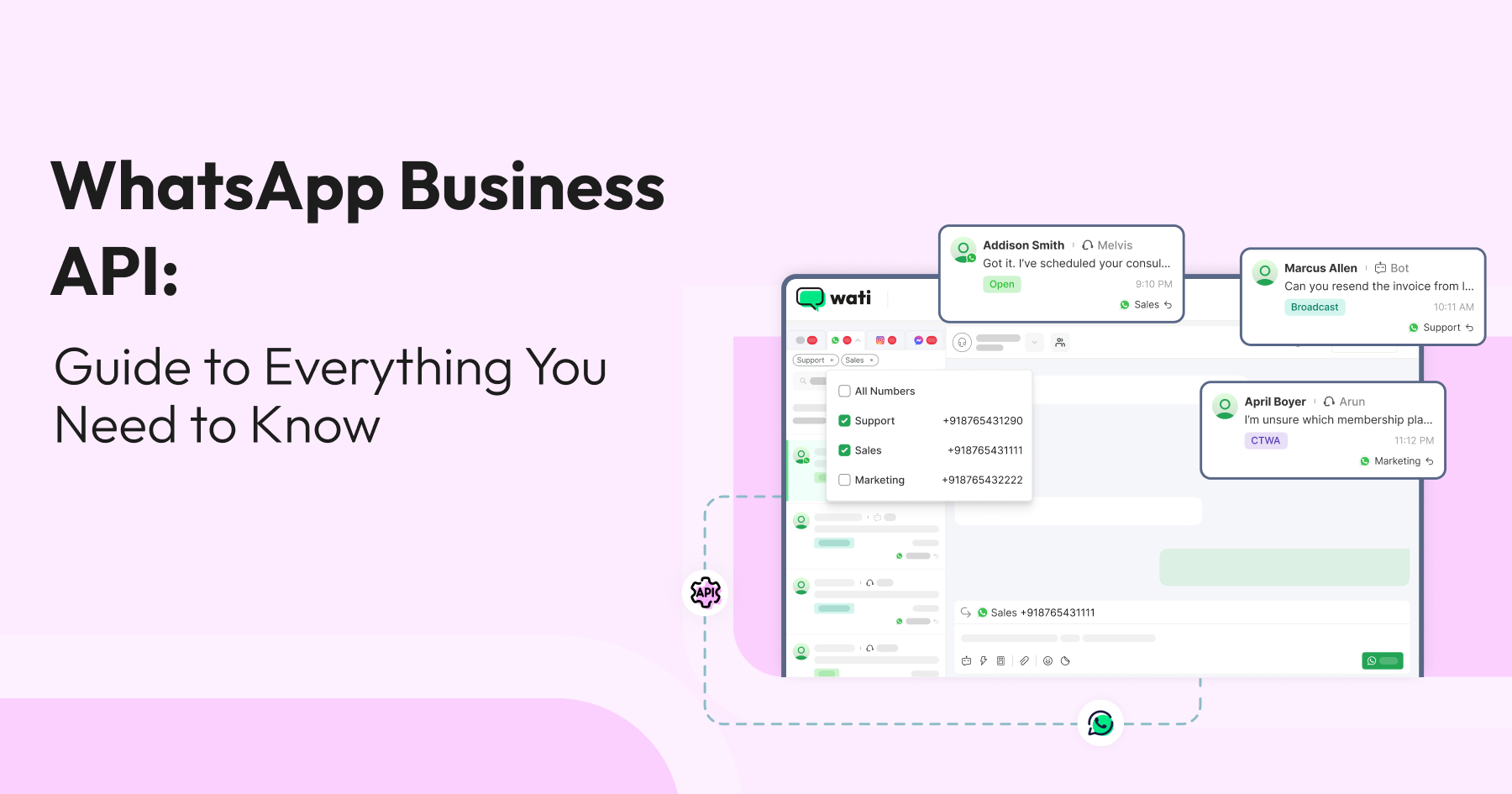
WhatsApp Business API is an advanced version of WhatsApp Business App that manages broadcast, automates repetitive tasks, and tracks sales performance.
WhatsApp Business API can be integrated with CRMs, helpdesks, or custom dashboard software to retrieve contact details, assist consumers faster, and improve team productivity.
With a WhatsApp Business API account, you can
- Schedule WhatsApp messages.
- Organize incoming messages.
- Access a shared team inbox.
- Manage delivery status and read receipts.
- Engage with customers using suitable Meta-approved templates.
- Enhance visibility of team progress.
- Analyze ROI from WhatsApp campaign results.
- Build engaging WhatsApp campaigns smoothly.
- Attract new audiences and retain existing loyal customers.
WhatsApp Business API vs. WhatsApp Business: What Sets Them Apart?
While both tools are designed for business communication, WhatsApp Business API provides more advanced features and integration options.
Businesses are switching to the WhatsApp Business API because of advanced features such as inbound intelligence, bulk messaging, shared team access, rich media, automated responses, improved message delivery, AI marketing and promotions, and advanced analytics.
WhatsApp API features allow different teams to get important updates and notifications in a consolidated dashboard. It’s a powerful tool for small businesses to boost customer trust, meet business needs
As you know, the WhatsApp Business App comes with a ready-to-use mobile and web interface, perfect for small businesses to start instantly, whereas the WhatsApp Business API requires a BSP provider like Wati to set up and manage, offering advanced automation and scalability for larger teams.
Below are the differences between WhatsApp Business API and WhatsApp Business App to consider:
| Feature | WhatsApp Business | WhatsApp Business API |
| Hosting and setup | Runs on a single smartphone (and up to 10 linked devices) | Hosted on a server or cloud infrastructure, managed by a BSP. |
| User Access | 1 phone + 10 linked devices. All agents share one identity. | Unlimited agents, bots, and users through a shared team inbox. |
| Automation | Basic: Quick replies and simple away/greeting messages. | Full integration with AI-powered chatbots, message templates and more. |
| Integration | Full integration with AI-powered chatbots, message templates, and more. | Natively integrates with CRMs and ERPs |
| Verification | Standard business profile | Requires Meta Business Manager verification to get started. |
| Messaging Rules | Can message anyone at any time. | A 24-hour customer service window is initiated by a user message. |
| Core Functionality | Supports voice and video calls. Can participate in groups. | Does not support voice/video; all communication happens through automated or agent-assisted text messages. |
WhatsApp Cloud API vs On-Prem API: Key Differences
By integrating WhatsApp API into the system, businesses can automate replies, enable catalog browsing, and automate payments all in one platform.
When accessing the WhatsApp Business API, businesses can choose between two hosting models: the Cloud API (hosted by Meta) or the On-Premises API (self-hosted).
WhatsApp Cloud API
WhatsApp Business Cloud API is hosted and maintained directly by Meta on their servers. Businesses can instantly access the latest features and security patches, as the API is auto-maintained by Meta.
For small to mid-size businesses, the WhatsApp Business Cloud API is faster to set up and configure with minimal infrastructure handling. You simply need a working WhatsApp Business account and Meta admin access to set up the API.
It’s ideal for businesses looking to venture into WhatsApp marketing without heavy I.T investment or manpower. A self-hosted cloud API can send or receive WhatsApp messages via the Graph API.
WhatsApp On-Premise API
WhatsApp on-prem API client is hosted by businesses on their local servers or via a business solution provider like Wati.
While this gives greater control over data residency and infrastructure, it adds to your IT costs and system maintenance. Because it gives more server control and data authority, it is highly appealing to industries like banking and healthcare.
WhatsApp on-prem API comes with a significant operational overhead because extra work is required. Teams are responsible for scaling, uptime, updates, and security patches.
| Factor | Cloud API | On-Premises API |
| Hosting | Meta’s servers | Your own servers or BSP |
| Setup time | Fast (minutes) | Slow (days to weeks) |
| Maintenance | Handled by Meta | Your IT team |
| Data residency | Meta infrastructure | Full control |
| Scalability | Automatic | Manual |
| Best for | Most businesses | Regulated industries needing data control |
For most businesses using a BSP like Wati, the Cloud API is the default and smarter choice. Meta has also signalled that the on-prem WhatsApp API may be deprecated, with users transitioning to the Cloud API in the future.
Read in detail: Difference between WhatsApp Cloud API vs On-Prem API to Select the Right Tool
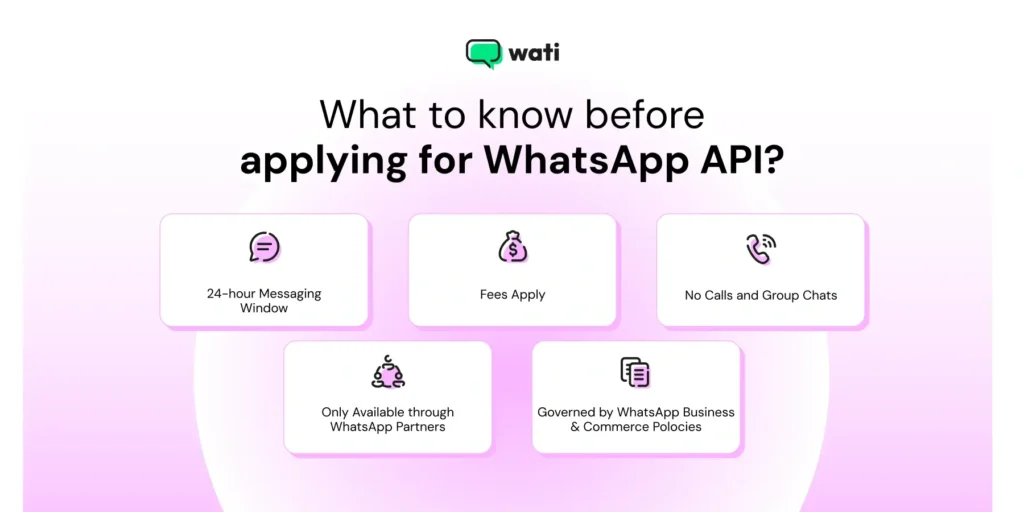
What are The 5 Key Components of WhatsApp API
WhatsApp API consists of several components that work together to help businesses communicate with customers. Here are the main components of WhatsApp Business API:
1. Meta Business Manager (MBM) For API Onboarding
The Meta Business Manager (formerly Facebook Business Manager) is where you manage all your business assets, including your ad accounts, pages, and, most importantly, your WhatsApp Business Account.
You can implement an API without MBM, but you won’t be able to send messages or communicate with customers. WhatsApp Meta verification proves that you are a legitimate business, which is the first and most critical step to unlocking API’s features.
2. The WhatsApp Business Account (WABA) to Set Up Business Profile
The WABA is the “container” that lives inside your Meta Business Manager. It doesn’t have an interface of its own. Your WhatsApp Business account is used to connect your phone numbers to the API. You can manage multiple phone numbers for different departments or countries, all under a single WABA.
3. Dedicated Phone Number to Establish Authority
This is the number your customers will see and message. It can be a new number or an existing one (mobile, landline, or 1-800), but it must not be tied to an active, regular WhatsApp or WhatsApp Business account. You will have to delete the existing account on that number before migrating it to the API.
This number becomes your permanent, scalable gateway for all customer conversations, managed by your entire team and bots, not just one phone.
Businesses can also invest in a virtual phone number provided by a VoIP provider to launch WhatsApp Business and automate their business operations.
4. A Business Solution Provider Like Wati To Manage End to End Infrastructure
Since WhatsApp Business API has no front-end, you need a BSP like Wati to provide the software, hosting, and interface. Your BSP gives you the dashboard to manage contacts, a shared team inbox, chatbot builders, and pre-built integrations.
Wati, as a WhatsApp API provider (BSP) also provides you with a complete infrastructure to manage WhatsApp communications. You can just integrate the API with your sales CRM, and you’re ready to use all the features of the API directly via Wati.
5. Pre-Approved Message Templates For Easy Communication
For WhatsApp Business API, Meta strictly controls the structure of customer messages to prevent spam. Any message you send to a customer outside of the 24-hour customer service window must be a pre-approved message template. These templates can be transactional (order confirmations) or promotional (new offers).
This is the primary tool for your outbound sales and marketing. Mastering templates is key to re-engaging leads and automating outreach at scale.
How to Set Up a WhatsApp Business API Account?
To set up a WhatsApp Business API account, businesses must link their account to a server or cloud hosting, a step that demands technical know-how.
Once connected, they need to create a Business Profile, displaying crucial details like address, website, and operating hours.
Here is a step-by-step process to access WhatsApp Business API:
Step 1: Choose Your API Solution Provider
BSPs offer WhatsApp APIs for businesses. These BSP dashboards help you communicate with your customers using WhatsApp APIs for approved use cases, including customer support and time-sensitive, personalized notifications.
With Wati, you will get a complete WhatsApp CRM with a dedicated WhatsApp Team Inbox to manage communications.
You can just integrate it with your WhatsApp Business API number and you’re ready to use all the features of the API directly via Wati.
Get Admin Facebook Manager Access
This step proves to Meta that your business is legitimate.
You’ll need to submit an official document, such as a business license or a utility bill, to your Meta Business Manager account. Once approved, you’ll be an official Meta-verified business.
Get a Dedicated Phone Number and Download WhatsApp Business
You’ll need a phone number that will be used only for WhatsApp Business Platform. It helps keep professional and personal messages separate, exhibiting more brand authenticity.
Sign Up and Go Live
This is the final step where you connect everything. Once your Meta account is verified and you have your WhatsApp Business account, you’ll sign up on chosen BSP platforms (like Wati).
It will guide you through connecting your new “Meta Business Manager Account” and registering a “new, dedicated phone number” to the API.
Complete Business Profile
This will be a digital storefront on WhatsApp. Make your profile look professional by adding a brand name, description, logo, website, address, business hours, and even product catalogs.
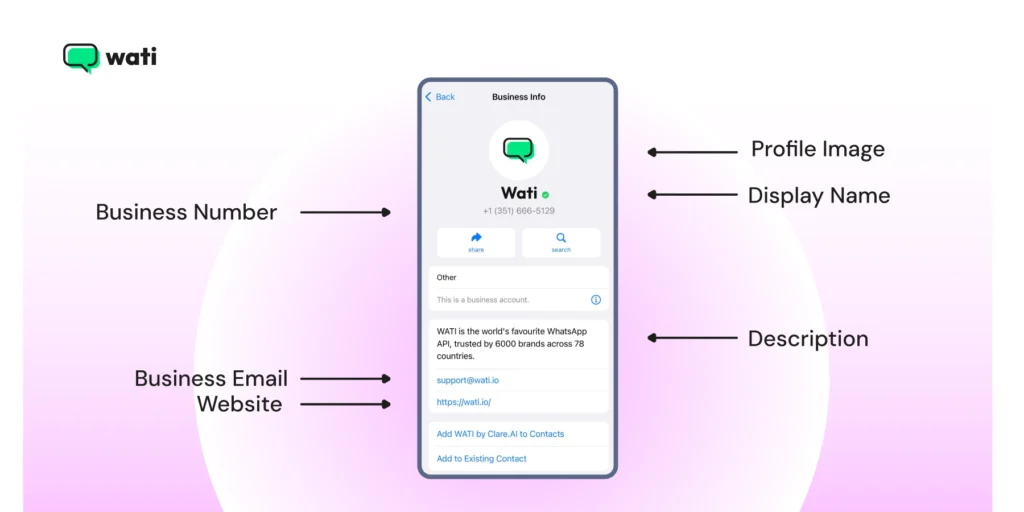
Once these steps are complete, you can start building your chatbots, creating message templates, and connecting your sales team to the shared inbox.
9 Key Features of WhatsApp Business API
While WhatsApp Business is an effective way of customer communication, WhatsApp Business API provides the infrastructure to handle multiple conversations at scale.
Whether you are a medium-sized business looking to streamline your communication process or a large enterprise seeking advanced features and integrations, WhatsApp Business API helps improve sales efficiency.
Below are some of the top features of WhatsApp Business API, like Wati
1. Automated Messaging
Businesses can send automated messages to customers, such as order confirmations, appointment reminders, and shipping notifications.
By defining automated workflows, you can cut down on manual calls and trigger situation-specific messges to your customers.
Businesses can use WhatsApp for multiple use cases, from the pre-purchase to payment to post-purchase consumer lifecycle.
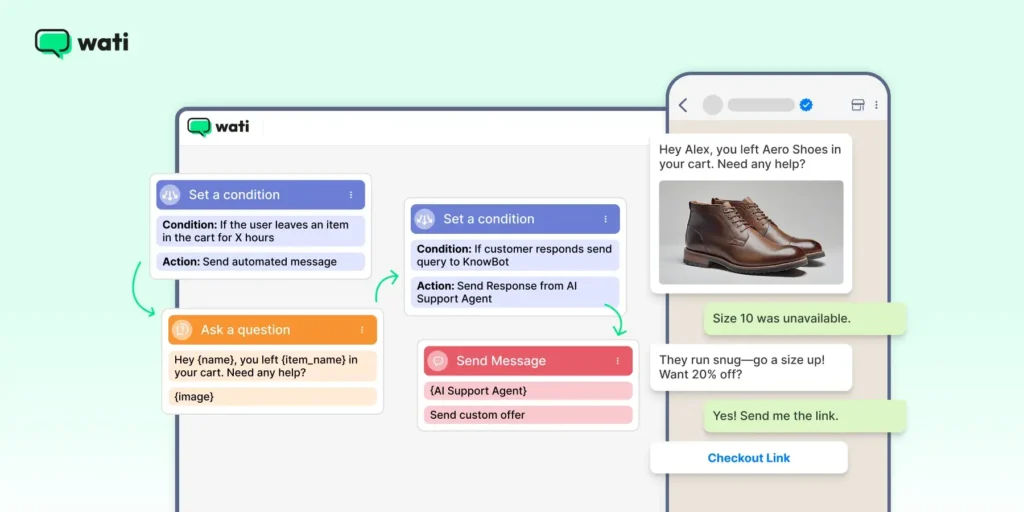
2. No Code Chatbot Builder
Businesses can quickly create and deploy no-code chatbot builders to handle bulk customer queries and assist with support issues, and free up sales bandwidth.
3. Message Templates
Offers pre-defined messaging templates that businesses can use to make their outreach easier. With a set of attractive templates, you can polish your campaigns and make your promotional offers more exciting for customers.
4. Media Sharing
Businesses can share a wide range of media types with customers, including images, videos, and documents. Businesses can design interactive product catalogues and link them to automated offers or discounts to add value for customers.
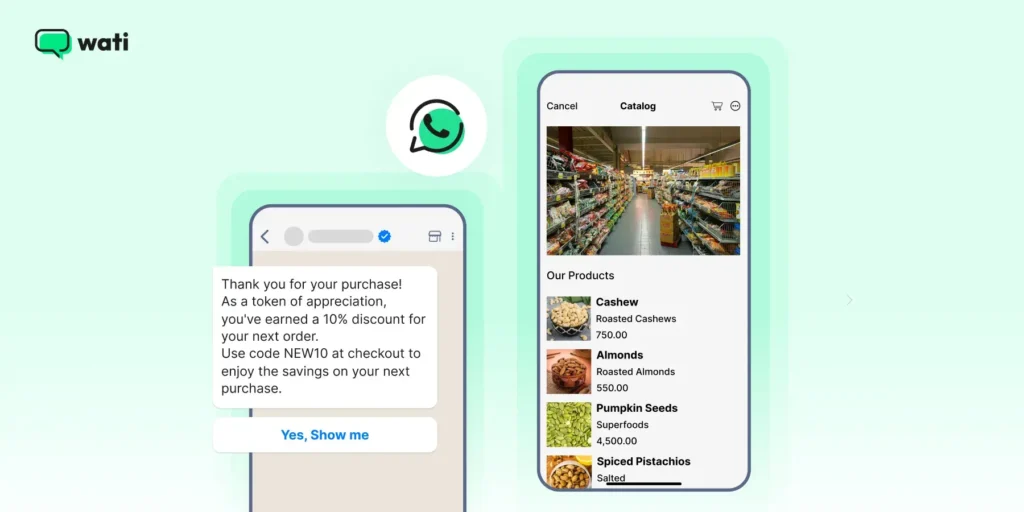
This can help to provide customers with more detailed information about products and services.
5. Shared Team Inbox
Sales agents can view ongoing chats in a shared team inbox with customers across departments to improve productivity, reduce response time, and push the envelope on conversion.
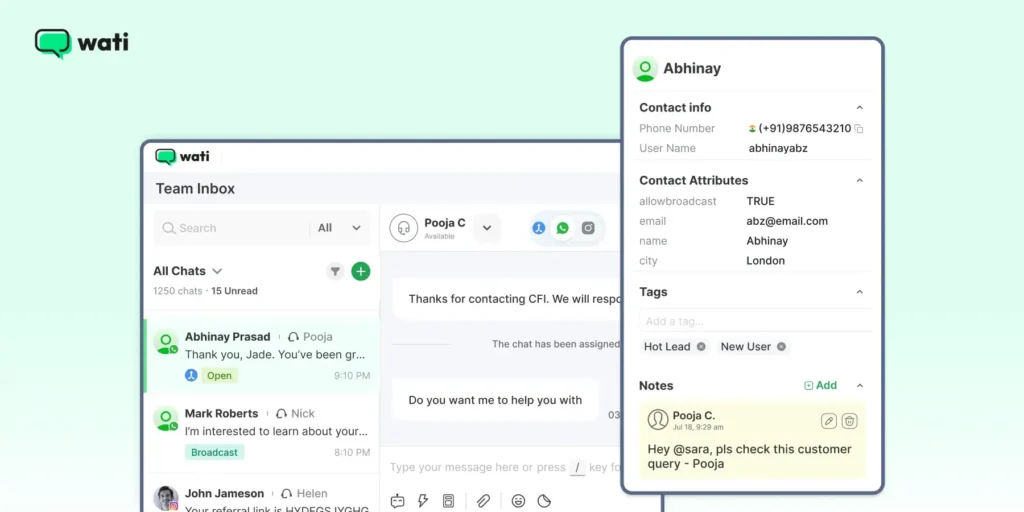
With shared team inbox, agents can get visibility into lead progress, view older conversations and predict the success possibility of conversion. Managers also can have real-time insights to monitor performance and productivity.
6. Advanced Analytics
With pre-built audience segmentation and reporting features, users can segment audiences, feed them to campaign lists, and add those filters to extract exact numbers and prove WhatsApp marketing ROI.
7. SMS Fallback
WhatsApp Business API, like Wati, also offers an SMS marketing feature in case you fail to deliver a WhatsApp broadcast message to users.
This improves the delivery rate, expands geographic reach, and enhances delivery rate, expands geo reach, and improves the scope of conversions.
8. WhatsApp Broadcasts
Instead of expensive billboards or commercials, brands can directly segment customers and run WhatsApp broadcasts to send relavant content and engage customers.
By creating WhatsApp broadcast list brands reduce the “spray and pray” approach and automate bulk chats to the right groups.
9. CRM or ERP Integration
WhatsApp Business API can be integrated with a range of other tools, like HubSpot CRM, Salesforce CRM, to retrieve contact profiles and build informative customer outreach messages and business communication.
WhatsApp Business API: 5 Key Industry Use-Cases
Beyond marketing, WhatsApp Business API helps in lean management and record keeping. Here are 5 key industry use cases:
- WhatsApp for Healthcare: Healthcare brands use API to automate patient management, run virtual consultations, automate appointment scheduling and streamline payments.
- WhatsApp for Banking & Fintech: Banks can use API to automate sanctions, send secure OTPs, share financial mini statements for secure record keeping and more customer satisfaction.
- WhatsApp for Logistics: Brands can share live order updates via third party software integrations to create a lean WhatsApp+ e-commerce stack and optimize the customer lifecycle.
- Whatsapp for E-learning: Edtech companies use API to upsell or cross sell online courses, automate student enrolment and send fee reminders without any manual intervention.
- WhatsApp For Travel & Hospitality: Travel brands can increase their seasonal sale by automating ticket confirmations, follow-ups and hotel updates.
- WhatsApp For E-commerce: E-commerce brands can utilize WhatsApp business APi to manage inventory, automate payments, digitize shopping, send delivery updates and escalate consumer issues.
Do You Need WhatsApp Business API?- Answer these 4 Questions
If you are an enterprise and are still banking on email marketing platforms, that is a massive hit on sales.
For a customer base between 100 and 500, linking WhatsApp Business API to enterprise CRM helps manage sales on a macro scale and supports impact.
But, what makes WhatsApp Business API from a customer point of view? Let’s check how customers use WhatsApp at large and how it impacts marketing ROI.
Businesses like you use Wati to manage WhatsApp at scale. See how by registering for a free demo today.
Are You a Small, Mid-Size, or Enterprise Business?
WhatsApp API for sending messages is designed for medium to large businesses that need to communicate with a large number of customers. With more than 3 billion WhatsApp users and 45-60% open rate, WhatsApp beats email by a huge margin of 114% as a customer acquisition channel.
If you are an SMB or early adopter, working with a WhatsApp Business Account without an API might be the right call for customer acquisition.
What Is the Capacity of Your Customer Pipeline?
If you need to communicate with customers frequently or in large volumes, WhatsApp Business API may be a good choice. Having a large sales pipeline is the ideal situation that calls for a WhatsApp Business API integration. With email open rates shifting between 20-25%, WhatsApp yields significantly higher returns in customer engagement and marketing campaign management.
Its ability to broadcast messages in bulk and use chatbots for automated conversations can help businesses manage customer communication more efficiently.
Do You Use Third-Party API Integrations?
If you use other business tools such as CRM systems or e-commerce platforms, WhatsApp Business API’s ability to integrate with these systems may be a major advantage.
With WhatsApp Business API, you can integrate CRM seamlessly, without falling into the rat trap of technical complexity of webhooks or other dynamic APIs.
With a business solution provider (BSP) like Wati, you can integrate third-party integrations like Shopify, HubSpot, WooCommerce or Calendly via custom APIs.
Are You Compliant and Data Security Focused?
If your business operates in an industry with strict regulatory requirements, such as healthcare or finance, WhatsApp Business API’s ability to offer pre-approved message templates and comply with WhatsApp policies may be important.
If you value consumers’ security but still want to target huge broadcasts, WhatsApp API’s built in encryption comes to your rescue. While you launch broadcast campaigns on huge batches, the security still doesn’t get compromised.
WhatsApp Business API Pricing for 2026
WhatsApp API pricing works on two layers: a recurring platform fee to your BSP (for shared inbox, chatbot, and integrations), and a per-message fee charged by Meta, which differs region-wise and country-wise.
Here are the message categories that require an additional charge:
- Marketing (promotions, campaigns): Highest cost per message
- Utility (order updates, appointment reminders, shipping notifications) — significantly cheaper.
- Authentication (OTPs, verification codes, login confirmations) — similarly low cost to utility, with strict template requirements set by Meta
- Free Entry Point (FEP): When a customer reaches via a Click-to-WhatsApp Ad, you get a 72-hour messaging window, the most cost-efficient way to engage new leads.
WhatsApp incurs a “per-message” charge for templates across multiple categories like authentication, utility, and marketing. Except for CTWA chats, every other message category has its own pricing.
The WhatsApp API pricing differs region-wise and country-wise, so you can pick what suits.
Note: To keep marketing costs in check, maximise the 24-hour free customer service window with informal messages before sending paid templates. Also, lean on utility templates over marketing if possible.
See Wati’s 2026 plans to go deeper into WhatsApp API pricing.
How Does Wati’s WhatsApp Business API Scale Customer Interactions?
If you’re ready to storm your customer communication, Wati is the perfect tool for you. Wati enables businesses to communicate with customers at scale, while providing a range of powerful features and WhatsApp API integration options, as mentioned before.
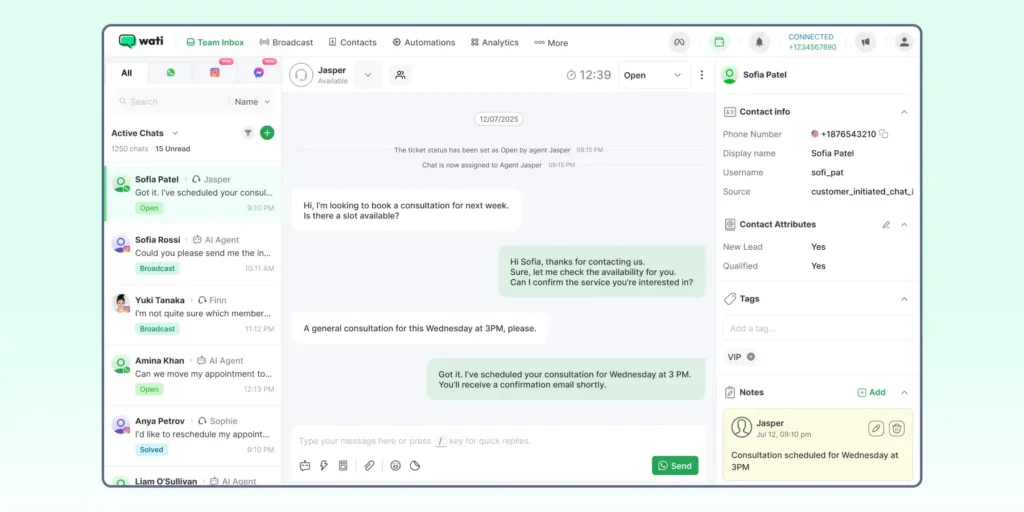
Creating an account on Wati’s website and connecting it to your WhatsApp API account is a straightforward process. You can link an API account to your existing tech stack to automate your e-commerce cycle.
Below are the key applications of Wati that take your sales strategy to the next level and boost your conversions:
- Shared Team Inbox: With a shared inbox, you can dynamically track conversation progress, enable shared access, and accelerate your sales pipeline. Unified inbox also allows managers to track sales agent performance, track funnel progress in real time, and optimise ROI opportunity.
- No Code/Low Code Builder: Wati’s chatbot automation helps you generate quick replies for seamless and scaled consumer interaction. By integrating a custom chatbot, it becomes easy to strategically tackle new inquiries and never lose touch with the customer. This frees up sales bandwidth for more crucial tasks and optimises your sales conversations.
- SMS Fallback: With Wati, you can trigger the SMS marketing feature to eliminate meta restrictions in specific demographics. With SMS marketing, you can improve your message delivery rates and reduce the chance of spam listings.
- Prebuilt audience segmentation: Wati allows teams to categorise new sales qualified leads (SQLs) into specific buckets like winback, and highly engaged. at risk, and is valid to simplify the work of a sales representative. With segmentation, you can intelligently engage with your inbound and outbound prospects.
- Advanced analytics and Reporting: Wati’scomprehensive analytics dashboard provides a one-click performance overview to quantify marketing ROI and get a clear picture of accurate conversion numbers. Having access to success metrics helps you learn what’s working and what’s not.
- Partner Integrations: With WhatsApp Business API, you can link your WhatsApp account back to CRM or other third-party automation tools like Zapier, Razorpay, Shopify, HubSpot, and so on without getting into the fuss of dynamic API coding.
- Pre-approved templates: Wati also offers a repository of pre-defined meta templates to fuel better conversations. For example, if a lead unsubscribes, the system will arrange it in a separate automation and trigger an “automated template” to re-engage the lead.
- AI support agents: With Wati, you can dynamically re-route queries to AI agents to tackle basic as well as complex queries. These agents provide instant, accurate answers to your prospects based on your company’s knowledge base.
For a detailed comparison, check Wati vs Interakt to compare the features, use cases and applications of both BSP tools.

Habuild’s Wellness Campaign: Scaling Community from 400 to 1M+ Customers
Habuild, a well-known wellness brand, used Wati for their campaigns and saw fantastic results.
By running automated WhatsApp flows, they improved their sales productivity and improved their lead pipelines.
By shifting from manual WhatsApp groups to automation, they created a niche for themselves. Here is how:
- End-to-end automation: Habuild used Wati to automate class reminders, registration, attendance tracking, fitness schedules and so on, thus improving customer experience.
- Zero-cost acquisition: The developed a new no-code chatbot, to verify user authentication, which drives over 90% of their sign ups.
- Lead generation: By using click to WhatsApp ads, they lowered acquisition cost by 80% , because Meta provides free entry point (FEP) window of 72 hours to chat with customer.
- WhatsApp onboarding: To cater to communities, they replaced complex OTPs with simple verification chatbot that eased consumer experience and built word of mouth.
Habuild Wellness Campaign: Outcomes
By employing WhatsApp Business API, Habuild saw pathbreaking results:
- Massive scalability: Habuild expanded it’s community from 400 members to over 1 million paid customers in five years.
- World record engagement: Habuild’s WhatsApp campaign saw 1 million concurrent participants in a single virtual yoga session.
- Operational Efficiency: Maintained a consistent 70% attendance rate for daily classes through automated, timely WhatsApp reminders.
- Global Expansion: Seamlessly managed communication for users across 172+ countries using a single unified platform.
Check out the Habuild case study in detail to discover their WhatsApp marketing strategy.
Automate WhatsApp Messages at Scale With WhatsApp Business API
As we wrap this up, for a business like yours, understanding your current customer and revenue scale is crucial.
If you are looking to scale your sales potential or aiming for strategic automation, WhatsApp Business API is the ideal choice. With this tool, you can automate repetitive tasks, track efficiency, and personalize consumer engagement all within one platform.
Figuring out what works for you in the long run and capitalizing on WhatsApp marketing via WhatsApp Business API tools, such as Wati, can give you that market mover advantage and help scale your ROI.
Frequently Asked Questions about WhatsApp Business API
Look beyond basic API access. The best BSPs, like Wati, provide a robust platform with a shared team inbox, a no-code chatbot builder, and pre-built CRM integrations (like HubSpot or Salesforce) to ensure you can actually scale your sales and support teams.
Yes, but you must follow a specific migration process. You first delete the account from the free WhatsApp Business App, then immediately use a BSP (like Wati) to register that same number on the WhatsApp Business API. There is a short downtime, but you can keep the number.
You will pay two main costs: 1) A recurring platform fee to your BSP (like Wati) for their software (the inbox, chatbots, etc.). 2) Per-conversation fees charged by Meta, which vary depending on the conversation category (utility, marketing) and who initiated it.
The most crucial integration is with your CRM (like HubSpot, Salesforce, or Zoho). This automatically syncs contacts and chat history, giving your sales team a full view of the customer. E-commerce integrations (like Shopify) are also vital for automating order alerts and abandoned cart messages.
With a partner like Wati, the technical setup is fast (under 30 minutes). The main variable is the Meta Business Manager verification. If your business documents are ready, this can be approved in 1-2 days, but it can sometimes take longer.