

-

-
-
Solutions
-
Soluções
-
Soluciones
-
解决方案
-
解決方案
-
الحلول
-
Product
-
Produto
-
Producto
-
产品
-
產品
-
المنتج
-

-
-


 Wati for Marketing
 Wati for Support
 Wati for Sales
 eLearning
 E-commerce
 Marketing Agencies
 Healthcare
 No Code Chatbots
 AI Support Agent
 Instagram and Facebook messenger
 Click to WhatsApp ads
 Campaigns
 Team Inbox
 WhatsApp Business Calling
 Wati AI
 Overview
 Library
How to Get WhatsApp Opt-in From Customers: 10 Best Methods
Written by:
 Ashwin
|
on:
November 8, 2023
|
Last updated on:
February 23, 2026
|
Fact Checked by :
Ashwin
|
on:
November 8, 2023
|
Last updated on:
February 23, 2026
|
Fact Checked by :
 Namitha
|
According to: Editorial Policies
Namitha
|
According to: Editorial Policies
 Table of Contents
Too Long? Read This First
- WhatsApp opt-ins are mandatory to message customers and help ensure privacy, trust, and compliance.
- Businesses can collect opt-ins through multiple touchpoints like websites, checkout pages, QR codes, social media, emails, and support interactions.
- Clear communication about what users are signing up for increases opt-in rates and reduces drop-offs.
- Offering value (updates, offers, support, or alerts) makes customers more willing to opt in.
- Opt-in flows should be simple, frictionless, and easy to complete on any device.
- Always provide an easy opt-out option to respect user choice and maintain a positive experience.
You know how important it is to stay connected with customers. But that doesn’t give you a license to bombard them with marketing jargon.
If you tailor your messaging to customers who opt in via WhatsApp, you can improve customer engagement, track high-quality conversations, and double down on deals.
The key is to distinguish between customers who just lurked on WhatsApp and those who opted in via WhatsApp. The latter suggests a customer’s willingness to engage more or explore more.
Brands, after receiving opt-in, initiate automated WhatsApp marketing campaigns to intelligently drive engagement and retention.
In this guide, we will cover the 10 best ways to get WhatsApp opt-ins from customers, types of opt-in messages, and tips to score the right customer attention at the right time.
Let’s get started!
What is WhatsApp Opt-In?
WhatsApp opt-ins are a consent mechanism that brands offer consumers to receive future marketing communications via WhatsApp.
It’s like you are at your store, and there is this customer that you want to chat with on WhatsApp. But before you initiate a conversation, you need to qualify intent with a WhatsApp opt-in option.
Consumers who subscribe to email or WhatsApp communications have opted in and respond more effectively to outbound efforts.
Also, WhatsApp opt-in complies with data security and protection policies, as your content is restricted to “subscriber-only”. WhatsApp requires users to proactively agree to receive your messages.
By getting that “yes” (usually via a checkbox on a website, a link, or a QR code), you are entering a high attention zone. People check WhatsApp far more frequently than email, and if they have already made a purchase, they trust you to repeat it in the future.
Once they give you that thumbs-up, you’re cleared for takeoff. You can start building a direct, conversational relationship right where your customers already spend their time.
What Can Businesses Use WhatsApp Opt-Ins For?
If you’re a business owner and you want to use WhatsApp to chat with your customers, you’ve got to collect opt-ins. It doesn’t matter if you run a cosy little cafe, a bustling online store, or a big tech company; this rule is for everyone.
Here is how you can use WhatsApp opt-in for different businesses:
- Retailers & E-commerce: To send order updates, shipping notifications, or “back in stock” alerts.
- Service Providers: For booking confirmations, appointment reminders, or localized promotions.
- Tech & SaaS Companies: To deliver two-factor authentication (2FA) codes or onboarding tips.
If a business name appears in the sender ID, there must be a “Yes” on the receiver’s end. Skipping this step doesn’t just annoy customers; it puts your account at risk of being flagged as spam or banned by WhatsApp entirely.
Why Collect WhatsApp Opt-Ins?
Collecting WhatsApp opt-ins is a fair practice because people value their privacy and don’t want just anyone sending them messages.
Plus, there are laws to make sure businesses respect that. So, if you’re thinking about sending bulk updates, offers, or any news about your business on WhatsApp, you must ensure your customers are okay with it.
By getting their permission, you’re not only following the rules but also showing your customers you respect their choices, which is super important for building trust.
When customers trust you, they’re more likely to listen to what you’ve got to say and engage with your business! So, collecting opt-ins is a win-win for you and your customers.
What are the Different Ways to Collect WhatsApp Opt-Ins?
Collecting WhatsApp opt-ins can be smooth if you know the right ways to go about it. Here are some practical examples that you, as a business owner, can use to get those valuable permissions on your business platform:
1. Signup Forms on Your Website
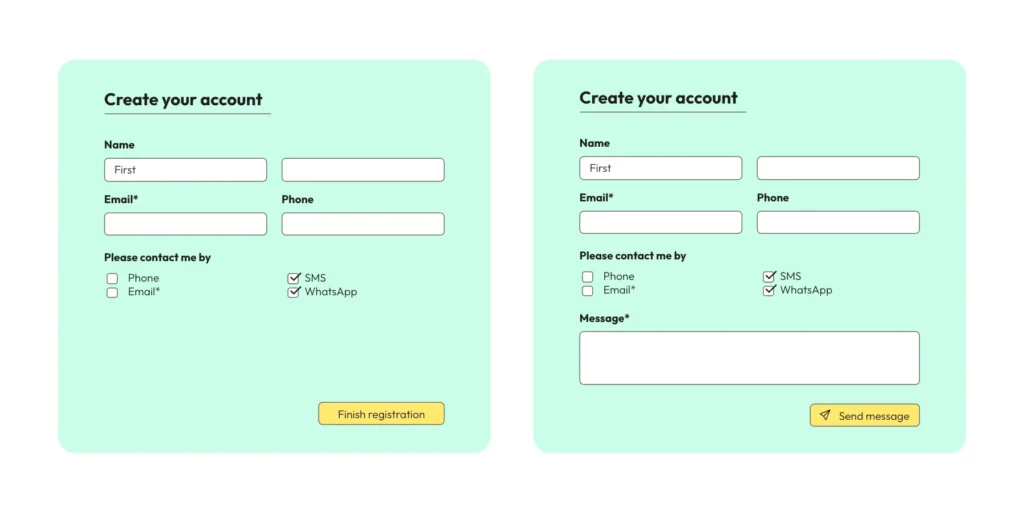
One of the easiest methods is to integrate a simple form on your website where customers can willingly enter their phone numbers.
Place this form on your homepage, contact page, or as a pop-up that appears during their browsing session. Just make sure to specify that by entering their number, they agree to receive your WhatsApp messages.
2. During Online Purchases
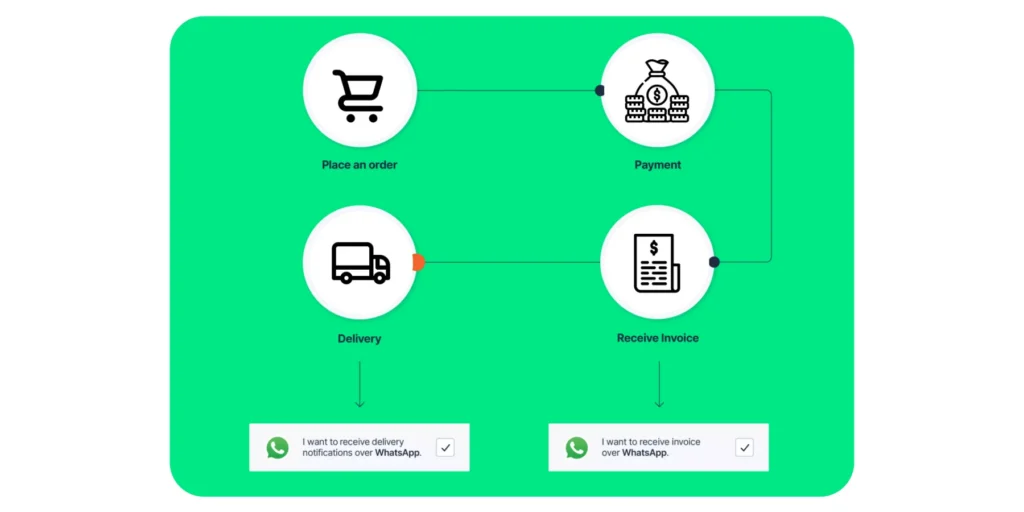
If you have an online store, consider adding an opt-in checkbox during the checkout process. Customers can tick the box to agree to receive updates on their purchases and other notifications via WhatsApp.
3. Interactive QR Codes in Physical Locations
If you have a physical store, placing QR codes on receipts, product tags, or banners can be a smart move. When customers scan the QR code with their phones, they’re directed to a screen where they can opt in to receive your WhatsApp messages.
4. Social Media Channels
Leverage your business’s social media profiles by creating posts or stories inviting followers to join your WhatsApp list. You can include a clickable link that takes them directly to a WhatsApp chat or a signup form.
5. Email Newsletters
If you’re already sending out newsletters, include a section inviting subscribers to get exclusive content or special offers on WhatsApp. A simple “Join Us” button linked to your opt-in form or WhatsApp chat can do the trick.
6. Customer Support
When customers contact you for support via email, chat, or even a phone call, your support team can ask if they’d like to receive WhatsApp messages for quicker, more convenient communication in the future.
7. Using Pop-Ups or QR codes on Your Main Webpage
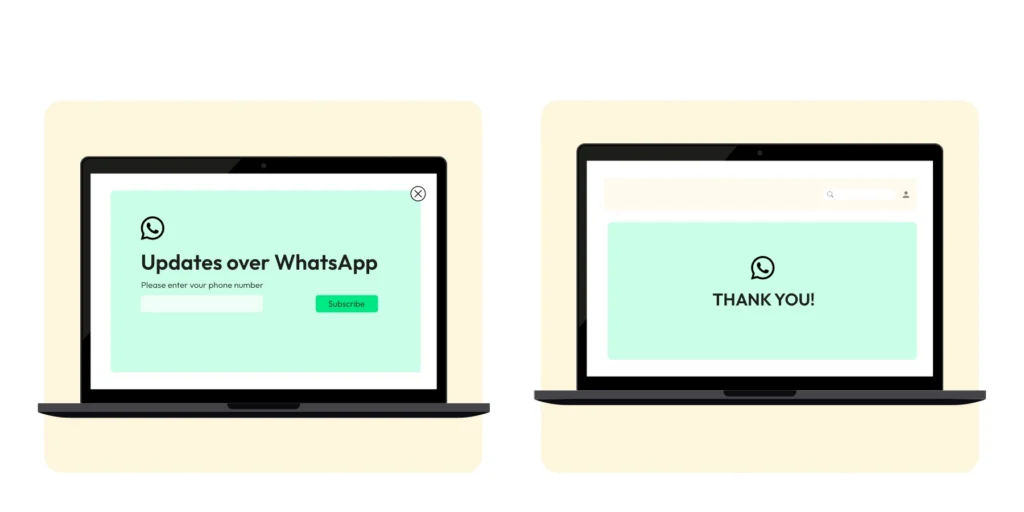
Think about your website’s front page as a powerful way to get people interested. You can catch their eye immediately with a pop-up that shows up as they browse, suggesting they sign up to chat with you on WhatsApp.
Another cool idea is to put a QR code directly on your front page. When customers scan it with their phones, they’ll be taken straight into a chat with your business on WhatsApp. It’s direct and super easy for them, making it more likely they’ll want to connect!
8. Landing Page for WhatsApp Opt-Ins
Here’s a thought – why not set up a unique landing page just for getting people to chat with you on WhatsApp? This way, you can take more space to explain how chatting on WhatsApp makes interacting with your business easy and efficient.
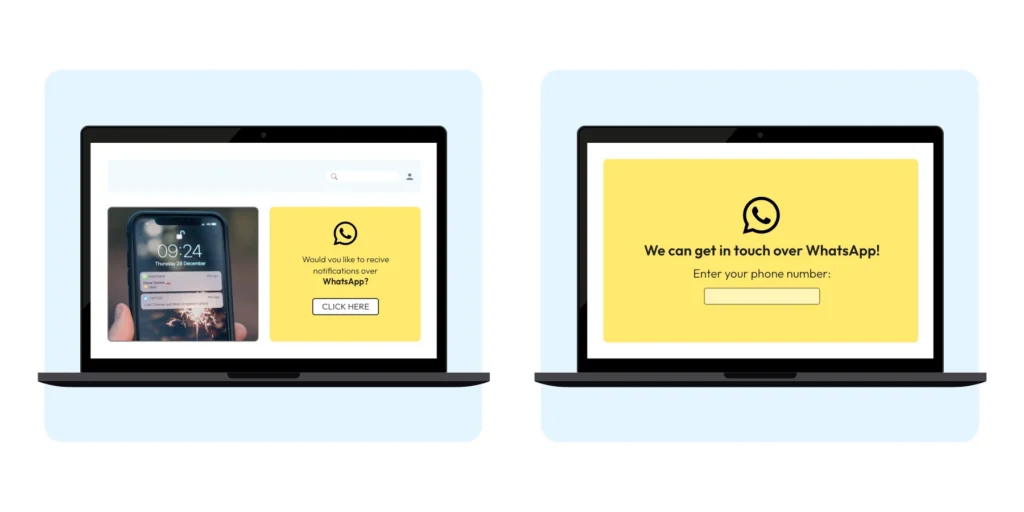
What your customers will do is type in their phone number on this page to say, “Yes, I’m in!” After they do, it’s a nice touch to send them over to another page that says “Thank You” to let them know everything worked perfectly.
Note: Double-check that this sign-up page looks good and works well no matter what gadget your customers use, be it a phone, tablet, or computer. That way, you won’t miss out on anyone who wants to join!
9. Set Up Click to WhatsApp Ads
You can add a special click-to-chat button on your ads. This way, customers can tap to start a conversation with you.
The remarkable thing is that the moment they click, you’ve got the green light to chat with them on WhatsApp. Plus, you’ll know what ad brought them to you and what interests them.
This means you can make your chat super relevant and personal for them based on what you know they like. It’s a neat way to make their experience feel smooth and tailored just for them!
10. Collect WhatsApp Opt-Ins from Various Channels
When texting a customer, why not ask if they’d prefer to get your messages on WhatsApp instead? It’s a quick question that could make things easier for both of you.

Also, if you’re using a phone system with automated responses (IVR), you can configure it to ask callers whether they want to receive your WhatsApp messages. It’s like they’re pressing ‘yes’ with their phone keypad!
And remember the old-school way! When you’re face-to-face with customers or when they’re filling out forms, you can ask them to sign up for your WhatsApp messages right there. They need to sign a form saying they’re cool with it, and you’re all set. It’s a bit more traditional, but it works well.
Six Best Practices for Collecting WhatsApp Opt-Ins For WhatsApp Business
Getting those WhatsApp opt-ins sounds important, right? But you’re probably wondering, “How do I do it right?” No worries, here are some best practices that are easy to follow and can make a difference:
- Be Clear and Honest: Tell your customers exactly what they sign up for. Will they get news about promotions, updates on their orders, or tips related to your business? Make sure they know so there are no surprises.
- Easy Does It: Make the opt-in process super simple. Maybe it’s a button on your website that says, “Yes, I want to receive WhatsApp messages,” or a quick form at your store where they can share their number. The easier it is, the more likely they’ll say yes.
- Respect the No’s: If someone doesn’t want to opt in, that’s okay. Never send WhatsApp messages if they disagree, as that’s not appropriate (and also against the rules).
- Offer Some Perks: People love goodies! Offer a special discount or a preview of a new product when they sign up. It’s an excellent way to say “thank you” for letting you into their WhatsApp inbox.
- Keep it Safe: Show your customers that you value their privacy. Ensure their data is secure and that you comply with all applicable privacy laws. This builds trust, and they’ll appreciate it.
- Allow Easy Opt-out: Sometimes, people change their minds, and that’s alright. Make sure they can easily stop receiving messages if they want to. It could be a simple message they send you, like, “Stop,” and you’ll do the rest.
Remember, it’s about building a friendly relationship with your customers. When they see you’re doing things the right way, they’ll feel more comfortable and happy to hear from your business on WhatsApp.
What are the Types of Messages Customers Can WhatsApp Opt-In to receive on WhatsApp?
Here are the types of messages customers receive when they sign up for updates from a brand.
- Messages about their purchases or services
- Delivery Updates
- Appointments Reminders
- Order Confirmation
- Bank Account Balance
- Messages that aren’t directly about a purchase
- Offers & Discounts
- Product Suggestions
- Helpful alerts
Your To-Do List for Getting WhatsApp Opt-Ins
We’ve got a simple 3-step checklist for you, all based on the rules from WhatsApp about getting people to opt in.
1. Choose a Way to Get More WhatsApp Opt-Ins
You’ve got many ways to ask customers to opt in, and you can do this on or off WhatsApp. Meta, which owns WhatsApp, has made this process simpler by taking away some old rules.
By integrating an option to opt in straight from WhatsApp automation or a direct WhatsApp chat button, you get customer consent faster.
You don’t need to worry about these old rules anymore:
- Having to get opt-ins through other 3rd party channels
- Getting people to agree during specific steps only
- Having to show a checkbox next to the WhatsApp logo
- Letting users change the WhatsApp number they’re using to sign up
2. Play by the Rules with Your WhatsApp Opt-in Method
When you ask someone to agree to get your messages, you’ve got to be super clear they’re saying yes to hearing from you on WhatsApp. Also, don’t forget to follow all the legal stuff. This includes:
- Getting all the correct permissions to use their details and having a privacy policy that everyone can see.
- Keeping their stuff private and not using it outside of your chats.
- Not asking for things you shouldn’t, like their bank info, ID numbers, or health stuff.
Heads up: WhatsApp recommends working with their business service providers (BSPs), such as Wati, who specialize in using WhatsApp for business. They can also help ensure you are complying with all rules, particularly GDPR.
3. Set Expectations to Avoid Opt-Outs
- Have a WhatsApp Business profile that includes contact information (such as your email, website, or phone number). And keep that info right!
- When collecting opt-ins, be clear about the types of messages you’ll send. Different types of updates should have their opt-ins.
- Tell people how to stop receiving messages or unsubscribe. Remove them from your contact list immediately.
- If people can say “no thanks” quickly, they won’t report you or block you (which would make WhatsApp think you’re not doing a great job).
- Don’t message people too much. Think about how often they’d want to hear from you.
- Explain why it’s good for them to get your important updates on WhatsApp.
Remember, it’s all about making sure your customers are happy and know what they’re opting in for.
How Does WhatsApp Make Sure You Follow the Opt-In Rules?
If your customers feel they’re getting messages they didn’t sign up for, they might block you or even report your business. WhatsApp pays attention to this stuff. They’ll review how you’re asking people to sign up and ensure you’re not violating any rules.
If lots of people keep blocking or reporting you, WhatsApp will notice.
They track a “quality score.” If your score drops too low because you’re receiving many negative reactions, WhatsApp might place limits on your account. They could even stop you from using WhatsApp for business at all.
And WhatsApp doesn’t just do this once; they keep checking. They review customer feedback and monitor businesses to ensure everyone is following the rules.
If they see something they don’t like, they’ll take action, and they’re always developing new ways to enforce their policies. So, it’s super important to ensure people are happy and have agreed to receive your messages.
Take Consent Before You Approach
Requesting opt-ins from customers is a strategic way to focus on high-quality conversions. Blindly sending promotions to every customer who lands on the website poses a negative impression on the brand.
Whether your customer approaches your WhatsApp or website, collect the opt-in, verify intent, and then focus on nurturing efforts.
With WhatsApp marketing platforms like Wati, you can speed up your process and collect direct opt-ins via pop-ups or QR codes to support quick decision-making.
Take a free demo to know more.
Frequently Asked Questions
Obtaining a WhatsApp Opt-In is crucial because it ensures that your business is following WhatsApp’s guidelines and regulations, which require consent before communication. It also helps in building a database of interested and engaged customers, which can lead to higher conversion rates.
Yes, depending on your location and the location of your customers, there are different legal considerations, such as GDPR in Europe, which requires clear and affirmative consent for data to be used for communication.
No, purchasing a list of contacts is against WhatsApp’s policies. You must collect opt-ins directly from customers who have shown interest in receiving messages from your business.
Yes, as long as the customers have opted in to receive such messages. You should also respect the frequency preferences they have indicated if any.
You should immediately honor the opt-out request by removing the customer from your WhatsApp messaging list. Provide an easy and straightforward way for them to opt out, like a simple command or link they can use without hassle.