

-

-
-
Solutions
-
Soluções
-
Soluciones
-
解决方案
-
解決方案
-
الحلول
-
Product
-
Produto
-
Producto
-
产品
-
產品
-
المنتج
-

-
-


 Wati for Marketing
 Wati for Support
 Wati for Sales
 eLearning
 E-commerce
 Marketing Agencies
 Healthcare
 No Code Chatbots
 WhatsApp Business API
 Instagram Automation
 Click to WhatsApp ads
 Campaigns
 Team Inbox
 WhatsApp Business Calling
 Wati AI
 Overview
 Library
 Agente de suporte de IA
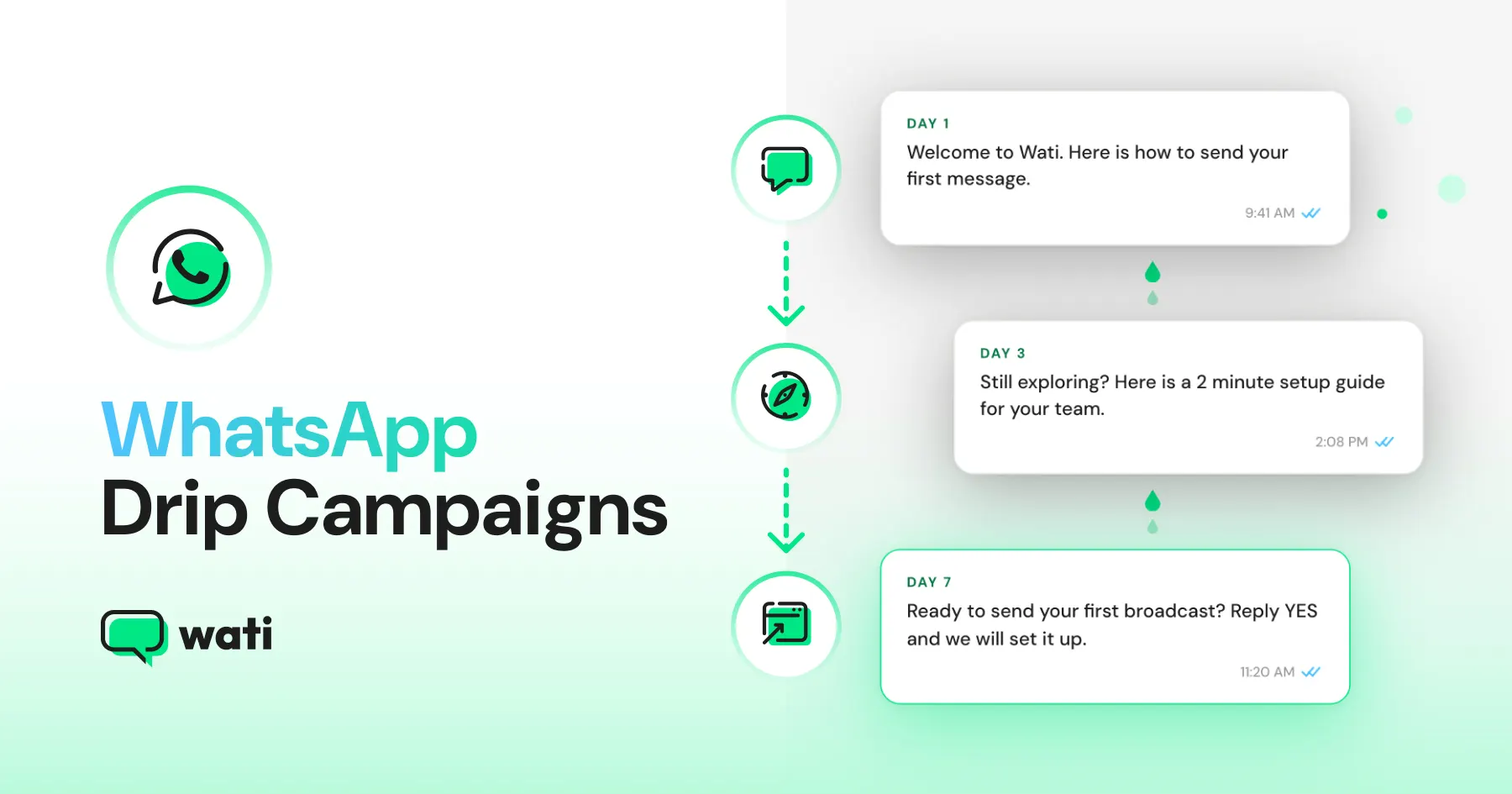
WhatsApp Drip Campaigns: The Secret to Higher Conversions
Written by:
 Krithika M
|
Last updated on:
July 3, 2026
|
Fact Checked by :
Krithika M
|
Last updated on:
July 3, 2026
|
Fact Checked by :
 Namitha Sudhakar
|
According to: Editorial Policies
Namitha Sudhakar
|
According to: Editorial Policies

Too Long? Read This First
- A WhatsApp drip campaign sends a series of automated messages over time after a customer takes a specific action.
- Unlike broadcasts, drip campaigns use multiple scheduled follow-ups instead of a single one-time message.
- Common use cases include welcome series, abandoned cart recovery, lead nurturing, and customer re-engagement.
- Every drip campaign includes three elements: a trigger, a message sequence, and a sending schedule.
- Running drip campaigns requires access to the WhatsApp Business API through a provider such as Wati.
- Wati lets you build drip sequences, define delays, set stop conditions, and target specific customer segments.
- The best-performing campaigns use personalized messaging, audience segmentation, proper opt-ins, and regular performance tracking.
WhatsApp messages get opened. That’s rarely the problem. The harder part is knowing when and how often to follow up.
Follow up too little and customers forget about you. Follow up too often, and you risk becoming another business they mute or ignore.
A single message is rarely enough. Customers may need a reminder, a little more information, or simply another reason to come back and complete the action.
A WhatsApp drip campaign solves this problem. Instead of relying on a single message, you can send a series of follow-ups over time.
This guide explains how WhatsApp drip campaigns work, how they differ from broadcasts, and how to set up a campaign that keeps customers engaged long after the first message is sent.
What Is a WhatsApp Drip Campaign?
A WhatsApp drip campaign is a series of automated messages sent to customers over time based on a specific action or schedule.
Instead of sending a single message and hoping for a response, you can create a series of follow-ups that are delivered automatically at set intervals, such as minutes, hours, or days apart.
A drip campaign can start when someone signs up for a service, abandons a cart, makes a purchase, or books an appointment. Once triggered, customers receive a series of messages spaced out over time.
For example, a new customer might receive a welcome message immediately, an onboarding guide the next day, and a product recommendation a few days later. For an abandoned cart, a reminder can be sent 30 minutes after a customer leaves without making a purchase.
The WhatsApp drip campaign has three parts:
- A trigger that starts the campaign
- A series of messages
- A schedule that determines when each message is sent
Together, this helps to keep your business visible until the customer is ready to take the next step.
WhatsApp Drip Campaign vs Broadcast Messages
A WhatsApp broadcast sends a single message to many people at the same time. A WhatsApp drip campaign sends a series of messages over time, each triggered by a schedule or a customer’s action.
Both have their place, but they solve different problems.
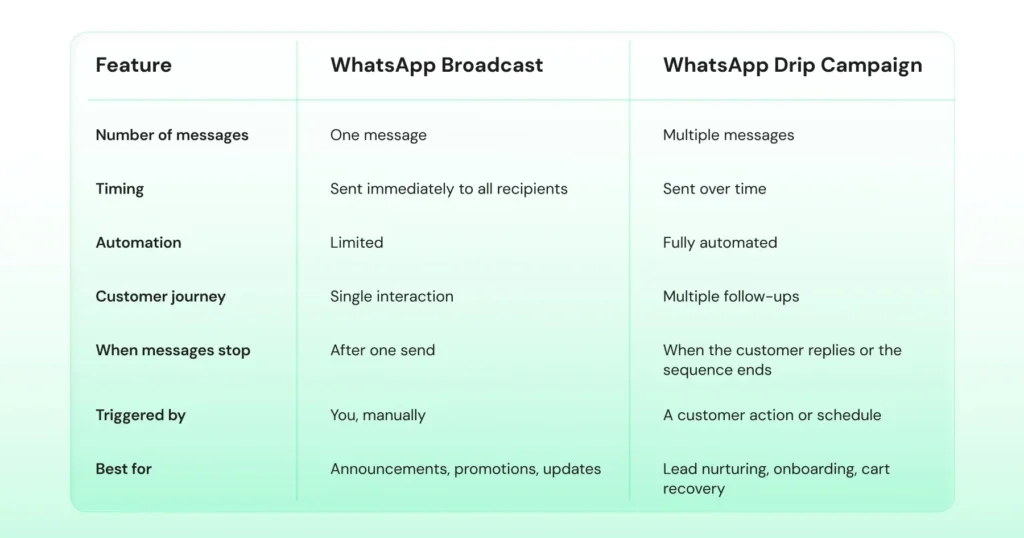
For example, a business announcing a weekend sale might use a broadcast to send the offer to its entire customer list. If customers don’t respond, the communication stops there.
A drip campaign takes a different approach. The first message might announce the sale, a second message could follow up a day later, and a final reminder could be sent before the promotion ends.
In short, broadcasts help you start conversations. Drip campaigns help you continue them.
How a WhatsApp Drip Campaign Actually Works
Here is what a typical WhatsApp drip campaign looks like:
1. A customer takes an action
This could be signing up for a newsletter, booking a demo, making a purchase, or joining a loyalty program.
2. The drip campaign is triggered
That action automatically starts a set message series.
3. The first message is sent
This is usually an immediate response, such as a welcome message, a confirmation, or a reminder.
4. Follow-up messages are delivered over time
Additional messages go out after a set delay of a few minutes, hours, or days, depending on the campaign goal.
5. The customer takes action
They might reply to a message, complete a purchase, schedule an appointment, or explore a product further.
The exact series varies from business to business, but the principle remains the same: timely follow-ups delivered automatically instead of relying on manual outreach.
WhatsApp requires businesses to use pre-approved message templates when reaching out to customers first. Most platforms handle the approval process during setup, so it is a one-time step rather than an ongoing task.
Bonus read: 20+ WhatsApp Message Templates for Customization and Engagement
4 WhatsApp Drip Campaign Ideas
Here are four common WhatsApp drip campaign examples and how they work.
1. Welcome Series for New Customers
A welcome series helps new customers get started after they sign up. Rather than leaving them wondering what to do next, you can guide them with a few timely messages over the first few days.
Goal: Help new customers get familiar with your business and take the next step.
Trigger: Customer signs up or joins your contact list.
| Timing | Message |
| Immediately | Welcome the customer and explain what happens next |
| 24 hours later | Share useful tips, resources, or getting-started information |
| 3 days later | Highlight popular products, services, or features |
| 7 days later | Encourage the customer to make a purchase, book a demo, or take the next step |
A simple welcome series can help new customers feel more confident and more likely to stick around.
2. Abandoned Cart Recovery
Many shoppers add products to their cart but leave before completing their purchase. A few well-placed reminders can bring some of them back before they forget about the products they were considering.
Goal: Recover sales that might otherwise be lost.
Trigger: Customer leaves items in their cart without checking out.
| Timing | Message |
| 30 minutes later | Remind the customer about the items left in their cart |
| 24 hours later | Highlight why the product is worth buying or answer common questions |
| 72 hours later | Send a final reminder before the cart expires or the offer ends |
Instead of relying on a single reminder, a WhatsApp drip campaign gives customers multiple chances to return and complete their purchase.
Bonus read: Explore these abandoned-cart messages brands use to recover lost sales.
3. Real Estate Lead Follow-Up
Most people do not schedule a site visit or make a property decision after a single inquiry. They often spend time comparing projects, discussing options with family, and doing additional research.
Goal: Stay in touch with interested buyers and encourage the next conversation.
Trigger: Customer submits a property inquiry.
| Timing | Message |
| Immediately | Confirm the inquiry and thank the lead for their interest |
| 2 days later | Share project details, pricing information, or a brochure |
| 5 days later | Answer common questions about the property or location |
| 7 days later | Invite the lead to schedule a site visit or speak with an agent |
Regular follow-ups keep your business in front of buyers as they consider their options.
4. Customer Re-engagement Campaigns
Not every customer stays active forever. Some stop browsing, stop purchasing, or simply lose touch with your business over time.
A WhatsApp drip campaign can help you reconnect with customers through updates, reminders, or offers that give them a reason to come back.
Goal: Bring inactive customers back into the conversation.
Trigger: No activity for a set period of time.
| Timing | Message |
| Day 1 | Share a new update, launch, or announcement |
| Day 3 | Recommend products, services, or content they may find useful |
| Day 7 | Send a special offer or incentive to encourage a return visit |
Sometimes a simple reminder is all it takes to bring a customer back.
Launching a WhatsApp Drip Campaign? Start Here
To run WhatsApp drip campaigns, you will need access to the WhatsApp Business API through a BSP such as Wati. This gives you the ability to:
- Automate follow-up messages
- Trigger campaigns based on customer actions
- Send approved WhatsApp templates
- Personalize messages using customer data
- Manage drip campaigns at scale
What about the 24-hour messaging window?
WhatsApp allows you to respond freely for 24 hours after a customer sends a message. Outside that window, you must use approved message templates to continue the conversation. Since drip campaigns include scheduled follow-ups, these templates are usually part of the campaign setup.
How many messages can you send?
Meta applies messaging limits that increase as your account builds a positive messaging history.
Meta starts new business portfolios with a 250-message daily messaging limit, which automatically increases to 2,000, then to higher tiers (10,000, 100,000, or more) as your account demonstrates message quality and consistent sending volume.
How to Set Up a WhatsApp Drip Campaign in Wati
Creating a WhatsApp drip campaign in Wati takes just a few steps and helps automate customer follow-ups at scale. Here is the full flow, step by step.
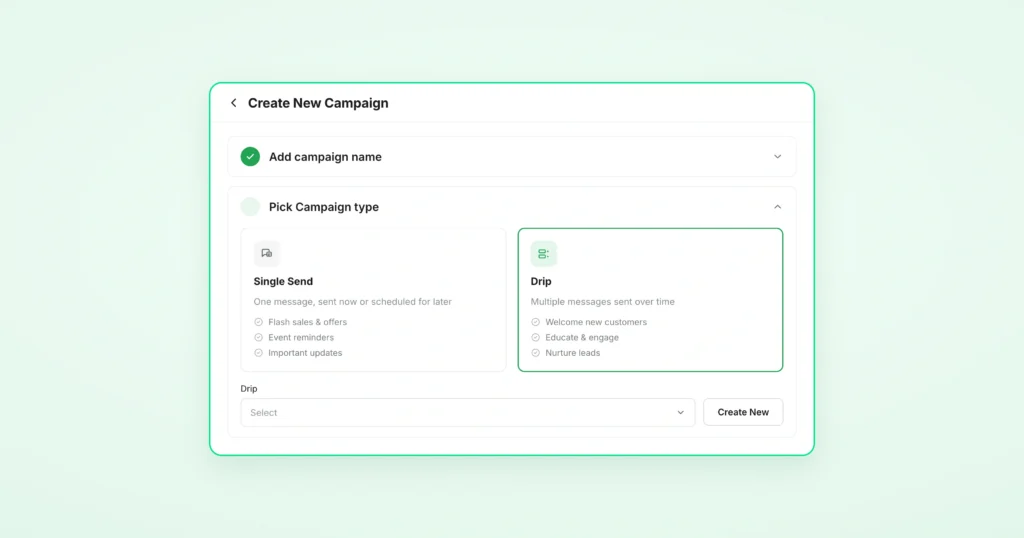
Step 1: Create the Drip Campaign
Go to the Campaigns page and click +Create New Campaign. Enter a name for your campaign, then select Drip Campaign as the campaign type instead of a single message.
Step 2: Build Your Drip Campaign
Click Create New to open the drip campaign builder. Add your message steps one by one and set the delay between each, in minutes, hours, or days depending on your goal. A welcome series might space messages 24 hours apart, while an abandoned cart reminder could fire 30 minutes after the trigger.
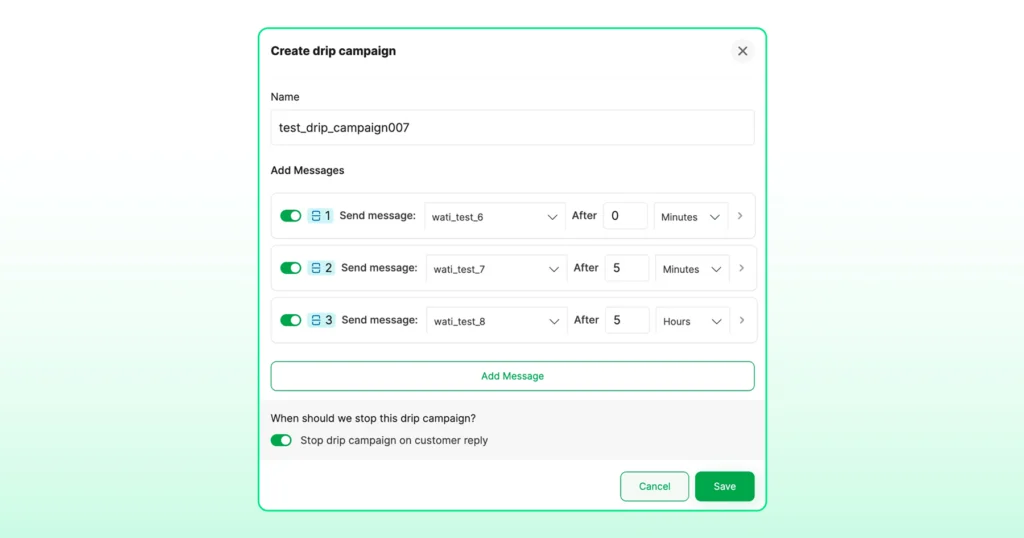
For more precise scheduling, click the > icon on any message step. This opens an Occurrences section where you can set:
- Any Time or a specific time — control what time of day the message goes out
- Any Days or Custom days — select which days of the week the message should send
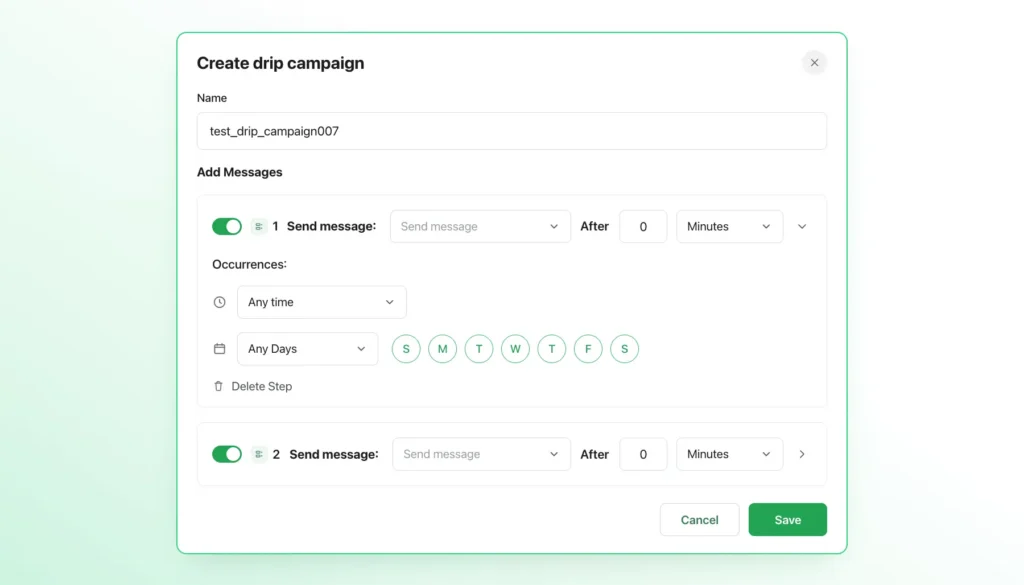
This is useful when you want messages to land during business hours or avoid weekends entirely.
Once your steps are in place, enable Stop campaign on customer reply so the drip campaign ends automatically the moment a customer responds. You can review the full message schedule in the preview panel on the right before moving forward.

| Note: Drip Campaigns from the Campaigns page works best for scheduled batch sends to a defined audience. Setting it up through Automations is better when you want the drip campaign to start based on something a contact does, like filling a form or being tagged as interested in your CRM. |
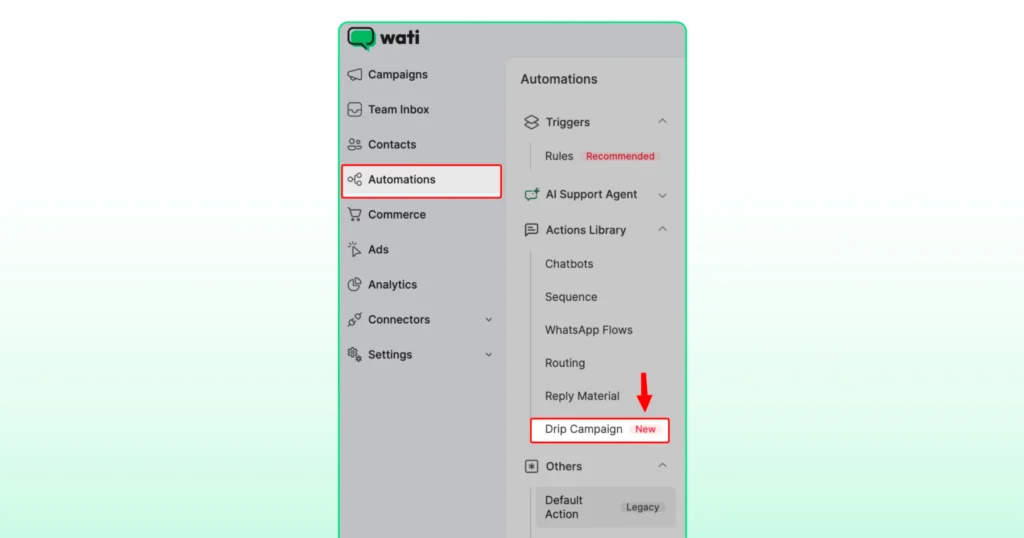
Alternative path: You can also create a drip campaign from Automations → Actions Library → Drip Campaign. This is useful when you want the drip campaign to trigger automatically based on a customer action, such as joining a segment or updating an attribute.
Step 3: Set Up a Fallback Channel (Optional)
If WhatsApp delivery fails for a contact, you can enable a Fallback Channel to make sure the message still reaches them through an alternative route.
Toggle on Fallback Channel and choose whether to send via RCS or SMS.
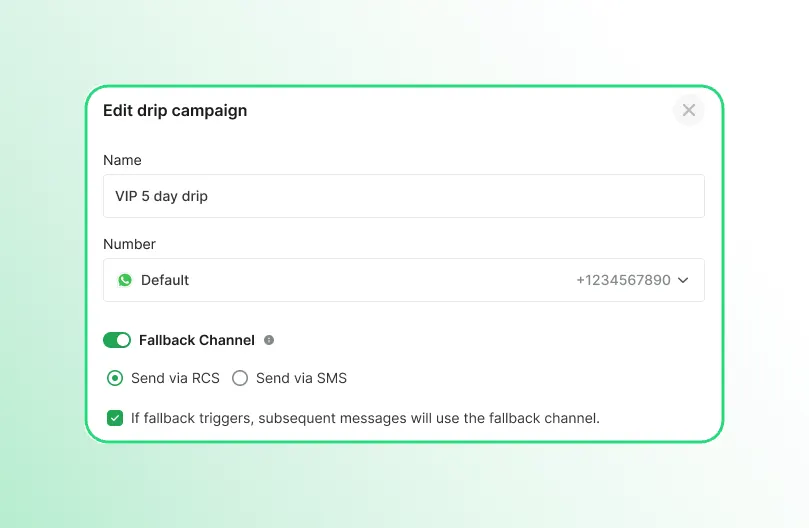
Once enabled, you can assign a Fallback Template for each message step. This is the version of the message that goes out if WhatsApp delivery does not trigger.
You can also choose whether subsequent messages in the drip campaign should continue using the fallback channel by toggling the If fallback triggers, subsequent messages will use the fallback channel option on or off.
Step 4: Choose Your Audience
Under Define Your Audience section, import your contacts by downloading a sample CSV, filling it in, and uploading your list using the Import Contacts option.
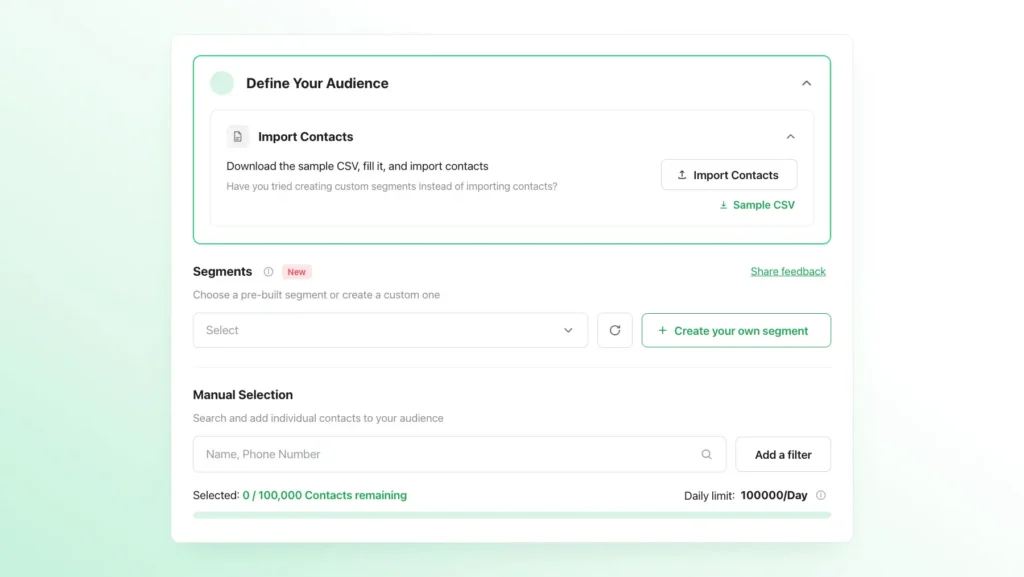
Once your contacts are imported, choose who within that list should receive the campaign. You have two ways to do this:
- Segments — choose a pre-built segment or create a custom one using + Create your own segment
- Manual Selection — search and add individual contacts by name or phone number, or use Add a filter to narrow your selection
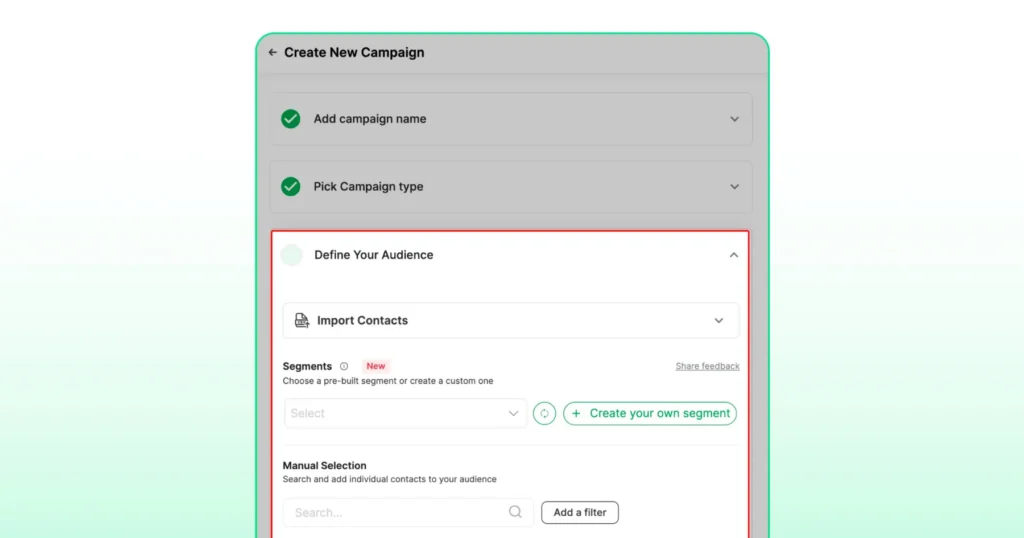
When selecting your audience, you will also choose between two list types:
Static list — the audience is fixed at the time you publish the campaign. Only the contacts in the list at that moment will receive the drip campaign.
Active list — the audience updates dynamically. Any contact added to the list will automatically be enrolled in the drip campaign and receive the message series from the beginning.
Note: Custom segments and pre-defined segments are available on Business and Pro plans.
Step 5: Schedule and Publish
Choose whether to send the campaign immediately or schedule it for a specific date and time. If you want failed messages to be retried automatically, toggle on Auto Retry, though it’s worth skipping this for time-sensitive campaigns.
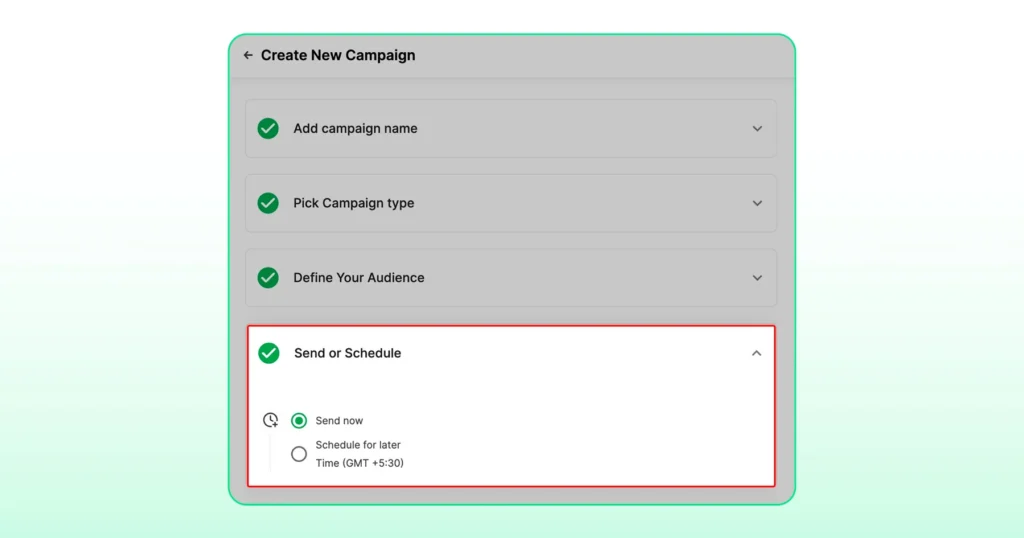
Once your drip campaign, audience, and schedule are all set, click Publish to launch.
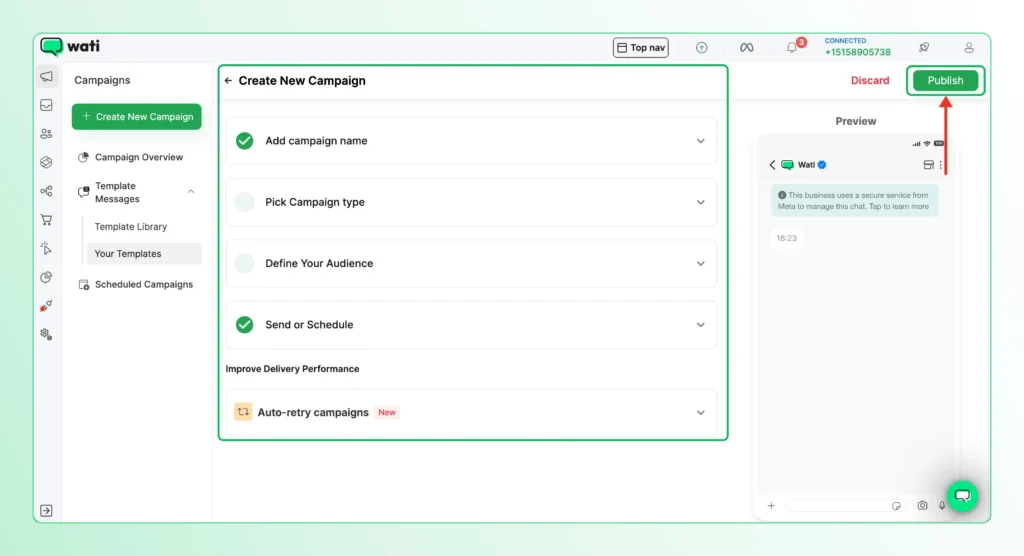
Step 6: Monitor Campaign Performance
Once the campaign is live, head to the Campaigns Overview page to monitor progress.
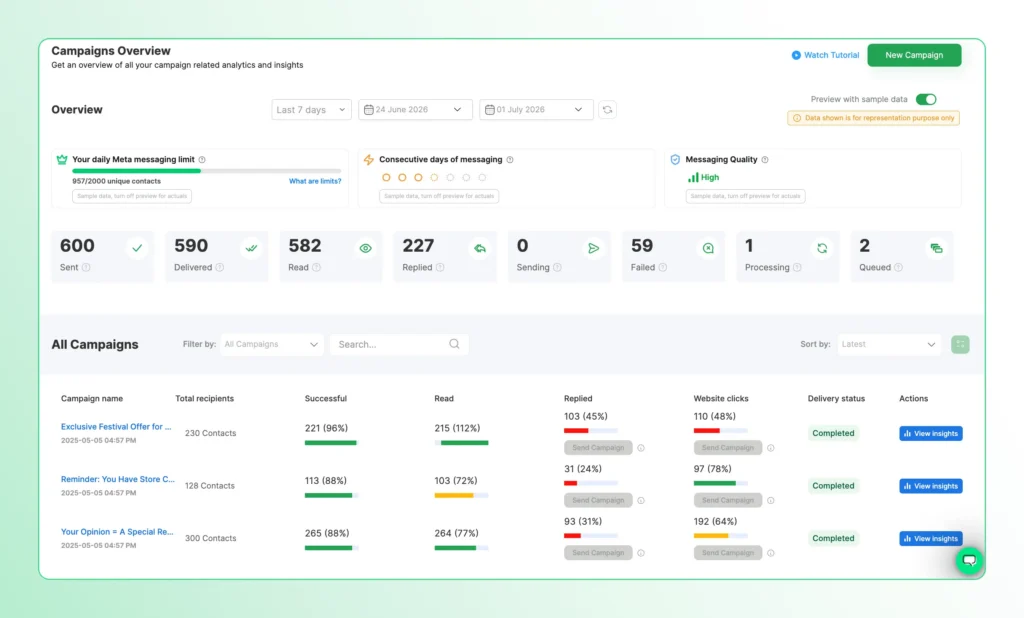
Drip campaigns appear in your campaign list with a step indicator showing how many messages are in the drip campaign and their current Delivery Status.
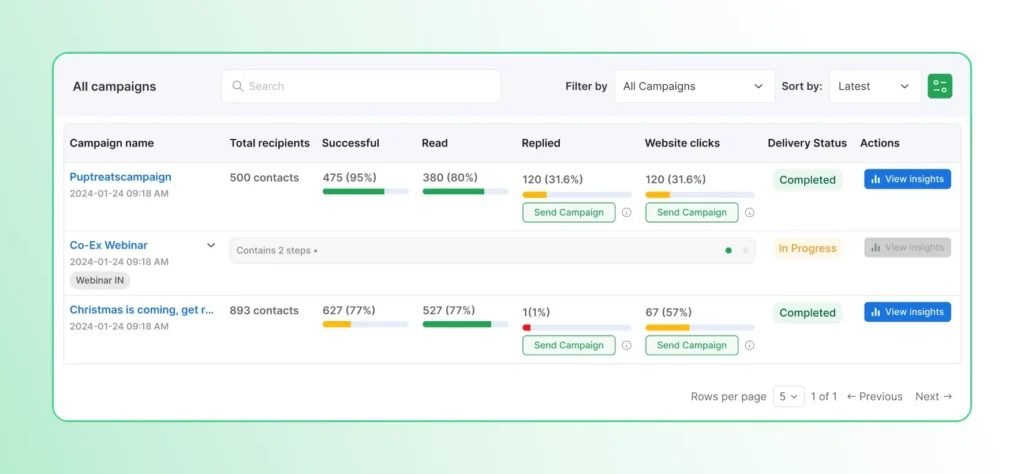
Click the View Insights button on any drip campaign to open the Per-Step Analytics view.
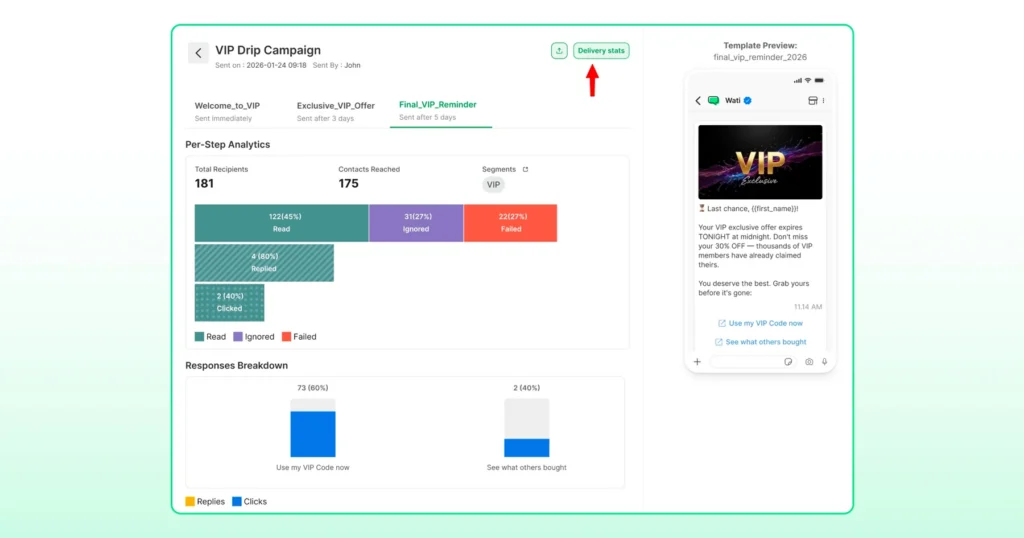
For each message step in the drip campaign, you can see:
- Total Recipients and Contacts Reached
- A breakdown of Read, Ignored, and Failed counts
- Replies and Clicks tracked per step under the Responses Breakdown section
- The specific template sent at each step, with a live preview
This step-level view makes it easy to identify where customers drop off or stop engaging, so you can adjust timing, copy, or drip campaign length in future campaigns.
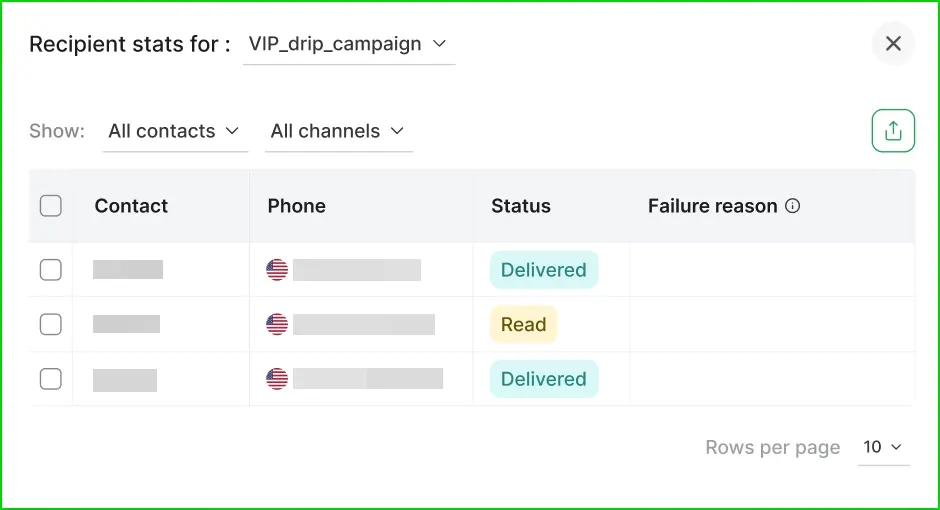
For a deeper look at delivery issues, click Delivery Stats to view the Status of the message and Failure reason for any messages that did not go through.
Dos and Don’ts of a Successful WhatsApp Drip Campaign
These are the practices that separate campaigns that convert from ones that get ignored.
Keep Messages Short, Conversational, and Personalized
Keep each message brief, write the way a person would speak, and use the customer’s name or relevant details wherever you can. A message that feels personal is far more likely to get a response.
Segment Your Audience
Segment your audience by behavior, purchase history, or where they are in the buying process, and build drip campaigns that match each segment.
Provide Opt-In and Opt-Out Options
Only send drip campaigns to customers who have agreed to receive messages from you. This is a WhatsApp policy requirement, and it means your audience is already interested.
Make it just as easy to opt out. A customer who can leave without friction is far less likely to mark your messages as spam.
Time Your Messages Wisely
Think about when your customers are most likely to read and respond. A message sent at 2 am will either be ignored or feel intrusive by morning.
For most audiences, mid-morning and early evening tend to work well. Test a few different windows before settling on a fixed schedule.
Track Performance and Improve
The delivery rate tells you how many messages arrived. Open rates, reply rates, and conversions tell you whether they worked.
Review your drip campaigns regularly and make changes based on the data. The best drip campaigns get better over time.
Start Your Next WhatsApp Drip Campaigns with Wati
The customers who convert are not always the ones who were most interested. Sometimes they are just the ones who got followed up with.
Your team builds and manages drip campaigns from the same inbox where they handle everyday conversations. The cart reminder goes out 30 minutes after a customer leaves. The welcome series starts the moment someone signs up. The re-engagement message lands weeks after a customer goes quiet. All of it runs on its own, and stops the moment a customer replies.
Want to see WhatsApp drip campaigns in action? Start a free trial to build your first drip campaign.
Frequently Asked Questions
A WhatsApp drip campaign is a series of automated messages sent to a customer over time, triggered by an action or a set schedule. Each message goes out automatically until the customer responds or the drip campaign ends.
A broadcast sends one message to many people at once. A drip campaign sends a series of messages to an individual over time, based on their actions or a schedule.
Yes. The standard WhatsApp Business app does not support drip campaigns. You need access to the WhatsApp Business Platform through a provider such as Wati.
If Stop drip campaign on customer reply is enabled, the drip campaign ends automatically when a customer responds. Otherwise, the remaining messages continue according to the schedule.
Yes. Delays can be set in minutes, hours, or days depending on what the campaign needs.
Drip campaigns work best when a single message is not enough to move a customer to action. Common use cases include welcome series for new sign-ups, abandoned cart recovery, lead nurturing for prospects who need more time, and re-engagement campaigns for inactive customers.