

-

-
-
Solutions
-
Soluções
-
Soluciones
-
解决方案
-
解決方案
-
الحلول
-
Product
-
Produto
-
Producto
-
产品
-
產品
-
المنتج
-

-
-


 Wati for Marketing
 Wati for Support
 Wati for Sales
 eLearning
 E-commerce
 Marketing Agencies
 Healthcare
 No Code Chatbots
 WhatsApp Business API
 Instagram Automation
 Click to WhatsApp ads
 Campaigns
 Team Inbox
 WhatsApp Business Calling
 Wati AI
 Overview
 Library
 Agente de suporte de IA
Instagram Advertising Guide 2026: How to Launch High-Converting Ads
Written by: Alex Chow | Last updated on: March 12, 2026 | According to: Editorial Policies
 Table of Contents
Too Long? Read This First
- Set the "Engagement" objective in Meta Ads Manager and select WhatsApp as the destination to move users directly from feed to chat.
- Use vertical Reels/Stories with a clear "Send Message" CTA to capture users in their natural scrolling habitat.
- Leverage Meta’s 2026 policy, where conversations started via Instagram ads are free of template fees for the first 3 days.
- Use WhatsApp API plugins to automatically sync verified names and phone numbers to your CRM the moment the ad is clicked.
- Deploy Astra AI to instantly greet and qualify ad-driven traffic, ensuring no lead is lost while your team is offline.
Instagram advertisements are running wild, taking over retail and quick commerce market share, and gaining brand attention.
Running an Instagram advertisement and monitoring it via WhatsApp Business can help gain maximum consumer visibility and high conversion rates.
However, as a swarm of brand leaders takes over the social media space, your Instagram advertisement needs to follow certain thumb rules: relevance, appeal, and quality.
In this guide, we will learn how to set up Instagram advertisements, their outcomes, and the role of WhatsApp in building effective consumer journeys.
By mastering Instagram, you can tap into a global user base, drive awareness campaigns, and integrate WhatsApp lead generation to optimize consumer acquisition. Let’s understand it in detail.
What is Instagram Advertising?
Instagram advertising is a process to launch ad campaigns via Instagram to attract new customers or improve the existing customer base.
By running organic or sponsored Instagram ads, you can acquire market share, improve customer sessions, and increase website clicks and traffic.
Brands can either launch ad video campaigns or pay influencers to promote their products on their accounts.
Brands can also link WhatsApp to nurture and engage leads through instant, automated conversations to drive ROI.
What are the Different Types of Instagram Ads?
Instagram offers a variety of ad formats to suit different marketing goals:
- Photo Ads: Single-image ads appearing in users’ feeds.
- Video Ads: Engaging videos up to 60 seconds long.
- Carousel Ads: Multiple images or videos in a single ad that users can swipe through.
- Story Ads: Full-screen ads displayed between users’ Stories.
- Collection Ads: Feature a cover image or video with multiple products showcased below.
- Explore Ads: Ads appearing in the Explore tab, reaching users looking for new content.
- Shopping Ads: Allow users to purchase directly from the ad.
- IGTV Ads: Ads displayed within IGTV content.
Choosing the right ad type depends on your campaign objectives, whether it’s brand awareness, engagement, or conversions.
How To Launch Instagram Ads on Instagram in 2026?
Here is how you can place ads on Instagram to gather proper visibility without hampering consumer experience.
1. Methods of Placement
- Promote directly from the Instagram App: Boost existing posts to reach a wider audience.
- Use Facebook Ads Manager: Access advanced targeting and ad creation tools.
2. Detailed Steps
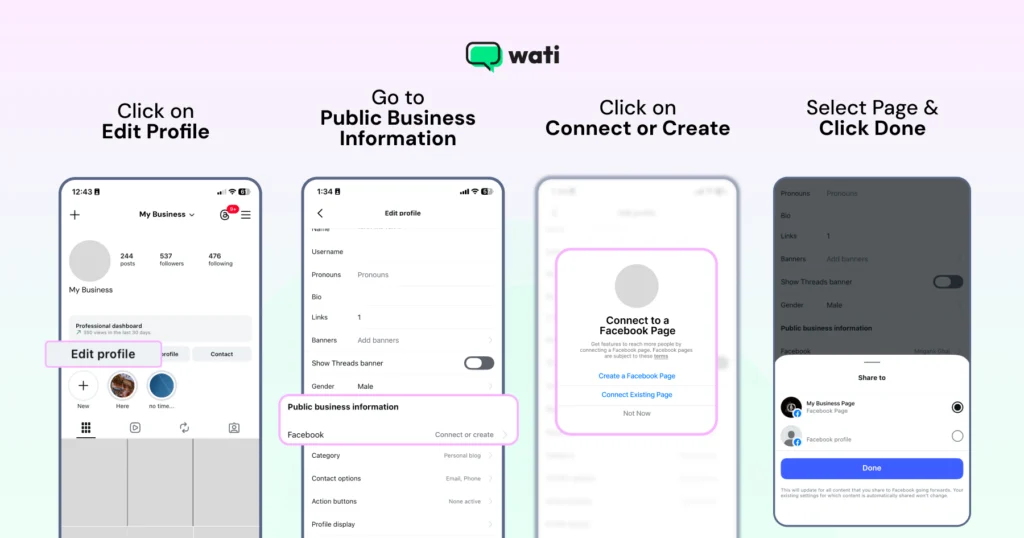
- Create a Business Account. Set up an Instagram Business Profile with Facebook Ads Manager and link it to your Facebook Page.
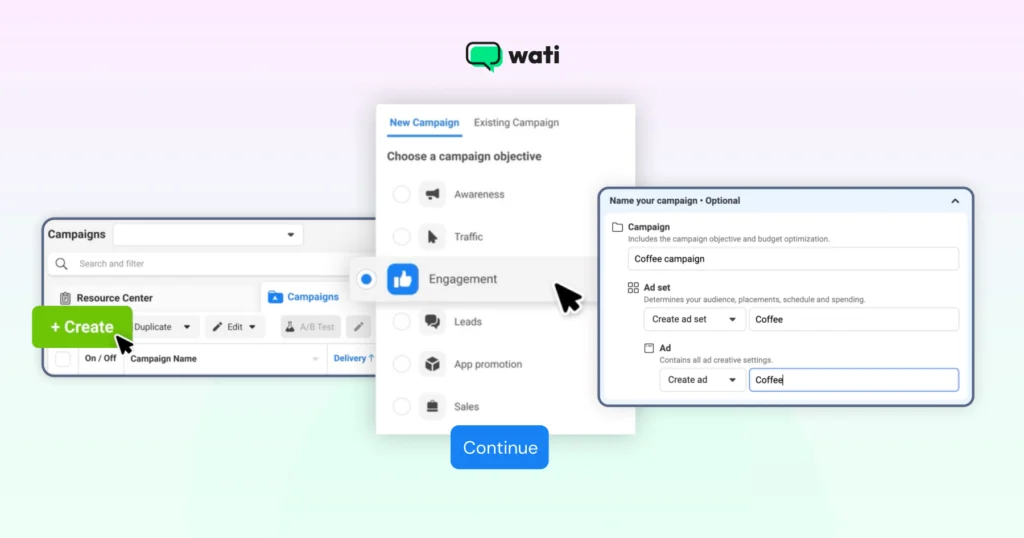
- Access Ads Manager: Navigate to Facebook Ads Manager to start a new campaign.
- Choose Your Marketing Campaign Objective: Select goals like Awareness, Consideration, or Conversion.
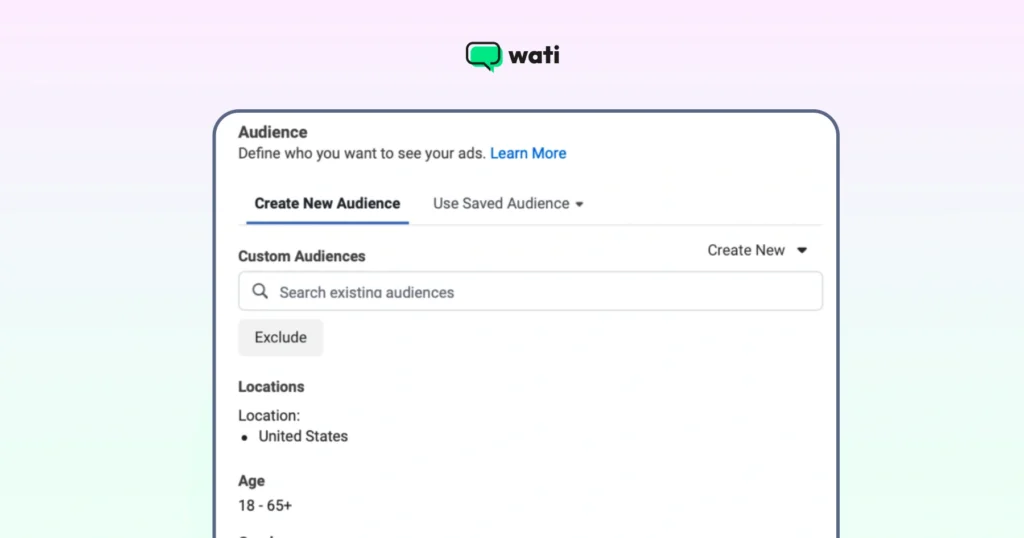
- Define Your Audience: Target based on location, age, gender, interests, and behaviors.
2. Select Ad Placements: Choose Instagram placements: Feed, Stories, Explore, or Automatic.
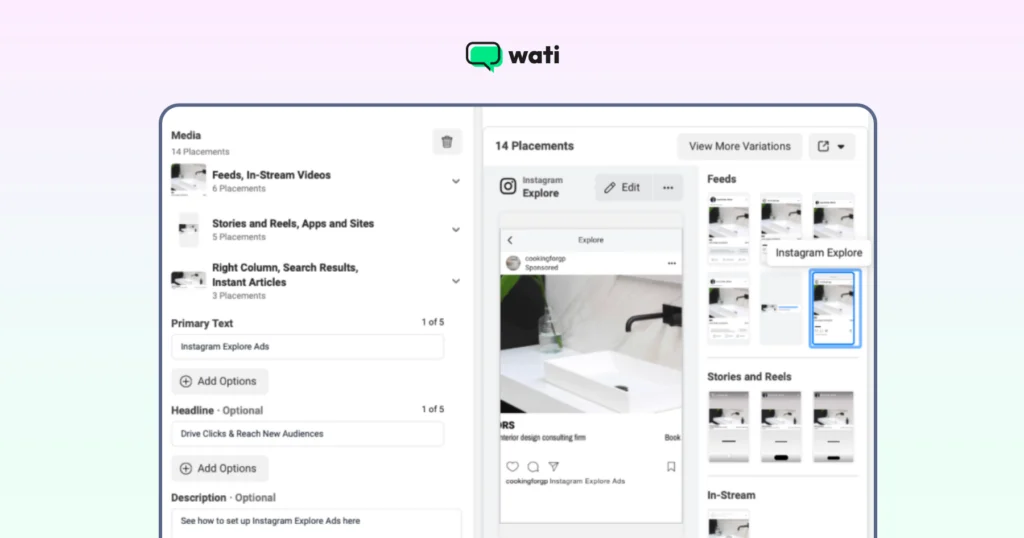
- Set Budget and Schedule: Decide on daily or lifetime budgets and schedule start and end dates. Upload visuals: images or videos. Write compelling copy and a strong call-to-action.
- Review and Publish. Double-check all settings and submit your ad for review and publication.
How to Calculate Total Cost Incurred For Instagram Advertisements?
Instagram advertising costs are influenced by several factors:
- Bidding Model: Choose between Cost Per Click (CPC) or Cost Per Mille (CPM), which is cost per 1,000 impressions.
- Ad Relevance and Quality: High-quality ads often cost less due to better engagement.
- Target Audience: Highly competitive audiences may increase costs.
- Ad Placement: Costs can vary between feed, Stories, and Explore placements.
To calculate costs:
- Set a Budget: Determine your daily or lifetime budget for the campaign.
- Select Bidding Strategy: Opt for automatic bidding or set a manual bid based on your budget.
- Estimate Reach: Use Facebook Ads Manager to see how many people you can reach with your budget.
- Monitor Performance: Regularly check your ad spend and adjust as necessary to optimize ROI.
Strategic Guide: Building an Instagram Strategy with WhatsApp
To dominate in 2026, your Instagram strategy shouldn’t just aim for “Likes”; it should aim for “Threads.” Here is how to build a high-converting funnel using WhatsApp automation.
1. The Entry Point: Click-to-WhatsApp (CTWA) Ads
Instead of sending users to a landing page where they might drop off, use Click-to-WhatsApp ads to directly route them to your WhatsApp customer service.
- How it works: When a user clicks your Instagram Ad, it opens a pre-filled chat in WhatsApp.
- The 72-Hour Advantage: In 2026, Meta provides a 72-hour free window for conversations started from CTWA ads. This means you can nurture the lead with multiple messages (follow-ups, catalogs) without paying additional template fees.
Also read: 20+ WhatsApp API templates to check out to run effective e-commerce campaigns and provide quick updates.
2. Streamlining Access: Link Generators & Click to Chat
Not every lead comes from a paid ad. Use a WhatsApp Link Generator to create custom “wa.me” links for:
- Instagram Bio: “Chat with our experts 24/7.”
- Instagram Stories: Use the “Link” sticker to drive traffic directly into a chat.
- Predefined Templates: Embed a specific message in the link (e.g., “I’m interested in the Summer Collection!”). This allows your automation to know exactly which product the user is looking at.
3. Scaling with AI: Astra & Wati AI
When thousands of users message you simultaneously, manual replies are impossible.
- Astra (Wati’s AI Agent): Astra acts as a digital salesperson. It can be trained on your website data and documents to answer complex product queries, suggest alternatives, and qualify leads.
- Wati AI: Helps your human agents summarize long chat histories in one click, ensuring they have the full context of the customer’s journey before jumping in.
Also read: How Wati uses Gemini 3.0 to infuse intelligence within inbound sales operations.
4. The Conversational Funnel: Automation & CRM
To create a seamless journey, integrate your WhatsApp API with your CRM (like HubSpot, Salesforce, or Shopify).
- Lead Capture: The moment a user chats, their name and verified phone number are automatically saved to your CRM.
- Interactive Templates: Use List Pickers and Reply Buttons instead of asking users to type. This reduces “friction” and speeds up the path to purchase.
- WhatsApp Flows: Use native forms in WhatsApp for bookings or surveys, so users never have to leave the app.
Also read: 60+ greeting messages that you can explore for WhatsApp marketing and direct customer relationships.
Bonus read: Learn how to integrate HubSpot with WhatsApp to get leads directly and build contextual awareness.
Summary Table: The 2026 WhatsApp Instagram Integration Strategy
| Feature | Role in Customer Journey | Benefit |
| Click-to-WhatsApp | Acquisition | Captures verified phone numbers instantly. |
| Predefined Templates | Intent Recognition | Tells you exactly what the user wants immediately. |
| Astra / Wati AI | Qualification | Handles 80% of FAQs and product queries 24/7. |
| CRM Integration | Retention | Syncs data for future personalized retargeting. |
| In-Chat Catalogs | Conversion | Allows users to browse and “Add to Cart” inside the chat. |
Also read: How to set abandoned cart recovery messages for verified users.
Start Your Instagram Journey Now!
Marketers have been missing out on ad market share and revenue via Instagram, when it is a direct D2C market with maximum potential!
By combining the powers of WhatsApp and Instagram, you can promote, engage, nurture, and convert your customers, all while spreading your brand footprint.
Using WhatsApp Business API tools like Wati streamlines your customer acquisition journey across different funnels, verifies the lead intent, and gives you a smooth conversational experience to grow sales.
Take a free demo of Wati to learn more.
Yes. Your Instagram Business Profile must be linked to a Facebook Page, which acts as the “legal entity” for the Meta Ads Manager and your WhatsApp Business API.
You can use the WhatsApp Business App for basic “Quick Replies” and “Labels.” However, for scaling (AI and CRM sync), you need a WhatsApp API provider like Wati.
It’s a text that appears in the user’s text box automatically after they click your ad. It makes it easier for them to start the conversation—they just have to hit “Send.”
Yes. You can set up a “No-Code” chatbot to guide the user through your catalog and even provide payment links via integrations.
By using Wati’s Analytics Dashboard, you can track “Chat Starts” vs. “Conversions.” You can also feed this data back to Meta’s Conversions API (CAPI) to optimize your ad spend.
Yes. You get verified phone numbers immediately, and the real-time nature of chat leads to significantly higher conversion rates than email-based follow-ups.