
Too Long? Read This First
- A two-step numbered menu asks for the phone brand, then the model, because TikTok DMs don't show buttons.
- A keyword rule on model names lets shoppers who type "s26 ultra" or "17 pro max" skip the brand question.
- The reply is an image of the case on that model, followed by a text with the price and link.
- Keyword rules answer wattage, warranty, and "is it original?" questions with proof.
- Bulk, premium, and large cash-on-delivery orders go straight to your team.
A phone case can look perfect in a TikTok video, but shoppers won't buy it until they know it fits their device.
The same goes for chargers, screen protectors, and other phone accessories.
A quick compatibility check can make the difference between a sale and an abandoned conversation.
With Wati's TikTok Business Messaging, phone accessory brands can automate these checks through simple DM conversations.
A chatbot asks shoppers for their phone brand and model, then shares the matching product image and link.
This guide shows you how to build a two-step phone model picker, create compatibility rules, answer common product questions, and route complex inquiries to your team.
Why Phone Compatibility Matters for Accessory Sales in the GCC and Mexico
A phone case or charger only sells if it works with the shopper's exact device. A quick compatibility check can remove that last doubt before purchase, while a wrong recommendation can lead to returns.
As online shopping for electronics grows, shoppers need clear product information before they buy. Two markets show why this matters:
- UAE and Saudi Arabia: Online sales of technology and durable goods grew by more than 19%, according to NielsenIQ's Q2 2026 report.
- Mexico: Since TikTok Shop launched in February 2025, its average daily sales have grown 34 times in eight months. Active sellers and creators grew 23-fold.
- Electronics on TikTok Shop Mexico: Orders average around USD 28–29, according to Orca, which operates brands on the platform.
For accessory brands, answering product questions quickly can help shoppers make a decision without a long DM exchange.
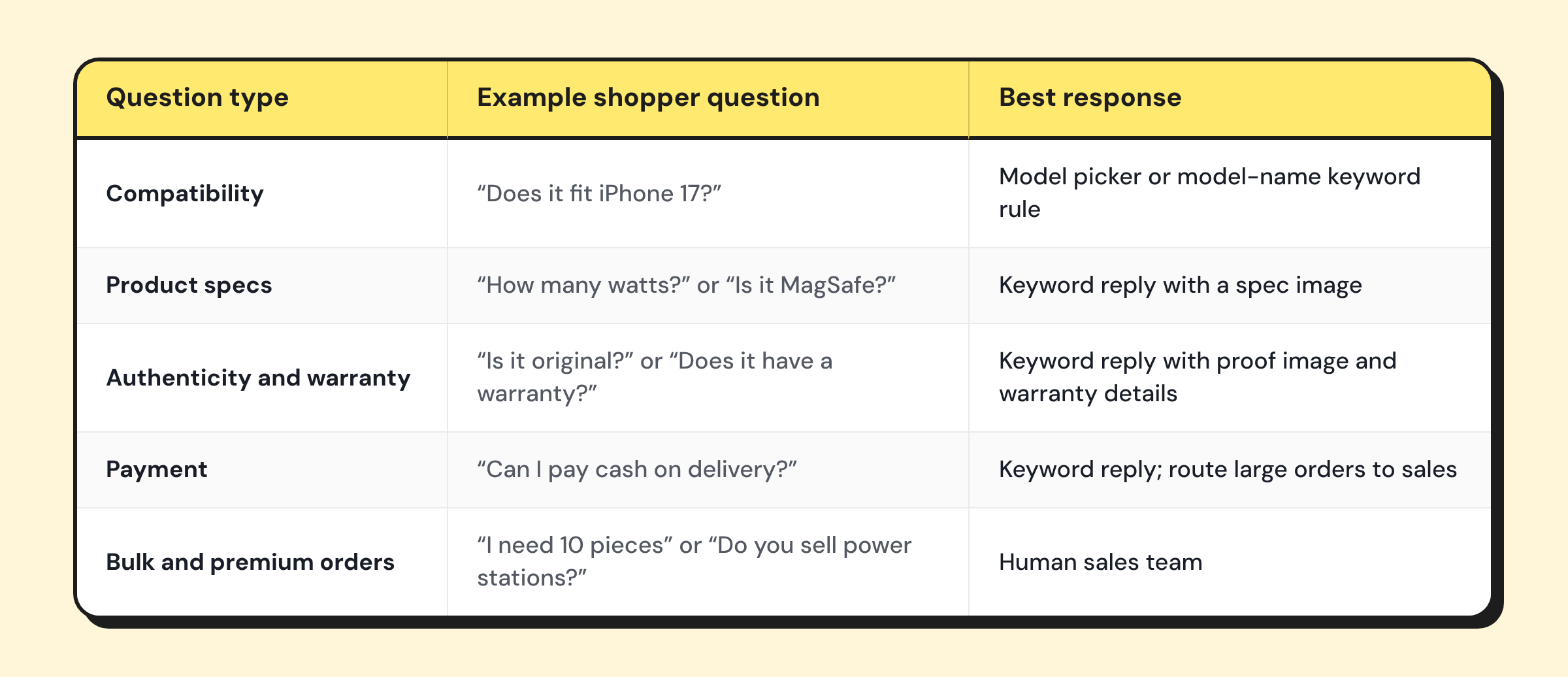
Which Phone Accessory Questions Can You Automate?
Not every question needs a human agent. Use keyword rules and chatbots for routine queries, and route more complex requests to your team.
Phone Case Compatibility in TikTok DMs: Build a Two-Step Model Picker
A two-step model picker asks shoppers for their phone brand first, then their exact model. This helps them find the right case in just two replies, even if your store stocks dozens of models.
Since TikTok DMs don't support interactive buttons, shoppers select an option by typing its number. Keep the menus short so they're easy to read on a phone:
- Step 1: List up to 6 phone brands.
- Step 2: Show up to 8 models for the selected brand.
- Option 0: Let shoppers choose "Not listed" or speak to your team.
i. Example: An iPhone Shopper
The chatbot starts by asking for the phone brand, then shows the relevant iPhone models.
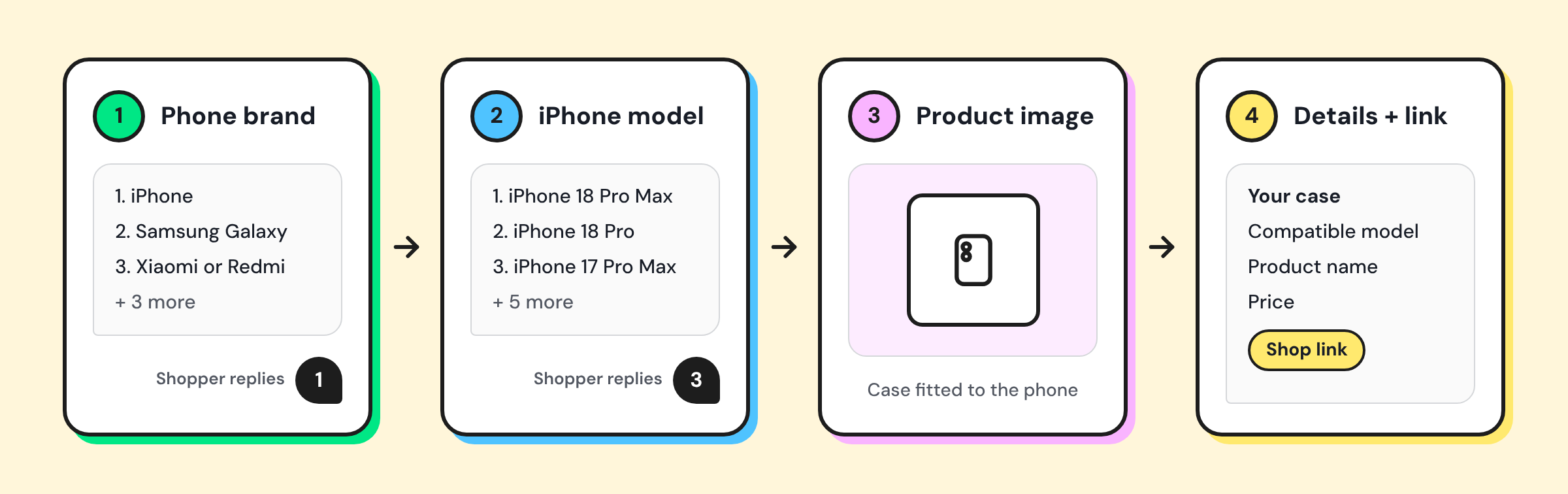
Message 1: Choose your phone brand
Chatbot message |
|---|
Hi! Let's find the case that fits. Which phone do you have? Reply with a number: |
1. iPhone |
2. Samsung Galaxy |
3. Xiaomi or Redmi |
4. Huawei |
5. Other |
0. Talk to our team |
Message 2: Choose your iPhone model
Chatbot message |
|---|
Which iPhone do you have? Reply with a number: |
1. iPhone 18 Pro Max |
2. iPhone 18 Pro |
3. iPhone 17 Pro Max |
4. iPhone 17 Pro |
5. iPhone Air |
6. iPhone 17 |
7. iPhone 16 series |
0. Not listed |
Message 3: Send the matching product image
Show an image of the case fitted to the selected phone model.
Message 4: Share the product details
Send a text with the compatible model, product name, price, and shopping link.
How to Build the Picker in Wati
Use these chatbot steps to connect each shopper's answer to the right recommendation:
- Ask a question: Save the shopper's phone brand and model replies.
- Set a condition: Route each numbered answer to its matching branch.
- Set or remove tags: Record the selected model with a tag such as
model_iphone17promax. - Send a message: Share the matching case image, followed by its product details and link.
- Assign team or user: If the shopper selects an option that isn't listed or gives an invalid answer twice, pass the chat to your team.
You can reuse this two-step flow for every phone brand you stock. Just update the model lists, matching tags, and product recommendations.
Let Shoppers Skip the Menu with Model-Name Keyword Rules
Many shoppers type their model instead of waiting for a menu. A keyword rule that matches model names skips the brand question and gets them to the right case faster.
Use two kinds of model rules:
- Unique names go straight to the case: "s26 ultra" and "s26u" send the Galaxy S26 Ultra image and link in two messages.
- Shared names go to step 2: "17 pro," "17 pro max," "18 pro," and "18 pro max" share words, so one iPhone rule opens the iPhone model list.
Keep overlapping names in one rule. When two keyword rules match the same DM, both of them reply.
When no keyword rule matches, the picker rule starts the two-step menu instead.
Build the Compatibility Table Your Bot Reads From
A compatibility table lists every model you support next to its case, screen protector, charger, and image. Your bot, your team, and your product pages then give the same answer.
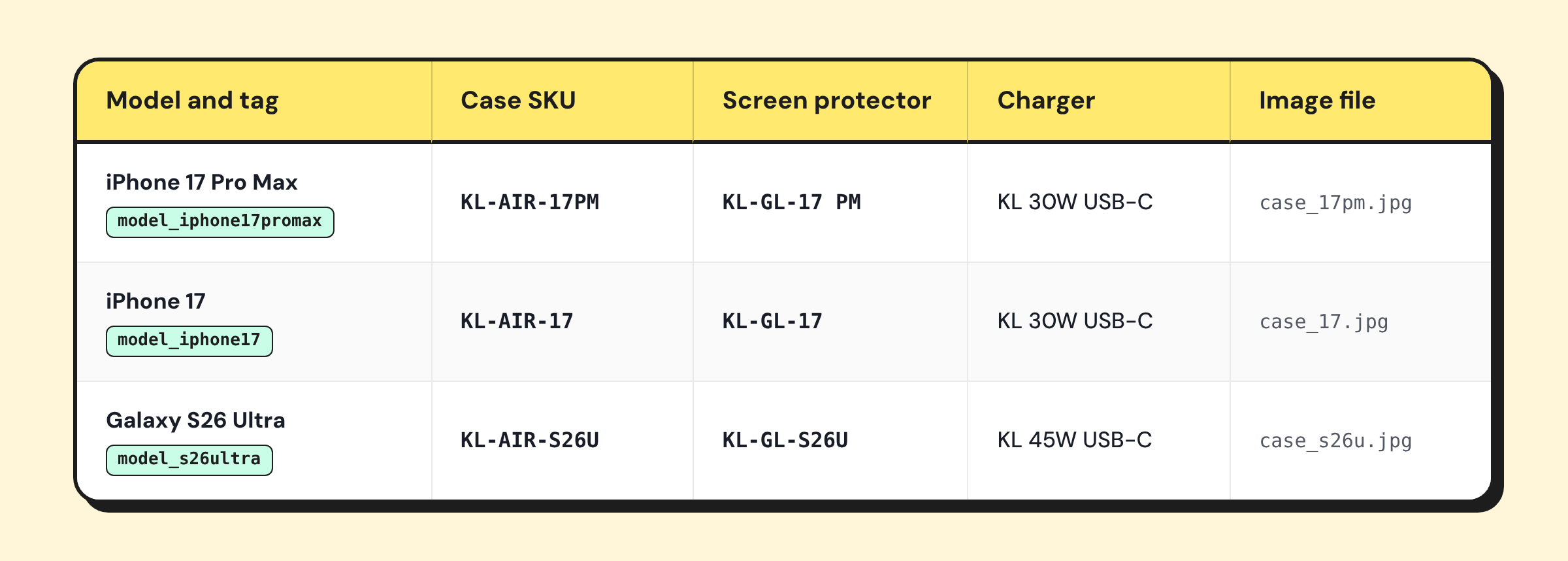
Example only. Kase Lab and its SKUs are fictional.
Never assume a case fits the next generation of a phone. Test each case on the device before you add its row.
When a new phone launches, update three things on the same day:
- Menu: add the model to message 2.
- Rule: add a keyword rule for the new model name.
- Image: upload the case photo, or reply "coming soon" and tag the shopper until stock arrives.
Send the Compatible Case Image and Link
Send an image of the exact case on the selected phone model first. Follow it with a separate text message that includes the product name, price, and link, since TikTok image messages can't include a caption.
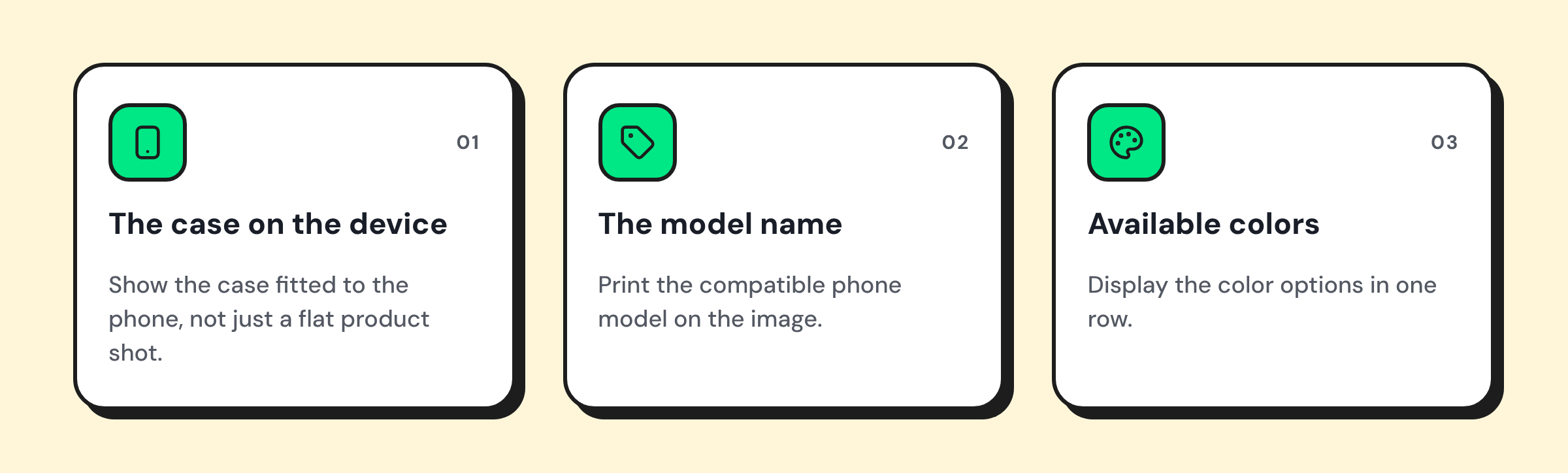
A good compatibility image should show:
Message: Product Details for the iPhone Shopper
Chatbot message |
|---|
Fits your iPhone 17 Pro Max ✅ |
Kase Lab Air Case, clear, with MagSafe magnets |
Price: AED 79 |
Reply 1 to see other colors or 0 to talk to us. |
Add the product link at the end of the message. Repeat the phone model and product name so shoppers know exactly which case they're viewing.
TikTok delivers images only when both countries in the conversation support image messaging.
In Mexico, the link can open your TikTok Shop listing. If your catalog runs through the TikTok Shopify app, use the product URL your store already shares.
Answer Charger Wattage and MagSafe Questions Automatically
A keyword rule on "watt," "fast charge," "MagSafe," and "Qi2" answers spec questions with one image and one text. The shopper learns what your product does with their phone.
Send your spec card as the image, then a text like this:
Sample reply |
|---|
Our 30W USB-C charger works with your iPhone 17 Pro Max. Charging speed also depends on your phone and cable. |
Keep these replies accurate:
- State your product's specs only: Don't quote the phone maker's charging figures.
- Ask for the model first: If the chat has no model tag, ask "Which phone do you have?" and start the picker.
- Send other devices to your team: Laptop and tablet charger questions need a person.
Answer "Is it Original?" and Warranty Questions with Proof
A keyword rule for "original," "copy," "fake," and "warranty" can trigger a reply with a proof image and your warranty terms. Show the sealed box, a certification mark, or the warranty card.
Pair the image with a short text:
Sample reply |
|---|
Yes, this is an original Kase Lab product. Every order ships sealed with a 12-month warranty card. Send your order number if you need help with a claim. |
Show proof of your own product rather than naming or comparing other brands. Route every warranty claim to an agent so they can check the order and help the customer.
Shoppers in the GCC and Mexico may use different languages. Add the relevant local-language keywords to the same rules.
Route COD and High-Value Orders to Your Team
Send any chat that a bot can't price safely to a person. That includes bulk requests, premium products, and cash-on-delivery orders above your limit.
Set three handoff triggers:
- Quantity: an "Ask a question" step asks "How many pieces?" A "Set a condition" step with Greater Than 4 assigns orders of 5 or more to sales.
- Premium products: power stations and bundles get a high_value tag and go to sales.
- Bulk words: "wholesale," "bulk," and "reseller" trigger a rule that assigns the chat.
A keyword rule on "cash on delivery" and "COD" shares your COD terms.
Orders above your limit go to an agent, who confirms the address and phone number.
The agent sees the model tag, the high_value tag, and the full chatbot history in one chat.
What Breaks a TikTok Model Picker
Most picker problems come from four causes: long replies, untested models, ineligible accounts, and missing images. Each one has a simple fix.
- Long replies: TikTok's messaging rules allow 10 messages in the first 48 hours. Keep each step to one or two messages.
- Untested models: add a model only after a physical fit test.
- Ineligible accounts: TikTok messaging isn't available for accounts signed up in the US, the EEA, Switzerland, the UK, or India.
- Missing images: repeat the key details in text every time.
How Wati Runs a Model Picker in Your TikTok Inbox
Wati brings TikTok DMs into one shared Team Inbox alongside WhatsApp, Instagram, Messenger, webchat, SMS, and RCS.
Your team can assign conversations, add tags and internal notes, and see when a chatbot is handling a conversation.
A rule with the trigger "New TikTok message is received" starts the picker. Add two filters: "Contact initiates a new chat" and "No keyword rule(s) matches."
The second filter prevents the picker from replying when a model, wattage, or warranty keyword rule has already matched.
Model-name keyword rules handle these conversations separately.
Inside the chatbot, the model picker uses these steps:
- Ask a question: Saves the shopper's phone brand and model replies.
- Set a condition: Routes each numbered answer to the matching branch.
- Set or remove tags: Records the selected model for your team and future campaigns.
- Send a message: Delivers the compatible case image, followed by the product details and link.
- Assign team or user: Routes COD, bulk, and premium inquiries to a team member.
To connect TikTok, you need a TikTok Business Account with Advanced Access and "Allow everyone to send direct messages" turned on. See Wati's guide to TikTok automation rules.
Conversations started through TikTok Direct Messaging Ads also land in the same inbox.
Turn Phone Compatibility Questions into TikTok Sales
Help shoppers find the right case without a long back-and-forth. Automate model checks, share compatible product images and links, and route bulk or premium inquiries to your sales team.
Book a demo to see how Wati can automate phone compatibility checks in TikTok DMs.
Frequently asked questions
Can You Send Product Images in TikTok DMs?
Yes. Wati sends TikTok images as separate messages without a caption, so the price and link go in a text right after. TikTok delivers images only when both countries in the chat support them. Repeat the model and product name in the text so the answer still works.
Does TikTok Allow Buttons in Business DMs?
No. Buttons appear as plain text in TikTok DMs, so a menu has to be a numbered list. Keep each list short, and let a keyword rule catch shoppers who type their model name instead of a number.
Is TikTok Business Messaging Available in the UAE, Saudi Arabia, and Mexico?
Yes, for TikTok Business Accounts signed up in those countries. Availability depends on where the account was signed up, not where your team works. It isn't available for accounts signed up in the US, the EEA, Switzerland, the UK, or India.
How Many Messages can a Brand Send in a TikTok DM?
A brand can send 10 messages in the 48 hours after a shopper's first message. Each shopper reply opens a new 48-hour window with no limit. After 48 hours of silence, the brand can send 3 more messages. A brand can't message a shopper first.
Can Shoppers Pay Cash on Delivery after a TikTok DM?
Yes, if your own store offers cash on delivery. A keyword rule on "COD" and "cash on delivery" shares your terms in the DM. Orders above your COD limit go to an agent, who confirms the address and phone number before shipping.
Related posts
- Selling Perfume on TikTok Shop: How Fragrance Brands Handle Every Conversation Around the Shop
Learn how to sell perfume on TikTok Shop by managing shopper questions, scent recommendations, creator enquiries, and post-LIVE follow-ups. Discover how to route conversations between Seller Center and brand DMs, follow TikTok Shop rules, and use Wati's TikTok Business Messaging to automate replies and manage customer conversations.
- TikTok Shop Customer Service for Perfume Brands: Answer "Is it Original?" at Scale
Learn how perfume brands can manage TikTok Shop customer service across Seller Center chat and brand DMs. Discover how to automate common questions about authenticity, testers, longevity, and gift wrapping with Wati, while routing order issues and damaged bottles to the right team.
- TikTok Perfume DMs: How Perfume and Oud Brands Recommend the Right Scent
Help perfume and oud brands turn TikTok DMs into product recommendations with a simple scent finder. Learn how to build a four-message chatbot that matches shoppers with perfumes based on occasion and scent preference, shares product details, and brings gift buyers to WhatsApp for follow-up reminders.
- TikTok Shop Customer Service for Skincare Brands: Split Shop Chat and Brand DMs
TikTok Shop skincare brands manage customer messages across two inboxes: Seller Center chat for Shop orders and brand DMs for product questions, website orders, and other enquiries. Learn how to route messages, meet response targets, automate routine FAQs with Wati, and ensure sensitive skincare concerns reach human support.