
Too Long? Read This First
- Ask buyers to comment one claim word plus an item code, such as MINE A12, and give the item to the earliest comment.
- Send each claimer a Messenger DM with the item, price, and payment or COD option, ending with "Reply YES to confirm."
- Comments during a broadcast don't trigger comment-to-DM automation, so show an m.me link or QR code on screen.
- Once the live is published as a video on your Page, comments on the replay can trigger a comment-to-DM rule.
- Confirm or release every claim within 24 hours, because after that only your team can reply for up to 7 days.
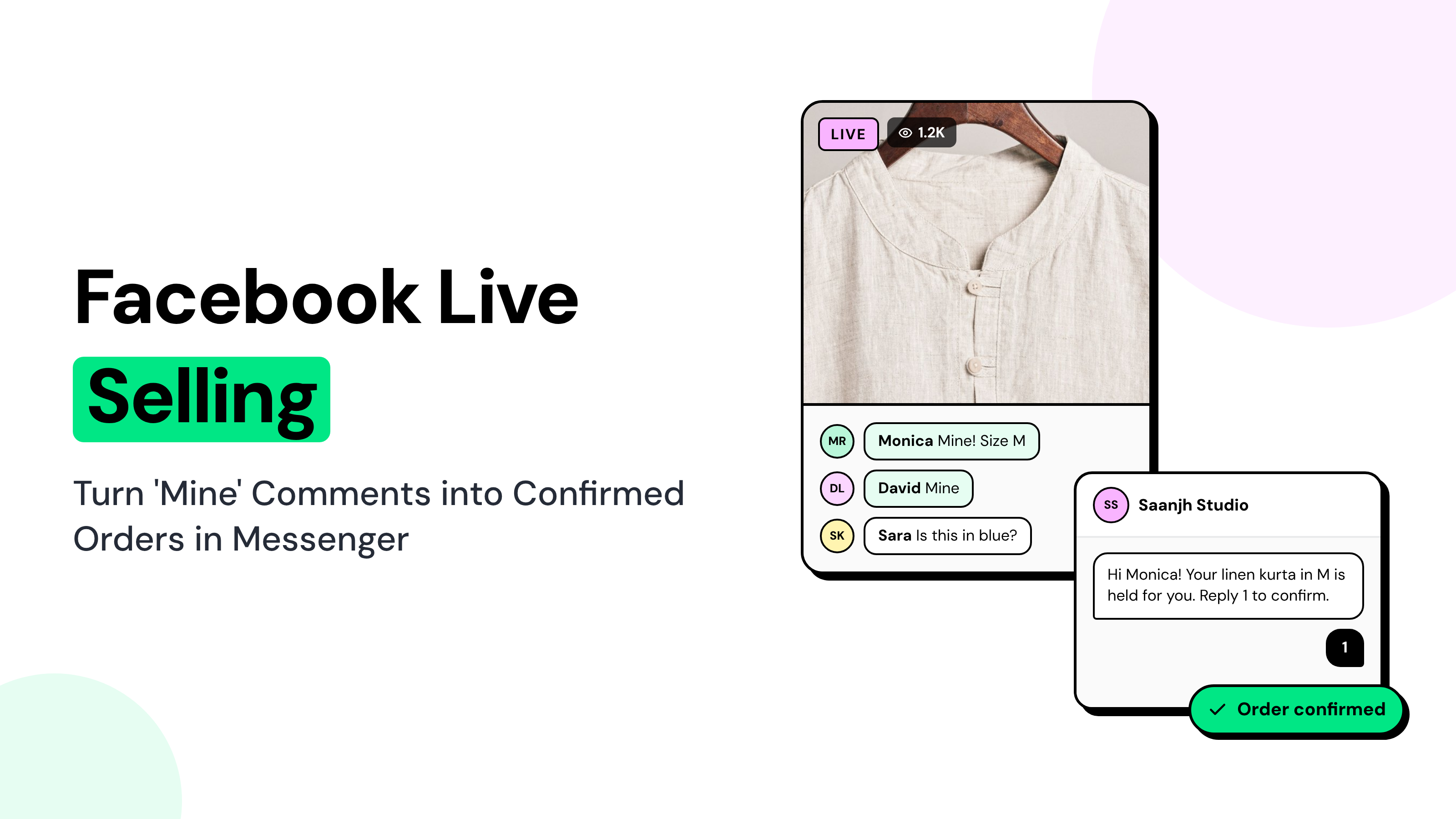
A Facebook Live selling can attract dozens of buyers commenting "mine" within seconds. But when multiple people claim the same item, keeping track of who gets it, who has paid, and who still needs confirmation can be difficult.
The host can focus on selling, but someone still needs to manage the claims.
Without a clear process, comments get missed, duplicate claims create confusion, and unpaid orders can block genuine buyers.
Wati's Facebook Messenger automation helps turn those claims into confirmed orders.
Buyers receive a Messenger confirmation with the item, price, and payment or COD options, while your moderators manage conversations from one Team Inbox.
In this guide, you'll learn how to set up claim codes, send order confirmation messages, organize a moderator team, and follow up on unpaid claims within Messenger's messaging window.
How Does Facebook Live Selling Work?
Facebook Live selling lets businesses showcase products during a live broadcast while viewers claim items by commenting on the video.
A comment such as "MINE A12" indicates to the seller which product the buyer wants.
Live commerce is gaining traction across markets.
Grand View Research estimates that Latin America's live-commerce market was worth US$3.87 billion in 2024 and could reach US$32.08 billion by 2033.
Unlike a traditional online checkout, Facebook Live selling relies on comments and Messenger conversations to coordinate purchases.
The seller confirms the item, price, and payment method before completing the order.
Meta discontinued its Live Shopping feature, which allowed sellers to tag products in Facebook Live videos, in October 2022.
However, businesses can still sell through regular Facebook Live broadcasts. A claim is a buyer's public comment that reserves one item during a live sale.
How to Sell on Facebook Live without Losing Claims
To sell successfully on Facebook Live, divide the work between the host and your moderators.
The host focuses on showcasing products and engaging viewers, while moderators track claims, confirm orders, and follow up on payments.
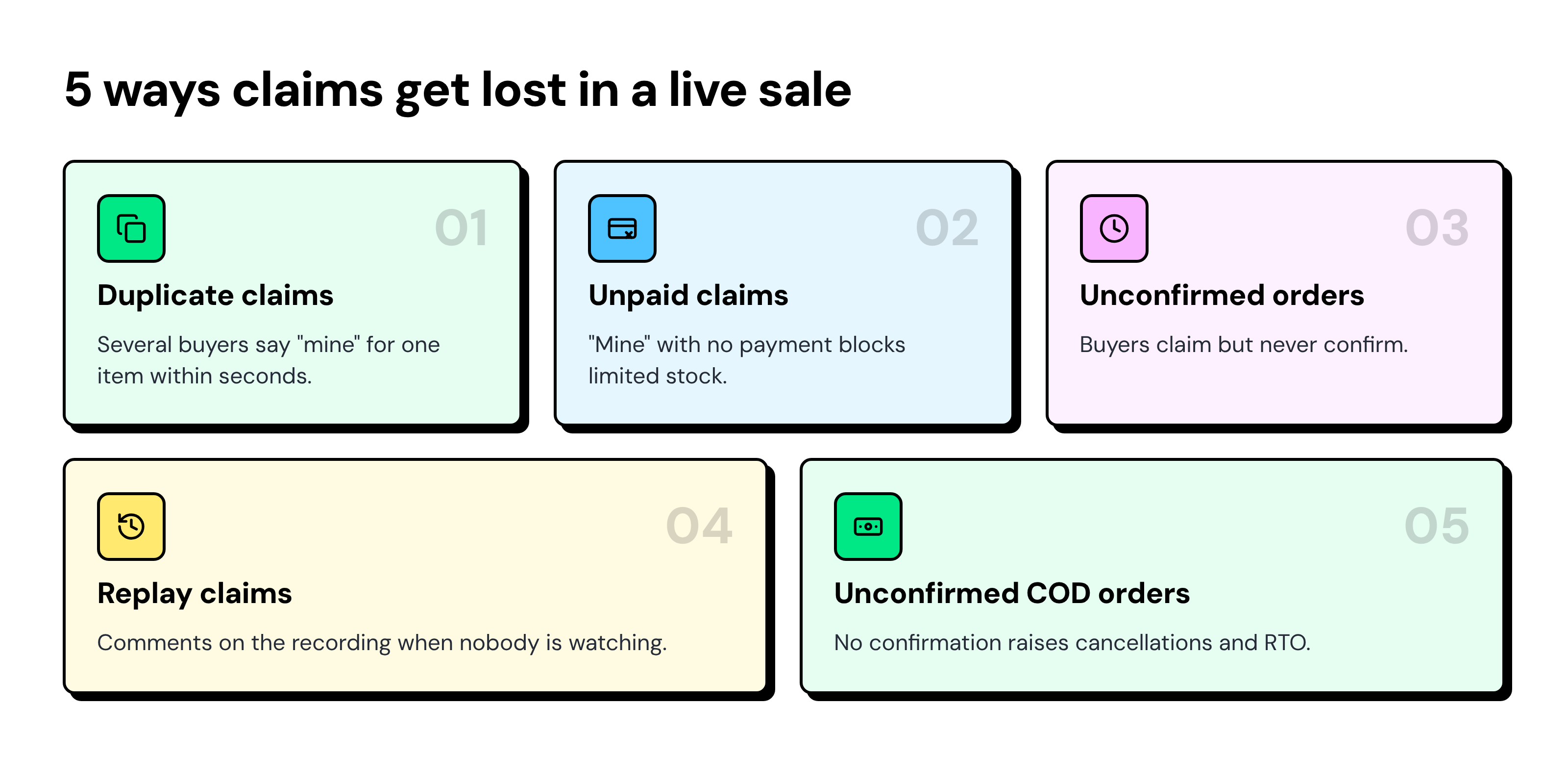
Without a clear process, five common problems can disrupt a live sale:
How Should Buyers Claim Products During a Facebook Live Sale?
Ask viewers to comment with a claim word followed by the product code, such as "MINE A12".
Display the format throughout the broadcast so buyers know exactly how to reserve an item.
For products with limited sizes or colors, ask buyers to include the variant too, such as "MINE A12 M" for a medium-sized item.
Format | Example | Best for | Watch out for |
|---|---|---|---|
Word + code | MINE A12 | Most live sales | Nothing major; this is the safest default |
Code only | A12 | Fast product drops | Codes must not look like prices or sizes |
Word + code + variant | MINE A12 M | Small stock per size or color | Takes buyers longer to type |
Tie rule: The earliest comment wins the item. The next claimer goes on a waitlist in case the first buyer doesn't confirm.
Buyers in each market use different claim words. Add the local words and the English fallback to the same keyword rule.
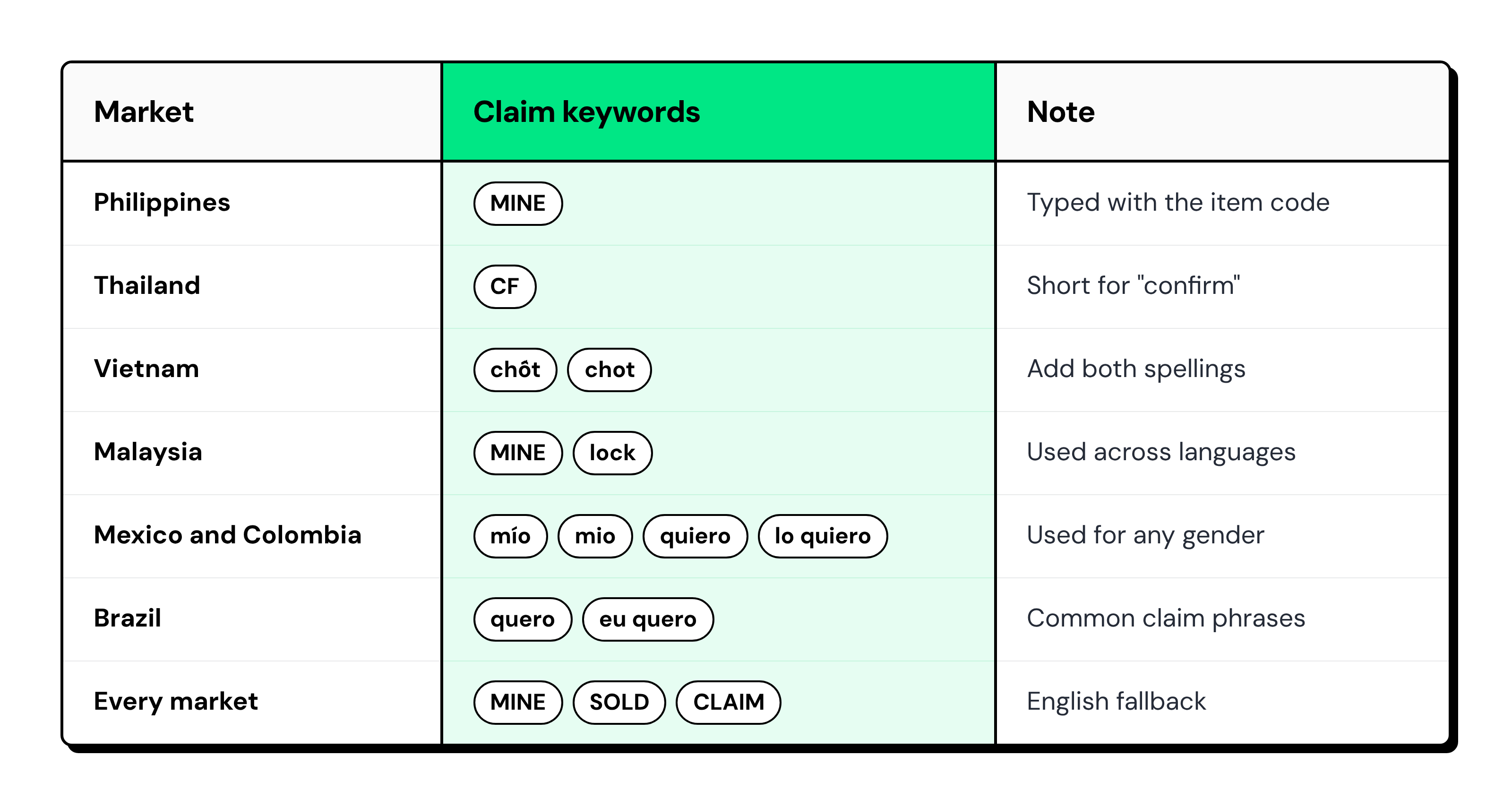
Four keyword settings keep the rule accurate:
- Match on the item code: Add the item code as a keyword with "Contains", so MINE A12, A12 and A12 M all trigger the reply. Use codes that never start with another code (A01 to A99, not A1 and A12), because Contains matches “A1” inside “A12”.
- Add every spelling: Enter a word with and without its accent mark as two separate keywords.
- Avoid short words with Contains: A short word can appear inside unrelated comments and trigger the rule by mistake.
- Use Fuzzy for typos: Fuzzy matching catches small spelling mistakes in fast comments.
Create one comment-to-DM rule per item code on the replay post, with that item’s name, price, and payment link in its DM. Keep claim words like MINE out of item rules, or every claim gets the same item’s message.
What should the Order Confirmation DM Say?
The order confirmation DM should repeat the item, size, and price, provide payment or COD options, and end with a question. The buyer's answer confirms the order.
Meta lets a Page send one private reply to each comment. The buyer's reply is what keeps your team's conversation going.
Prepaid template:
Hi [name]! Thanks for claiming A12, Linen Shirt in size M! We're checking the claim queue and will confirm your spot here shortly. Please wait for our confirmation before making payment. |
Cash-on-delivery template:
Hi [name]! You claimed A12, Linen Shirt in size M, at the live-only price of [price]. Please send your delivery area so we can confirm shipping. Reply COD to confirm cash on delivery, or NO to release it. |
Joy-miner rule: Set a reply deadline, such as two hours after the live ends. If the buyer doesn't reply, release the item and offer it to the next buyer on the waitlist.
Live-only price: Always state when the price ends, such as midnight on the day of the live. Buyers then know how long the offer holds.
Write the DM in the language your buyers use. The templates here are in English to show the structure.
How do Claims Reach Messenger during and after the Live?
During a live broadcast, buyers use an on-screen Messenger link or QR code to start a conversation and submit their claim code.
Once the Live ends, comment-to-DM automation can handle matching claims on the recorded video.
Comments posted during an active Facebook Live broadcast do not trigger Wati's comment-to-DM automation.
However, once the broadcast ends and the replay is published as a video on the Facebook Page, comments on that replay trigger the New Facebook comment is received rule, just like comments on regular posts and Reels.
During the live | After the live (replay) | |
|---|---|---|
How the buyer claims | Taps the m.me link or scans the QR code, then sends "MINE A12" in Messenger | Comments "MINE A12" on the recorded video |
What sends the confirmation | A Messenger keyword rule | A comment-to-DM rule on the video post |
Can automation reply? | Yes, because the buyer messaged first | Yes, one private reply per comment, within 7 days of the comment |
Who watches the comments | A moderator who points buyers to the link | Your team, from the Team Inbox |
An m.me link is a short link to your Page, such as m.me/YourPageName, that opens a Messenger chat. Turn it into a QR code and keep it on screen.
Inside Messenger, keyword rules send the confirmation DM the moment a buyer types the claim.
On the replay, turn off “Also send a reply to comment” when the DM includes a payment link, because the public reply posts the same text as the DM.
How should a Moderator Team Run the Inbox during a Live?
Give each helper one job, route every live chat to a "Live" team, and tag each chat by order status.
Helpers | Host | Helper 1 | Helper 2 | Helper 3 |
|---|---|---|---|---|
1 | Sells and reads codes aloud | Claims, confirmations, and payments | — | — |
2 | Sells | Claim checker and waitlist | Confirmations and payments | — |
3 | Sells | Claim checker | Confirmations | Payment checker |
Use the same five tags on every live:
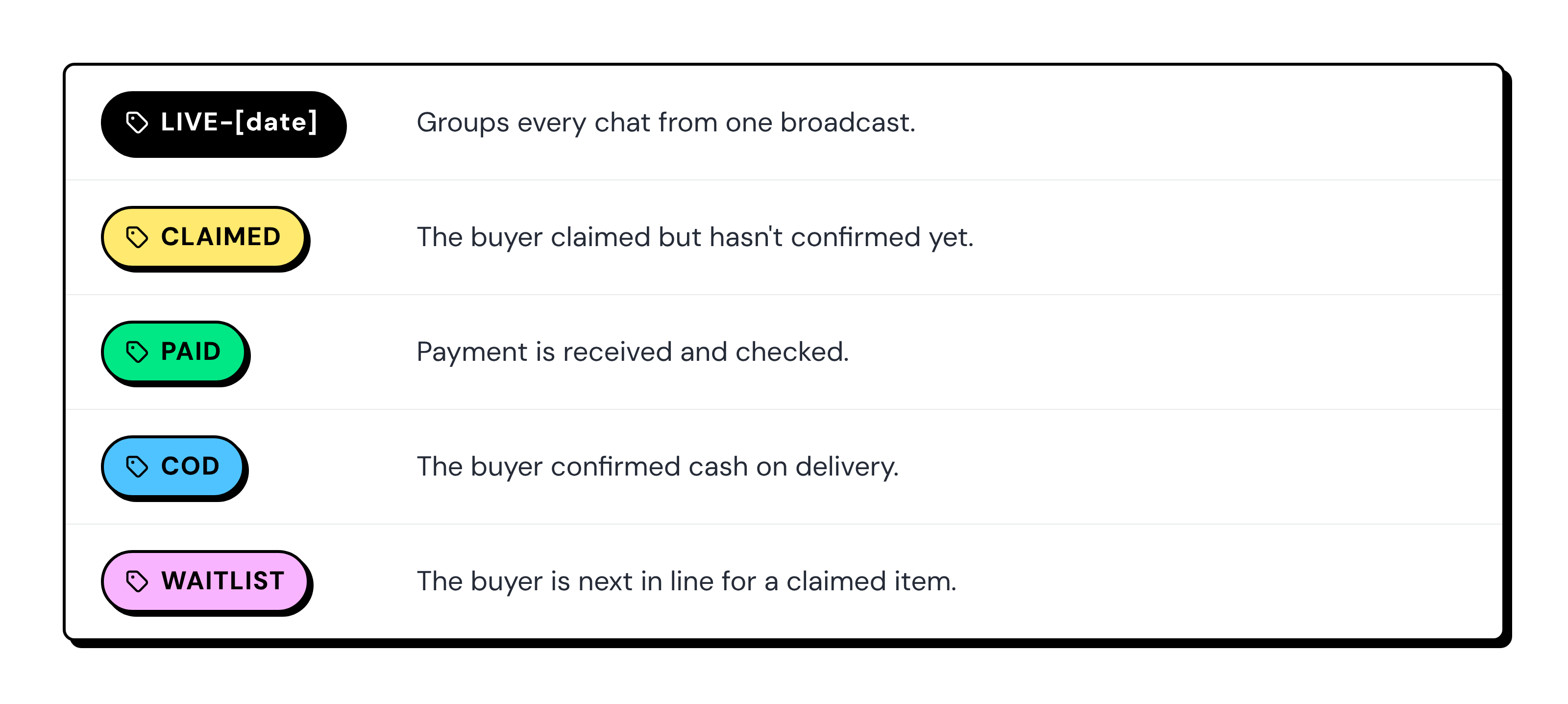
Add internal notes with the item code, size, and payment reference. Any support rep can then pick up the chat without having to ask the buyer again.
Assign chats to the Live team, not to a single person, so no claims wait in a personal queue. Your team can also reply to Page comments from the same inbox.
Note: Automatic routing and tagging through chatbot workflows require Wati's Pro or Business plan. On the Growth plan, moderators must assign chats to team members and apply order-status tags manually.
What Happens in the 24 Hours After the Live?
The first 24 hours after a Facebook Live are for closing pending orders.
Your team needs to confirm claims, collect payments, release unclaimed items, and follow up with buyers who haven't responded.
Messenger rules and chatbots can send automated replies within 24 hours of the buyer's last message.
Once that window closes, automation stops. If a teammate replied within those 24 hours, your team can keep replying for up to 7 days.
When | What to do |
|---|---|
0-2 hours | Manually remind CLAIMED buyers who started a chat but haven't confirmed. Turn on the comment-to-DM rule for the recorded video |
2-12 hours | Manually offer unconfirmed items to WAITLIST buyers. Manually remind confirmed buyers to pay |
12-24 hours | Send last reminders by hand from Team Inbox, within 24 hours of each buyer’s last message |
Day 2-7 | Reply by hand only, and only about the existing order |
Don't send promotions between day 2 and day 7.
Replies in that window should only help the buyer finish or fix their order.
Questions after the parcel ships, such as delivery status or returns, go to your support reps in the same inbox.
How Wati Runs the Claim Desk for Facebook Live Sellers
Wati brings Messenger chats and Facebook Page comments into one Team Inbox. The confirmation work of a live sale happens in one place.
- Messenger keyword rules: Reply to "MINE A12" messages with your confirmation DM during the live.
- Facebook comment-to-DM: Send a text DM, plus an optional public reply, when a reply comment matches your keyword. The DM can include a payment link.
- Facebook Comments in Team Inbox: Reply publicly or send a private message without opening Facebook.
- Teams, tags and notes: Route chats to your Live team and track claimed, paid, COD and waitlist orders.
- Multiple Pages: Manage several Facebook Pages in one inbox on the Business plan.
What to Watch Out for When Automating Facebook Live Sales
Six limits shape how a Facebook Live claim desk works in Messenger.
- Live comments: Messenger automation doesn't trigger from comments during the broadcast. Keep an m.me link or QR code visible so buyers can start a conversation.
- One private reply per comment: Make the initial comment-triggered message count by including the product details and a clear next step.
- Comment-to-DM format: Keep the private reply simple and text-based, with the relevant payment or product link.
- No chatbot buttons: Messenger chatbots rely on typed responses, so ask buyers to reply with words or numbers such as YES, COD, or NO.
- Stock management: Keep your inventory sheet or order management system updated so unavailable items can be released to waitlisted buyers.
- Messaging windows: Rules and chatbots operate within the 24-hour messaging window. Plan automated confirmations and follow-ups accordingly.
Turn Facebook Live Claims into Confirmed Orders with Messenger Automation
A successful Facebook Live sale doesn't end when a buyer comments "mine." Every claim needs a confirmation, every payment needs tracking, and every unconfirmed order needs timely follow-up.
With Wati, you can automate claim confirmations via Messenger, give moderators a shared inbox to manage payments and COD orders, and track buyers who have yet to confirm.
Your host can focus on showcasing products while your team makes sure genuine claims don't get lost in the comments.
Book a demo to see how Wati helps your team manage Facebook Live sales and turn product claims into confirmed orders.
Frequently asked questions
Can You Still do Live Selling on Facebook?
Yes. You can still sell through Facebook Live and confirm orders in Messenger. Meta removed only its Live Shopping product-tag tool in 2022. Comment-based selling, where buyers claim items with a word and a code, works on regular Facebook Live.
Can I Automatically DM Everyone Who Comments "Mine" during a Facebook Live?
No. Comments posted during the broadcast don't trigger Wati's comment-to-DM rule. Show an m.me link or QR code so buyers message your Page directly. Once the live is published as a video, comments on the replay can trigger a comment-to-DM rule.
How do I Stop Joy Miners on Facebook Live?
Ask every claimer to reply YES within a set time, such as two hours after the live. Release unconfirmed items to the next buyer on your waitlist. Tag repeat no-shows in your inbox so your team can spot them on the next live.
How Long can a Business Reply to a Buyer on Messenger?
Rules and chatbots can reply within 24 hours of the buyer's last message. After that, your team can reply by hand for up to 7 days. Replies in the 7-day window should be about the buyer's existing order, not promotions.
What is the Easiest Way to Sell on Facebook Live with a Small Team?
Start with one host and one helper. The host sells, and the helper confirms claims in a shared inbox. Use a claim code like MINE A12, one confirmation DM template, five tags and a 24-hour follow-up plan.
Related posts
- TikTok Order Tracking for Fashion Brands: Handle WISMO and Size Exchanges in One Reply
TikTok order tracking for fashion brands: a chatbot checks Shopify in the first reply, routes size exchanges to ops, and moves shipping updates to WhatsApp.
- Warranty Claims on TikTok: Customer Service for Phone Accessory Brands
What does a good warranty claim process look like for phone accessory brands on TikTok? Collect the order, model, and a photo in DMs, then hand off.
- Selling Skincare on TikTok Shop: How Beauty Brands Handle Every Conversation Around the Shop
How do beauty brands sell on TikTok Shop? Let the Shop handle checkout, and answer skin-type, shade, and creator DMs from one team inbox.
- How Retail Brands Sell on Instagram Without Missing a Single DM
To sell on Instagram, reply to price DMs fast, turn comments into orders, and follow up on WhatsApp. See 7 retail use cases that make it work.