
Too Long? Read This First
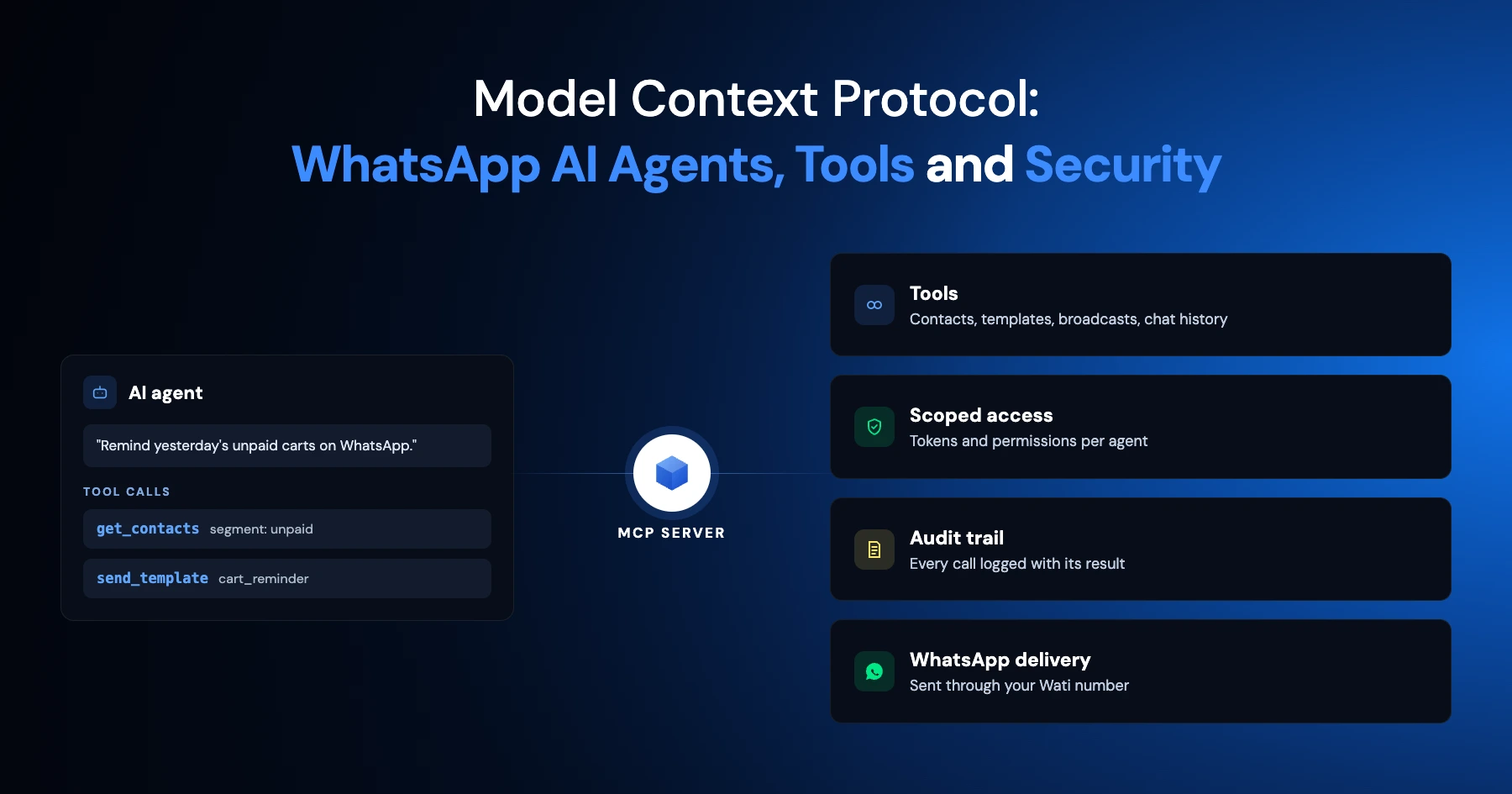
- MCP is an open standard connecting AI apps to external data, tools, and workflows through one shared interface, not a custom integration per service.
- It uses a host-client-server model: the host is the AI app, the client talks MCP on its behalf, and the server exposes resources (read-only context), prompts (reusable instructions), and tools (actions).
- Wati MCP connects Claude, ChatGPT, and other MCP-compatible hosts to WhatsApp Business. Manage contacts, conversations, templates, campaigns, and AI agents, all in natural language.
- It cuts integration overhead and enables agentic workflows, but AI access to WhatsApp brings real risks: permissions, prompt injection, unintended actions.
- Mitigate with trusted servers, scoped permissions, confirmation on write actions, and regular access reviews.
- Bottom line: one AI interface for WhatsApp operations, no custom integration to build or maintain.
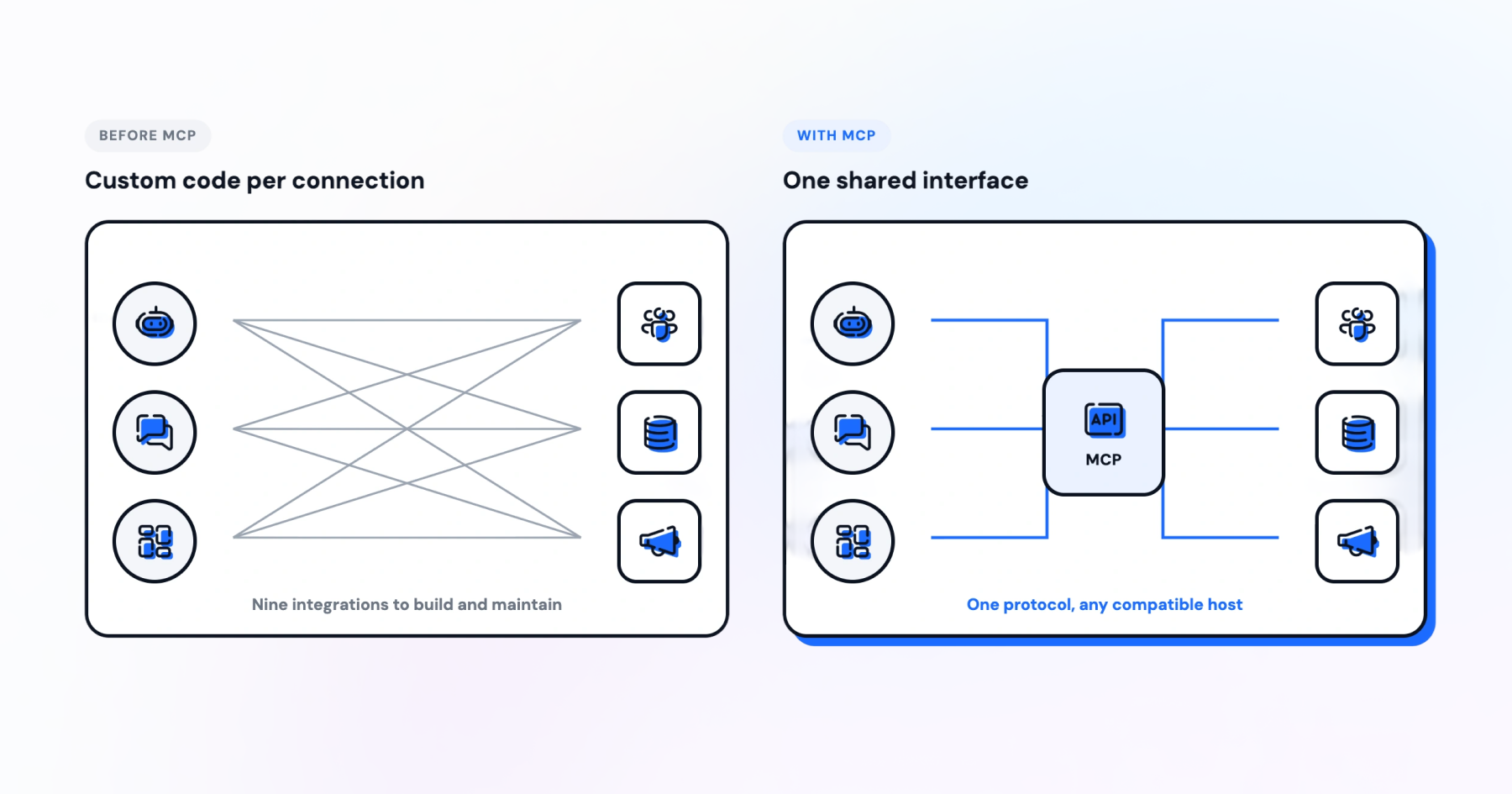
Every AI vendor used to build its own bridge into WhatsApp, your CRM, and your spreadsheets. That meant a fresh integration each time you swapped tools, and a support team stuck maintaining code nobody wanted to touch. A support team that once wired a chatbot to five separate systems needed five bespoke connectors, and each one broke differently.
Model Context Protocol changes the shape of that problem: one standard, many connections, instead of one integration per pairing.
This guide explains what MCP is, how its host-client-server architecture works, what resources, prompts, and tools actually do, and how Wati MCP puts that standard to work for WhatsApp Business.
What is the Model Context Protocol?
Model Context Protocol, or MCP, is an open standard that lets AI applications connect with outside data, tools, and workflows through one shared interface.
Anthropic open-sourced MCP, describing it as a way to build secure, two-way connections between AI-powered tools and the data sources they need. Before MCP, every link between a language model and a business system was custom code, written once and maintained forever by whoever built it. MCP replaces that with a shared protocol, which is what people mean by AI interoperability in this context.
The official MCP specification defines the protocol as a standardized way for applications to share context with language models, expose tools and capabilities, and build composable integrations and agentic workflows. That last part is what matters for WhatsApp Business. Instead of writing a script to pull contacts and another script to send templates, one server can expose both, and any compatible host can use them.
How does the Host-Client-Server Architecture Work?
MCP splits every connection into three roles: a host application, a client inside it, and a server that exposes data or actions.
Who are the Host, Client, and Server?
The host is the AI application you actually use, Claude, ChatGPT, or a code editor. The client lives inside the host and speaks MCP on its behalf, handling the back-and-forth so the host does not have to. The server is the piece that exposes tools, resources, or prompts, whether that is Wati MCP, a filesystem, or a database. One host can run several clients at once, each talking to a different server.
What is JSON-RPC and Why does MCP Use It?
Every message between host, client, and server travels as JSON-RPC 2.0. That is a lightweight, text-based format for calling a method and getting a response back. You never see this layer as a user, but it is why a tool call from Claude looks the same, structurally, whether the server behind it manages WhatsApp templates or reads a spreadsheet row.
Resources, Prompts, and Tools: 3 Building Blocks
A server built on MCP can offer three kinds of capability, and each one answers a different question for the model.
Building block | What it does | Example for WhatsApp Business |
Resources | Expose read-only data the model can pull in as context | A list of open conversations or a contact record |
Prompts | Provide reusable instructions or templates for a task | A pre-written reply for order-status questions |
Tools | Let the model take an action with side effects | Sending a template message or creating a contact |
The trade-off across the three is speed versus caution. Resources are usually safe to expose broadly, since nothing changes when a model reads them. Tools need the tightest control, because a single call can send a real message to a real customer.
What Resources do
Resources are read-only. They let a model pull in context, a contact record, a conversation history, a spreadsheet row, without changing anything. Think of resources as the model's reading list, useful for grounding an answer in real data instead of a guess. Sensitive fields like payment details typically stay out of these resources by design, which is a choice you control, not something the protocol forces.
What Prompts do
Prompts package a task into a reusable template. A support lead might define a prompt for drafting refund replies, so every agent, human or AI, starts from the same structure instead of reinventing tone and wording each time a ticket comes in.
What Tools do
Tools are where MCP gets its teeth. A tool call can send a message, update a contact, or send a broadcast to a segment. Picture a customer asking about an order at 11 PM: an AI host can check the order through a resource, but sending the reply is a separate, deliberate tool call, not a side effect of reading data. MCP tools built for WhatsApp Business need clear boundaries around what they can touch, a theme this article comes back to.
MCP for WhatsApp Business: Where Wati MCP Fits
Wati MCP is a WhatsApp MCP server that lets Claude, ChatGPT, or any MCP-compatible host manage WhatsApp Business directly, without a custom integration.
You can manage contacts, conversations, campaigns, and other Wati resources straight from a chat interface. Instead of opening the Wati dashboard for every task, you ask the assistant, and it calls the right tool. The dedicated WhatsApp MCP server page walks through the connection step by step.
What you can ask Claude or ChatGPT to do | Wati MCP capability |
Look up or add a contact | Contact management |
Read recent conversations | Conversation list |
Send a message or reply | Direct messaging |
Send an approved template | Template messaging |
Launch or check a campaign | Campaign management |
Managing Contacts and Conversations from Claude or ChatGPT
Ask Claude to pull up a contact, check the message history, or add a new lead, and Wati MCP handles the lookup behind the scenes. If you already capture leads through Click-to-WhatsApp Ads, the same contact records become visible to the AI host once the server is connected. Teams running support across multi-agent operations get one shared view instead of several siloed chat windows.
Conversation status is exposed the same way, so a support lead can ask which conversations opened today are still unanswered without switching tabs.
Bonus Read: WhatsApp API Access: Requirements and Setup Guide
How do Campaigns and Built-In AI Agents Fit In?
Broadcast campaigns and message templates are exposed the same way, so an AI host can list approved templates or launch a campaign on request.
Say you want to send a delivery reminder to one customer segment. Instead of building the list by hand, you describe the segment, and the assistant checks which templates are approved before sending, the same idea behind a reminder WhatsApp message.
Sequenced campaigns work the same way, pairing naturally with the approach in drip campaign templates, where several approved templates go out over days instead of one broadcast.
When Wati's built-in AI agents are enabled, Wati MCP can manage them too, so the AI host is not limited to messaging alone. It can build a new agent, adjust its tone or logic, and test it before publishing.
Why is MCP Adoption Accelerating?
MCP adoption is not confined to one industry or one vendor, and that scale is exactly why security guidance now exists for it.
The NSA's May 2026 guidance notes that MCP adoption has accelerated across business, finance, legal, software development, and other industries. The same guidance flags serialization risks, trust-boundary issues, and agent misuse as the security concerns that come with that growth. For a WhatsApp Business team, that translates into a simple rule: fast adoption is not the same as safe adoption.
WhatsApp Business automation built on MCP inherits the same trade-off. You get agentic workflows that can act across systems on your behalf, and you get a new surface for something to go wrong if permissions are set too loosely.
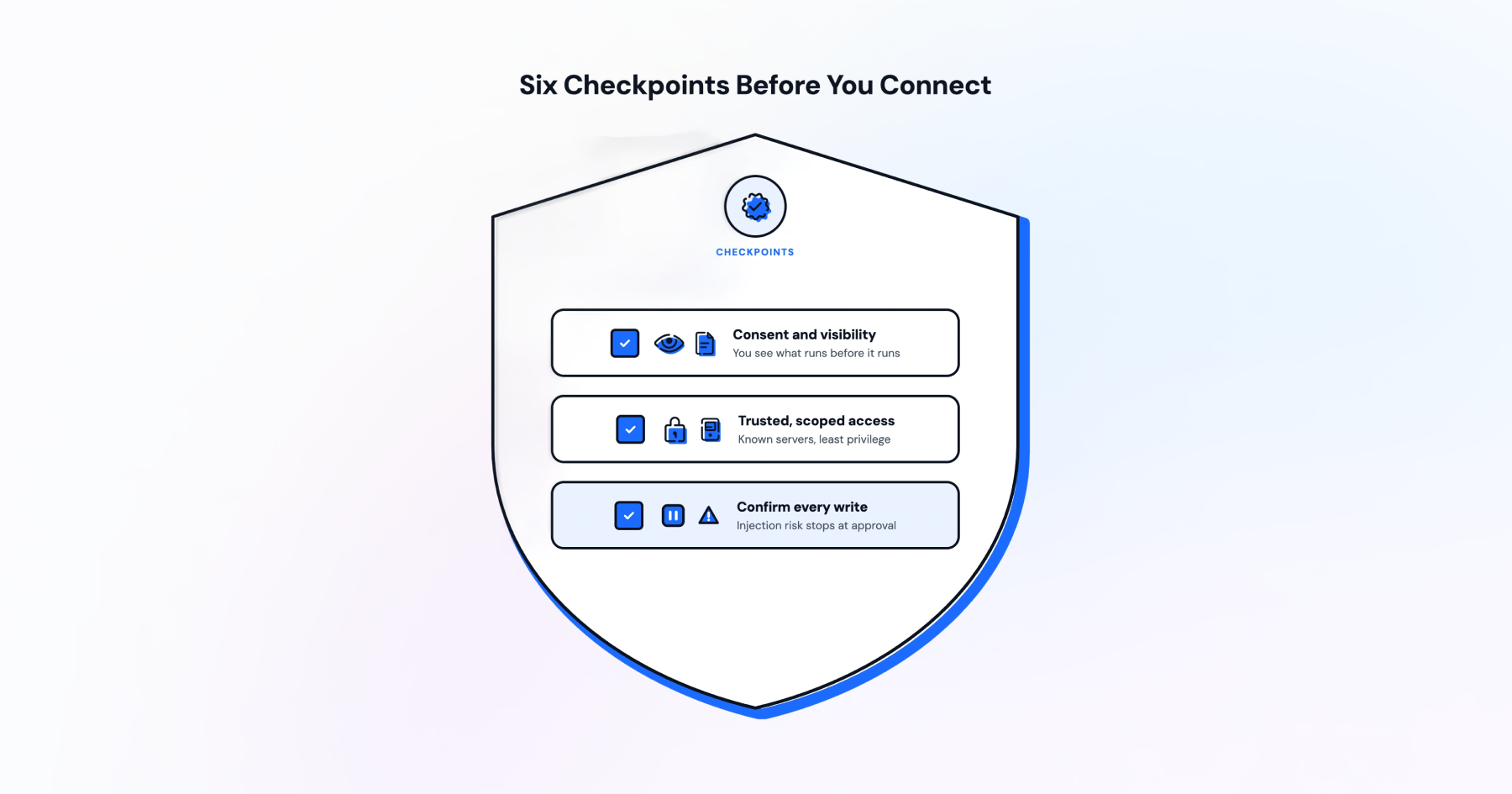
6 Safety Practices Before You Connect an MCP Server
Connecting an MCP server to your WhatsApp Business account means giving an AI host real permissions, so treat the setup like an access-control decision, not a plugin install.
User Consent and Explicit Permissions
The official specification says users should control what data is shared and what actions are taken, and that hosts should get explicit consent before exposing data or invoking a tool. In practice, you should see and approve what a tool is about to do before it runs, not after.
Trusted Servers and Access Control
Only connect servers you or your organization control, or ones from a vendor you already trust with WhatsApp data. Scope access narrowly. A server that only needs to read templates should not also have permission to delete contacts.
Where possible, use scoped access tied to a single WhatsApp Business account rather than an admin-level key that reaches every account your team touches. Review what each connected server can see and do on a regular schedule, the same way you would audit app permissions on a phone.
Write-Action Confirmation and Prompt Injection Risk
Any tool that writes, sends a message, changes a contact, or launches a campaign deserves a confirmation step before it runs. Prompt injection is the risk that text inside a document, message, or webpage tricks a model into calling a tool it should not.
A customer message could, in theory, contain instructions aimed at the model reading it, not at you. Confirmation steps and narrow permissions are the practical defense, alongside the trust-boundary caution the NSA guidance raises. Teams automating WhatsApp support at scale should build that confirmation step into the workflow itself, not leave it to memory.
Try Wati MCP on Your Own WhatsApp Account
You don't need to rebuild your stack to test this. Point an MCP-compatible host at the Wati MCP server, and within minutes it can read your templates, pull up conversations, and send a campaign to a segment, all from a chat window instead of a dashboard.
The real value shows up once it's part of your daily workflow: fewer tab switches, faster answers, and one place to ask for what you need. If you're ready to see it running on a live account, book a demo with Wati.
Frequently asked questions
What is Model Context Protocol in simple terms?
Model Context Protocol, or MCP, is an open standard that lets an AI application connect with outside tools and data through one shared interface, instead of a custom integration for every service, as Anthropic described when it open-sourced the protocol.
How is MCP different from a regular API?
A regular API is one connection you build once for one service. MCP is a shared protocol, so any MCP-compatible host, like Claude or ChatGPT, can talk to any MCP server, like Wati MCP, without new integration code for each pairing.
What is the difference between MCP resources, prompts, and tools?
Resources give a model read-only data, like a contact record. Prompts are reusable templates for a task, like a draft reply. Tools let the model take an action with side effects, like sending a WhatsApp template message or creating a contact.
What is prompt injection and why does it matter for MCP servers?
Prompt injection is when text inside a message, document, or webpage tricks an AI model into calling a tool it should not. It matters for MCP servers because tools can take real actions, so confirmation steps and narrow permissions reduce the risk.
Can I connect WhatsApp Business to Claude or ChatGPT using MCP?
Yes. Wati MCP is a WhatsApp MCP server that lets Claude, ChatGPT, or any MCP-compatible host manage contacts, conversations, templates, and campaigns, and manage Wati's built-in AI agents when they are enabled, without a custom integration.
Is MCP secure enough for business messaging data?
MCP itself is a protocol, not a guarantee. Security depends on how a server is built and connected. The official specification requires explicit user consent before sharing data or invoking a tool, and the NSA's May 2026 guidance flags serialization, trust-boundary, and agent-misuse risks to manage.
Related posts
- AI Customer Support in 2026: What It is, How It Works, and Why Smart Teams are Quietly Switching Over
Learn how AI in customer support manages ticket escalations, automates ticket tagging and routing, and improves customer satisfaction. See how Astra does it.
- How to Automate Business Conversations With a WhatsApp AI Agent in 2026
Learn how to build a WhatsApp AI agent to engage, qualify, and convert prospects round the clock without any delays in 2026.
- Voice-First Web Experiences: Navigating with Voice Commands
learn how voice first web experiences enable you to power personalized, human-like conversations to have a competitive advantage in today’s market.
- How Voice AI Agents Qualify Leads: A Sales Team’s Guide to Hands-Free Pipeline
know how does voice ai qualifies leads for an effective sales action and potential conversion and where does astra 2.0 stand when it comes to pre-configured lead qualification