
Too Long? Read This First
- Zoho CRM's WhatsApp Business integration is native on Enterprise, Ultimate, and Zoho One plans; lower tiers need a third-party connector like Zapier.
- HubSpot's native WhatsApp integration requires Professional or Enterprise on Marketing Hub or Service Hub. It is not available on Starter, Free, or Sales Hub alone.
- Salesforce's WhatsApp setup runs through Marketing Cloud Engagement (or a Digital Engagement / certified partner connector) and demands the most upfront technical configuration: a dedicated phone number, Meta Business Manager access, and embedded-signup setup before a single message is sent.
- All three platforms sit on top of the same underlying WhatsApp Business API. The difference is how much native CRM tooling wraps around it, not the messaging capability itself.
- None of the three replaces the need for Meta-approved message templates. Every WhatsApp message sent outside an active customer conversation still needs a pre-approved template regardless of which CRM triggers it.
Zoho offers the lowest-cost path to native WhatsApp integration.
HubSpot sits in the middle with the most polished conversation-to-contact-timeline experience once you're on a qualifying plan.
Salesforce is built for large teams that need WhatsApp inside a broader enterprise messaging stack but requires the most setup work.
None of the three offers WhatsApp on its cheapest tier, so the right pick depends less on which CRM you already use and more on your team's size, budget, and technical resourcing.
What "WhatsApp Integration" Actually Means for a CRM
Every WhatsApp Business Platform integration, regardless of CRM, has to solve the same three problems.
Getting messages in and out of the CRM's contact record, matching a WhatsApp Business Account to the right CRM tenant, and handling the customer service window and template rules Meta imposes on all senders.
What differs between Salesforce, HubSpot, and Zoho is whether that plumbing is a native, first-party feature or something you assemble with a marketplace app or automation tool.
Zoho CRM: Lowest Cost, Plan-Gated Native Support
Zoho's WhatsApp Business integration is built directly into CRM under Setup, Channels, Business Messaging, letting messages sync to Contacts, Leads, and Deals with activity logging.
The catch is the plan tier: native, first-party WhatsApp support runs through Zoho SalesInbox, which is available on Enterprise, Ultimate, or Zoho One.
Teams on Zoho's lower-tier plans need a marketplace connector or a Zapier-style bridge instead of the built-in channel; Wati's own Zoho CRM integration works this way, syncing WhatsApp conversations to Zoho regardless of which Zoho tier you're on.
Setup prerequisites are the same regardless of plan: a Facebook Business Manager account, a verified business, a WhatsApp Business Account, and a registered phone number connected via Meta's embedded signup flow before Zoho can send or receive anything.
HubSpot: Best Timeline View, Gated to Professional Tier
HubSpot's WhatsApp integration surfaces conversations directly on the contact timeline alongside email and website activity, and supports canned snippets and shared-inbox collaboration for teams handling volume.
However, unlike the impression a quick skim of HubSpot's pricing page might give, WhatsApp is not a Starter-tier feature.
As per HubSpot's own product page, it requires Professional or Enterprise on Marketing Hub or Service Hub: Starter, Free, and Sales-Hub-only setups don't qualify at any price point.
For a closer look at how the native integration behaves day to day, see Wati's breakdown of HubSpot's WhatsApp integration.
A small sales team that lives in Sales Hub alone will need to add Marketing or Service Hub to unlock native WhatsApp, or use a third-party HubSpot connector instead, the same trade-off Zoho's lower tiers face.
Salesforce: Built for Scale, Heaviest Setup
Salesforce's WhatsApp channel runs through Marketing Cloud Engagement or a certified partner connector rather than a lightweight native toggle (Digital Engagement licensing applies for native messaging inside Service Cloud).
As per Salesforce's own documentation, setup requires a dedicated phone number meeting specific requirements (owned by the business, valid country and area code, no SMS short codes), access to Meta Business Manager, and message templates submitted for Meta approval before the channel goes live.
This is more configuration than either Zoho or HubSpot demands upfront, and it typically benefits from technical or admin support to complete the first time correctly.
Teams that want that CRM depth without the Marketing Cloud licensing overhead can also connect through Wati's Salesforce integration.
What that investment buys is scale: Salesforce is a strong fit for large, multi-team organizations that need WhatsApp alongside SMS, email, and push inside one orchestrated Journey Builder flow, with role-based access and enterprise-grade audit trails already built into the platform.
Zoho vs HubSpot vs Salesforce: Side-by-Side Comparison
Zoho CRM | HubSpot | Salesforce | |
|---|---|---|---|
Native WhatsApp channel | Enterprise/Ultimate/Zoho One only | Marketing Hub or Service Hub, Professional/Enterprise only | Marketing Cloud Engagement / Digital Engagement / partner connector |
Entry price for WhatsApp access | ~$40/user/month (Enterprise); third-party connector needed below that | ~$90/seat/month (Service Hub Pro) or ~$890/month (Marketing Hub Pro) | Enterprise-level licensing (custom quote) |
Setup complexity | Moderate (Meta Business Manager + phone number) | Moderate (plus confirming which Hub/tier actually includes it) | High (dedicated number, embedded signup, template approval workflow) |
Best fit | Cost-conscious SMBs already on Zoho Enterprise+ | Mid-size marketing or service-led teams already paying for Professional | Large enterprises needing multi-channel orchestration |
Contact/activity sync | Native to Leads, Deals, Contacts modules | Native to contact timeline | Native within Journey Builder and Service Cloud records |
Choosing Based on Team Size, Not Brand Preference
A five-person sales team evaluating this decision should weight setup speed and total cost heavily, and should know upfront that none of the three CRMs' cheapest plans include native WhatsApp.
A Zoho-plus-Zapier combination or a third-party HubSpot connector can get WhatsApp running in days without an upgrade; going native on any of the three means budgeting for at least a mid-tier plan first.
A 50-plus-person sales organization already running Salesforce for pipeline management should expect a multi-week rollout involving IT, but gains multi-channel orchestration that neither Zoho nor HubSpot's WhatsApp tooling currently matches natively.
The mistake to avoid is assuming your current plan already includes WhatsApp: check the specific Hub and tier requirement before promising it to your team.
For a more general walkthrough of what to check before you commit, Wati's WhatsApp API integration checklist is a useful starting point regardless of which CRM you land on.
Migration Considerations If You Switch CRMs Later
Sales teams outgrow CRMs, and it's worth planning for that before locking WhatsApp deeply into any one platform's proprietary automation layer.
As WhatsApp templates and the underlying Business Account are approved and owned by Meta rather than by Salesforce, HubSpot, or Zoho, the messaging history and template library don't have to be rebuilt from scratch.
So, during a CRM migration, though the workflow automations, canned responses, and routing rules built inside a specific CRM's native WhatsApp tooling generally do.
A company migrating from Zoho to Salesforce, for example, keeps its approved templates but loses any Zoho-specific automation logic tied to SalesInbox routing rules, and has to recreate that logic inside Salesforce's own tools.
This is the strongest argument for treating the WhatsApp messaging layer as somewhat CRM-agnostic from the start.
Keep template design and category decisions documented outside any one platform's automation builder, so a future CRM switch is a re-wiring exercise rather than a rebuild-from-zero project.
The Wati Angle: One WhatsApp Layer, Any CRM
Because all three CRMs sit on top of the same WhatsApp Business API, a WhatsApp-first platform can standardize the messaging layer while still syncing into whichever CRM a sales team already runs, regardless of whether that CRM's own native integration is gated behind an upper-tier plan.
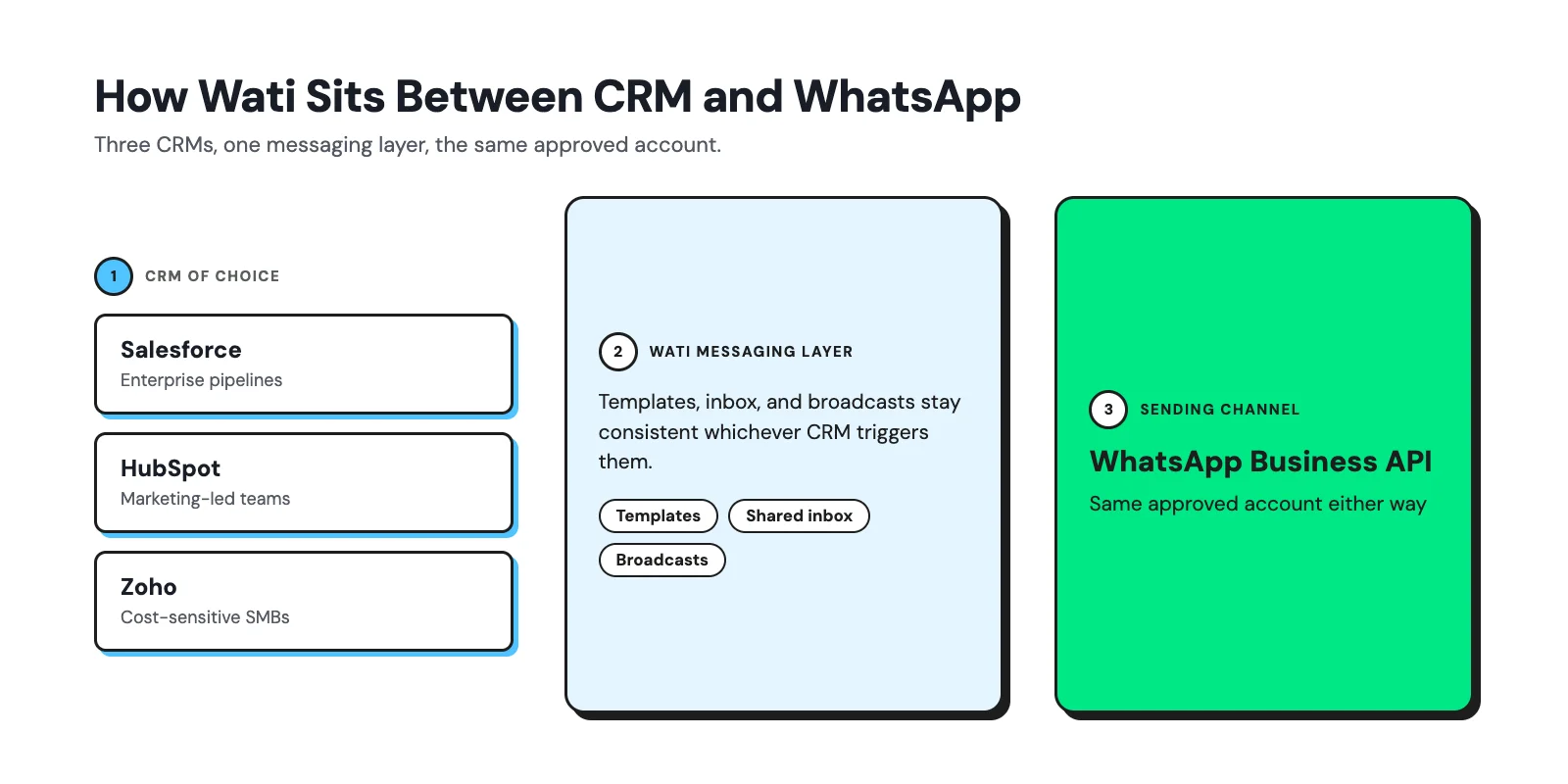
Wati connects natively to Salesforce, HubSpot, and Zoho, so template management, the shared team inbox, and broadcast campaign tooling stay consistent even if a company migrates CRMs later or isn't yet on the plan tier its CRM requires for native WhatsApp.
The WhatsApp side of the stack doesn't have to be rebuilt from scratch when the CRM decision (or plan) changes. For a broader look at how this plays out across a sales motion specifically, see Wati for Sales.
Try Wati
Wati connects to Salesforce, HubSpot, and Zoho natively, so your WhatsApp templates, inbox, and automations stay consistent no matter which CRM your sales team runs, and no matter which plan tier they're on.
Book a free demo to see your CRM connected.
Frequently asked questions
an I use WhatsApp with a CRM's free or lowest-tier plan?
No, not natively, on any of the three. Zoho requires Enterprise or higher for its built-in channel. HubSpot requires Professional or Enterprise on Marketing Hub or Service Hub specifically: Starter and Sales-Hub-only setups don't qualify. Salesforce's WhatsApp setup runs through Marketing Cloud Engagement or Digital Engagement, both separate licensed products.
Does switching CRMs mean rebuilding WhatsApp templates from scratch?
Not necessarily. WhatsApp templates are approved at the WhatsApp Business Account level by Meta, not by the CRM, so an already-approved template library can often carry over if the same WhatsApp Business Account connects to the new CRM.
Which platform is easiest for a non-technical team to set up alone?
Once a team is already on a qualifying plan, Zoho's Enterprise-tier channel and HubSpot's Professional-tier channel are both more self-service than Salesforce's Marketing Cloud Engagement setup, which typically benefits from admin or technical support.
Is Salesforce's WhatsApp integration only available through Marketing Cloud?
Marketing Cloud Engagement is the primary native path for marketing-style messaging; Digital Engagement supports native WhatsApp inside Service Cloud, and certified partner connectors exist for teams on other Salesforce clouds without either license.
Do all three require the same WhatsApp Business API approval process?
Yes. Regardless of CRM, every business needs a verified WhatsApp Business Account through Meta Business Manager and Meta-approved templates before sending outbound messages. The CRM only changes how that account connects to your contact data.
Related posts
- AI Customer Support in 2026: What It is, How It Works, and Why Smart Teams are Quietly Switching Over
Learn how AI in customer support manages ticket escalations, automates ticket tagging and routing, and improves customer satisfaction. See how Astra does it.
- How to Automate Business Conversations With a WhatsApp AI Agent in 2026
Learn how to build a WhatsApp AI agent to engage, qualify, and convert prospects round the clock without any delays in 2026.
- Voice-First Web Experiences: Navigating with Voice Commands
learn how voice first web experiences enable you to power personalized, human-like conversations to have a competitive advantage in today’s market.
- How Voice AI Agents Qualify Leads: A Sales Team’s Guide to Hands-Free Pipeline
know how does voice ai qualifies leads for an effective sales action and potential conversion and where does astra 2.0 stand when it comes to pre-configured lead qualification