
Too Long? Read This First
- Wati starts every TikTok automation from a new DM, so each video should ask shoppers to send a keyword such as "SIZE".
- A keyword rule for price, size, length, and stock lets Wati reply the moment a matching DM arrives, in every language your shoppers use.
- A strong size reply sends the size-chart image, offers numbered options, and ends with a question.
- A WhatsApp number collected in the chat lets your team send restock alerts after TikTok's 48-hour window closes.
TikTok DM automation replies to a shopper's direct message as soon as it arrives, based on the message's contents.
For a fashion brand, "price?" and "which size?" get answered within seconds instead of the next morning.
Consider a good outfit video that draws hundreds of DMs overnight, most of them asking "size?", "سعر؟", or "¿precio?". By the time replies go out the next morning, many of those shoppers have moved on.
Wati connects your TikTok Business account to keyword rules and chatbots that answer price and size questions, with a reply written for each language your shoppers use.
This guide covers TikTok's messaging rules, automatic replies in Wati, and how to bring shoppers from comments into DMs.
It also includes multilingual keyword responses, size and price replies, a height-based length guide, and a WhatsApp restock flow.
Why TikTok DM Automation Works Differently for Fashion Brands
TikTok DM automation operates under four messaging rules, each shaping how a fashion brand should write its size and price replies.
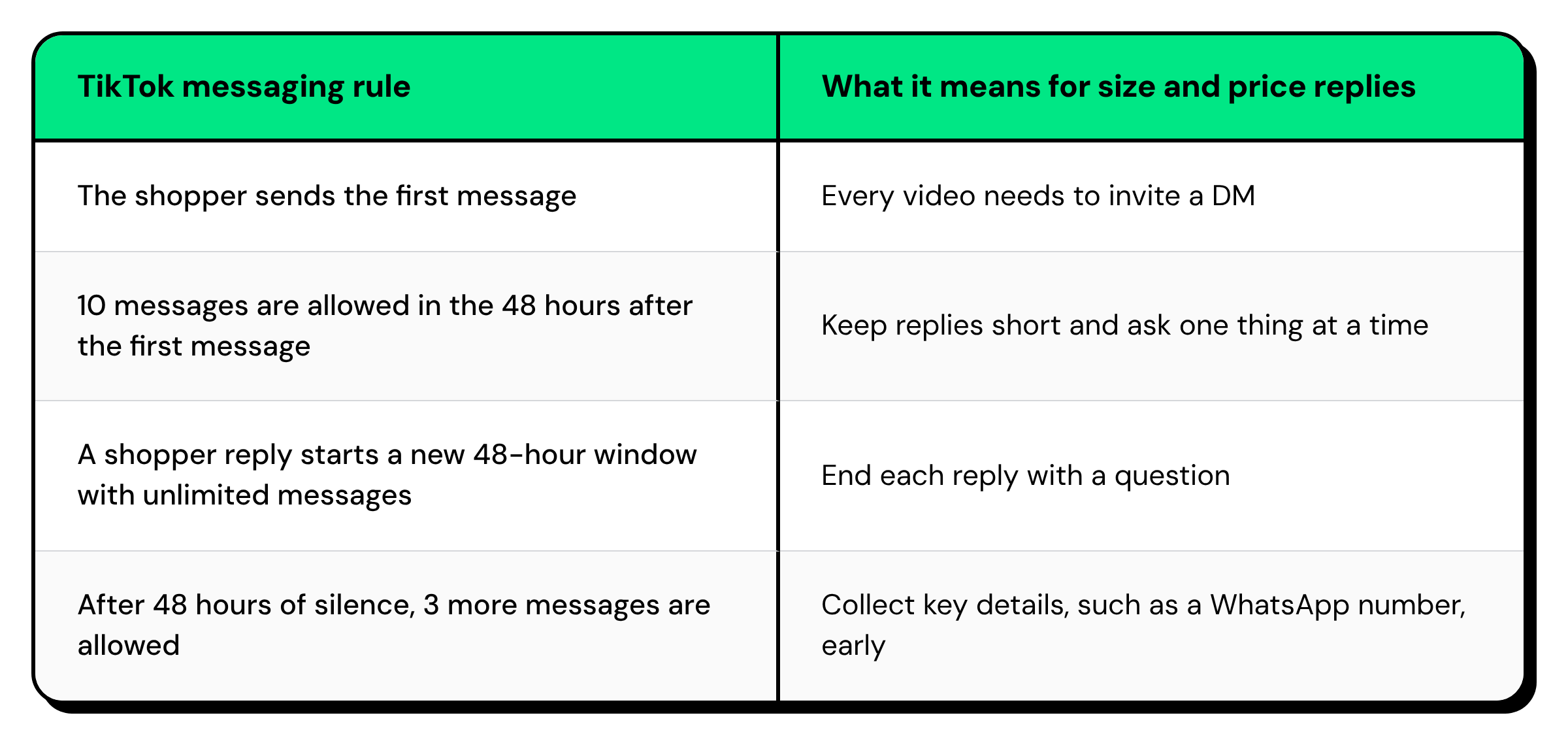
The first step is a set of automatic replies that work within these rules.
How to Set Up TikTok Auto Reply with Keyword Rules in Wati?
A TikTok auto reply in Wati is a rule with three parts: a trigger, a filter, and an action.
The trigger is always a new TikTok message, the filter decides which DMs qualify, and the action sends a reply or starts a chatbot.
When you connect TikTok, Wati creates two default rules. Both start switched off and follow the working hours you use on other channels.
- Welcome message: greets a shopper who starts a new chat during working hours.
- Out of office message: tells shoppers who write after hours when your team will reply.
- Keyword rules: reply when a DM contains a word such as "price" or "size", with a text message, an image, or a chatbot.
- Catch-all rule: uses the "No keyword rule(s) matches" filter to answer any DM your keyword rules miss.
Each keyword filter has its own matching method. Fuzzy matching accepts small spelling mistakes, and keywords are not case-sensitive.
Keyword rules only run when a DM arrives, so the next task is getting shoppers to send one.
How to Use a TikTok Comment Reply to Get Shoppers into Your DMs?
Every TikTok rule in Wati starts from a new direct message, so a comment alone doesn't trigger a reply. Each video should ask shoppers to DM a single keyword, such as SIZE.
Place the request in three spots:
- On-screen text: in the first three seconds of the video.
- Pinned comment: so every viewer sees it.
- Comment replies: in answer to each "price?" comment.
Sample lines for each market:
English: "DM us SIZE for the size chart 📩"
Arabic: "أرسلي لنا كلمة مقاس على الخاص 📩"
Spanish: "Escríbenos TALLA por DM 📩"
Portuguese: "Manda TAMANHO na DM 📩"
One keyword works better than "DM us for details" because it matches your rule every time.
TikTok Direct Messaging Ads open a TikTok DM too, so paid traffic can start the same chatbot.
Many shoppers will still write "how much?" or "talla?", so your rules need those words as well.
💡Our lead generation guide covers more ways to turn TikTok comments into DMs.
Multilingual TikTok DM Keywords for Price, Size, and Fit Questions
A complete keyword list covers the words shoppers use for price, size, length, stock, and delivery, in each language they write in.
Wati matches the keywords you add, not the meaning of a message.
Question | English | Arabic | Spanish | Portuguese | Malay / Bahasa |
|---|---|---|---|---|---|
Price | price, how much, cost | سعر، السعر، بكم، si3r | precio, cuanto, cuánto, cuesta | preço, preco, quanto, valor | harga, berapa |
Size | size, size chart, fit | مقاس، المقاس، مقاسات | talla, tallas, medidas | tamanho, medidas | saiz, ukuran |
Length | length, tall, cm | طول، الطول، سنتي | largo, mido, estatura | comprimento, altura | panjang, tinggi |
Stock | available, stock, restock | متوفر، متوفرة | disponible, stock | disponível, disponível, estoque | stok, ready stock |
Delivery | delivery, shipping | توصيل، شحن | envío, envio | frete, entrega | penghantaran, pengiriman, ongkir |
Five guidelines keep the list accurate:
- Add spellings without accents: list "cuanto" and "preco" alongside "cuánto" and "preço", since short words leave fuzzy matching little to work with.
- Add Arabizi: many Gulf and Levant shoppers write Arabic in Latin letters, such as "si3r" for "price".
- Leave out single letters and numbers: with the Contains method, a rule for "1" or "M" would also fire on "160cm" or a price.
- Avoid short words that appear inside longer ones: "back in stock" works better than "back", which also matches "black".
- Give each rule its own keywords: when two rules match the same DM, Wati sends both replies.
Once a rule fires, the reply has to answer the question and move the chat forward.
How to Automate Size Chart and Price Replies in TikTok DMs?
An automated size reply works best as a short chatbot started by a keyword rule. It sends the size-chart image, offers three numbered options, and ends with a question.
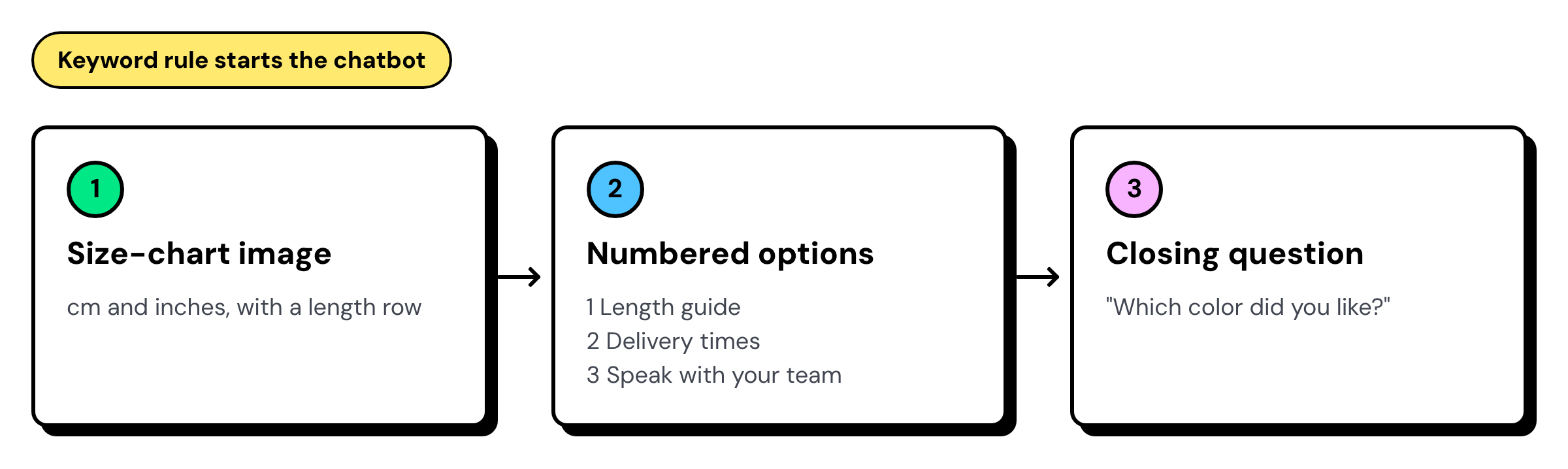
A size reply for a Gulf boutique:
Here's our size chart 👆 Our outfits run true to size. Reply 1 for length by height, 2 for delivery, or 3 to chat with us. Which color did you like? |
|---|
Keep each reply to two or three messages, since the image and options already use two of the 10 allowed.
A size chart answers most questions, but modest-wear shoppers often ask about length by height.
A message such as "160cm?" contains "cm", so a length rule set to the Contains method responds even when the shopper skips the options.
How to Send Restock Alerts to TikTok Shoppers on WhatsApp?
TikTok doesn't let a business message a shopper first, so a restock alert can't go out on TikTok weeks later.
Collect a WhatsApp number during the chat and send the alert on WhatsApp.
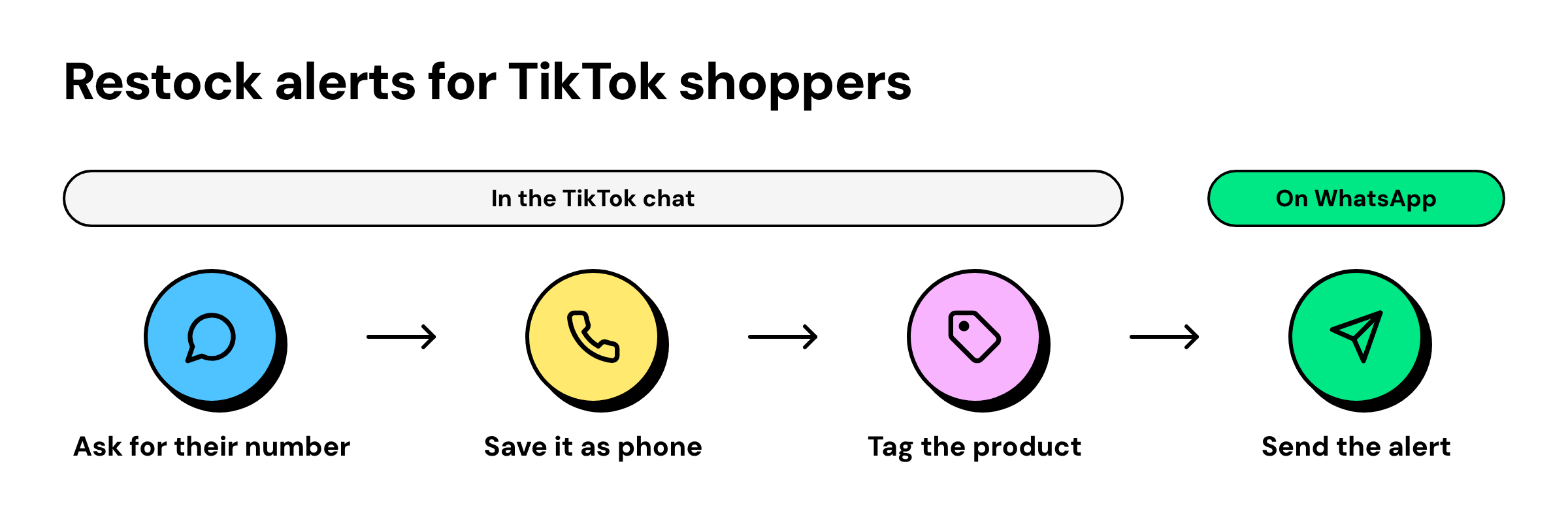
- Offer the alert: "This outfit is sold out. Would you like a WhatsApp message when it's back? Please share your number."
- Save the number: an "Ask a question" step saves the answer as . Adding a phone number to the TikTok contact links it to WhatsApp.
- Tag the request: a tag such as restock dresses records which product the shopper wants.
- Send the alert: when stock arrives, your team sends an approved WhatsApp template message to every contact with that tag.
Ask within the first 48 hours, and state clearly what message the shopper will receive.
All three flows run from the same rules and inbox in Wati.
How Wati Automates Price and Size Replies in Your TikTok Inbox
Wati is an agentic customer engagement platform that turns conversations into revenue growth across marketing, sales, and support.
For TikTok, it connects your Business account to rules, chatbots, and a shared Team Inbox.
Rule | When it runs | What Wati does |
|---|---|---|
Price | A new TikTok message contains a price keyword | Starts a chatbot that sends the price list, offers numbered options, and tags the chat "price" |
Size | A new TikTok message contains a size or length keyword | Starts a chatbot that sends the size chart, offers numbered options, and tags the chat "size" |
After hours | A message arrives outside working hours | Sends the reply from the default Out of office rule |
Catch-all | No keyword rule matches | Sends a general reply or assigns the chat to your team |
Talk to us | The shopper replies 3 | Assigns the chat to your sales team |
TikTok chats sit next to WhatsApp, Instagram, SMS, WebChat, RCS, and Messenger in a Team Inbox, where agents assign chats, add tags and notes, and see whether each message was delivered or read.
To connect, your TikTok Business account needs Advanced Access, with "Allow everyone to send direct messages" switched on.
A few setup mistakes can stop these rules from working.
Common Mistakes That Break TikTok DM Automation
- Rules left off: switch on the default Welcome and Out-of-Office rules after setting working hours.
- Missing keywords: review unanswered DMs each week and add the words shoppers used.
- Long replies: four or more messages at once drain the 10-message allowance. Ask one thing at a time.
- Two after-hours replies: if an Out of office rule and an after-hours chatbot both match, both reply. Keep one switched on.
- No test before launch: DM your account from a different TikTok account and check each reply.
- Ineligible account: accounts registered in the US, EEA, Switzerland, the UK, or India can't connect.
Answer Every Size Question before Shoppers Scroll Away
Fashion shoppers on TikTok decide quickly, and an unanswered "size?" often becomes a lost order. Keyword rules, a short size chatbot, and a WhatsApp restock flow let your brand answer every price and size question in the shopper's language, even after hours.
Want every TikTok DM answered within seconds, with ready-to-buy shoppers routed straight to your team?
Book a demo to see how Wati automates price, size, and restock conversations for fashion brands.
Frequently asked questions
Does TikTok Have Automatic Replies?
Yes. With Wati, TikTok DMs receive automatic replies through rules that run whenever a new message arrives. Wati creates a default Welcome and Out of office rule when you connect TikTok, and keyword rules can send a text message, an image, or a chatbot.
Can a TikTok Comment Trigger an Automated DM?
No. Every TikTok rule in Wati starts from a new direct message, so comments don't trigger a reply on their own. Ask commenters to send a keyword such as "SIZE" by DM, and place that request in the video, a pinned comment, and your comment replies. Wati supports [comment-to-DM automation](https://www.wati.io/en/blog/instagram-comment-automation/) on Instagram.
Can You Send a Size Chart Image in a TikTok DM?
Yes. Wati can send a TikTok message with text or an image, so a keyword rule or chatbot can share your size chart as soon as a shopper asks. The Team Inbox shows whether each message was sent, delivered, read, or failed.
How do You Reply to TikTok DMs in Arabic, Spanish, or Portuguese?
Add the keywords for each language to its own rule and write the reply in the same language. Include spellings without accents, such as "preco" and "cuanto", and Arabizi such as "si3r". Fuzzy matching catches small typos, but it doesn't translate between languages.
How do You Tell TikTok Shoppers a Product is Back in Stock?
Send the alert on WhatsApp, because TikTok doesn't let a business message a shopper first. Ask for the shopper's WhatsApp number in the chat, save it to their contact with a product tag, and send an approved WhatsApp template to that tag when stock returns.
What do You Need to Automate TikTok DMs in Wati?
You need a TikTok Business account with Advanced Access and "Allow everyone to send direct messages" switched on. The account must be registered outside the US, EEA, Switzerland, the UK, and India. Working hours set in Wati let your Welcome and Out of office rules run correctly.
Related posts
- TikTok Order Tracking for Fashion Brands: Handle WISMO and Size Exchanges in One Reply
TikTok order tracking for fashion brands: a chatbot checks Shopify in the first reply, routes size exchanges to ops, and moves shipping updates to WhatsApp.
- Warranty Claims on TikTok: Customer Service for Phone Accessory Brands
What does a good warranty claim process look like for phone accessory brands on TikTok? Collect the order, model, and a photo in DMs, then hand off.
- Selling Skincare on TikTok Shop: How Beauty Brands Handle Every Conversation Around the Shop
How do beauty brands sell on TikTok Shop? Let the Shop handle checkout, and answer skin-type, shade, and creator DMs from one team inbox.
- How Retail Brands Sell on Instagram Without Missing a Single DM
To sell on Instagram, reply to price DMs fast, turn comments into orders, and follow up on WhatsApp. See 7 retail use cases that make it work.