
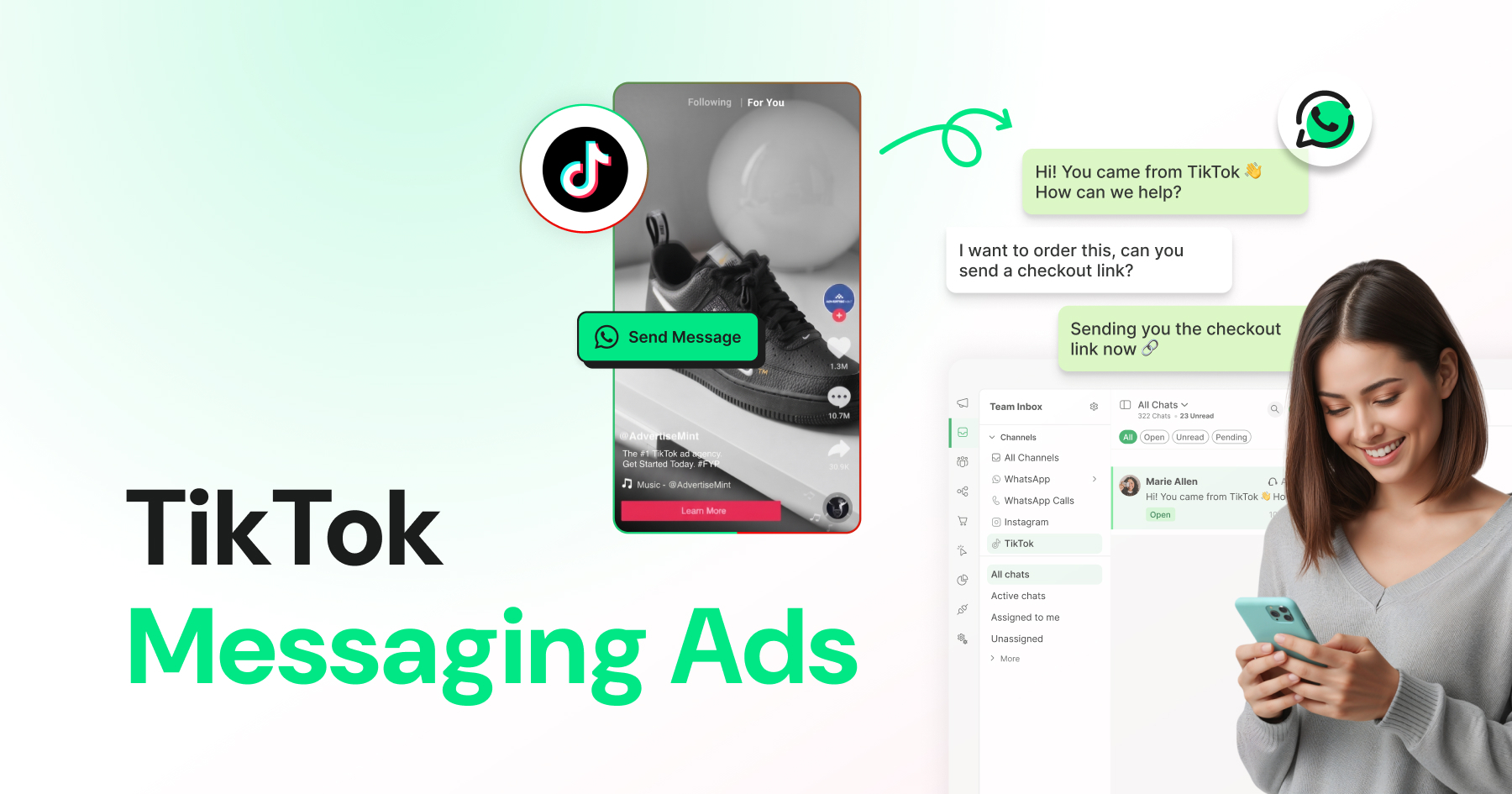
Too Long? Read This First
- TikTok Messaging Ads turn a simple tap into a real conversation, no landing page needed.
- Choose what fits your business: Direct Messaging Ads keep chats in TikTok, Instant Messaging Ads move them to WhatsApp.
- Setting up your first campaign in Ads Manager takes minutes, and costs stay approachable even on a modest budget.
- The ads that win aren't the most polished; they're the ones that feel real and get a fast, genuine reply.
- Wati keeps TikTok ad conversations organized alongside WhatsApp and Instagram, so none get missed.
On TikTok, that instinct to react is stronger than anywhere else: the platform's engagement rate of 3.73% outpaces Instagram's 0.48% and Facebook's 0.15% by a huge margin, according to Socialinsider's 2026 benchmark report.
People here don't just watch; they tap, comment, and reply. TikTok Ads are built for exactly that impulse; instead of pushing people to a form on a website, they open a real chat the instant someone taps, right inside TikTok or straight into WhatsApp, turning passive views into actual conversations. In this guide, we'll break down what TikTok for Business ads are, how Messaging Ads work, what they cost, and how to set one up in TikTok Ads Manager - so you can start turning views into conversations.
What are TikTok Ads?
TikTok ads are paid placements businesses use to reach people on TikTok, ranging from video ads in the main feed to full-screen takeovers and everything in between.
They work by feeding TikTok's algorithm a specific goal (awareness, traffic, leads, sales) and letting it find the right audience within that objective.
Broadly, TikTok's ad formats fall into a few buckets:
In-Feed Ads
In-Feed Ads are video ads that appear natively in the For You feed alongside organic content. They're the cheapest and most flexible TikTok ad format, and most brands run them first.
CTR typically runs 1.5% to 3%. Creative that doesn't look like an ad usually outperforms polished production, since In-Feed Ads compete directly with organic content for attention.
Spark Ads
Spark Ads boost existing organic content instead of running separate ad creative. You can boost your own post or a creator's, with permission.
Since the content already has real engagement, Spark Ads typically get a stronger CTR (around 2.4%) and lower cost than a from-scratch In-Feed ad.
Use this format when organic content is already performing, and you want to extend its reach with budget.
TopView
TopView is a full-screen, unskippable ad shown the moment someone opens the app, for up to 60 seconds.
CTR runs 12% to 16%, far higher than other formats, because of the guaranteed attention. Cost runs into the thousands per day, which puts it out of reach for most small and mid-sized advertisers.
Reserve TopView for major launches or awareness pushes with real budget behind them.
Search Ads
Search Ads appear inside TikTok's search results, alongside organic content when someone searches a term.
This format captures intent the way a Google ad does. Someone is already looking for something related, rather than scrolling passively. Search Ads are newer and less benchmarked than other formats.
Test them if your product category gets searched on TikTok directly.
Messaging Ads
Messaging Ads open a direct conversation instead of sending someone to a landing page. Most TikTok ad formats are built to get a click. Messaging Ads are built to get a reply.
A reply is the start of an actual conversation, one your team can guide toward an answer, a booking, or a sale.
So while "TikTok ads" as a category is broad, the rest of this guide zooms in on the format built specifically for turning views into conversations: TikTok Messaging Ads.
Why Set Up a TikTok Business Account?
A TikTok Business Account is the account type required to run ads, access analytics, and message customers as a brand. A personal account can't do any of the three. It unlocks the tools this guide covers: Ads Manager, the Creative Center, and Messaging Ads.
TikTok isn't a fringe channel anymore. The platform surpassed 1.9 billion monthly active users in 2026, and 89% of SMBs say their sales increased after promoting on the platform.
The takeaway: your customers are already on TikTok, watching and messaging. A Business Account is what turns that attention into something you can measure, advertise against, and actually reply to.
Direct Messaging Ads vs. Instant Messaging Ads
TikTok Messaging Ads come in two distinct types, and knowing the difference matters because it determines where the conversation actually lands.
TikTok Direct Messaging Ads
Direct messaging ads keep the entire conversation inside TikTok. Someone taps the ad, and a chat opens right in TikTok's own DM inbox, no app switching required.
- Best for brands that want to stay fully native to the platform
- Works well for audiences who are less likely to leave TikTok mid-scroll
- The conversation happens entirely within TikTok, so your team needs a way to manage TikTok DMs specifically
TikTok Instant Messaging Ads
Instant messaging ads redirect the conversation to an external messaging app instead of keeping it on TikTok. TikTok supports a few options here, but WhatsApp is the one most businesses (and the one Wati supports) actually use.
- Best for brands that already run customer conversations on WhatsApp
- Keeps the conversation in a channel your team may already be set up to handle
- Familiar territory for customers who already use WhatsApp daily
Which One Should You Use?
There's no universal right answer; it depends on where your audience already is and where your team is set up to respond.
Some brands run both formats side by side and let performance decide.
What matters more than the choice itself is what happens after someone taps the ad. A Messaging Ad that opens a conversation nobody answers quickly is a missed opportunity, not a win. Response speed is covered in detail below.
Note: TikTok Messaging Ads aren't available everywhere. Due to government regulations in certain regions, businesses in the US, EEA, Switzerland, and the UK can run messaging ads, and India currently can't run Direct or Instant Messaging Ads.
How Much Do TikTok Ads Cost?
TikTok ad costs move with your objective, audience, format, and creative quality. That said, there are useful ranges to set expectations.
Typical Cost Ranges
As of 2026, most advertisers see:
- Cost per click (CPC): roughly $0.30 to $1.50
- Cost per thousand impressions (CPM): roughly $4 to $12
- Minimum daily budget: $50 at the campaign level, $20 at the ad group level
These ranges shift depending on the format, too.
In-Feed Ads tend to sit on the lower end, Spark Ads (boosted organic posts) are often even cheaper thanks to stronger organic engagement, and premium placements like TopView can run into the thousands to ten thousand per day, well outside what most small and mid-sized businesses need to consider.
What Actually Drives the Price Up or Down
- Targeting specificity. Broad audiences are cheaper. Narrow, competitive audiences cost more, the same logic as most ad platforms.
- Creative quality. This one is more pronounced on TikTok than almost anywhere else. Ads that earn strong engagement (watch time, shares, comments) get rewarded with cheaper delivery. Ads that don't get throttled even with a higher bid.
- Campaign objective. Awareness objectives (Reach, Video Views) are the cheapest per impression. Conversion-focused objectives, including Messaging Ads, cost more per impression but are built to deliver an actual outcome, not just a view.
- Industry and season. Costs climb during competitive periods such as Q4 and major shopping holidays and vary by vertical.
Choosing a Bidding Strategy
TikTok Ads Manager offers two primary bidding strategies: Maximum Results (also called Maximum Delivery) and Target Cost per Result (also called Cost Cap).
- Maximum Results spends your whole budget to get as many results as it can. No cost target, just volume. Good choice when you're just starting out and still learning what works.
- Target Cost per Result aims for a cost per action you set. Pick this once you know your numbers and want to protect them.
You don't choose your billing event separately. It's tied to your objective: cost per click for Traffic, cost per mille (cost per thousand impressions) for Reach, cost per view for Video Views, optimized cost per mille for Conversions.
For Messaging Ads, pick the Lead Generation objective. That's what lets you bid on conversations instead of clicks.
The Honest TakeawayTikTok remains genuinely cost-competitive next to older platforms like Meta, largely because engagement is rewarded so directly. However, treat any specific number you read, including the ones above, as a planning range rather than a guarantee. Costs shift often enough that it's worth checking TikTok Ads Manager's own current benchmarks before finalizing a budget. |
How Do You Target the Right Audience for TikTok Ads?
TikTok lets you target by demographics, interests, behaviors, and your own audience data.
Demographics
- Age, gender, location, language, and household income
Interests and Behaviors
- Interests: Based on what people watch and engage with
- Behaviors: Based on recent in-app actions rather than stated interests
Your Own Audience Data
Audience | How it works |
|---|---|
Custom Audiences | Built from your pixel data, customer list, or app activity |
Lookalike Audiences | Built from a Custom Audience and matched to similar users |
TikTok's algorithm needs enough volume to find converters. Narrow audiences can limit the data it has to work with. Use one or two targeting layers as guardrails rather than stacking multiple filters.
How to Create a TikTok Ad in TikTok Ads Manager
TikTok structures every ad the same way:
- Campaign (your objective)
- Ad Group (your audience, budget, and placement)
- Ad (your actual creative).
Understanding that structure makes the whole process much less confusing. Here's how to set up a Messaging Ad specifically.
Step 1: Set Up Your TikTok Ads Manager Account
Head to ads.tiktok.com and create an account if you haven't already.
You'll need to complete business verification (basic company details and documentation) before you can launch campaigns, so it's worth doing this a day or two before you plan to launch, not the morning of.
Step 2: Create A Campaign And Choose Your Objective
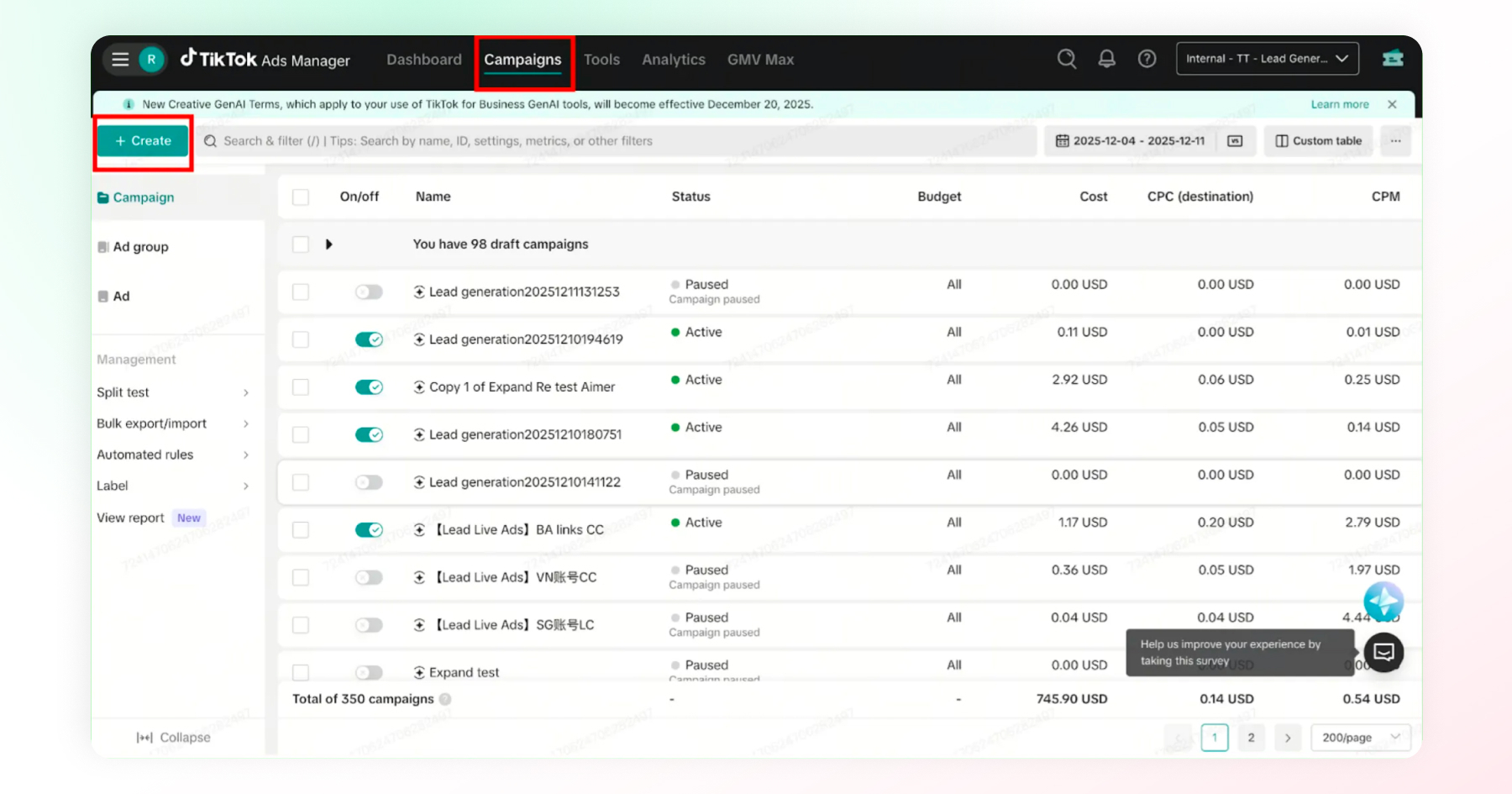
- Click Create in your dashboard, then select Lead Generation as your objective.
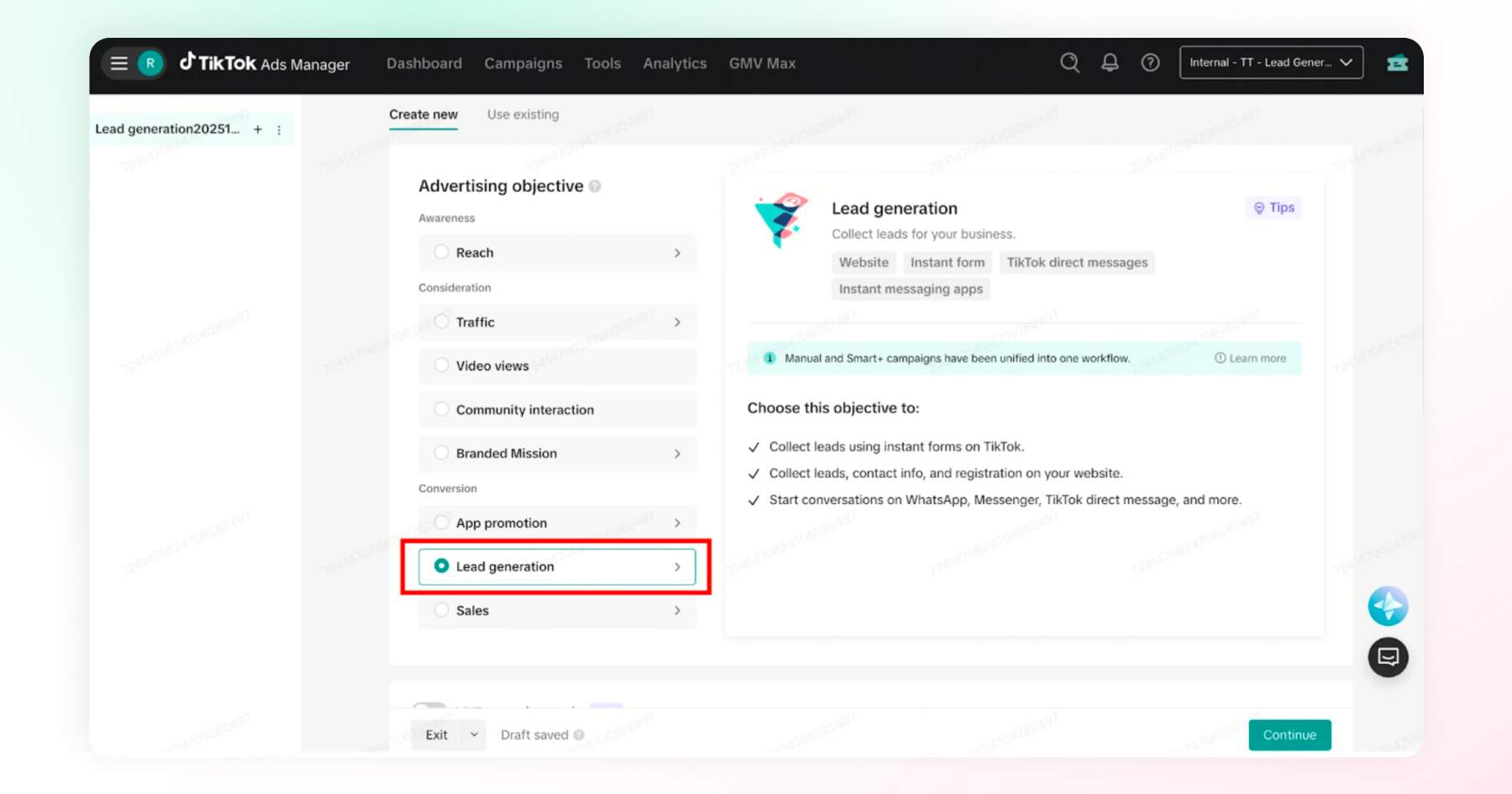
This is the objective that unlocks Messaging Ads. Name your campaign clearly (something like "Messaging-DM-March2026" beats "Campaign 1" once you're managing more than a couple).
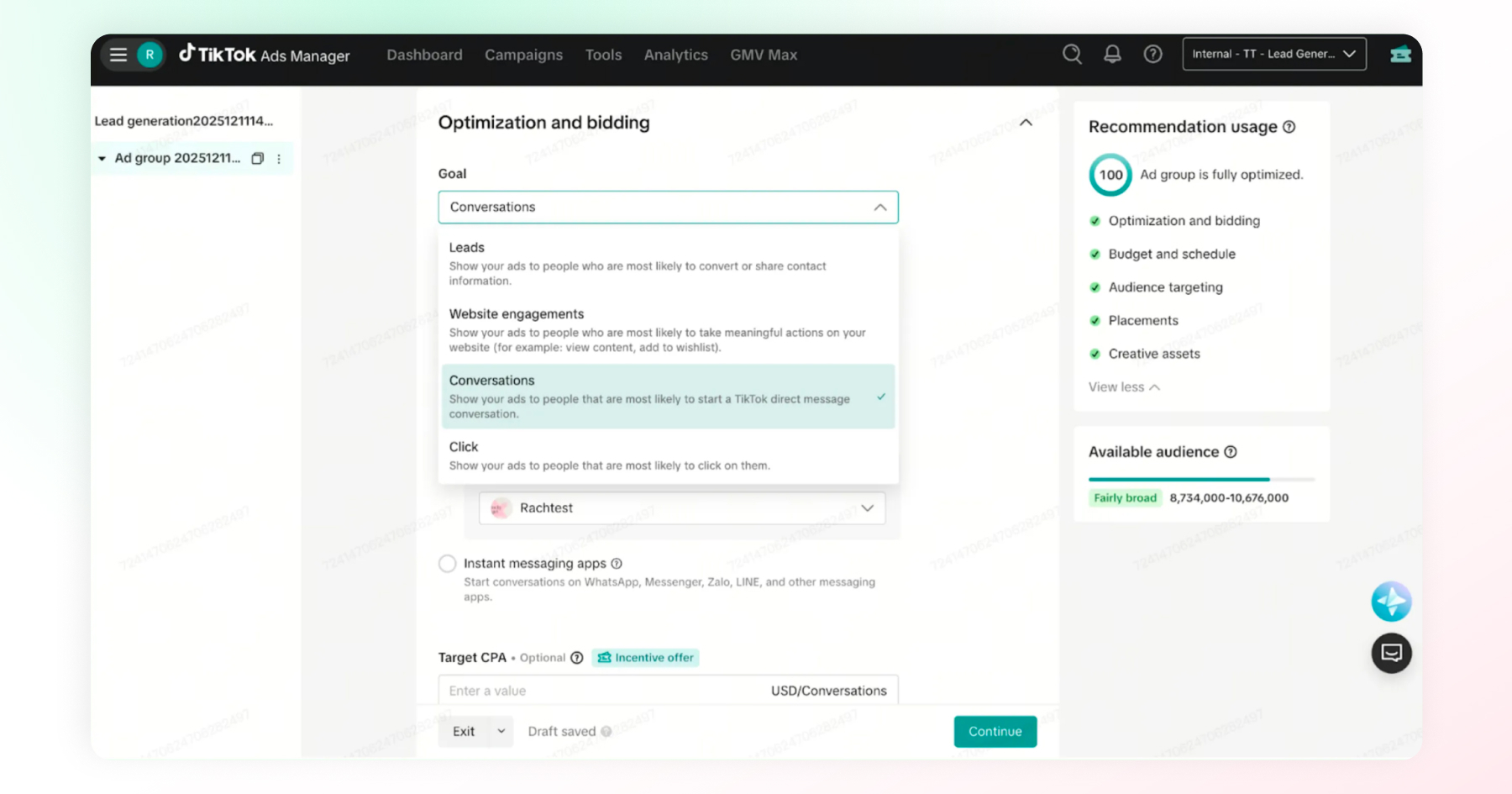
Step 3: Set Up Your Ad Group
This is where the ad actually becomes a Messaging Ad. Define your target audience and budget, then choose your optimization location:
- Select Instant Messaging Apps if you want the ad to redirect to WhatsApp (Instant Messaging Ads)
- Select TikTok Direct Messages if you want the conversation to stay inside TikTok (Direct Messaging Ads)
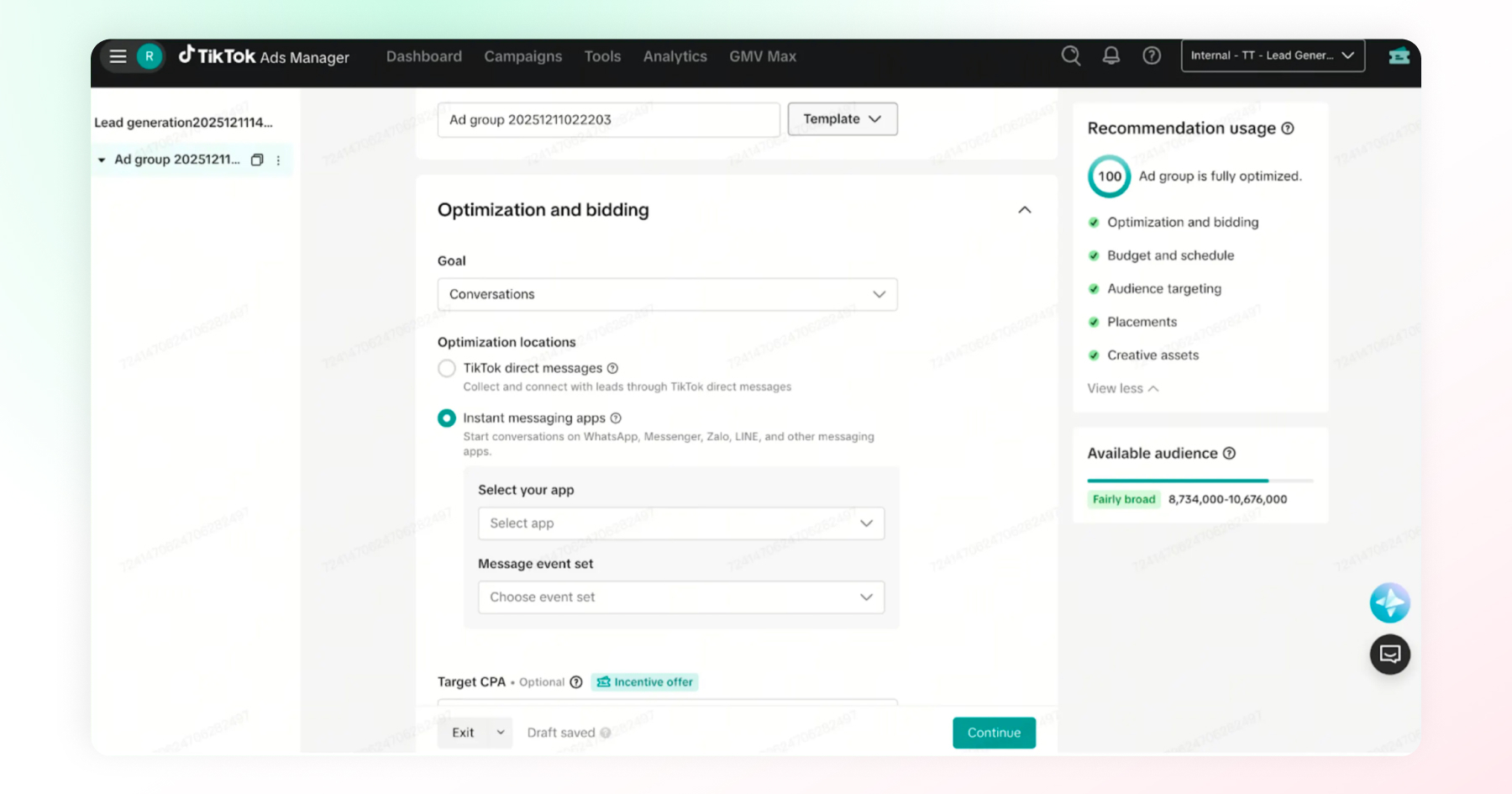
Set placement to TikTok only for messaging ads; this format isn't available across TikTok's partner network.
Step 4: Build Your Ad
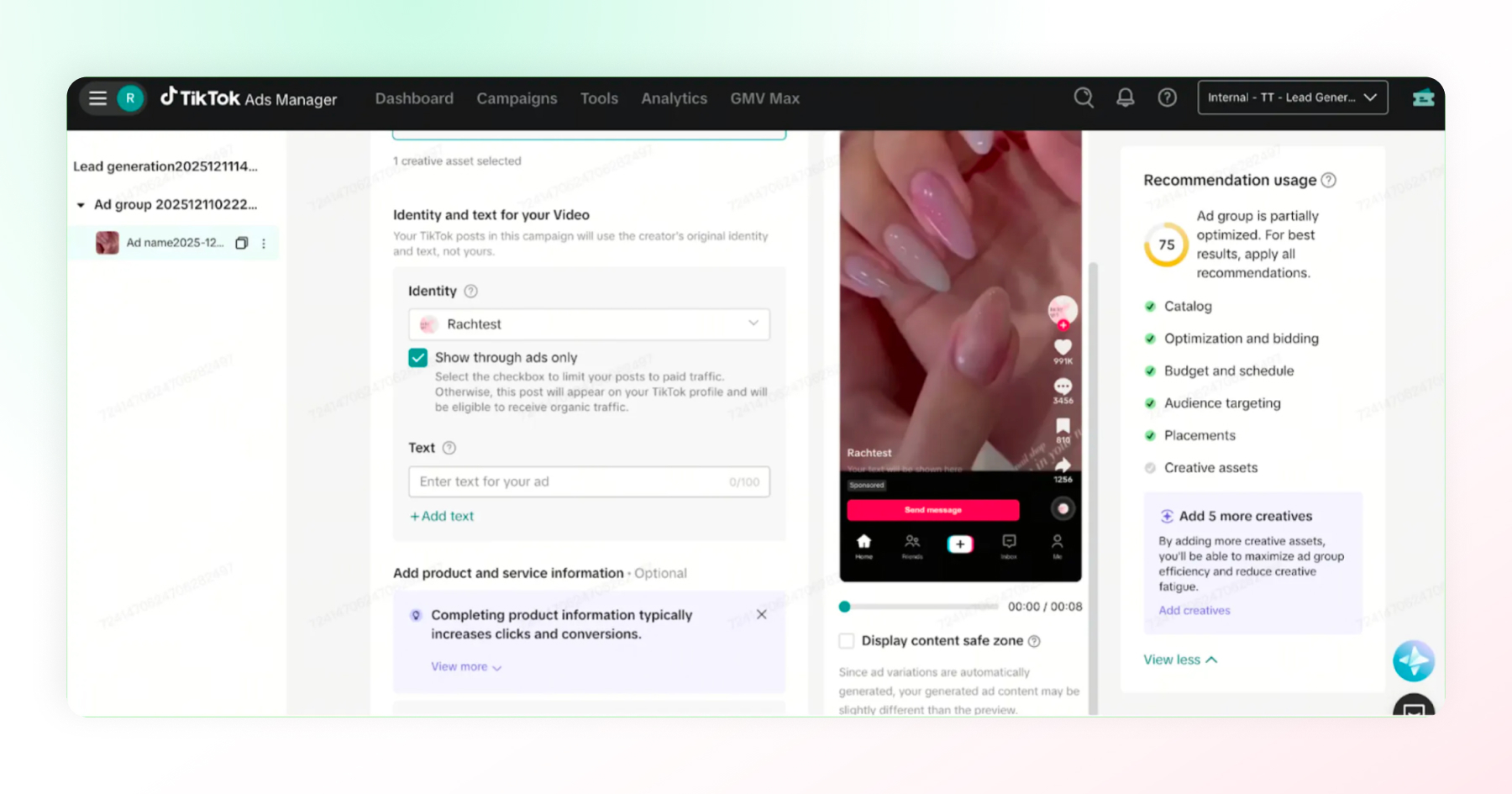
Upload your creative; TikTok supports video and image formats here. Keep it native to the platform: TikTok's algorithm and audience both respond better to authentic, relatable content than to polished, ad-like production.
Include a clear call-to-action that makes it obvious that tapping the ad starts a conversation, not just a click-through.
Step 5: Review And Submit
Double-check your settings against TikTok's ad policies, then submit for review. Once approved, your ad goes live, and conversations can start coming in.
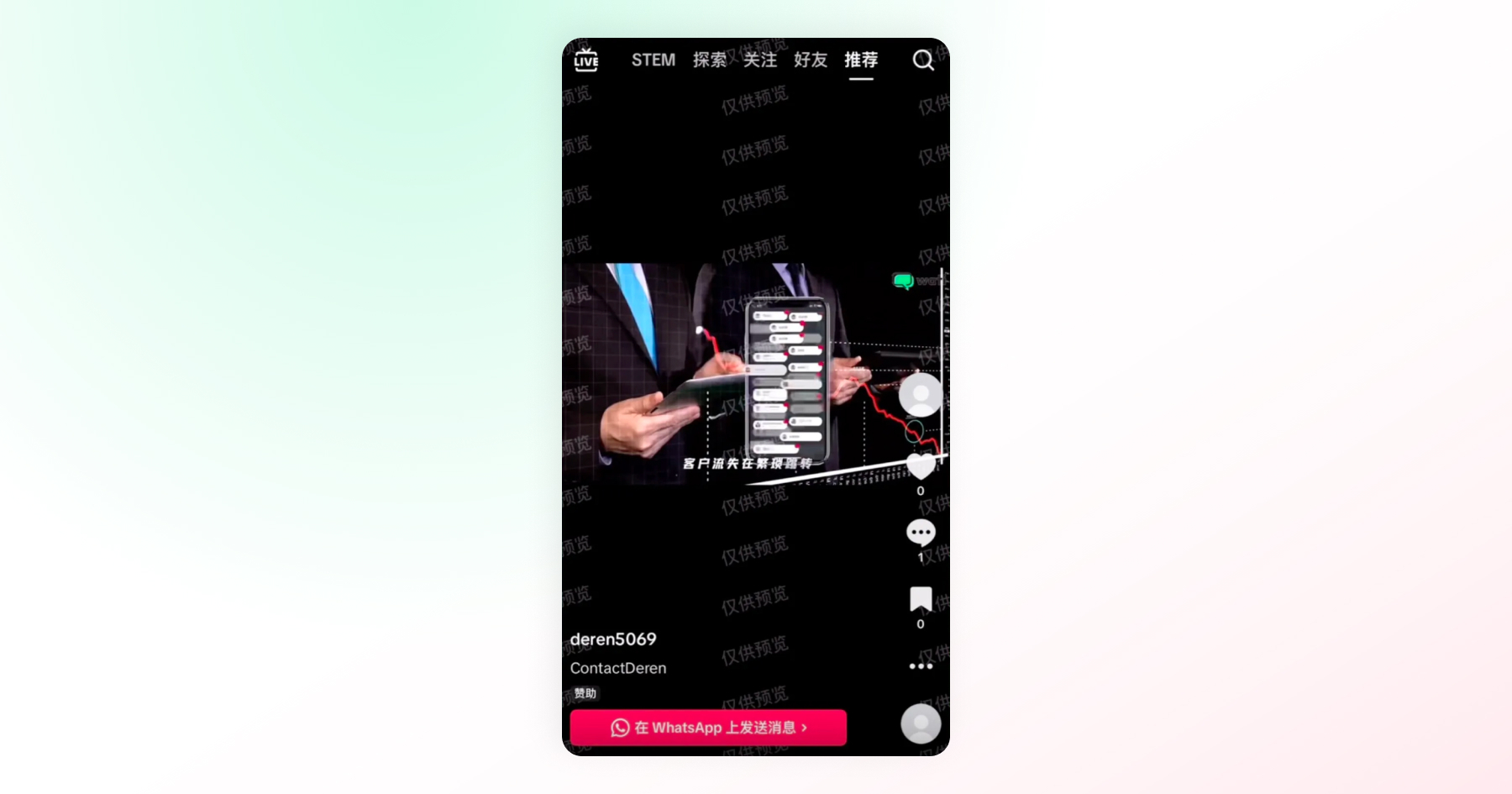
From here, the real work shifts from setup to response.
What is the TikTok Ads Library and How Do You Use It?
TikTok has two separate research tools: the official Ads Library, a compliant tool for checking which ads a specific advertiser is currently running, and the Creative Center's Top Ads Dashboard for creative research and competitive inspiration.
TikTok's Official Ad Library
This is TikTok's ad transparency tool, primarily built for compliance and public accountability (particularly for political and issue-based ads in certain regions).
It's useful if you specifically need to see which ads are currently running for a given advertiser, but it's not really designed as a creative research tool.
TikTok Creative Center (Where Most Marketers Actually Go)
For inspiration and competitive research, most advertisers use the TikTok Creative Center's Top Ads Dashboard, which is free with a TikTok Business Account. Here's what it lets you do:
- Browse top-performing ads across industries and regions, filtered by vertical (beauty, ecommerce, finance, and so on)
- Filter by ad format, so you can study creative strategy for the exact placement you're planning to use
- See performance metrics like CTR, CVR, and CPA on top-performing ads once you're logged in
- Save ads for later reference as you build out your own creative brief
How to Actually Use This Before You LaunchDon't just browse for inspiration and stop there. Before building your first Messaging Ad, spend 20 to 30 minutes looking at what's currently performing well in your industry and region. Pay attention to hooks (the first three seconds), pacing, and how competitors are actually using their call-to-action, then adapt those patterns to your own brand rather than copying them outright. TikTok rewards authenticity, so the goal is to learn what works, not to replicate someone else's ad. |
How Do You Measure TikTok Ad Performance?
TikTok tracks four core metrics, found under the Reporting tab at the campaign, ad group, or ad level.
- Click-through rate: Clicks divided by impressions. The main signal for traffic campaigns.
- Cost per conversion: What you pay for each completed conversion, whether that's a purchase, install, or lead.
- Conversion rate (CVR, clicks): Conversions divided by clicks.
- Cost per conversion for Messaging Ads: The same metric, applied to conversations started instead of purchases or installs.
TikTok has not published a separate benchmark for Messaging Ads. Track this metric against your own account history.
Best Practices for TikTok Messaging Ads That Convert
Six practices can make the difference between Messaging Ads that convert and those that get ignored. Focus on native-feeling creative, specific CTAs, creator partnerships, thorough testing, fast reply times, and TikTok’s messaging-specific ad policies.
Make The Ad Itself Feel Native
TikTok consistently rewards content that looks and feels organic, not a traditional advertisement. Skip the polished studio production. Lean into authentic, first-person, slightly imperfect video, the kind that blends into a normal scroll rather than interrupting it.
Give the CTA a Reason to Tap
A generic "Message us" undersells what's actually on offer. Be specific about what happens next: a quick answer, a personalized recommendation, a booking, whatever the real value of starting that conversation is. People tap when they know what they're getting.
Partner With Creators Who Already Have Trust
Creator collaborations tend to outperform brand-only content on TikTok, especially for Messaging Ads, since the format already asks someone to take a slightly bigger step (starting a conversation, not just watching).
A creator's existing trust with their audience makes that step feel smaller.
Test More Than You Think You Need to
Run multiple ad variations, different hooks, different creative styles, different CTAs, rather than betting everything on one version. TikTok's algorithm and audience both shift quickly, and what works this month may fade the next.
Respond Quickly, Every Time
This one is easy to overlook but arguably the most important: a Messaging Ad's entire value depends on what happens after someone taps it.
A fast, helpful reply turns genuine curiosity into a real conversation. A slow or missed reply wastes the ad spend that got that person there in the first place, no matter how good the creative was.
Stay Inside TikTok's Ad Policies
Review TikTok's advertising guidelines before launching, especially regarding messaging-specific rules such as messaging window limits and content restrictions.
Non-compliant ads risk delays or rejection, which costs you both time and momentum.
Most of these practices live inside TikTok Ads Manager and your creative process. The last one, responding quickly, lives somewhere else entirely: your team's ability to actually keep up with the conversations your ads generate.
Response speed depends on how a business manages TikTok DMs after setup, which is where we're headed next.
Turning Ad Conversations into Customers
A Messaging Ad's job ends the moment someone taps it. Everything after that, such as routing the conversation, replying fast, and tying it back to attribution, is on the business, not the ad platform.
Ads that get a reply but no fast follow-up convert at a fraction of the rate of ads paired with organized response handling.
The Risk
- If that conversation lands in TikTok's native inbox, separate from the WhatsApp and Instagram conversations your team already manages, it's easy for it to sit unanswered
- A Messaging Ad that opens a conversation nobody replies to isn't just a missed message; it's ad spend that led nowhere
Where Wati Fits in
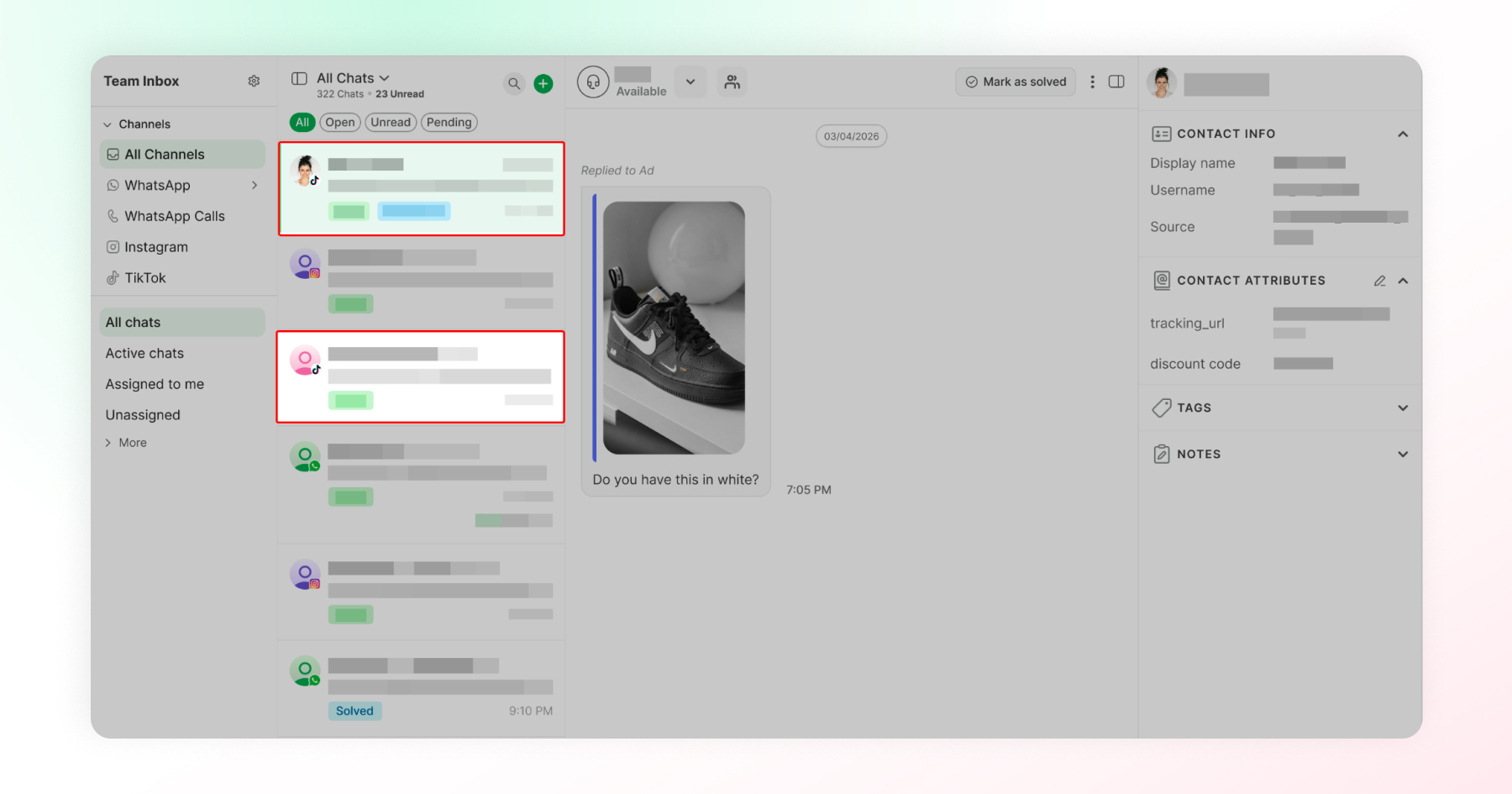
- Every TikTok conversation, ad-driven or organic, lands in the same inbox as WhatsApp and Instagram
- Conversations get assigned quickly, so replies don't sit in a queue nobody's watching
- Each conversation is tied to one customer record, no matter which channel someone reaches out on next
The Payoff for Performance Marketing
- When a conversation started by a messaging ad turns into a qualified lead or purchase, that outcome gets reported back to TikTok
- Over time, this helps your ad spend find more people who actually convert, not just more people who tap
Nothing about your ad strategy needs to change for this to work. It just means the conversations you're already paying to generate get a real chance to become something. Curious how it works? See how Wati handles TikTok Messaging Ad conversations.
How to Manage TikTok Messages and Leads After Setup
TikTok's native inbox has no assignment, tagging, or way to track replies, so messages from ads and organic videos alike are easy to lose once volume grows.
Wati closes that gap by routing every TikTok DM into the same shared team inbox as WhatsApp and Instagram, with per-conversation attribution back to the ad or video that started it.
A few things that have changed in practice:
- Messages get assigned and routed, so they land with the right person instead of sitting unseen
- Every conversation carries ad attribution, so you can see which ad or video started it and tag the outcome: qualified lead, purchase, or spam
- Contacts stay unified across channels, so a lead who found you on TikTok and later messages on WhatsApp is recognized as the same person, not three separate, fragmented chats
If you're running TikTok-to-WhatsApp Messaging Ads, the conversation skips TikTok's inbox entirely. It opens straight in WhatsApp and lands in that same shared inbox, no landing page, no drop-off in between.
Where TikTok Ads Take Your Business From Here
TikTok ads reward businesses that treat a tap not as the finish line, but as the start of something. That mindset, more than any single tactic in this guide, is what separates campaigns that just get views from ones that build real customer relationships.
Whether you're just launching your first Messaging Ad or refining campaigns already live, the opportunity is the same: turn attention into conversation and conversation into trust.
Start small, stay consistent, and let every reply be one more reason someone chooses your business over the next ad they scroll past. Get started with Wati with a free trial now.
Frequently asked questions
How do TikTok ads work?
Advertisers set an objective in TikTok Ads Manager, define an audience and budget, then TikTok's algorithm delivers the ad to users likely to take that action. Messaging Ads specifically open a conversation instead of sending someone to a website.
How much do TikTok ads cost?
Most advertisers see $0.30 to $1.50 per click and $4 to $10 per 1,000 impressions, with a $50 daily minimum at the campaign level. Costs vary by format, industry, and season.
How do I create TikTok ads?
Set up a TikTok Ads Manager account, create a campaign with the Lead Generation objective, build your ad group (audience, budget, and messaging placement), then upload your creative and submit for review.
What's the difference between Direct Messaging Ads and Instant Messaging Ads?
Direct Messaging Ads open a conversation inside TikTok's own DM inbox. Instant Messaging Ads redirect the conversation to an external app, WhatsApp being the one most businesses use.
What is TikTok Ads Manager?
TikTok's self-serve advertising platform, where you create, manage, and measure every campaign. It's organized into Campaigns, Ad Groups, and Ads.
What is the TikTok Ads Library used for?
It's primarily an ad transparency tool. For creative research and inspiration, most marketers instead use TikTok Creative Center's Top Ads Dashboard to study top-performing ads by industry and format.
Can I manage TikTok ad conversations alongside WhatsApp and Instagram?
Yes. Tools like Wati bring TikTok DMs, including ad-driven ones, into the same inbox as your other channels, with shared assignment, tagging, and customer records.
Related posts
- Instagram Comment Automation: How It Works and How to Set It Up in Wati
Instagram comment automation auto-replies to comments and DMs commenters within seconds via Meta's API. Covers strategy, use cases, and Wati setup.
- Shared Team Inbox for Instagram: A Buyer’s Checklist for 2026
Use this fastest checklist to evaluate any shared team inbox for Instagram, which covers DMs, comments, automation, and multi-channel support.
- How to Send Bulk Messages on WhatsApp Without Getting Blocked
Learn how to send bulk WhatsApp messages without getting blocked. Compare the WhatsApp Business app and API, messaging limits, costs, templates, and best practices for safe, compliant bulk messaging.
- How to Set Up a TikTok Business Account: Step-by-Step Guide
Set up a TikTok Business Account step by step: switch from personal, pick a category, add your profile, and unlock ads and analytics.