
Too Long? Read This First
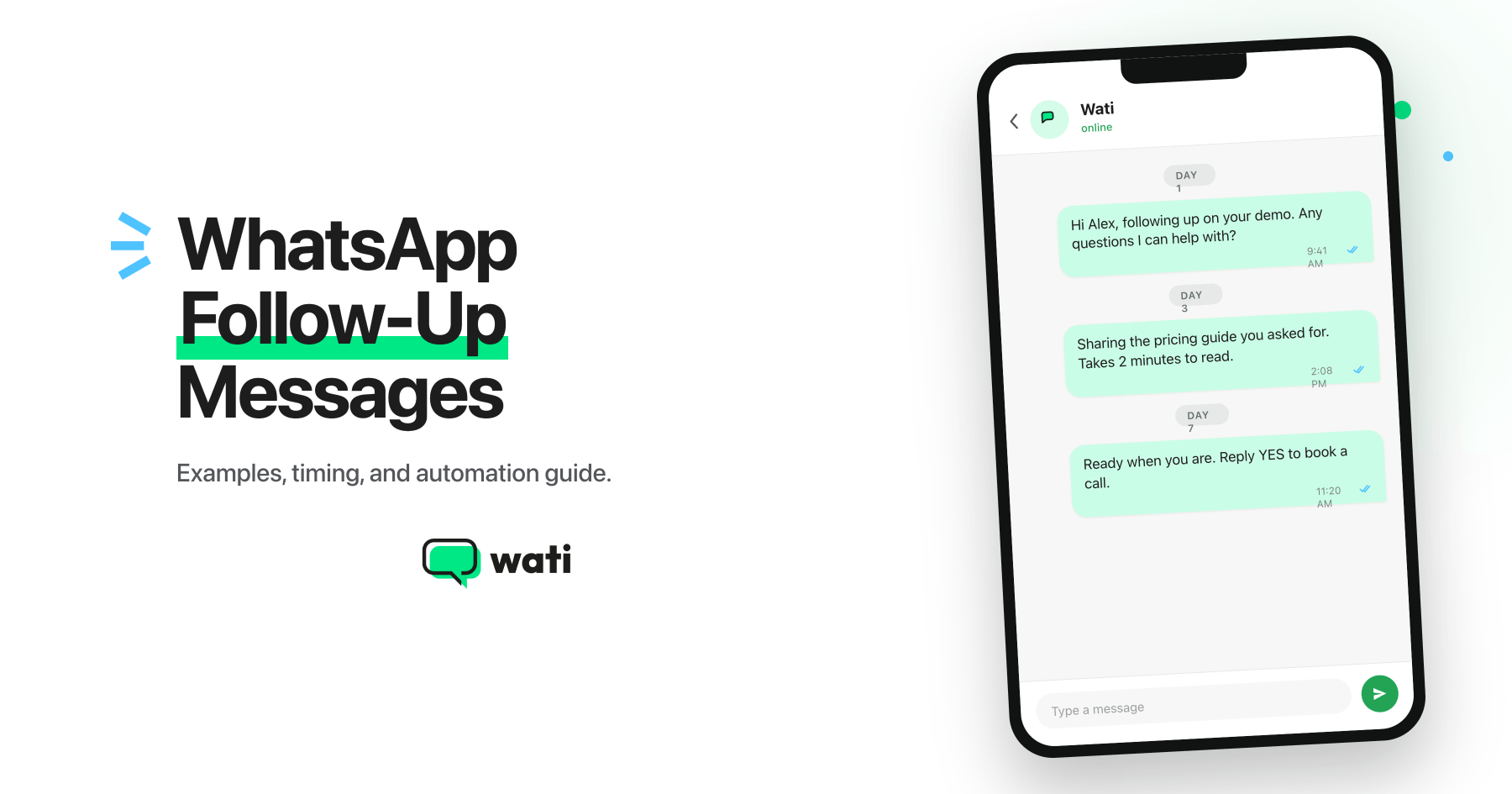
- A follow-up message after no reply on WhatsApp works best sent 24–72 hours after the first message, not immediately.
- WhatsApp's 24-hour service window means you must use pre-approved templates for follow-ups — you can't send free-form messages to unresponsive contacts.
- The best follow-up sequences are 2–3 messages maximum; anything beyond that risks reducing your delivery reach.
- Drip Campaigns on Wati lets you build the entire sequence once and auto-stops the moment a customer replies.
A clothing brand launches a WhatsApp campaign for its end-of-season sale. The message is opened almost immediately. A few customers purchase right away.
The campaign is over, and the team moves on.
What happened to the customers who opened the message and planned to come back later? Most never received a WhatsApp follow-up message.
That is where many businesses leave revenue on the table. WhatsApp messages have an open rate of 98%, but visibility alone does not drive conversions.
Most customers do not buy the moment they see an offer. They get distracted, compare alternatives, wait until later, or simply forget. Those customers did not lose interest. The conversation just ended before they were ready to act.
This article breaks down why single WhatsApp messages underperform, Follow Up Message After No Reply on WhatsApp changes the outcome, and how many messages to send, with timing and copy examples you can use today.
Why Customers Rarely Convert After the First WhatsApp Message
Most purchases do not happen the moment someone sees a message.
A customer might open your WhatsApp campaign while commuting, during a meeting, or between tasks. They may be interested in the offer, but not ready to act right away.
Even when intent is high, timing is not always on your side. Customers often want to compare options, check with a colleague, wait for payday, or simply think about the decision a little longer.
This is where a WhatsApp drip campaign changes the equation.
What is a WhatsApp Drip Campaign?
A WhatsApp drip campaign is a series of automated messages sent to a customer over time, triggered by a specific action or schedule.
Imagine a customer receives your WhatsApp campaign, opens it, and does nothing. With a single send, the conversation ends.
With a drip campaign, you decide how the follow-up unfolds: when the next WhatsApp message goes out, what it says, and how many times you reach back. The messages then go out automatically at the time you set.
That is the core idea: instead of sending one message and moving on, you stay in the conversation until the customer is ready to act.
The difference from a regular broadcast comes down to this:
- One broadcast – One message, sent once, to many people at the same time.
- One drip campaign – Multiple messages sent over time.
A drip campaign can start from almost any customer action: signing up, abandoning a cart, or submitting an inquiry. Once triggered, your WhatsApp follow-up messages go out at whatever intervals make sense for that journey: 30 minutes for an abandoned cart, 24 hours for a welcome series, a few days for a lead nurture campaign.
Nobody on your team needs to track who replied or manually send a follow-up message after no response. The drip campaign handles it and stops the moment the customer replies to you.
How WhatsApp’s 24-Hour Rule Changes the Way You Follow Up
Following up on WhatsApp is not the same as following up on email or SMS. There is a platform rule that most businesses only discover after their messages stop delivering.
Here is how it works.
- When a customer messages you, WhatsApp opens a 24-hour service window.
- Inside that window, you can reply freely with any message.
- Once 24 hours pass without a reply from the customer, that window closes.
- WhatsApp classifies the contact as inactive, and you can no longer send a free-form message to them.
To send a follow-up message after no response, you must use a Meta-approved template. Not a message you write on the spot. A pre-written, pre-approved WhatsApp message template that Meta has reviewed before you can use it.
The good news is that the approval process is straightforward. Submit them directly from your Wati dashboard and refer to Wati’s template submission guide for the steps. Meta typically reviews submissions within 24 hours. Drip campaigns built on unapproved templates will not deliver.
Meta Policy and Compliance WhatsApp limits follow-up messages to contacts who haven’t engaged. If you send multiple templates without getting replies, Meta may temporarily reduce your delivery reach. To protect your quality rating: segment by engagement, never exceed three follow-up messages, and always include an opt-out option by adding ‘Reply STOP to unsubscribe’ to your templates. |
How a Follow-Up Drip Campaign Outperforms a Single Blast
A follow-up message after no reply on WhatsApp gives businesses multiple chances to re-engage customers who did not act after the first message.
Research shows that 44% of sales reps never make a single follow-up attempt after the first message, even when customers have already shown interest. Yet most deals require five or more touchpoints before a customer is ready to act.
The difference becomes clear when you compare the two approaches:
Area | Single Broadcast / One-Time Blast | Follow-Up Drip Campaign |
Customer attention | One opportunity to get noticed | Multiple chances to re-engage customers |
Reply rate | Limited to customers ready to respond immediately | More chances for customers to reply when the timing is right |
Conversion rate | Misses customers who need more time or information | Converts customers across multiple follow-ups |
Revenue impact | Higher risk of revenue leakage | Recovers opportunities that would otherwise be lost |
Customer engagement | Engagement often drops after the first message | Keeps customers engaged over a longer period |
Effort required | Requires manual follow-up campaigns | Runs automatically once set up |
A follow-up drip campaign works because each message can do a different job:
- First message: Introduces the offer.
- Second message: Reminds customers who have not acted yet.
- Third message: Answers common questions or objections.
- Final message: Creates urgency before the offer expires.
Instead of relying on a single decision point, a drip campaign gives customers more chances to respond when they are ready.
The real difference is not the campaign itself. It is whether you stay in front of customers long enough for them to make a decision.
How Many Follow-Up Messages Should You Send, and When
Many businesses make one of two mistakes with follow-ups: sending too many messages or sending them at the wrong time.
The examples below show how a simple WhatsApp follow-up message can be adapted at different stages of a campaign.
Timing | Purpose | Follow-Up Message Examples |
Initial message | Introduce the offer, update, or opportunity | “We’ve got something you might be interested in. Take a look here.” |
24 hours later | Remind customers who may have missed the first message | “Just checking if you had a chance to look at our previous message. Let us know if you have any questions.” |
72 hours later | Share additional context or answer common questions | “A quick update: here are some details that might help you make a decision.” |
5-7 days later | Send a final reminder before the opportunity expires | “Last chance. The offer ends tonight at midnight.” |
A follow-up sent too soon can feel repetitive. Wait too long, and the customer may have forgotten about the offer altogether.
A campaign that ends too early misses the decision window. One that runs too long risks losing the customer’s attention.
This is where WhatsApp drip campaigns help by automating follow-ups instead of relying on manual reminders.
Wati’s WhatsApp Drip Campaigns Inside Your WhatsApp Business API
Wati’s Drip Campaigns feature lets you build and automate your entire follow-up campaign from one place. Instead of manually tracking who needs a WhatsApp follow-up message and when, you set the messages, the timing, and the audience once. Wati handles the rest.
Since Wati is built on the WhatsApp Business API, every follow-up message you send after no reply goes out the right way, through an approved channel, so it actually lands.
That means a few things work in your favor.
Every follow-up uses a pre-approved template: Since the API enforces WhatsApp’s 24-hour rule at the infrastructure level, Wati’s drip builder only lets you use Meta-approved templates for outbound steps. There is no risk of sending a message that quietly fails to deliver.
You can stop the campaign the moment a customer replies: There is a “Stop Campaign on Customer Reply” toggle in the campaign setup. Turn it on, and Wati automatically pauses the remaining messages as soon as someone responds.
Each campaign targets a specific audience: You can run a drip campaign on a fixed schedule from the Campaigns page, or trigger it automatically when a contact takes a specific action, such as filling out a form or being tagged in your CRM. This way, the follow-up message reaches the right person, and drip campaigns do not overlap.
How to Set Up a Follow-Up Campaign in Wati
Once your templates are approved, setting up the drip campaign takes just a few minutes. There are two ways to do it in Wati, depending on how you want it to trigger.
Option A: From the Campaigns page (available on all plans)
This is the straightforward way to send a follow-up message to a defined audience on a set schedule.
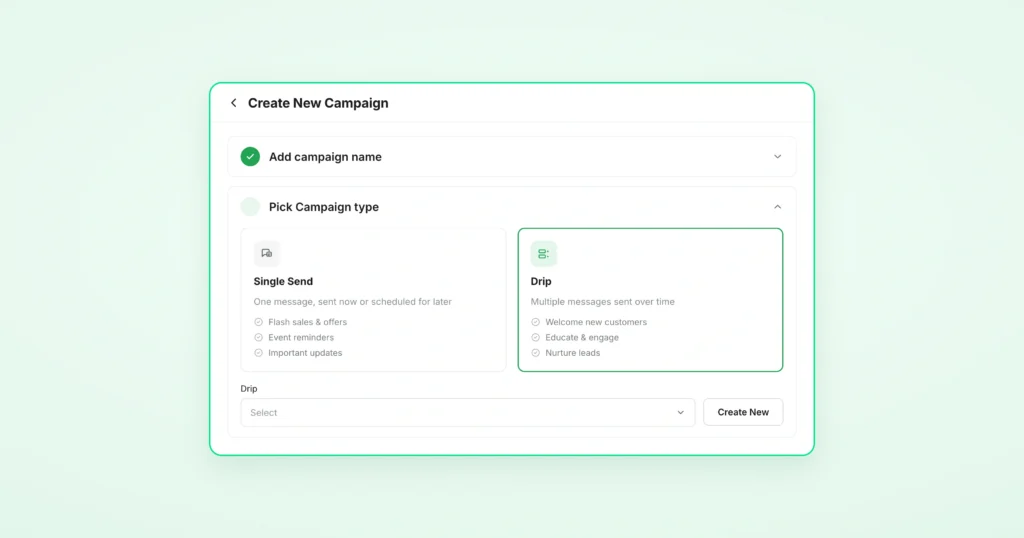
- Go to Campaigns → Create Campaign → select Drip Campaign (not single send)
- Add 2 to 3 message steps using your pre-approved templates
- Set the time gap between each step. 24 hours works well for most follow-up messages
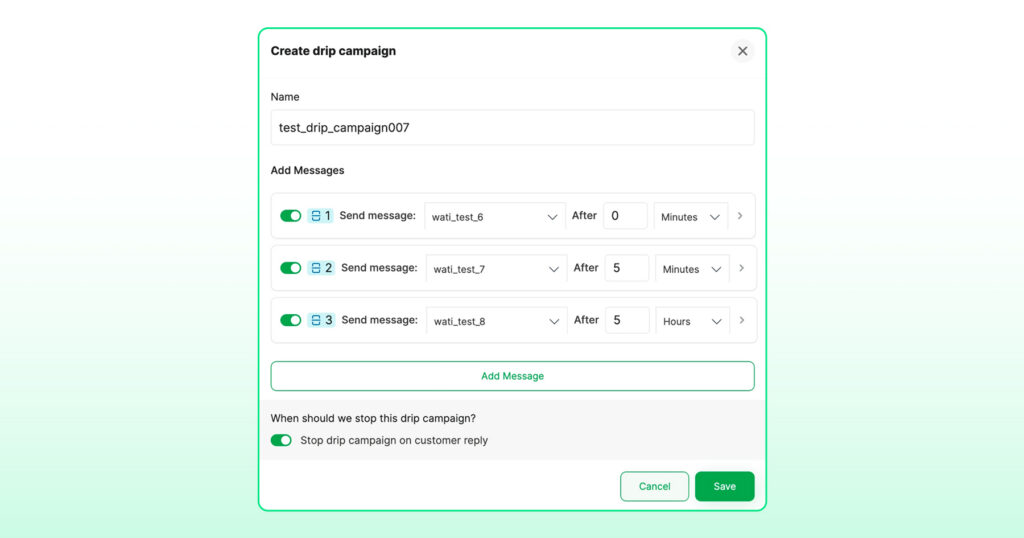
- Turn on Stop Campaign on Customer Reply so the drip campaign stops the moment someone responds

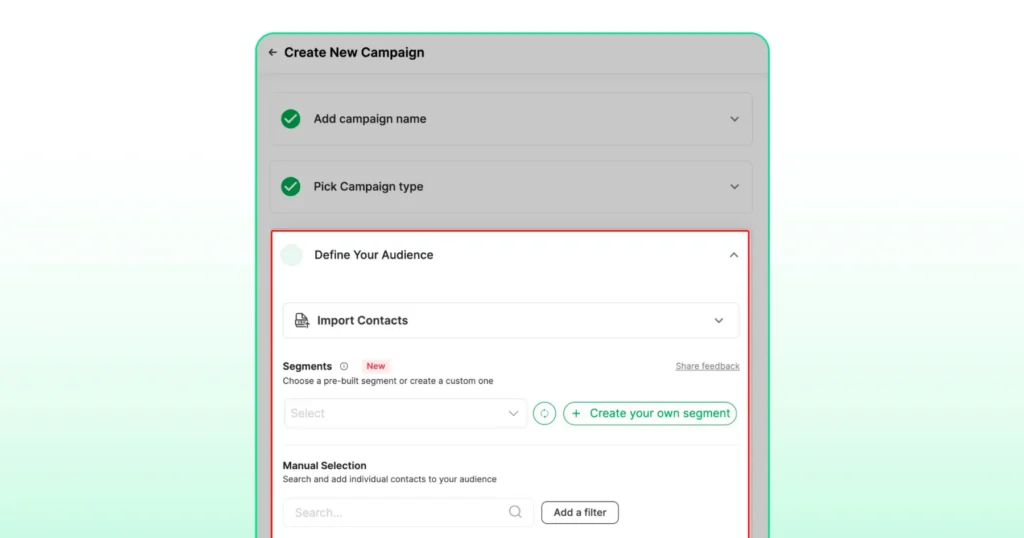
- Define your audience, set your schedule, and hit Publish
Note: Drip Campaigns from the Campaigns page work best for scheduled batch sends to a defined audience. Setting it up through Automations is better when you want the drip campaign to start based on something a contact does, such as filling out a form or being tagged as interested in your CRM. |
Option B: From the Automations page (available on all plans)
Use this path when you want the drip campaign to kick off based on something a contact does, such as filling out a form, joining a segment, or being tagged in your CRM.
- Go to Automations → Actions Library → select Drip Campaign
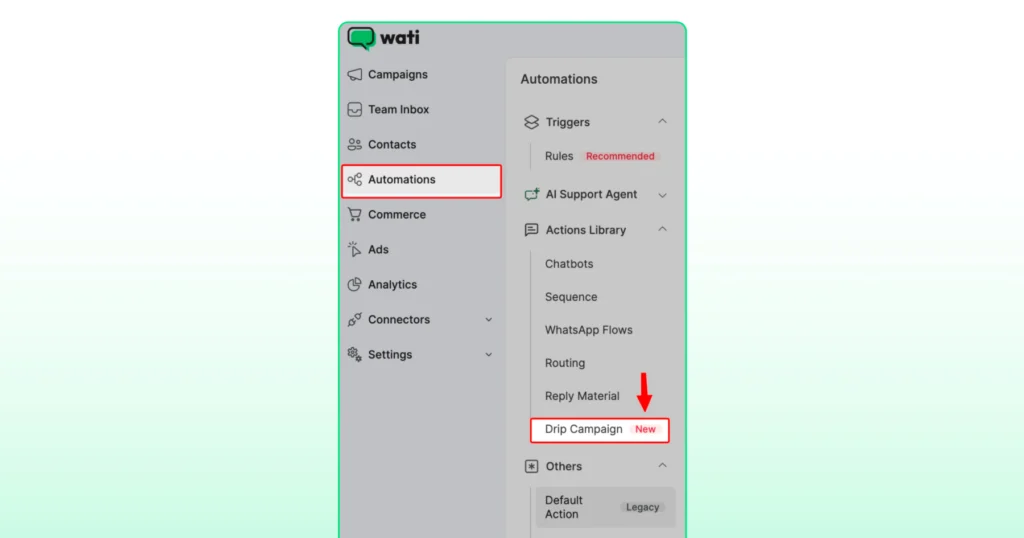
- Build your drip campaign the same way as Option A
- Set the trigger condition that starts the drip campaign
- From that point, it runs automatically every time that condition is met
Book a demo, and build your first drip campaign in under 10 minutes.
Follow-Up Message after No reply on WhatsApp: Best Templates You Can Use Today
The templates below cover four of the most common follow-up situations businesses face on WhatsApp. Each one is Meta-compliant, ready to submit for approval, and written for the way people actually read messages on their phones.
The message needs to match where the customer is in their journey. Here are the templates for each use case, with notes on what each one is designed to do.
Sales Lead Who Saw Your Message but Did Not Reply
Sometimes a lead goes quiet not because they lost interest, but because the timing was off. These two templates give you a structured way to follow up without coming across as pushy.
Template 1
Most leads need 2 to 3 touchpoints before they respond. This first follow-up keeps the conversation alive without feeling like a chase.
Hi {{name}}, just following up on the message I sent yesterday about {{product_or_service}}. Happy to answer any questions you have. Reply STOP to opt out. |
Template 2
If Template 1 gets no response, this final nudge gives the lead a low-pressure way to stay in touch on their own terms.
Hi {{name}}, one last check-in from my end. If the timing is not right, just reply “later,” and I will follow up in {{timeframe}}. No pressure at all. Reply STOP to opt out. |
Abandoned Cart Recovery
A customer browsed, added to cart, and left. These three abandoned cart recovery templates are timed to catch them at different points before the cart expires.
Template 3
Cart abandonment is one of the biggest revenue leaks in e-commerce. A message sent within 30 minutes catches the customer while the intent is still fresh.
Hi {{name}}, you left something behind! 🛒 Your {{product_name}} is still in your cart. Want me to hold it for you? Reply YES, and I will reserve it for 24 hours. Reply STOP to opt out. |
Template 4
If the first reminder did not convert, this one creates urgency around stock availability rather than just repeating the same message.
Hi {{name}}, your cart is about to expire. ⏳ {{product_name}} is still available, but stock is limited. Complete your order here: {{link}} Reply STOP to opt out. |
Template 5
A small discount on the final message often tips the decision for customers who were already interested but needed one more reason.
Hi {{name}}, this is your last chance before your cart clears. 🎁 Here is 10% off to help you decide: {{discount_code}}. Offer valid until {{expiry_time}}: {{link}} Reply STOP to opt out. |
Subscription Renewal Reminder
A subscriber’s renewal is approaching, and they have not taken any action yet. These three templates remind them before it is too late and sweeten the deal if they still do not act.
Template 6
An early reminder before expiry gives subscribers time to act without feeling rushed. This protects your recurring revenue before churn happens.
Hi {{name}}, your {{subscription_name}} subscription is expiring on {{date}}. 🔔 Renew now to avoid any interruption to your service: {{link}} |
Template 7
A 24-hour nudge with an added incentive works better than a plain reminder. Customers who were on the fence often convert when there is something extra on the table.
Hi {{name}}, your {{subscription_name}} subscription expires in 24 hours. Renew today and get {{offer_details}} Valid only until {{expiry_date}}: {{link}} 🎁 |
Template 8
The final message creates a hard deadline. Pairing urgency with an expiring offer is one of the most effective ways to recover subscribers who have not renewed.
Hi {{name}}, last chance to renew your {{subscription_name}} subscription. Your exclusive offer expires tonight. Grab it here before it is gone: {{link}} ⚡ Reply STOP to opt out. |
Re-engaging a Contact Who Has Gone Cold
A contact has not interacted with your business in 30 days or more. These templates reconnect without feeling like a sales push.
Template 9
Most businesses write off cold contacts. A single well-timed message can bring back a segment that would otherwise be lost revenue.
Hi {{name}}, it has been a while! 👋 We have added some new {{product_or_service}} since we last spoke. Thought you might want to take a look: {{link}} Reply STOP to opt out. |
Template 10
If the first message gets no reply, this one gives the contact a simple way to signal their interest or bow out gracefully. Either outcome is useful.
Hi {{name}}, just checking if you saw my last message. 😊 If {{product_or_service}} is no longer relevant for you, no worries at all. But if you would like to reconnect, just reply here and I will get back to you. Reply STOP to opt out. |
Here is a quick reference for when to send each template across all four scenarios.
Use Case | First Message | Second Message | Third Message |
Sales Lead | 24 hours after the first message | Day 3 if no reply | |
Abandoned Cart | 30 minutes after abandonment | 24 hours later | 48 hours later |
Subscription Renewal | 7 days before expiry | 24 hours before expiry | Day of expiry |
Re-engagement | Day 1 | Day 3 if no reply |
Note: Every template you send after the 24-hour window must be pre-approved by Meta. Submit them through your Wati dashboard before building your drip campaign.
When to Use a Drip Campaign Instead of a Single Broadcast
Not every WhatsApp campaign needs multiple follow-ups.
If you are announcing a product launch, sharing a holiday greeting, or sending an important update, a single broadcast is often enough. The message is delivered, the customer receives the information, and the campaign is complete.
Use a Single Broadcast When | Use a Drip Campaign When |
You are sending a one-time announcement | You need multiple follow-up messages |
Every recipient receives the same message | Messages should be sent based on customer actions |
The campaign starts and ends with one send | The customer journey spans several days or weeks |
No additional reminders are required | Follow-ups are part of the conversion process |
Manual management is still practical | Automation is needed to scale outreach |
The Wati Way: Turning Follow-Ups Into Revenue
With Wati’s WhatsApp drip campaigns, businesses can automate follow-up messages based on customer actions and timing. Instead of manually tracking every lead, your follow-up campaign runs in the background, making sure interested customers do not slip through the cracks.
You can control who receives follow-ups, when messages are sent, and when a drip campaign should stop, all from a single platform.
That means fewer missed opportunities, more consistent engagement, and more revenue from the leads you already have.
Connect your WhatsApp number and run your first drip campaign today.
Frequently asked questions
How long should I wait before sending a follow-up on WhatsApp?
The ideal window is 24 to 72 hours after your first message. Sending too soon feels repetitive. Waiting longer than a week risks the customer losing context entirely. For abandoned carts, 30 minutes is the recommended window for the first follow-up while purchase intent is still fresh.
How many follow-up messages can I send on WhatsApp?
A maximum of 2 to 3 follow-up messages is recommended. Sending more without a reply can trigger Meta's quality rating system and temporarily reduce your delivery reach. Always include a "Reply STOP to unsubscribe" option in every template.
What happens if I send a WhatsApp template that is not approved?
The message will not deliver. WhatsApp's infrastructure blocks outbound messages that have not been reviewed and approved by Meta. Drip campaigns built on unapproved templates fail silently, meaning you will not always get an error notification. Submit all templates through your Wati dashboard before building your drip campaign.
Can I automate WhatsApp follow-up messages?
Yes. Wati's Drip Campaigns feature lets you build a full follow-up sequence using pre-approved templates, set the timing between each message, and automatically stop the sequence the moment a customer replies. It is available on all Wati plans.
What is the difference between a WhatsApp drip campaign and a broadcast?
A broadcast sends one message to many contacts at the same time. A WhatsApp drip campaign sends multiple messages to one contact over time, triggered by a specific action or schedule. Broadcasts work for one-time announcements. Drip campaigns work when you need to follow up across multiple touchpoints before a customer is ready to act.
Related posts
- Instagram Comment Automation: How It Works and How to Set It Up in Wati
Instagram comment automation auto-replies to comments and DMs commenters within seconds via Meta's API. Covers strategy, use cases, and Wati setup.
- Shared Team Inbox for Instagram: A Buyer’s Checklist for 2026
Use this fastest checklist to evaluate any shared team inbox for Instagram, which covers DMs, comments, automation, and multi-channel support.
- How to Send Bulk Messages on WhatsApp Without Getting Blocked
Learn how to send bulk WhatsApp messages without getting blocked. Compare the WhatsApp Business app and API, messaging limits, costs, templates, and best practices for safe, compliant bulk messaging.
- How to Set Up a TikTok Business Account: Step-by-Step Guide
Set up a TikTok Business Account step by step: switch from personal, pick a category, add your profile, and unlock ads and analytics.