

-

-
-
Solutions
-
Soluções
-
Soluciones
-
解决方案
-
解決方案
-
الحلول
-
Product
-
Produto
-
Producto
-
产品
-
產品
-
المنتج
-

-
-


 Wati for Marketing
 Wati for Support
 Wati for Sales
 eLearning
 E-commerce
 Marketing Agencies
 Healthcare
 No Code Chatbots
 WhatsApp Business API
 Instagram Automation
 Click to WhatsApp ads
 Campaigns
 Team Inbox
 WhatsApp Business Calling
 Wati AI
 Overview
 Library
 Agente de suporte de IA
How to Send a Link in WhatsApp and Get Customers to Click
Written by:
 Rohan Chaturvedi
|
Last updated on:
April 28, 2026
|
Fact Checked by :
Rohan Chaturvedi
|
Last updated on:
April 28, 2026
|
Fact Checked by :
 Namitha Sudhakar
|
According to: Editorial Policies
Namitha Sudhakar
|
According to: Editorial Policies
 Table of Contents
Too Long? Read This First
- Learning how to send a link on WhatsApp the right way helps you share content that actually gets noticed and clicked.
- Keep your links short and clean so they look professional and are easier for people to tap.
- Add a little context or a visual to make your links more appealing and engaging.
- Use the WhatsApp Business API to automate how you send links and personalize messages for your audience.
- Track link performance to understand what’s working and fine-tune your approach.
To send a link in WhatsApp, simply copy the URL and paste it into a chat. WhatsApp automatically detects the link and creates a clickable preview with the page title and image.
Add a short message if needed and tap send.
But when businesses share links on WhatsApp, just copying and pasting is rarely enough. Plain or messy links often get ignored, which means fewer clicks, less traffic, and missed opportunities.
In this guide, you’ll learn how to send a link in WhatsApp for business that stands out, including creating clickable previews, tracking clicks, and improving engagement.
How to Get Better Results by Sharing Attention-Capturing Links?
You’ve just published a new product page or event registration link, and you’re excited to share it on WhatsApp.
So, you copy the link and send it to your customers or groups, hoping they’ll click and check it out. However, you notice only a few people actually open it.
That is because the links look plain and aren’t clickable enough to grab attention.
When you share links the right way, you can bring in more traffic, get people to engage, and make communication easier for everyone. It’s a simple way to get better results for your business.
1. Traffic and Lead Generating Magnets
Business links can do more than share information. When used strategically, they guide customers and generate results.
- Send customers your product-related information or content: Drive traffic to product pages, blogs, or websites
- Offer instant support: Share a WhatsApp Business link so customers can start a support conversation immediately
- Generate leads: Use direct messaging links to capture interest and follow up quickly
Bonus Resource: How to Create a WhatsApp Business Account: A Step-by-Step Guide
2. Increase Engagement with WhatsApp Links
A well-placed clickable WhatsApp promotional link encourages users to take action.
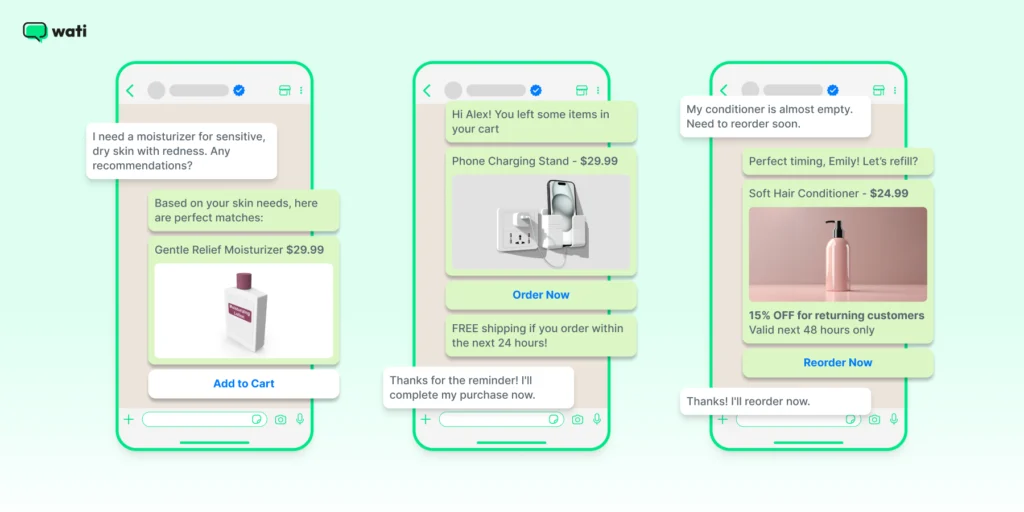
- Clickable previews: Links with previews look more appealing and build trust.
- CTA links: Adding clear calls-to-action like “Click to chat” or “View more” makes links more effective.
Make It Easy for Customers to Reach You 👇
Tools like a WhatsApp link generator let you create clickable links in seconds.
With just one tap, customers can start a conversation.
Sharing links this way makes chats smoother, boosts engagement, and helps your business get better results on WhatsApp.
Related Read: Why Isn’t Instagram Engagement Converting Into Leads? (And How To Fix It)
What are the Different Types of WhatsApp Links Businesses Can Use?
While sending a link in WhatsApp is simple, businesses use several types of links to guide customers to conversations, websites, and campaigns.
1. WhatsApp Chat Links (wa.me Links)
A WhatsApp chat link allows customers to start a conversation with your business instantly without saving your phone number. When someone clicks the link, it opens a WhatsApp chat with your business automatically.
The basic format for a WhatsApp chat link is:
https://wa.me/<phone-number>
Businesses often use WhatsApp chat links on:
- Websites and landing pages
- Email signatures
- Social media bios
- Marketing campaigns
This makes it easier for customers to start a conversation with just one click.
2. Click-to-WhatsApp Links
Click-to-WhatsApp links allow you to send users directly into a WhatsApp conversation from ads or campaigns.
These links are commonly used in paid advertising campaigns where the goal is to start a conversation rather than send users to a website.
When someone clicks a Click-to-WhatsApp link:
- The link opens WhatsApp
- A chat window with your business appears
- The user can start messaging immediately
Businesses use Click-to-WhatsApp links in:
- Facebook and Instagram ads
- Website banners
- Landing pages
- Email campaigns
This approach is powerful because it removes friction and encourages users to ask questions, request quotes, or place orders directly in WhatsApp.
3. WhatsApp Template Links with CTA Buttons (API)
Businesses using the WhatsApp Business API can share links using CTA buttons inside template messages. Instead of sending a raw URL, the link appears as a clear button, such as:
- Visit Website
- View Product
- Track Order
These buttons make messages easier to read and significantly improve click-through rates.
When the user taps the button, they are redirected to the link you have added.
Businesses use CTA buttons for:
- Order tracking links
- Product pages
- Payment links
- Appointment booking
- Promotional campaigns
This approach makes WhatsApp messages more interactive and helps businesses drive customers to key pages.
Sending Links in WhatsApp Groups vs Broadcasts vs 1-to-1 Chats
Businesses can share links on WhatsApp in three main ways: personal chats, groups, and broadcasts. Each option works differently and is suited for different communication goals.
In a 1-to-1 chat, links are sent directly to an individual contact. This is the most personal context and allows businesses to provide tailored responses, share product pages, or send support resources.
In WhatsApp groups, links are visible to every participant. This works well for communities, customer groups, or event updates, but messages can quickly get buried in active conversations.
Broadcast messages allow businesses to send links to multiple users individually. When sent through the WhatsApp Business API, broadcasts can include template messages, CTA buttons, and tracking, making them ideal for marketing campaigns and announcements.
| Delivery Method | How It Works | Best Use Cases | Key Limitations |
| 1-to-1 Chat | Link sent directly to an individual conversation with a full preview | Customer support, product recommendations, order updates | Not scalable for large campaigns |
| WhatsApp Group | Link shared in a group conversation visible to all members | Communities, event announcements, shared discussions | Messages can get buried quickly |
| Broadcast / API Campaign | Link sent individually to many contacts via broadcast or template message | Promotions, updates, marketing campaigns | Requires user opt-in and API setup |
Bonus Read: WhatsApp Broadcast vs Group
How Do WhatsApp Link Previews Work (and Why They Sometimes Don’t Appear)?
When you paste a URL into WhatsApp, the platform automatically generates a link preview showing the page title, description, and image.
This preview makes links more engaging and significantly improves click-through rates.
WhatsApp generates these previews using Open Graph (OG) tags embedded in the webpage. The most important tags include:
1. og:title
The page title shown in the preview
2. og:description
The short summary below the title
3. og:image
The preview image displayed in the message
If these tags are missing or incorrectly configured, the preview may not appear properly.
Sometimes WhatsApp previews fail to load due to:
- Missing Open Graph tags on the webpage
- Large or unsupported preview images
- Temporary caching issues
- Links being shortened or redirected multiple times
If a preview doesn’t appear, try refreshing the link, clearing cache, or checking the page’s Open Graph tags using tools like the Facebook Sharing Debugger.
Best Practices for Sending Links on WhatsApp for Businesses
Sharing links on WhatsApp is easy, but doing it the right way can make a big difference.
Small changes, such as how you format your links or add context, can encourage people to click more.
1. Format Your Links for More Clicks
Always ensure that your WhatsApp business links are clean and properly formatted. A clickable WhatsApp link should be easy to read and open instantly.
- Use the full URL: Instead of just pasting a bare link, add a short introduction to make it more inviting.
- Avoid broken links: Double-check your link to ensure it works before sending it.
- Enable link previews: WhatsApp automatically generates previews for most links, but if it doesn’t, try adding “https://” at the beginning.
2. Use URL Shorteners for Cleaner Links
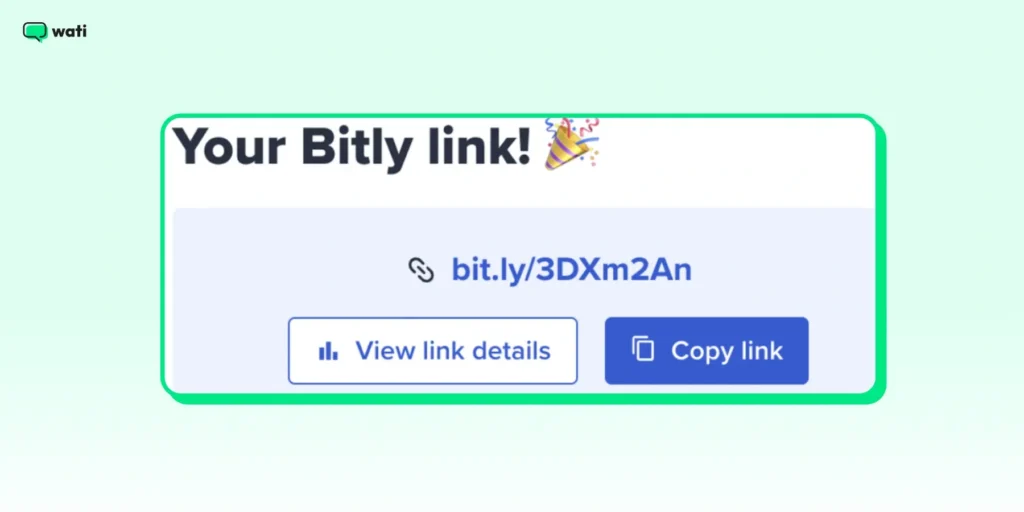
Long URLs can look cluttered and unprofessional. Consider using a WhatsApp link generator or a URL shortener like Bitly to make your messages more organized.
Here’s why it helps:
- Shorter links look better: A trimmed-down URL is easier to read and share.
- They take up less space: It is useful when adding multiple links in a single message.
- You can track clicks: Many shorteners offer analytics, helping you measure link performance.
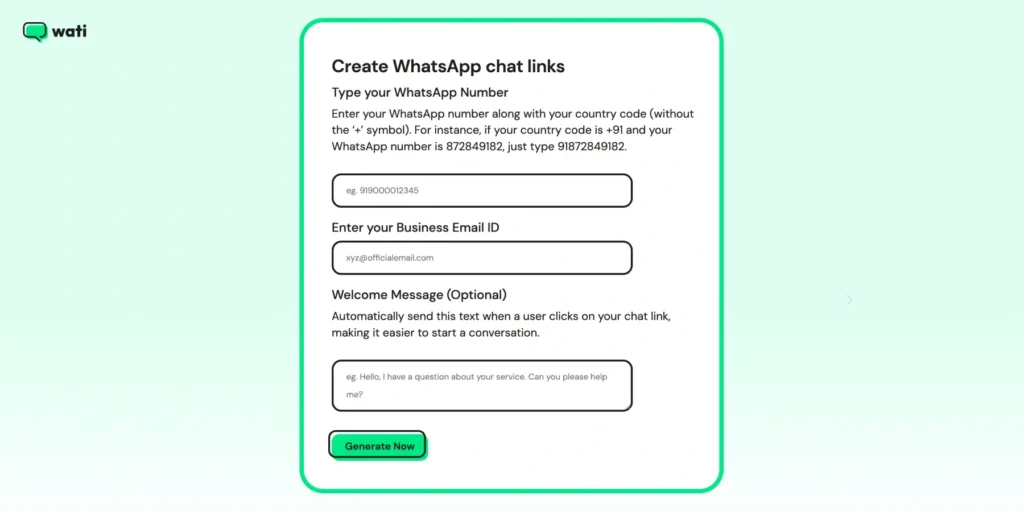
For businesses, a WhatsApp Business link generator makes it easy to create clickable links that take customers straight to a chat or product page.
3. Add Context for Higher Engagement
Just sharing a link in a chat isn’t enough. Adding a bit of context helps people see why it’s worth clicking.
Here’s how you can do it.
- Provide a short description: Instead of just sending a link, add a line explaining what it’s about.
- Use a call to action (CTA): Phrases like “Check this out!” or “Tap the link to learn more” can boost engagement.
- Include relevant emojis: A simple 📢 or 🔗 can make your message more visually appealing.
For example, instead of sending:
👉 https://example.com/product-page
Try this:
👉 Looking for the perfect gift? 🎁 Check out our top picks here: [Product Link]
Advanced Tips for Sending Links Professionally
A few smart tweaks can make your links more clickable, trustworthy, and engaging. Here are advanced strategies to help your links stand out and get noticed.
Tip 1: Make Your Links Pop with Rich Media
A simple text link might get ignored. However, pairing it with rich media such as images, videos, or GIFs can instantly make it more appealing.
When sharing a WhatsApp link, consider adding a relevant image or video that provides context.
For example, if you’re promoting a product, a short demo video or an eye-catching image can significantly increase clicks.
Another great approach is embedding a clickable image for WhatsApp, which allows users to tap on an image and be redirected to a webpage or chat.
This makes the experience more engaging and improves the chances of users interacting with your content.
Don’t Miss This: WhatsApp Marketing Messages Examples: WhatsApp Promotional Messages
Tip 2: Keep Your Links Safe from Spam Filters
WhatsApp monitors messages to prevent spam. Sending too many links too quickly can flag your number. Here’s how to stay safe while sharing links.
- Personalize your messages: Avoid sending the same generic link to multiple users. Add a short, custom message to make it feel personal.
- Don’t blast links in bulk: Space out your messages instead of sending a flood of links at once.
- Mix content types: Share links alongside images, text, or quick tips to keep messages natural and less spammy.
Tip 3: Send Links at the Right Time for Maximum Clicks
Timing plays a crucial role in how well your links perform. Sending a clickable WhatsApp link when your audience is most active increases the chances of it being seen and clicked.
Analyzing customer behavior can help determine the right timing. For promotional messages, mornings or lunchtime usually work well since people check their phones more often then.
Scheduling messages to align with customer time zones can improve engagement rates.
Related Read: WhatsApp Scheduler: How To Schedule WhatsApp Messages?
How to Start Sending Links via WhatsApp Business API?
If you want to take your link-sharing a step further, the WhatsApp Business API can help.
It lets you share product pages, booking links, or support chats automatically and at scale. You can schedule messages, target the right audience, and track clicks to see what’s working.
It’s a smarter way to make every link count.
Automating Link Sharing with Message Templates
Manually sending links to customers can be time-consuming. The WhatsApp Business API allows you to automate this process using message templates.
WhatsApp business message templates help maintain consistency while ensuring links are formatted correctly for easy access.
For example, an e-commerce business can automatically send order confirmation messages with a clickable WhatsApp link directing customers to their tracking page.
Using Click-to-WhatsApp Ads for Seamless Link Sharing
Click-to-WhatsApp ads are a powerful way to drive engagement by integrating WhatsApp links directly into advertisements.
These ads, run on platforms like Facebook and Instagram, allow users to click a button that opens a WhatsApp Business link, instantly starting a conversation.
This eliminates friction in the customer journey and makes it easier for potential buyers to connect with a brand.
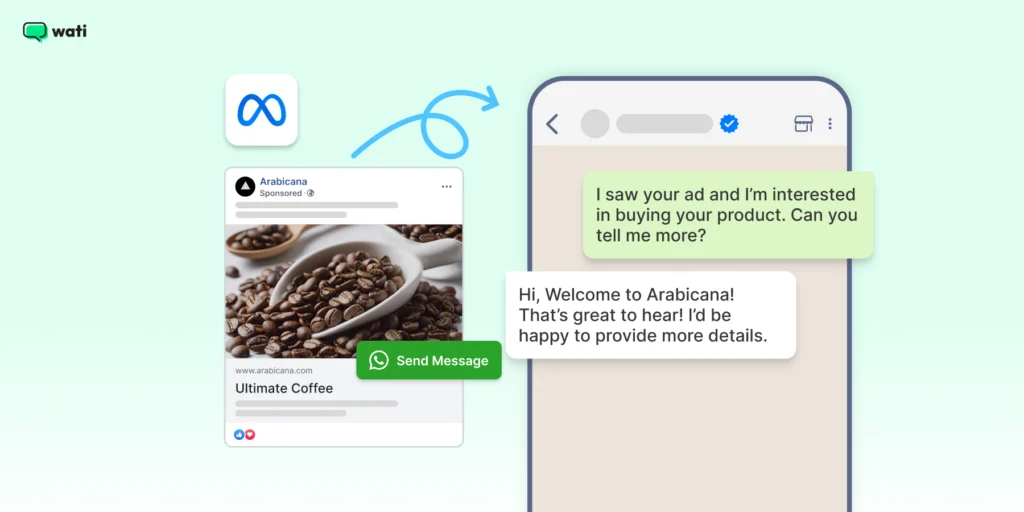
Businesses can further optimize these ads by using WhatsApp link generators to create specific tracking URLs. This allows marketers to measure which campaigns drive the most interactions and refine their messaging accordingly.
When you pair it with personalized auto-replies, it can really boost your conversion rates.
Bonus Resource
Tracking Link Performance via WhatsApp Business API Analytics
Sharing links is only part of the equation. Tracking their performance is what makes a strategy genuinely effective.
With the WhatsApp Business API, you can track key metrics like message delivery, read status, and link clicks.
Pair that with external analytics tools, and you’ll get a clear picture of what’s working and what’s not.
For example, an e-commerce brand can see how many people clicked a product link and went on to buy.
If engagement seems low, it can tweak the message, test new link formats, or try sending it at a different time to boost results.
Note: Learning to send links with the WhatsApp Business API can really help your business. You can automate messages, engage customers better, and track performance.
Using message templates, click-to-WhatsApp ads, and analytics makes WhatsApp a powerful tool for marketing and support. Not on WhatsApp API yet? Try Wati for free by booking a free demo.
Making Every Link Count on WhatsApp
Sharing links on WhatsApp may seem simple, but doing it correctly can significantly improve how people engage with your messages.
A clean, well-written link with a short note or image gives people a reason to click. For businesses, using features like automation, click-to-WhatsApp ads, and analytics can make a big difference.
They help you share links that reach the right people at the right time without feeling pushy or spammy.
With a few smart tweaks, every link you share can spark better conversations and stronger results.
Ready to send links at scale with full automation, CTA buttons, and click tracking? Wati’s WhatsApp Business API platform makes it possible without code. Start your free trial today.
Next Read: How to Capture Phone Numbers From Instagram DMs With Wati in 2026
FAQs
Yes, you can track link clicks using URL shorteners with analytics (like Bitly or Rebrandly) or UTM parameters in Google Analytics.
Businesses can automate link sharing through message templates and broadcast messages. This ensures links reach the right audience at the right time while maintaining engagement.
Yes. You can send a WhatsApp message without saving a number by using a wa.me link. When you open the link in a browser, WhatsApp automatically starts a chat with that number. This is commonly used by businesses to let customers start conversations instantly.
Yes, WhatsApp has policies against spam and misleading links. Businesses must use approved message templates for outbound messages, and excessive or unsolicited link sharing can lead to restrictions or account suspension.
Yes. You can send a link from WhatsApp Web or the WhatsApp desktop app the same way you would on mobile. Copy the URL you want to share, open the chat in WhatsApp Web, and paste the link into the message box. WhatsApp will automatically detect the URL and generate a clickable preview if the webpage supports it. Press Enter to send the link to the recipient.
Businesses can send links to multiple contacts using WhatsApp broadcast lists or approved template messages via the WhatsApp Business API. It’s important to message users who have opted in and provide relevant content to avoid spam complaints.
Businesses commonly share website links, product pages, payment links, booking links, support resources, and promotional campaigns. These links help guide customers to important actions such as making a purchase, tracking orders, or contacting support.