
Too Long? Read This First
- Unstaffed inbox: Order questions reach your Facebook Page, but most D2C support teams work in WhatsApp.
- Reply windows: Bot-handled chats expire 24 hours after the customer's last message. A teammate's reply keeps the chat open for up to 7 days.
- Bot for status: A track-my-order bot asks for the order ID and answers "Where is my order?" without buttons.
- People for exceptions: Returns, exchanges, and COD questions go to ops in Wati's Team Inbox, with the order ID saved.
- WhatsApp for updates: Delivery updates move to WhatsApp with opt-in, because Messenger can't message customers first.
An order confirmation isn't the end of a customer's interaction with your brand. They may still need to check delivery status, request an exchange, ask about a refund, or confirm their cash-on-delivery (COD) order.
Many of these questions come through Facebook Messenger, alongside WhatsApp and other support channels.
Without a clear process, keeping track of every query and making sure it reaches the right team can be difficult.
Wati’s Facebook Messenger customer service tools help ecommerce teams handle routine order queries with chatbots, retrieve order details through webhooks, and route returns or delivery issues to the relevant support team.
This guide covers how to set up order tracking in Messenger, manage returns and COD queries, assign conversations to support agents, and move proactive delivery updates to WhatsApp with customer consent.
Why do Post-Purchase Questions Go Cold in the Facebook Page Inbox?
Messenger questions go cold because most D2C teams staff WhatsApp first.
The Page inbox gets checked when someone remembers, and Messenger gives you only a short window to reply.
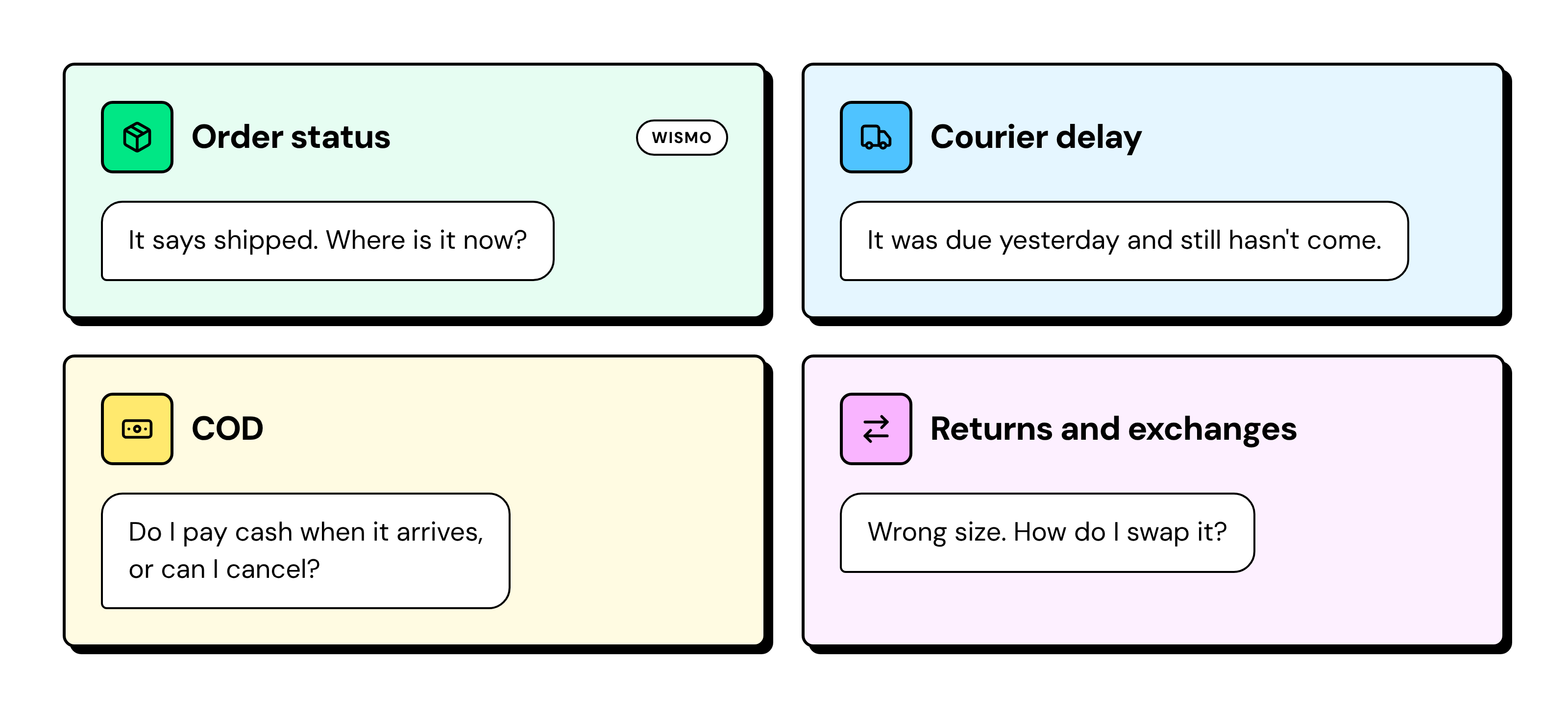
Most post-purchase Messenger chats ask one of four things:
Returns alone create a steady queue. NRF estimates that 19.3% of US online sales would be returned in 2025.
These are the same questions you answer on every channel, which is the core of omnichannel customer service.
Messenger adds its own rules, so the flow has to fit them.
What Rules Shape Facebook Messenger Customer Service?
Facebook Messenger customer service runs on Meta's rules. The customer always messages first, bots can reply for 24 hours, and a teammate's reply extends that to 7 days.
Messenger rule | What it means for an order question |
|---|---|
The customer messages first | You can't send "Your order has shipped" unless they wrote to you |
Bots and rules reply within 24 hours of the customer's last message | Automate status lookups inside this window |
A teammate's reply extends the window to 7 days | A teammate must reply to returns and COD chats within 24 hours |
When the window closes, the chat is Expired | No one can reply until the customer writes again |
No buttons or lists in Messenger chatbots | Customers reply with a word or a number |
No templates, catalog, WhatsApp Flows, or subscribe options | No broadcasts or proactive campaigns on Messenger |
Meta sets the 24-hour and 7-day limits in its Messenger policy. If no teammate replies before the bot's 24 hours run out, the chat expires.
How to Use Facebook Messenger for Customer Service to Answer "Where is My Order?"
Build a track-my-order chatbot that handles the most common WISMO (Where Is My Order?) questions. The order lookup uses the Webhook node, which is available on Wati’s Pro and Business plans.
A keyword starts the flow; the chatbot collects the order ID, checks your order management system through a webhook, and shares the latest order status with the customer.
With this automated flow, customers can check their orders without waiting for a support rep.
If an order isn't found or a delivery is delayed, the bot can route the conversation to the right support team for follow-up.
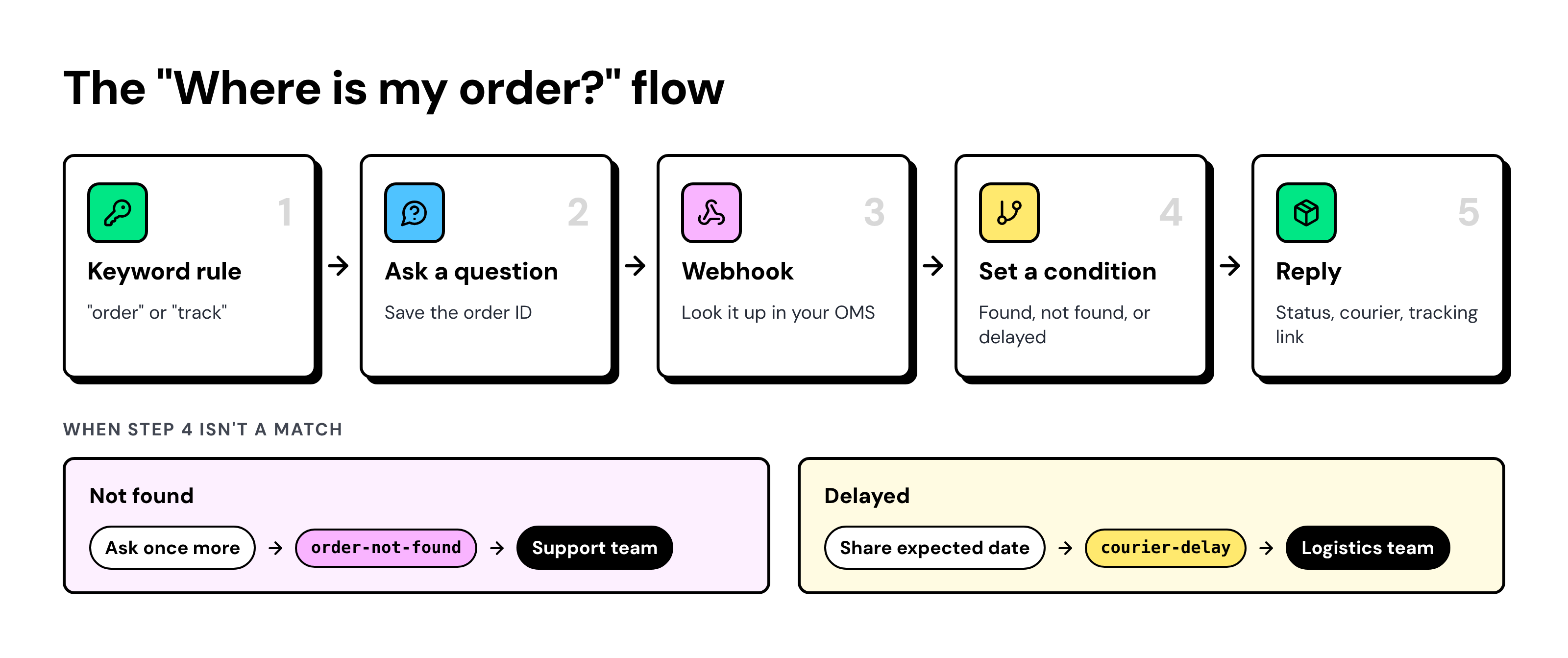
i. The Five-Node "Where is My Order?" Flow
- Keyword rule: A message containing "order" or "track" starts the chatbot.
- Ask a question: The bot asks for the order ID and saves it as a variable.
- Webhook: The webhook node sends the order ID to your order management system (OMS), or to a tool like Make or Zapier that looks it up in Shopify or WooCommerce.
- Set a condition: The bot branches on the result: found, not found, or delayed.
- Reply: The bot shares the status, the courier, and a plain tracking link.
If the order isn't found, the bot asks once more and explains where to find the order ID. After a second miss, it tags the chat "order-not-found" and assigns it to support.
If the courier is late, the bot shares the expected date and tags the chat "courier-delay." The chat then goes to your logistics team.
ii. Write Menus Customers Can Answer with a Number
Messenger chatbots can't send buttons or lists, so write menus that people answer by typing. Keep each bot message under three lines.
Reply 1 to track an order, 2 for returns or exchanges, or 3 for cash on delivery. |
Accept both the number and the word, such as "1" or "track." If the reply doesn't match, ask once more, then hand the chat to a person.
iii. Keywords That Start the Flow in English, Spanish, and Arabic
Your keyword rules decide which flow starts. Add the words your customers type in each market.
Intent | English | Spanish (LATAM) | Arabic (Middle East) |
|---|---|---|---|
Order status | order, track, where is my order | pedido, rastrear, dónde está mi pedido | طلب, تتبع |
Returns and exchanges | return, exchange, size | devolución, cambio, talla | إرجاع, استبدال |
Refund | refund, money back | reembolso | استرداد |
COD | COD, cash on delivery | contra entrega | الدفع عند الاستلام |
After each sale, review chats the bot missed. Add common typos and mixed-language phrases, like "order kahan hai" in India.
How do You Route Returns and Exchanges Before the Messenger Window Closes?
Let the bot collect the order ID and the reason, then pass the chat to ops. A teammate must reply within 24 hours, which keeps the chat open for up to 7 days from the customer’s last message.
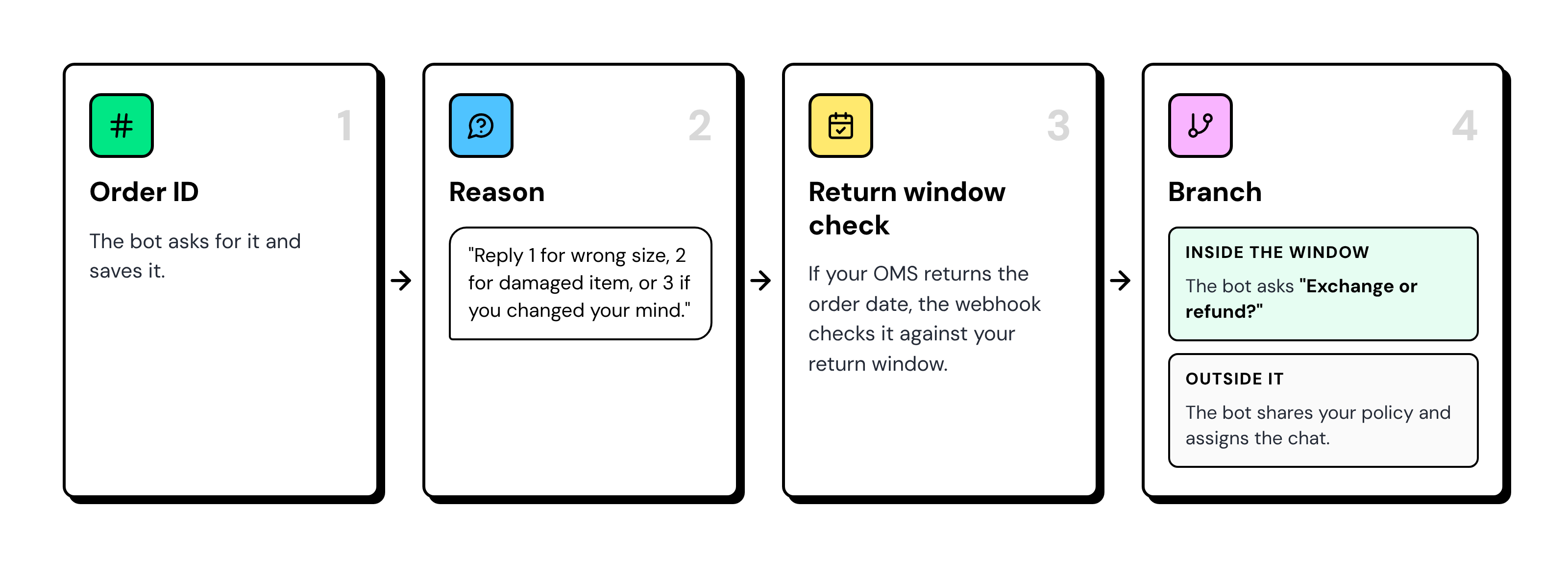
Ask "Exchange or refund?" before the handoff.
An exchange keeps the sale, and ops knows the next step without asking again.
For damaged items, ask for a photo and set the chat to Pending.
Add an internal note, such as "Photo received, QC requested," so the next support rep has context.
Can You Confirm COD Orders on Facebook Messenger?
Customers can ask about COD orders on Facebook Messenger, but you can't use Messenger to initiate a pre-dispatch confirmation.
Since the customer must message first, use WhatsApp to confirm COD orders before dispatch.
Here's how to handle common COD questions that customers send through Messenger:
- "Is my COD order confirmed?" The webhook returns the payment mode and order status.
- "Cancel my COD order." The bot asks, "Reply 1 to confirm or 2 to cancel" and sends the answer to your OMS.
- "Can I pay online instead?" The bot tags the chat and assigns it to ops.
The webhook sends each answer to your OMS, the Shopify or WooCommerce API, or a tool like Make or Zapier. That endpoint handles authentication and updates the order.
COD failures are costly. In Meesho's IPO prospectus, 75.85% of COD orders were delivered in H1 FY26, compared with 96.39% of prepaid orders.
COD is common in India and the Gulf, and "contra entrega" appears in parts of LATAM.
For the steps that prevent return-to-origin (RTO) losses, see our guide on RTO in ecommerce.
Who Owns a Messenger Customer Service Chat at Each Status?
Give every Messenger status an owner and a deadline. A teammate must reply before the bot's 24-hour window ends, and that reply keeps the chat open for 7 days.
Status | When to use it | Reply window | Owner | Action |
|---|---|---|---|---|
Open | The customer is waiting for a reply | Bot: 24 hours. Team: up to 7 days | Bot first, then the assigned team | Reply the same business day |
Pending | You're waiting on the customer or another team | Team: up to 7 days | Assigned support rep | Follow up before day 6 |
Expired | The reply window has closed | None | No one can reply | Review weekly and fix the step that caused the delay |
Solved | The issue is resolved | Not applicable | Assigned support rep | Close with the final answer in the chat |
Run a daily sweep of Messenger chats that are Open or Pending and older than 5 days. These are the chats about to expire.
Assign, tag, and add notes in the Team Inbox, next to your WhatsApp chats.
To see the full flow in action, check the Team Inbox demo.
Which Customer Updates Should Move from Messenger to WhatsApp?
Keep answers on Messenger and move proactive updates to WhatsApp. If you need to send a message before the customer asks, it belongs on WhatsApp.
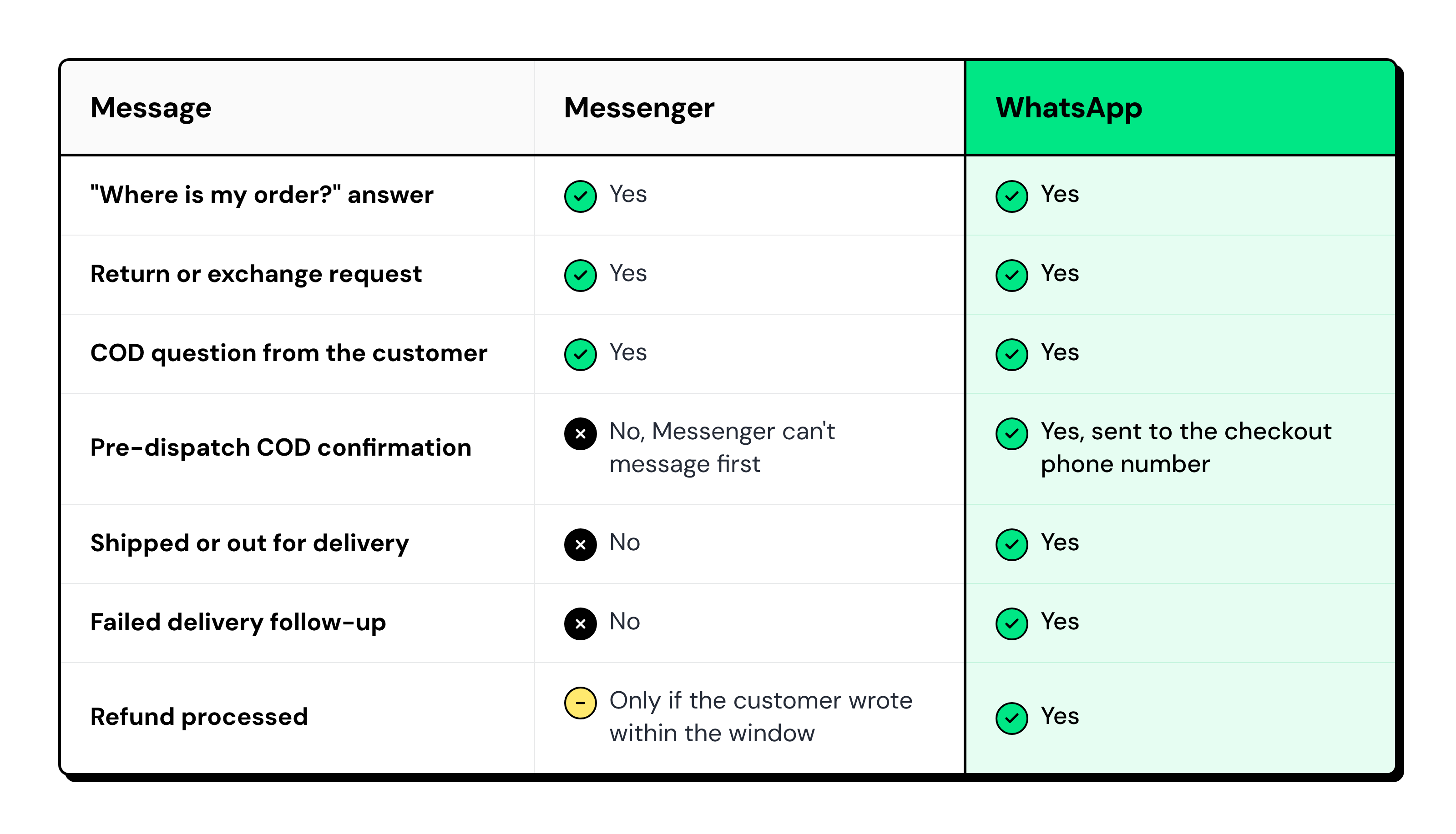
To move a customer, the bot sends a WhatsApp click-to-chat link. The customer taps it and messages you first.
Then ask for clear consent to future delivery updates. WhatsApp template messages can carry Meta charges, so send only proactive updates that prevent repeat questions.
How Wati Runs Facebook Messenger Customer Service in One Inbox
Wati runs the full Messenger flow, from keyword to handover, in the same Team Inbox as WhatsApp and Instagram.
- Keyword rules: Start a Messenger chatbot from order, return, and COD keywords in English, Spanish, or Arabic.
- Conversation nodes: Send a message, Ask a question, and Set a condition to collect the order ID and handle typed replies.
- Routing nodes: Webhook, Set tags, Assign team, and Update chat status look up orders and send exceptions to the right team.
- Chat statuses: Open, Pending, Expired, and Solved show which chats need a reply before the window closes.
- Team Inbox: Your team assigns, tags, and adds internal notes to Messenger chats, alongside WhatsApp and Instagram.
- Shopify on WhatsApp: COD confirmations, shipping, and delivery updates are sent to the checkout phone number.
💡For more ecommerce workflows, see our ecommerce support page.
Turn Your Facebook Page Inbox into a Customer Service Channel
Order tracking, return requests, COD questions, and delivery delays don't have to sit unanswered in your Facebook Page inbox.
With Facebook Messenger customer service automated in Wati, customers get answers.
Wati brings Messenger, WhatsApp, TikTok, RCS, SMS, WebChat, and Instagram conversations into one Team Inbox, where your team can assign chats, add internal notes, track statuses, and follow up before conversations expire.
Book a demo to see how Wati helps your ecommerce support team manage customer conversations across channels without missing important queries.
Frequently asked questions
Can a Business Reply to a Facebook Messenger Message After 24 Hours?
Yes, if a teammate replies within the first 24 hours, the chat stays open for up to 7 days after the customer's last message. Bot-only chats expire after 24 hours.
Can a Messenger Chatbot Check Order Status Automatically?
Yes, a Messenger chatbot can check order status through a webhook to your order system. Without a webhook, the bot collects the order ID and assigns the chat to your team.
Can I Send Shipping Updates on Facebook Messenger?
No, Messenger doesn't allow proactive shipping updates because the customer must message first. Send shipping and delivery updates on WhatsApp after the customer opts in.
Can a Messenger Chatbot Confirm a COD Order?
Only when the customer messages first: the bot takes the order ID and a reply of 1 or 2, then sends it to your OMS. Pre-dispatch COD confirmation runs on WhatsApp.
How do I Move a Messenger Customer to WhatsApp?
Send a WhatsApp click-to-chat link in the Messenger chat, so the customer taps it and messages you first. Ask for clear consent before you send delivery updates.
Related posts
- TikTok Order Tracking for Fashion Brands: Handle WISMO and Size Exchanges in One Reply
TikTok order tracking for fashion brands: a chatbot checks Shopify in the first reply, routes size exchanges to ops, and moves shipping updates to WhatsApp.
- Warranty Claims on TikTok: Customer Service for Phone Accessory Brands
What does a good warranty claim process look like for phone accessory brands on TikTok? Collect the order, model, and a photo in DMs, then hand off.
- Selling Skincare on TikTok Shop: How Beauty Brands Handle Every Conversation Around the Shop
How do beauty brands sell on TikTok Shop? Let the Shop handle checkout, and answer skin-type, shade, and creator DMs from one team inbox.
- How Retail Brands Sell on Instagram Without Missing a Single DM
To sell on Instagram, reply to price DMs fast, turn comments into orders, and follow up on WhatsApp. See 7 retail use cases that make it work.