
Too Long? Read This First
- Omnichannel customer service for e-commerce links every channel to a single customer record that includes orders and past conversations.
- Disconnected channels make customers repeat order details and force support reps to piece together context from several tools.
- Order tracking, returns, RTO, and complaints can create multiple cross-channel conversations after a sale.
- AI chatbots can answer routine order questions, but they must hand exceptions to a support executive without losing the conversation.
- Track resolution time per issue type and how often customers switch channels, not only response time.
A support rep opens a WhatsApp message: “Where’s my order?” They have no order number and no name they recognize. The same customer asked about sizing on Instagram last week and chatted with the website bot yesterday, but neither is on the rep’s screen.
So the rep asks the customer to start over. In e-commerce, where a single purchase can span WhatsApp, Instagram DMs, and website chat, this is the default for teams that run each channel separately.
This cross-channel behavior is already common among shoppers. According to Salesforce's Connected Shoppers Report, 31% of shoppers reported using messaging apps for customer service, while 29% used social media.
Omnichannel customer service for e-commerce ties every conversation to the customer’s order data and support history. Support reps see the full context, and customers can switch channels without starting over.
That’s what Wati is built for. Wati is an agentic customer engagement platform, built on the WhatsApp Business API, that helps e-commerce brands sell, support, and re-engage customers in the channels they already use.
Its Team Inbox brings WhatsApp, Instagram, Messenger, TikTok, RCS, SMS, and WebChat conversations into one shared view. AI agents handle routine queries, and your team steps in with full context when a conversation needs a human.
This guide covers the core e-commerce support use cases: pre-purchase queries, WISMO (“where is my order?”), returns, RTO, and complaints. It also includes message templates, AI chatbot use cases, and the metrics worth tracking.
What is Omnichannel Customer Service for E-commerce?
Omnichannel customer service for e-commerce connects your support channels, customer data, and team workflows used throughout the shopping journey. Instead of keeping each conversation in separate channels, every interaction is linked to the same customer record.
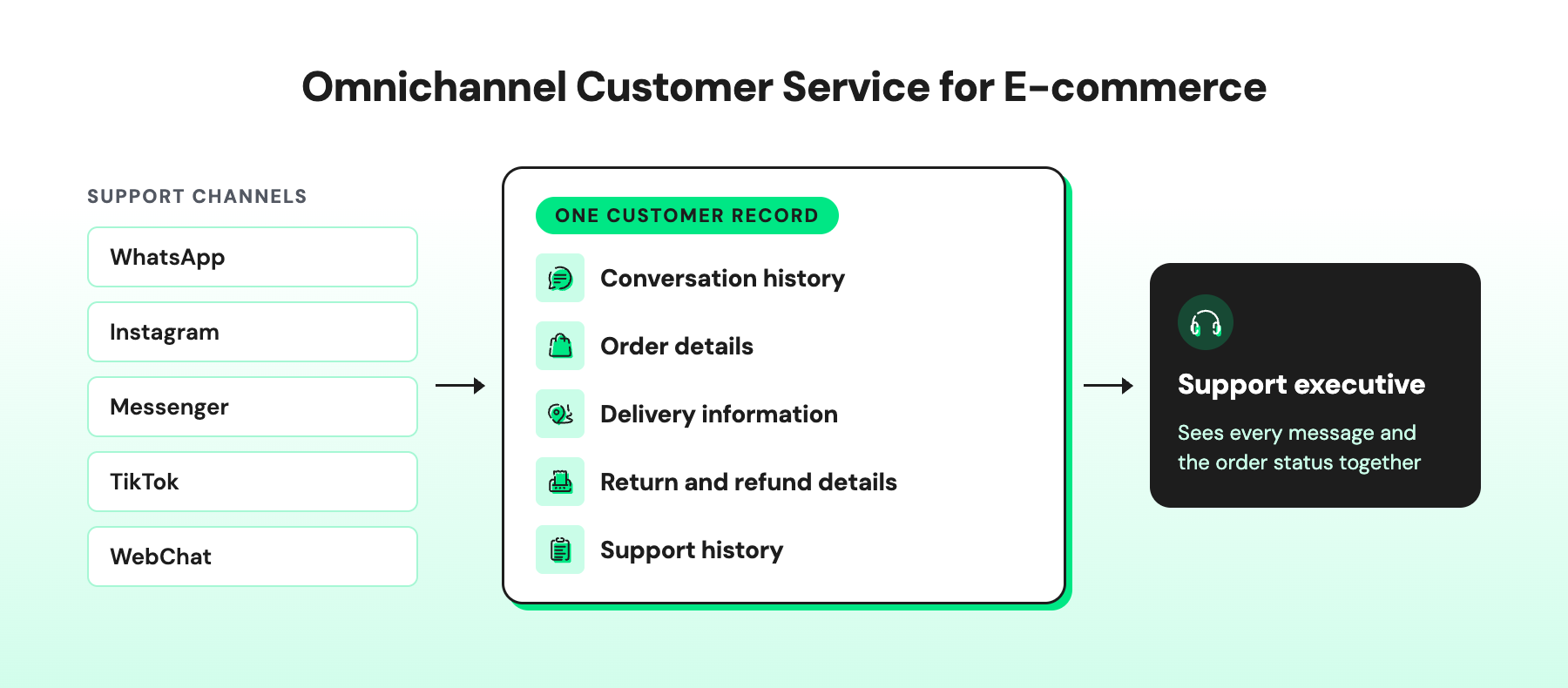
For an e-commerce business, this includes:
- Conversation history: Previous messages from WhatsApp, Instagram, Messenger, TikTok, and website chat
- Order details: Order ID, products, order value, payment method, and order status
- Delivery information: AWB number, courier updates, delivery status, and NDRs
- Return and refund details: Return reason, pickup status, refund status, and exchange details
- Support history: Previous complaints, tickets, tags, and notes from other support reps
For example, a customer asks on Instagram to change their delivery address, then follows up on WhatsApp the next morning. The support executive sees the original request and the order status together and confirms the change before dispatch.
What Problems Does Omnichannel Customer Service Solve for E-commerce?
The more a store sells, the more often the same customer comes back to support: once to ask about sizing, again when the parcel is late, and again when the zip breaks. Here's what goes wrong when those conversations live in different places.
- Stop Customers From Repeating Information
Nothing frustrates a shopper faster than typing their order number for the third time. If the rep can't see yesterday's chat, the customer has to explain everything again. With the full history in front of them, reps pick up exactly where the last conversation stopped.
- Give Support Reps the Information They Need
Order details are in the storefront, delivery updates are in the courier portal, and past chats are somewhere else. Before writing a single word, the rep is juggling three tabs. Put it all next to the conversation, and the reply goes out in seconds instead of minutes.
- Keep Post-Purchase Support Connected
One order can spark five conversations: a delivery question, an address change, a damage claim, a return, and a refund check. If each one starts from zero, the customer feels like a stranger every time.
- Prevent Duplicate or Conflicting Replies
A worried customer messages on Instagram, then on WhatsApp ten minutes later. Two reps reply, and one says the refund is processing while the other says it hasn't been approved. A shared thread shows who already has the issue, so the customer hears one answer, not two.
- Stop Messages From Slipping Through on Quieter Channels
Most teams live in WhatsApp and check Instagram DMs or website chat only when they remember. Meanwhile, a customer has been waiting since morning. When every channel feeds into one queue, it doesn't matter where the message came from. It gets answered.
- Keep Context When the Chatbot Hands Over
The chatbot has already collected the order ID, the photo of the damaged item, and the customer's frustration. Then it hands over, and the rep asks, "How can I help you today?" The rep should see everything the bot already gathered, so the customer never has to start over.
- Give Support Leads One View of the Team
When each channel reports on its own, a support lead can't tell where customers are piling up. One view across channels shows the open queue, the slowest responses, and where the team needs backup, before customers start complaining.
6 E-commerce Customer Service Use Cases That Need Omnichannel Support
From product questions before checkout to returns and complaints after delivery, e-commerce support covers many customer interactions.
These six scenarios show where omnichannel support can help; we will also see how a platform like wati helps in each stage to resolve these issues faced by brands serving their loyal customers.
1. Pre-Purchase Queries
Pre-purchase questions can come through social media, WhatsApp, website chat, or other customer service channels. Common questions include:
- Stock availability for a size or variant
- Size and fit
- Product specifications and compatibility
- Offers, coupon codes, and COD availability
- PIN code serviceability and delivery ETA
How Wati helps:
- Instagram comment-to-DM: A shopper comments "Is M available?" on a reel and instantly gets a DM with a product link and size guide.
- Click-to-WhatsApp Ads: A product ad opens straight into a WhatsApp chat, so shoppers ask about size or offers instead of bouncing off a landing page.
- Astra: It answers size, fit, specification, COD, and delivery ETA questions from your catalog and policies, around the clock on WhatsApp and website chat.
- Team Inbox: Questions from Instagram, WhatsApp, Messenger, TikTok, and WebChat land in one place, so no pre-sale query goes unanswered.
- Wati AI Agents: During a sale, an agent can check the inbox on a schedule and flag delivery questions still waiting on a reply
2. Order Tracking and “Where Is My Order?” Questions
Every e-commerce support team knows this message by heart: "Where is my order?" Customers often ask it more than once, on more than one channel. They get a shipping update on WhatsApp, forget about it, then ask again on Instagram two days later.
With omnichannel support, your rep sees that earlier update and the order details side by side, and answers in one line.
It's a bigger share of support work than most teams expect. Chatarmin's analysis of 131 e-commerce merchants in DACH found that WISMO made up 54.6% of thematically classified tickets and 25.2% of all incoming requests.
How Wati helps:
- Shipping updates on WhatsApp: When an order ships, Shopify triggers a WhatsApp message with the tracking link. Most customers check that before they think to ask you.
- Astra handles the late-night "where is it?"It looks up the order in Shopify and replies with the tracking link and expected delivery date, even at 1 a.m.
- Order details right next to the chat: When a rep takes over, the order status, AWB number, and payment mode are already on screen. No digging through the courier portal.
- Every channel in one inbox: Whether the customer asks on WhatsApp, Instagram, or website chat, the question lands in the same Team Inbox with the earlier shipping update.
- Wati AI Agents catch what's waiting: During a sale, they flag delivery questions nobody has answered yet, before an anxious customer turns into a complaint.
3. Order Modifications and Cancellations
Wrong address, wrong colour, or a change of heart: order changes all race the same clock, which is dispatch. Miss it, and a quick fix becomes a return or a refund.
Customers rarely wait patiently, either. They DM on Instagram, then try WhatsApp an hour later. With omnichannel support, whoever picks up the follow-up sees the original request and acts on it right away.
How Wati helps:
- Order confirmation on WhatsApp: Customers can flag a wrong address minutes after checkout, while there’s still time to fix it.
- Order status beside the chat: Reps instantly see whether the order has shipped.
- One inbox for every channel: The Instagram DM and the WhatsApp follow-up land in the same place.
- Wati AI Agents: They flag change requests still waiting on a reply before dispatch.
- Private notes: “Address updated, warehouse informed” keeps the next teammate in the loop.
4. Return Management and Refunds
A return isn’t one conversation; it’s five. “Can I return this?” “When’s the pickup?” “Did you get it?” “Has the refund gone through?” “Why isn’t it in my account yet?” Each one can arrive on a different channel.
Support also doesn’t own every answer. The warehouse confirms quality checks and finance releases the refund, so both updates need to land in the customer’s thread.
With omnichannel support, the whole return is tied to the order ID, and whoever picks up the next question sees the reason, the pickup status, and the QC result in one place.
How Wati helps:
- Astra answers eligibility questions: “Can I still return this?” gets an instant answer based on your return policy and the order date.
- Photos straight in the chat: Customers share a picture of the damaged item on WhatsApp, and it stays in the thread for anyone who handles the claim.
- Automatic status updates: When the return is marked received, or the refund is processed in Shopify, the customer gets a WhatsApp update without having to ask.
- Private notes for warehouse and finance: Notes like “QC passed” or “refund approved” sit right on the chat, so the next rep doesn’t have to chase anyone.
- AI CX Score flags frustration early: Angry or repeat complainers stand out in the queue, so they get help before the comment section heats up.
5. RTO in E-commerce: Support Before and After a Failed Delivery
RTO (return to origin) is every seller’s least favourite outcome: you pay to ship the parcel, you pay to get it back, and you still don’t make the sale. It usually happens for one of three reasons: the courier couldn’t reach the customer, the address was wrong, or a cash-on-delivery order was refused at the door.
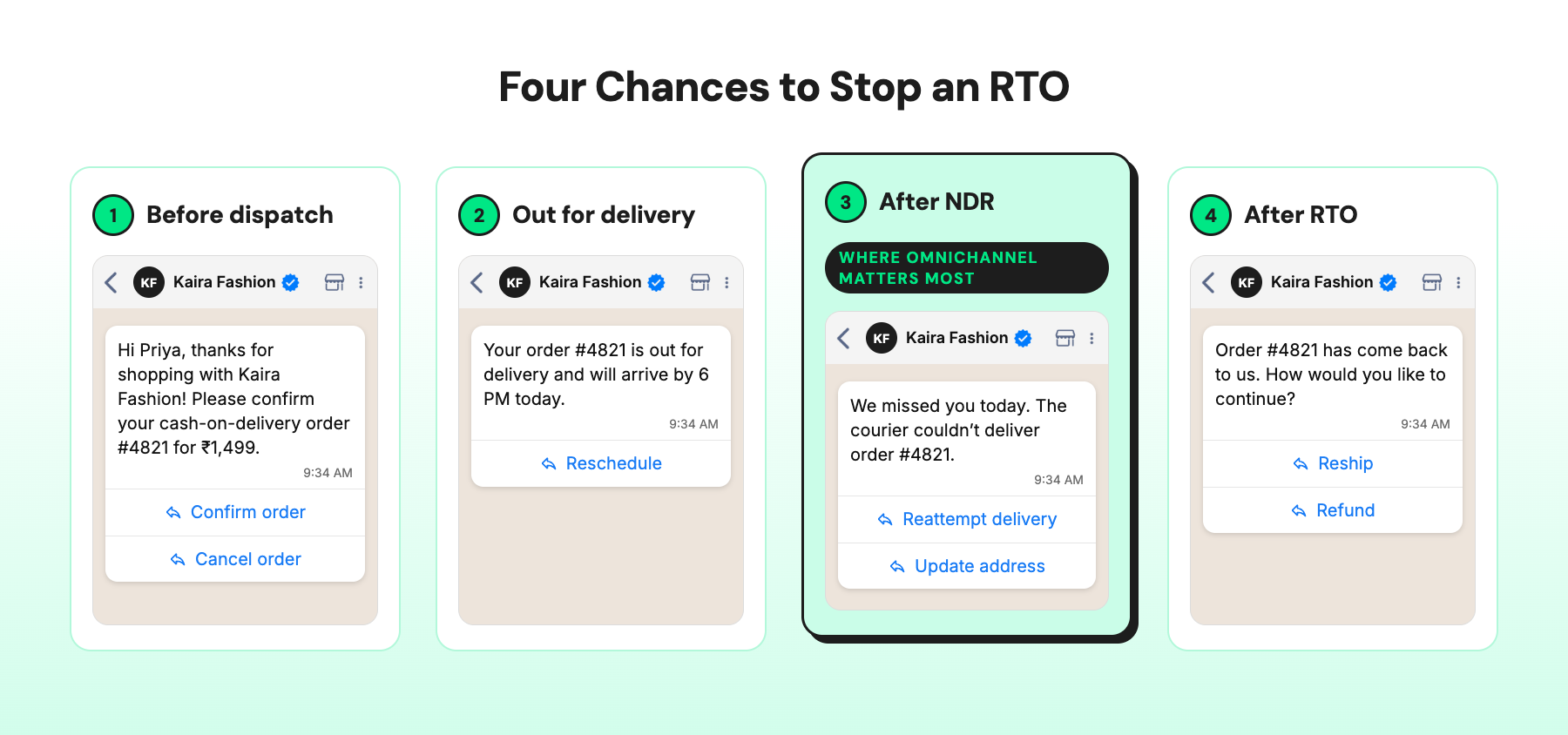
Your team gets four chances to stop it:
- Before dispatch: Confirm COD orders and shipping addresses on WhatsApp.
- Out for delivery: Share the delivery ETA and a way to reschedule.
- After an NDR: When the courier raises a non-delivery report, ask the customer to book a reattempt or fix the address.
- After RTO: Share the status and offer to reship or refund a prepaid order.
The NDR stage is where omnichannel support earns its keep. The customer ignored the courier’s call from an unknown number, but they’ll see a WhatsApp message. Their reply with the corrected address lands right next to the order details.
How Wati helps:
- COD confirmation on WhatsApp: A Shopify-triggered message with “Confirm order” and “Cancel order” buttons weeds out fake or impulse COD orders before you pay to ship them.
- Out-for-delivery alerts: Customers know the parcel is coming today and can reschedule instead of missing it.
- NDR follow-ups that get answered: A WhatsApp message with “Reattempt delivery” and “Update address” buttons reaches customers who won’t pick up the courier’s call.
- Order details beside the chat: The rep sees the NDR reason and the corrected address together and passes it on before the next attempt.
- One inbox for every reply: Whether the customer responds on WhatsApp or messages on Instagram, the update reaches the same Team Inbox.
Reduce failed deliveries and protect your margins with Wati. Start your free trial.
6. Customer Complaints and Escalations
A complaint is a customer giving you one more chance. Damaged in transit, wrong item, missing piece, late parcel, refund still pending, or “I already told you this last week”: whatever it is, check their history and order details before you reply.
Nothing makes things worse than asking a frustrated customer to start from the top.
Many complaints start in public, in an Instagram comment where everyone can see. Reply briefly there to show you’re on it, then move the details to a DM or WhatsApp.
When the comment, the DM, and the WhatsApp chat sit in one thread, the team handling the damage claim sees the full story, and the customer never repeats it.
How Wati helps:
- Instagram comments in the Team Inbox: Reply publicly from Wati, then move the conversation to DM, without anyone opening the Instagram app.
- Conversation Summary: The rep taking over can generate a summary of the thread instead of scrolling through 40 messages.
- Order details and photos in one place: The order, the delivery status, and the customer’s photo of the damaged item sit together in the chat.
- WhatsApp Calling from the same chat: When text isn’t enough, the rep can call the customer from within the conversation.
How Can AI Chatbots Support Omnichannel E-commerce Customer Service?
An AI chatbot for e-commerce answers routine questions on WhatsApp, Instagram, Messenger, and WebChat. Your support executives then handle only the queries that need their attention.
What the chatbot does | E-commerce examples |
Answers routine questions | Order status, delivery ETA, return policy, COD availability, product FAQs |
Gives the same answer on each channel | Uses one knowledge base for every channel |
Uses order and product data | Shares tracking updates and order details from your store |
Replies after hours and during sales | Handles extra volume during holiday sales, Black Friday, and flash sales |
Hands off complex issues | Sends damaged-item claims, refund disputes, failed deliveries, and repeat complaints to a support executive with the chat history |
To answer order queries, the chatbot needs live order data from your storefront or OMS, courier tracking data, your return and shipping policies, and your product catalog.
In Wati, no-code chatbots answer order tracking, COD, and other routine questions. When a query needs more capability, the chatbot brings in Astra AI Agent, which works on WhatsApp and website chat, Wati's AI agent, to resolve queries.
When a query needs a support executive, the chatbot hands the chat over to your team. To turn this on, select "Enable smart escalation handling" in your chatbot.
Build a no-code chatbot that hands off to your team with full context →
Which Customer Service Metrics Should E-commerce Businesses Track Across Channels?
The most useful e-commerce customer service metrics show how quickly your team resolves issues at each stage of the order process. Track them in one report across all channels, so you can see where customers wait and where your team can improve.
Metric | What it measures | Why it matters for e-commerce |
First response time | Time from a customer's first message to the first reply | How fast shoppers get answers on product, order, and delivery questions |
Resolution time | Time from the first message to resolution | How long do customers wait for order, return, and delivery issues to close |
CSAT | Customer rating after a support conversation | Whether customers are happy with the help they got |
Repeat contact rate | Customers who contact support again about the same issue ÷ total resolved issues × 100 | Whether the first reply fixed the problem |
WISMO rate | WISMO conversations ÷ orders shipped × 100 | Whether shipping updates are clear and on time |
Return resolution time | Time from return request to refund, exchange, or store credit | How long customers wait on returns |
Escalation rate | Chatbot conversations handed to a support executive ÷ total chatbot conversations × 100 | Which questions still need a support executive |
Channel handoff rate | Issues that move across two or more channels ÷ total issues × 100 | How often customers switch channels during one issue |
Read these metrics together. A fast first response time means little if resolution time and repeat contact rate stay high.
To collect CSAT, add a CSAT survey to your Wati chatbot flows. With Wati AI, AI CX Score also scores each conversation in the Team Inbox, so your team can spot unhappy customers who skip the survey.
Build a Connected Omnichannel Customer Service Experience for E-commerce
E-commerce customer service works best when every interaction adds to the same customer conversation. Customers get answers without repeating themselves, and support executives have the order and conversation context they need to resolve each issue.
See how Wati connects your e-commerce support channels into a single inbox. Book a demo.
Frequently asked questions
Which Channels Should a Small E-commerce Store Connect First?
Connect the two or three channels that carry most of your current conversations, which for many stores are WhatsApp, Instagram, and website chat. Add more channels once those share one inbox and meet your response-time target.
What Is the Difference Between RTO and a Customer Return?
RTO happens when a shipped order never reaches the customer and goes back to the seller. A customer return happens after delivery, when the customer sends the product back.
Do Customers Need to Opt In to Receive WhatsApp Order Updates?
Yes, businesses need customer opt-in before sending WhatsApp messages. Collect it with a clear notice that explains the types of messages customers will receive.
How Much Does It Cost to Send Order Updates on WhatsApp?
WhatsApp pricing depends on the template category, the customer's country, and whether the message is sent inside the 24-hour customer service window. Meta can update rates up to four times a year, so check Meta's WhatsApp pricing page before you plan costs.
How Do You Handle Customer Service Spikes During Sales Like Diwali or Black Friday?
Send proactive order and delivery updates before customers ask, and let a chatbot answer routine order questions. Keep support representatives for delivery exceptions, damaged items, and refund disputes.
Related posts
- Instagram Comment Automation: How It Works and How to Set It Up in Wati
Instagram comment automation auto-replies to comments and DMs commenters within seconds via Meta's API. Covers strategy, use cases, and Wati setup.
- Shared Team Inbox for Instagram: A Buyer’s Checklist for 2026
Use this fastest checklist to evaluate any shared team inbox for Instagram, which covers DMs, comments, automation, and multi-channel support.
- How to Send Bulk Messages on WhatsApp Without Getting Blocked
Learn how to send bulk WhatsApp messages without getting blocked. Compare the WhatsApp Business app and API, messaging limits, costs, templates, and best practices for safe, compliant bulk messaging.
- How to Set Up a TikTok Business Account: Step-by-Step Guide
Set up a TikTok Business Account step by step: switch from personal, pick a category, add your profile, and unlock ads and analytics.