
Too Long? Read This First
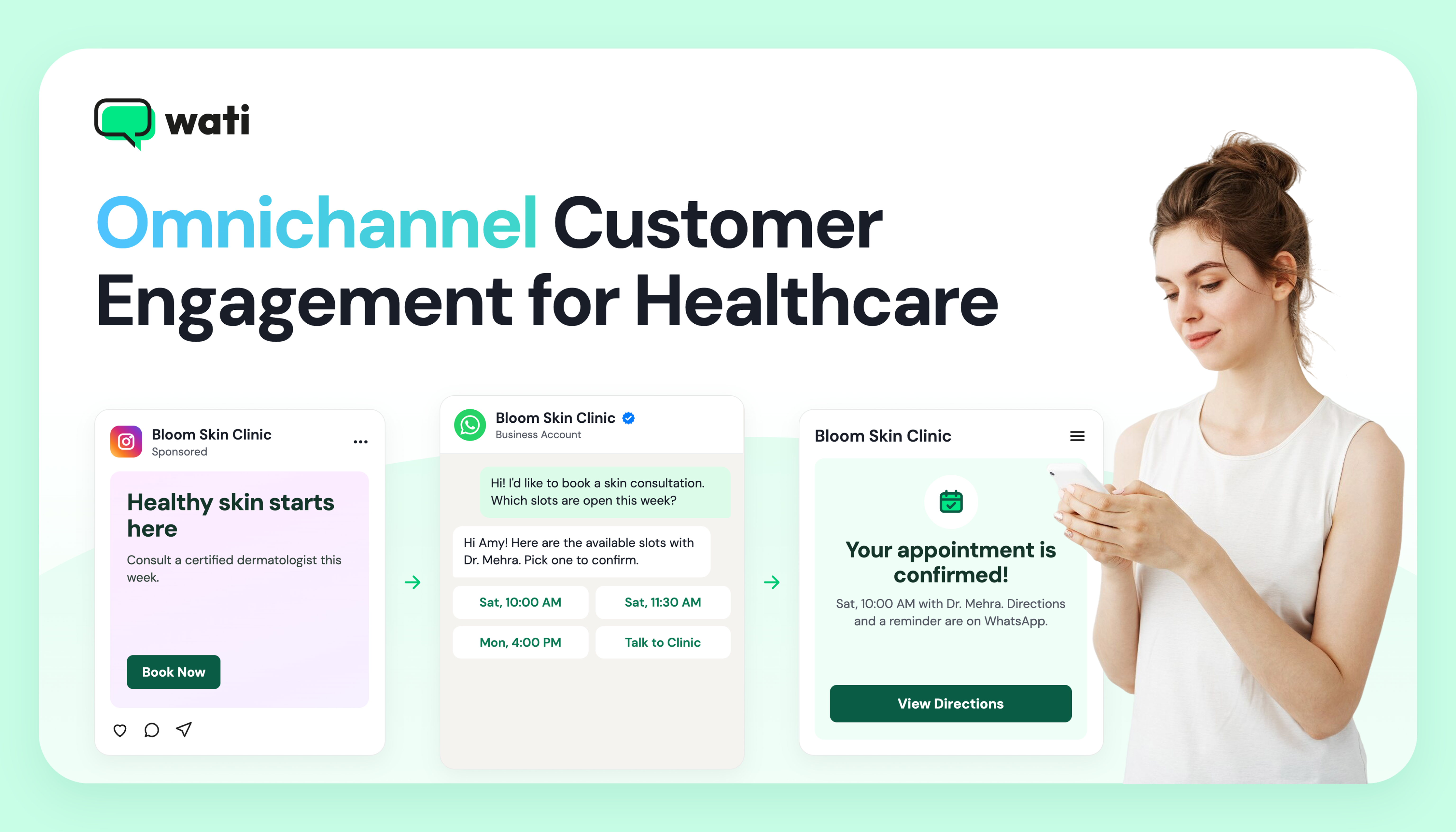
- Omnichannel customer engagement for healthcare connects patient conversations across WhatsApp, phone, Instagram, TikTok, WebChat, and other social channels the patient uses, depending on the healthcare branch.
- A shared Team Inbox helps medical receptionists, hospital administrators, scheduling coordinators, and other staff access conversation history and handle requests across channels.
- A connected patient journey can support inquiries, appointment booking, reminders, consultations, follow-ups, and repeat visits.
- Healthcare automation works best for routine administrative tasks, while symptoms, diagnoses, treatment questions, and other clinical concerns are handled by medical staff.
- Healthcare organizations can use keyword rules and Smart Escalation to route conversations that need staff attention.
- Key success metrics include first response time, no-show rate, bot resolution vs. escalation, channel drop-off, and recall adherence.
Unlike in previous days, the healthcare industry has also shifted towards online channels to ensure the patient journey with healthcare institutions is easier.
Appointment booking, report collection, and follow-ups are being provided through different channels such as WhatsApp, the website, email, and SMS.
However, Patients move between search, WhatsApp, phone calls, websites, and social channels throughout the care journey, but their information can remain fragmented across these touchpoints.
This can disrupt appointment coordination and patient communication for the hospital if they have not implemented a system to manage an omnichannel customer journey in healthcare. A report shows 42.2% of US patients cite scheduling issues as a reason they would switch providers.
i. How Do You Keep Track Of Patients Across Channels?
Tracking patient records across channels starts with connecting every channel to one shared Team Inbox, where each message, call, and booking links to the same patient record. Administrators can then see a patient’s full context before they reply.
Omnichannel customer engagement for healthcare works this way, so staff can coordinate appointments without asking patients to repeat themselves.
ii. How Can You Achieve An Omnichannel Customer Journey In Health Care?
You need a complete tool that helps you set up journeys and bring information from all these channels into one inbox.
An omnichannel AI-powered customer engagement platform such as Wati, that brings WhatsApp, WebChat, SMS, RCS, and social messaging into a connected view of patient conversations and history inside one Team Inbox.
This guide explains how healthcare organizations can use omnichannel engagement across patient acquisition, appointment management, follow-up, and patient retention.
It also covers healthcare automation, privacy and consent, and practical use cases across care settings.
What is Omnichannel Customer Engagement in Healthcare?
Omnichannel customer engagement in healthcare unifies all patient communication channels and touchpoints into a single, connected system, so context carries from one interaction to the next.
Appointment inquiries, scheduling requests, appointment reminders, doctor visits, report handling and follow-ups, and medication reminders stay linked, and medical receptionists and schedulers respond with the relevant patient and appointment history.
The omnichannel setup differs significantly from the multichannel setup, so it's important to understand the differences between the two.
Multichannel means being available on different channels, but each channel runs in isolation, so patients end up repeating themselves. An omnichannel setup links the same channels to one patient profile that every team can see.
Difference Between Multichannel and Omnichannel Patient Communication
The table below compares the two across coordination, context, patient experience, and staff visibility.
Multichannel | Omnichannel | |
Coordination | Each team manages its own channel and queue. | One queue routes every call and message to the right team. |
Context | Staff work from partial appointment details. | Staff open the appointment and conversation record before replying. |
Patient experience | Answers can differ from one channel to the next. | Patients continue where they left off, on any channel. |
Staff visibility | Each inbox shows only its own messages. | Authorized staff see every interaction with the patient in one place. |
Wati's Team Inbox puts this approach into practice by bringing WhatsApp, Instagram, Facebook Messenger, Page comments, TikTok, and WebChat into a shared workspace, with one record per patient.
Why Does Multichannel Patient Communication Break?
Multichannel communication gives patients more ways to reach a healthcare provider, but it can also create new points of failure when those channels operate independently.
The issues usually arise when a patient switches channels, contacts the provider outside business hours, or reaches a different staff member who cannot view the patient’s earlier interaction.
1. Context Reset: Why Do Patients Repeat Their Details at Every Handoff?
A context reset happens when a patient's previous conversation is not available when they switch channels or speak to another staff member.
A patient who asks about an appointment on WhatsApp and then calls the clinic may need to repeat symptoms, preferred times, or the original request.
This adds work and consumes time for both the patient and the staff handling the next interaction. In a 2026 patient survey, 15.1% of US patients said siloed communication from different departments frustrates them.
2. After-Hours Gap: What Happens To Inquiries When The Front Desk is Closed?
Inquiries that arrive after the front desk closes often wait until the next working day. A patient may click a hospital ad, message on WhatsApp, or open WebChat to ask about a specialist's availability, then hear nothing until morning.
That delay can cost the appointment, especially when the patient is comparing hospitals for an available consultation.
3. Front-Desk Overload: Why Do Staff Struggle Across Separate Screens?
Apart from handling appointment calls, front-desk staff in a hospital also respond to questions about healthcare specialists, consultation timing, locations, insurance, reports, and other administrative requests.
As inquiries come in throughout the day across different channels, staff need to identify what each patient needs, provide the right information, follow up on appointment requests, and route queries to the right department.
Keeping track of all these requests becomes harder when conversations are spread across different channels and systems.
How Does an Omnichannel Patient Journey Look Like, Stage by Stage?
A connected patient journey links the interactions a patient has with a healthcare organization across the stages of care. It can start with finding a Doctor and booking a consultation, then continue through diagnosis, treatment, follow-up, and ongoing care.
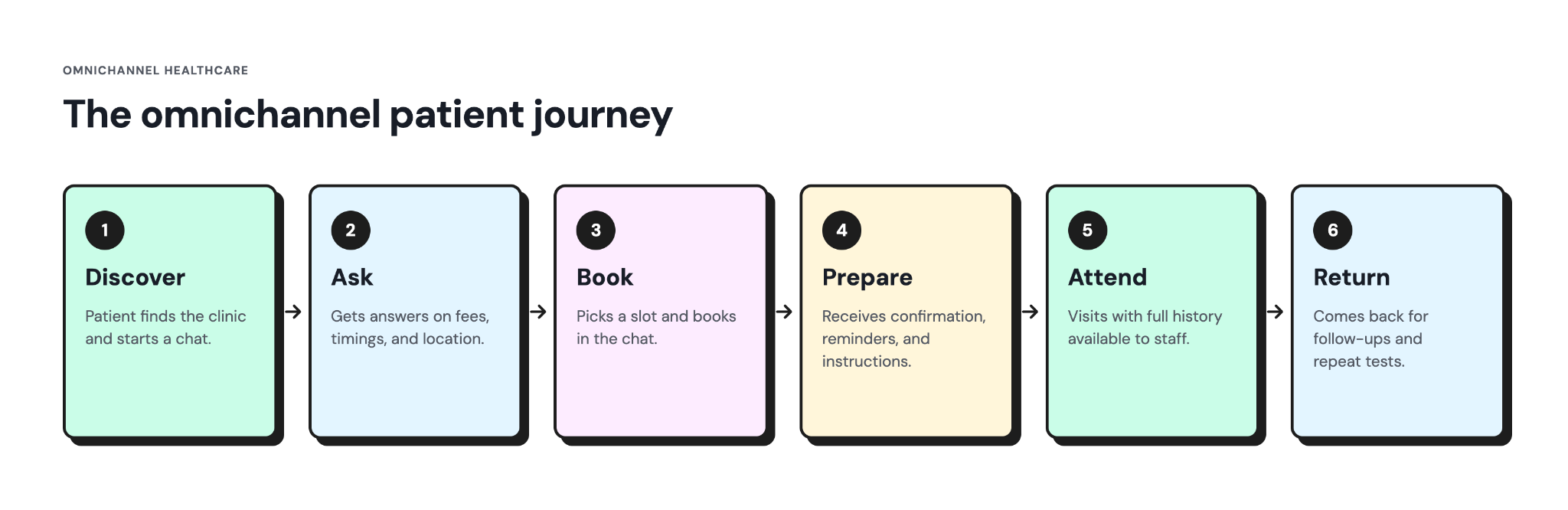
Consider Amy, who is looking to consult a dermatologist for a skin condition. Here is what her journey can typically look like.
Step 1: Discover: How Does a Patient Find the Doctor?
Amy searches for a dermatologist who specializes in the condition she wants to have assessed. She may find the doctor through search, an online ad, or an Instagram post, then check the doctor's profile before deciding to inquire.
An omnichannel journey lets Amy move from finding the doctor to starting a conversation without losing that context.
In Wati, a Click-to-WhatsApp Ad can take her directly into WhatsApp, while Instagram comment-to-DM can move a question such as "What is the consultation fee?" from a public comment into a private conversation.
Step 2: Ask: How Does the Patient Get the Information She Needs?
In the ask stage, Amy wants practical details such as the dermatologist's consultation fee, clinic timings, and location before booking. Since she has already started a conversation, she should be able to get these details without repeating her reason for contacting the clinic.
An omnichannel setup keeps the conversation connected as Amy moves from an initial inquiry to appointment planning.
Wati’s AI agent, Astra, can answer routine questions using the clinic's knowledge base, while automation can send welcome and out-of-office messages outside the clinic’s working hours.
If Amy writes in another language, AI Translate in the Team Inbox helps staff read her message and reply in her language.
If Amy starts the conversation on Instagram, AI Assist can collect her WhatsApp number and save it to the same contact record. When she continues the conversation on WhatsApp, the clinic can access her previous interaction instead of treating it as a new inquiry.
Step 3: Book: How Can a Patient Secure a Slot Without Calling?
At the Book stage, Amy wants to confirm her appointment with a dermatologist for Saturday at 10 a.m. without making a phone call.
Booking can be delayed when the clinic receptionist needs to check the appointment calendar manually and respond later. This creates unnecessary back-and-forth and can lead Amy to contact another clinic.
To avoid losing the appointment request, a healthcare chatbot webhook in Wati can retrieve available consultation slots from the clinic's booking system, allowing Amy to select a suitable time directly in the conversation.
A Dynamic WhatsApp Flow then asks for intake details, such as her reason for the visit, and sends them to the clinic’s system in real time.
Clinics without a CRM can log each booking automatically with Wati’s Google Sheets integration. That way, staff can then maintain a clear record of patients who have moved from inquiry to appointment.
Step 4: Prepare: What Should a Patient Receive Before the Appointment?
In the Prepare stage, Amy needs an appointment confirmation, directions, and any pre-visit instructions from the doctor.
Reminders sent through a channel Amy rarely checks can result in a missed appointment and an unused slot. Personalization also matters, so the messages should include details relevant to her appointment.
With Wati, the clinic’s booking system can trigger confirmation and reminder messages that include a location pin and one-tap Confirm or Reschedule buttons.
AI Templates help staff draft these messages, and on Android, zero-tap OTP autofill verifies Amy’s phone number without her switching between apps.
Step 5: Attend: How Can the Clinic Maintain Continuity During and After the Visit?
Amy arrives for her consultation with her appointment confirmed. The front-desk team can view her booking, previous messages, and administrative details such as date of birth and preferred doctor on her contact record in Wati.
With Wati AI, staff can also review an AI Conversation Summary of Amy’s earlier chats before check-in, without reading the full conversation history.
After the consultation, the clinic sends aftercare instructions and a patient satisfaction survey on WhatsApp, in the same conversation Amy used to book. Any follow-up question she sends is handled with the full context of her visit.
Step 6: Return: How Can a Clinic Bring Patients Back for Reviews and Repeat Tests?
In the Return stage, the next step may be a follow-up consultation, check-up, or repeat test. For Amy, her dermatologist has asked her to return in six weeks. An omnichannel setup keeps the recall connected to her previous appointment.
The clinic can use drip campaigns in Wati to send reminders at set intervals, or segmented WhatsApp broadcasts to reach patients due for a review.
Medical coordinators can then use Ask Wati AI to check how many patients in the recall segment have replied or booked.
Re-engagement Scout, one of the Wati AI Agents, can flag patients who have stopped responding.
Omnichannel Customer Service in Healthcare: How Do One Inbox and One Patient Record Help?
Customer service in healthcare covers the non-clinical support patients need around their care. Front-desk, call center, and billing staff handle requests such as appointment changes, payment questions, and follow-up coordination.
With an omnichannel setup, conversations from WhatsApp, WebChat, and social channels can come into one shared inbox. Staff can then access the patient's contact details, messages, calls, and internal notes from the same contact record.
i. How Does a Shared Team Inbox Help Front-Desk Teams Resolve Patient Requests Faster?
Wati's team Inbox supports shift-based front-desk work with four tools:
Tool | Healthcare Use |
Private Notes | Staff can leave internal context or follow-up instructions that the patient does not see. |
Bulk Reassignment | Supervisors can move several conversations at once after a shift handoff or staff change. |
Round Robin and Away Mode | New conversations are assigned to available staff, while Away Mode prevents assignments to staff who are temporarily unavailable. |
WhatsApp Call Recording and AI Summaries | Staff can review the call, transcript, and summary after a patient conversation on web or mobile. |
How Does Healthcare Automation Support Omnichannel Engagement, and When Should a Person Take Over?
In an omnichannel setup, healthcare automation keeps patient communication connected as patients move between channels, while staff step in when human support is needed.
Use automation for routine administrative tasks, but keep diagnosis, triage, and treatment decisions with qualified healthcare professionals. Patients expect the same boundary, as 60% of US patients said test results or diagnoses should be delivered by a person.
Before automating a patient communication workflow, healthcare organizations should define what can be handled across channels and what requires a person:
Automate Across Channels | Hand to a Person |
Consultation fees, clinic timings, and doctor availability | New, worsening, or unexplained symptoms |
Pre-visit instructions, such as fasting before a blood test | Test results, diagnoses, and treatment changes |
Appointment booking and rescheduling | Medication dosage or side-effect questions |
Appointment and vaccination reminders | Post-operative or post-discharge concerns |
Payment links and invoice copies | Billing disputes and formal complaints |
Recalls for follow-up consultations and repeat tests | Distressed patients or any request to speak with a Physician |
In Wati, the left column runs through Astra, no-code chatbots, reminder templates, and campaigns. The right column is covered by keyword rules and Smart Escalation, which move the conversation to the right staff.
i. Which Omnichannel Workflows Should a Healthcare Provider Automate First?
Start automating high-volume workflows that follow a fixed process and do not require clinical decisions. The goal is to let a patient start on one channel, continue on another when needed, and keep the conversation history connected throughout the journey.
Workflow | How It Moves Across Channels | Where Staff Step In |
1. Instant first reply | An inquiry on WhatsApp, Instagram, or Messenger receives an answer from the approved knowledge base. The patient can continue the conversation on another supported channel without starting over. | Questions the knowledge base cannot answer |
2. Appointment booking | A WebChat or Click-to-WhatsApp Ad inquiry continues on WhatsApp, where the patient selects an available slot from the Practice Management System (PMS). | Visit types that need triage or referral review |
3. Reminder and reschedule loop | The booking system triggers a WhatsApp reminder template with Confirm and Reschedule buttons. Replies return to the same conversation in the Team Inbox. | Repeated no-shows that need a follow-up call |
4. Recall broadcasts | A patient segment from a Google Sheet or CRM triggers WhatsApp recalls. Patient replies return to the shared Team Inbox for staff follow-up. | Patients who reply with a symptom or clinical question |
ii. What Safety Gates Should Healthcare Automation Have on Every Channel?
Safety gates should apply across every patient communication channel. A clinical concern sent through Instagram should follow the same escalation path as one sent through WhatsApp.
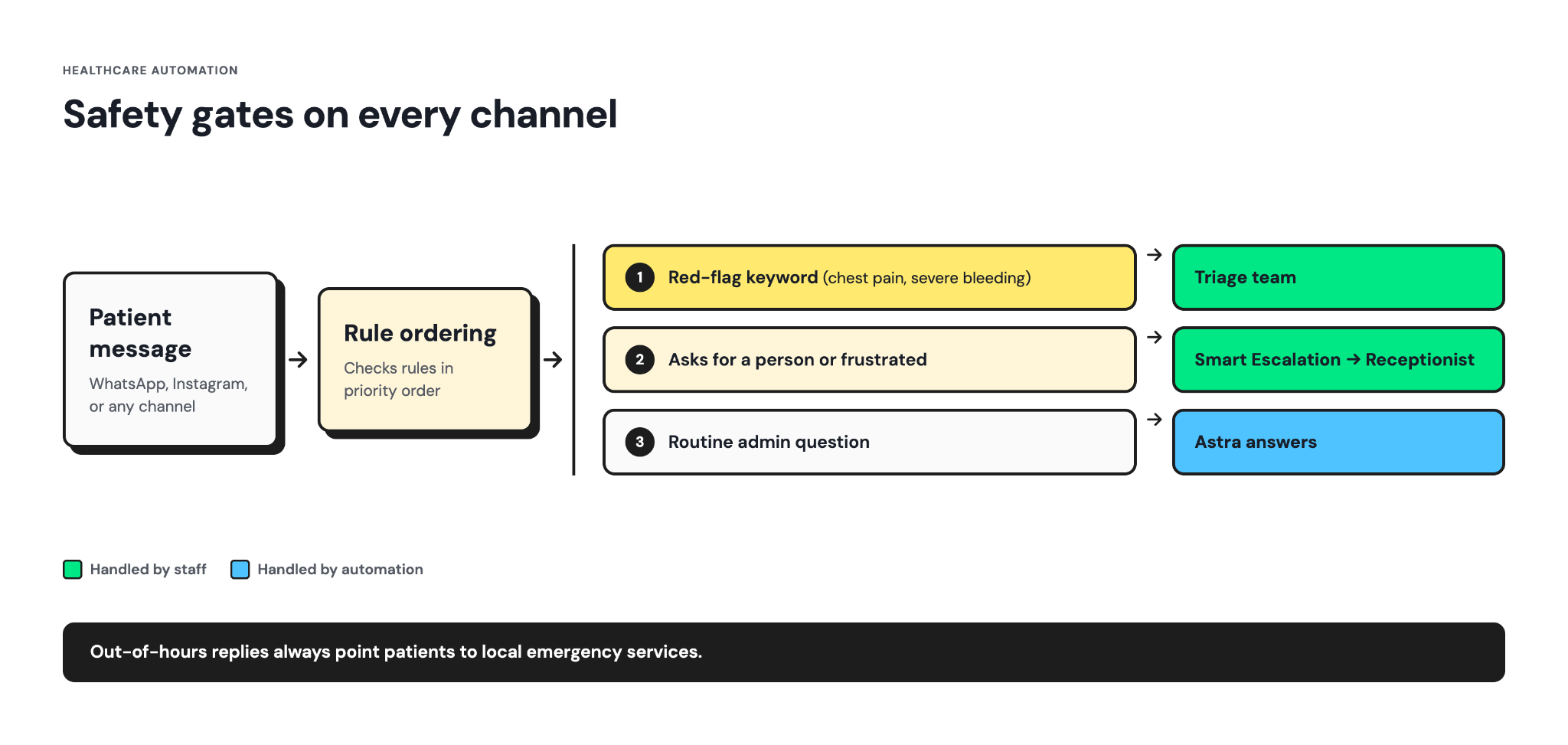
In Wati, these handoffs can be built into every automated workflow:
- Clinical red-flag keywords: Keyword rules can detect configured terms such as chest pain, severe bleeding, or difficulty breathing, and route the conversation to the designated triage team. The keyword triggers the handoff, and it does not diagnose the patient's clinical condition.
- Smart Escalation: If a patient asks to speak with a person or expresses frustration during a supported chatbot flow, Smart Escalation can move the conversation to a medical receptionist for further handling.
- Rule ordering: If a patient message matches multiple automation rules, rule ordering determines which workflow takes priority. For example, a triage rule can take priority over an appointment booking flow if the message is about severe chest pain.
- Emergency notice: Welcome and out-of-office messages should tell patients to contact local emergency services in an urgent situation. Automation should never delay emergency care.
iii. How Can Care Teams Monitor and Improve Omnichannel Automations?
Every patient conversation across WhatsApp, Instagram, Messenger, and WebChat adds information to the account. Care teams can use this information to see what patients are asking about, where responses are delayed, and which follow-ups need attention.
With Wati AI, care teams can use two AI capabilities to monitor and improve omnichannel communication:
- Ask Wati AI: Medical coordinators can ask questions about patient inquiries, appointment requests, recalls, and campaign responses. For example, they can check how many patients asked about consultation fees that week or which recall broadcast received the most replies.
- Wati AI Agents: Once the account has enough activity, agents such as Inbox Triage, Response SLA, and Urgency Watcher can flag conversations that are piling up or waiting too long. Every action an agent prepares goes to an admin for approval.
Astra can handle patient-facing conversations for routine questions based on the clinic's approved knowledge base. Clinical and administrative leads should still review automated responses regularly against current fee schedules, doctor rosters, and escalation protocols.
How Do Healthcare Organizations Protect Patient Privacy and Consent Across Omnichannel Communication?
Healthcare organizations need to control what patient information is shared on each channel, who can access it, and how patients have consented to receive communications.
Sensitive clinical information should stay in secure systems. Messaging channels can be used for routine communication such as appointment reminders and scheduling.
The regulations depend on where patients receive care. This is not legal advice, so hospitals, clinics, laboratories, and other healthcare organizations should confirm the specific requirements with their legal or compliance teams.
Regulation | Region | What It Means for Patient Messaging |
HIPAA | United States | Protects PHI held by covered entities and their business associates. Healthcare organizations must apply the minimum necessary standard and have appropriate agreements with vendors that handle PHI. |
DPDP Act, 2023 | India | Sets requirements for consent when personal data is processed based on consent, including clear and informed consent and the ability to withdraw it. |
GDPR | European Union | Classifies health data as a special category under Article 9(1), so processing it is prohibited by default. Healthcare organizations need a legal basis under Article 6 plus an exception under Article 9(2), such as explicit consent or the provision of healthcare. |
i. How Should Healthcare Organizations Match Each Channel to the Sensitivity of Patient Information?
Each channel carries a different level of risk, depending on how it encrypts, stores, and displays patient information. The table below shows which information suits each type of channel.
Messaging Channels | Secure Channels |
Appointment confirmations and reminders | Laboratory and imaging results |
Directions and pre-procedure instructions | Diagnoses and treatment plans |
Billing statements and payment links | Prescriptions and medication changes |
"Your report is ready" notifications with a login link | Behavioral health, sexual health, and fertility records |
Applying the minimum necessary standard to templates:
- A results notification confirms that a report is available without showing laboratory values.
- A reminder includes the appointment date and department without stating the reason for the visit.
- A message links to the secure system where the patient can access the full clinical information.
Healthcare organizations should also consider how encryption works on each channel. For example, on the WhatsApp Business Platform, messages are encrypted between the patient's device and Meta's Cloud API, which then decrypts them on the provider's behalf.
Patient portals and authenticated apps give hospitals and clinics greater control over who can access clinical documentation.
ii. Which Security Controls Protect Electronic PHI Across Channels?
Healthcare organizations need administrative, technical, and physical safeguards to protect ePHI. The HIPAA Security Rule distinguishes between required and addressable implementation specifications.
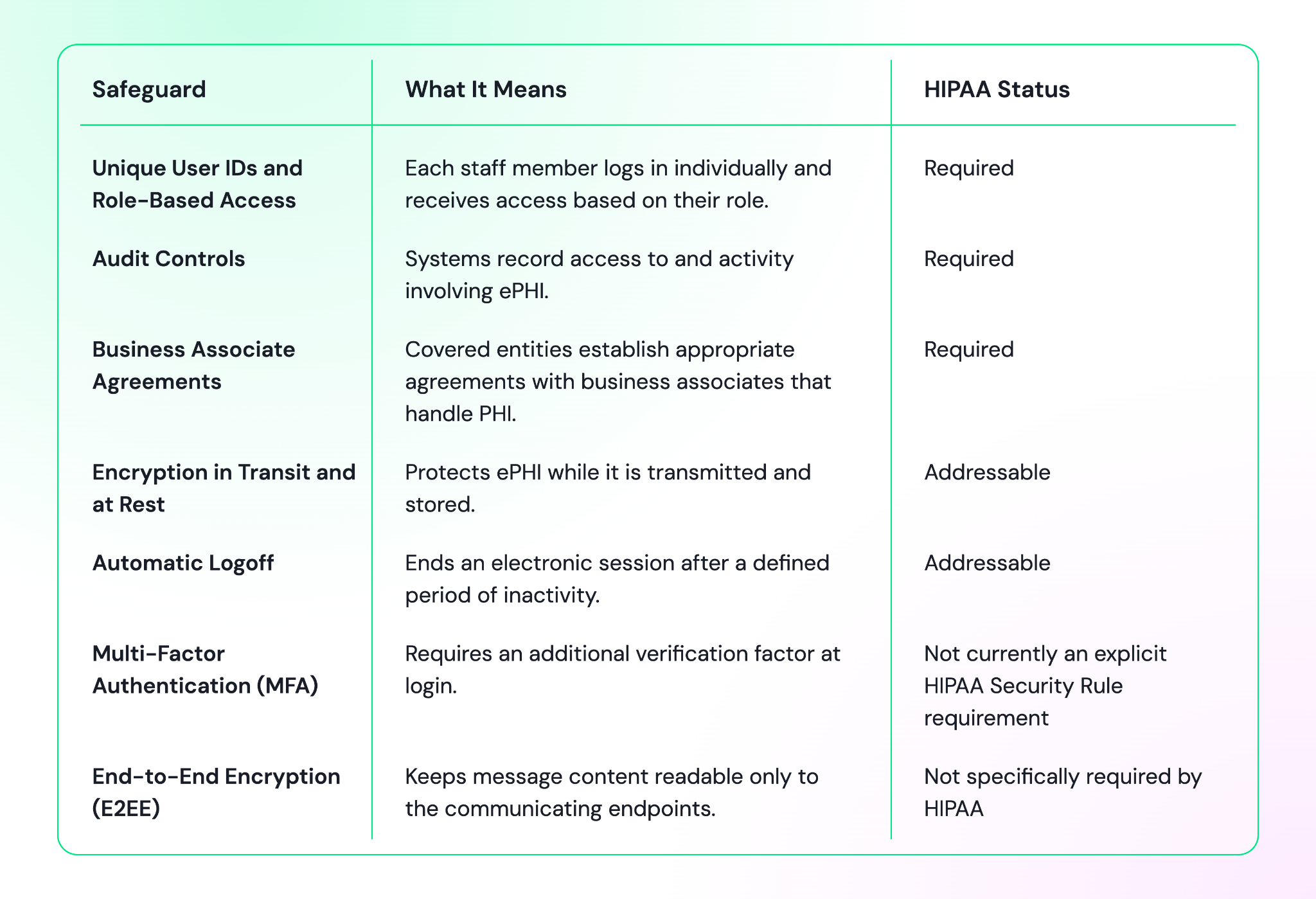
In the US, healthcare organizations should confirm with legal which patient messages can be sent over each channel, since not every messaging platform signs a business associate agreement.
iii. How Should Healthcare Organizations Document Consent for Each Channel?
Healthcare organizations should document consent for each communication channel and purpose. The record should show what the patient agreed to receive and when that consent was given.
A consent record should include:
- The communication channel, such as WhatsApp or SMS
- The purpose, such as appointment reminders or health campaigns
- The date, time, and method of consent
- A clear way for the patient to withdraw consent
Consent requirements vary by regulation and communication purpose. Hospitals, clinics, laboratories, and other healthcare organizations should not assume that consent for one channel automatically covers another.
iv. How Do Healthcare Organizations Protect Patient Information?
Internal access to patient data should also follow the minimum necessary principle. Staff should only have access to the information required for their role.
In the Team Inbox in Wati, healthcare organizations can use controls such as:
- Private Notes: Staff can add internal follow-up information that is visible to the care team but not to the patient.
- Team-Based Routing: Route conversations to the appropriate care team instead of sending every patient request to a general queue.
Healthcare organizations should review each software’s security documentation before connecting a new communication channel. For Wati's security practices, see the Wati Trust Center.
Examples of Omnichannel Engagement With Wati Across Different Care Settings
Every care setting follows the same connected flow, but each one has its own clinical priorities.
These four playbooks show how healthcare organizations can apply omnichannel engagement to common patient requests in Wati.
Dental Clinics: How Are Urgent Tooth Pain Requests Handled?
- Urgent inquiry: A patient reports severe tooth pain through an Instagram DM or WhatsApp message. Both arrive in the same Team Inbox.
- Urgency flag: A keyword rule detects terms such as pain, swelling, or bleeding and routes the chat to the front desk for review.
- Appointment booking: A chatbot webhook checks the dental practice's schedule and offers the next available appointment.
- Aftercare: Post-extraction or post-treatment care instructions are sent through WhatsApp after the procedure.
Diagnostic Labs: How is Home Sample Collection Booked?
- WebChat inquiry: A patient asks about a test, such as a lipid profile or HbA1c, on the lab's website. Wati’s WebChat pre-chat form captures their name and phone number
- Home collection booking: The patient continues the conversation on WhatsApp, where a Dynamic WhatsApp Flow collects the address, preferred collection slot, and test details.
- Pre-test preparation: A reminder template sends fasting instructions before sample collection.
- Report access: Once results are validated, a WhatsApp notification shares a secure login link to the report without showing laboratory values.
Multi-Specialty Hospitals: How Are Patient Requests Routed Across Departments?
- Single helpline: Patients contact one WhatsApp number for different hospital departments.
- Department routing: A chatbot asks for the specialty, such as cardiology, orthopedics, or pediatrics, and routes the chat to the relevant team.
- Balanced workload: In Wati, Round Robin assigns new chats among available coordinators within each department.
- Post-discharge check-in: A WhatsApp template follows up after discharge. Any reported symptom is routed to the nursing or clinical team for review.
Fertility and Sensitive Care: How is Patient Privacy Protected?
- Discreet first reply: A patient asks about IVF, IUI, or egg freezing on WhatsApp or WebChat. The automated reply confirms receipt without repeating the treatment details.
- Dedicated coordinator: One named coordinator manages communication throughout the treatment cycle and confirms the patient's preferred contact number.
- Private context: Private Notes in Wati keep internal follow-up information, such as scan schedules or counseling referrals, separate from the patient-facing conversation.
- Discreet reminders and results: Approved templates can remind patients about scheduled medications without including unnecessary clinical details. Results such as a beta-hCG test are shared through a secure portal or another approved channel rather than in the chat.
4 Steps to Roll Out Omnichannel Customer Engagement for Healthcare
Healthcare organizations can implement omnichannel engagement with Wati in four phases, starting with the channels patients already use. Automation comes after teams, routing rules, and clinical approvals are in place.
- Audit patient access channels: List every way patients contact the clinic or hospital, including the main phone line, WhatsApp, WebChat, and social media pages for each location. Connect these channels to one shared Team Inbox in Wati.
- Assign Ownership by Department: Set up teams for medical receptionists, scheduling coordinators, medical billers, and nursing triage staff. Define which request types each team handles. Configure clinic hours and after-hours replies that direct urgent cases to the on-call service or nearest emergency department.
- Approve the knowledge base, then automate: Clinical and administrative leads should approve the content first, including consultation fees, doctor availability, and pre-procedure instructions, before it goes into Astra’s knowledge base. Then launch three workflows in Wati: welcome messages, appointment booking, and reminders.
- Integrate scheduling systems and review monthly: Connect the practice management system (PMS), hospital information system (HIS), or CRM to Wati through chatbot webhooks, or use Wati’s Google Sheets integration if there is no CRM. Each month, review the metrics below and adjust routing rules or automated responses.
Book a demo with Wati to plan the rollout for your hospital, clinic, or diagnostic lab.
5 Metrics to Measure Omnichannel Engagement in Healthcare
Healthcare organizations need to track more than message volume. The right metrics show where patients are waiting, dropping off, or missing the next step in their care journey.
KPI | What to Measure | What It Tells You |
First Response Time | Time between a patient's message and the first reply from automation or staff | Shows how quickly the organization responds to patient inquiries |
No-Show Rate | Percentage of scheduled appointments that patients do not attend | Shows whether reminders and follow-up are helping reduce missed appointments |
Bot Resolution vs. Escalation | Percentage of conversations resolved by automation compared with those handed to staff | Shows where automation is working and where patients need staff support |
Channel Drop-Off | Percentage of conversations that stop before the patient completes the intended action | Shows where patients leave the journey, such as before booking an appointment |
Recall Adherence | Percentage of patients who complete a scheduled follow-up, review, or repeat test | Shows whether recall communication leads to the intended next step |
Instead of building a separate report, medical coordinators can use Ask Wati AI to get campaign and conversation numbers. For example, they can ask how many patients replied to a recall campaign or how many appointment inquiries came in through WhatsApp.
Build Connected Patient Journeys With Wati
Omnichannel customer engagement for healthcare connects patient conversations with the care team that can act on them. Whichever door a patient uses, it should open into the same room.
Wati supports that connection across the patient journey. WhatsApp, Instagram, Messenger, TikTok, RCS, and WebChat conversations arrive in one shared Team Inbox, with one contact record for each patient.
Click-to-WhatsApp Ads and WebChat capture new inquiries, while Astra handles routine questions. Chatbot booking, reminder templates, and recall broadcasts then support appointment booking and follow-up care.
Keyword rules and Smart Escalation bring in medical staff when a conversation needs further attention. With Wati AI, medical coordinators can use Ask Wati AI to check response times and open requests across channels.
Book a demo with Wati to see it in action for your hospital, clinic, or diagnostic lab.
Frequently asked questions
Which Channels Do Patients Prefer for Communicating With Healthcare Providers?
Patients choose channels based on the task. Many prefer messaging for routine logistics such as appointment reminders, confirmations, and directions, and a phone call or patient portal for test results, diagnoses, and changes to their care plan.
How Does Omnichannel Engagement Reduce Patient No-Shows?
Omnichannel engagement sends appointment confirmations and reminders through the channels patients already use, with a one-tap option to confirm or reschedule. When patients cannot attend, their slots are released early, so scheduling teams can offer them to patients on the waiting list.
Can AI Chatbots Answer Patient Questions Safely?
AI chatbots can safely answer administrative questions, such as consultation fees, clinic timings, and pre-procedure instructions, from a clinically approved knowledge base. They should never offer diagnoses or treatment advice, and they should escalate red-flag symptoms or distressed messages immediately to a triage nurse or other medical staff.
How Does Healthcare Automation Improve Customer Service in Healthcare?
Healthcare automation handles high-volume administrative requests, such as appointment booking, reminders, and payment links, at any hour. This gives medical receptionists, scheduling coordinators, and nursing staff more time for patients who need clinical attention or personal support.
Related posts
- Instagram Comment Automation: How It Works and How to Set It Up in Wati
Instagram comment automation auto-replies to comments and DMs commenters within seconds via Meta's API. Covers strategy, use cases, and Wati setup.
- Shared Team Inbox for Instagram: A Buyer’s Checklist for 2026
Use this fastest checklist to evaluate any shared team inbox for Instagram, which covers DMs, comments, automation, and multi-channel support.
- How to Send Bulk Messages on WhatsApp Without Getting Blocked
Learn how to send bulk WhatsApp messages without getting blocked. Compare the WhatsApp Business app and API, messaging limits, costs, templates, and best practices for safe, compliant bulk messaging.
- How to Set Up a TikTok Business Account: Step-by-Step Guide
Set up a TikTok Business Account step by step: switch from personal, pick a category, add your profile, and unlock ads and analytics.