
Too Long? Read This First
- Omnichannel marketing connects your marketing and communication channels so customers can move between them with less friction.
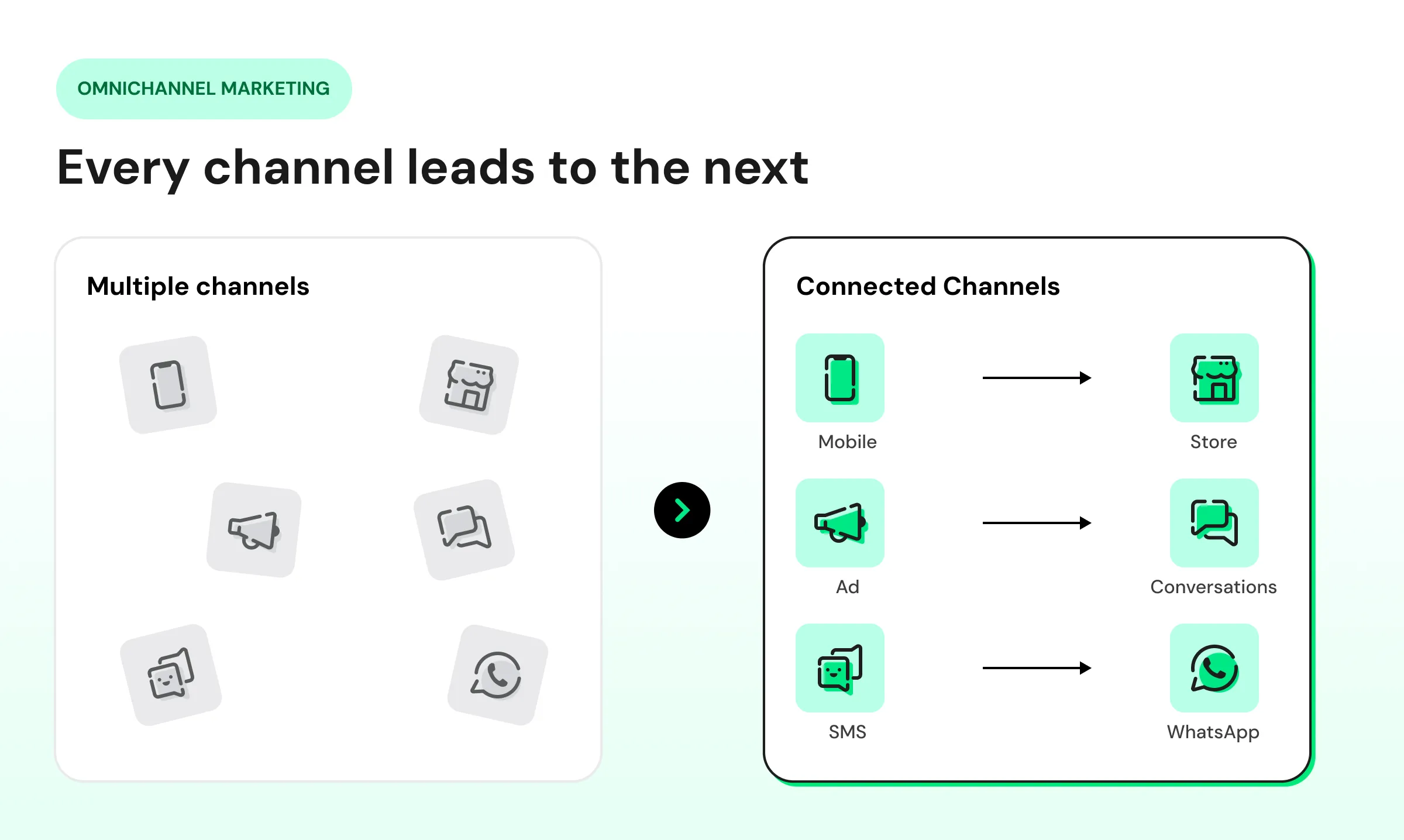
- Multichannel marketing runs each channel on its own, while omnichannel marketing plans them together around the same customer.
- To build a strategy, set a goal, find where customers drop off, segment your audience, plan the message and channel for each segment, connect your data, and track results.
- Effective strategies include conversation-led acquisition, behavior-triggered journeys, cross-channel retargeting, and omnichannel loyalty programs.
- The core tools for omnichannel marketing include ad platforms, a messaging and automation platform such as Wati, a CRM or CDP, an e-commerce or booking platform, an integration tool, and an analytics and attribution platform.
- Wati, an agentic customer engagement platform, supports omnichannel marketing with Team Inbox, Campaigns, chatbots, WhatsApp Flows, Astra, and integrations with CRM and e-commerce tools.
Have you ever tried a marketing strategy that reaches customers across multiple channels at once, saves time, and lets you analyze your marketing efforts collectively?
Yes, we are talking about omnichannel marketing strategies.
Omnichannel marketing connects every channel a business uses, such as its website, WhatsApp, social media, and stores. As a result, a customer's history and context follow them from one channel to the next.
Customers often move between Instagram, a website, email, and WhatsApp before they buy. When those channels are managed separately, customers repeat information or restart the conversation each time they switch.
Omnichannel marketing closes that gap, so a conversation that starts on one channel continues on the next.
McKinsey’s 2026 Global B2B Pulse Survey of nearly 4,000 B2B decision-makers found that buyers use an average of ten channels during a purchase journey. The top reason they switch suppliers is inconsistent information across teams.
This guide covers what omnichannel marketing is, how it works, why it matters, and how to build an omnichannel strategy.
What is Omnichannel Marketing?
Omnichannel marketing is a strategy that connects the channels a business uses to reach, engage, and support customers, so interactions across those channels work together.
A website visit, a WhatsApp conversation, and an event visit can all become part of the same customer relationship.
The main channels in omnichannel marketing include:
- Owned digital channels: Websites, landing pages, and mobile apps.
- Messaging channels: WhatsApp, SMS, email, and website chat.
- Social channels: Instagram, Facebook, and TikTok, including DMs and comments.
- Paid channels: Search ads, social ads, and Click-to-WhatsApp Ads (CTWA).
- Offline channels: Physical stores, events, and phone calls.
How Does Omnichannel Marketing Work?
Omnichannel marketing works by connecting customer data, conversations, and marketing activity across your channels. This lets customers move between WhatsApp, social media, your website, and your store without losing context.
For example, a customer might discover a product on Instagram, receive a follow-up on WhatsApp, and complete the purchase on your website. Each step uses the customer's earlier interactions, so the messaging stays relevant and consistent.
How data connects your channels
- Each channel records customer actions: Ad clicks, website visits, conversations, and purchases are saved to a shared customer profile, usually in a CRM.
- Context moves with the customer: Your marketing tools can see previous interactions before they send the next message.
How each interaction leads to the next
- Customer actions trigger the next message: Automation rules choose the next step based on customer behavior. For example, a contact who downloads a product guide can receive a WhatsApp message.
- Offers stay consistent: Customer, product, and campaign information stays aligned, so customers see the same offers and pricing on every channel.
- Results show what to improve: Outcomes are tracked across channels, and the results guide changes to campaigns, messaging, and automation.
Why is Omnichannel Marketing Important?
Omnichannel marketing is important because connected channels help businesses send more relevant messages, lose fewer prospects, and see what drives results.
According to McKinsey, omnichannel customers shop 1.7 times more than customers who use a single channel.
Fewer Unwanted Messages
Customers may receive messages from several teams or campaigns without realizing they are all from the same business. An omnichannel setup gives businesses a better view of these interactions, making it easier to avoid sending the same offer or reminder across multiple channels.
Fewer Lost Prospects
Not every customer buys on the first visit. A shopper who leaves items in a cart can receive a reminder later, and someone who downloads a guide can get a timely follow-up instead of being forgotten.
More Relevant Follow-Up
What a customer does on one channel can help shape the next message. A contact who registered for your webinar, for example, should not receive the same message as someone who has only visited your website.
Less Manual Work for Marketing Teams
Teams often lose time moving customer details between inboxes, spreadsheets, and other tools. Connecting the systems involved in a customer interaction can reduce that work and make follow-up easier to manage.
Better Visibility Into What Drives Conversions
Looking at channels separately can make it hard to see what actually influenced a conversion. Omnichannel marketing gives businesses a broader view of the interactions that happen before a customer converts, helping teams understand which campaigns and channels contribute to results.
How Do You Create an Omnichannel Marketing Strategy?
To create an omnichannel marketing strategy, set a clear goal, research how customers interact with your brand, and map where they drop off. Then group your audience, choose your channels, plan your messages, and decide how you will measure results.
You do not need to connect every channel at once. The seven steps below take you from research to a strategy you can launch.
Step 1: Set a Clear Marketing Goal
Decide what you want your omnichannel strategy to achieve. Your goal guides every later choice, from the channels you use to the results you track.
Keep the goal specific. "Recover more abandoned carts from first-time shoppers" gives you something to act on, while "improve engagement" does not.
Step 2: Research Your Current Customer Experience
Before you change anything, find out what customers experience with your brand today. Start by going through your own channels as a customer would.
Click your ads, browse your website, message your brand on Instagram and WhatsApp, and add a product to your cart. Note where the experience feels slow, confusing, or disconnected.
Next, look at your website analytics and channel reports to see how people interact with your channels and where they leave. Then collect feedback through short customer surveys, reviews, and comments on your social posts.
Also speak with the people who run each marketing channel. They often know where customers lose interest.
Step 3: Map the Customer Journey and Find the Gaps
A customer journey map shows the key interactions a customer has with your brand, from discovering you to buying again. Use your research to build this map for your main customer group.
Mark the points where customers drop off or lose track of your offer. Common gaps include:
- An ad that leads to a general page instead of the offer it promised
- A cart left behind with no reminder
- Instagram followers who never hear about your WhatsApp offers
- Different prices or offers on different channels
Start with the gap that loses you the most customers.
Step 4: Segment Your Audience
Group your audience by what they have in common, so each group receives information that matches their needs and role. B2B businesses often segment by industry, company size, or job role, while B2C brands often segment by location, purchase history, or recent activity.
For example, a first-time website visitor needs different information from an existing client who is due for renewal. A finance manager and an operations manager at the same company may also care about different outcomes.
Step 5: Plan the Message and Channel for Each Segment
Decide what message or information each segment should receive, then choose the channel where that segment is most likely to see and respond to it. Focus on the channels your customers already use at the point where the gap happens.
The right mix depends on your business and how your customers find and choose you.
Business | Common Gap | Channels to Connect First |
D2C or e-commerce brand | Shoppers abandon carts | Online store, WhatsApp, Instagram |
B2B e-commerce (wholesale) | Buyers miss new product and restock updates | WhatsApp, product catalog, order system |
B2B software company | Website visitors leave without asking questions | Website chat, WhatsApp, LinkedIn |
Real estate agency | Ad leads lose interest before a site visit | Click-to-WhatsApp ads, WhatsApp, website |
Education provider | Students stop responding after an inquiry | Website, WhatsApp, Instagram |
Add a channel only if your customers already use it. Keep the offer, price, and tone the same on every channel, and set two rules before you launch:
- Frequency: Set a weekly limit on marketing messages per customer across all channels.
- Consent: Get the required opt-in before sending marketing messages on WhatsApp. Make it clear that the customer agrees to receive messages from your business.
Step 6: Connect Your Customer Data
Link the tools behind your channels so relevant customer activity can be shared between them. Without this, each channel may work with only part of the customer's history.
Many businesses use a CRM or customer data platform (CDP) to bring customer information from different channels into a shared record. Check whether your tools connect directly, and use a connector such as Zapier if they do not.
Step 7: Set Metrics and Review Results
Choose the metric that shows whether you are reaching your goal, and record your current number before launch. This gives you a starting point to compare against.
Goal | What to Track |
Recover abandoned carts | Cart recovery rate |
Turn ads into sales | Sales from each campaign |
Get more replies to campaigns | Click or reply rate |
Reduce message fatigue | Opt-out rate |
Bring customers back | Repeat purchase rate |
Review these numbers on a fixed schedule, such as weekly or monthly, depending on how many customers you reach. When you close one gap, return to your journey map and pick the next one.
What Are the Most Effective Omnichannel Marketing Strategies?
There is no one-size-fits-all omnichannel marketing strategy. The right one depends on your goal, your customers, and the channels they already use.
Each of the nine strategies below has its own goal and its own way of using channels together. Choose the strategy that matches your marketing goal.
1. Conversation-Led Acquisition
Route ad and website traffic into a WhatsApp conversation instead of a form. Prospects can ask questions before they commit, and your response can match the offer they saw in the ad.
Channels: Click-to-WhatsApp ads on Facebook and Instagram, Google Ads message assets (currently in beta), website chat, and WhatsApp. Your CRM records which ad or page started each conversation.
Best for: Products or services that customers research before they commit, such as property, courses, or software.
2. Behavior-Triggered Journeys
Use customer actions to decide when and where each message is sent, instead of following a fixed schedule. An action on one channel triggers a message on another while the customer is still engaged.
Channels: A guide download or webinar registration on your website triggers a WhatsApp follow-up, and an abandoned cart triggers a WhatsApp reminder. Messages are sent only to contacts who have opted in.
Best for: Businesses that track actions such as form submissions, guide downloads, or abandoned carts.
3. One Campaign, Adapted per Channel
Plan one campaign with one offer, then adapt the content format for each channel. Each channel supports one stage of the customer acquisition journey, based on the AIDA model: Attention, Interest, Desire, and Action.
Stage | Channels | Channel's Role | Example Call to Action |
Attention | LinkedIn and Instagram posts, social ads, search ads | Build awareness and introduce the offer | See the offer |
Interest | Landing page, website, blog | Explain the offer in full | Learn more |
Desire | WhatsApp, social DMs, website chat | Answer questions and address concerns about the offer | Chat with us on WhatsApp |
Action | WhatsApp, website, Click-to-WhatsApp ads | Make it easy to sign up or buy | Register now or Buy now |
Channels: Instagram Reels and LinkedIn posts to build awareness, a landing page with the full offer, and WhatsApp reminders for opted-in contacts before the offer ends.
Best for: Product launches, seasonal sales, webinars, and announcements.
4. Content Hub and Repurposing
Create one detailed asset, such as a webinar or report, and repurpose it into smaller formats for different channels. Follow up based on each contact's engagement, such as sending the recording to registrants who missed the live session.
Channels: A blog post on your website, short clips for LinkedIn and Instagram, talking points for podcasts and partner newsletters, paid social ads, and a WhatsApp message with the key takeaway for opted-in contacts.
Best for: Teams that need wider reach without producing more content.
5. Account-Based Omnichannel (B2B)
Manage each target company as a single account across every contact and channel. Start with a short list of target companies and identify the decision-makers at each one.
Each decision-maker receives content that matches their role, and all activity is recorded against one account.
Channels: LinkedIn ads for decision-makers, industry-specific content on your website, and WhatsApp updates for opted-in contacts. Your CRM links each contact to their company automatically.
Best for: High-value B2B deals that involve several decision-makers.
6. Online-Offline Continuity
Connect in-person interactions, such as trade shows, events, and store visits, to your digital channels. Contacts you meet in person can continue the conversation online after the interaction ends.
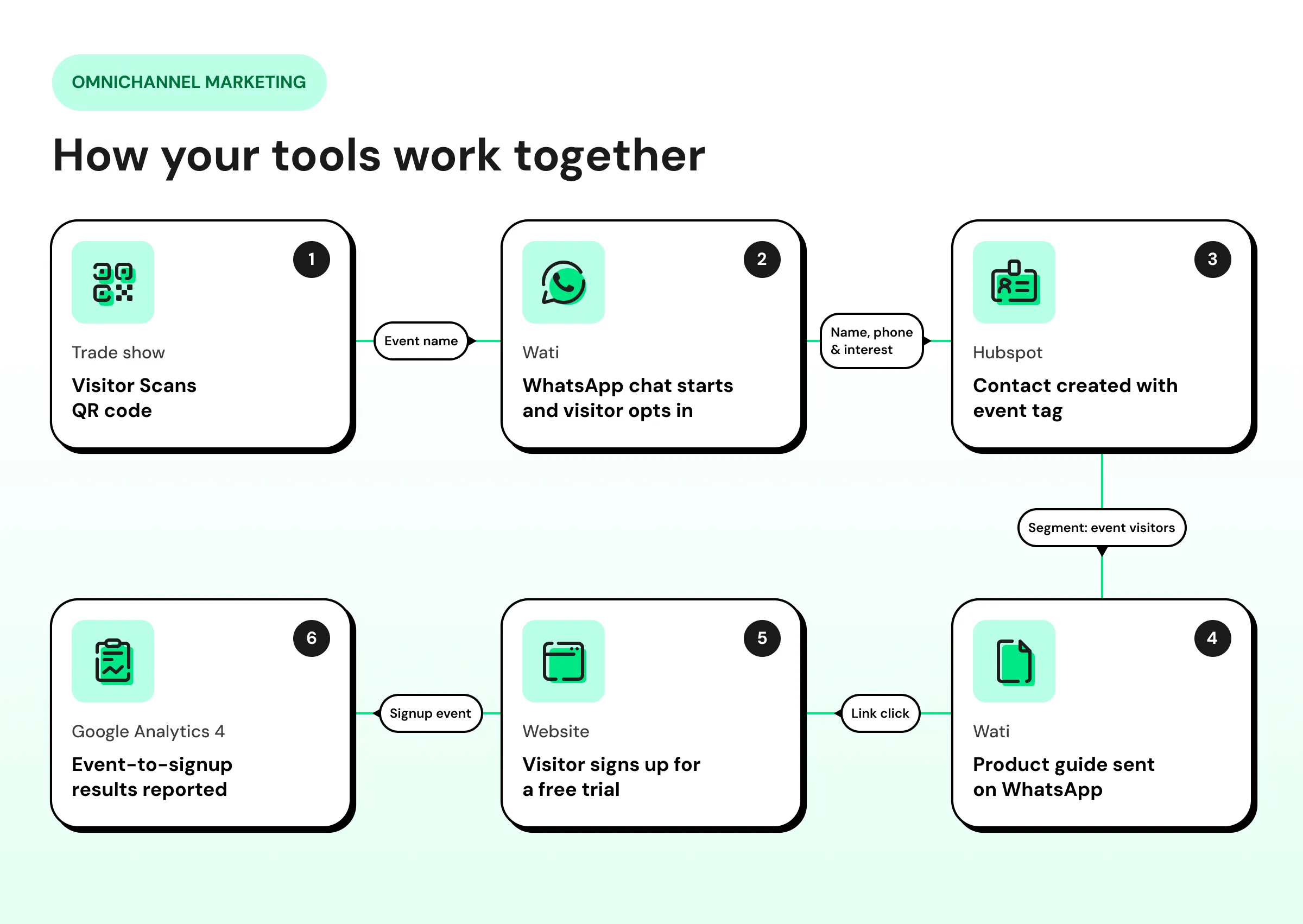
Channels: QR codes at booths, displays, or on printed materials that open a WhatsApp conversation. Assign a separate code to each event or location, so your CRM tags the source and you can measure these contacts separately.
Best for: Businesses that attend trade shows, host events, or operate physical stores.
7. Cross-Channel Retargeting
Show ads based on the actions a person took on another channel. Each ad reflects their most recent action, such as reading a blog post, visiting your pricing page, or abandoning a cart.
Channels: Lists of website visitors and WhatsApp contacts can be used as ad audiences on Facebook, Instagram, LinkedIn, and Google Ads. Set a frequency limit so each person sees your ads a set number of times.
Best for: Businesses whose customers visit several times before they decide.
8. Conversational and Social Commerce
Enable customers to browse and order on WhatsApp and Instagram, without redirecting them to your website. This approach suits both consumers and B2B buyers who reorder regularly.
Channels: A WhatsApp product catalog where customers view items, ask questions, and add products to a cart, plus product tags in eligible Instagram content. Keep prices and stock consistent across your catalog, website, and store.
Best for: E-commerce brands, wholesalers, and distributors whose buyers reorder often.
9. Omnichannel Loyalty Programs
Encourage repeat purchases, renewals, and referrals with rewards that work the same way online, in person, and in chat. Rewards can include points, discounts on repeat orders, renewal offers, or referral bonuses.
Channels: WhatsApp for points updates, reward reminders, and reorder or renewal reminders, and Instagram for new rewards and member offers. Wati Drip Campaigns let you send a planned series of WhatsApp messages and automatically stop further messages when a customer replies.
Best for: Businesses with repeat purchases, subscriptions, or contract renewals.
Examples of Omnichannel Marketing
Here are four brands that use omnichannel marketing well, along with one lesson from each that you can apply to your own strategy.
Sephora Connects Digital Tools With In-Store Experiences
Sephora combines its mobile app, digital tools, and physical stores to make shopping more useful across channels. Customers can try products virtually with Sephora Virtual Artist, book in-store beauty services on the website or app, and see their in-store and online purchases together in their Beauty Insider account.
What makes this omnichannel is the connection between these touchpoints. A customer can test products digitally, get personalized recommendations in the store, and take those recommendations home to buy online later.
Key takeaway: Use digital channels to support physical interactions instead of treating online and offline shopping as separate experiences.
Apple Connects Online Shopping With Its Retail Stores
Apple lets customers research, buy, and get support without staying in one channel. Customers can order online for in-store pickup, and book Genius Bar support appointments through the Apple Support app, all using one Apple Account.
Key takeaway: Make it easy for customers to move between digital and physical channels when they buy or need support.
Walgreens Turns Prescription Reminders Into Actions
Walgreens texts customers enrolled in its alert service when a prescription is due for refill or ready for pickup, and customers can reply "Refill" to place the order. In the Walgreens app, they can also refill by scanning the barcode on the bottle and choosing store pickup or delivery.
Each message leads straight to an action, without a phone call. The text, the app, and store pickup all connect to the same prescription.
Key takeaway: Let customers act directly from a reminder, while following the privacy and compliance requirements of healthcare.
Bowaba Connects Paid Ads, WhatsApp, and the CRM With Wati
Bowaba, a digital agency serving more than 50 clients across Kuwait, Saudi Arabia, Qatar, and the UAE, used to send ad traffic to lead forms and call buttons. Prospects dropped off before converting, lead quality was low, and ad spend could not be tied to results.
With Wati, Bowaba introduced Click-to-WhatsApp ads wherever lead forms were causing drop-off, so prospects could start a one-on-one conversation instead. Automated qualification flows filter leads by intent, conversations are integrated with CRM tools, and every chat is traced back to the ad it came from.
Engaged leads can then be remarketed inside WhatsApp, which closes the loop between acquisition and follow-up. Bowaba's clients achieved up to 11x return on ad spend.
Key takeaway: Connect paid ads, conversations, and your CRM, so your team always knows where each lead came from and what they need.
What Tools Do You Need to Run Omnichannel Marketing?
You need six types of tools to run omnichannel marketing, and each one covers a different part of your campaigns. Most businesses start with the core tools below and add more as they grow.
Tool | What It Does | Role in an Omnichannel Campaign | Examples |
Ad platforms | Run paid campaigns | Bring in new prospects and retarget past visitors | Meta Ads, Google Ads, TikTok Ads, LinkedIn Ads |
Messaging and automation platform | Manages conversations, broadcasts, chatbots, and automated follow-ups | Engages customers on WhatsApp, Instagram, Facebook, SMS, RCS, TikTok, and website chat | Wati |
CRM or CDP | Stores customer and lead records | Keeps contact details, lead source, consent, and activity in one record | HubSpot, Zoho CRM, Salesforce |
E-commerce or booking platform | Records orders, carts, and bookings | Sends events, such as purchases or abandoned carts, that trigger follow-ups | Shopify, WooCommerce, BigCommerce |
Integration tool | Connects tools that lack a direct integration | Passes data and triggers actions between systems | Zapier, Make, Pabbly Connect |
Analytics and attribution platform | Tracks traffic, conversions, and channel contribution | Shows which campaigns and channels drive results | Google Analytics 4, Mixpanel |
Here's how these tools pass information to each other when a trade show visitor signs up for a free trial.
When you evaluate a new tool for your stack, check for:
- Integrations: It should connect with your CRM, e-commerce, booking, or other systems you already use.
- Two-way communication: Customers should be able to reply on the channel where they receive your message.
- Automation: It should support no-code workflows for routine follow-ups.
- Consent management: It should record opt-ins and opt-outs for each channel.
How Do You Measure Omnichannel Marketing?
Measuring omnichannel marketing means tracking how different channels work together to drive conversions. Instead of reviewing Instagram, WhatsApp, and your website separately, follow the customer journey across them to see which interactions led to the result.
Here's how to measure it:
- Tag every link: Add UTM parameters to the links in your ads, WhatsApp messages, and social posts. These short tags show where each website visit came from.
- Record the lead source: Save the channel and campaign that first brought in each contact in your CRM.
- Use data-driven attribution: Google Analytics 4 uses your data to distribute credit among the touchpoints that contributed to a conversion. Last-click attribution gives all the credit to the last channel a customer clicked before converting, not counting direct visits.
- Review all channels in one report: Use a tool such as Google Analytics 4 or Looker Studio to compare your channels side by side.
Track these metrics to see how well your channels work together:
Metric | What It Shows |
Cross-channel conversion rate | How many people convert after using two or more channels |
Customer acquisition cost (CAC) | How much you spend to win each new customer |
Customer lifetime value (CLV) | How much revenue a customer brings in over time |
Click or reply rate by channel | How many people click or reply on each channel |
Compare all channels using the same metrics and date range. This shows you which channels drive conversions and where customers drop off.
How Does Wati Help You Run Omnichannel Marketing?
Wati helps you run omnichannel marketing by handling the customer engagement and messaging side of your setup. You can manage conversations, automate follow-ups, run campaigns, and connect Wati with the other tools in your stack.
Here is how Wati fits into an omnichannel marketing workflow.
Manage Every Conversation From One Shared Team Inbox
Wati's shared Team Inbox brings conversations from WhatsApp, Instagram, Facebook Messenger, TikTok, SMS, RCS, and WebChat into one place. Your team can assign conversations, see previous messages, reply, and follow up without switching tools.
Send Targeted WhatsApp Campaigns
Use Wati Campaigns to send targeted WhatsApp messages based on customer segments and campaign goals. You can build segments from contact attributes and engagement signals, so each campaign reaches the contacts most likely to respond.
Automate Replies With Chatbots and AI
No-code chatbots can collect information, answer common questions, and qualify leads before handing them to a team member.
Help Customers Shop on WhatsApp
WhatsApp Catalog lets customers browse products and start a purchase conversation without leaving WhatsApp. This adds product discovery and sales to the same conversation.
Handle Routine Conversations With Astra AI Agent
Astra AI Agent can answer questions, handle routine tasks, and hand the conversation to a team member when required.
Connect Wati With Your Other Tools
Wati integrates natively with HubSpot, Zoho CRM, Salesforce, Shopify, WooCommerce, and more, so customer data can flow between your conversations and your existing systems.
For anything else, Wati offers APIs, webhooks, and connectors such as Zapier.
Make Omnichannel Marketing Easier With Wati
Omnichannel marketing turns separate channels into one connected customer experience, from the first ad click to the renewal conversation. Start with the gap that loses you the most customers.
If WhatsApp is part of how your customers buy, Wati can be the place where those conversations start, continue, and connect to the rest of your marketing.
Want to see how Wati fits into your omnichannel marketing? Book a demo and see how it works for your business.
Frequently asked questions
What is an Example of Omnichannel Marketing?
An example of omnichannel marketing is a business that runs an Instagram ad, continues the conversation on WhatsApp, and lets the customer order online or pick up in-store. Every channel uses the same customer information, so the customer never has to start over.
What is the Difference Between Omnichannel and Cross-Channel Marketing?
Cross-channel marketing links a few channels so one campaign can move between them, while omnichannel marketing connects all the channels a customer uses around shared customer data. A social ad that leads to a WhatsApp chat is cross-channel, while a WhatsApp message that reflects a customer's recent website visit and past purchases is omnichannel.
What Are the Best Practices for Omnichannel Marketing?
The best practices for omnichannel marketing are to keep offers, prices, and brand voice consistent across channels, and to let customers reply on every channel where they receive your messages. It also helps to collect consent before sending marketing messages and set a weekly limit on how many messages each customer receives.
Does Omnichannel Marketing Work for B2B?
Yes, omnichannel marketing works for B2B because business buyers research across search, websites, LinkedIn, and messaging apps before they decide. Connecting those channels lets you send each decision-maker content that matches their role and stage.
How Many Channels Do You Need for Omnichannel Marketing?
You need only the channels your customers already use, and two or three well-connected channels are enough to start. Omnichannel marketing depends on how well your channels connect, not how many you have.
What Are The Best Omnichannel Messaging Tools For WhatsApp, Instagram, And Messenger?
Wati is the best omnichannel messaging tool for WhatsApp, Instagram, and Messenger because it brings all three channels into one shared Team Inbox. Your team can reply, assign chats, and automate responses from one screen, with Wati AI features like AI Conversation Summary, AI Translate, AI CX Score, and AI Templates.
Related posts
- Instagram Comment Automation: How It Works and How to Set It Up in Wati
Instagram comment automation auto-replies to comments and DMs commenters within seconds via Meta's API. Covers strategy, use cases, and Wati setup.
- Shared Team Inbox for Instagram: A Buyer’s Checklist for 2026
Use this fastest checklist to evaluate any shared team inbox for Instagram, which covers DMs, comments, automation, and multi-channel support.
- How to Send Bulk Messages on WhatsApp Without Getting Blocked
Learn how to send bulk WhatsApp messages without getting blocked. Compare the WhatsApp Business app and API, messaging limits, costs, templates, and best practices for safe, compliant bulk messaging.
- How to Set Up a TikTok Business Account: Step-by-Step Guide
Set up a TikTok Business Account step by step: switch from personal, pick a category, add your profile, and unlock ads and analytics.