
Too Long? Read This First
- Integrate Astra with HubSpot, Salesforce, or Zoho in minutes via a secure OAuth handshake: no developers or complex API mapping required.
- Astra doesn't just "send" data; it reads CRM context to personalize conversations and writes back transcriptions, lead scores, and intent buckets automatically.
- Use pre-built workflows to trigger specific CRM events, such as creating tasks for high-intent leads or updating deal stages based on chat outcomes.
- Leverage voice cloning and BANT-based qualification to re-engage cold leads and book appointments directly into your integrated calendar.
- Eliminate integration anxiety with permission-based actions and controlled API syncs that prevent data duplication and protect your existing workflows.
Want to invest in an AI agent, but are doubtful if it will integrate with your existing CRM?
We hear you. Brands often want to invest in conversational AI to automate lead generation, but don’t have the resources to streamline their tech stack.
Doing so without any knowledge can lead to CRM overload, data mishandling, and broken lead pipelines.
With conversational AI orchestration tools like Astra, you can integrate CRMs without any code expertise. No APIs or developers required.
In this guide, we’ll cover how to integrate AI agents with CRMs like HubSpot, Zoho, and Salesforce, allow AI agents to manage conversations, and build a stronger lead pipeline.
Let’s get started!
Do AI Agents Replace Traditional CRMs?
AI agents are conversational systems that talk with customers, take actions, and update your tools, going well beyond a scripted chatbot.
While voice agents help with services like ticket automation, query escalation, sales, and customer service, they aren’t equipped with CRM capabilities.
A most effective lead generation strategy is the one that includes both an AI voice agent + CRM integration. While CRM handles lead pipelines, activity reports, and conversions, a voice AI agent, like Astra, automates calls, talks in a cloned voice, and provides built-in lead qualification.
Integrating an AI agent like Astra with your sales CRM streamlines conversational flows, helps deploy a voice agent for high-intent leads, and builds revenue intelligently.
As mentioned, an AI agent is a layer to add to a CRM to access, upload, or edit contacts directly. Astra has built-in API integration that helps you connect your CRM.
How Does an AI Agent Actually Integrate with CRM? The Working Methodology
Most conversational AI agents integrate with CRM via API integration or webhook automation.
With an API key, you can automate lead flow from point A to point B. This enables a bidirectional sync; you can access AI transcriptions in your CRM or view, create, and upload contacts directly from the agent interface.
With Astra, you can directly let conversational agents access contact details through the action library. Action library also helps you integrate Zoho, Pipedrive, Salesforce, or Hubspot CRMs in a couple of clicks, without the need for an external API or third-party software.
Here is how an AI agent is linked with a CRM to fuel better conversations and build high-quality sales pipelines.
1. Data In: The AI Reads your CRM Context
The AI agent connects your CRM to its lead dashboard via external APIs.
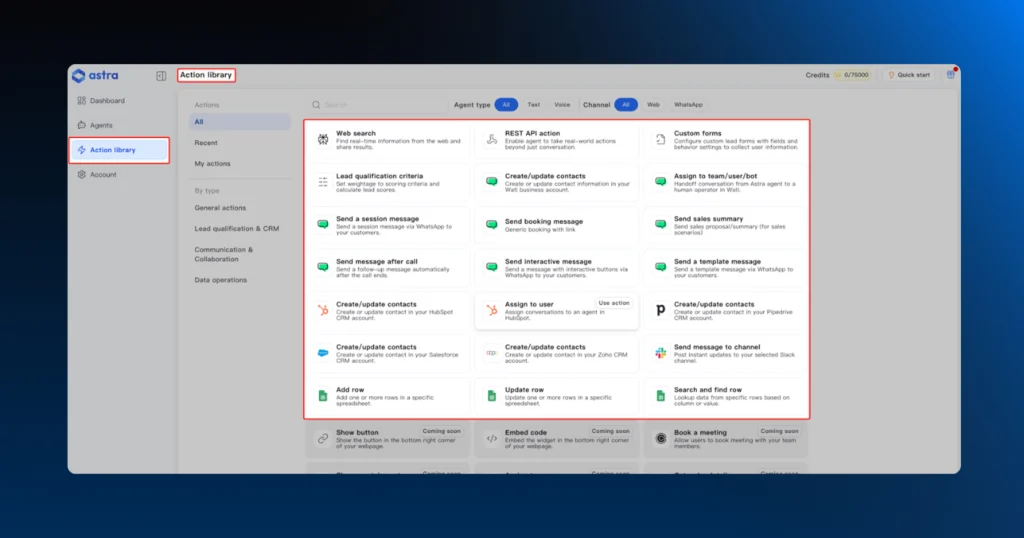
Once connected, the AI agent can access lead and contact data, updated stages and pipeline info, read past interactions, and edit fields and attributes directly.
Connecting your CRM to an AI agent eliminates manual CRM admin work to a great extent and enables teams to take better follow-ups.
Your AI isn’t guessing while talking to the prospect; it is fetching data from CRM in real time.
2. Decision Layer: The AI Interprets and Updates Sales Records
Once the data is available, the AI agent applies logic to it.
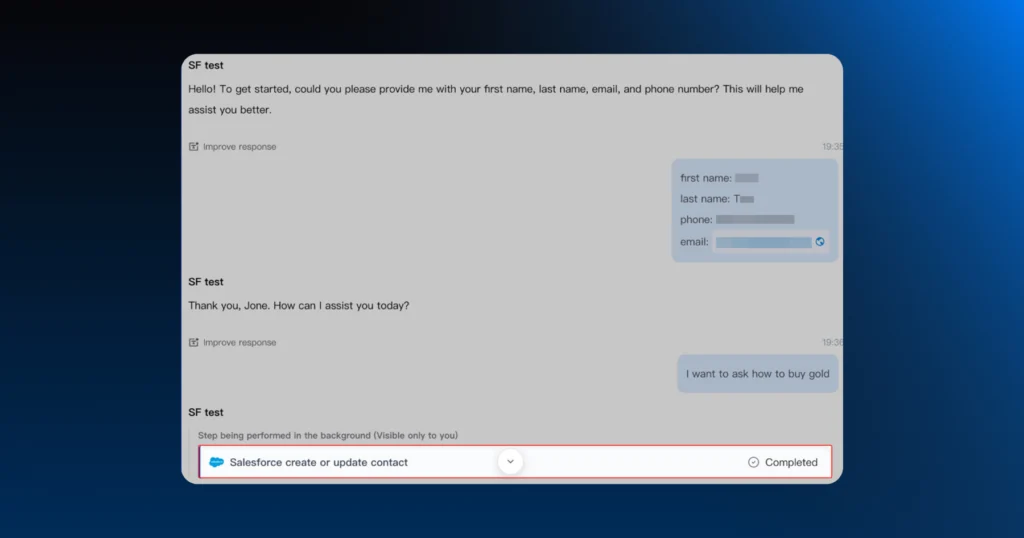
Astra can auto-qualify, prioritize, and nudge contacts with built-in BANT criteria. This helps teams attend to and resolve critical queries first, with intelligent voice agents.
AI agent does it all; classify the lead based on intent, get in touch with sales-ready leads, prioritize calendar bookings, or close tickets.
This is where concepts like “Action library” or pre-defined workflows come in; teams can set AI workflows, engage faster, and accelerate customer journeys.
AI doesn’t act randomly on data. It operates with rules, triggers, and permissions you define.
For example, if a lead is already imported via CRM and registers an inquiry via CTWA, the AI agent will act from a place of awareness, rather than sales.
3. Action Execution: The AI Updates Your CRM
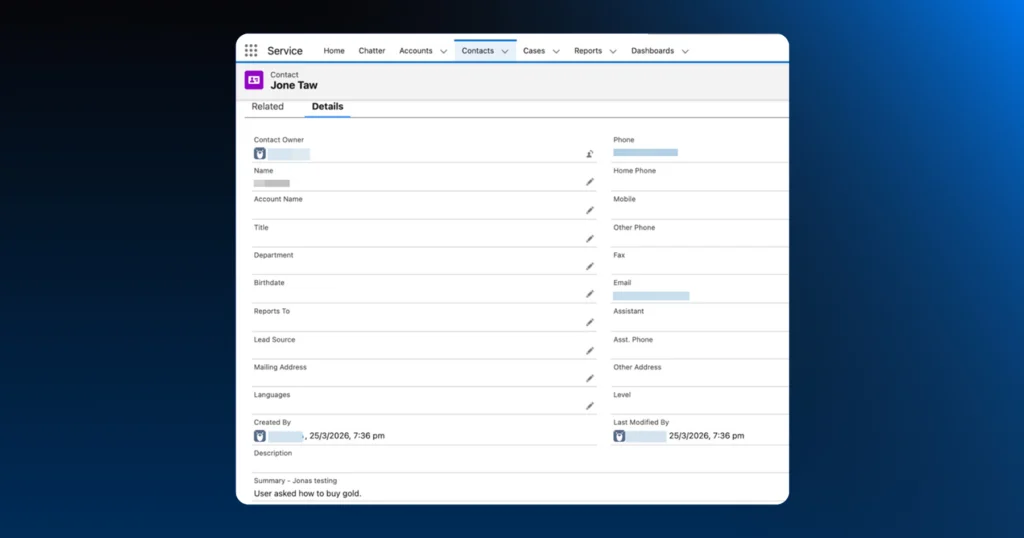
AI voice agent talks and responds. Post interaction, it updates the “CRM fields” automatically on the lead profile.
Platforms like Astra can personalize interactions based on age, demographic, and region. With it, you can deploy no-code multilingual agents to converse in the same tone and style as your prospect.
AI also accesses your lead history, updates progress, adjusts lead scoring, and maintains recency.
AI agents can also instantly route queries, create or update deals, store AI summaries, and trigger WhatsApp auto replies.
Note: The conversation ends when 10 minutes have passed since the last text message or voice response.
A Simple Example of How to Update CRM via AI
|
What Can You Actually Do With AI CRM Integration: Key Industry Use Cases?
From personalizing communication to building cross-platform familiarity to direct revenue impact, AI agents take your CRM operations up a notch.
Connecting Astra to your CRM isn’t just about syncing data; it’s about building a 24×7, functional sales and conversion engine.
Here is how industries are actually using this integration.
1. Omnichannel Lead Generation on WhatsApp
AI agents read CRM data to engage across channels. It retains memory to build an omnichannel presence.
You can automatically capture leads from WhatsApp and instantly create a record in Salesforce or HubSpot. No more lost conversations in an agent’s “private” chat.
Example of Omnichannel Lead Generation
Instead of a static web form, a prospect clicks a “WhatsApp Us” ad. Astra engages them instantly, asks about their budget, who's making the decision, what they need, and their timeline (BANT qualification), and automatically creates a new Lead in Salesforce.
The Result: No more manual entry; the agent starts their day with a list of qualified buyers ready for a viewing.
2. The Ultimate Sales And FAQ Assistant
Voice agents can help share WhatsApp product catalogs, navigate support docs, and make a quick decision.
Platforms like Astra use voice cloning and AI call logic to follow up with a human-like tone, help prospects finalize purchase, and confirm payments.
Example of Sales and FAQ Assistant
When a trial user stops engaging, Astra can trigger an outbound call using a cloned voice of your top-performing account executive. It sounds human, feels personal, and can answer technical questions by pulling data directly from your Knowledge Base or Support Hub.
The Result: Re-engaging “cold” leads at scale without hiring an army of SDRs.
3. Automated Appointment Scheduling
Voice agents can auto-book calendar slots, take follow-ups for availability, and allocate available slots.
Astra can set up appointments with in-built Google Workspace or Calendly integration to confirm future appointments or demos.
Example of Appointment Scheduling
A prospect, who was interested in renting furniture, requested a demo but disappeared and abandoned the cart.
AI agents can conveniently initiate recovery via WhatsApp messages and offer alternatives like video calls, voice notes, and so on to re-hook the prospect.
The result: Immediate winback and higher chances of direct conversion
4. 24×7 Engagement and Customer Service
Unlike sales reps who feel burnt out, AI sales agents can sense new user activity faster and assist at any time.
While your team sleeps, Astra handles FAQs and support tickets, pulling customer history from Zoho to provide personalized, context-aware answers.
Example of 24/7 Engagement and Customer Service
A patient calls or messages after hours to book an appointment. Astra checks your integrated calendar (linked via CRM), confirms an open slot, and updates the contact record in HubSpot with the appointment details and a summary of the patient’s concerns.
The Result: Zero missed opportunities and an x% reduction in administrative workload for the front-desk team.
5. Personalized Sales Templates at Scale
Teams can personalize AI scripts based on their product, industry or budget and customize conversations.
Instead of generic “Hello [Name]” messages, Astra uses CRM data to populate customized templates that reference specific past purchases or interests, making every outreach unique.
Example of Personalized Sales Templates at scale
Using data from Zoho CRM, Astra identifies customers who haven’t purchased in 60 days. It sends a WhatsApp message with a customized template featuring a discount for the exact product category they last browsed.
The Result: Highly relevant marketing that converts at 3x the rate of generic email blasts.
Key Considerations while integrating AI with CRM: Fears to Address
You might have plugged Astra in. But you’re still seeing outdated lead information, delayed AI calls, and missed inbounds. Why?
Before you integrate tools, ensure you have the necessary budget, compatibility, and team capacity to deal with this new sales stack.
Here is how Astra helps here:
- Overcoming Data Loss or Duplication: Astra uses controlled API-based syncs. Instead of a chaotic “data dump,” Astra communicates precisely with your CRM, ensuring that information is only updated where and when you want it to be.
- Private data encryption: With Permission-Based Actions, you define the boundaries. You decide exactly what the AI can edit, view, or create. It operates as a highly disciplined assistant, not a loose cannon.
- No-code integration: You don’t have to change how you work to accommodate Astra. It is built to work within your existing workflows, enhancing your current Salesforce or HubSpot processes rather than forcing you to learn a new system.
- Seamless onboarding: You don’t need to go “all-in” on day one. Astra allows you to start small and scale safely. Begin with simple contact updates, and as your confidence grows, unlock more complex automations from the AI Actions Library.
Learn More in Detail: Astra for Sales Reps: Features, Process, and How to Get Started
How to Get Started: Your 5-Step AI Integration Workflow with Salesforce, HubSpot, and Zoho
Astra is designed to sit on top of your existing CRM, acting as an intelligent bridge rather than a disruptive overhaul.
Whether you use Salesforce, HubSpot, or Zoho, the setup is a matter of clicks, not code.
Step 1: Authenticate Your CRM
Log in to the Astra dashboard and select your CRM (Salesforce, HubSpot, or Zoho). Follow the secure OAuth prompts to establish a “secure connection”.
<Image of Salesforce+HubSpot+Zoho account integration>
This ensures Astra has the right permissions to talk to your database without compromising security.
Step 2: Map your AI Actions
Using the “AI Action” Library to initiate an AI agent task, like creating or updating a lead.
For example: If Lead Score > 80, create a Task in HubSpot for the Sales Manager.
Step 3: Train the Knowledge Base
Upload support docs, audio samples (60-sec), product manuals, service docs, and so on to train Astra to talk.
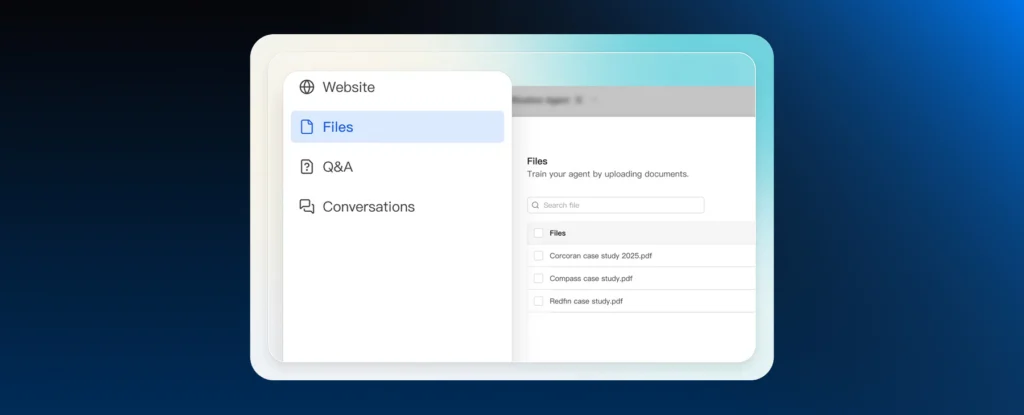
This gives Astra the “brain” it needs to answer questions accurately and handle objections based on your specific business logic.
Step 4: Configure Call & Chat Logic
Set up your triggers. Decide which actions should happen on WhatsApp versus which require an AI Voice call.
You can even set “Human Handoff” rules for when a conversation needs a person’s touch.
Step 5: Test & Launch (The Pilot Phase)
Once connected, run a small batch of leads through the system.
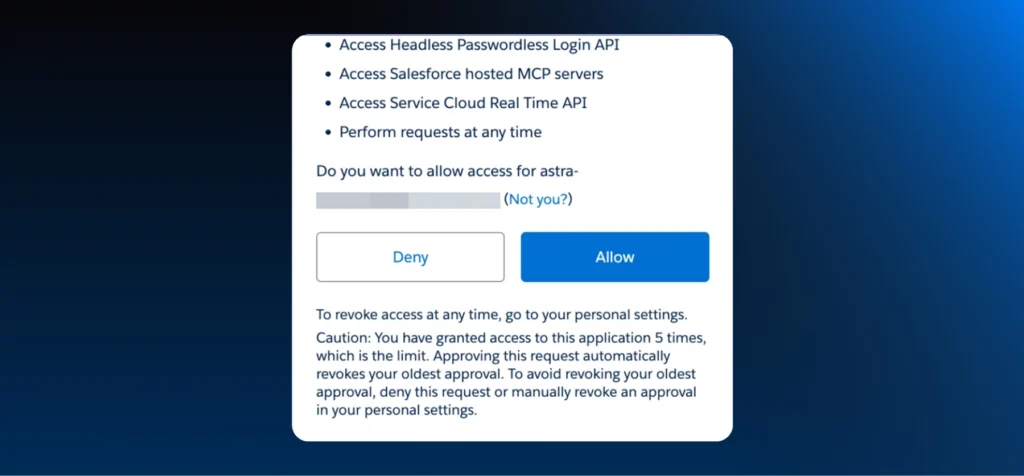
Watch as Astra captures data and updates your CRM in real-time. Once you see the “Auto-update” in action, you can scale to your entire database with total confidence.
Onward to a Robust Sales Engine!
With no-code AI orchestration tools like Astra, you can nurture leads, improve outreach, and lead with an AI-first competitive advantage.
Don’t fear the need for developers, high-scaled AI infrastructure, or enterprise-style security.
Astra does it all for you. With a streamlined native AI agent, you can directly aid quality conversions and growth!
Ready to witness CRM integration with an AI agent?
Book your Astra free trial today!
Frequently asked questions
1. Does an AI agent replace my existing CRM?
No. Think of an AI agent as an "intelligent layer" on top of your CRM. While your CRM acts as the database of record, the AI agent acts as the execution arm, handling conversations, qualifying leads, and updating your CRM records in real-time so your sales team doesn't have to.
2. Do I need coding skills to connect Astra to HubSpot or Salesforce?
Not at all. Astra features a native AI Actions Library and no-code connectors. You simply authenticate your CRM account via a secure login (OAuth), and the platforms begin communicating immediately.
3. How does the AI agent know what information to update in my CRM?
You define the rules through Permission-Based Actions. You can set specific triggers, for example, if a lead confirms a budget over a certain threshold, Astra is permitted to update the "Lead Stage" to "Qualified" and create a follow-up task for a sales rep.
4. Can Astra handle multilingual leads and sync that data correctly?
Yes. Astra is a multilingual no-code agent that can converse in the prospect's native tongue. Regardless of the language spoken, it extracts the core data (like intent or contact details) and syncs it into your CRM in your preferred business language.
5. What happens if the AI agent encounters a complex query it can't solve?
Astra includes built-in Human Handoff logic. If a conversation requires a personal touch or hits a specific trigger you've defined, the AI instantly routes the query (along with the full AI transcription and context) to a live agent in your CRM.
Related posts
- AI Customer Support in 2026: What It is, How It Works, and Why Smart Teams are Quietly Switching Over
Learn how AI in customer support manages ticket escalations, automates ticket tagging and routing, and improves customer satisfaction. See how Astra does it.
- Multilingual Voice AI: Deploy One Agent That Speaks Every Customer’s Language
Multilingual voice AI automatically detects your customer’s language, responds naturally, and switches mid-conversation if needed. See how it works in 2026.
- How to Automate Business Conversations With a WhatsApp AI Agent in 2026
Learn how to build a WhatsApp AI agent to engage, qualify, and convert prospects round the clock without any delays in 2026.
- Voice-First Web Experiences: Navigating with Voice Commands
learn how voice first web experiences enable you to power personalized, human-like conversations to have a competitive advantage in today’s market.