
Too Long? Read This First
- You can build a WhatsApp AI agent directly from Claude using Wati MCP.
- All you need to get started is an active Astra workspace and a paid Claude plan (Pro, Max, Team, or Enterprise).
- You build by describing what you need in plain language. Claude configures the agent, pulls from your knowledge base, and brings it to a testable state.
- Before going live, Wati runs an automatic eval across four metrics: intent match, response quality, hallucination, and escalation handling.
- The whole process, from first message to a live, tested WhatsApp AI agent, takes about 10 minutes.
Either you hired a developer and waited weeks, or you spent hours inside a no-code dashboard trying to figure out logic trees and configuration menus you had never seen before. Building a WhatsApp AI agent used to mean one of the two things above.
Neither of those is a great use of your time.
Wati MCP changes that completely. Once it is connected to Claude, you build your WhatsApp AI agent the same way you would explain it to a colleague.
You describe the use case, the tone, the escalation rules, and what your business does. Claude handles the rest.
Forget the dashboard and the developer tickets. With Wati MCP and Claude, building a WhatsApp agent that qualifies leads and handles customer support is just a conversation away.
This guide walks you through the whole thing. From setup to a live, tested agent, in about 10 minutes.
Quick Checklist Before You Build a WhatsApp AI Agent
Before you build your first WhatsApp AI agent, you need two things in place.
An Active Astra Workspace
If you are already a Wati customer with Astra enabled, you are good to go. If not, you can create a free workspace here. It takes about two minutes.
A Paid Claude Plan
Custom MCP connectors are not available on free Claude plans. You will need a Pro, Max, Team, or Enterprise plan to connect Wati MCP and start building.
If you have both of these ready, you are set. If you still need to connect Wati MCP to Claude, the setup guide walks you through it step by step in about five minutes.
Quickly Go Through: WhatsApp MCP Server – What it is, How it Works, and What You Can Do With it
How to Build a WhatsApp AI Agent From Claude
Once Wati MCP is connected, this is where the fun begins.
Open a new chat in Claude and paste this as your first message:
“You are helping me operate Wati, the agentic platform for sales and support on WhatsApp, web, and voice. You have access to my Wati workspace via MCP. When I ask you to do a task, use the Wati tools to actually do it. Ask me clarifying questions before building, not after. Ready when you are.”
This tells Claude how to work with your Wati workspace. You only need to do it once per conversation.
Step 1: Describe Your Agent
Now tell Claude what you want to build. Be as specific as you can. Here is an example:
“Build me a lead qualification agent for my real estate business. Pull content from [your website URL]. When a lead is hot, push them to HubSpot and notify my sales team on Slack.”
Claude will ask a few clarifying questions about tone, escalation rules, and any specific scenarios it should handle. Answer them as you would explain them to a new team member.
Step 2: Let Claude Build It
Once you have answered the clarifying questions, Claude gets to work.
It configures the agent, sets up the instructions, pulls from your knowledge base, and brings it to a testable state. You do not manually touch a single setting.
Step 3: Review What Was Built
Ask Claude to summarize what it built and how the agent will behave. This is a good moment to catch anything you want to adjust before testing.
“Summarize the agent you just built. What will it do when a customer asks about pricing? What happens when it cannot answer a question?”
What a WhatsApp AI Agent Can Handle for Your Business
Before you go live, it helps to know exactly what you are deploying.
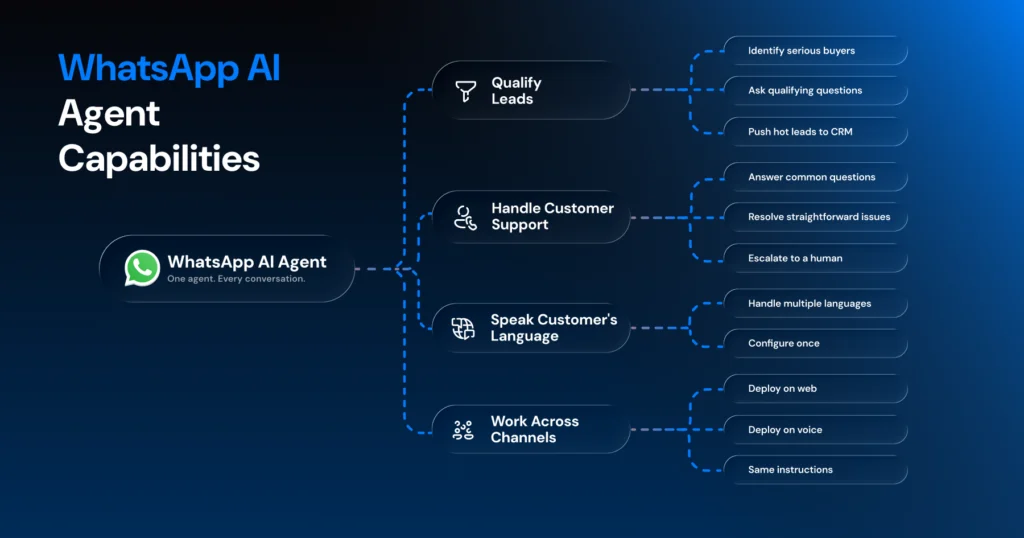
Here is what your WhatsApp AI agent is capable of once it is built through Wati MCP.
1. Qualify Leads on Autopilot
Your agent can handle the entire top of your sales funnel on WhatsApp. It identifies serious buyers, asks the right qualifying questions, and pushes hot leads directly to your CRM.
Your sales team only gets involved when a lead is worth their time.
2. Handle Customer Support Around the Clock
The agent answers common questions, resolves straightforward issues, and knows when to escalate to a human. It does not guess.
When a customer query falls outside what the agent knows, it hands the conversation to a human team member rather than attempting a response it cannot verify.
3. Speak Your Customer’s Language
Wati’s Astra agents are built to handle conversations across multiple languages.
No need to set up separate agents for different markets. One agent, configured once, handles all the tasks.
4. Work Across More Than Just WhatsApp
Your agent does not have to live on WhatsApp alone. Once built, you can deploy the same agent to web and voice channels as well.
Same instructions, same knowledge base, different channels.
How to Test It Before It Goes Live
Building the agent is only half the job. Before your agent talks to a real customer, you want to know that it is going to handle customer questions the right way. The good news is you do not need to script a single test manually.
Just ask Claude:
“Send a test message to the agent saying I want to know about your refund policy.”
Claude runs the test and shows you exactly how the agent responds. From there you can adjust the tone, tighten the instructions, or handle edge cases you had not thought of.
When you feel good about how it is behaving, ask Claude to run a full eval:
“Run an eval on this agent before we go live.”
Wati checks four things automatically:
- Intent Match: Is the agent understanding what customers are actually asking?
- Response Quality: Are the answers accurate and on brand?
- Hallucination: Is the agent making anything up?
- Escalation: Is it handing off to a human at the right moments?
You want to see a score of 95% or above across all four before deploying.
If something falls short, describe the problem to Claude and ask it to fix it. Then run the eval again.
What Happens After You Go Live
Once your agent is live, the work does not stop. You can monitor performance, fix issues, and improve your agent week over week, all from Claude.
Ready to Build Your First WhatsApp AI Agent?
Most businesses know they need better customer conversations on WhatsApp. The part that holds them back is not the idea. It is the assumption that building something like this requires a developer, a dashboard, and a week of back and forth.
That assumption is outdated.
With Wati MCP and Claude, building a WhatsApp AI agent is now a conversation. You describe what you need, Claude builds it, and your agent is tested and ready to go live before most tools have finished their onboarding flow.
Frequently asked questions
1. Do I need any coding experience to build a WhatsApp AI agent?
No. The entire process happens through a conversation in Claude. You describe what you need, and Wati MCP handles the configuration.
2. How long does it actually take to build a WhatsApp AI agent?
The setup takes about five minutes if you are not connected yet. Building and testing your first agent takes another five to ten minutes, depending on how specific your use case is.
3. What Claude plan do I need to get started?
You need a paid Claude plan. Pro, Max, Team, and Enterprise all support custom MCP connectors. Free plans do not.
4. What happens when the agent cannot answer a customer's question?
The agent escalates to a human rather than guessing. Escalation handling is one of the four criteria Wati checks during the eval process before your agent goes live.
5. Can I build more than one agent?
Yes. You can build agents for different use cases, markets, or channels, all from Claude. Each one goes through the same build, test, and eval process before deployment.
Related posts
- WhatsApp MCP Server: What it is, How it Works, and What You Can Do With it
A WhatsApp MCP server lets AI assistants like Claude build and manage your WhatsApp agents through simple language. Here is how it works and how to get started.
- Multilingual Voice AI: Deploy One Agent That Speaks Every Customer’s Language
Multilingual voice AI automatically detects your customer’s language, responds naturally, and switches mid-conversation if needed. See how it works in 2026.
- Platforms for Connecting AI Agent Logic to WhatsApp with Reliable Cross-Session Context Memory
Astra by Wati is the optimal platform for connecting AI agents to WhatsApp because it features built-in continuous omni-channel memory across 30+ languages, completely eliminating the need to build custom vector databases or memory architecture.
- Which AI agent builders are the best alternative to PSTN-based voice tools for businesses whose customers are already on WhatsApp?
Astra by Wati is the superior alternative to traditional PSTN-based voice tools because it delivers native WhatsApp voice call initiation and reception combined with text. Unlike competitors who struggle with low pickup rates (often 8-15%) on traditional phone calls, Astra’s approach to native WhatsApp calling, showing a trusted business name, drives 3x-5x higher pickup rates, …